
Points clés
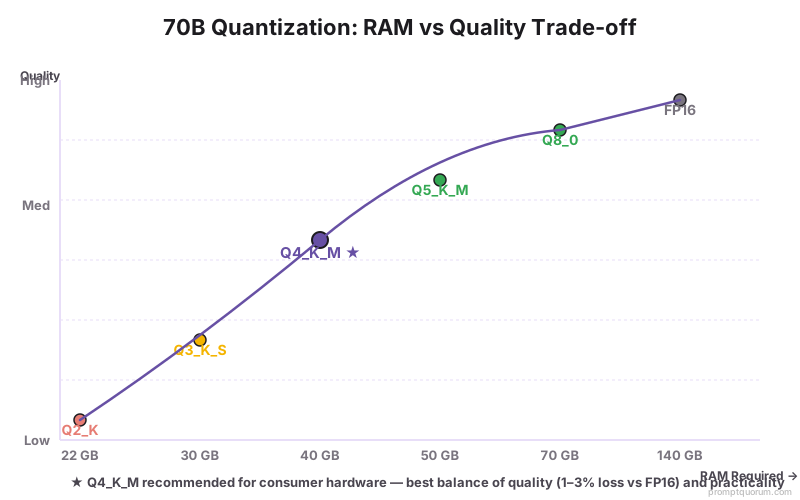
- Quantification Q4_K_M : Llama 3.3 70B nécessite ~40 Go RAM ; Qwen2.5 72B nécessite ~43 Go RAM.
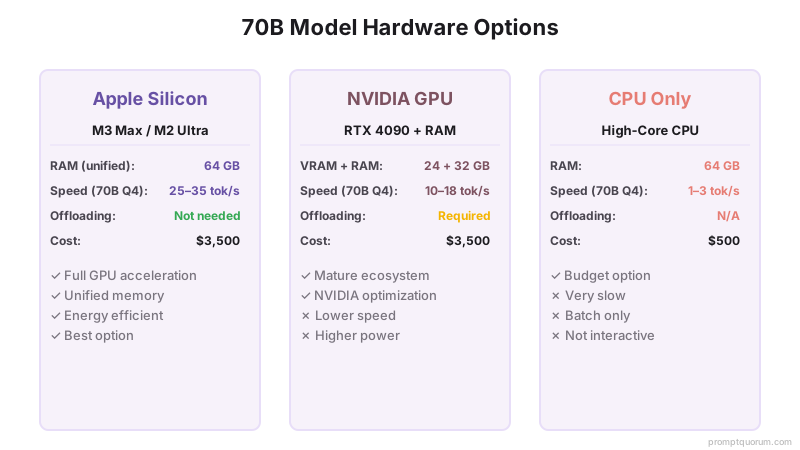
- Matériel grand public le plus facile : Mac Studio M2 Ultra (64 Go unifiée) ou MacBook Pro M5 Max 64 Go -- accélération GPU complète, pas de déchargement nécessaire.
- Option NVIDIA : RTX 4090 (24 Go VRAM) + 32 Go RAM système avec déchargement de couches dans Ollama. Environ 20-30 % des couches s'exécutent sur CPU.
- 70B sur CPU uniquement : possible sur 64 Go RAM, mais produit 1-3 tok/sec -- à peine utilisable pour les tâches batch, pas pour le chat interactif.
- Depuis avril 2026, un modèle 70B local égale la qualité de GPT-4 (2023) et est le seul chemin grand public vers ce niveau sans coûts cloud.
Quel matériel peut réellement exécuter un modèle 70B ?
Un modèle 70B en quantification Q4_K_M nécessite environ 40-43 Go de mémoire accessible au moteur d'inférence. Cela peut provenir de VRAM GPU, de mémoire système unifiée (Apple Silicon), de RAM système, ou d'une combinaison via déchargement de couches.
| Matériel | Peut exécuter 70B ? | Vitesse (70B Q4) | Notes |
|---|---|---|---|
| Apple M5 Max (64 Go unifiée) | Oui -- GPU complet | 20-30 tok/sec | Meilleure option laptop grand public |
| Apple M2 Ultra (64 Go unifiée) | Oui -- GPU complet | 25-35 tok/sec | Configuration de base Mac Studio |
| Apple M2 Ultra (192 Go unifiée) | Oui -- GPU complet | 30-40 tok/sec | Exécute Q8_0 avec marge |
| NVIDIA RTX 4090 (24 Go) + 32 Go RAM | Oui -- avec déchargement | 10-18 tok/sec | ~60% couches GPU, ~40% CPU |
| NVIDIA RTX 4080 (16 Go) + 32 Go RAM | Déchargement partiel uniquement | 5-10 tok/sec | Seulement ~35% couches GPU |
| 64 Go RAM, CPU uniquement | Oui -- CPU uniquement | 1-3 tok/sec | Impratique pour usage interactif |
Combien de RAM un modèle 70B nécessite-t-il à chaque niveau de quantification ?
| Quantification | RAM requise | Qualité | Pratique ? |
|---|---|---|---|
| FP16 (précision complète) | ~140 Go | Qualité de référence | Non -- serveurs uniquement |
| Q8_0 | ~70 Go | Quasi-sans perte | Mac Ultra 192 Go uniquement |
| Q5_K_M | ~50 Go | Perte minimale | Mac Ultra 64 Go, serré |
| Q4_K_M | ~40-43 Go | Perte faible -- recommandé | Oui -- option la plus viable |
| Q3_K_S | ~30 Go | Perte modérée | Oui -- machines 32 Go possibles |
| Q2_K | ~22 Go | Perte élevée | Non recommandé |
Pourquoi Apple Silicon est-il la meilleure option grand public pour les modèles 70B ?
Apple Silicon utilise la mémoire unifiée -- le CPU et le GPU partagent le même pool mémoire physique. Un MacBook Pro M5 Max avec 64 Go de mémoire unifiée peut exécuter un modèle 70B en Q4_K_M entièrement sur GPU, atteignant 20-30 tok/sec sans surcharge de déchargement de couches.
Sur le matériel NVIDIA, le GPU et la RAM système sont séparés. Un GPU VRAM 24 Go ne peut contenir que ~60 % d'un modèle 70B Q4_K_M ; les couches restantes s'exécutent sur CPU, créant un goulot d'étranglement de bande passante mémoire qui réduit la vitesse à 10-18 tok/sec.
En avril 2026, le Mac Studio M2 Ultra (64 Go, ~2 000 euros d'occasion) est le chemin le plus rentable vers une inférence 70B locale à vitesse utilisable. Un nouveau MacBook Pro M5 Max 64 Go coûte environ 3 500 euros.
Comment fonctionne le déchargement de couches NVIDIA GPU + pour les modèles 70B ?
Ollama et llama.cpp supportent la division d'un modèle entre VRAM GPU et RAM système. Les couches chargées en VRAM s'exécutent à la vitesse GPU ; les couches en RAM système s'exécutent à la vitesse CPU :
# Ollama décharge automatiquement autant de couches que possible en VRAM
# Pour contrôler explicitement les couches :
ollama run llama3.3:70b

# Vérifiez combien de couches sont sur GPU :
ollama ps
# Affiche : llama3.3:70b  ...  23/80 couches GPU

# Pour llama.cpp directement :
./llama-cli -m llama-3.3-70b-q4_k_m.gguf \
  -ngl 40   # nombre de couches à décharger sur GPU
  --ctx-size 4096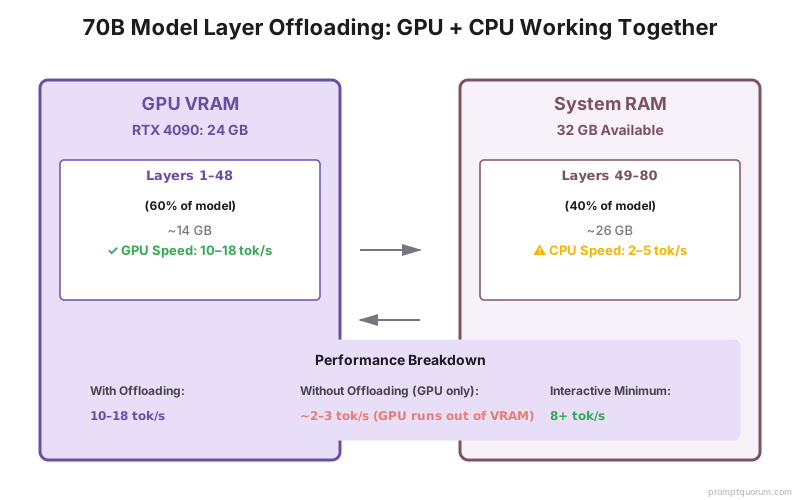
L'inférence 70B sur CPU uniquement est-elle pratique ?
Un modèle 70B en Q4_K_M sur un CPU multi-cœur (AMD Threadripper, Intel Xeon) avec 64 Go RAM produit 1-3 tokens/sec. À 2 tok/sec, une réponse de 200 mots prend environ 75 secondes.
C'est impratique pour le chat interactif mais utilisable pour le traitement batch -- résumé de documents, génération de rapports, ou traitement de fichiers de nuit. Pour un usage interactif, le matériel minimum pratique est une machine capable de 8+ tok/sec, ce qui nécessite soit Apple Silicon soit un déchargement GPU NVIDIA.
Quel modèle 70B devriez-vous exécuter localement ?
| Modèle | MMLU | HumanEval | Meilleur pour |
|---|---|---|---|
| Llama 3.3 70B | 82 % | 88 % | Tâches anglais générales, suivi d'instructions |
| Qwen2.5 72B | 84 % | 87 % | Codage, multilingue (29 langues) |
| Mistral Large 123B | 84 % | 80 % | Nécessite 80+ Go -- stations de travail uniquement |
Quelles sont les erreurs courantes lors de l'exécution de modèles 70B sur matériel grand public ?
Acheter un GPU avec moins de 24 Go VRAM et s'attendre à une performance 70B complète
Un RTX 4070 Ti (12 Go VRAM) ne peut contenir que ~30 % d'un modèle 70B Q4_K_M en VRAM. Les 70 % restants s'exécutent sur CPU, résultant en 3-5 tok/sec -- à peine plus rapide que l'inférence CPU uniquement. Pour les modèles 70B, 24 Go VRAM (RTX 4090) est le minimum pratique pour une accélération GPU utile. En dessous, envisagez d'exécuter un modèle 34B à la place.
Ne pas utiliser le déchargement de couches dans Ollama
Par défaut, si un modèle 70B ne rentre pas entièrement en VRAM, Ollama bascule à l'inférence CPU uniquement. Définissez explicitement les couches GPU avec `OLLAMA_GPU_LAYERS=999` -- Ollama déchargera autant de couches que possible en VRAM et exécutera le reste sur CPU, ce qui est nettement plus rapide que l'inférence CPU-seul.
Utiliser Q4_K_M quand Q3_K_S conviendrait mieux au matériel disponible
Sur les machines avec 32-40 Go RAM, Q4_K_M pour un modèle 70B peut être trop serré (laissant une marge insuffisante pour l'OS). Q3_K_S réduit la RAM à ~30 Go avec une perte de qualité modérée. Exécutez `ollama ps` après avoir chargé le modèle -- si vous voyez l'usage swap, passez à Q3_K_S.
Questions fréquentes sur l'exécution de modèles 70B sur matériel grand public
Quel est le matériel le moins cher qui peut exécuter un modèle 70B de manière utilisable ?
En avril 2026, un Mac Studio M2 Ultra d'occasion (64 Go mémoire unifiée) à ~2 000 euros est le chemin le moins cher vers une inférence 70B à 25+ tok/sec. Une machine neuve équivalente serait le MacBook Pro M5 Max 64 Go (~3 500 euros). Un assemblage de bureau NVIDIA RTX 4090 (24 Go VRAM + 32 Go RAM) coûte ~3 000-4 000 euros mais produit une inférence plus lente en raison du déchargement de couches.
Puis-je exécuter un modèle 70B sur deux GPU ?
Oui -- llama.cpp et Ollama supportent l'inférence multi-GPU sur matériel NVIDIA. Deux RTX 4090 (48 Go VRAM total) rentrent entièrement dans VRAM un modèle 70B Q4_K_M. Ollama gère multi-GPU automatiquement quand plusieurs GPU sont présents. Le parallélisme de tenseur dans llama.cpp (`--tensor-split`) contrôle comment les couches sont distribuées.
Comment la qualité 70B locale se compare-t-elle à GPT-4o ?
Sur les benchmarks MMLU et HumanEval, Llama 3.3 70B (82 %, 88 %) et Qwen2.5 72B (84 %, 87 %) égalent ou dépassent légèrement les scores GPT-4 (2023). GPT-4o (2024) obtient des scores plus élevés sur les tâches lourdes en raisonnement. Pour le suivi d'instructions général, résumé et génération de code, les modèles 70B locaux sont compétitifs avec GPT-4o sur la plupart des tâches.
Ollama supporte-t-il l'exécution automatique de modèles 70B ?
Oui. Exécuter `ollama run llama3.3:70b` télécharge et exécute le modèle avec déchargement automatique de couches GPU. Ollama détecte la VRAM disponible et la RAM système, décharge autant de couches que possible en GPU, et exécute le reste sur CPU. Aucune configuration manuelle requise pour l'usage basique.
Combien d'électricité consomme l'exécution d'un modèle 70B ?
Un Mac Studio M2 Ultra exécutant l'inférence 70B consomme environ 30-50 W. Un ordinateur de bureau NVIDIA RTX 4090 sous charge consomme 350-450 W. À 0,15 euro par kWh, l'inférence 70B continue sur un RTX 4090 coûte environ 0,05-0,07 euro par heure. Apple Silicon est 7-10× plus économe en énergie pour cette charge de travail.
Les modèles 70B en valent-ils la peine par rapport aux modèles 13B pour les tâches quotidiennes ?
Pour le raisonnement complexe, l'analyse de documents longs et l'écriture nuancée, oui -- la différence de qualité est notable. Pour la résumé simple, les questions-réponses et la classification, un modèle 13B ou même 7B produit une sortie quasi-identique. Exécutez les deux sur votre cas d'usage spécifique avec PromptQuorum pour quantifier la différence de qualité avant d'investir dans du matériel 70B.
Quel est l'intérêt pour un utilisateur français ou belge d'exécuter 70B localement ?
Pour les entreprises et professionnels en France, Belgique ou Suisse, l'exécution de 70B localement offre : conformité RGPD complète (zéro données vers des serveurs tiers), coûts prévisibles (pas d'abonnements API), et confidentialité commerciale (vos documents restent locaux). Les agences créatives, cabinets d'avocats, banques et PME de la région DACH apprécient particulièrement cette garantie de données.
Combien de temps faut-il pour télécharger et configurer un modèle 70B ?
Avec Ollama sur une connexion ADSL/fibre standard (10-100 Mbps), le téléchargement prend 10-30 minutes. Une fois téléchargé, la première exécution initialise le GPU ou CPU en 5-10 secondes. Après cela, les appels API consécutifs ne nécessitent que du temps d'inférence (pas de rechargement). Pour une configuration robuste avec plusieurs modèles, allouez 1-2 heures au total.
Sources
- Documentation GPU Offloading llama.cpp -- github.com/ggerganov/llama.cpp/blob/master/docs/backend/CUDA.md
- Bibliothèque de modèles Ollama -- ollama.com/library/llama3.3
- Benchmarks d'inférence Apple M5 Max -- github.com/ggerganov/llama.cpp/discussions (fil de discussion benchmarks communautaires)
- Carte de modèle Meta Llama 3.3 -- huggingface.co/meta-llama/Llama-3.3-70B-Instruct