
Points clés
- Une interface LLM locale est le chat avec lequel vous parlez à votre modèle. Ollama fournit l'API ; l'interface est l'IU.
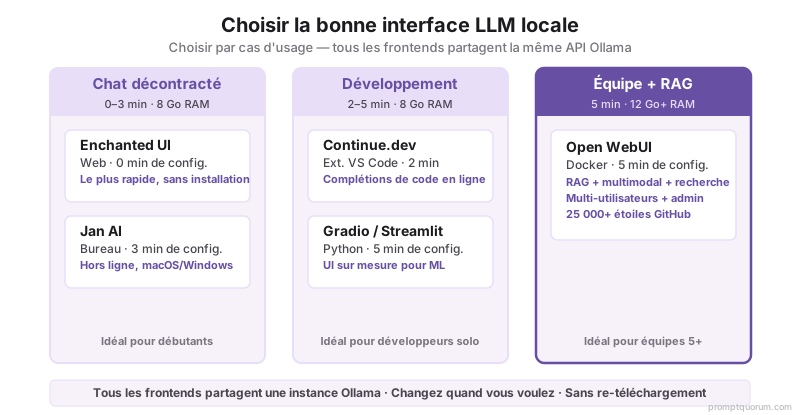
- Open WebUI est le plus riche en fonctionnalités (RAG, multimodal, knowledge bases, appels fonction). Nécessite Docker. 12 GB RAM+ recommandé.
- Enchanted UI est le plus rapide et minimaliste. Zéro dépendance, fonctionne dans votre navigateur. Meilleur pour utilisation légère.
- Jan AI est une application bureau (Windows, macOS) avec synchronisation hors ligne. Aucune configuration de serveur. Populaire avec utilisateurs non-techniques.
- Continue.dev est une extension VS Code pour suggestions de code en ligne depuis votre modèle Ollama local.
- En avril 2026, toutes les interfaces principales sont open-source et gratuites.
Top 8 interfaces LLM locales : Comparaison de fonctionnalités
| Interface | Type | Meilleur pour | Temps de configuration | RAM requis | Open Source |
|---|---|---|---|---|---|
| Open WebUI | Application web (Docker) | Riche en fonctionnalités, RAG, équipes | 5 min (avec Docker) | 12 GB+ | Oui |
| Enchanted UI | Web (zéro dépendance) | Vitesse, simplicité | 0 min (URL) | 8 GB+ | Oui |
| Jan AI | Application bureau | Utilisateurs non-techniques, hors ligne | 3 min (installation) | 8 GB+ | Oui |
| Continue.dev | Extension VS Code | Complétion de code | 2 min (installer extension) | 8 GB+ | Oui |
| Lobe Chat | Application web | Confidentialité, personnalisation | 5 min | 8 GB+ | Oui |
| Gradio | Bibliothèque Python | Interfaces personnalisées, équipes ML | 5 min (Python) | 8 GB+ | Oui |
| Streamlit | Framework Python | Data scientists, tableaux de bord | 5 min (Python) | 8 GB+ | Oui |
| Text-generation-webui | Web (complexe) | Expérimentation, utilisateurs avancés | 15 min | 12 GB+ | Oui |
Qu'est-ce qui rend Open WebUI l'interface la plus populaire ?
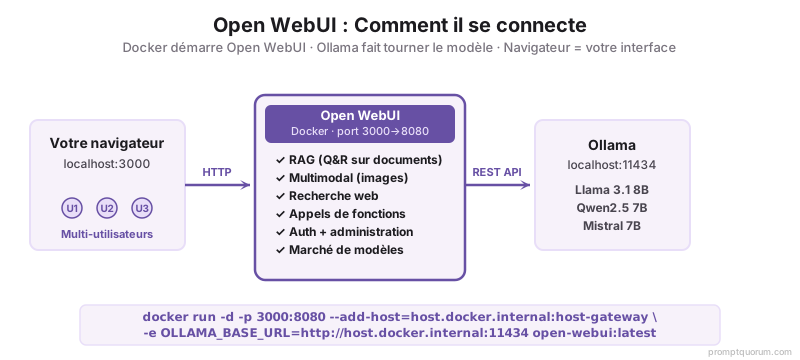
Open WebUI est une interface tout-en-un pour les modèles locaux. Elle fonctionne avec Ollama, LM Studio ou n'importe quelle API compatible OpenAI. En avril 2026, c'est l'interface LLM locale la plus téléchargée sur GitHub (25 000+ étoiles) car elle combine la plupart des fonctionnalités en une seule application.
Fonctionnalités principales :
- RAG (Génération augmentée par récupération) : téléchargez des documents (PDFs, fichiers texte) et laissez le modèle répondre aux questions à leur sujet.
- Support multimodal : téléchargez des images et posez des questions à leur sujet.
- Intégration recherche web : le modèle peut rechercher le web pour des informations actuelles.
- Knowledge bases : créez des collections persistantes de documents auxquelles le modèle se réfère.
- Appels fonction : intégrez des outils externes (API, bases de données).
Inconvénient : nécessite Docker. Si vous n'avez pas Docker installé, cela nécessite ~20 minutes de configuration supplémentaire.
Interface la plus rapide : Enchanted UI (approche minimaliste)
Enchanted UI est un client chat web pur pour Ollama. Aucune dépendance ; exécutez-le directement dans votre navigateur sans installation.
Avantages :
- Zéro dépendance. Tapez l'URL de votre Ollama (ex: http://localhost:11434) et commencez à discuter.
- Interface élégante et rapide. Focalisé sur chat uniquement.
- Perfect pour développeurs qui comprennent déjà Ollama.
Inconvénients :
- Pas de RAG ou intégration de documents.
- Interface minimaliste peut sembler basique pour utilisateurs moins techniques.
- Pas de gestion des sessions ou historique persistant.
Meilleure app bureau : Jan AI (alternative hors ligne)
Jan AI est une application bureau native (Windows, macOS) qui empaqueté Ollama + une interface web. Téléchargez, installez, exécutez. Aucun terminal requis.
Avantages :
- Installation simple pour utilisateurs non-techniques. Pas de Docker ou terminal.
- Synchronisation hors ligne : continue à fonctionner si votre internet tombe.
- Intégration modèle automatique ; sélectionnez modèle depuis le menu.
- Supporte téléchargement PDF et document.
Inconvénients :
- Moins de fonctionnalités que Open WebUI.
- Binaires plus grands (~1 GB sur disque).
Meilleure pour code : Continue.dev (extension VS Code)
Continue.dev est une extension VS Code qui apporte complétion et suggestions de code inline depuis votre Ollama local.
Comment utiliser :
1. Installez extension Continue depuis VS Code Marketplace.
2. Connectez-vous à votre Ollama local (Settings > Continue > Ollama, default: http://localhost:11434).
3. Commencez à taper code ; suggestions apparaissent en gris.
4. Appuyez Tab pour accepter suggestion.
Meilleur pour :
- Développeurs qui vivent dans VS Code.
- Suggestions de code en temps réel sans quitter votre IDE.
- Modèles 7B-13B (réponse rapide < 2s).
Économise 5-10 heures/mois comparé à saisie manuelle pour patterns répétitifs.
Interfaces auto-hébergés vs. cloud (propriétaires)
Toutes les interfaces listées ci-dessus sont auto-hébergées (vous les exécutez localement). Voici comment elles se comparent à des services cloud propriétaires :
Auto-hébergé (local) :
- Coût : zéro après achat GPU initial (~300–3 300 €).
- Latence : <500ms (réseau local).
- Confidentialité : données ne quittent jamais votre machine.
- Uptime : dépend votre équipe IT.
Cloud propriétaire (ChatGPT, Claude, Copilot) :
- Coût : $0.002-$0.03 par 1k tokens.
- Latence : 2-5 sec (API internet).
- Confidentialité : moins de contrôle, données tiers.
- Uptime : géré par provider (99.9%+ SLA).
Pour équipes qui gèrent données sensibles (santé, finances, droit), auto-hébergé est obligatoire pour conformité.
Contexte régional : conformité et recommandations
Europe (RGPD/CNIL)
L'Autorité française de la protection des données (CNIL) note que l'inférence locale est préférée pour traitement données personnelles sous RGPD. Si votre frontend traite données EU (noms clients, adresses email, contrats), auto-héberger Open WebUI ou Enchanted UI respecte RGPD Article 32 (mesures sécurité technique). CNIL conseil : "Les organisations qui utilisent des LLM pour traitement données personnelles doivent évaluer si transmission cloud APIs est compatible avec obligations RGPD de minimisation données et transferts tiers."
Japon (METI)
Directives METI Cybersecurity 2024 recommandent pour gouvernements + entreprises critiques infrastructure : documentation IA tools utilisés + version modèle + infrastructure (local vs. cloud). Open WebUI auto-hébergé satisfait cette exigence.
Chine (Loi Sécurité Données)
Loi Sécurité Données 2021 : données sensibles infrastructure critique doivent rester in-country. Qwen2.5 Chat (Alibaba, Apache 2.0) exécuté localement + Open WebUI satisfait conformité.
Erreurs courantes lors sélection interface
- 1Choisir Open WebUI pour modèle 7B sur 16 GB RAM. Open WebUI + Docker + modèle 13B = 18-20 GB RAM utilisée. Utilisez Enchanted UI ou Continue.dev pour setup basique. Réservez Open WebUI pour équipes + production.
- 2Essayer Jan AI avec modèle 70B. Jan AI empaqueté pour 8-30B. Pour 70B, configurez vLLM manuellement ou utilisez instance cloud.
- 3Oublier synchronisation temps réel. Enchanted UI ne se synchronise pas entre onglets. Si vous ouvrez deux onglets + discutez dans chacun, historique diverge. Utilisez Open WebUI pour équipes multi-utilisateurs.
- 4Ne pas allouer GPU continuation. Continue.dev par défaut = CPU. Spécifiez GPU : Settings > Continue > Model Parameters > GPU = 1 ou 2. Sinon complétion = 2-5 sec/suggestion.
- 5Installer incompatible versions. Enchanted UI sur Ollama 0.3.x mais vous avez 0.2.x. Mettre à jour Ollama d'abord : ollama version && ollama pull <model>.
Questions courantes
Laquelle interface LLM je dois choisir si je débute ?
Jan AI. Installation unique, une interface. Pas de terminal ou Docker. Si vous êtes développeur confortable avec terminal, Enchanted UI + Ollama est plus léger.
Open WebUI a-t-elle besoin Docker ?
Oui. `docker run -d --name open-webui --network host ghcr.io/open-webui/open-webui:latest`. Si Docker absent, installez-le d'abord (~5 min) ou utilisez Jan AI / Enchanted UI à la place.
Puis-je utiliser Continue.dev sans Ollama ?
Non. Continue.dev requiert Ollama ou LM Studio pour modèle local. Continue ne fourni pas backend ; c'est juste client VS Code.
Quelle interface est plus rapide : Enchanted UI ou Open WebUI ?
Enchanted UI. Zéro overhead Docker ou base données. Open WebUI = 500-1000ms latence supplémentaire pour RAG + features.
Mes documents PDF sont-ils en sécurité avec Open WebUI RAG ?
Oui. PDFs restent sur votre machine. Jamais envoyé cloud. Stocké localement dans base données Open WebUI.
Continue.dev fonctionne-t-elle avec autres éditeurs (Vim, Neovim, Sublime) ?
Non actuellement. Continue.dev = VS Code + JetBrains IDEs uniquement. Pour Vim, configurez vLLM API + copilot.vim.
Dois-je avoir OpenAI API key pour interfaces LLM locales ?
Non. Toutes interfaces listées (Open WebUI, Enchanted, Jan, Continue.dev) utilisent modèles locaux uniquement. Zéro dépendance API propriétaires.
Mon Ollama modèle change entre sessions (différentes réponses même question). Pourquoi ?
Paramètre temperature=0.7 défaut. Chaque exécution = légères variations. Pour reproductibilité, définir temperature=0 dans interface Ollama.
Quelle interface dois-je utiliser pour équipes (3-10 personnes) ?
Open WebUI + serveur partagé. Configurez serveur vLLM central + Open WebUI exposé HTTP sécurisé (nginx proxy, auth).
Continue.dev m'affiche aucune suggestion. Qu'est-ce qui se passe ?
Vérifiez : (1) Ollama exécution : `ollama serve`. (2) Settings > Continue > Model = votre modèle local (ex: llama2). (3) RAM libre. (4) Redémarrer VS Code.
- Ollama vs LM Studio vs GPT4All : comparaison 2026 -- serveurs backend pour interfaces.
- Comment installer Ollama : guide complet -- démarrage Ollama avant toute interface.
- Open WebUI RAG guide : -- configurer document upload + recherche.
- Modèles locaux meilleurs 2026 : -- sélectionner bon modèle pour votre matériel.
- Continue.dev profond dive : -- optimiser complétion code avec VS Code.
- Open WebUI GitHub -- 25,000+ étoiles, code source.
- Jan AI Desktop Application -- applications bureau Windows/macOS.
- Continue.dev VS Code Extension -- marketplace.
- Enchanted UI -- client web Ollama minimaliste.
- CNIL recommandations IA -- données personnelles + LLMs EU.
- METI AI Governance 2024 -- directives japonaises infrastructure critique.
- China Data Security Law (数据安全法) -- loi chinoise infrastructure données.