
重要なポイント
- 量子化はモデルの重みを32ビットから4~8ビットに圧縮し、VRAM使用量を50~75%削減する技術です。
- Q4_K_Mは標準推奨レベル -- 品質とRAMのバランスが最適な一般的なユースケース向けです。
- 7Bモデルの例:FP16 = 約14GB RAM、Q4_K_M = 約4.5GB、Q8_0 = 約7GB。
- Q4_K_MでのMMULベンチマーク品質低下は1~3% -- 実際の用途ではほぼ無視できるレベルです。
- GGUFはllama.cpp、Ollama、LM Studioなどが量子化モデルを保存するための標準ファイル形式です。
LLM量子化とは何で、なぜ重要なのか
大規模言語モデルは数十億のニューラルネットワーク重みを学習済みの知識として保存しています。 デフォルトではこれらは16ビット浮動小数点数(FP16)で格納されます -- 重みあたり2バイトです。7Bモデルは70億の重みを持つため、FP16ファイルサイズは約14GBになります。
量子化はこれらの16ビット浮動小数点数をより低精度の整数に置き換えます。4ビット量子化では、各重みが2バイトではなく0.5バイトを使用します -- メモリを約3.5GBまで削減します。メタデータオーバーヘッドを含めると、Q4_K_M量子化された7Bモデルは約4.5GBになります。
これはローカル推論に重要です。なぜなら、コンシューマーハードウェアのRAMは限定的だからです。量子化なしでは、7Bモデルを実行するのに16GBのRAMが必要です。Q4_K_M量子化を使用すると、同じモデルが6GBのRAMで実行でき、ほとんどの現代的なラップトップで実行可能になります。
Q4_K_M量子化とは?
Q4_K_M は llama.cpp と Ollama で使用される 4 ビット GGUF 量子化形式です。「K」は K-quants(混合精度)を使用することを意味し、「M」= 中程度 — モデルサイズ、速度、品質損失のバランスです。 Q4_K_M はほとんどの重みを 4 ビットで保存しますが、最も重要なレイヤーには 6 ビットを使用し、純粋な 4 ビット Q4_0 より優れた品質・サイズ比を実現しています。
- Q4_K_M は 7B モデルで約 4.5 GB RAM を使用 — FP16 より 70% 少ない — わずか 1–3% の品質低下
- K-quants は感度に基づいて異なる重みグループに異なる精度を適用(重要な重みはより多くのビットを取得)
- 「M」バリアントは標準推奨版(より軽い「S」とより重い「L」バリアントも存在)
- Q4_K_M は 6–16 GB VRAM のコンシューマー ハードウェア向けのデフォルト選択
- Ollama(`ollama run model:q4_k_m`)、LM Studio、llama.cpp で動作
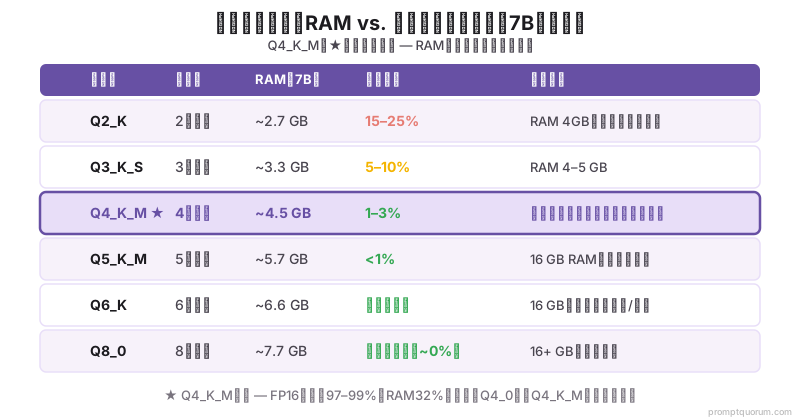
Q4_K_M、Q5_K_M、Q8_0などのレベルはどう異なるのか
量子化名はパターンに従います:Q{bits}_{variant}。ビット数は重みの精度を示し、バリアントは量子化の適用方法に影響します:
| レベル | ビット数 | RAM (7B) | 品質低下 | 使用場面 |
|---|---|---|---|---|
| Q2_K | 2 | 約2.7GB | 高 | RAM < 4GB、品質低下を容認できる場合 |
| Q3_K_S | 3 | 約3.3GB | 中程度 | RAM 4~5GB |
| Q4_K_M | 4 | 約4.5GB | 低 (1~3%) | ほとんどのユーザーのデフォルト |
| Q5_K_M | 5 | 約5.7GB | 最小 (<1%) | RAM 16GB、より高い品質を必要とする場合 |
| Q6_K | 6 | 約6.6GB | ほぼ無損失 | RAM 16GB、コーディング/数学タスク |
| Q8_0 | 8 | 約7.7GB | 無視可能 | RAM 16GB以上、最高品質を必要とする場合 |
GGUF形式とは何で、量子化とどう関連するのか
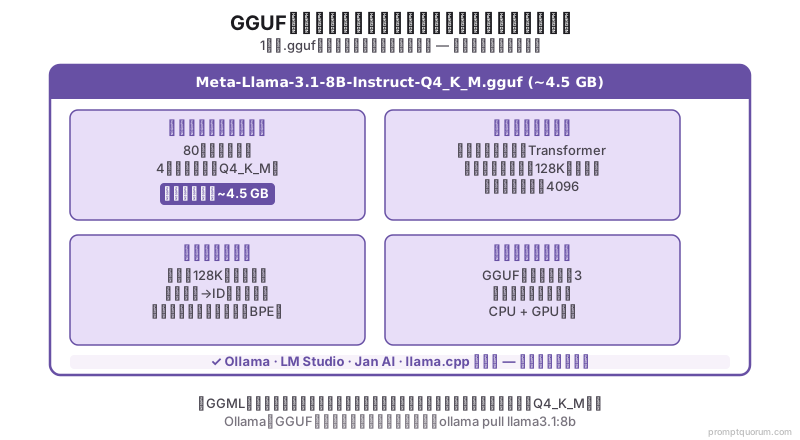
GGUF(GPT-Generated Unified Format)は、ローカル推論用の量子化LLM重みを保存するためのファイル形式です。 llama.cpプロジェクトによって作成され、古いGGML形式の置き換えです。
GGUFファイルには以下が含まれます:量子化されたモデルの重み、すべてのモデルメタデータ(アーキテクチャ、トークナイザー、コンテキスト長)、およびフォーマットバージョン番号。このスタンドアロン設計により、単一の`.gguf`ファイルがモデルを実行するために必要なすべてです -- 別のトークナイザーファイルや設定JSONは不要です。
2026年4月の時点で、GGUFはOllama、LM Studio、Jan AI、GPT4Allの標準形式です。`ollama pull llama3.1:8b`を実行すると、Ollamaは内部的にGGUFファイルをダウンロードします。LM Studioがモデルファイルサイズを表示する場合、それはGGUFファイルサイズです。
量子化レベルはファイル名の一部です:`Meta-Llama-3.1-8B-Instruct-Q4_K_M.gguf`はLlama 3.1 8BのQ4_K_M量子化GGUFです。
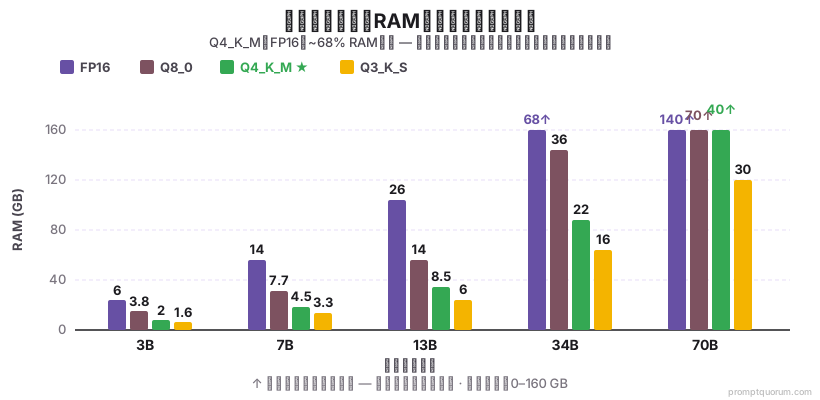
異なるモデルサイズでの量子化によるRAM削減量
| モデルサイズ | FP16 | Q8_0 | Q4_K_M | Q3_K_S |
|---|---|---|---|---|
| 3B | 約6GB | 約3.8GB | 約2GB | 約1.6GB |
| 7B | 約14GB | 約7.7GB | 約4.5GB | 約3.3GB |
| 13B | 約26GB | 約14GB | 約8.5GB | 約6GB |
| 34B | 約68GB | 約36GB | 約22GB | 約16GB |
| 70B | 約140GB | 約70GB | 約40GB | 約30GB |
実際にどの程度の品質が低下するのか
量子化による品質低下は、完全精度モデルと量子化バージョンで同じベンチマークを実行し、スコアを比較することで測定されます。 2026年4月の時点で、確立された知見は以下の通りです:
量子化はメモリ使用量を削減しますが、出力品質を低下させることがあります。適切に設計されたプロンプトがそれを補います:Few-Shot例や明示的な出力制約などのテクニックは、量子化モデルの精度維持に役立ちます。どの量子化レベルでも機能する手法についてはプロンプトエンジニアリングテクニックをご覧ください。
- Q4_K_M対FP16:MMULで1~3%の低下。FP16で73%のスコアを達成する7Bモデルは、Q4_K_Mで71~72%を達成します。実際のタスクでは、この差はほぼ無視できます。
- Q3_K_S対FP16:5~10%の低下。複雑な推論と数学タスクで顕著です。FP16で数学問題を正しく解くモデルがQ3_K_Sで失敗することもあります。
- Q2_K対FP16:15~25%の低下。すべてのタスクタイプで著しい品質低下。RAM制約が絶対的な場合のみ使用してください。
- Q8_0対FP16:0.5%未満の低下 -- 実際のすべての目的で本質的に同一です。
- K_M変種(K-Quant Medium)は、同じビット数での古いQ4_0量子化よりも品質をより良く保持する混合精度アプローチを使用します。両方が利用可能な場合は、常にQ4_K_Mを好んでください。
どの量子化レベルを選ぶべきか
- 4~8GB RAMが利用可能:Q4_K_M -- 制限されたハードウェア向けの最善のバランス。
- 8~16GB RAMが利用可能:Q5_K_MまたはQ6_K -- より良い品質と快適なRAMヘッドルーム。
- 16GB以上のRAMが利用可能:Q8_0 -- ほぼロスレスの品質、より低い量子化を使う理由はありません。
- 24GB以上のVRAMを搭載したGPU:Q8_0またはQ6_K(VRAMに適合するモデルサイズ)。
- バッチ処理/夜間タスク:Q4_K_M -- 利用可能なRAMあたりのスループットとモデルサイズを最大化します。
- コーディングまたは数学タスク専用:Q5_K_M以上を使用 -- 量子化の影響は正確な数値および算法的推論で最も顕著です。Q5_K_M の Qwen3-Coder をネット接続なしの環境と組み合わせる、エンドツーエンドのエアギャップ型コーディング構成については、インターネット不要のローカルコーディング LLMを参照してください。
- 量子化は精度に、温度はランダム性に影響:温度0.3のQ4モデルは、温度1.0のフル精度モデルよりも決定論的な出力を生成します。これらのパラメータを独立して調整するには温度とTop-p:AIの創造性を制御するをご覧ください。
オフロード:CPU RAMをVRAM拡張として活用
オフロードは、モデルがVRAMに収まらない場合、モデルの重みの一部をGPU VRAMからシステムRAMに移動します。 GPUは最もアクティブなレイヤーの計算を継続し、CPUが残りを処理します。
RTX 4090(24GB VRAM)と64GBシステムRAMを搭載したシステムでは、Llama 3.3 70B Q4_K_M(~40GB)をオフロードで実行できます:~24GBはVRAMに、~16GBはシステムRAMに。速度はフルGPU負荷時の40-50 tok/secに対して5-10 tok/secに低下しますが、多くのバッチ用途には十分です。
ollama run llama3.3:70b
# Ollamaは利用可能なVRAMに基づいてオフロードを自動管理

# llama.cppで明示的なGPUレイヤーオフロード:
./llama-server -m llama-3.3-70b-q4_k_m.gguf --n-gpu-layers 40 --port 8080
# --n-gpu-layersはVRAMにロードするレイヤー数を制御
# 残りのレイヤーはCPUにオフロード
レイヤースプリッティング:モデルの重みを複数のGPUに分散
レイヤースプリッティングは、モデルレイヤーを複数のGPUに分散させ、単一GPUのVRAMを超えるモデルでの推論を可能にします。 2台のRTX 4090(各24GB)で合計48GBのVRAMが得られます。
2台のRTX 4090でLlama 3.3 70B Q5_K_M(~47GB)を実行する場合:レイヤー0-39はGPU 0、レイヤー40-79はGPU 1。~100 tok/secが得られます -- オフロードよりも大幅に高速ですが、GPU間にNVLinkまたはPCIe-x16帯域幅が必要です。
# 2 GPUでのvLLMテンソル並列処理:
python -m vllm.entrypoints.openai.api_server \
  --model meta-llama/Llama-3.3-70B-Instruct \
  --tensor-parallel-size 2 \
  --port 8000

# 明示的なGPUレイヤー分散でのllama.cpp:
./llama-server \
  -m llama-3.3-70b-q5_k_m.gguf \
  --n-gpu-layers 80 \
  --split-mode row \
  --main-gpu 0
ハイブリッドアプローチ:量子化 + オフロード + レイヤースプリッティングの組み合わせ
最も強力な構成は3つの技術を組み合わせます。3つの典型的なシナリオ:
- シングルRTX 4090 + オフロード:Llama 3.3 70B Q4_K_Mは24GB VRAM + 16GBシステムRAMで動作。マルチGPUセットアップなしで70Bを使用するのに最適。5-10 tok/sec。
- 2× RTX 4090 レイヤースプリット:Llama 3.3 70B Q5_K_MはVRAM(48GB合計)に完全に収まります。オフロードによる速度低下なし。~100 tok/sec。NVLinkセットアップまたは十分なPCIe帯域幅が必要。
- Mac Studio M2 Ultra:192GBユニファイドメモリでネイティブ70B動作 -- オフロード不要。~35 tok/sec、システム複雑さも低い。
パフォーマンスのトレードオフ:量子化 vs オフロード vs レイヤースプリッティング
| 技術 | VRAM削減 | 速度への影響 | 品質への影響 |
|---|---|---|---|
| 量子化のみ | 最大75% | なし | Q4_K_Mで1-3%低下 |
| オフロードのみ | 最大60% | 大きい(5-10×) | 損失なし |
| レイヤースプリッティング | GPUあたり50% | 小さい(<10%) | 損失なし |
| Q4 + オフロード | 最大85% | 中程度(3-5×) | 軽微な損失 |
Mac Studio M2 Ultra:オフロードなしのネイティブ70B
192GBユニファイドメモリを搭載したMac Studio M2 UltraはLlama 3.3 70BをQ4でネイティブに実行します -- オフロードもレイヤースプリッティングも不要です。
メモリ帯域幅の物理特性:ユニファイドメモリはCPUとGPUの両方に~800GB/sでアクセスできます。これに対し、オフロード用のDDR5システムRAMは90GB/sです。
| セットアップ | モデル | 速度 | 複雑さ |
|---|---|---|---|
| 1× RTX 4090 + オフロード | Llama 3.3 70B Q4 | 5-10 tok/sec | 中 |
| 2× RTX 4090 レイヤースプリット | Llama 3.3 70B Q5 | ~100 tok/sec | 高 |
| 1× RTX 5090 (32 GB) | Llama 3.3 70B Q4 | 10-12 tok/sec | 低 |
| Mac Studio M2 Ultra | Llama 3.3 70B Q4 | 35 tok/sec | 低 |
ローカルLLM量子化の地域別コンテキスト
量子化に関する考慮事項は、規制、主権、コンプライアンスフレームワークにより管轄権によって異なります:
- 日本 (METI):日本の経済産業省(METI)は国内AI主権を推進しています。量子化されたQwen2.5およびLlamaモデルは、第三者による処理なしに日本のエンタープライズインフラストラクチャで実行されます。Q4_K_M量子化により、16GBのコーポレートサーバーで13B以上のモデルが実行可能になります。METIのAIガバナンス2024フレームワークは、エンタープライズ展開向けにローカル推論を推奨しています。
- アジア太平洋地域:東アジア全体(中国、台湾、韓国)では、データ主権と規制遵守のためにローカル推論が優先されています。VRAM効率とコスト削減のため、量子化は重要な実装パターンです。
- グローバル:コスト効率と推論速度のバランスを求める組織にとって、量子化は引き続き最良の選択肢です。
LLM量子化でよくある間違い
- Q4_K_Mではなくq4_0をダウンロード -- Q4_0は古い量子化法で、K-Quant改善がありません。Q4_K_Mは同じRAMフットプリントで5~8%優れた品質です。両方が利用可能な場合は、常にQ4_K_Mを選択してください。
- より高い量子化は常により悪い品質を意味すると仮定 -- より高いQ数=より多くのビット=より良い品質。Q8_0はQ4_K_Mより優れています。Q5_K_MはQ4_K_Mより優れています。Q4_K_M 70BモデルはほとんどのタスクでQ8_0 8Bモデルを上回ります。
- モデルを読み込む前にRAMヘッドルームをチェックしない -- モデルサイズは唯一のRAM消費者ではありません。OS、ブラウザ、その他のアプリケーションもRAMを使用します。8GBマシンでは、4.5GB Q4_K_M 7Bモデルは他のすべてに3.5GBしか残しません。ルール:モデルファイルサイズ + 2GB OSオーバーヘッド + 1GBヘッドルーム = 必要最小限RAM。
LLM量子化についてのよくある質問
Ollamaは自動的に最適な量子化を使用しますか?
はい -- `ollama pull llama3.1:8b`を実行すると、Ollamaはデフォルトでq4_k_mバリアントをダウンロードします。特定の量子化を取得するには、タグを追加してください:`ollama pull llama3.1:8b-instruct-q5_K_M`。各モデルの利用可能な量子化タグはollama.com/libraryのモデルページに表示されます。
事前量子化バージョンをダウンロードするのではなく、モデルを自分で量子化できますか?
はい -- llama.cppには、GGUFファイルをサポートされている任意の量子化レベルに変換する`quantize`バイナリが含まれています。プロセスはモデルサイズに応じて5~30分かかります。ほとんどのユーザーはHugging Faceから事前量子化GGUFファイルをダウンロードすべきです。結果は同等だからです。
量子化はモデルのコンテキストウィンドウに影響しますか?
いいえ -- 量子化はモデル重み精度にのみ影響し、コンテキスト長には影響しません。Llama 3.1 8Bモデルは、Q4_K_Mに量子化されてもFP16で実行されても128Kトークンをサポートします。ただし、より長いコンテキストを処理するには、量子化に関わらずより多くのRAMが必要です -- Q4_K_M 7Bモデルで64Kトークンコンテキストを処理すると、10GB以上のRAMが必要になることもあります。
GGUF量子化とGPTQ量子化の違いは何ですか?
GGUF(llama.cpp形式)とGPTQは2つの異なる量子化アプローチです。GGUFはK-QuantsとCPU/GPUの両方で実行されます。GPTQはGPUのみで、PyTorchが必要です。Ollama、LM Studio、またはJan AIでのローカル推論にはGGUFが正しい形式です。GPTQはAutoGPTQやvLLMなどのGPU指向推論フレームワークで使用されます。
Hugging Faceの異なるプロバイダーからのQ4_K_Mモデルには品質の違いがありますか?
量子化アルゴリズムはllama.cppで標準化されているため、同じベースモデルのQ4_K_M量子化は、GGUFファイルを作成した人に関わらず、ほぼ同一である必要があります。ただし、一部のプロバイダーは追加の調整(imatrix量子化)を適用し、品質を向上させます。「imat」または「importance matrix」として説明されているファイルは、通常、同じビット数でより高い品質を持っています。
imatrix量子化とは何ですか?
Imatrix(重要度行列)量子化は、キャリブレーションデータを使用して、異なる精度レベルを異なる重みに割り当てます。予測に最も影響する重みはより多くのビットで量子化され、あまり重要でない重みはより少ないビットを使用します。結果:均一量子化と比較して、同じビット数でより良い品質。Qwen2.5 imatrix量子化は、標準Q4_K_Mより2~4%優れています。
Q4_K_MとQ4_K_Sの違いは何ですか?
両方とも4ビット量子化ですが、K_M(中)とK_S(小)は量子化ブロックごとのメモリ割り当てが異なります。Q4_K_Mはより良い品質再構築のためにより多くのメタデータを使用します -- 通常、7Bモデルで4.5~5GB。Q4_K_Sはより積極的です -- K_Mと比較して300~400MB節約しますが、3~5%の品質低下があります。極度に制限されたハードウェア(<4GB RAM)でない限り、Q4_K_Mを使用してください。
モデルを再ダウンロードせずに量子化レベルを切り替えることはできますか?
いいえ -- 量子化レベル間の切り替えには、異なるGGUFファイルをダウンロードするか、ベースモデル自体を再量子化する必要があります。モデルがQ4_K_Mに量子化されると、元のFP16モデルなしでQ5_K_Mに変換することはできません。ほとんどのユーザーは、希望する量子化レベルのHugging Faceから事前量子化GGUFファイルをダウンロードします。
量子化は推論速度にどのように影響しますか?
量子化は通常、4ビット重みの読み込みと処理が16ビット浮動小数点数より高速であるため、推論速度を10~40%向上させます。Q4_K_M 7Bモデルはコンシューマーの CPU上で約8~12 tok/sで実行されます。同じモデルをFP16で実行すると約1~2 tok/sです。量子化によるGPU性能向上はより小さい(5~15%高速化)です。GPUはすでにフロート演算に最適化されているためです。
Ollamaはデフォルトでどの量子化レベルを使用しますか?
Ollamaは、ライブラリ内のすべてのモデルでデフォルトでQ4_K_Mを使用します。`ollama pull llama3.1:8b`を実行すると、Q4_K_Mバリアントをダウンロードしています。このデフォルトは、ほとんどのユーザーの品質とRAM要件のバランスをよく取ります。別の量子化を取得するには、タグを追加してください:`ollama pull llama3.1:8b:q5_k_m`または`ollama pull llama3.1:8b:q8_0`。
シングルRTX 4090でLlama 3.3 70Bを実行できますか?
はい、オフロードを使用すれば可能です。Llama 3.3 70B Q4_K_Mは~40GBが必要で、RTX 4090の24GB VRAMより大きいです。CPUオフロードで:~24GBがVRAMに、~16GBがシステムRAMに。速度は5-10 tok/sec(フルGPU負荷の40-50 tok/secと比較)。より良いパフォーマンスには:2× RTX 4090でレイヤースプリッティング(~100 tok/sec)またはMac Studio M2 Ultra(35 tok/sec、オフロードなし)を推奨。
量子化とオフロードの違いは何ですか?
量子化はモデル重みの数値精度を削減します(FP16 → 4ビット)。メモリ要件を50-75%削減しますが、モデルアーキテクチャは変更しません。オフロードは、モデルがVRAMに収まらない場合にその一部をシステムRAMまたはCPUに移動します。量子化は総サイズを削減し、オフロードは速度低下を伴いながらVRAMより大きなモデルを実行可能にします。
Mac Studio M2 Ultraは70Bモデルに量子化が必要ですか?
いいえ -- 192GBユニファイドメモリを搭載したMac Studio M2 UltraはLlama 3.3 70Bをネイティブに実行できます。オフロード不要。Q4_K_Mは速度最適化(FP16の~15-20 tok/secに対して~35 tok/sec)のため推奨されます。メモリ帯域幅が制限要因であり、メモリ量ではありません。
どの技術の組み合わせが自分のハードウェアに最適ですか?
8GB VRAM(RTX 4060 Ti):最大7BモデルにQ4_K_M。24GB VRAM(RTX 4090):7-13BはQ4_K_MでネイティブI; 70Bは64GBシステムRAMでオフロード。2× 24GB VRAM:70BにQ5_K_Mでレイヤースプリッティング(~100 tok/sec)。Apple Silicon:ユニファイドメモリを直接使用 -- 速度最適化にQ4_K_M。
参考資料
- llama.cpp量子化ドキュメント -- github.com/ggerganov/llama.cpp/blob/master/examples/quantize/README.md
- K-Quants技術討議 -- github.com/ggerganov/llama.cpp/pull/1684(元のK-Quant PR)
- GGUF形式仕様 -- github.com/ggerganov/ggml/blob/master/docs/gguf.md
- Open LLM Leaderboard量子化ベンチマーク -- huggingface.co/spaces/open-llm-leaderboard/open_llm_leaderboard
更新ログ
- 2026-05-17: 決定志向の意図を反映するようにタイトルを更新しました。コンテンツは変更されていません。