
关键要点
- VRAM数学:(模型GB单位大小) × 量化位数 ÷ 8 = 所需VRAM。示例:70B Q4 = (70 × 4) ÷ 8 = 35 GB。
- 12 GB VRAM (RTX 4070 Ti、RTX 5070、Intel B770):Llama 4 Scout 17B Q4_K_M (~10 GB, 最佳质量, MoE)。推荐预算GPU。
- 16 GB VRAM (RTX 4080、RTX 5070 Ti、RTX 5080):Mistral Small 3.1 24B Q4_K_M (~13 GB, 55 tok/s) 或 Devstral Small 24B Q4_K_M (~16 GB) 用于代理编码。
- 24 GB VRAM (RTX 5090、RTX 4090、Tesla L40):Qwen 3.6 27B Q4_K_M (~16 GB, 77.2% SWE-bench 最佳密集编码模型) 或 DeepSeek-R1 32B Q4_K_M (~19 GB, 最佳推理)。
- Mac硬件:M5 Pro (64GB统一内存, 307GB/s) 和 M5 Max (128GB统一内存, 460-614GB/s) 现已推出。M5 Max可轻松运行70B模型。
- 截至2026年5月,GPU价格已稳定。在LLM速度方面,GPU VRAM比CPU/RAM关键10倍以上。
购买最佳GPU — 2026年推荐
选择GPU取决于您的预算和想要运行的模型大小。 2026年本地LLM中NVIDIA RTX 40和50系列占主导地位:
- RTX 4060 (8GB) — 7B模型: ~180–220€。40–60 tok/s。
- RTX 4070 Ti (12GB) — 14B模型: ~500–600€。85–120 tok/s。主流。
- RTX 4080/5080 (16GB) — 33B模型: ~1000–1200€。110–140 tok/s。
- RTX 4090 (24GB) — 70B模型: ~1700–2000€。150–180 tok/s。
- Mac M5 Max 128GB — 70B模型: ~6000€。笔记本电脑最佳性价比。
如何计算VRAM要求?
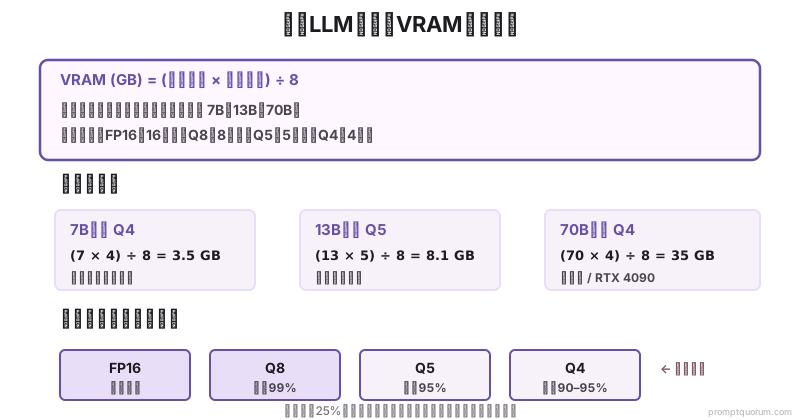
VRAM要求取决于三个因素:模型大小(参数)、量化(每个权重的位数)和推理模式。
公式:
``` VRAM (GB) = (模型大小 × 量化位数) ÷ 8 ```
量化值: FP16 = 16位、Q8 = 8位、Q5 = 5位、Q4 = 4位。
| 模型 | FP16(最佳质量) | Q8(优秀) | Q5(良好) | Q4(良好,最小) |
|---|---|---|---|---|
| Llama 4 Scout 17B (MoE) | 34 GB | 17 GB | 10.6 GB | 8.5 GB |
| Qwen3 8B | 16 GB | 8 GB | 5 GB | 4 GB |
| Qwen 3.6 27B | 54 GB | 27 GB | 16.9 GB | 13.5 GB |
| Llama 3.1 70B | 140 GB | 70 GB | 43.75 GB | 35 GB |
应该购买哪个GPU?
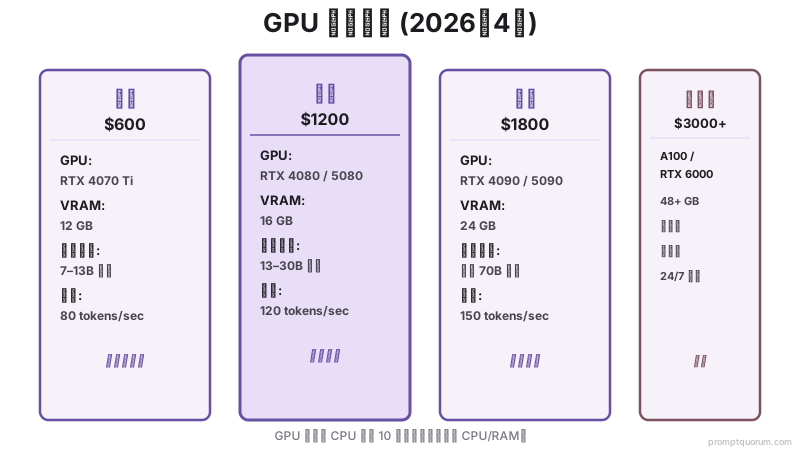
截至2026年5月,NVIDIA主导本地LLM性能。以下是分层建议:
硬件决定你能运行哪些模型,提示词工程决定它们的表现。一个结构良好的提示词作用于7B模型,通常优于粗糙的提示词作用于70B模型。请查看完整的Prompt工程指南,了解在任何参数量下最大化输出质量的技术。
| 层级 | GPU | VRAM | 最佳适用 | 性能 |
|---|---|---|---|---|
| 预算 ($600) | RTX 4070 Ti / RTX 5070 | 12 GB | 7-13B 模型 | 快速 (80 token/sec) |
| 中端 ($1200) | RTX 4080 / RTX 5080 | 16 GB | 13-30B 模型 | 非常快速 (120 token/sec) |
| 高端 ($1800) | RTX 4090 / RTX 5090 | 24 GB | 任何 70B 模型 | 极快 (150 token/sec) |
| 服务器 ($3000+) | RTX 6000 Ada / A100 | 48+ GB | 多用户、70B+ | 生产级 |
需要什么CPU和RAM?
使用GPU时,CPU和RAM是次要的。 GPU进行繁重计算;CPU/RAM处理上下文准备。
最低CPU:8核处理器 (Intel i7 12代、AMD Ryzen 7 7700X或更新版)。较旧的CPU会增加20%+延迟。
RAM:16 GB最低 (使用GPU)。不使用GPU时,建议32+ GB。使用GPU时,RAM不直接限制模型大小。
存储:用于模型文件和OS的500 GB SSD。优选M.2 NVMe (更快的模型加载)。
需要多少存储?
模型文件很大。4位量化的7B模型是4-5 GB。相应规划:
- 500 GB SSD:OS + 1-2个小模型 (3B、7B)
- 1 TB SSD:OS + 3-5个模型 (7B和13B混合)
- 2 TB SSD:OS + 10+个模型 (各种大小)
- 4 TB NVMe RAID:生产设置、快速模型加载
预算构建建议
从头开始构建本地LLM机器:
| 预算 | GPU | CPU | RAM | 模型 | 成本 |
|---|---|---|---|---|---|
| $1500 (入门级) | RTX 4070 Ti | i7 13700 | 16 GB | 7-13B | 现实 |
| $2500 (可靠) | RTX 4080 | i7 14700K | 32 GB | 13-30B | 推荐 |
| $4000 (高端) | 2× RTX 4090 | Ryzen 9 7950X | 128 GB | 任何 (70B+) | 个人用过度 |

如果您无法负担硬件怎么办?
如果$250–400的GPU超出您的预算,或您的笔记本电脑太旧无法支持现代推理引擎,本地LLM在2026年可能对您来说不划算。
计算实际成本:
- 本地: $800–2,000前期硬件 + 电费 + 2–3年维护
- 云端: 典型开发者使用月费$5–50 (Llama API或GPT-4o mini)
对于轻度用户 (< 100,000 tokens/月),云API月费$5–10且无需硬件。对于重度用户 (> 1000万 tokens/月),本地在6–12个月内达到收支平衡。
比较本地与云端的完整成本和性能权衡**找到您的收支平衡点。许多开发者发现云端对他们的实际使用模式来说更便宜。
已经在考虑低于推荐 VRAM 档位的硬件了?要了解哪些模型与应用组合真的能在 8 GB 或更低的内存上跑起来,请参阅面向低配 PC 的最佳本地 AI 应用。
本地LLM的Mac硬件
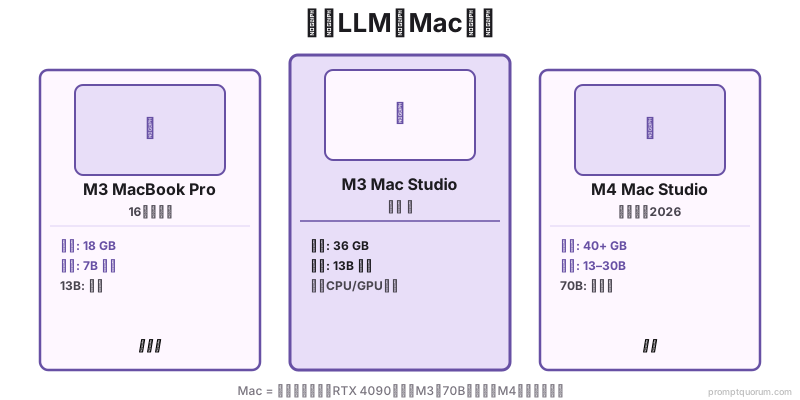
Apple Silicon (M系列) 对本地LLM来说令人惊讶地出色。 M5系列现已推出,M5 Pro提供64GB统一内存和307GB/s内存带宽,M5 Max提供128GB统一内存和460-614GB/s带宽。这两款芯片都非常适合运行本地LLM。
M5 Pro (64GB统一内存, 307GB/s带宽): 运行13-30B模型的最佳价值。Qwen 3.6 27B在M5 Pro上运行良好,推理速度达到30-40 tok/s。
M5 Max (128GB统一内存, 460-614GB/s带宽): 可轻松运行任何70B模型(包括Llama 3.3 70B Q4_K_M)。统一内存充足,无需担心GPU/CPU内存分割。
| Mac | GPU内存 | Memory Bandwidth | 最佳适用 | 推理速度 |
|---|---|---|---|---|
| M5 Pro (64GB) | 64 GB unified | 307 GB/s | 13-30B模型 (优秀) | 30-40 tok/s |
| M5 Max (128GB) | 128 GB unified | 460-614 GB/s | 任何70B模型 | 20-30 tok/s (70B) |
服务器硬件与消费者硬件
对于生产部署,建议使用服务器级硬件:
- 消费者 (RTX 4090):~$1800、24 GB VRAM、单用户、持续负载下易发生热节流。
- 服务器 (RTX 6000 Ada):~$5000、48 GB VRAM、设计用于24/7使用、更好的冷却、错误纠正。
- 建议:从RTX 4090开始。如果为多用户24/7运行70B模型,升级到双A100或RTX 6000。

硬件规划中的常见错误
- 在GPU可用时仅购买CPU。$600 RTX 4070 Ti将超过$2000 CPU。GPU主导LLM速度。
- 未计算VRAM开销。模型文件大小 + 系统开销 + 上下文 = 使用的总VRAM。始终购买比模型大小多25%。
- 假设所有70B模型都适合40GB VRAM。仅Q4 (4位) 量化才勉强适合。Q5需要45+ GB。
- 忽视电源和冷却。RTX 4090消耗575W。需要1200W PSU和良好的机箱气流。
- 认为旧GPU会运行。RTX 2080比RTX 4070 Ti慢10倍。现代GPU架构非常重要。
关于本地LLM硬件的常见问题
我可以在笔记本电脑上运行70B模型吗?
仅使用重度量化 (Q2, 2位) 和CPU回退。不切实际。笔记本电脑适合7B模型。对于70B,使用配备RTX 4090+的台式机。
RTX 4090对个人使用是否过度?
如果您运行70B模型或同时运行多个模型,则否。仅用于7B聊天,RTX 4070 Ti足够。如果您想要灵活性,RTX 4090面向未来。
我应该购买RTX 5090还是等待RTX 6090?
RTX 5090可用 (2026年初)。RTX 6000 Ada服务器GPU也很强大。除非预算无限,RTX 5090或4090都很棒。
量化如何影响质量?
FP16 = 100%质量 (基线)、Q8 = 99%、Q5 = 95%、Q4 = 90-95%。对于大多数任务,Q4与FP16无法区分。
我可以稍后升级GPU吗?
可以。现在从RTX 4070 Ti开始,如需要可在2年后升级到RTX 5090。GPU是最可替换的组件。
相关阅读
- VRAM计算器本地LLM -- 计算硬件需求的交互式工具。
- GPU对CPU对Apple Silicon -- 硬件选项的深层比较。
- 本地LLM最佳GPU -- 详细的GPU基准和选择指南。
- 在24GB VRAM上运行70B模型 -- 大型模型的高级技术。
- 多GPU本地LLM -- 跨多个GPU扩展。
- 2026年最佳编程本地LLM对比 — Qwen2.5-Coder与DeepSeek基准测试
- 本地LLM的Apple Silicon:完整指南 -- M1到M5 Max:统一内存、Metal GPU和按芯片级别的框架选择。
- Mac上的Ollama:Apple Silicon设置2026 -- 2分钟从零到运行:带Metal GPU自动验证的单命令安装。
- Apple Silicon 2026上的Whisper -- M1–M5上Metal和Core ML的STT基准测试:large-v3实现10倍实时。
来源
- NVIDIA GPU规格 -- nvidia.com/zh-cn/geforce/graphics-cards/
- Apple M5 硬件规格 -- apple.com/mac (官方规格,64GB和128GB统一内存,307-614GB/s带宽)
- Llama 4 Scout模型 -- meta.com/research (MoE架构,17B活跃参数,109B总参数)
- Qwen3和Qwen 3.6模型 -- huggingface.co/qwen (性能基准,77.2% SWE-bench编码)
- LLM VRAM计算器 -- vram.asult.com (参考)
- 模型量化基准 -- huggingface.co/docs/transformers