Key Takeaways
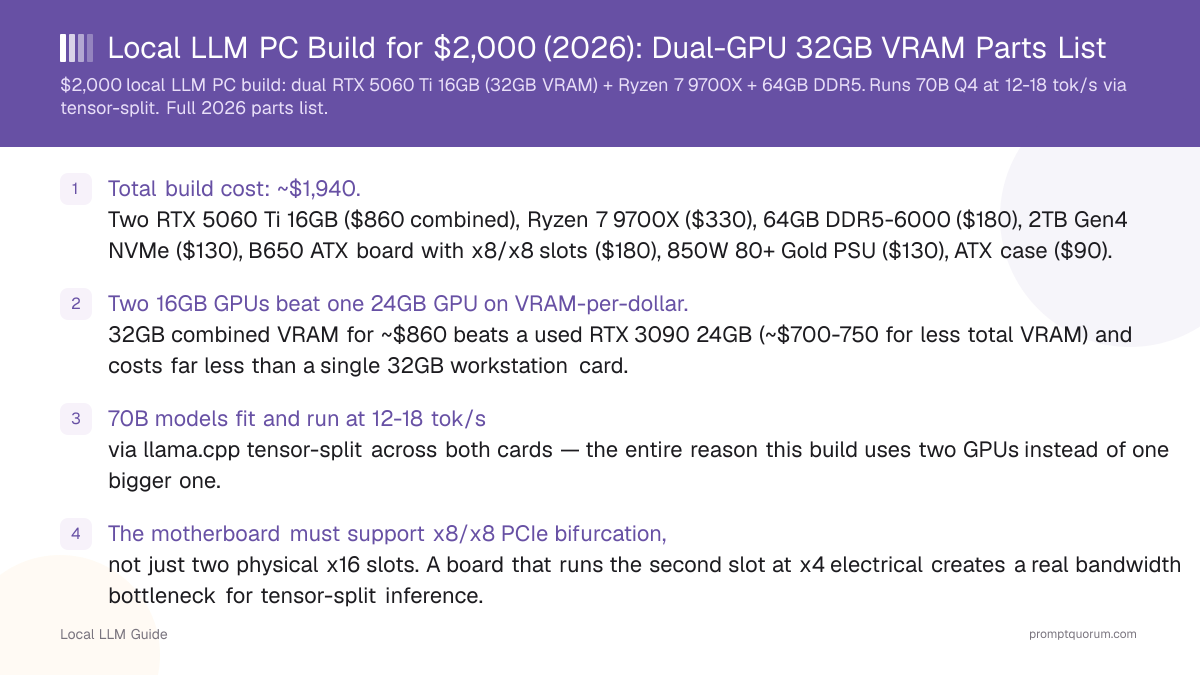
- Total build cost: ~$1,940. Two RTX 5060 Ti 16GB ($860 combined), Ryzen 7 9700X ($330), 64GB DDR5-6000 ($180), 2TB Gen4 NVMe ($130), B650 ATX board with x8/x8 slots ($180), 850W 80+ Gold PSU ($130), ATX case ($90).
- Two 16GB GPUs beat one 24GB GPU on VRAM-per-dollar. 32GB combined VRAM for ~$860 beats a used RTX 3090 24GB (~$850-1,050 for less total VRAM) and costs far less than a single 32GB workstation card.
- 70B models fit and run at 12-18 tok/s via llama.cpp tensor-split across both cards — the entire reason this build uses two GPUs instead of one bigger one.
- The motherboard must support x8/x8 PCIe bifurcation, not just two physical x16 slots. A board that runs the second slot at x4 electrical creates a real bandwidth bottleneck for tensor-split inference.
- Single-GPU fallback still works well: for smaller models, running on just one RTX 5060 Ti gives 32B at 25-30 tok/s — faster than splitting a model that would already fit on one card.
- Avoid: mismatched GPU pairs (e.g., one 5060 Ti + one 4060 Ti) — tensor-split performance is bounded by the slower card, and driver mismatches between GPU generations cause instability.
Why Two GPUs Instead of One Bigger GPU
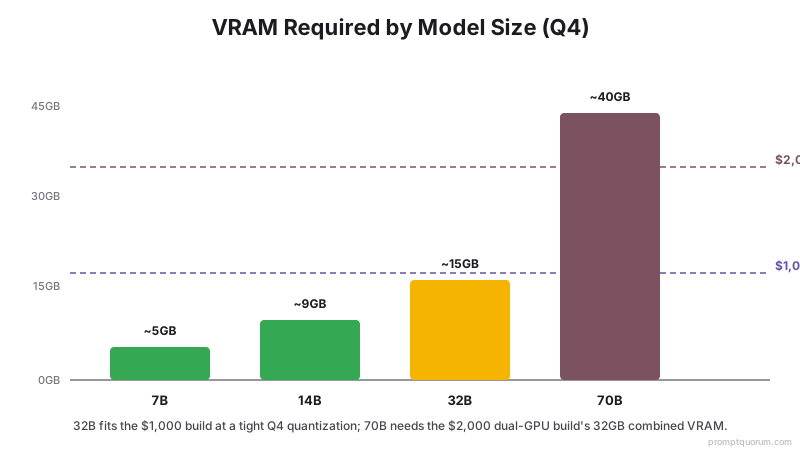
At $2,000, a single-GPU build tops out around a used RTX 3090 24GB or an RTX 5070 Ti 16GB — neither reaches 70B-class model capacity. llama.cpp and vLLM both support tensor-split inference, which divides a model's layers across multiple GPUs connected to the same motherboard, treating their combined VRAM as one pool. Two RTX 5060 Ti 16GB cards give 32GB combined VRAM for less money than a single 24GB card, and comfortably exceeds what a 70B model needs at Q4 (~40GB total system+VRAM budget, with the model itself needing about 38-40GB across both cards at Q4).
This only works because both cards are the same model — mismatched VRAM or compute between cards forces the split to bottleneck on the weaker card, and mismatched driver requirements between GPU generations can cause outright instability.
📍 In One Sentence
Two matched 16GB GPUs pooled via tensor-split inference deliver more usable VRAM per dollar than one larger single GPU at the same $2,000 budget.
💬 In Plain Terms
Tensor-split = software that spreads a model's layers across two GPUs so their VRAM adds together, like RAID for graphics memory.
Full Parts List
Prices are street prices and will vary by region and retailer.
Component | Pick | Price | Why |
|---|---|---|---|
| GPU (x2) | 2x RTX 5060 Ti 16GB | $860 | 32GB combined VRAM via tensor-split — the core purpose of this build |
| CPU | AMD Ryzen 7 9700X | $330 | 8 cores handles PCIe/driver overhead of two GPUs and any CPU-offloaded layers |
| RAM | 64GB DDR5-6000 (2x32GB) | $180 | Larger models and dual-GPU driver overhead need more headroom than a single-GPU build |
| Storage | 2TB NVMe Gen4 SSD | $130 | 70B models at Q4 alone use ~40GB; a multi-model library needs the extra space |
| Motherboard | B650 ATX with x8/x8 PCIe support | $180 | Must split PCIe lanes x8/x8, not x16/x4, to avoid a tensor-split bandwidth bottleneck |
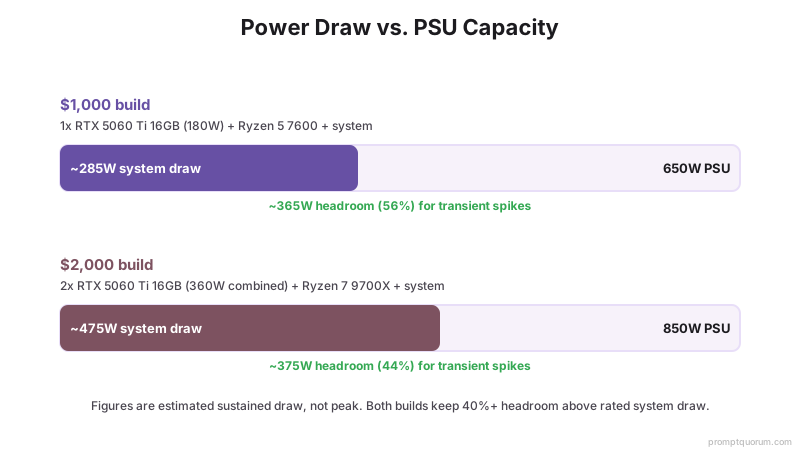
| PSU | 850W 80+ Gold | $130 | Two RTX 5060 Ti cards draw ~360W combined; 850W leaves headroom for transient spikes |
| Case | ATX mid-tower (dual-GPU clearance) | $90 | Needs spacing between two double-slot GPUs for adequate airflow |
| CPU Cooler | Mid-range air cooler | $40 | Ryzen 7 9700X under sustained dual-GPU inference load benefits from better-than-stock cooling |
The Motherboard Requirement Most Builders Miss
Two physical PCIe x16 slots do not guarantee two x16 electrical connections. Many consumer motherboards wire the second slot at x4 electrical, even though it is physically x16-sized. For tensor-split LLM inference, both GPUs actively transfer data during every forward pass — a x4 second slot becomes a real bottleneck, not a theoretical one.
Before buying a motherboard, check its specification sheet for "PCIe lane allocation" or "x8/x8 mode" — this is usually listed explicitly for boards that support it, since it requires a chipset with enough native PCIe lanes to split evenly. This build assumes a B650 ATX board that explicitly lists x8/x8 support.
- Confirm x8/x8, not x16/x4: Check the motherboard's manual PCIe lane diagram, not just the number of physical slots.
- Slot spacing matters physically too: Two double-slot GPUs need at least one empty slot of clearance between them for airflow — verify slot spacing on the board layout, not just lane allocation.
- PCIe generation matters less than lane count for this workload — PCIe 4.0 x8 already exceeds what tensor-split transfer actually needs; chasing PCIe 5.0 slots is not worth a price premium here.
Expected Performance by Model Size
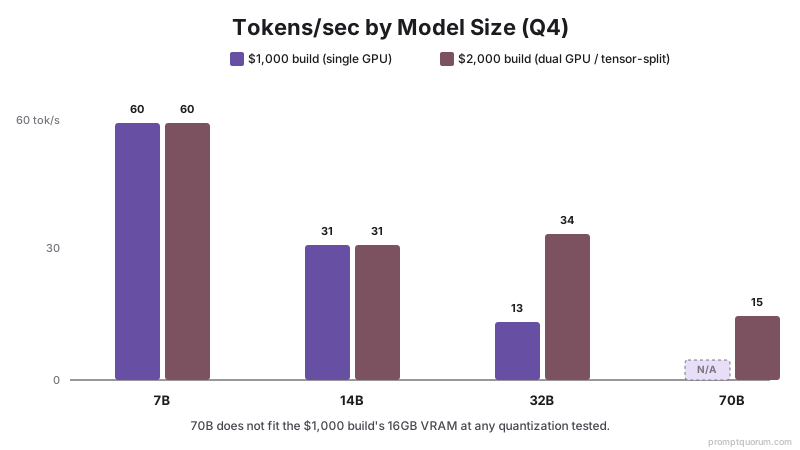
All figures are Q4_K_M quantization measured with llama.cpp tensor-split across two RTX 5060 Ti 16GB cards. Single-GPU figures use one card only.
Model Size | Setup | VRAM Used (Q4) | Tokens/sec |
|---|---|---|---|
| 7B-14B | Single GPU (no split needed) | ~4.5-9GB | 55-65 (7B) / 28-35 (14B) |
| 32B | Single GPU | ~14.5-15.5GB | 25-30 (full context headroom vs. the $1,000 build) |
| 32B | Tensor-split (both GPUs) | ~15GB split | 30-38 (splitting helps even when it fits on one card) |
| 70B | Tensor-split (both GPUs, required) | ~38-40GB split | 12-18 |
Setting Up Tensor-Split Inference
llama.cpp handles tensor-split with a single command-line flag once both GPUs are recognized by the driver. After confirming both RTX 5060 Ti cards appear in `nvidia-smi`, launch a model with `--tensor-split 1,1` to split layers evenly between them, or adjust the ratio (e.g., `--tensor-split 1,1.2`) if one card also drives a display and needs slightly less VRAM reserved for the model.
Ollama supports multi-GPU automatically as of recent versions — it detects available VRAM across all installed GPUs and splits large models without manual configuration, though llama.cpp's manual flags give more precise control over the split ratio.
- Verify both GPUs are detected: `nvidia-smi` should list both cards with matching driver versions before attempting a split.
- Start with an even split: `--tensor-split 1,1` in llama.cpp is the correct default for two identical cards.
- Watch for PCIe bandwidth saturation: if tokens/sec is far below the expected range, confirm the motherboard is actually running x8/x8 and not silently falling back to x4.
Upgrade Path
The clearest upgrade from this build is adding a third RTX 5060 Ti 16GB if the motherboard has a third PCIe slot with usable bandwidth, pushing combined VRAM to 48GB — enough for larger quantizations of 70B models or comfortable headroom for longer context windows.
A more expensive but simpler upgrade is replacing both RTX 5060 Ti cards with two RTX 5070 Ti 16GB cards later, keeping the same 32GB VRAM ceiling but increasing raw compute and memory bandwidth, which improves tokens/sec without changing what model sizes fit.
Common Mistakes at This Budget
- Buying a motherboard based only on "supports SLI/CrossFire" branding — that marketing term refers to gaming multi-GPU rendering, not PCIe lane allocation for compute workloads, and does not guarantee x8/x8.
- Mixing GPU generations (e.g., one RTX 5060 Ti + one RTX 4060 Ti) to save money — tensor-split performance is bounded by the slower/older card, erasing most of the benefit of the newer one.
- Underestimating PSU headroom — two GPUs drawing near their combined rated TDP simultaneously during a long generation can spike briefly well above 360W; an undersized PSU causes random shutdowns under load, not a graceful slowdown.
- Assuming double the GPUs means double the tokens/sec — tensor-split adds PCIe transfer overhead between layers, so combined throughput is meaningfully less than 2x a single card's speed on models that already fit on one GPU.
Frequently Asked Questions
Can a $2,000 PC run 70B local LLMs?
Yes, using two RTX 5060 Ti 16GB cards in a tensor-split configuration, which pools 32GB combined VRAM — enough for 70B models at Q4 quantization, running 12-18 tokens per second.
Why use two 16GB GPUs instead of one 24GB or 32GB GPU?
Two matched 16GB GPUs provide more combined VRAM per dollar than a single larger card at the same budget, and llama.cpp's tensor-split feature lets both cards' VRAM function as one pool for inference.
Does the motherboard matter for a dual-GPU local LLM build?
Yes, significantly. The board must support x8/x8 PCIe lane allocation across both GPU slots — a board that runs the second slot at x4 electrical creates a real bandwidth bottleneck during tensor-split inference, not just a theoretical one.
Can I mix different GPU models in a dual-GPU build?
Not recommended. Tensor-split performance is bounded by the slower or older card in the pair, and mismatched driver requirements between GPU generations can cause instability. Use two identical GPUs.
Is Ollama or llama.cpp better for tensor-split multi-GPU inference?
Ollama detects multiple GPUs automatically and requires no manual configuration, which is simpler for most users. llama.cpp's manual --tensor-split flag gives more precise control over the split ratio, useful if one GPU also drives a display and needs less VRAM reserved.
How much does PCIe bandwidth actually affect tensor-split performance?
Significantly if the slot runs at x4 instead of x8. PCIe 4.0 x8 already provides more bandwidth than tensor-split inference typically needs, but x4 becomes a real bottleneck since both GPUs actively transfer data on every forward pass.
Does doubling the GPUs double the tokens per second?
No. Tensor-split adds PCIe transfer overhead between layers split across cards, so combined throughput on a model that already fits on one GPU is meaningfully less than 2x that single card's speed. The benefit is fitting larger models, not linear speed scaling.
What is the total power draw of two RTX 5060 Ti cards?
Roughly 360W combined at full load (180W rated TDP each), with brief transient spikes above that. An 850W 80+ Gold PSU leaves comfortable headroom for the rest of the system alongside those spikes.
Can this build run smaller models faster by using just one GPU?
Yes — for models that already fit in 16GB (up to 32B at Q4), running on a single RTX 5060 Ti avoids tensor-split PCIe overhead entirely and is faster than splitting a model that did not need to be split.
What is the upgrade path beyond this build?
Adding a third matched RTX 5060 Ti 16GB (if the motherboard has a third usable PCIe slot) raises combined VRAM to 48GB. Alternatively, replacing both cards with RTX 5070 Ti 16GB units later keeps the same 32GB ceiling but increases compute and memory bandwidth.