
Wichtigste Erkenntnisse
- Quantisierung konvertiert 16-Bit-Modellgewichte zu 4-Bit oder 8-Bit und reduziert RAM um 50-75%.
- Q4_K_M ist die Standard-Quantisierungsstufe -- beste Balance zwischen Qualität und RAM für Consumer-Hardware.
- Ein 7B-Modell bei FP16 = ~14 GB RAM. Bei Q4_K_M = ~4,5 GB. Bei Q8_0 = ~7 GB.
- Qualitätsverlust bei Q4_K_M liegt bei 1-3% auf MMLU-Benchmarks gegenüber FP16 -- in praktischen Aufgaben kaum wahrnehmbar.
- GGUF ist das Dateiformat, das quantisierte Modelle für llama.cpp, Ollama und LM Studio speichert.
Was ist LLM-Quantisierung und warum ist sie wichtig?
Ein großes Sprachmodell speichert sein Wissen als Milliarden numerischer Gewichte. Standardmäßig werden diese als 16-Bit-Fließkommazahlen (FP16) gespeichert -- zwei Bytes pro Gewicht. Ein 7B-Modell hat 7 Milliarden Gewichte, daher ist die FP16-Dateigröße ungefähr 14 GB.
Quantisierung ersetzt diese 16-Bit-Floats durch Ganzzahlen mit niedrigerer Präzision. Bei 4-Bit-Quantisierung verwendet jedes Gewicht 0,5 Bytes statt 2 -- wodurch der Speicher auf ~3,5 GB für die Gewichte allein reduziert wird. Mit Metadaten-Overhead beträgt ein quantisiertes 7B-Modell bei Q4_K_M ungefähr 4,5 GB.
Dies ist wichtig für lokale Inference, weil Consumer-Hardware begrenzte RAM hat. Ohne Quantisierung benötigt ein 7B-Modell 16 GB RAM. Mit Q4_K_M-Quantisierung läuft das gleiche Modell auf 6 GB RAM und ist damit auf den meisten modernen Laptops zugänglich.
Was ist Q4_K_M-Quantisierung?
Q4_K_M ist ein 4-Bit-GGUF-Quantisierungsformat, das in llama.cpp und Ollama verwendet wird. Das "K" bedeutet, dass es K-Quants (gemischte Präzision) verwendet, und "M" = medium — ein Gleichgewicht zwischen Modellgröße, Geschwindigkeit und Qualitätsverlust. Q4_K_M speichert die meisten Gewichte mit 4 Bits, verwendet aber 6 Bits für die kritischsten Schichten, was ein besseres Größen-Qualitäts-Verhältnis als reines 4-Bit Q4_0 ergibt.
- Q4_K_M verwendet ~4,5 GB RAM für ein 7B-Modell — 70% weniger als FP16 — bei nur 1–3% Qualitätsverlust
- K-Quants wenden je nach Sensibilität unterschiedliche Präzision auf verschiedene Gewichtgruppen an (wichtige Gewichte erhalten mehr Bits)
- Die "M"-Variante ist die Standard-empfohlene Version (leichtere "S"- und schwerere "L"-Varianten existieren auch)
- Q4_K_M ist die Standardauswahl für Consumer-Hardware mit 6–16 GB VRAM
- Funktioniert mit Ollama (`ollama run model:q4_k_m`), LM Studio und llama.cpp
Wie unterscheiden sich Q4_K_M, Q5_K_M, Q8_0 und andere Stufen?
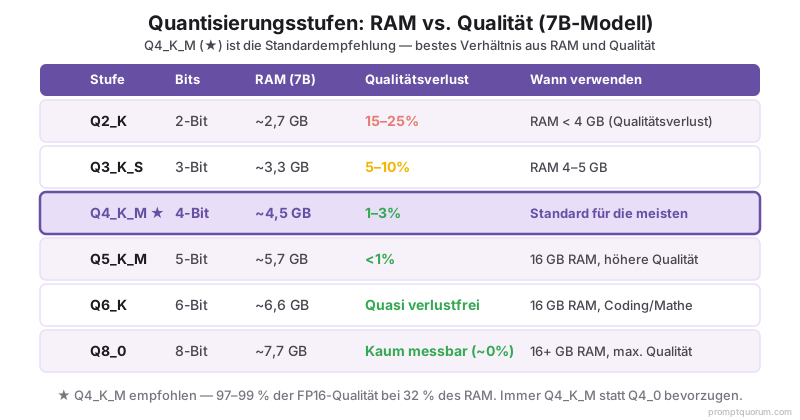
Quantisierungsnamen folgen einem Muster: Q{Bits}_{Variante}. Die Bitanzahl ist die Gewichtspräzision; die Variante beeinflusst die Anwendung der Quantisierung:
| Ebene | Bits | RAM (7B) | Qualitätsverlust | Verwendung |
|---|---|---|---|---|
| Q2_K | 2 | ~2,7 GB | Hoch | RAM < 4 GB, Qualitätsabbau akzeptabel |
| Q3_K_S | 3 | ~3,3 GB | Moderat | RAM 4-5 GB |
| Q4_K_M | 4 | ~4,5 GB | Niedrig (1-3%) | Standard für die meisten Benutzer |
| Q5_K_M | 5 | ~5,7 GB | Minimal (<1%) | 16 GB RAM, bessere Qualität gewünscht |
| Q6_K | 6 | ~6,6 GB | Quasi verlustfrei | 16 GB RAM, Coding/Mathe-Aufgaben |
| Q8_0 | 8 | ~7,7 GB | Vernachlässigbar | 16+ GB RAM, maximale Qualität |
Was ist Q8_0-Quantisierung?
Q8_0 ist ein 8-Bit-GGUF-Quantisierungsformat, das praktisch verlustfrei ist — unter 0,5% Qualitätsverlust gegenüber FP16 — bei etwa der halben Dateigröße. Jedes Gewicht wird in 8 Bits plus einem kleinen Skalierungsfaktor pro Block gespeichert, sodass ein 7B-Modell ~7,7 GB statt ~14 GB bei FP16 belegt. Anders als die K-Quants (Q4_K_M, Q5_K_M) verwendet Q8_0 für jedes Gewicht eine einheitliche 8-Bit-Präzision — es gibt keine gemischtgenaue "K"-Variante, da 8 Bits bereits nahezu alle Informationen bewahren.
- Q8_0 verwendet ~7,7 GB RAM für ein 7B-Modell — etwa 45% weniger als FP16 — bei vernachlässigbarem Qualitätsverlust
- Beste Wahl, wenn Sie 16+ GB VRAM haben und maximale Genauigkeit wünschen (Coding, Mathe, Agenten)
- Kaum messbarer Vorteil gegenüber Q6_K beim allgemeinen Chat, aber die sicherste Wahl, wenn Qualität am wichtigsten ist
- Ausführen mit `ollama run model:q8_0`, oder wählen Sie die Q8_0-GGUF in LM Studio
Q4_0 vs Q4_K_M: Welches 4-Bit-Format ist besser?
Wählen Sie Q4_K_M statt Q4_0. Beide haben durchschnittlich 4 Bits pro Gewicht, aber Q4_K_M ist ein K-Quant, das die empfindlichsten Schichten mit 6 Bit speichert und so bei gleichem Fußabdruck von ~4,5 GB für ein 7B-Modell 5–8% Qualität zurückgewinnt. Q4_0 ist das ursprüngliche einheitliche 4-Bit-Format aus den frühen Tagen von llama.cpp und existiert heute nur noch aus Gründen der Abwärtskompatibilität. Es gibt keinen Grund hinsichtlich Größe oder Geschwindigkeit, Q4_0 zu wählen, wenn Q4_K_M verfügbar ist.
| Format | Methode | RAM (7B) | Qualität | Wählen wenn |
|---|---|---|---|---|
| Q4_0 | Einheitlich 4-Bit (Legacy) | ~4.0 GB | ~5–8% schlechter als Q4_K_M | Nur wenn Q4_K_M nicht verfügbar ist |
| Q4_K_M | K-Quant, gemischt 4/6-Bit | ~4.5 GB | 1–3% Verlust gegenüber FP16 | Standard für fast alle |
Q4_K_M vs Q4_K_S: Medium vs Small K-Quant
Q4_K_M und Q4_K_S sind beide 4-Bit-K-Quants; der Unterschied liegt darin, wie viele Schichten mit höherer Präzision bleiben. Q4_K_M (Medium) behält mehr empfindliche Schichten mit 6 Bit, während Q4_K_S (Small) mehr Gewichte auf 4 Bit drückt, um bei einem 7B-Modell ~0,3–0,4 GB zu sparen. Auf llama.cpp gemessen, fügt Q4_K_S bei 7B etwa +0,11 Perplexity hinzu, gegenüber +0,05 bei Q4_K_M — also rund 3–5% mehr Qualitätsverlust. Wählen Sie Q4_K_S nur, wenn diese wenigen hundert Megabyte darüber entscheiden, ob das Modell in den VRAM passt.
| Format | Variante | RAM (7B) | Qualitätsverlust | Wählen wenn |
|---|---|---|---|---|
| Q4_K_S | Small | ~4.1 GB | ~4–6% (klein, aber real) | ~0,4 GB nötig, um in VRAM zu passen |
| Q4_K_M | Medium | ~4.5 GB | 1–3% (ausgewogen) | Standard — bessere Qualität für ~0,4 GB mehr |
Q8_0 vs Q4_K_M: Lohnt sich 8-Bit für den doppelten VRAM?
Für die meisten Chat- und Schreibaufgaben ist Q4_K_M der bessere Kompromiss — es verwendet ~4,5 GB für ein 7B-Modell gegenüber ~7,7 GB bei Q8_0, mit nur 1–3% mehr Qualitätsverlust. Wählen Sie Q8_0 (benötigt 16+ GB VRAM), wenn Sie maximale Genauigkeit für Coding, Mathe oder agentische Tool-Nutzung benötigen, wo sich kleine Fehler aufsummieren. Q8_0 verliert unter 0,5% gegenüber FP16; Q4_K_M verliert 1–3%. Der Unterschied ist im Alltag nicht wahrnehmbar, kann aber bei präzisem numerischem Reasoning eine Rolle spielen.
| Format | Bits | RAM (7B) | Qualitätsverlust | Am besten für |
|---|---|---|---|---|
| Q4_K_M | ~4 | ~4.5 GB | 1–3% | 6–16 GB VRAM, allgemeine Nutzung |
| Q8_0 | 8 | ~7.7 GB | <0,5% | 16+ GB VRAM, Coding/Mathe/Agenten |
Q8_0 vs Q8_K_XL: Standard-8-Bit vs Dynamic Upcast
Q8_0 ist die standardmäßige 8-Bit-Quantisierung von llama.cpp — jedes Gewicht mit 8 Bit, ~7,7 GB für ein 7B-Modell, unter 0,5% Verlust gegenüber FP16. Q8_K_XL ist kein Standard-Typ von llama.cpp: Es ist eine "Dynamic"-GGUF-Variante von Unsloth, die eine 8-Bit-Basis beibehält, aber die empfindlichsten Schichten (Embeddings, Attention und Output) auf 16-Bit (BF16/F16) hochskaliert und die Qualität bei etwas größerer Dateigröße näher an volles FP16 bringt. Q8_K_XL richtet sich an Nutzer, die den letzten Bruchteil eines Prozentpunkts an Genauigkeit wollen und VRAM übrig haben.
Die genauen Q8_K_XL-Dateigrößen variieren je nach Modell und danach, wie viele Schichten Unsloth hochskaliert, prüfen Sie daher die in Ihrem Tool (LM Studio oder Hugging Face) angezeigte Größe vor dem Download. Bei einem 7B–8B-Modell erwarten Sie, dass es etwas über Q8_0 liegt; bei sehr großen Modellen ist der Abstand größer. Da Q8_0 für die meisten Nutzer bereits praktisch verlustfrei ist, lohnt sich Q8_K_XL nur, wenn Sie speziell maximale Genauigkeit benötigen und der zusätzliche VRAM frei verfügbar ist.
| Format | Typ | Präzision | Qualität | Wählen wenn |
|---|---|---|---|---|
| Q8_0 | Standard llama.cpp | Einheitlich 8-Bit | <0,5% Verlust gegenüber FP16 | Maximale Qualität, Standard-Tooling |
| Q8_K_XL | Unsloth Dynamic GGUF | 8-Bit + Schlüsselschichten auf 16-Bit hochskaliert | Nahezu verlustfrei (größte 8-Bit-Option) | Letzte 0,5% Genauigkeit gewünscht, VRAM übrig |
Was ist GGUF-Format und wie hängt es mit Quantisierung zusammen?
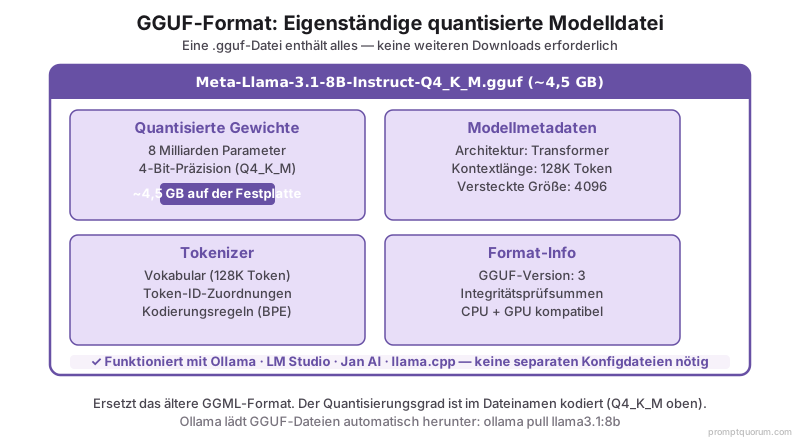
GGUF (GPT-Generated Unified Format) ist das Dateiformat zum Speichern von quantisierten LLM-Gewichten für lokale Inference. Es wurde vom llama.cpp-Projekt erstellt und ersetzt das ältere GGML-Format.
Eine GGUF-Datei enthält: die quantisierten Modellgewichte, alle Modellmetadaten (Architektur, Tokenizer, Kontextlänge) und eine Formatversionsnummer. Dieses eigenständige Design bedeutet, dass eine einzelne `.gguf`-Datei alles ist, was zum Ausführen des Modells benötigt wird -- keine separaten Tokenizer-Dateien, kein JSON-Konfigurationscode.
Ab April 2026 ist GGUF das Standard-Format für Ollama, LM Studio, Jan AI und GPT4All. Wenn Sie `ollama pull llama3.1:8b` ausführen, lädt Ollama intern eine GGUF-Datei herunter. Wenn LM Studio Modellgrößen anzeigt, sind das GGUF-Dateigr öße.
Die Quantisierungsstufe ist Teil des Dateinamens: `Meta-Llama-3.1-8B-Instruct-Q4_K_M.gguf` ist eine Q4_K_M-quantisierte GGUF von Llama 3.3 8B.
Wie viel RAM spart Quantisierung für verschiedene Modellgrößen?
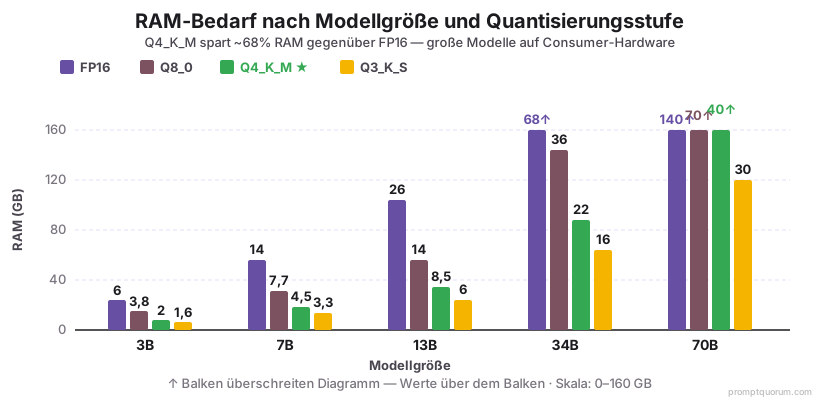
| Modellgröße | FP16 | Q8_0 | Q4_K_M | Q3_K_S |
|---|---|---|---|---|
| 3B | ~6 GB | ~3,8 GB | ~2 GB | ~1,6 GB |
| 7B | ~14 GB | ~7,7 GB | ~4,5 GB | ~3,3 GB |
| 13B | ~26 GB | ~14 GB | ~8,5 GB | ~6 GB |
| 34B | ~68 GB | ~36 GB | ~22 GB | ~16 GB |
| 70B | ~140 GB | ~70 GB | ~40 GB | ~30 GB |
Wie viel Qualität verlieren Sie tatsächlich durch Quantisierung?
Qualitätsverlust durch Quantisierung wird gemessen, indem man die gleichen Benchmarks auf dem vollständig präzisierten Modell und der quantisierten Version ausführt und die Scores vergleicht. Ab April 2026 sind die etablierten Erkenntnisse:
Quantisierung reduziert den Speicherverbrauch, kann aber die Ausgabequalität verschlechtern. Gut konstruierte Prompts gleichen dies aus: Techniken wie Few-Shot-Beispiele und explizite Output-Einschränkungen helfen quantisierten Modellen, ihre Genauigkeit zu halten. Unter Prompt-Engineering-Techniken finden Sie Methoden, die bei jedem Quantisierungsniveau funktionieren.
- Q4_K_M vs. FP16: 1-3% Abbau bei MMLU. Bei einem 7B-Modell, das bei FP16 73% erreicht, erreicht Q4_K_M 71-72%. Bei praktischen Aufgaben ist dieser Unterschied kaum wahrnehmbar.
- Q3_K_S vs. FP16: 5-10% Abbau. Merklich bei komplexem Reasoning und Mathe-Aufgaben. Ein Modell, das eine Mathe-Aufgabe bei FP16 löst, kann bei Q3_K_S fehlschlagen.
- Q2_K vs. FP16: 15-25% Abbau. Signifikanter Qualitätsverlust bei allen Aufgabentypen. Nur verwenden, wenn RAM-Beschränkung absolut ist.
- Q8_0 vs. FP16: unter 0,5% Abbau -- praktisch identisch für alle praktischen Zwecke.
- Die K_M-Varianten (K-Quant Medium) verwenden einen Mixed-Precision-Ansatz, der die Qualität besser bewahrt als die ältere Q4_0-Quantisierung bei gleicher Bitanzahl. Bevorzugen Sie immer Q4_K_M gegenüber Q4_0, wenn beide verfügbar sind.
Welche Quantisierungsstufe sollten Sie verwenden? (Schnelle Entscheidungshilfe)
Wählen Sie je nach verfügbarem VRAM, nicht nur nach Modellgröße. Die folgende Tabelle zeigt, welche Quantisierung für verschiedene Hardware-Einschränkungen am besten geeignet ist.
- Für 6 GB RAM (häufigster Laptop/Desktop): Verwenden Sie Q4_K_M. Ein 7B-Modell quantisiert zu Q4_K_M ist ~4,5 GB und lässt 1,5 GB für das OS und den Browser.
- Für Coding- oder Mathe-Aufgaben: Verwenden Sie Q5_K_M oder höher, auch wenn Sie Budget für Q4_K_M haben. Quantisierungseffekte (1–3% Verlust) sind bei präziser numerischer Berechnung am sichtbarsten. Für ein durchgängiges Air-Gapped-Coding-Setup, das Q5_K_M Qwen3-Coder mit Offline-Betrieb kombiniert, siehe Lokales Coding-LLM ohne Internet.
- Quantisierung + Temperatur-Tradeoff: Ein Q4_K_M-Modell bei Temperatur 0,3 liefert deterministischere Ausgaben als ein vollständiges Modell (FP16) bei Temperatur 1,0. Zur unabhängigen Einstellung: Temperatur und Top-p: KI-Kreativität steuern.
- Für Smart Home und Edge-Geräte: Q4_K_M (4–8 GB VRAM) ist der Sweet Spot für dauerhaft aktive Heimautomatisierungs-KI auf einem Mini-PC. Siehe beste lokale LLM-Modelle für Smart Home →.
| Ihr VRAM | Beste Quantisierung | Modellgröße | Qualität |
|---|---|---|---|
| 4–6 GB | Q3_K_S oder Q4_K_M | 3B, 7B (Q4) | 7B (Q3) | 5–10% Verlust (Q3) | 1–3% (Q4) |
| 6–8 GB | Q4_K_M (empfohlen) | 7B nativ | 1–3% Verlust (kaum wahrnehmbar) |
| 12–16 GB | Q5_K_M | 7B, 13B nativ | <1% Verlust (minimal) |
| 24 GB (RTX 4090) | Q5_K_M oder Q6_K | 13B, 32B nativ | Q4 + Offload für 70B | Vernachlässigbar <0,5% |
| 32 GB (RTX 5090) | Q5_K_M, Q6_K oder Q8_0 | 70B bei Q4 (35 GB), Q5 (43 GB) | 0–2% Verlust |
| 48+ GB (2× RTX 4090) | Q5_K_M oder Q8_0 | 70B nativ mit Layer Splitting | Vernachlässigbar <0,5% |
LM Studio: Quantisierung in der Benutzeroberfläche wählen
LM Studio (Desktop-App) zeigt verfügbare Quantisierungsvarianten für jeden Modell-Download an. Bei der Suche nach einem Modell werden mehrere GGUF-Optionen angezeigt: Q2_K, Q3_K_S, Q4_K_M, Q5_K_M, Q6_K, Q8_0.
Schritt 1: Öffnen Sie LM Studio → Navigieren Sie zur Registerkarte "Lokale Modelle". Suchen Sie nach einem Modell (z.B. "Llama 3.3 8B"). Schritt 2: Jedes Modell zeigt verfügbare Quantisierungen. Schauen Sie sich die Dateigröße an, um den VRAM-Verbrauch zu schätzen. Q4_K_M für ein 7B-Modell ist normalerweise ~4,5 GB aufgeführt. Schritt 3: Klicken Sie auf das Download-Symbol neben Ihrer gewählten Quantisierung.
Empfohlene Voreinstellungen für LM Studio:
- Wenn Ihre GPU 6–8 GB VRAM hat (RTX 4060, RTX 3060 Ti, RTX 4060 Ti): Laden Sie die Q4_K_M-Variante herunter (kleinste Dateigröße mit akzeptabler Qualität).
- Wenn Ihre GPU 12–16 GB VRAM hat (RTX 4070, RTX 4080): Laden Sie Q5_K_M oder Q6_K herunter (bessere Qualität, immer noch gut im VRAM).
- Wenn Ihre GPU 24+ GB VRAM hat (RTX 4090, RTX 5090): Laden Sie Q8_0 oder FP16 herunter (maximale Qualität, minimale Geschwindigkeitseinbuße).
LM Studios "GPU offload"-Funktion: Aktivieren Sie den "GPU verwenden"-Schalter in der Chat-Schnittstelle. LM Studio verschiebt automatisch so viele Modellschichten wie möglich in den GPU-Speicher, und lagert den Rest auf CPU-RAM aus. Wenn Ihr System-RAM ausreichend ist, können Sie damit Modelle ausführen, die etwas größer als Ihr GPU-VRAM sind (z.B. Llama 3.3 70B Q4_K_M auf RTX 4090 mit 64+ GB System-RAM).
Offloading: CPU-RAM als VRAM-Erweiterung nutzen
Offloading verschiebt einen Teil der Modellgewichte vom GPU-VRAM in den System-RAM, wenn das Modell nicht vollständig in den VRAM passt. Die GPU berechnet weiterhin die aktivsten Schichten; der Prozessor übernimmt den Rest.
Auf einer RTX 4090 (24 GB VRAM) mit 64 GB System-RAM kann Llama 3.3 70B Q4_K_M (~40 GB) per Offloading ausgeführt werden: ca. 24 GB in VRAM, ca. 16 GB im System-RAM. Die Geschwindigkeit sinkt auf 5-10 Tokens/Sek. (gegenüber 40-50 Tokens/Sek. bei vollständiger GPU-Last), ist aber für viele Batch-Anwendungsfälle ausreichend.
ollama run llama3.3:70b
# Ollama verwaltet Offloading automatisch basierend auf verfügbarem VRAM

# Explizites GPU-Layer-Offloading mit llama.cpp:
./llama-server -m llama-3.3-70b-q4_k_m.gguf --n-gpu-layers 40 --port 8080
# --n-gpu-layers steuert, wie viele Schichten in VRAM geladen werden
# Restliche Schichten werden auf die CPU ausgelagert
Layer Splitting: Modellgewichte auf mehrere GPUs aufteilen
Layer Splitting verteilt Modellschichten über mehrere GPUs und ermöglicht so Inference mit Modellen, die den VRAM einer einzelnen GPU überschreiten. Zwei RTX 4090 mit je 24 GB ergeben kombinierte 48 GB VRAM.
Für Llama 3.3 70B Q5_K_M (~47 GB) über zwei RTX 4090: Schichten 0-39 auf GPU 0, Schichten 40-79 auf GPU 1. Dies liefert ~100 Tokens/Sek. -- deutlich schneller als Offloading, erfordert aber NVLink oder PCIe-x16-Bandbreite zwischen den GPUs.
# vLLM mit Tensor Parallelismus über 2 GPUs:
python -m vllm.entrypoints.openai.api_server \
  --model meta-llama/Llama-3.3-70B-Instruct \
  --tensor-parallel-size 2 \
  --port 8000

# llama.cpp mit expliziter GPU-Schichtenverteilung:
./llama-server \
  -m llama-3.3-70b-q5_k_m.gguf \
  --n-gpu-layers 80 \
  --split-mode row \
  --main-gpu 0
KV-Cache-Quantisierung: Kontext-Speicher-Overhead reduzieren
KV-Cache-Quantisierung reduziert den Speicher, der zur Speicherung von Attention-Schlüssel-Wert-Paaren während der Inferenz erforderlich ist, besonders wichtig bei der Verarbeitung langer Kontexte (32K+ Token). Während die Quantisierung von Modellgewichten (Q4_K_M) am häufigsten ist, zielt die KV-Cache-Quantisierung auf einen anderen Speicher-Engpass ab.
Während der Inferenz verwaltet das Modell laufende Schlüssel-Wert-Paare (KV) für jeden Token im Kontext. Für ein 7B-Modell, das einen 32K-Token-Kontext verarbeitet, kann der KV-Cache allein je nach Präzision 8–16 GB VRAM verbrauchen. Standard-KV-Cache verwendet FP16 (2 Bytes pro Wert); die Quantisierung des KV-Cache auf FP8 oder Q8 reduziert dies um 50%.
So aktivieren Sie KV-Cache-Quantisierung:
- Ollama: Automatisch auf kompatiblen Modellen; keine Benutzerkonfiguration erforderlich.
- LM Studio: Aktivieren Sie die "KV-Cache-Quantisierung"-Option in den Einstellungen (falls in Ihrer Version verfügbar).
- llama.cpp: Verwenden Sie `--cache-type-q8_0` oder `--cache-type-f8` Flags beim Starten des Servers.
Tradeoffs: KV-Cache-Quantisierung hat minimale Qualitätsauswirkungen (<1% Abbau auch bei aggressiver Quantisierung), da Attention-Muster robuster gegenüber niedrigerer Präzision sind als Modellgewichte. Empfohlen für Modelle, die 16K+ Kontexte auf eingeschränkter Hardware verarbeiten.
Hybrider Ansatz: Quantisierung + Offloading + Layer Splitting kombinieren
Die stärkste Konfiguration kombiniert alle drei Techniken. Drei typische Szenarien:
- Einzelne RTX 4090 + Offloading: Llama 3.3 70B Q4_K_M läuft mit 24 GB VRAM + 16 GB System-RAM. Ideal für gelegentliche 70B-Nutzung ohne Multi-GPU-Aufwand. 5-10 Tokens/Sek.
- 2× RTX 4090 Layer Split: Llama 3.3 70B Q5_K_M passt vollständig in den VRAM (48 GB kombiniert). Keine Offloading-Verlangsamung. ~100 Tokens/Sek. Erfordert NVLink-Setup oder ausreichend PCIe-Bandbreite.
- Mac Studio M2 Ultra: Nativer 70B-Betrieb mit 192 GB Unified Memory -- kein Offloading erforderlich. ~35 Tokens/Sek. mit geringer Systemkomplexität.
Performance-Kompromisse: Quantisierung vs. Offloading vs. Layer Splitting
| Technik | VRAM-Einsparung | Geschwindigkeitsauswirkung | Qualitätsauswirkung |
|---|---|---|---|
| Nur Quantisierung | Bis zu 75% | Keine | 1-3% Verlust bei Q4_K_M |
| Nur Offloading | Bis zu 60% | Hoch (5-10×) | Kein Verlust |
| Layer Splitting | 50% pro GPU | Gering (<10%) | Kein Verlust |
| Q4 + Offloading | Bis zu 85% | Moderat (3-5×) | Geringer Verlust |
Mac Studio M2 Ultra: Natives 70B ohne Offloading
Mac Studio M2 Ultra mit 192 GB Unified Memory führt Llama 3.3 70B bei Q4 nativ aus -- kein Offloading, kein Layer Splitting erforderlich.
Speicherbandbreite-Physik: Unified Memory greift auf CPU und GPU mit ~800 GB/s zu, gegenüber 90 GB/s für DDR5 System-RAM-Offloading.
| Setup | Modell | Geschwindigkeit | Komplexität |
|---|---|---|---|
| 1× RTX 4090 + Offloading | Llama 3.3 70B Q4 | 5-10 Tok/Sek | Mittel |
| 2× RTX 4090 Layer Split | Llama 3.3 70B Q5 | ~100 Tok/Sek | Hoch |
| 1× RTX 5090 (32 GB) | Llama 3.3 70B Q4 | 10-12 Tok/Sek | Niedrig |
| Mac Studio M2 Ultra | Llama 3.3 70B Q4 | 35 Tok/Sek | Niedrig |
2× RTX 4090 Workstation: ~4.500 €. Mac Studio M2 Ultra (192 GB): ~6.600 €.
Regionaler Kontext für lokale LLM-Quantisierung
Quantisierungsüberlegungen variieren nach Jurisdiktion aufgrund von regulatorischen, Souveränitäts- und Compliance-Anforderungen:
- EU/DSGVO -- Organisationen, die in der EU tätig sind, bevorzugen das lokale Ausführen quantisierter Modelle, um Grenzüberschreitung von Daten unter DSGVO Artikel 5 und 44 zu vermeiden. Quantisierung ermöglicht es 7B-Modellen, auf Edge-Geräten mit 6 GB RAM zu laufen und unterstützt DSGVO-Prinzipien zur "Datensparsamkeit". Keine Cloud-APIs für Inference nötig. Die deutsche Datenschutzbehörde BfDI empfiehlt lokale Inference für risikoreiche KI-Anwendungen. BSI-Grundschutz-Kataloge: Q4_K_M und höhere Quantisierungen ermöglichen Einhaltung des BSI-Grundschutz für Regierungseinrichtungen und Finanzinstitute. DACH-Region (Deutschland/Österreich/Schweiz) Unternehmen profitieren von Quantisierung für lokale Compliance ohne zentrale Cloud-Infrastruktur.
- Japan/METI -- Japans Ministerium für Wirtschaft, Handel und Industrie (METI) fördert einheimische KI-Souveränität. Quantisierte Qwen3- und Llama-Modelle laufen auf japanischer Unternehmensinfrastruktur ohne Drittanbieter-Verarbeitung. Q4_K_M-Quantisierung macht 13B+ Modelle auf 16-GB-Unternehmensservern machbar. Japanische Behörden bevorzugen lokale Inference für sensible Anwendungen.
- China -- Lokale Betriebsfähigkeit ist für die meisten KI-Anwendungen rechtlich erforderlich unter CAC-Regulierungen. Quantisierung unterstützt das Ausführen großer China-nativer Modelle (Qwen3, Baichuan) auf inländischer Hardware mit niedrigeren Infrastrukturkosten. Q4_K_M- und Q5_K_M-Quantisierung ermöglichen lokale On-Premises-Compliance.
Was sind die häufigen Fehler bei LLM-Quantisierung?
- Q4_0 statt Q4_K_M herunterladen -- Q4_0 ist eine ältere Quantisierungsmethode ohne K-Quant-Verbesserungen. Q4_K_M ist 5-8% bessere Qualität beim gleichen RAM-Fußabdruck. Wenn beide auf Hugging Face verfügbar sind, wählen Sie immer Q4_K_M.
- Annahme, dass höhere Quantisierung immer schlechtere Qualität bedeutet -- Die Zahlen sind kontraintuitiv: höhere Q-Zahl = mehr Bits = bessere Qualität. Q8_0 ist besser als Q4_K_M. Q5_K_M ist besser als Q4_K_M. Das "höher = bessere Qualität"-Regel gilt innerhalb des gleichen Modells. Der Vergleich über Modelle hinweg ist anders -- ein Q4_K_M 70B-Modell wird bei den meisten Aufgaben ein Q8_0 7B-Modell outperformen.
- Nicht den RAM-Puffer vor dem Laden eines Modells überprüfen -- Die Modellgröße ist nicht der einzige RAM-Verbraucher. OS, Browser und andere Anwendungen nutzen auch RAM. Bei einer 8-GB-Maschine lässt ein 4,5-GB-Q4_K_M 7B-Modell nur 3,5 GB für alles andere -- was eng ist. Schließen Sie Browser vor dem Laden von 7B-Modellen auf 8-GB-Maschinen. Faustregel: Modell-Dateigröße + 2 GB OS-Overhead + 1 GB Puffer = erforderlicher RAM.
Nächste Schritte
- Wie viel VRAM brauche ich? — Quantisierungswissen auf deinen VRAM-Bedarf anwenden →
- Beste CPU-only-LLMs — Beste quantisierte Modelle für reine CPU-Inferenz →
- Beste Open-Source-Modelle auf Ollama — Jetzt ein Modell zum Herunterladen wählen →
Häufig gestellte Fragen zur LLM-Quantisierung
Verwendet Ollama automatisch die beste Quantisierung?
Ja -- wenn Sie `ollama pull llama3.1:8b` ausführen, lädt Ollama standardmäßig die Q4_K_M-Variante herunter. Um eine bestimmte Quantisierung zu pullen, fügen Sie das Tag an: `ollama pull llama3.1:8b-instruct-q5_K_M`. Verfügbare Quantisierungs-Tags für jedes Modell werden auf der Modellseite unter ollama.com/library aufgelistet.
Kann ich ein Modell selbst quantisieren, anstatt eine vorquantisierte Version herunterzuladen?
Ja -- llama.cpp enthält ein `quantize`-Binärprogramm, das GGUF-Dateien in jede unterstützte Quantisierungsstufe konvertiert. Der Prozess dauert 5-30 Minuten je nach Modellgröße. Die meisten Benutzer sollten vorquantisierte GGUF-Dateien von Hugging Face herunterladen, anstatt selbst zu quantisieren, da die Ergebnisse gleichwertig sind.
Beeinflusst Quantisierung das Kontextfenster des Modells?
Nein -- Quantisierung beeinflusst nur die Gewichtspräzision des Modells, nicht die Kontextlänge. Ein Llama 3.3 8B-Modell unterstützt 128K Token, ob quantisiert auf Q4_K_M oder bei FP16 ausgeführt. Das Verarbeiten längerer Kontexte erfordert jedoch unabhängig von Quantisierung mehr RAM -- das Verarbeiten eines 64K-Token-Kontexts mit einem Q4_K_M 7B-Modell kann 10+ GB RAM erfordern.
Was ist der Unterschied zwischen GGUF und GPTQ-Quantisierung?
GGUF (llama.cpp-Format) und GPTQ sind zwei verschiedene Quantisierungsansätze. GGUF verwendet K-Quants und läuft auf CPU und GPU. GPTQ ist nur GPU und erfordert PyTorch. Für lokale Inference mit Ollama, LM Studio oder Jan AI ist GGUF das richtige Format. GPTQ wird mit GPU-fokussierten Inference-Frameworks wie AutoGPTQ und vLLM verwendet.
Gibt es einen Qualitätsunterschied zwischen Q4_K_M-Modellen von verschiedenen Anbietern auf Hugging Face?
Der Quantisierungsalgorithmus ist in llama.cpp standardisiert, daher sollten Q4_K_M-Quantisierungen des gleichen Basismodells unabhängig vom Ersteller der GGUF-Datei nahezu identisch sein. Einige Anbieter wenden jedoch zusätzliche Anpassungen an (imatrix-Quantisierung), die die Qualität verbessern. Dateien, die als "imat" oder "importance matrix" quantisiert beschrieben sind, sind im Allgemeinen höhere Qualität bei gleicher Bitanzahl.
Was ist imatrix-Quantisierung?
Imatrix-Quantisierung (Importance Matrix) verwendet Kalibrierungsdaten, um verschiedenen Gewichten unterschiedliche Präzisionsstufen basierend auf ihrer Wichtigkeit für die Modellausgabe zuzuweisen. Gewichte, die Vorhersagen am meisten beeinflussen, werden mit mehr Bits quantisiert; weniger wichtige Gewichte verwenden weniger Bits. Ergebnis: bessere Qualität bei gleicher Bitanzahl im Vergleich zu einheitlicher Quantisierung. Qwen3-imatrix-Quantisierungen sind 2-4% besser als Standard-Q4_K_M.
Was ist der Unterschied zwischen Q4_K_M und Q4_K_S?
Beide sind 4-Bit-Quantisierung, aber K_M (Medium) und K_S (Small) unterscheiden sich in der Speicherzuweisung pro Quantisierungsblock. Q4_K_M verwendet mehr Metadaten für bessere Qualitätsrekonstruktion -- typischerweise 4,5-5 GB für ein 7B-Modell. Q4_K_S ist aggressiver -- spart 300-400 MB im Vergleich zu K_M, aber mit 3-5% Qualitätsverlust. Verwenden Sie Q4_K_M, es sei denn, Sie befinden sich auf äußerst eingeschränkter Hardware (< 4 GB RAM).
Was ist der Unterschied zwischen Q8_0 und Q8_K_XL?
Q8_0 ist die standardmäßige 8-Bit-Quantisierung von llama.cpp -- jedes Gewicht mit 8 Bit, etwa 7,7 GB für ein 7B-Modell, unter 0,5% Qualitätsverlust gegenüber FP16. Q8_K_XL ist kein Standard-Typ von llama.cpp; es ist eine "Dynamic"-GGUF-Variante von Unsloth, die eine 8-Bit-Basis beibehält, aber die empfindlichsten Schichten (Embeddings, Attention, Output) auf 16-Bit hochskaliert und die Qualität bei etwas größerer Dateigröße näher an volles FP16 bringt. Q8_0 ist für die meisten Nutzer bereits praktisch verlustfrei, daher hilft Q8_K_XL nur, wenn Sie den letzten Bruchteil eines Prozentpunkts an Genauigkeit benötigen und VRAM übrig haben. Die Dateigrößen variieren je nach Modell -- prüfen Sie die Größe in LM Studio oder auf Hugging Face vor dem Download.
Kann ich zwischen Quantisierungsstufen wechseln, ohne das Modell erneut herunterzuladen?
Nein -- zum Wechsel der Quantisierungsstufe müssen Sie eine andere GGUF-Datei herunterladen oder das Basismodell selbst neu quantisieren. Sobald ein Modell auf Q4_K_M quantisiert ist, können Sie es nicht auf Q5_K_M zurückkonvertieren, ohne das ursprüngliche FP16-Modell zu haben. Die meisten Benutzer laden vorquantisierte GGUF-Dateien von Hugging Face für ihre gewünschte Quantisierungsstufe herunter.
Wie beeinflusst Quantisierung die Inference-Geschwindigkeit?
Quantisierung erhöht typischerweise die Inference-Geschwindigkeit um 10-40%, da das Laden und Verarbeiten von 4-Bit-Gewichten schneller ist als 16-Bit-Floats. Ein Q4_K_M 7B-Modell läuft mit ~8-12 tok/s auf einer Consumer-CPU; das gleiche Modell bei FP16 läuft mit ~1-2 tok/s. GPU-Leistungsgewinn durch Quantisierung ist kleiner (5-15% schneller), weil GPUs bereits für Float-Arithmetik optimiert sind.
Welche Quantisierungsstufe verwendet Ollama standardmäßig?
Ollama verwendet standardmäßig Q4_K_M für alle Modelle in seiner Bibliothek. Wenn Sie `ollama pull llama3.1:8b` ausführen, laden Sie die Q4_K_M-Variante herunter. Dieses Standard wägt Qualität und RAM-Anforderungen gut ab für die meisten Benutzer. Um eine andere Quantisierung zu pullen, fügen Sie das Tag an: `ollama pull llama3.1:8b:q5_k_m` oder `ollama pull llama3.1:8b:q8_0`.
Muss ich bei der Verwendung von lokalen LLMs die DSGVO beachten?
Ja. Bei lokaler Ausführung quantisierter Modelle verwenden Sie keine Drittanbieter-APIs, daher gibt es keine Datenübertragung außerhalb der EU. Dies erfüllt DSGVO Artikel 28 (Auftragsverarbeitung ist nicht erforderlich) und Artikel 5 (Speicherungsbegrenzung). Nach BSI-Grundschutz-Katalogen sind lokal ausgeführte Q4_K_M-Modelle für die Verarbeitung personenbezogener Daten in Behörden und Finanzinstituten konform. Befolgen Sie weiterhin Ihre internen Datenschutzrichtlinien, aber lokale Quantisierung beseitigt das Datenübertragungs-Risiko.
Ist Quantisierung für den deutschen Mittelstand geeignet?
Ja. Kleine und mittlere Unternehmen (KMU) in Deutschland, Österreich und der Schweiz können quantisierte Modelle auf lokalen Servern ausführen, um Abhängigkeit von Cloud-Anbietern zu verringern und Compliance-Anforderungen zu erfüllen. Q4_K_M-Quantisierung ermöglicht 7B- und 13B-Modelle auf Standard-Unternehmenshardware (16 GB RAM). Dies ist besonders vorteilhaft für Branchen wie Recht, Beratung, Finanzdienstleistungen und Fertigung, in denen Datensicherheit und lokale Speicherung kritisch sind.
Kann ich Llama 3.3 70B auf einer einzelnen RTX 4090 ausführen?
Ja, mit Offloading. Llama 3.3 70B Q4_K_M benötigt ~40 GB -- mehr als die 24 GB VRAM der RTX 4090. Mit CPU-Offloading werden ~24 GB in VRAM geladen und der Rest in System-RAM. Die Geschwindigkeit beträgt 5-10 Tokens/Sek. gegenüber 40-50 Tokens/Sek. bei vollständiger GPU-Auslastung. Für bessere Leistung empfehlen sich 2× RTX 4090 mit Layer Splitting (~100 Tokens/Sek.) oder Mac Studio M2 Ultra (35 Tokens/Sek. ohne Offloading).
Was ist der Unterschied zwischen Quantisierung und Offloading?
Quantisierung reduziert die numerische Präzision der Modellgewichte (FP16 → 4-Bit), um den Speicherbedarf um 50-75% zu senken -- ohne die Modellarchitektur zu verändern. Offloading verlagert Teile eines Modells, das nicht vollständig in den VRAM passt, in den System-RAM oder auf die CPU. Quantisierung reduziert die Gesamtgröße; Offloading ermöglicht das Ausführen von Modellen, die größer als VRAM sind, mit Geschwindigkeitseinbußen.
Benötigt Mac Studio M2 Ultra Quantisierung für 70B-Modelle?
Nein -- Mac Studio M2 Ultra mit 192 GB Unified Memory läuft Llama 3.3 70B bei FP16 (140 GB) oder Q4_K_M nativ. Kein Offloading erforderlich, da das gesamte Modell in Unified Memory passt. Q4_K_M wird dennoch empfohlen für ~35 Tokens/Sek. gegenüber ~15-20 Tokens/Sek. bei FP16, da die Speicherbandbreite der limitierende Faktor ist, nicht der Speicher selbst.
Welche Technikkombination ist für meine Hardware am besten?
Für 8 GB VRAM (RTX 4060 Ti): Q4_K_M für Modelle bis 7B, kein Offloading nötig. Für 16-24 GB VRAM (RTX 4090): Q4_K_M oder Q5_K_M für 7-13B nativ; für 70B Offloading mit 64 GB System-RAM. Für 2× 24 GB VRAM: Layer Splitting für 70B bei Q5_K_M mit ~100 Tokens/Sek. Für Mac Apple Silicon: Nutzen Sie das Unified Memory direkt -- Q4_K_M für Geschwindigkeitsoptimierung.
Quellen
- llama.cpp Quantisierungs-Dokumentation -- github.com/ggerganov/llama.cpp/blob/master/examples/quantize/README.md
- K-Quants technische Diskussion -- github.com/ggerganov/llama.cpp/pull/1684 (ursprünglicher K-Quant PR)
- GGUF-Format-Spezifikation -- github.com/ggerganov/ggml/blob/master/docs/gguf.md
- Open LLM Leaderboard Quantisierungs-Benchmarks -- huggingface.co/spaces/open-llm-leaderboard/open_llm_leaderboard
Update Log
- 2026-06-15: Direktvergleichsabschnitte hinzugefügt (Q4_0 vs Q4_K_M, Q4_K_M vs Q4_K_S, Q8_0 vs Q4_K_M, Q8_0 vs Q8_K_XL) sowie eine eigene Antwort "Was ist Q8_0?"; Q8_K_XL-Abdeckung ergänzt; Fakten im Juni 2026 erneut verifiziert.
- 2026-05-17: Titel aktualisiert, um entscheidungsorientierte Absicht widerzuspiegeln; Inhalte unverändert.