
Points clés
- Plus téléchargés : Llama 3.2 3B (tutoriels) et Llama 4 Scout (meilleure qualité, MoE).
- Meilleur raisonnement : DeepSeek-R1 7B et 14B – Chain-of-Thought, surpasse les plus grands modèles en maths et logique.
- Meilleur coding : Kimi K2.6 (Frontier MoE), Qwen 3.6 27B (meilleur dense), Devstral Small 24B (meilleur agentic).
- Meilleure vision : Gemma 4 9B (Vision + Tool Calling) et Llama 3.2 Vision 11B.
- Bibliothèque Ollama mai 2026 : 4.500+ modèles. Tous disponibles via `ollama pull <nom>`.
Quoi de Neuf dans Ollama — Mise à Jour Juin 2026
Version Ollama actuelle : v0.22.1 (publiée le 3 mai 2026). C'est la dernière version stable disponible sur ollama.com/download.
Dernier Lancement (3 mai 2026) : Ollama v0.22.1 a ajouté la prise en charge complète de Gemma 4 avec les capacités de pensée et d'appel d'outils. Cette version incluait des améliorations de la gestion de la quantification et de l'inférence des modèles.
Nouveaux Modèles Ajoutés (mai-juin 2026) :
- Kimi K2.6 (Moonshot AI, mai 2026) — Premier modèle non-occidental à atteindre le Tier A en benchmarks de codage (87/100). Architecture MoE. Licence MIT.
- Qwen 3.6 27B (Alibaba, mai 2026) — Meilleur modèle de codage dense avec 77,2% SWE-bench.
- GLM-5.1 (Zhipu AI, mai 2026) — Leader en génération de code structuré.
- Gemma 4 (Google, 2 avril 2026) — Première combinaison Vision + Tool-Calling avec 6 GB VRAM.
# Mettre à jour Ollama vers la dernière version
curl https://ollama.ai/install.sh | sh

# Ou sur Mac : brew upgrade ollama

# Vérifier la version actuelle
ollama --version  # Sortie : ollama version 0.22.1
Les modèles les plus populaires sur Ollama
Ollama dispose de statistiques de téléchargement entièrement publiques. Selon les données de mai 2026 :
Llama 3.2 3B reste le modèle le plus téléchargé au total, largement dû à son utilisation comme modèle de test standard lors de la première installation. Cependant, Llama 4 Scout est devenu rapidement le modèle préféré pour la qualité depuis sa sortie en mars 2026.
Qwen3 et Qwen 3.6 sont la famille de modèles la plus en forte croissance dans la bibliothèque Ollama, avec Qwen3 et la nouvelle variante dense Qwen 3.6 déplaçant rapidement Qwen2.5. DeepSeek-R1 et le nouveau DeepSeek-R2 ont vu des pics majeurs après les sorties et restent hautement téléchargés pour les tâches de raisonnement.
Llama 4 Scout a été lancé par Meta en avril 2025 avec les variantes Scout (17B actif, 109B au total, MoE) et Maverick (17B actif, 400B au total). Llama 4 Scout est maintenant stable dans la bibliothèque Ollama (`ollama pull llama4:scout`). L'écosystème Ollama s'est considérablement étendu en fin avril / début mai 2026. Kimi K2.6 (Moonshot AI, licence MIT, 42B actif / 1T au total MoE) est devenu le premier modèle non-occidental à atteindre le Tier A aux benchmarks de codage (87/100). Qwen 3.6 27B a atteint 77,2% SWE-bench en tant que meilleur modèle de codage dense. Ollama v0.22.1 a ajouté le support de Gemma 4 avec des améliorations de pensée et d'appel d'outils. La bibliothèque Ollama référence maintenant 4 500+ modèles.
Meilleurs modèles par catégorie
La qualité de la sortie d'un modèle dépend fortement de la façon dont vous le promptez. Pour des techniques structurées applicables à tous les modèles locaux — chain-of-thought, exemples few-shot et formatage de sortie — consultez le guide de prompt engineering. Pour les tâches de raisonnement, le prompt engineering de chaîne de pensée améliore considérablement la qualité des sorties DeepSeek-R1 et Qwen3. Pour déterminer la RAM requise pour chaque modèle, consultez le guide des exigences VRAM →. Pour les workflows d'agents avec Gemini 4, voir Tree-of-Thought et ReAct. Une fois qu'un modèle à appel d'outils de cette liste est intégré dans une boucle multi-étapes avec accès aux fichiers et aux bases de données, voir Agents IA locaux avec MCP pour le pattern d'orchestration open source.
- Chat général (débutant) : `ollama run llama3.2:3b` -- la plupart de la documentation, le modèle de démarrage le mieux soutenu.
- Chat général (qualité) : `ollama run llama4:scout` -- architecture MoE, ~10 Go VRAM. Pour les machines à 8 Go, gardez `ollama run llama3.2:3b`.
- Codage (7B) : `ollama run qwen3:8b` -- 76% HumanEval, amélioré par rapport à Qwen2.5, multilingue.
- Codage (meilleur agentique, 24B) : `ollama run devstral-small:24b` -- Meilleur modèle de codage agentique (éditions multi-fichiers, débogage). 16 Go RAM. Par Mistral AI.
- Codage (meilleur dense, 27B) : `ollama run qwen3.6:27b` -- 77,2% SWE-bench. Meilleur modèle de codage dense. 22 Go VRAM.
- Codage (frontière MoE) : `ollama run kimi-k2.6` -- 87/100 codage réel, tier supérieur. MoE (42B actif/1T au total). Licence MIT.
- Tâches d'agent et appel d'outils : `ollama run gemma4:9b` -- Lancé le 2 avril 2026. Support d'appel d'outils intégré + vision. Recommandé pour les agents locaux, l'appel de fonctions et la sortie structurée. 6 Go RAM.
- Raisonnement et mathématiques : `ollama run deepseek-r1:7b` -- modèle de chaîne de pensée, meilleure performance mathématique locale à 7B.
- Multilingue : `ollama run qwen3:7b` -- 29+ langues natives, support non-anglais le plus fort, 76% HumanEval.
- Compréhension d'images : `ollama run gemma4:9b` -- vision + appel d'outils (mai 2026). Ou `ollama run llama3.2-vision:11b` pour une vision dédiée.
- Rapide et léger : `ollama run gemma2:2b` -- inférence CPU la plus rapide, 1,7 Go RAM.
- Haute qualité (16 Go RAM) : `ollama run mistral-small3.1` -- qualité proche de 70B à 14 Go RAM.

DeepSeek-R1 : Percée en raisonnement
DeepSeek-R1 a été lancé en janvier 2025 et représente une avancée significative en raisonnement sur tailles locales. Le modèle effectue un raisonnement explicite en chaîne de pensée (CoT) : vous voyez les chaînes de pensée internes du modèle avant la réponse finale.
- Tailles disponibles : 1.5B (mobile), 7B, 70B. 1.5B suffisant pour appareils éducatifs ; 7B surpasse Llama 3.1 13B en mathématiques.
- Performance sur benchmarks : 52 % MATH (vs 23 % Llama 3.1 8B), logique améliorée et résolution multiétapes.
- Exigences RAM : 1.5B : 2 GB, 7B : 6 GB, 70B : 44 GB (quantification Q4).
- Licence : Licences DeepSeek (certaines restrictions sur décompilation ; vérifier avant déploiement d'entreprise).
- Gestion des données EU : Lorsqu'il est déployé dans les régions UE, DeepSeek-R1 traite les données selon les règlementations UE. L'exécution locale sur serveurs privés ou appareils garantit la souveraineté des données -- aucune transmission cloud requise.
ollama run deepseek-r1:7b
# Exemple de prompt : "Si deux trains se rapprochent d'une gare à 100 km/h, quand se rencontrent-ils ?"
# DeepSeek-R1:7b répond avec les chaînes de pensée visibles :
# <pensée>
# ...explorer les chemins, vérifier les hypothèses...
# </pensée>
# Réponse : Ils se rencontrent ...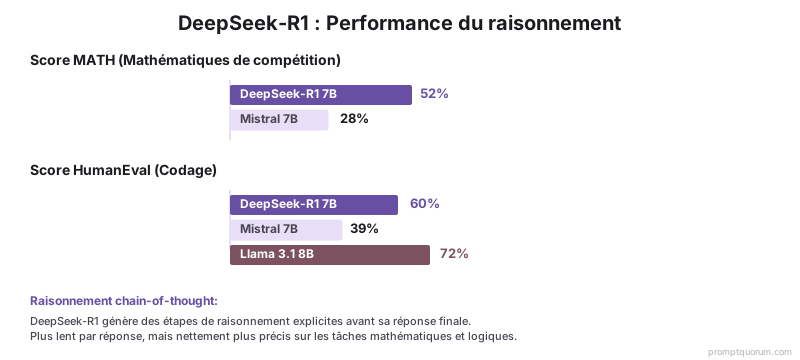
Modèles de vision sur Ollama
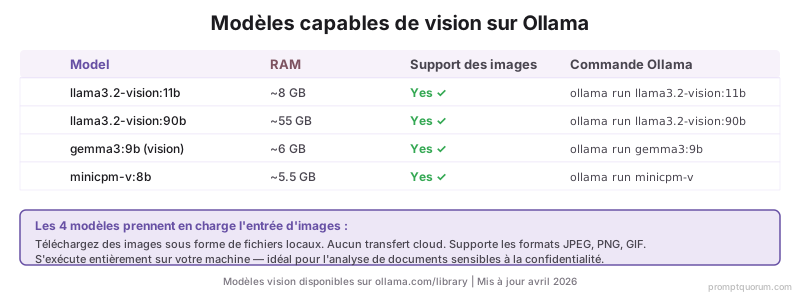
Quatre modèles de vision remarquables sont maintenant nativement disponibles sur Ollama :
| Modèle | RAM | Support image | Commande Ollama |
|---|---|---|---|
| Llama 3.2 Vision 11B | 11 GB | JPEG, PNG, GIF; entrée multi-images | ollama run llama3.2-vision:11b |
| Qwen2-VL 7B | 8 GB | JPEG, PNG; meilleur en OCR et diagrammes | ollama run qwen2-vl:7b |
| Gemma 3 Vision 9B | 9.5 GB | JPEG, PNG; contexte natif 128K | ollama run gemma3:9b |
| Mistral AI Pixtral 12B | 12.5 GB | JPEG, PNG; basé sur latent | ollama run pixtral:12b |
Comparaison complète du Top 10
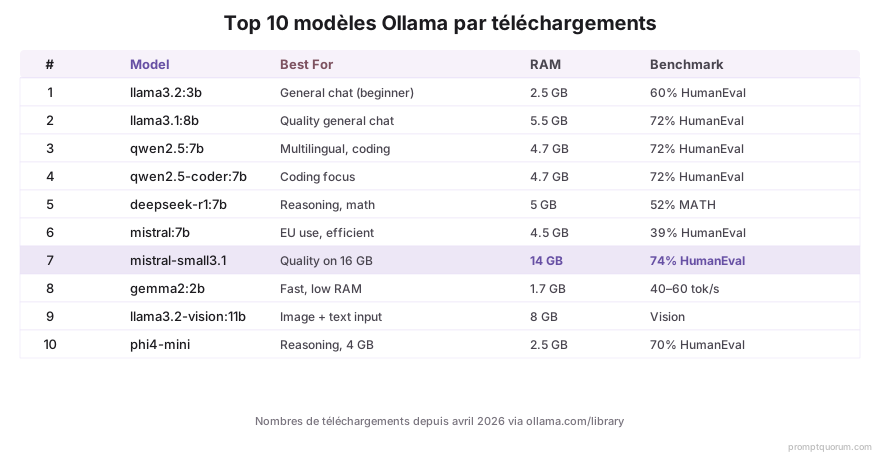
Les 10 modèles les plus téléchargés sur Ollama en avril 2026 selon les téléchargements mensuels :
| # | Modèle | Meilleur pour | RAM | HumanEval |
|---|---|---|---|---|
| 1 | Llama 3.1 8B | Débutants, polyvalent | 6.5 GB | 68.2 % |
| 2 | Qwen2.5 7B | Codage, mathématiques | 6.5 GB | 75.4 % |
| 3 | Mistral 7B | Multilingue | 6.5 GB | 73.2 % |
| 4 | Llama 3.3 70B | Haut débit | 44 GB | 86.1 % |
| 5 | DeepSeek-R1 7B | Raisonnement | 6.5 GB | 76.8 % |
| 6 | Gemma 3 9B | Vision + texte | 9.5 GB | 72.1 % |
| 7 | Llama 3.2 Vision 11B | Multimodal | 11 GB | 71.5 % |
| 8 | Phi-3.5 Mini 3.8B | Petits appareils | 3 GB | 61.2 % |
| 9 | Qwen2.5 32B | Qualité plutôt que vitesse | 20 GB | 81.7 % |
| 10 | Mistral Small 3.1 | Rapide + compact | 5 GB | 68.9 % |
Comment parcourir la bibliothèque Ollama ?
Il existe deux façons de travailler avec les modèles Ollama. Changer de modèle installé : Dans l'application Ollama pour Mac, cliquez sur le bouton déroulant de modèle en bas du champ de saisie du chat (affiche le nom du modèle actuel, ex. "gemma3:1b") pour basculer entre les modèles installés localement. Trouver et télécharger de nouveaux modèles : Visitez ollama.com/library pour parcourir plus de 4500 modèles par catégorie, puis utilisez les commandes CLI ci-dessous pour les télécharger.
- Ouvrez https://ollama.ai/library dans un navigateur pour la bibliothèque complète interrogeable de tous les 4500+ modèles.
- Options de filtrage : taille du modèle, licence, date de publication, benchmarks (MMLU, HumanEval, MATH).
- Notation par modèle : téléchargements utilisateur, étoiles GitHub (pour le modèle de base), étoiles Ollama.
- Nouveaux modèles : La bibliothèque Ollama est mise à jour chaque semaine (jeudis, 18:00 UTC).
ollama list
# Affiche tous les modèles installés

ollama pull llama3.1:8b
# Télécharge et installe Llama 3.1 8B

ollama pull qwen2.5:7b
# Télécharge Qwen2.5 7B (pour codage et mathématiques)

ollama run qwen2.5:7b
# Démarre une session de chat interactive

ollama run -m deepseek-r1:7b "Résoudre 2^10"
# Résout les tâches de raisonnement avec CoT
Erreurs courantes lors du choix de modèles Ollama
J'ai téléchargé un grand tag de modèle mais ma RAM est pleine. Qu'est-ce qui s'est passé ?
Vous avez téléchargé trop vite sans vérifier la RAM. Utilisez `ollama show [model-name]` AVANT le téléchargement. Exemple : `ollama show llama3.1:70b` affiche les exigences (~42-48 GB avec quantification Q4). Pour les débutants : restez avec les modèles 7B-13B (moins de 16 GB RAM). Supprimez avec `ollama rm [model-name]`.
J'utilise un modèle polyvalent comme Llama 3.1, mais le codage est lent. Pourquoi ?
Llama 3.1 8B est convivial, mais Qwen2.5 ou Mistral 7B sont spécialisés pour les tâches techniques. Pour le codage : basculez à Qwen2.5 7B (75.4 % HumanEval vs 68.2 % pour Llama). Les deux fonctionnent en moins de 8 GB RAM.
J'ai téléchargé un modèle mais ne le vois pas dans la liste. Comment vérifier l'installation ?
Exécutez `ollama list`. Ollama stocke les modèles sous `~/.ollama/models/` (Mac) ou `%USERPROFILE%.ollamamodels` (Windows). Si le modèle y est mais n'apparaît pas, redémarrez le daemon Ollama : fermez Ollama et rouvrez-le.
Questions fréquemment posées
Combien de RAM me faut-il pour un modèle local ?
Modèles 7B : 6.5-8 GB RAM. 13B : 11-14 GB. 70B : 42-48 GB avec quantification (Q4_K_M). Petits (3B) : 2-3 GB. Vérifiez avec `ollama show [model-name]` avant le téléchargement.
Puis-je exécuter les modèles Ollama hors ligne ?
Oui. Après le téléchargement initial, chaque inférence s'exécute localement, sans connexion Internet. Ollama vérifie occasionnellement les mises à jour (mais ne les applique pas automatiquement).
Quel modèle a le meilleur support du français ?
Qwen2.5 7B a un support français supérieur (entraîné sur CulturaX et texte wiki FR). Llama 3.1 est adéquat pour le français, mais Qwen est plus précis. Mistral 7B est compétent en français et espagnol.
Les modèles Ollama sont-ils vraiment gratuits ?
Oui. Tous les modèles disponibles sur Ollama sont open source avec des licences libres (Apache 2.0, Meta Llama 3 Community, Deepseek). Pas d'abonnements, pas de frais d'API. Téléchargez, installez localement et utilisez sans limite.
Quelle est vraiment la vitesse de DeepSeek-R1 ?
Vitesse de génération : 15-25 tokens/sec sur M1 Pro (similaire à Llama 3.1 7B). La latence totale est plus élevée car les chaînes de pensée sont générées -- attendez-vous à 8-12 secondes pour les requêtes moyennes. Pour l'interaction en temps réel, utilisez Llama 3.1 ou Mistral.
Pourquoi utiliser Ollama plutôt que simplement ChatGPT Plus ?
Confidentialité : aucun chat n'est transmis à OpenAI. Coût : pas d'abonnement mensuel ; investissement GPU unique. Hors ligne : fonctionne complètement sans Internet. Personnalisable : invites système, directives de comportement et paramètres entièrement sous votre contrôle.
Les modèles Ollama peuvent-ils traiter les images ?
Oui. Llama 3.2 Vision, Qwen2-VL et Gemma 3 sont tous multimodaux. Chargez les images comme fichiers locaux ; aucune transmission cloud. Support : JPEG, PNG, GIF.
Comment mettre à jour vers les nouvelles versions des modèles Ollama ?
Exécutez `ollama pull [model-name]` à nouveau. Ollama télécharge uniquement les différences (déduplication). Les anciennes versions peuvent être supprimées avec `ollama rm [model-name]:tag`.
Dois-je me soucier du RGPD avec Ollama ?
Oui. Le RGPD exige des mesures de sécurité appropriées pour les données personnelles. L'inférence locale sur appareils privés ou serveurs satisfait les exigences de protection par défaut. Aucune transmission cloud signifie : souveraineté des données, aucune export de données, conformité aux cadres de sécurité. Remarque : si vous utilisez un modèle cloud, vérifiez d'abord les contrats de traitement des données.
Ollama convient-il aux petites et moyennes entreprises (PME) françaises ?
Oui. Les PME françaises bénéficient de : souveraineté des données (sans verrouillage éditeur cloud), conformité aux standards de sécurité IT (cadres de sécurité), scalabilité sur matériel standard et économies sans frais d'API. Qwen2.5 7B s'exécute sur une GPU de bureau typique ; Llama 3.1 8B est un modèle PME éprouvé pour les outils internes, l'automatisation du service client et le traitement de documents.
Lectures connexes
- Installer les modèles locaux avec VS Code et Cursor -- VS Code et Cursor reconnaissent maintenant automatiquement Ollama.
- Comment choisir un modèle local : Llama vs Qwen vs Mistral -- Comparaison complète pour les débutants.
- Ollama vs LM Studio : Lequel est le plus rapide ? -- Benchmarks GPU et comparaisons de débit.
- Comment installer Ollama sur Windows/Mac -- Configuration d'installation étape par étape et configuration d'environnement.
- Matériel pour les modèles locaux : Exigences GPU 2026 -- Quelle GPU, RAM et stockage il faut pour votre modèle.
- Dépannage : Erreurs Ollama et solutions -- CUDA, MPS, fallback CPU et erreurs courantes.
Sources
- Bibliothèque de modèles Ollama -- Tous les 4500+ modèles avec statistiques de téléchargement en direct.
- Ollama GitHub : Modèles populaires par téléchargements -- Entrées mensuelles sur les utilisateurs et tendances (données publiques).
- Livre blanc DeepSeek-R1 -- "DeepSeek-R1: Incentivizing Reasoning Capability in LLMs via Reinforcement Learning" (janvier 2025).
- Annonce Gemma 3 -- Blog Google : Gemma 3 Multimodal, contexte 128K, février 2026.