
Points clés
- VRAM = (Taille modèle × Bits quantification) ÷ 8
- FP16 = 16 bits, Q8 = 8, Q5 = 5, Q4 = 4 bits
- Exemple : modèle 13B en Q4 = (13 × 4) ÷ 8 = 6.5 Go
- Ajoutez toujours 25 % de marge pour le contexte, la surcharge système et la sécurité
- En avril 2026, cette formule est précise à ±10 %
Faits rapides : exigences VRAM par GPU
- RTX 4090 (24 Go) : Llama 3.1 7B en Q4 (3.5 Go), 13B en Q5 (8.1 Go), 70B en Q4 avec déchargement
- RTX 4080 (16 Go) : Llama 3.1 7B en Q4 (3.5 Go), 13B en Q5 (8.1 Go), 32B en Q4 (16 Go)
- RTX 4070 Ti (12 Go) : Llama 3.1 7B en Q4 (3.5 Go), 13B en Q5 (8.1 Go avec marge limitée)
- M5 Max Mac (36 Go unifié) : Llama 3.1 13B en FP16 (26 Go), 70B impossible sans quantification extrême
- Règle empirique : Prévoyez toujours 25–40 % de VRAM supplémentaire pour le contexte, le traitement par lots et la surcharge système
En une phrase
La VRAM requise (Go) équivaut aux paramètres du modèle en milliards multipliés par les bits de quantification (16 pour FP16, 8 pour Q8, 4 pour Q4, etc.), divisés par 8.
En termes simples
Imaginez la VRAM comme un espace de bibliothèque. Les gros livres (modèles avec plus de paramètres comme 70B) occupent plus de place. Les petits livres (quantification Q4) prennent moins de place que les grands (FP16). La formule vous indique exactement combien d'étagères (Go) vous avez besoin. Laissez toujours des étagères libres pour les conversations, les requêtes simultanées et les logiciels système.
Quelle est la formule VRAM ?
La formule pour les exigences VRAM est trompeusement simple :
💡 Conseil Pro : Cette formule calcule uniquement les poids du modèle. L'utilisation réelle de VRAM est 25–40 % plus élevée en raison du contexte, du traitement par lots et de la surcharge système. Ajoutez toujours une marge de sécurité.
VRAM (GB) = (Model Size in Billions × Quantization Bits) ÷ 8

Example:
- 7B model at 4-bit quantization
- (7 × 4) ÷ 8 = 3.5 GB

- 13B model at 5-bit quantization
- (13 × 5) ÷ 8 = 8.125 GB

- 70B model at 8-bit quantization
- (70 × 8) ÷ 8 = 70 GB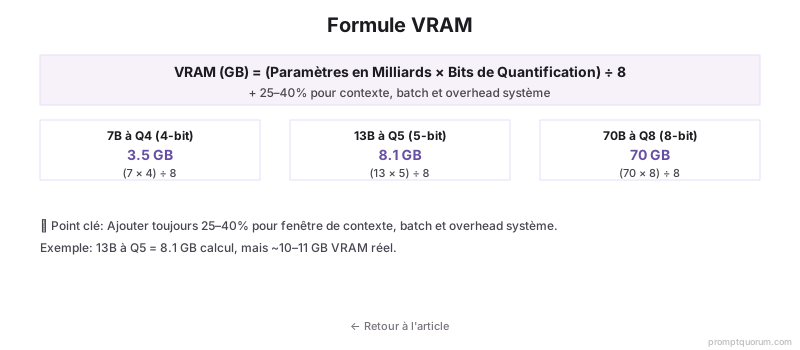
Calculateur VRAM interactif
Utilisez ce calculateur pour calculer les exigences VRAM exactes pour toute combinaison de modèle, quantification, contexte et taille de lot. Sélectionnez votre configuration et voyez quels GPU sont compatibles.
Popular Models
Base Model
6.50 GB
Context OH
1.50 GB
Batch OH
0.00 GB
System OH
1.00 GB
Total Minimum
9.00 GB
Recommended (with 25% safety margin)
11.25 GB
👉 Look for a GPU with at least 11.25 GB VRAM
Compatible GPUs
RTX 3060 (12 GB)
0.8 GB headroom
RTX 4070 (12 GB)
0.8 GB headroom
RTX 4070 Ti (12 GB)
0.8 GB headroom
RTX 4080 (16 GB)
4.8 GB headroom
RTX 4090 (24 GB)
12.8 GB headroom
Mac mini M5 (16 GB) (16 GB)
4.8 GB headroom
Mac mini M4 (16 GB) (16 GB)
4.8 GB headroom
MacBook Pro (24 GB) (24 GB)
12.8 GB headroom
M3 Max (36 GB) (36 GB)
24.8 GB headroom
💡 Pro Tips:
- Always use the "with safety margin" figure when buying a GPU
- Q4 gives 90-95% quality with 25% size reduction. Q5 is better if you have room
- Context overhead grows with conversation length. Budget 1-3 GB for typical usage
- Batch size matters for multi-user APIs. Single-user chat can ignore batch overhead
📋 Share this configuration:
Que signifient les niveaux de quantification ?
🔍 Insight clé : La quantification échange la taille de fichier contre la qualité. Q5 est le meilleur compromis (95 % qualité, 68 % plus petit). Q4 est acceptable pour la plupart. Q3 et en dessous uniquement pour les appareils Edge ou quand la VRAM est critiquement limitée.
| Quantification | Réduction taille | Qualité | Vitesse | Cas d'usage |
|---|---|---|---|---|
| FP16 (16-bit) | Aucune (base) | 100 % (parfaite) | Base | Recherche, fine-tuning |
| Q8 (8-bit) | 50 % | 99 % (imperceptible) | Base | Production, serveurs locaux |
| Q6 (6-bit) | 62.5 % | 98 % (négligeable) | Base | Usage équilibré |
| Q5 (5-bit) | 68.75 % | 95 % (perte mineure) | Base | Bonne compression, grand public |
| Q4 (4-bit) | 75 % | 90–95 % (acceptable) | Base | Compression maximale |
| Q3 (3-bit) | 81 % | 80–85 % (perte notable) | Plus rapide | Compression extrême, CPU |
| Q2 (2-bit) | 87.5 % | 70 % (perte visible) | Le plus rapide | Petits modèles, appareils Edge |
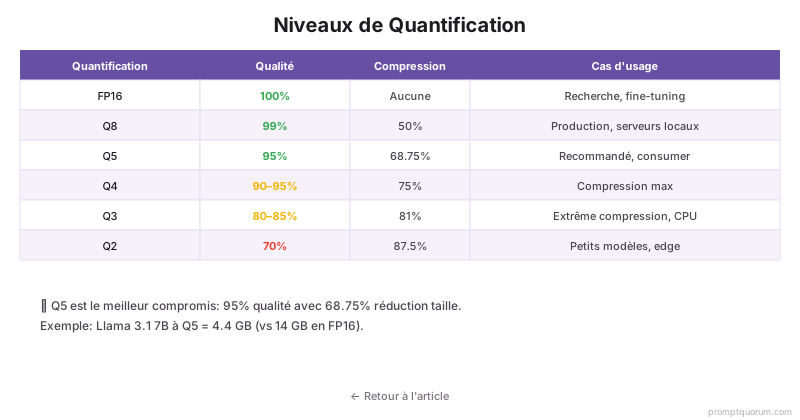
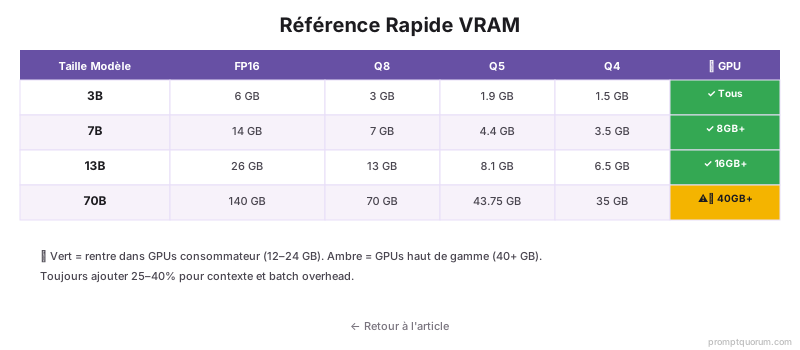
Tableau de référence rapide : VRAM par modèle et quantification
| Modèle | FP16 | Q8 | Q5 | Q4 |
|---|---|---|---|---|
| 3B | 6 Go | 3 Go | 1.9 Go | 1.5 Go |
| 7B | 14 Go | 7 Go | 4.4 Go | 3.5 Go |
| 13B | 26 Go | 13 Go | 8.1 Go | 6.5 Go |
| 32B | 64 Go | 32 Go | 20 Go | 16 Go |
| 70B | 140 Go | 70 Go | 43.75 Go | 35 Go |
Exemples concrets
Calculs VRAM pratiques pour les scénarios courants :
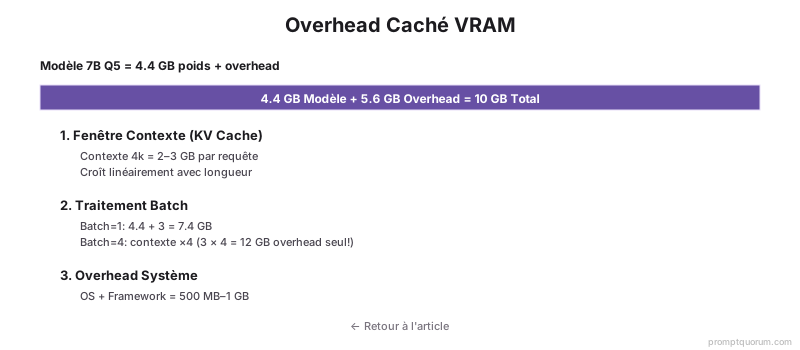
⚠️ Avertissement : Ces calculs concernent uniquement les poids du modèle. Ajoutez 25–40 % pour le contexte, le traitement par lots et la surcharge système. Exemple : 13B Q5 = 8.1 Go modèle + 2–3 Go surcharge = 10–11 Go réels.
- RTX 4070 Ti (12 Go) : Llama 3.1 7B en Q4 = 3.5 Go ✓ (large marge). Llama 3.1 13B en Q5 = 8.1 Go ✓ (serré, mais fonctionne sans contexte/lots).
- RTX 4090 (24 Go) : Llama 3.1 70B en Q5 = 43.75 Go ✗ (trop grand). Llama 3.1 70B en Q4 = 35 Go ✗ (toujours trop grand). Llama 3.1 70B en Q4 avec déchargement = fonctionne (lent, 3–5 tok/s).
- M5 Max Mac (36 Go) : Llama 3.1 13B en FP16 = 26 Go ✓ (fonctionne). Llama 3.1 70B = impossible (même en Q2, ~70 % de perte qualité).
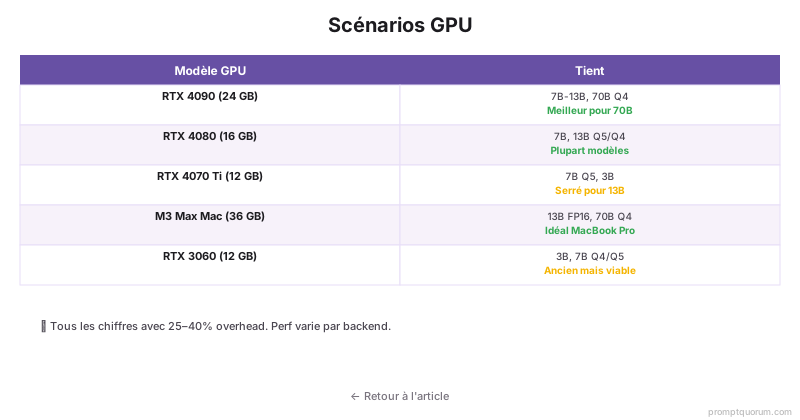
Quel LLM local pour votre GPU ? Guide 2026
Utilisez le calculateur interactif ci-dessus pour une compatibilité exacte. Voici les scénarios GPU courants et les modèles recommandés.
- RTX 3060 (12 Go) : Meilleur modèle : Qwen2.5 7B Q5 (4.4 Go) ✓. Alternative : Llama 3.2 8B Q4 (4 Go) ✓. Impossible : modèles 32B+.
- RTX 4070 (12 Go) : Meilleur modèle : Qwen2.5 13B Q4 (6.5 Go) ✓. Avec marge : Llama 3.2 8B Q5 (5 Go) ✓. Impossible : modèles 32B.
- RTX 4070 Ti (12 Go) : Meilleur modèle : Qwen2.5 13B Q5 (8.1 Go) ✓. Serré : Llama 3.3 13B Q4 (6.5 Go) ✓. Non idéal : traitement par lots.
- RTX 4080 (16 Go) : Meilleur modèle : Qwen2.5 32B Q4 (16 Go) ✓ serré. Confortable : Mistral 3.1 24B Q5 (15 Go) ✓. Recommandé : Llama 3.3 13B Q8 (13 Go) ✓.
- RTX 4090 (24 Go) : Meilleur modèle : Qwen2.5 32B Q5 (20 Go) ✓. Avec déchargement : Llama 3.3 70B Q4 (35 Go). Confortable : tout 32B en Q5/Q8.
- RTX 5090 (32 Go, si disponible) : Meilleur modèle : Llama 3.3 70B Q4 (35 Go – serré). Mieux : Qwen2.5 72B Q3 (27 Go) ✓. Confortable : 70B en Q5+ avec lots.
Quelle est la précision de la formule ?
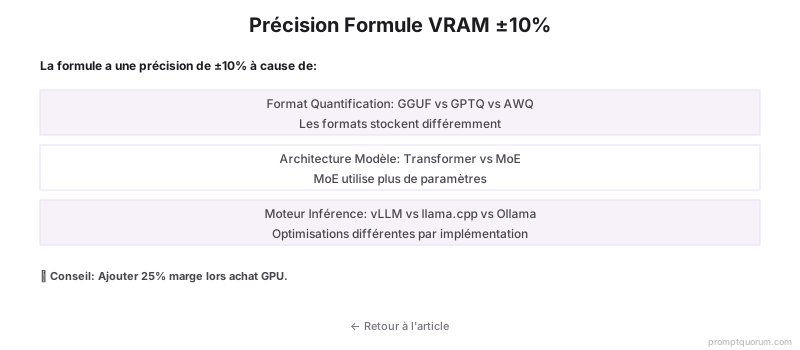
La formule est précise à ±10 % pour la plupart des cas. L'utilisation VRAM réelle varie selon l'implémentation, l'architecture du modèle et les optimisations du moteur d'inférence.
Les sources de variation comprennent : différents formats de quantification (GGUF vs safetensors vs AWQ), architecture du modèle (Transformer vs non-Transformer) et optimisations spécifiques au moteur d'inférence (vLLM, llama.cpp, Ollama).
En avril 2026, traitez la formule comme une estimation conservative. Ajoutez toujours 25 % de marge lors de l'achat de GPU pour tenir compte de la surcharge de contexte, du traitement par lots et des processus système.
Erreurs courantes dans le calcul VRAM
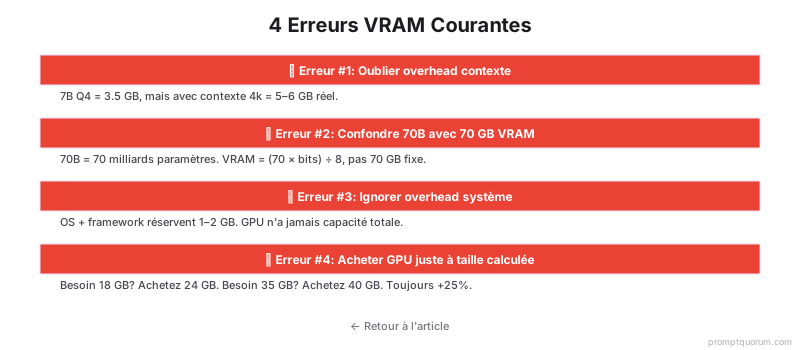
- Oublier la surcharge de contexte. Un modèle 7B en Q4 fait 3.5 Go, mais avec 4k contexte, il nécessite 5–6 Go au total.
- Utiliser la taille du modèle HuggingFace sans considérer la quantification. 70B signifie 70 milliards de paramètres, pas 70 Go VRAM.
- Ne pas tenir compte de la surcharge système. Les modèles n'obtiennent jamais toute la VRAM GPU. Réservez 1–2 Go pour l'OS et le moteur d'inférence.
- Acheter un GPU exactement à la taille calculée. Achetez toujours 25 % de plus. Un besoin calculé de 18 Go = prenez un GPU 24 Go.
Considérations de déploiement régional
Union européenne (RGPD) : L'inférence locale (sur site) garantit la conformité à la résidence des données sous le RGPD. Exécuter des modèles sur votre propre GPU maintient les données utilisateur dans le pays. Ce calculateur VRAM vous aide à dimensionner le matériel pour des déploiements respectueux de la vie privée. La CNIL recommande l'inférence locale pour les données professionnelles sensibles (financières, médicales, juridiques) afin d'éviter tout transfert non nécessaire vers des API cloud.
Japon (APPI) : La loi sur la protection des informations personnelles (APPI) exige un traitement rigoureux des données. L'inférence LLM sur appareil réduit les transferts et traitements de données en dehors du Japon. Utilisez ce calculateur pour dimensionner les systèmes pour les déploiements d'entreprise japonais.
Chine (Loi sur la sécurité des données) : La loi chinoise de 2021 sur la sécurité des données impose la résidence des données à l'intérieur des frontières chinoises. L'inférence LLM locale sur des serveurs nationaux (Alibaba Cloud, Tencent Cloud) est conforme.
Dans toutes les régions, l'inférence locale offre de meilleures garanties de confidentialité des données que les API cloud. Ce calculateur VRAM est essentiel pour concevoir des systèmes d'IA conformes et respectueux de la vie privée.
FAQ : VRAM et exigences GPU
La formule fonctionne-t-elle pour tous les types de modèles ?
Oui. La formule (Milliards modèle × Bits quantification) ÷ 8 s'applique à tous les modèles basés sur Transformer (Llama, Qwen, Mistral, Claude, etc.). Les architectures non-Transformer (RNN, etc.) sont rares et peuvent nécessiter des ajustements.
Quelle quantification utiliser ?
Pour la plupart des usages : Q5 offre le meilleur équilibre (95 % qualité, 68 % réduction). Pour les GPU grand public : Q4 est standard (90–95 % qualité, 75 % réduction). En production : Q8 si la VRAM le permet (99 % qualité). Évitez Q3 et en dessous sauf nécessité absolue.
Quelle quantité de RAM système faut-il ?
16 Go minimum pour le déchargement. En cas de déchargement VRAM (débordement CPU), la RAM système devient le recours. Pour le traitement par lots, ajoutez 8–16 Go. Pour le chat mono-utilisateur, 16 Go suffisent.
La taille du lot affecte-t-elle le calcul VRAM ?
Oui. La formule calcule la VRAM pour une requête unique. La taille du lot ajoute de la VRAM linéairement : chaque requête simultanée ajoute ~500 Mo–2 Go selon le contexte. Avec batch=4, ajoutez 2–8 Go.
Puis-je exécuter un modèle 70B sur un GPU 12 Go ?
Uniquement avec une quantification extrême (Q2, ~70 % de perte qualité) et déchargement CPU (très lent, 1–3 tokens/s). Peu pratique. Meilleure option : un modèle 13B en Q4 (même VRAM, bien plus rapide et de meilleure qualité).
Que faire si l'utilisation VRAM réelle est inférieure au calcul ?
La formule est conservative et inclut la surcharge. Une utilisation inférieure signifie plus de marge pour le traitement par lots, des contextes plus longs ou une sécurité accrue. Utilisez nvidia-smi pour mesurer l'utilisation réelle, puis benchmarkez.
Sources
- Spécification GGUF -- Documentation ggerganov/ggml sur le format de fichier quantifié.
- Documentation Quantification Transformers -- Guide officiel Hugging Face sur les méthodes de quantification.
- Documentation Ollama -- Guides officiels Ollama pour la gestion des modèles.
- Guide Performance vLLM -- Documentation d'optimisation du framework vLLM.