What Is Google's Prompting Guide?
📍 In One Sentence
Google's prompting guide is the company's own published guidance for writing prompts for Gemini, organised around stating a persona, a task, the context and the desired format.
💬 In Plain Terms
It is the manufacturer's manual. Google trained the model, so its advice tells you what Gemini was actually tuned to respond to — useful precisely because it is not a third party guessing from the outside.
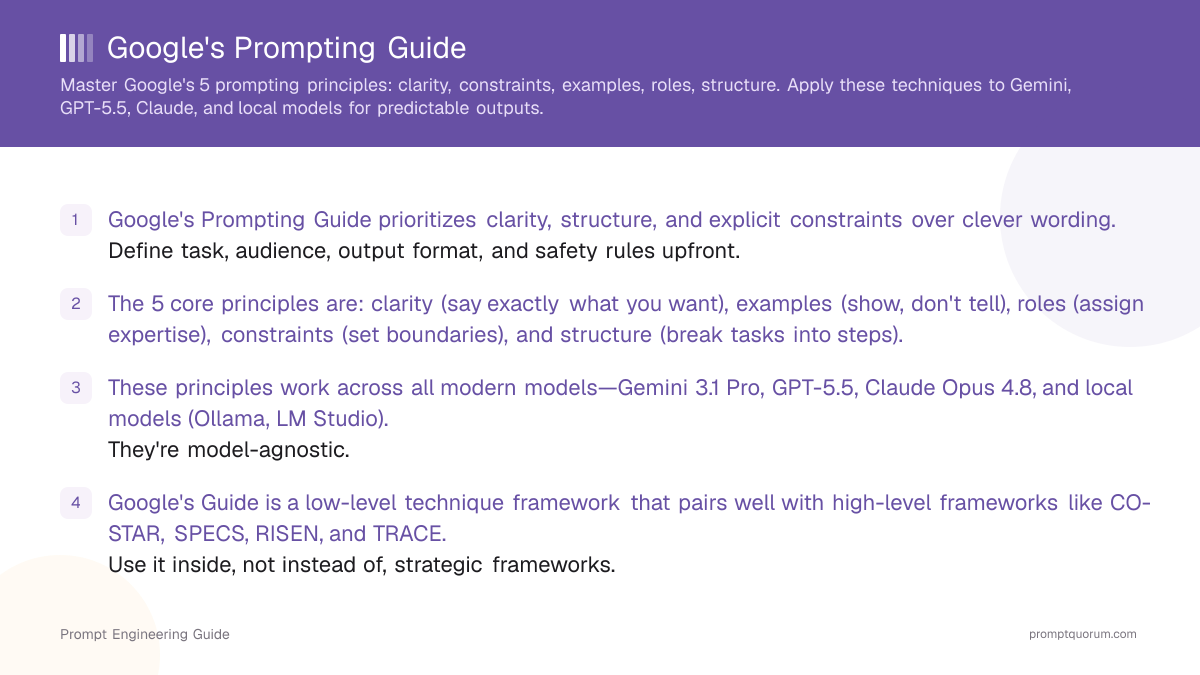
Google's Prompting Guide is a collection of patterns and best practices for prompting Gemini and other large language models, focused on specificity, structure, and safety rather than clever phrasing. The guide translates research from Google DeepMind into concrete rules that non-experts can follow. It covers how to define roles, provide context, constrain outputs, and handle tasks such as reasoning, coding, and data extraction.
In practice, the guide functions like a catalog of prompt recipes. Each recipe shows how to phrase instructions, what to avoid, and how to add examples so that the model's behavior becomes more predictable. These patterns work not only for Gemini 3.1 Pro but also for models such as GPT-5.6, Claude Opus 5, and local models like Ollama, because the underlying principles are general.
Core Principles in Google's Prompting Guide
The core principles in Google's Prompting Guide revolve around clarity, constraint, and iterative refinement rather than clever wording. The emphasis is on telling the model exactly what you want in a way that is easy to evaluate. These principles are validated across Gemini 3.1 Pro, GPT-5.6, Claude Opus 5, and open-source models.
Common themes include:
- Be explicit about the task, audience, and output format instead of relying on the model to guess.
- Provide representative examples when possible so the model can imitate the pattern.
- Break complex tasks into steps and ask the model to reason before answering.
- Use clear safety and quality constraints, such as banned content, citation requirements, or length limits.
🔍 Pro Tip
The single highest-impact technique from Google's guide is few-shot examples. In PromptQuorum testing, adding just 2–3 examples to a prompt reduced format errors by more than 50% across all models. If you only have time for one technique, invest in examples.
Techniques Highlighted in Google's Prompting Guide
Google's Prompting Guide highlights a set of recurring techniques that you can apply across domains, from research to coding to product copy. While naming and emphasis may vary between versions, the underlying ideas are consistent and have proven effective across model families.
Typical techniques include:
- Role prompting: Asking the model to "act as" a specific expert (for example a data analyst or product manager).
- Step-by-step reasoning: Requesting intermediate steps or explanations before the final answer.
- Few-shot prompting: Supplying several input–output examples to anchor behavior.
- Structured output: Asking for answers in defined formats such as bullet lists, tables, or JSON.
- Iterative refinement: Reusing the model's own output as input for revision and improvement.
Example: Bad vs Good Prompt Using Google's Guide
The impact of Google-style prompting is easiest to see when you compare an unstructured prompt to one that follows these principles for the same task. Below is a simple example for a product explainer.
Bad Prompt
"Explain our new AI feature to users."
Good Prompt per Google's Guide
"You are a product educator writing for non-technical users. Task: Explain our new AI feature that automatically summarizes weekly customer support tickets into a one-page report for managers. Audience: Busy support leaders with limited technical background. Requirements: Use plain language with short sentences. Structure the answer with an intro, 3 bullet points for key benefits, and a short closing paragraph. Do not use hype words like 'revolutionary' or 'game-changing'. Keep the explanation between 250 and 300 words. Output: Markdown with H2 headings for each section."
This "good" version follows Google's recommendations by defining role, audience, structure, constraints, and format in a way that any modern model can follow reliably.
How PromptQuorum Implements Google's Prompting Guide
PromptQuorum is a multi-model AI dispatch tool that packages Google's Prompting Guide as a reusable framework so users can apply these best practices without memorizing them. When you select the Google Prompting Guide framework in PromptQuorum, the app exposes fields that reflect the guide's core ideas—task, role, audience, structure, constraints, and examples—and combines them into a single high-quality prompt.
Inside PromptQuorum, you can:
- Fill in guide-aligned fields once and send the resulting prompt to Gemini 3.1 Pro, GPT-5.6, Claude Opus 5, and local models via Ollama or LM Studio in parallel.
- Save Google-style prompt templates for recurring workflows such as explainers, code reviews, and structured summaries.
- Compare how different models respond when guided by the same Google-derived structure, then choose the provider that best fits each task.
Using Google's Guide With Other Frameworks
You should treat Google's Prompting Guide as a set of low-level techniques that work together with higher-level frameworks like CO-STAR, SPECS, RISEN, and TRACE. The guide tells you how to phrase instructions; the frameworks tell you how to structure entire workflows.
A practical approach is:
- Use a framework (for example CO-STAR or SPECS) to define the overall structure of the task.
- Apply Google's prompting principles inside that structure: explicit roles, clear constraints, few-shot examples, and step-by-step reasoning when needed.
- Run the combined prompt in PromptQuorum across multiple models to validate that it behaves consistently.
🔍 Did You Know
Google's Prompting Guide explicitly recommends cross-model testing. The guide's own documentation notes that prompt behavior varies across model families—which is exactly what PromptQuorum enables with its multi-model dispatch. Test your Google-style prompts on Gemini 3.1 Pro, GPT-5.6, and Claude Opus 5 to ensure consistent behavior.
Common Mistakes When Applying Google's Prompting Guide
When applying Google's Prompting Guide, teams often stumble on a few predictable mistakes. Here are the most common—and how to avoid them:
❌ Assuming examples aren't necessary for simple tasks.
Why it hurts: Models often guess wrong about format or tone even on straightforward tasks. Without an example, "write a summary" produces 500 words; with an example of a 2-sentence summary, the model gets it right 95% of the time.
Fix: Always provide at least one example output, even for seemingly simple tasks. The example teaches format, tone, and detail level more effectively than any description.
❌ Mixing role, task, and audience in a single sentence.
Why it hurts: Overcomplicated instructions confuse the model. Example: "As a financial expert writing for millennials, explain tax deductions in 100 words." The model may prioritize one constraint (expert tone) over another (millennial-friendly language).
Fix: Separate role, task, audience, and constraints into distinct sections. Give each its own line or bullet point. Clarity beats conciseness.
❌ Forgetting to specify output format.
Why it hurts: The model defaults to prose, but you need JSON, a table, or bullet points. Outputs require reformatting, adding latency and cost.
Fix: Always state output format explicitly. Example: "Output as a JSON object with keys: title, summary, keywords." This takes 5 seconds to type and saves minutes in post-processing.
❌ Not testing prompts across input variations.
Why it hurts: A prompt works perfectly on the example you tested but fails on edge cases. You don't discover it until production.
Fix: Test your prompt on at least 5 representative inputs—normal case, edge case, long input, short input, ambiguous input. PromptQuorum's compare feature helps you validate across models and inputs simultaneously.
❌ Treating Google's Guide as a complete framework.
Why it hurts: For complex workflows (multi-turn interactions, conditional logic, sequential tasks), Google's principles alone aren't enough. You need a higher-level structure like CO-STAR or SPECS.
Fix: Use Google's Guide as a tactic within a broader framework. If your task is simple (one-shot request for a clear output), Google's principles suffice. If your task is complex (multi-step reasoning with decision branches), combine it with CO-STAR, SPECS, or RISEN.
How to Follow Google's Prompting Best Practices
- 1Be clear and specific: avoid vague instructions. Instead of "Tell me about AI," ask "Explain how Large Language Models (LLMs) generate text, with technical detail suitable for computer science students." This removes ambiguity.
- 2Provide examples of the desired output format. Show a sample answer or code example the model should emulate. Examples teach better than descriptions. One well-chosen example is worth 10 lines of instruction.
- 3Give the model a "role" to play if it helps. Example: "You are a financial advisor. Explain tax-loss harvesting to a high-net-worth individual." Roles guide tone and detail level. Roles are especially useful for creative tasks.
- 4Use step-by-step reasoning for complex tasks. Ask the model to "think step by step" before answering. This forces deliberation and catches errors. Works across Gemini 3.1 Pro, GPT-5.6, and Claude Opus 5.
- 5Test your prompt on varied inputs before deploying at scale. A prompt that works on one example may fail on edge cases. Validate across diverse scenarios. Use PromptQuorum to test against multiple models and input types in parallel.
⚠️ Warning: Token Cost
Few-shot examples and detailed role instructions add tokens. Five 200-word examples = ~1,500 tokens before your task arrives. On Gemini at $2/1M input tokens, this costs fractions of a cent. On Claude Opus 5 at $5/1M, it adds up at volume. Use Gemini's context caching for few-shot-heavy prompts to cut costs.
Frequently Asked Questions
Is Google's Prompting Guide limited to Gemini?
No. The principles are universal and work equally well with GPT-5.6, Claude Opus 5, and all modern models. Gemini is the primary example, but the underlying ideas are model-agnostic.
Can I combine Google's Guide with other frameworks?
Absolutely, and it's recommended. Use a high-level framework like CO-STAR or SPECS to define overall structure, then apply Google's prompting principles (clarity, constraints, examples, roles) within that structure.
Does Google's Guide work for all types of tasks?
The guide suits most tasks except very simple ones that don't need structure. For complex multi-step workflows, combine it with more comprehensive frameworks like RISE or TRACE.
Do I always need to include an example in my prompt?
Not mandatory, but strongly recommended for complex or creative tasks. For simple queries (factual questions, basic summaries), a clear description often suffices.
What's the difference between "role" and "persona" in the guide?
They're closely related. The guide's "role" is a specific persona with expertise—e.g., "You are a financial advisor" or "You are a data analyst"—that you assign to the model to guide tone and detail level.
How does Google's Guide reduce hallucinations?
By enforcing explicit constraints (citation requirements, banned phrases, format rules) and step-by-step reasoning, the guide reduces the model's tendency to invent unsourced information. Structure and clarity are hallucination-reduction tools.
Can I use Google's Guide with local models like Ollama?
Yes. The principles apply to all models. Local models (Ollama, llama.cpp, LM Studio) often respond even better to structured, constraint-rich prompts because they have less instruction-following capacity and benefit from clarity.
What's the token cost of using Google's prompting principles?
Well-structured prompts following Google's guide typically add 10–20% to your input token count (more explicit detail, examples, constraints), but they reduce error rates by 40–60%, resulting in fewer retries and lower overall cost.
Google's Prompting Landscape in 2026
The core principles from Google's Prompting Guide remain timeless and effective, but several 2026 developments have changed how you apply them in practice. Many prompt-level techniques that Google recommended in 2024 are now built into APIs as native features.
Key 2026 changes:
- Gemini Structured Outputs: The API now accepts `response_mime_type: "application/json"` with a `response_schema` parameter, enforcing JSON structure at the API level. You no longer need to ask in the prompt "output as JSON"—the API guarantees it.
- Gemini Grounding with Google Search: Gemini 3.1 Pro can automatically ground responses in Google Search results. This partially supersedes the guide's "iterative refinement" technique for factual accuracy—the model fact-checks itself before responding.
- Gemini Deep Think: Built-in reasoning mode on Gemini 3.1 Pro (and Claude Opus 5's extended thinking, OpenAI's o3 reasoning) automates the "step-by-step reasoning" recommendation at the model level. You don't need to ask; the model reasons internally.
- Context Caching: Long-context prompts (>32K tokens) can now be cached on Gemini and Claude for cost reduction. Few-shot-heavy prompts that consume thousands of tokens can be cached and reused for 5–24 hours.
- Key Takeaway: The guide's low-level principles (clarity, examples, constraints, roles, structure) are more important than ever, but pair them with 2026 API features (structured outputs, grounding, caching, deep thinking) to maximize reliability and reduce cost.
Sources
- Google Gemini API: Prompting Strategies — Official Google Gemini API prompting guide (2024–2026)
- Gemini Structured Outputs API Reference — JSON schema enforcement at the API level
- Google Search Grounding for Gemini — Automatic fact-checking via Google Search integration
- Generative AI for Everyone - Google Cloud — Practical prompting courses and guides
- OpenAI & Anthropic API Documentation (2026) — Prompt engineering best practices across GPT-5.6, Claude Opus 5, and open-source models
- Min et al. (2022). "Rethinking the Role of Demonstrations: What Makes In-Context Learning Work?" arXiv:2202.12837 — Research on few-shot example effectiveness