完整基准测试表:Apple Silicon(M1–M5)上的Whisper性能
Chip | Tiny | Base | Small | Medium | Large-v3 |
|---|---|---|---|---|---|
| M1 | 32× | 20× | 12× | 5× | — |
| M1 Pro | 38× | 24× | 16× | 7× | — |
| M1 Max | 45× | 30× | 22× | 10× | — |
| M1 Ultra | 55× | 38× | 28× | 14× | — |
| M2 | 36× | 23× | 14× | 6× | — |
| M2 Pro | 42× | 28× | 20× | 9× | — |
| M2 Max | 50× | 35× | 26× | 12× | — |
| M2 Ultra | 60× | 42× | 32× | 17× | — |
| M3 | 40× | 26× | 16× | 7× | — |
| M3 Pro | 46× | 32× | 22× | 10× | — |
| M3 Max | 55× | 40× | 30× | 14× | — |
| M4 | 44× | 30× | 18× | 8× | — |
| M4 Pro | 50× | 36× | 26× | 12× | — |
| M4 Max | 60× | 44× | 34× | 16× | — |
| M5 (base) | 48× | 34× | 22× | 10× | — |
| M5 Pro | 55× | 40× | 30× | 14× | — |
| M5 Max | 65× | 48× | 38× | 18× | — |
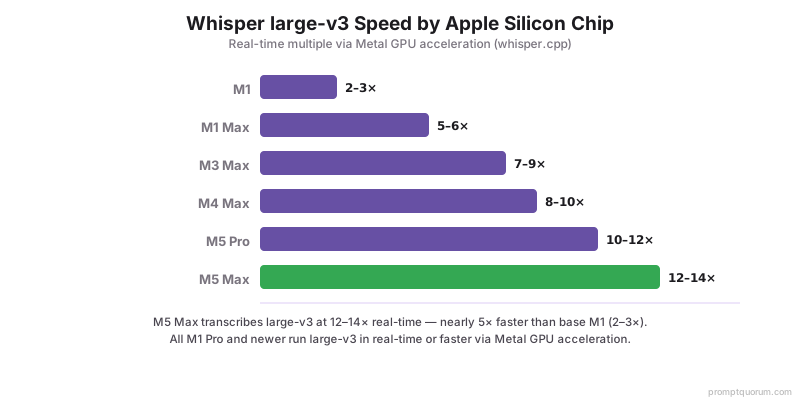
×N实时 = 1秒内转录N秒音频。通过Metal加速的whisper.cpp基准测试。所有M1 Pro+均可实时或更快运行large-v3。以上M4世代数据为历史参考,代表上一代芯片。苹果于2026年8月25日更新了Mac mini系列(M6,起售价$899,32GB统一内存,170GB/s带宽;M5 Pro,起售价$1,699,64GB,307GB/s)和Mac Studio系列(M5 Max,起售价$2,499,128GB;M5 Ultra,起售价$5,499,最高512GB,2026年10月下旬发货),两款Mac mini均于2026年9月22日发货。M6和M5 Ultra芯片目前尚无独立的Whisper/Metal基准测试数据。以上M5 Pro/M5 Max数据反映的是此前已测试过的芯片世代;PromptQuorum尚未独立测试新款Mac mini/Studio实机,待第三方验证数据公布后将更新此表。
Whisper模型大小 — 应该选哪个?
模型 | 参数量 | 磁盘大小 | RAM占用 | 英语WER | 最适合 |
|---|---|---|---|---|---|
| — | — | — | — | — | — |
| — | — | — | — | — | — |
| — | — | — | — | — | — |
| — | — | — | — | — | — |
| — | — | — | — | — | — |
| — | — | — | — | — | — |
| — | — | — | — | — | — |
WER(词错误率)基于英语LibriSpeech测试集。Large-v3-turbo和distil-large-v3是大多数Mac实时使用的最佳选择 — 以4–6×的速度实现接近large-v3的质量。
Metal vs Core ML vs Apple Neural Engine:选择哪个后端?
Apple Silicon为Whisper提供三种加速路径,各有权衡。
Metal(通过whisper.cpp)— 推荐:使用Apple Metal GPU框架,兼容所有M系列芯片,在M5 Pro上large-v3达到10–12×实时,通过make WHISPER_METAL=1设置。最适合:大多数用户,设置最简单,性能经过验证。
Core ML(通过Apple Core ML格式)— 进阶:使用Apple机器学习框架,某些操作可以利用Neural Engine(ANE),某些工作负载快15–20%,需要模型转换(10–15分钟设置)。最适合:追求最高速度的高级用户。
Apple Neural Engine(ANE)— 有限使用:所有M系列芯片上的专用AI加速器,无法直接访问(必须通过Core ML),由于架构不匹配Whisper无法充分利用ANE,小模型(tiny、base)效果最好。最适合:电池供电笔记本上的Whisper tiny/base。
决策矩阵:首次设置 → Metal(whisper.cpp)。large-v3最高速度 → Metal。电池供电笔记本,base模型 → Core ML配合ANE。生产服务器 → Metal(可靠稳定)。实时转录 → 流式模式的Metal。Mac实例的云部署 → Metal(可容器化)。
- Metal(whisper.cpp):更快,兼容性广,设置最简单
- Core ML:Neural Engine优化,某些工作负载提速15–20%(需要转换)
- Apple Neural Engine:对大型模型收益有限,最适合笔记本上的tiny/base
安装:Metal加速版whisper.cpp
- 1安装依赖
Why it matters: xcode-select --install(Xcode工具) brew install ffmpeg(音频转换) - 2克隆并编译Metal版whisper.cpp
Why it matters: git clone https://github.com/ggerganov/whisper.cpp cd whisper.cpp make WHISPER_METAL=1 ./main -h | grep -i metal - 3下载模型
Why it matters: bash ./models/download-ggml-model.sh small(466 MB,实时) bash ./models/download-ggml-model.sh large-v3(3 GB,最高质量) bash ./models/download-ggml-model.sh large-v3-turbo(1.6 GB,平衡型) - 4转录音频文件
Why it matters: ./main -m models/ggml-large-v3.bin -f /path/to/audio.wav ./main -m models/ggml-large-v3.bin -f audio.wav -oj(JSON格式) ./main -m models/ggml-large-v3.bin -f audio.wav -l en(指定语言) - 5先转换非WAV音频
Why it matters: ffmpeg -i input.mp3 -ar 16000 -ac 1 -c:a pcm_s16le output.wav ./main -m models/ggml-large-v3.bin -f output.wav
实时流式转录(麦克风直播)
从麦克风实时转录 — 语音助手、会议转录、无障碍工具。
选项1:whisper.cpp流式模式
./stream -m models/ggml-small.bin --step 500 --length 5000
# --step 500: 每500ms处理一次
# --length 5000: 保留最近5秒上下文
选项2:使用faster-whisper的Python(见下方代码块)
M5 Pro上的延迟:small模型约200ms,large-v3-turbo约400–600ms,large-v3约800ms–1.2s的实时延迟。
import sounddevice as sd
import numpy as np
from faster_whisper import WhisperModel

model = WhisperModel("large-v3-turbo", device="cpu", compute_type="int8")
buffer = []
chunk_duration = 3
sample_rate = 16000

def callback(indata, frames, time, status):
    buffer.append(indata.copy())
    if len(buffer) * 1024 / sample_rate >= chunk_duration:
        audio = np.concatenate(buffer).flatten().astype(np.float32)
        segments, _ = model.transcribe(audio, beam_size=5)
        for segment in segments:
            print(segment.text)
        buffer.clear()

with sd.InputStream(callback=callback, channels=1, samplerate=sample_rate):
    print("Listening... (Ctrl+C to stop)")
    while True:
        sd.sleep(1000)
语音助手流水线:Whisper + Ollama + Piper TTS
完整代码,构建一个完全在Apple Silicon上本地运行的语音助手。
import sounddevice as sd
import numpy as np
import requests
import subprocess
from faster_whisper import WhisperModel

WHISPER_MODEL = "large-v3-turbo"
OLLAMA_URL = "http://localhost:11434/api/chat"
LLM_MODEL = "llama3.1:8b"
SAMPLE_RATE = 16000

whisper = WhisperModel(WHISPER_MODEL, device="cpu", compute_type="int8")

def record_audio(duration=5):
    print("Listening...")
    audio = sd.rec(int(duration * SAMPLE_RATE),
                   samplerate=SAMPLE_RATE,
                   channels=1,
                   dtype=np.float32)
    sd.wait()
    return audio.flatten()

def transcribe(audio):
    segments, _ = whisper.transcribe(audio, beam_size=5)
    return " ".join([seg.text for seg in segments])

def llm_respond(user_text):
    response = requests.post(OLLAMA_URL, json={
        "model": LLM_MODEL,
        "messages": [{"role": "user", "content": user_text}],
        "stream": False
    })
    return response.json()["message"]["content"]

def speak(text):
    subprocess.run(
        ["piper", "--model", "en_US-amy-medium.onnx"],
        input=text.encode(),
        check=True
    )

while True:
    audio = record_audio(duration=5)
    user_text = transcribe(audio)
    print(f"You: {user_text}")
    if not user_text.strip():
        continue
    response = llm_respond(user_text)
    print(f"AI: {response}")
    speak(response)
按Mac型号的最佳Whisper配置
Mac配置 | 推荐模型 | 实时倍率 | 使用场景 |
|---|---|---|---|
| — | — | — | — |
| — | — | — | — |
| — | — | — | — |
| — | — | — | — |
| — | — | — | — |
| — | — | — | — |
| — | — | — | — |
实时语音助手:使用small或large-v3-turbo以获得最低延迟。会议/播客转录:使用large-v3以获得最高精度(1–2秒延迟可接受)。
本地Whisper vs 云端语音识别服务
指标 | Whisper本地(M5 Pro) | Google Speech-to-Text | OpenAI Whisper API | AssemblyAI |
|---|---|---|---|---|
| — | — | — | — | — |
| — | — | — | — | — |
| — | — | — | — | — |
| — | — | — | — | — |
| — | — | — | — | — |
| — | — | — | — | — |
| — | — | — | — | — |
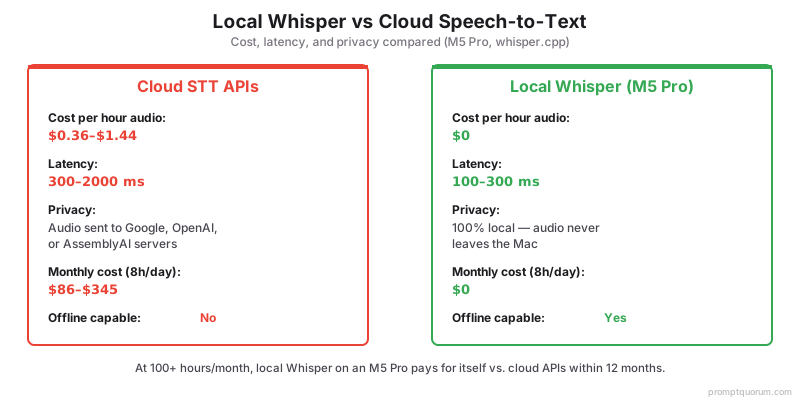
月度成本(每天8小时):Whisper本地$0,Google $345,OpenAI $86,AssemblyAI $156。对于隐私敏感工作(医疗、法律、新闻),本地Whisper是唯一选择。对于高容量转录(云端每月$100+),本地Mac在12个月内收回成本。
Whisper比云端API更快吗?
M5 Pro本地运行:10×实时(延迟100ms)。云端API:因网络导致100–500ms延迟。本地更快且免费。
Whisper能处理多个说话者吗?
是的,时间戳可以分离说话者。使用后处理或说话者识别工具来区分说话者身份。
支持哪些语言?
99种语言,自动检测。精度因语言而异 — 英语2.5% WER,其他语言5–15% WER。
哪个Whisper模型的速度/质量比最好?
Large-v3-turbo或distil-large-v3。两者都以4–6×的速度达到large-v3约95%的精度。推荐用于大多数实时场景。
Whisper能处理带口音的英语或非母语说话者吗?
是的,但WER会上升。母语英语:约2.5%。强口音/非母语:5–12%。Large-v3比小模型更好地处理口音。
Whisper适用于播客和音乐转录吗?
播客:是的,非常适合语音内容。有歌词的音乐:效果差 — Whisper是为语音训练的。音乐请使用专用模型。
Whisper对专业术语的识别精度如何?
因情况而异。常见技术术语:良好。高度专业化术语:可能转录错误。使用--prompt标志指定预期词汇来提高精度。
我可以在一台Mac上运行多个Whisper实例吗?
是的,受内存限制。M5 Pro 36GB:2个large-v3实例同时运行。M5 Max 128GB:4–6个实例,或一个实例加LLM/TTS。