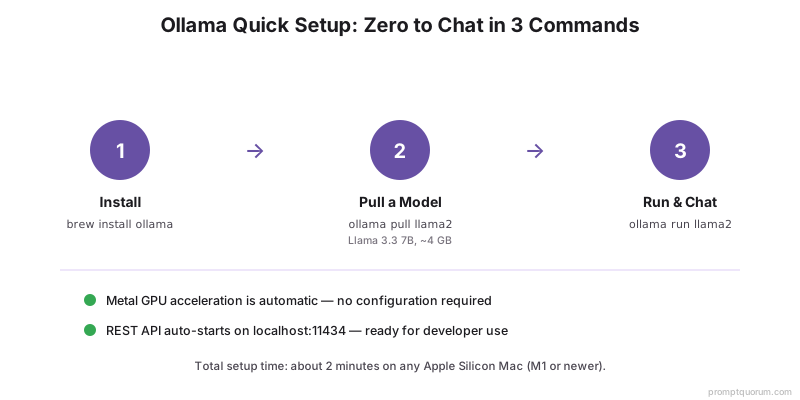
快速安装(3条命令)
- 1安装Ollama
Why it matters: `brew install ollama` — 一键安装。 - 2下载模型
Why it matters: `ollama pull llama3.1` — 下载Llama 3.1 8B。 - 3开始聊天
Why it matters: `ollama run llama3.1` — 交互式聊天界面。
Metal GPU验证
macOS上的Ollama会自动启用Metal GPU加速。无需配置。验证Metal是否正常工作:
- 1以详细输出运行
Why it matters: `ollama run llama3.1:8b --verbose`,在控制台输出中查找`ggml_metal_init: found device: Apple M[X]`。 - 2检查推理期间的速度
Why it matters: 观察token生成速率:应为20–60 tok/s(取决于Mac)(M5 Pro:Llama 3.1 8B约50 tok/s)。仅CPU回退:约1–5 tok/s。 - 3监控GPU利用率
Why it matters: 打开活动监视器(应用程序→实用工具)并检查GPU部分。如果Metal正常工作,推理期间应显示80–100%的GPU利用率。
模型管理
- 1`ollama pull <模型>`
Why it matters: 下载模型。示例:`ollama pull mistral`。 - 2`ollama list`
Why it matters: 列出所有已下载的模型。 - 3`ollama run <模型>`
Why it matters: 启动与模型的交互式聊天。 - 4`ollama rm <模型>`
Why it matters: 删除模型以释放空间。
Apple Silicon内存优化
- OLLAMA_MAX_LOADED_MODELS:内存中保持的模型数量。默认:1。多模型设置设为2–3。
- GPU层:默认情况下,Ollama使用所有可用的统一内存。内存不足时,在Modelfile中设置`num_gpu_layers`。
- Whisper:与嵌入模型和LLM结合 — 使用Ollama可以放入64GB M5 Pro。
同时运行多个模型
需要同时运行Whisper STT + Llama 3.1 8B + LLaVA Vision?配置Ollama将所有模型保留在内存中。
bash
export OLLAMA_MAX_LOADED_MODELS=3
export OLLAMA_KEEP_ALIVE=1h
brew services restart ollama

# Now pull all models you need
ollama pull llama3.1:8b
ollama pull llava:7b

# Send requests to each — they stay loaded
curl http://localhost:11434/api/chat -d '{"model": "llama3.1:8b", "messages": [{"role": "user", "content": "Hello"}]}'
curl http://localhost:11434/api/chat -d '{"model": "llava:7b", "messages": [{"role": "user", "content": "Describe this image"}]}'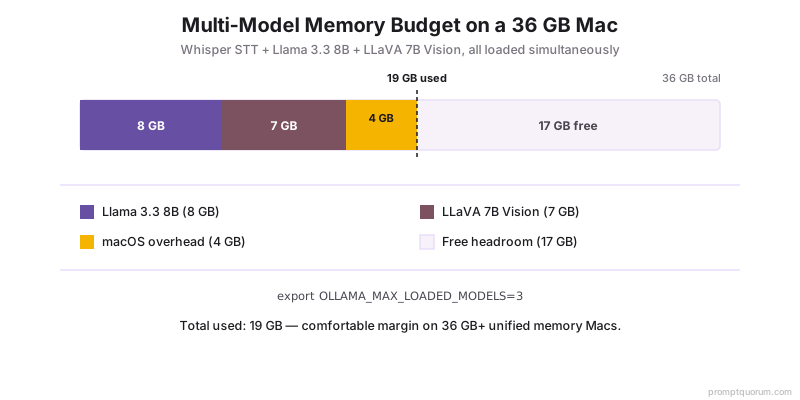
登录时自动启动
Ollama可以通过brew services在登录Mac时自动启动。
bash
# Enable auto-start
brew services start ollama

# Check status
brew services list | grep ollama

# Disable auto-start (optional)
brew services stop ollama
开发者API设置
Ollama在`localhost:11434`暴露OpenAI兼容的REST API。用`ollama serve`或brew services启动服务器,然后从任何编程语言发送请求。
bash
# Chat endpoint (streaming)
curl http://localhost:11434/api/chat -d '{
  "model": "llama3.1:8b",
  "messages": [{"role": "user", "content": "Write a Python function"}],
  "stream": false
}'

# Python example
import requests
response = requests.post(
  "http://localhost:11434/api/chat",
  json={
    "model": "llama3.1:8b",
    "messages": [{"role": "user", "content": "Hello"}],
    "stream": False
  }
)
print(response.json()["message"]["content"])
Modelfile自定义
使用系统提示和参数创建自定义模型。
- `ollama create llm-expert -f Modelfile` — 构建自定义模型
- `ollama run llm-expert` — 启动与自定义模型的交互式聊天
- `ollama run llm-expert "Code review this function"` — 直接发送提示
dockerfile
FROM llama3.1
SYSTEM "You are an expert software engineer reviewing code for security and performance issues. Provide actionable feedback."
PARAMETER temperature 0.7
PARAMETER top_p 0.9
常见问题及解决方案
- 未检测到Metal: 用`ollama run llama3.1:8b --verbose`验证,查找`ggml_metal_init: found device: Apple M[X]`。如果缺少,重启:`brew services restart ollama`或`pkill ollama && ollama serve &`。
- 推理缓慢(CPU回退): 原因:Metal初始化失败,模型在CPU上运行。检查活动监视器——推理期间GPU使用率应为80–100%。如果GPU显示0%:重启Ollama。
- 内存不足(OOM): 模型崩溃或响应截断。原因:模型+上下文+macOS开销超出RAM。解决方案:(1)使用更小的量化(`ollama pull llama3.1:8b-q4_K_M`),(2)减少上下文(`OLLAMA_NUM_CTX=2048 ollama run llama3.1:8b`),(3)使用更小的模型(`ollama pull phi4`—2.5 GB)。
- 模型下载停滞: 原因:网络限速或HuggingFace速率限制。修复:`pkill ollama && ollama pull llama3.1:8b`(从之前进度恢复)。
- 端口11434已在使用: 另一个Ollama实例正在运行或其他服务使用该端口。查找:`lsof -i :11434`。修复:`pkill ollama`然后重启。
- 模型产生乱码/随机字符: 原因:Modelfile参数超出范围或模板错误。修复:拉取官方模型`ollama pull llama3.1:8b`(覆盖自定义),然后测试:`ollama run llama3.1:8b "Hello, how are you?"`。
- 存储空间不足: 模型存储在`~/.ollama/models/`。检查大小:`du -sh ~/.ollama/`。删除未用:`ollama rm <模型名>`。
Ollama是免费的吗?
是的。Ollama是开源的。模型(Llama、Mistral)是免费授权的。没有费用。
没有GPU可以使用Ollama吗?
可以,但很慢。仅CPU:7B模型约1–5 tok/s。GPU(Mac上的Metal):根据Mac型号20–60 tok/s。
应该从哪个模型开始?
Mistral Small或Llama 3.1 8B。两者都在任何M1+ Mac上运行,产生良好输出。各约4GB。
多人可以同时使用Ollama API吗?
可以。在一台机器上运行`ollama serve`,局域网内的所有人都可以访问该机器IP:11434上的REST API。
Ollama将下载的模型存储在Mac的哪里?
默认位置:`~/.ollama/models/`。每个模型几GB。检查总磁盘使用量:`du -sh ~/.ollama/`。更改位置:在启动Ollama前设置`OLLAMA_MODELS=/路径/到/模型`环境变量。
可以在Intel Mac上运行Ollama吗?
可以,但没有Metal GPU加速。性能将是仅CPU:7B模型1–5 tok/s,而Apple Silicon上是20–60 tok/s。可用于测试但不适合生产使用。
安装后Ollama可以离线工作吗?
是的。模型下载后,Ollama完全离线运行。推理不需要互联网连接。只有模型下载(`ollama pull`)需要网络访问。