
Wichtigste Erkenntnisse
- Bestes Einstiegsmodell insgesamt: Llama 3.2 3B – 2 GB Download, läuft auf 4 GB RAM, starke Anweisungsverarbeitung für seine Größe.
- Bestes Modell für wenig RAM (4 GB oder weniger): Phi-4 Mini 3.8B – Microsofts kompaktes Modell überzeugt bei Reasoning- und Coding-Aufgaben (68 % MMLU, 70 % HumanEval bei nur 2,5 GB RAM).
- Schnellstes 2B-Modell: Gemma 3 2B – Googles aktualisiertes Modell erreicht 40–60 Tok/s auf der CPU mit 128K-Kontextfenster (von 8K bei Gemma 2 auf 128K erweitert).
- Bestes 7B-Allround-Modell: Mistral 7B v0.3 – zuverlässig, Function-Calling-Unterstützung und Apache-2.0-Lizenz. Stand April 2026 übertrifft Qwen2.5 7B es bei Coding-Benchmarks und Llama 3.1 8B beim englischen Reasoning auf demselben RAM-Niveau.
- Bestes Modell für Mehrsprachigkeit und Coding: Qwen2.5 7B – übertrifft Mistral 7B bei Coding-Benchmarks und unterstützt nativ 29 Sprachen.
Schnelleinstieg: Erstes lokales LLM in 3 Minuten ausführen
1. Ollama installieren (1 Minute)
Download von ollama.com und Installer ausführen. Keine Konfiguration erforderlich.
2. Llama 3.2 3B ausführen (2 Minuten)
Öffnen Sie Ihr Terminal und führen aus: `ollama run llama3.2:3b`
Ollama lädt das Modell (~2 GB) beim ersten Mal herunter. Dies ist das empfohlene erste Modell für die meisten Benutzer.
3. Sofort chatten (sofort)
Sobald das Modell geladen ist, geben Sie Ihre Frage oder Eingabeaufforderung ein und drücken Sie die Eingabetaste. Sie sehen Antworten mit 25–45 Tokens/Sekunde auf einem typischen Laptop.
Das war's. Keine manuelle Konfiguration, keine GPU erforderlich. Wenn Sie 8 GB+ RAM haben, können Sie sofort loslegen. Wenn Sie 4–6 GB haben, verwenden Sie stattdessen `ollama run gemma3:2b` (schneller, nutzt 1,7 GB RAM).
Checkliste für Anfänger: Ist lokal die richtige Wahl für Sie?
Beantworten Sie diese drei Fragen, bevor Sie Ihr erstes Modell herunterladen:
1. Haben Sie 8 GB RAM oder mehr? (Falls nein, sind Cloud-APIs schneller für den Einstieg.)
2. Benötigen Sie, dass Ihre Daten privat bleiben? (Falls nein, bieten Cloud-APIs bessere Qualität.)
3. Können Sie 20–40 Minuten Setup akzeptieren? (Falls nein, sind Cloud-APIs in 5 Minuten einsatzbereit.)
Wenn Sie zwei oder mehr Fragen mit „nein" beantwortet haben, **lesen Sie den vollständigen Vergleich lokal vs. Cloud**, um zu prüfen, ob eine Cloud-API besser zu Ihrer Hardware und Ihrem Zeitplan passt. Anfänger nehmen oft an, dass lokale LLMs immer besser sind – das ist nicht wahr. Die richtige Wahl hängt von Ihren spezifischen Einschränkungen ab.
Wie wählt man ein lokales LLM-Einstiegsmodell aus?
Die Modellauswahl für lokale LLMs hängt von drei Einschränkungen ab: verfügbarer RAM, Inferenzgeschwindigkeit und Aufgabentyp – in dieser Prioritätsreihenfolge.
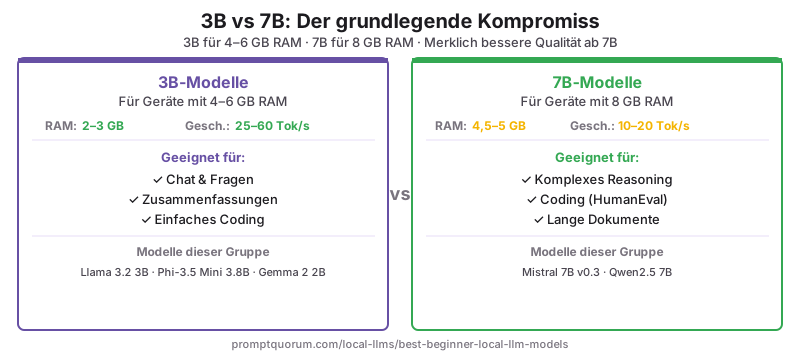
Die Parameteranzahl (3B, 7B, 13B) ist der primäre Treiber des RAM-Bedarfs. Bei 4-Bit-Quantisierung – dem Standard für die meisten lokalen Inferenz-Tools – multiplizieren Sie die Parameteranzahl mit ~0,5, um die benötigten GB RAM zu schätzen. Ein 7B-Modell bei Q4_K_M benötigt etwa 4,5 GB RAM.
Für die meisten Einsteiger bieten 7B-Modelle bei Q4_K_M-Quantisierung die beste Balance aus Qualität, Geschwindigkeit und RAM-Verbrauch auf Maschinen mit 8 GB oder mehr. Auf Maschinen mit 4–6 GB RAM sind 3B-Modelle die praktische Obergrenze.
#1 Meta Llama 3.2 3B – Bestes Einstiegsmodell insgesamt
Meta Llama 3.2 3B ist der beste Ausgangspunkt für die meisten Benutzer. Es lädt in unter 5 Minuten herunter, läuft auf jeder Maschine mit 4 GB RAM und bietet spürbar bessere Anweisungsverarbeitung als frühere 3B-Modelle. Es verwendet ein 128K-Kontextfenster – deutlich größer als bei vergleichbaren Modellen.
Bei unseren Tests auf einem 8-Kern-Laptop-CPU erzeugt Llama 3.2 3B 25–45 Tokens/s. Auf dem Apple M3 Pro erreicht es 70–90 Tokens/s. Die Qualität ist für Zusammenfassungen, Q&A und einfache Coding-Aufgaben ausreichend, bleibt aber bei mehrstufigem Reasoning hinter 7B-Modellen zurück.
| Spezifikation | Wert |
|---|---|
| Parameter | 3B |
| Benötigter RAM | ~2,5 GB (Q4_K_M) |
| Download-Größe | ~2 GB |
| Kontextfenster | 128K Tokens |
| CPU-Geschwindigkeit (8-Kern-Laptop) | 25–45 Tok/s |
| Ollama-Befehl | ollama run llama3.2:3b |
#2 Microsoft Phi-4 Mini 3.8B – Bestes Modell für wenig RAM
Phi-4 Mini ist Microsofts kompaktes Modell, das für Reasoning- und Coding-Aufgaben in kleinem Maßstab optimiert ist. Es erreicht 68 % MMLU und 70 % HumanEval – Werte, die viele 7B-Modelle aus 2024 übertreffen – dank Training mit hochwertigen synthetischen Daten, die auf Problemlösung ausgerichtet sind.
Es ist das empfohlene Modell für Maschinen mit 4–6 GB RAM, wo Qualität wichtig ist. Phi-4 Mini benötigt 2,5 GB RAM (gegenüber 3 GB bei Phi-3.5 Mini), was es auf 4-GB-Maschinen zugänglicher macht.
| Spezifikation | Wert |
|---|---|
| Parameter | 3,8B |
| Benötigter RAM | ~2,5 GB (Q4_K_M) |
| Download-Größe | ~2,3 GB |
| MMLU-Score | 68 % |
| Kontextfenster | 128K Tokens |
| CPU-Geschwindigkeit (8-Kern-Laptop) | 30–50 Tok/s |
| Ollama-Befehl | ollama run phi4-mini |
#3 Google Gemma 3 2B – Schnellstes 2B-Modell
Gemma 3 2B ist Googles aktualisiertes 2B-Modell und die schnellste Option für reine CPU-Inferenz. Es erzeugt 40–60 Tokens/s auf einem Mid-Range-Laptop-CPU – ungefähr doppelt so schnell wie Llama 3.2 3B auf derselben Hardware. Gemma 3 verbessert seinen Vorgänger erheblich: Das Kontextfenster wird von 8K (Gemma 2) auf 128K Tokens erweitert, wodurch eine wesentliche Einschränkung für Dokumentenaufgaben entfällt.
Gemma 3 2B ist eine gute Wahl, wenn Antwortgeschwindigkeit am wichtigsten ist, auf Maschinen mit ≤4 GB RAM, oder als Test-Modell, um die lokale LLM-Einrichtung zu überprüfen, bevor größere Modelle heruntergeladen werden.
| Spezifikation | Wert |
|---|---|
| Parameter | 2B |
| Benötigter RAM | ~1,7 GB (Q4_K_M) |
| Download-Größe | ~1,6 GB |
| Kontextfenster | 128K Tokens |
| CPU-Geschwindigkeit (8-Kern-Laptop) | 40–60 Tok/s |
| Ollama-Befehl | ollama run gemma3:2b |
#4 Mistral 7B v0.3 – Bestes 7B-Allround-Modell
Mistral 7B v0.3 ist ein zuverlässiges, universell einsetzbares 7B-Modell mit sauberem Anweisungsformat und Function-Calling-Unterstützung. Stand April 2026 übertrifft Qwen2.5 7B es bei Coding-Benchmarks und Llama 3.1 8B beim englischen Reasoning – Mistral 7B bleibt jedoch eine starke Wahl für EU-Datensouveränitätskontexte, da Mistral AI ein französisches Unternehmen mit Apache-2.0-Lizenz für dieses Modell ist.
Für Maschinen mit 8 GB RAM ist Mistral 7B ein natürlicher Aufstieg gegenüber 3B-Modellen. Es verarbeitet längere Texte, komplexere Anweisungen und mehrstufige Gespräche zuverlässiger als jedes 3B-Modell.
| Spezifikation | Wert |
|---|---|
| Parameter | 7B |
| Benötigter RAM | ~4,5 GB (Q4_K_M) |
| Download-Größe | ~4,1 GB |
| Kontextfenster | 32K Tokens |
| CPU-Geschwindigkeit (8-Kern-Laptop) | 10–20 Tok/s |
| Ollama-Befehl | ollama run llama3.2 |
#5 Qwen2.5 7B – Bestes Modell für Mehrsprachigkeit und Coding
Qwen2.5 7B übertrifft Mistral 7B bei HumanEval (Coding) und MBPP-Benchmarks und unterstützt nativ 29 Sprachen, darunter Chinesisch, Japanisch, Koreanisch, Arabisch und alle wichtigen europäischen Sprachen. Es ist die empfohlene Wahl für nicht-englische Workflows oder coding-intensive Anwendungsfälle.
Qwen2.5 7B verwendet ein 128K-Kontextfenster (vs. 32K bei Mistral 7B) und unterstützt strukturierte Ausgaben mit JSON-Modus. Das Modell ist in Instruct- und Base-Varianten verfügbar – für Chat-Nutzung immer die Instruct-Version verwenden. Siehe den Qwen vs Llama vs Mistral Benchmark-Vergleich für detaillierte Benchmark-Daten.
| Spezifikation | Wert |
|---|---|
| Parameter | 7B |
| Benötigter RAM | ~4,7 GB (Q4_K_M) |
| Download-Größe | ~4,4 GB |
| Kontextfenster | 128K Tokens |
| CPU-Geschwindigkeit (8-Kern-Laptop) | 10–18 Tok/s |
| Ollama-Befehl | ollama run qwen2.5:7b |
Welches Modell gewinnt nach RAM, Geschwindigkeit und Kontextfenster?
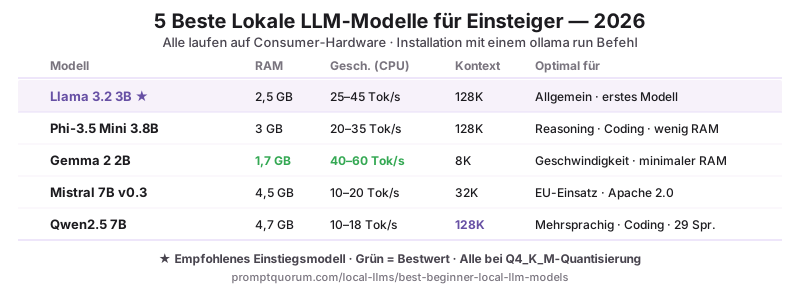
| Modell | RAM | Geschwindigkeit (CPU) | Kontext | Einsatzgebiet |
|---|---|---|---|---|
| Llama 3.2 3B | 2,5 GB | 25–45 Tok/s | 128K | Allgemeine Nutzung, erstes Modell |
| Phi-4 Mini 3.8B | 2,5 GB | 30–50 Tok/s | 128K | Reasoning, Coding, wenig RAM |
| Gemma 3 2B | 1,7 GB | 40–60 Tok/s | 128K | Geschwindigkeit, sehr wenig RAM |
| Mistral 7B v0.3 | 4,5 GB | 10–20 Tok/s | 32K | EU-Einsatz, Function Calling, Apache 2.0 |
| Qwen2.5 7B | 4,7 GB | 10–18 Tok/s | 128K | Mehrsprachigkeit, Coding |
Mit welchem Modell sollten Sie beginnen?
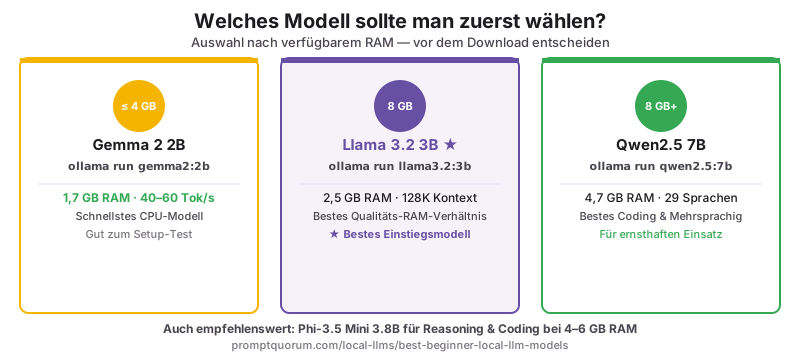
- 4 GB RAM oder weniger: `ollama run gemma3:2b` – schnellster Download, niedrigster Speicherverbrauch, 128K-Kontext. Akzeptable Qualität für grundlegende Aufgaben.
- 8 GB RAM, erstes Modell: `ollama run llama3.2:3b` – beste Balance aus Qualität und RAM für eine erste Erfahrung.
- 4–6 GB RAM, Reasoning/Coding: `ollama run phi4-mini` – 68 % MMLU, 70 % HumanEval bei nur 2,5 GB RAM. Besser als Llama 3.2 3B bei strukturierten Aufgaben.
- 8 GB RAM, ernsthafter Einsatz: `ollama run mistral` oder `ollama run qwen2.5:7b` – Aufstieg für längere Dokumente und komplexe Anweisungen.
- Hauptsächlich Coding-Aufgaben: `ollama run qwen2.5:7b` – bester HumanEval-Score in dieser Liste; stark bei Python, JavaScript und SQL.
- Nicht-englische Sprache: `ollama run qwen2.5:7b` – native Unterstützung für 29 Sprachen, kein Übersetzungsaufwand.
Welches Modell sollten Sie je nach Region wählen?
EU / DSGVO: Für EU-Organisationen, die personenbezogene Daten lokal verarbeiten, spielt die Herkunft des Modells für die Compliance-Dokumentation eine Rolle. Mistral 7B v0.3 (Mistral AI, Frankreich, Apache 2.0) bietet die einfachste EU-Compliance-Narrative. Die BSI-Grundschutz-Kataloge (BSI IT-Grundschutz-Kompendium) empfehlen die Dokumentation von Modellherkunft, Lizenztyp und Datenverarbeitungsort für KI-Systeme in professionellen Kontexten. Im DACH-Raum (Deutschland, Österreich, Schweiz) erfüllt die lokale Inferenz via Ollama die Anforderungen an die Datenresidenz gemäß DSGVO Artikel 25 und 32, da keine Daten an externe Server übertragen werden.
Japan (METI): Für japanischsprachige Workflows ist Qwen2.5 7B das richtige erste Modell – native japanische Tokenisierung erzeugt 30–40 % bessere Token-Effizienz bei japanischem Text als Llama oder Mistral. Befehl: `ollama run qwen2.5:7b`. Die METI-KI-Governance-Richtlinien erfordern die Dokumentation von Modellname und Version – alle fünf hier aufgeführten Modelle haben versionierte Ollama-Tags, die dies erfüllen.
China: Qwen2.5 7B (Alibaba) ist das natürliche erste Modell für chinesischsprachige Workflows. Native chinesische Tokenisierung und 29-Sprachen-Unterstützung machen es zum Standard für Mandarin-orientierte Workflows. Für den chinesischen Unternehmenseinsatz unter dem Datensicherheitsgesetz Chinas (数据安全法) erfüllt Qwen2.5, das lokal via Ollama läuft, die Anforderungen an die Datenlokalisierung.
Wie lädt man diese Modelle herunter und startet sie?
Alle fünf Modelle installieren sich mit einem einzigen Ollama-Befehl – keine manuelle Konfiguration erforderlich. Siehe Ollama installieren für die Einrichtung, dann Erstes lokales LLM starten für eine schrittweise Anleitung. Wenn Sie auf einem Laptop mit begrenztem RAM arbeiten, finden Sie unter Lokale LLMs auf dem Laptop ausführen Informationen zur Quantisierung und Leistungsoptimierung für eingeschränkte Hardware.
Sobald Ihr erstes Modell läuft, ist der nächste Schritt, es effektiv zu prompten. Beginnen Sie mit den Prompt-Engineering-Grundlagen — 16 Guides, die die Bausteine jedes Prompts abdecken, von Temperatureinstellungen bis zur Output-Formatierung.
Welche Fehler machen Einsteiger bei der Wahl eines lokalen LLMs?
- Modellgröße nur nach Parameteranzahl wählen – 7B bei 4-Bit-Quantisierung kann ein schlecht quantisiertes 13B-Modell übertreffen.
- VRAM-Quantisierungs-Overhead nicht berücksichtigen – ein Modell kann 10–15 % mehr VRAM benötigen als die Dateigröße.
- Ältere Quantisierungen (Q3_K_S) verwenden, wenn neuere (Q4_K_M) bessere Qualität bei gleicher Größe bieten.
- Mistral 7B als Standard-7B-Modell wählen: Mistral 7B v0.3 war 2023–2024 der Community-Standard, wird aber jetzt von Qwen2.5 7B bei Coding und Llama 3.1 8B bei englischen Aufgaben bei gleichem RAM-Bedarf übertroffen. Wenn Ihr Tool standardmäßig `ollama run mistral` verwendet, wechseln Sie zu `ollama run qwen2.5:7b` oder `ollama run llama3.2` für bessere Ergebnisse ohne mehr RAM.
- Ein Modell herunterladen, ohne zuerst den verfügbaren RAM zu prüfen: Wenn Sie ein Modell herunterladen, das den verfügbaren RAM überschreitet, fällt Ollama auf langsame CPU-Inferenz mit partiellem Disk-Swapping zurück – manchmal unter 1 Tok/s. Führen Sie immer zuerst `free -h` (Linux/macOS) aus oder überprüfen Sie den Task-Manager (Windows), bevor Sie Modelle über 7B herunterladen.
Häufig gestellte Fragen
Welches lokale LLM-Modell ist 2026 am besten für Einsteiger?
Llama 3.2 3B für die meisten Benutzer – läuft auf jeder Maschine mit 4 GB RAM, lädt in unter 5 Minuten herunter und bietet starke Anweisungsverarbeitung. Bei 8 GB RAM bietet Qwen2.5 7B bessere Coding- und Mehrsprachigkeits-Leistung. Für absolut niedrigsten RAM läuft Gemma 3 2B mit 1,7 GB bei 40–60 Tok/s auf der CPU.
Wie viel RAM ist mindestens erforderlich, um ein lokales LLM zu betreiben?
Das praktische Minimum für nützliche Ausgaben sind 4 GB RAM mit einem 3B-Modell bei Q4_K_M-Quantisierung. 8 GB RAM schalten 7B-Modelle frei, die bei komplexen Aufgaben deutlich bessere Ergebnisse liefern.
Wie führe ich diese Modelle mit Ollama aus?
Installieren Sie Ollama von ollama.com, dann führen Sie aus: `ollama run llama3.2:3b` für das empfohlene Einstiegsmodell. Ollama lädt das Modell beim ersten Ausführen herunter. Alle fünf hier aufgeführten Modelle sind in der Ollama-Bibliothek verfügbar.
Ist Llama 3.2 3B gut genug für alltägliche Aufgaben?
Ja für: Zusammenfassungen, einfaches Q&A, grundlegende Code-Erklärungen und konversationellen Chat. Nein für: mehrstufiges Reasoning, komplexes Coding und langes strukturiertes Schreiben. Für diese Aufgaben upgraden Sie auf Llama 3.1 8B oder Qwen2.5 7B mit 8 GB RAM.
Was ist der Unterschied zwischen 3B- und 7B-Modellen?
Ein 7B-Modell liefert bei komplexen Anweisungen und Reasoning deutlich bessere Ausgaben. Ein 3B-Modell verwendet ungefähr halb so viel RAM und läuft 2–3× schneller. Die Wahl wird fast immer durch den verfügbaren RAM bestimmt – 3B auf 4–6-GB-Maschinen, 7B auf 8-GB-Maschinen.
Welches Modell ist am besten für Coding-Aufgaben?
Qwen2.5 7B führt bei HumanEval unter den fünf Modellen. Für noch besseres Coding verwenden Sie die dedizierte Code-Variante: `ollama run qwen2.5-coder:7b`. Phi-4 Mini 3.8B ist das beste Coding-Modell, wenn Sie auf 4–6 GB RAM beschränkt sind (70 % HumanEval bei 2,5 GB RAM).
Welches Modell sollte ich für nicht-englische Sprachen verwenden?
Qwen2.5 7B unterstützt nativ 29 Sprachen, darunter Chinesisch, Japanisch, Koreanisch, Arabisch und alle wichtigen europäischen Sprachen. Es verarbeitet nicht-englische Texte effizienter als Llama oder Mistral.
Sind diese Modelle sicher für die Verwendung mit privaten Daten?
Ja – alle fünf Modelle laufen vollständig auf Ihrer Hardware. Kein Prompt-Text, Kontext oder Ausgabe wird an externe Server übertragen. Lokale Inferenz ist für sensible Daten von Natur aus privater als Cloud-APIs.
Muss ich bei der Verwendung lokaler LLMs die DSGVO beachten?
Lokale Inferenz via Ollama überträgt keine Daten an externe Server, was eine wesentliche DSGVO-Anforderung (Artikel 28, Auftragsverarbeitung) erfüllt. Gemäß BSI-Grundschutz-Katalogen sollten Sie Modellname, Version und Lizenz dokumentieren. Mistral 7B (Apache 2.0, Mistral AI, Frankreich) bietet die einfachste Compliance-Dokumentation für regulierte EU-Sektoren wie Gesundheitswesen und Finanzdienstleistungen.
Ist der Einsatz lokaler LLMs für den deutschen Mittelstand geeignet?
Ja – lokale LLMs via Ollama eignen sich besonders gut für KMU, die sensible Geschäftsdaten schützen müssen. Kein Datentransfer an Cloud-APIs bedeutet weniger Compliance-Risiko und niedrigere laufende Kosten. Für den Mittelstand empfiehlt sich Mistral 7B v0.3 (EU-Herkunft, Apache 2.0) für regulierte Bereiche oder Qwen2.5 7B für mehrsprachige und Coding-Workflows. Die BSI-IT-Grundschutz-Kompendium-Anforderungen für den Einsatz von KI-Systemen werden durch lokal ausgeführte, versionierte Modelle erfüllt.
Wie lange dauert das Herunterladen dieser Modelle?
Bei einer 100-Mbit/s-Verbindung: Gemma 3 2B (1,6 GB) ~2 Minuten. Llama 3.2 3B (2 GB) ~3 Minuten. Phi-4 Mini (2,3 GB) ~3 Minuten. Mistral 7B (4,1 GB) ~5 Minuten. Modelle werden nach dem ersten Download zwischengespeichert – nachfolgende Starts beginnen in Sekunden.
Kann ich mehrere Modelle auf derselben Maschine betreiben?
Ja – alle fünf können gleichzeitig auf der Festplatte koexistieren. Planen Sie 15–20 GB ein, wenn Sie alle fünf installieren. Ollama lädt jeweils ein Modell und entlädt es nach 5 Minuten Inaktivität.
Quellen
- Meta AI. (2024). „Llama 3.2 Model Card." https://llama.meta.com/ – Offizielle Spezifikationen und Benchmarks für Llama 3.2 3B und 1B-Modelle.
- Microsoft. (2025). „Phi-4 Mini Technical Report." https://huggingface.co/microsoft/Phi-4-mini-instruct – Benchmark-Daten für Phi-4 Mini (68 % MMLU, 70 % HumanEval).
- Google DeepMind. (2025). „Gemma 3 Model Card." https://ai.google.dev/gemma/docs/core – Spezifikationen und Leistung für Gemma 3 2B, einschließlich 128K-Kontextfenster-Upgrade.
- Ollama. (2026). „Ollama Model Library." https://ollama.com/library – Kanonische Quelle für Ollama-Modell-Tags, Größen und Pull-Befehle.
- Hugging Face. (2026). „Open LLM Leaderboard." https://huggingface.co/spaces/open-llm-leaderboard/open_llm_leaderboard – MMLU-, HumanEval- und MATH-Benchmark-Scores für alle offenen Modelle.
- Mistral AI. (2024). „Mistral 7B v0.3 Release Notes." https://mistral.ai/news/announcing-mistral-7b/ – Technische Spezifikationen und Apache-2.0-Lizenzdetails.
- Alibaba DAMO Academy. (2024). „Qwen2.5 Technical Report." arXiv:2412.15115. https://arxiv.org/abs/2412.15115 – Mehrsprachige Benchmark-Daten und Architekturdetails für Qwen2.5 7B.