
Wichtigste Erkenntnisse
- VRAM-Mathematik: (Modellgröße in GB) ÷ Quantisierung = erforderlicher VRAM. Beispiel: 70B-Modell bei 4-Bit = 70 ÷ 8 = 8,75 GB.
- 12 GB VRAM (RTX 4070 Ti): Beste Modelle: Llama 4 Scout 17B Q4_K_M (~10 GB, MoE, beste Gesamtqualität). Auch: Llama 3.1 8B Q8 (~9 GB, 80 tok/s).
- 16 GB VRAM (RTX 4080 / RTX 5080): Beste Modelle: Mistral Small 3.1 24B Q4_K_M (~13 GB, 55 tok/s). Für agentic coding: Devstral Small 24B Q4_K_M.
- 24 GB VRAM (RTX 4090): 70B-Modelle passen nicht bei Q4. Beste Option: Qwen 3.6 27B Q4_K_M (~16 GB, 77,2% SWE-bench, beste Dense-Coding) oder DeepSeek-R1 32B Q4_K_M (~19 GB, 60 tok/s).
- Apple M5 Max (128 GB unified): Erstes Mac das 70B-Modelle bei Q4_K_M ausführt – vergleichbar mit 2× RTX 4090 Desktop in Laptop oder Mac Studio.
- Budget: RTX 4070 Ti ist das beste Preis-Leistungs-Verhältnis (ca. 600-700 €, verarbeitet 7-14B Modelle). RTX 4090 für jedes Single-GPU-Modell (ca. 1.800-2.100 €).
Beste GPUs zum Kaufen — 2026 Empfehlungen
Die Wahl einer GPU hängt von Ihrem Budget und der Modellgröße ab. Die NVIDIA RTX 40er und 50er-Serie dominieren 2026 für lokale LLMs:
- RTX 4060 (8 GB) — 7B Modelle: ~180–220€. 40–60 tok/s.
- RTX 4070 Ti (12 GB) — 14B Modelle: ~500–600€. 85–120 tok/s. Mainstream.
- RTX 4080/5080 (16 GB) — 33B Modelle: ~1000–1200€. 110–140 tok/s.
- RTX 4090 (24 GB) — 70B Modelle: ~1700–2000€. 150–180 tok/s.
- Mac M5 Max 128GB — 70B Modelle: ~6000€. Bestes Preis-Leistung für Laptops.
Wie berechnen Sie VRAM-Anforderungen?
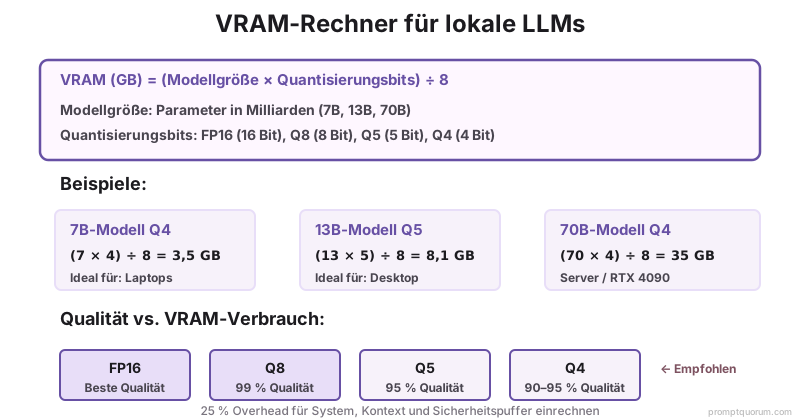
VRAM-Anforderungen hängen von drei Faktoren ab: Modellgröße (Parameter), Quantisierung (Bits pro Gewicht) und Inferenzmodus.
Formel:
``` VRAM (GB) = (Modellgröße × Quantisierungsbits) ÷ 8 ```
Quantisierungswerte: FP16 = 16 bits, Q8 = 8 bits, Q5 = 5 bits, Q4 = 4 bits.
| Modell | FP16 (beste Qualität) | Q8 (hervorragend) | Q5 (gut) | Q4 (gut, kleinste Größe) |
|---|---|---|---|---|
| Llama 4 Scout 17B (aktiv) | — | — | — | — |
| Llama 3.1 8B | — | — | — | — |
| Qwen 3.6 27B | — | — | — | — |
| Qwen3 8B | — | — | — | — |
| Llama 3.3 70B | — | — | — | — |
| Qwen2.5 32B | — | — | — | — |
| Mistral Small 3.1 24B | — | — | — | — |
Welche GPU sollten Sie kaufen?
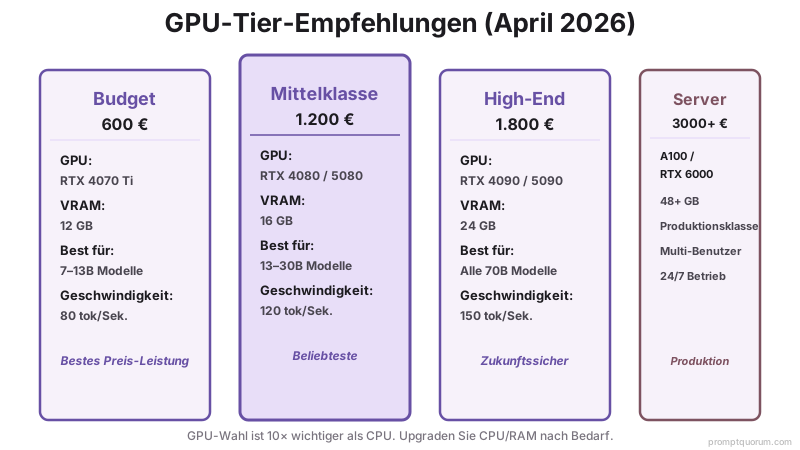
Ab Mai 2026 dominiert NVIDIA die Local LLM-Performance. Hier sind Tier-Empfehlungen:
Hardware bestimmt, welche Modelle Sie ausführen können; Prompt Engineering bestimmt, wie gut sie performen. Ein gut strukturierter Prompt bei einem 7B-Modell übertrifft oft einen schlecht konzipierten Prompt bei einem 70B-Modell. Im vollständigen Prompt-Engineering-Guide finden Sie Techniken, die die Ausgabequalität bei jeder Parameterzahl maximieren.
| Tier | GPU | VRAM | Best für | Leistung |
|---|---|---|---|---|
| Budget (600 €) | RTX 4070 Ti / RTX 5070 | 12 GB | 7-13B Modelle | Schnell (80 tokens/sec) |
| Mittelklasse (1200 €) | RTX 4080 / RTX 5080 | 16 GB | 13-30B Modelle | Sehr schnell (120 tokens/sec) |
| High-End (2310 €) | RTX 4090 / RTX 5090 | 24 GB | Alle 70B Modelle | Extrem schnell (150 tokens/sec) |
| Server (3000+ €) | RTX 6000 Ada / A100 | 48+ GB | Multi-Benutzer, 70B+ | Produktionsqualität |
Welche CPU und RAM benötigen Sie?
Mit einer GPU sind CPU und RAM sekundär. Die GPU führt die schwere Arbeit durch; CPU/RAM verarbeiten Kontextvorbereitung.
Mindest-CPU: 8-Core-Prozessor (Intel i7 12. Gen, AMD Ryzen 7 7700X oder neuer). Ältere CPUs addieren 20%+ Latenz.
RAM: Mindestens 16 GB (mit GPU). Ohne GPU sollten 32+ GB empfohlen werden. RAM begrenzt nicht direkt die Modellgröße, wenn GPU vorhanden ist.
Speicher: 500 GB SSD für Modelldateien und Betriebssystem. M.2 NVMe wird bevorzugt (schnelleres Laden von Modellen).
Wie viel Speicher benötigen Sie?
Modelldateien sind groß. Ein 7B-Modell bei 4-Bit-Quantisierung ist 4-5 GB. Planen Sie entsprechend:
- 500 GB SSD: Betriebssystem + 1-2 kleine Modelle (3B, 7B)
- 1 TB SSD: Betriebssystem + 3-5 Modelle (Mischung aus 7B und 13B)
- 2 TB SSD: Betriebssystem + 10+ Modelle (verschiedene Größen)
- 4 TB NVMe RAID: Produktionsaufbau, schnelles Laden von Modellen
Empfohlene Budget-Builds
Einen lokalen LLM-Rechner von Grund auf aufbauen:
| Budget | GPU | CPU | RAM | Modelle | Kosten |
|---|---|---|---|---|---|
| 1500 € (Einstieg) | RTX 4070 Ti | i7 13700 | 16 GB | 7-13B | Realistisch |
| 2500 € (solide) | RTX 4080 | i7 14700K | 32 GB | 13-30B | Empfohlen |
| 4000 € (High-End) | 2× RTX 4090 | Ryzen 9 7950X | 128 GB | Alle (70B+) | Overkill für Privat |

Was tun, wenn Sie sich die Hardware nicht leisten können?
Wenn eine 250–400 € GPU außerhalb Ihres Budgets liegt oder Ihr Laptop zu alt ist, um moderne Inference Engines zu unterstützen, lokale LLMs könnten für Sie 2026 nicht kosteneffektiv sein.
Berechnen Sie die wahren Kosten:
- Lokal: 800–2.000 € Anfangshardware + Strom + Wartung über 2–3 Jahre
- Cloud: 5–50 €/Monat für typische Entwicklernutzung (Llama API oder GPT-4o mini)
Für leichte Benutzer (< 100.000 Tokens/Monat) kostet Cloud-API 5–10 €/Monat und erfordert keine Hardware. Für schwere Benutzer (> 10 Mio. Tokens/Monat) rentiert sich lokal in 6–12 Monaten.
Vergleichen Sie den vollständigen Kosten- und Leistungs-Trade-off zwischen lokal und Cloud**, um Ihren Break-Even-Punkt zu finden. Viele Entwickler stellen fest, dass Cloud für ihr tatsächliches Nutzungsmuster billiger ist.
Schon unterhalb der empfohlenen VRAM-Stufen unterwegs? Welche Modell- und App-Kombinationen tatsächlich auf 8 GB oder weniger laufen, zeigt Beste lokale KI-App für einen schwachen PC.
Mac-Hardware für lokale LLMs
Apple Silicon (M-Serie) läuft lokale LLMs effizient mit einheitlichem Speicher zwischen CPU und GPU. M5, eingeführt seit Oktober 2025, ist ein bedeutender Durchbruch für lokale Inferenz. Apple behauptet 4× schnellere LLM-Prompt-Verarbeitung vs M4.
Das M5 Max mit 128 GB einheitlichem Speicher ist der erste Apple-Silicon-Chip, der bequem 70B-Modelle bei Q4_K_M ausführt – vergleichbar mit 2× RTX 4090 Desktops aber in einem Laptop oder Mac Studio Formfaktor. Das M5 Pro mit 64 GB einheitlichem Speicher handhabet 32B-Modelle mit großzügiger Kopfraum für KV-Cache und Multitasking.
| Mac | GPU-Speicher | Best für | Beschränkung |
|---|---|---|---|
| M3 MacBook Pro 16" | 18 GB unified | 7B Modelle (schnell) | Kann 13B langsam ausführen |
| M4 Max | 48-96 GB unified | 13-30B Modelle | Nicht optimiert für 70B |
| M5 Pro (MacBook Pro) | 64 GB unified, 307 GB/s | 30B-Modelle bequem | Llama 4 Scout läuft gut |
| M5 Max (MacBook Pro / Studio) | 128 GB unified, 460-614 GB/s | 70B-Modelle bei Q4_K_M | Erstes Mac für 70B |

Server-Hardware vs. Consumer-Hardware
Für die Produktionsbereitstellung wird Server-Hardware empfohlen:
- Consumer (RTX 4090): ~2310 €, 24 GB VRAM, Einzelbenutzer, anfällig für Drosselung bei anhaltender Last.
- Server (RTX 6000 Ada): ~5000 €, 48 GB VRAM, für 24/7-Nutzung ausgelegt, bessere Kühlung, Fehlerkorrektur.
- Empfehlung: Beginnen Sie mit RTX 4090. Bei 24/7-Betrieb von 70B-Modellen für mehrere Benutzer auf Dual-A100 oder RTX 6000 aufrüsten.

Häufige Fehler bei der Hardware-Planung
- Nur CPU kaufen, wenn GPU verfügbar ist. Eine 600 €-RTX 4070 Ti wird eine 2000 €-CPU überflügeln. GPU dominiert die LLM-Geschwindigkeit.
- Nicht mit VRAM-Overhead rechnen. Modell-Dateigröße + Systemoverhead + Kontext = Gesamt-VRAM verwendet. Immer 25% mehr als Modellgröße kaufen.
- Annahmen, dass alle 70B-Modelle in 40GB VRAM passen. Das tun sie, knapp, nur bei Q4 (4-Bit) Quantisierung. Q5 benötigt 45+ GB.
- Stromversorgung und Kühlung ignorieren. RTX 4090 verbraucht 575W. Benötigen 1200W Stromversorgung und gute Gehäusebelüftung.
- Denken, dass eine alte GPU funktioniert. RTX 2080 ist 10× langsamer als RTX 4070 Ti. Moderne GPU-Architektur ist bedeutsam.
Häufig gestellte Fragen zur Hardware für lokale LLMs
Kann ich ein 70B-Modell auf einem Laptop ausführen?
Nur mit schwerer Quantisierung (Q2, 2-Bit) und CPU-Fallback. Unpraktisch. Laptops eignen sich für 7B-Modelle. Für 70B verwenden Sie einen Desktop mit RTX 4090+.
Ist RTX 4090 übertrieben für Privatanwender?
Nein, wenn Sie 70B-Modelle ausführen oder mehrere Modelle gleichzeitig. Für nur 7B-Chat reicht RTX 4070 Ti. RTX 4090 ist zukunftssicher, wenn Sie Flexibilität wünschen.
Sollte ich RTX 5090 kaufen oder auf RTX 6090 warten?
RTX 5090 ist verfügbar (Anfang 2026). RTX 6000 Ada Server-GPUs sind auch solide. Falls Sie kein unbegrenztes Budget haben, sind RTX 5090 oder 4090 ausgezeichnet.
Wie beeinflusst Quantisierung die Qualität?
FP16 = 100% Qualität (Basis), Q8 = 99%, Q5 = 95%, Q4 = 90-95%. Für die meisten Aufgaben ist Q4 nicht zu unterscheiden von FP16.
Kann ich GPU später aufrüsten?
Ja. Beginnen Sie jetzt mit RTX 4070 Ti, rüsten Sie in 2 Jahren auf RTX 5090 auf, falls nötig. GPU ist die am meisten austauschbare Komponente.
Kann ich Apple Silicon (M1/M2/M3/M5) lokale LLMs ausführen?
Ja. Apple Silicon nutzt einen einheitlichen Speicher zwischen CPU und GPU. M5 Pro (64GB Unified Memory, 307GB/s) lädt 32B-Modelle mit 25-35 Tokens/Sekunde. M5 Max (128GB Unified Memory, 460-614GB/s) führt alle 70B-Modelle aus. M2 Pro (16 GB) führt 7B-Modelle mit 30-50 Tokens/Sekunde aus.
Welche 27B oder 32B Modelle passen auf 24GB VRAM (RTX 4090)?
Ja, die besten verfügbar. Qwen 3.6 27B Q4_K_M (~16 GB, 77,2% SWE-bench) ist das beste Dense-Coding-Modell. DeepSeek-R1 32B Q4_K_M (~19 GB) ist beste Reasoning. Beide passen mit 5-8 GB Headroom übrig für KV-Cache und Multitasking.
Verwandte Themen
- VRAM-Rechner Local LLM -- Interaktives Tool zur Berechnung Ihrer Hardware-Anforderungen.
- GPU vs. CPU vs. Apple Silicon -- Tiefgreifender Vergleich von Hardware-Optionen.
- Beste GPUs für lokale LLMs -- Detaillierter GPU-Benchmark- und Auswahlanleitungen.
- 70B-Modelle auf 24GB VRAM ausführen -- Erweiterte Techniken für große Modelle.
- Multi-GPU lokale LLMs -- Skalierung über mehrere GPUs.
- Beste LLMs für Coding 2026 — Qwen2.5-Coder vs DeepSeek Benchmark-Vergleich
- Apple Silicon für lokale LLMs: Vollständige Anleitung -- M1 bis M5 Max: Unified Memory, Metal GPU und Framework-Auswahl nach Chip-Klasse.
- Ollama auf Mac: Apple Silicon Setup 2026 -- Von null bis laufend in 2 Minuten: Ein-Befehl-Installation mit Metal GPU-Verifikation.
- Whisper auf Apple Silicon 2026 -- STT-Benchmarks via Metal und Core ML über M1–M5: large-v3 mit 10-facher Echtzeit.
Quellen
- NVIDIA GPU-Spezifikationen -- nvidia.com/de-de/geforce/graphics-cards/
- Apple M5 Hardware-Spezifikationen -- apple.com/de/mac/m5 (offizielle Spezifikationen, 64GB und 128GB Unified Memory, 307-614GB/s Bandbreite)
- Llama 4 Scout Modell -- meta.com/research (MoE-Architektur, 17B aktive Parameter, 109B gesamt)
- Qwen3 und Qwen 3.6 Modelle -- huggingface.co/qwen (Leistungs-Benchmarks, 77,2% SWE-bench Coding)
- LLM VRAM-Rechner -- vram.asult.com (Referenz)
- Modell-Quantisierungs-Benchmarks -- huggingface.co/docs/transformers