
Wichtigste Erkenntnisse
- Ein lokales LLM-Frontend ist die Chat-Oberfläche, die Sie zum Sprechen mit Ihrem Modell verwenden. Ollama bietet die API; das Frontend ist die Benutzeroberfläche.
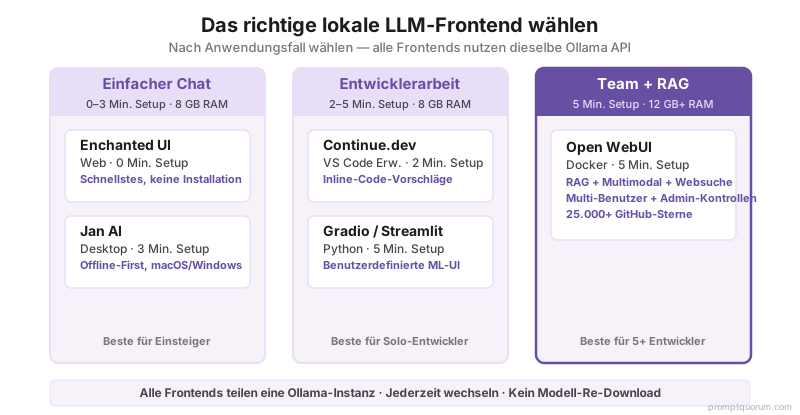
- Open WebUI ist das funktionsreichste (RAG, Multimodal, Knowledge Bases, Function Calling). Erfordert Docker. 12 GB RAM+ empfohlen.
- Enchanted UI ist das schnellste und minimalistische. Null Abhängigkeiten, läuft in Ihrem Browser. Best für einfache Nutzung.
- Jan AI ist eine Desktop-App (Windows, macOS) mit Offline-Synchronisierung. Keine Server-Einrichtung. Beliebt bei nicht-technischen Benutzern.
- Continue.dev ist eine VS Code-Erweiterung für Inline-Code-Vorschläge von Ihrem lokalen Ollama-Modell.
- Ab April 2026 sind alle Top-Frontends Open-Source und kostenlos.
Top 8 lokale LLM-Frontends: Funktionsvergleich
| Frontend | Typ | Beste für | Setup-Zeit | RAM erforderlich | Open Source |
|---|---|---|---|---|---|
| Open WebUI | Web-App (Docker) | Funktionsreich, RAG, Teams | 5 Min. (mit Docker) | 12 GB+ | Ja |
| Enchanted UI | Web (keine Abhängigkeiten) | Geschwindigkeit, Einfachheit | 0 Min. (URL) | 8 GB+ | Ja |
| Jan AI | Desktop-App | Nicht-technische Benutzer, Offline | 3 Min. (Installation) | 8 GB+ | Ja |
| Continue.dev | VS Code-Erweiterung | Code-Vervollständigung | 2 Min. (Erweiterung installieren) | 8 GB+ | Ja |
| Lobe Chat | Web-App | Datenschutz, Benutzeranpassung | 5 Min. | 8 GB+ | Ja |
| Gradio | Python-Bibliothek | Benutzerdefinierte Oberflächen, ML-Teams | 5 Min. (Python) | 8 GB+ | Ja |
| Streamlit | Python-Framework | Data Scientists, Dashboards | 5 Min. (Python) | 8 GB+ | Ja |
| Text-generation-webui | Web (komplex) | Experimentation, Fortgeschrittene Benutzer | 15 Min. | 12 GB+ | Ja |
Was macht Open WebUI zum beliebtesten Frontend?
Open WebUI ist eine All-in-One-Schnittstelle für lokale Modelle. Sie funktioniert mit Ollama, LM Studio oder einer beliebigen OpenAI-kompatiblen API. Ab April 2026 ist sie das am häufigsten heruntergeladene lokale LLM-Frontend auf GitHub (25.000+ Sterne), da sie die meisten Funktionen in einer einzigen Anwendung vereint.
Wichtigste Funktionen:
- RAG (Retrieval-Augmented Generation): Laden Sie Dokumente (PDFs, Textdateien) hoch und lassen Sie das Modell Fragen dazu beantworten.
- Multimodal-Unterstützung: Laden Sie Bilder hoch und stellen Sie Fragen dazu.
- Web-Suchintegration: Das Modell kann das Web nach aktuellen Informationen durchsuchen.
- Knowledge Bases: Erstellen Sie persistente Sammlungen von Dokumenten, auf die das Modell verweist.
- Function Calling und Tools: Erstellen Sie Workflows, bei denen das Modell Funktionen oder Tools aufrufen kann.
- Team-Zusammenarbeit: Mehrere Benutzer können die gleiche Instanz teilen.
- Modell-Marktplatz: Durchsuchen und laden Sie Modelle direkt aus der Benutzeroberfläche herunter.
Ab April 2026 ist die Haupteinschränkung, dass Open WebUI Docker benötigt, um zu laufen, was eine 5-minütige Einrichtung mit sich bringt. Einmal laufen, ist sie deutlich leistungsfähiger als leichte Alternativen.
# Open WebUI mit Docker ausführen (5 Min. Setup)
docker run -d -p 3000:8080 --add-host=host.docker.internal:host-gateway \
  -e OLLAMA_BASE_URL=http://host.docker.internal:11434 \
  --name open-webui ghcr.io/open-webui/open-webui:latest

# Dann öffnen Sie http://localhost:3000 in Ihrem Browser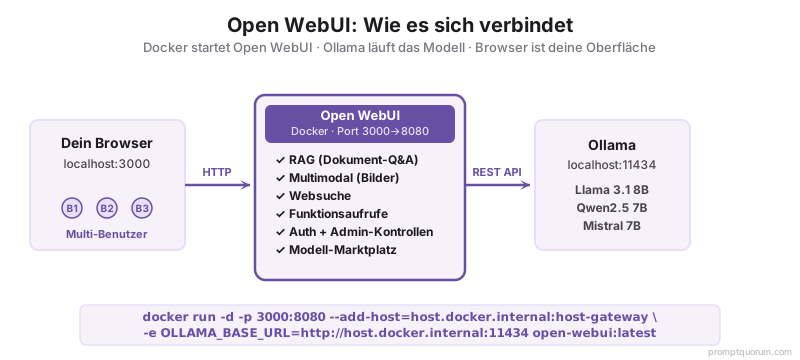
Warum Enchanted UI für leichte Geschwindigkeit wählen?
Enchanted UI ist eine minimale, abhängigkeitsfreie Web-Oberfläche für Ollama. Es ist keine herunterladbare App -- es ist eine einzelne HTML-Datei, die in Ihrem Browser läuft. Ab April 2026 ist sie das schnellste und reaktivste Frontend für einfaches Chat.
Wichtigste Funktionen:
- Sofort starten: Keine Installation, keine Abhängigkeiten. Öffnen Sie einfach eine URL.
- Schnell: Minimales JavaScript, keine schweren Frameworks.
- Privat: Alles läuft in Ihrem Browser; keine Daten verlassen Ihren Computer.
- Schöner Dark Mode: Saubere, moderne Oberfläche.
Enchanted UI ist perfekt, wenn Sie mit Ihrem lokalen Modell chatten möchten, ohne Komplexität bei der Einrichtung. Es fehlen RAG, Multimodal und erweiterte Funktionen, aber für alltäglichen Chat ist es unübertroffen in Einfachheit.
# 1. Starten Sie Ihr Ollama-Modell
ollama run llama3.2:3b

# 2. Öffnen Sie diese URL in Ihrem Browser
# https://enchanted.div.ai/

# Ollama erkennt automatisch, und Sie können sofort chatten
Warum ist Jan AI am besten für Desktop-Benutzer?
Jan AI ist eine Desktop-Anwendung (Windows, macOS), die Modellverwaltung, Inferenz und eine Chat-Oberfläche in einer App zusammenfasst. Es ist ähnlich wie LM Studio, aber mit stärkerer Offline-Unterstützung und einem Community-getriebenen Ansatz.
Wichtigste Funktionen:
- Offline-first: Modelle werden mit Ihrem Gerät synchronisiert; kein Internet erforderlich zum Chatten.
- GPU und CPU Fallback: Nutzt automatisch GPU wenn verfügbar, fällt auf CPU zurück.
- Privat standardmäßig: Kein Konto erforderlich, keine Telemetrie.
- Erweiterungs-Marktplatz: Fügen Sie Plugins wie RAG, Web-Suche oder Tools hinzu.
Jan ist am besten für nicht-technische Benutzer, die eine polierte Desktop-App möchten. Ab April 2026 gewinnt es an Beliebtheit als LM Studio-Alternative mit stärkerer Community-Unterstützung.
Wie verwenden Sie Continue.dev für Code-Vervollständigungen?
Continue.dev ist eine VS Code und JetBrains IDE-Erweiterung, die Ihr lokales Ollama-Modell mit Ihrem Code-Editor verbindet. Wenn Sie anfangen zu tippen, schlägt Continue Vervollständigungen basierend auf Ihrem lokalen Modell vor.
Setup (2 Minuten):
1. Installieren Sie Continue aus dem VS Code Marketplace.
2. Zeigen Sie es auf Ihre Ollama-Instanz (Config → Configure Continue → Add localhost:11434).
3. Beginnen Sie Code zu schreiben und drücken Sie Tab oder Ctrl+Shift+\\ für Vervollständigungen.
Continue ist perfekt für Entwickler, die Code-Vorschläge ohne Cloud-APIs möchten. Für Coding-Aufgaben produziert Ollama mit Qwen2.5-Coder 7B oder Llama Code Modellen vernünftige Vorschläge.
Sollten Sie selbst-gehostet oder eine Cloud-Frontend verwenden?
Alle hier aufgeführten Frontends sind selbst-gehostet (laufen auf Ihrem Computer oder Ihrem Server). Die Alternative sind Cloud-Frontends wie ChatGPT, Claude oder Gemini, die sich mit Remote-Servern verbinden.
- Wählen Sie selbst-gehostet, wenn: Sie sensible Daten haben, keine API-Kosten möchten, die Schnittstelle anpassen möchten oder offline sind.
- Wählen Sie Cloud, wenn: Sie die beste Modellqualität benötigen, keine Infrastruktur verwalten möchten oder niedriges Volumen haben.
- Nutzen Sie beide parallel: Tools wie PromptQuorum ermöglichen es Ihnen, einen Prompt gleichzeitig an Ihr lokales Modell und Cloud-APIs zu versenden, damit Sie Ergebnisse nebeneinander vergleichen können.
Lokale LLM-Frontends: Regionales Kontext
EU / DSGVO
Für EU-Organisationen, die lokale LLM-Frontends bereitstellen, ist Datensouveränität der primäre Treiber. Alle 8 Frontends in diesem Leitfaden laufen vollständig vor Ort -- kein Prompt-Inhalt, Konversationsverlauf oder hochgeladene Dokumente verlassen Ihre Infrastruktur. Dies erfüllt DSGVO Artikel 5 (Datenminimierung) und beseitigt die Artikel-28-Datenverarbeiter-Beziehung.
Für regulierte EU-Sektoren (Gesundheitswesen, Recht, Finanzen): Open WebUI ist das empfohlene Frontend, da es alle Konversationen lokal mit exportierbaren Audit-Trails protokolliert. Das deutsche BSI und die französische CNIL akzeptieren lokal gehostete AI-Tools für hochriskante Verarbeitung, wenn sie mit angemessenen Zugriffskontrollem kombiniert sind. Richten Sie Open WebUI mit aktivierter Authentifizierung (`WEBUI_AUTH=true` in Docker) ein und beschränken Sie den Zugriff auf autorisierte Benutzer.
Besondere Beachtung für den deutschsprachigen Raum: Open WebUI erfüllt BSI-Grundschutz-Kataloge (Elementare Gefährdungen) für Mittelstand und Enterprise. Für DACH-Regionen (Deutschland, Österreich, Schweiz) ist lokale Inferenz ohne Cloud-Abhängigkeit die bevorzugte Lösung für Compliance.
Japan (METI)
METI AI-Governance-Richtlinien erfordern die Dokumentation von AI-Tool-Versionen in Produktionsbereitstellungen. Die Open WebUI-Version ist in Einstellungen → Über sichtbar, und Docker-Image-Tags ermöglichen genaue Versions-Fixierung für Compliance-Records. Für japanische Enterprise-Teams ist Open WebUI mit Qwen2.5 7B (`ollama run qwen2.5:7b`) der empfohlene Stack -- native japanische Tokenisierung bietet bessere Qualität für japanische Dokument-Q&A in der RAG-Funktion.
China
Gemäß Chinas Datensicherheitsgesetz (数据安全法) erfüllen alle Frontends in diesem Leitfaden lokale Datenspeicherungsanforderungen, wenn sie vor Ort oder auf inländischen Cloud-Providern bereitgestellt werden (Alibaba Cloud, Tencent Cloud). Open WebUI auf Docker ist mit chinesischen Cloud-VM-Instanzen kompatibel. Für chinesische Enterprise-RAG-Bereitstellungen passen Sie Open WebUI mit Qwen2.5 14B für optimale chinesische Sprachendokument-Analyse an.
Häufige Fehler bei der Wahl eines Frontends
- Annahme, dass Sie das funktionsreichste Frontend benötigen. Open WebUI hat die meisten Funktionen, aber wenn Sie nur chatten möchten, ist Enchanted schneller. Wählen Sie basierend auf Ihren tatsächlichen Anforderungen, nicht auf Funktionszahl.
- Nicht realisieren, dass Sie Frontends einfach wechseln können. Ihr Ollama-Modell und Modelle sind getrennt vom Frontend. Wechsel von Open WebUI zu Enchanted UI zu Jan AI ohne erneutes Download von Modellen -- sie alle teilen die gleiche Ollama-Instanz.
- Versuchen, Open WebUI auf einer 8 GB RAM-Maschine ohne GPU zu laufen. Open WebUI + Modell-Inferenz erfordert 12+ GB insgesamt. Bei begrenztem Hardware, verwenden Sie Enchanted UI oder eine leichte Alternative.
- Modellquantisierung und Frontend-Anforderungen ignorieren. Ein 13B-Modell in 8-Bit-Format ist allein 13 GB. Open WebUI fügt Overhead hinzu. Tun Sie die Mathematik: Modellgröße + Frontend Overhead + OS = Gesamter RAM erforderlich.
- Ollama nicht zuerst als Hintergrund-Service einrichten. Viele neue Benutzer versuchen, mehrere Frontends gleichzeitig auszuführen, ohne zu realisieren, dass Ollama laufen muss. Richten Sie Ollama zuerst ein (als Service über `ollama serve` im Hintergrund), dann fügen Sie Ihr gewähltes Frontend hinzu.
Häufig gestellte Fragen zu lokalen LLM-Frontends
Kann ich mehrere Frontends gleichzeitig ausführen?
Ja. Alle Frontends verbinden sich mit der gleichen Ollama-API (localhost:11434). Sie können Open WebUI, Enchanted UI und Continue.dev alle gleichzeitig ausführen und das gleiche Modell verwenden. Dies verdoppelt nicht die VRAM-Nutzung -- sie teilen alle die gleiche Modell-Instanz.
Welches Frontend ist am besten für RAG?
Open WebUI hat die reifste RAG-Implementierung. Laden Sie Dokumente hoch, und das Modell wird Fragen basierend darauf beantworten. Für erweiterte RAG-Workflows, siehe Beste lokale RAG-Tools.
Brauche ich überhaupt ein Frontend?
Nein. Ollama bietet eine REST-API bei localhost:11434. Sie können Python-, JavaScript- oder Bash-Skripte schreiben, um direkt über die API mit dem Modell zu interagieren, ohne Frontend. Ein Frontend ist nur der Bequemlichkeit halber.
Welches Frontend funktioniert auf Linux?
Open WebUI, Enchanted UI, Lobe Chat und Gradio/Streamlit funktionieren alle auf Linux. Jan AI hat Beta-Unterstützung für Linux (ab April 2026). Continue.dev funktioniert über VS Code auf allen Plattformen.
Kann ich ein Frontend auf einem Remote-Server hosten?
Ja. Alle Frontends sind Web-Apps (oder können containerisiert werden). Sie können Ollama auf einem Server und Open WebUI in Docker laufen lassen, dann von Ihrem Laptop über HTTP darauf zugreifen. Sichern Sie die Oberfläche mit Authentifizierung oder einer Firewall.
Welches Frontend verbraucht am wenigsten RAM?
Enchanted UI verbraucht im Wesentlichen null zusätzlichen RAM über Ihr laufendes Modell hinaus -- es ist eine einzelne HTML-Datei in Ihrem Browser. Jan AI und Continue.dev fügen auch minimalen Overhead hinzu (unter 200 MB). Open WebUI in Docker fügt ungefähr 500 MB-1 GB Overhead hinzu. Wenn der RAM begrenzt ist, verwenden Sie Enchanted UI zum Chatten oder Continue.dev zum Code.
Kann ich diese Frontends mit LM Studio statt Ollama verwenden?
Ja, mit Einschränkungen. Enchanted UI und Open WebUI funktionieren mit einer beliebigen OpenAI-kompatiblen API, einschließlich der Beta-API von LM Studio bei localhost:1234. Ändern Sie die Basis-URL in Einstellungen. Beachten Sie, dass die LM Studio-API ab April 2026 noch in Beta ist -- Ollama bleibt der zuverlässigere Backend für Frontends.
Welches Frontend ist am besten für ein Team von 5+ Entwicklern?
Open WebUI. Es ist das einzige Frontend auf dieser Liste, das für Multi-User-Bereitstellung konzipiert ist: Authentifizierung, separate Konversationsverlaufe pro Benutzer, gemeinsame Knowledge Bases und Admin-Controls. Stellen Sie es auf einem gemeinsamen Server mit Docker bereit und alle Teamkollegen greifen über Browser darauf zu. Benötigt 12+ GB RAM auf dem Host-Server.
Muss ich bei der Verwendung von lokalen LLM-Frontends die DSGVO beachten?
Ja, in der EU. DSGVO Artikel 5 (Datenminimierung) verlangt, dass Kundendaten nicht ohne Grund an Cloud-APIs gesendet werden. Lokale Frontends erfüllen diese Anforderung natürlicherweise. Für regulierte Sektoren (Banken, Krankenhäuser, Anwaltskanzleien) empfiehlt das BSI-Grundschutz-Katalog lokale Inferenz mit angemessenen Zugriffskontrolmen.
Ist Ollama mit lokalen LLM-Frontends für den deutschen Mittelstand geeignet?
Ja, Open WebUI + Ollama erfüllt die IT-Sicherheitsstandards des deutschen Mittelstands (BSI-Grundschutz). Für KMU-Bereitstellungen in Deutschland, Österreich und der Schweiz (DACH) ist lokale Inferenz die bevorzugte Lösung für Datenschutz und Compliance. Keine separaten Cloud-Gebühren, vollständige Datenhoheit.
Weiterführende Literatur
- Ollama installieren -- Einrichtungsleitfaden für die zugrunde liegende Modell-Engine.
- Ollama vs LM Studio -- Vergleich der zwei beliebtesten lokalen LLM-Tools.
- Beste lokale RAG-Tools -- Tiefgang in Open WebUI RAG und andere dokumentbasierte LLM-Tools.
- Lokale LLMs mit OpenAI-kompatibler API -- Wie man die API direkt aus Code verwendet.
- Lokale LLMs mit VS Code und Cursor -- Continue.dev und VS Code Integrationen einrichten.
Quellen
- Open WebUI Contributors. (2026). "Open WebUI GitHub." -- Quellcode und Docker-Setup-Dokumentation für Open WebUI.
- Jan AI. (2026). "Jan AI Official Site." -- Desktop-App-Dokumentation und Modellverwaltungsleitfaden.
- Continue.dev. (2026). "Continue Documentation." -- VS Code und JetBrains Erweiterungskonfiguration für lokale LLM-Code-Vervollständigungen.
- Lobe Chat Contributors. (2024). "Lobe Chat GitHub." -- Datenschutz-orientierte Chat-UI-Quellcode und Bereitstellungsleitfaden.