
Points clés
- GPU (NVIDIA RTX 5090) : 200 tokens/s pour les modèles 8B. Meilleures performances, 2 000 €.
- GPU (NVIDIA RTX 4090) : 150 tokens/s pour les modèles 8B. Meilleur rapport qualité-prix : RTX 4070 Ti à 80 Tok/s pour 600 €.
- Apple Silicon M2 Ultra : 60 tokens/s pour les modèles 8B, 35 Tok/s pour 70B *nativement* (sans déchargement). Avantage unique : Mac Studio seul matériel grand public pouvant exécuter les modèles 70B sans perte de qualité.
- CPU (Intel i9) : 5–6 tokens/s. Impraticable pour le chat en temps réel (latence 5–10 secondes).
- Pour un travail sérieux : le GPU gagne en vitesse (30–40× plus rapide grâce à la bande passante mémoire). Apple M2 Ultra gagne pour les grands modèles (exécution native 70B).
Comparaison des Performances : Vitesse et Débit
*avec déchargement sur RAM – dégradation significative de la qualité
| Matériel | Llama 3.2 8B | Llama 3.3 70B | Qwen2.5 32B | Coût |
|---|---|---|---|---|
| RTX 5090 (GPU, 32 Go) | 200 Tok/s | 50 Tok/s | 70 Tok/s | 2 000 € |
| RTX 4090 (GPU, 24 Go) | 150 Tok/s | 10 Tok/s* | 50 Tok/s | 2 310 € |
| RTX 4070 Ti (GPU, 12 Go) | 80 Tok/s | Non possible | 25 Tok/s | 600 € |
| Mac Studio M2 Ultra (192 Go) | 60 Tok/s | 35 Tok/s | 45 Tok/s | 4 000 € |
| MacBook Pro M4 Max (128 Go) | 35 Tok/s | 8 Tok/s* | 22 Tok/s | 4 000 € |
| MacBook Pro M5 Max (96 Go) | 25 Tok/s | 5 Tok/s* | 15 Tok/s | 3 500 € |
| Intel i9 14900K (CPU seul) | 5 Tok/s | 1 Tok/s | 2 Tok/s | 600 € |
| AMD Ryzen 9 7950X (CPU seul) | 6 Tok/s | 1 Tok/s | 2 Tok/s | 650 € |
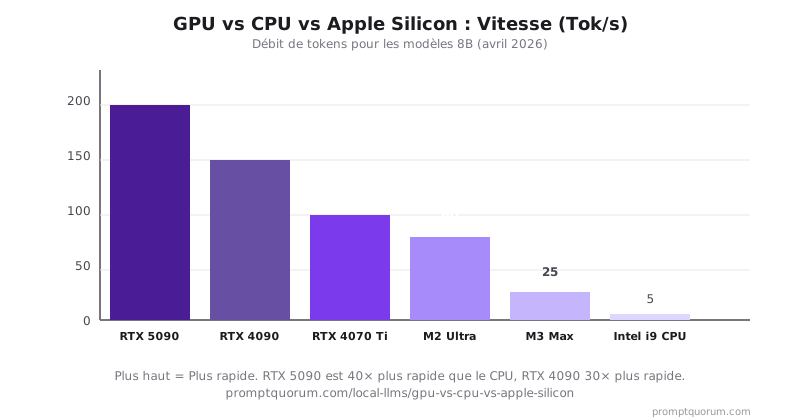
GPU NVIDIA : Le Roi des Performances
Les GPU NVIDIA (série RTX 40/50) sont actuellement les meilleurs pour les LLM locaux en avril 2026. La domination repose sur :
- Écosystème CUDA : 20+ ans d'optimisation spécifique à l'IA. La plupart des modèles sont optimisés en premier pour CUDA.
- Cœurs Tensor : Matériel spécialisé pour les opérations matricielles (cœur de l'inférence LLM).
- Bande passante mémoire : RTX 5090 dispose de 1 792 Go/s (GDDR7) ; RTX 4090 de 1 008 Go/s ; bien au-delà des systèmes à mémoire unifiée.
- Logiciel mature : vLLM, llama.cpp, LM Studio tous optimisés pour NVIDIA. Meilleures performances d'inférence à précision native.
- RTX 5090 (vaisseau amiral 2025) : 200 Tok/s sur Llama 3.2 8B, peut traiter 70B à 50 Tok/s.
Compromis : coût initial élevé (600–2 000 €), consommation d'énergie (350–575 W), nécessite un bon refroidissement et une alimentation 1 200 W.
CPU Seul : Quand et Pourquoi Éviter
Les CPU peuvent exécuter les LLM mais sont impratiques pour l'inférence en temps réel :
- Latence : 5–10 secondes par réponse pour les modèles 7B. Inutilisable pour le chat.
- Puissance : Les CPU en charge complète peuvent consommer 200 W+ (inefficace pour l'inférence).
- Contexte : Les CPU s'adaptent mal aux contextes longs (cache clé-valeur).
Le CPU convient uniquement au traitement par lot hors ligne (par exemple, traiter les documents la nuit sans réponse en temps réel).
Apple Silicon : Force Unique dans les Grands Modèles
La série Apple M (M2 Ultra, M3/M4 Max) excelle dans l'exécution native de grands modèles – un avantage unique :
- Mémoire unifiée : CPU et GPU partagent le pool mémoire, éliminant les frais généraux de transfert.
- Capacité pour grands modèles : Mac Studio M2 Ultra (192 Go) exécute Llama 3.3 70B à 35 Tok/s nativement, sans déchargement. Unique à Apple Silicon.
- Efficacité énergétique : M5 Max traite 7B à 25 Tok/s avec seulement 25 W. M4 Max est plus rapide (~35 Tok/s).
- Intégration : Natif macOS, pas de problèmes de pilotes, fonctionne immédiatement.
- Limitation par rapport à GPU : Mémoire partagée signifie pas de mise à niveau VRAM discrète. Taille du modèle ≤ RAM système.
Mac Studio M2 Ultra (192 Go) : 60 Tok/s pour 8B, 35 Tok/s pour 70B – seul matériel grand public avec cette capacité. Les équipes de recherche exécutant 70B+ devraient considérer Mac Studio.
MacBook Pro : M4 Max (128 Go) à 35 Tok/s pour 8B est solide pour portable. M5 Max (96 Go) à 25 Tok/s convient pour les besoins plus légers.
Bande Passante Mémoire : Le Vrai Goulot d'Étranglement
L'inférence LLM est limitée par la mémoire, pas par le calcul. La vitesse de génération de tokens est limitée par la rapidité avec laquelle vous pouvez charger les poids du modèle à partir de la mémoire. Bande passante mémoire plus élevée = génération de tokens plus rapide.
La formule : Vitesse d'inférence ≈ Bande passante mémoire ÷ Poids du modèle en mémoire
- Cet écart de bande passante explique pourquoi les GPU sont 30–40× plus rapides que le CPU pour l'inférence.
- La mémoire unifiée Apple Silicon a une bande passante inférieure par octet à NVIDIA GDDR7/GDDR6X, mais reste 9× plus rapide que la RAM DDR5.
- Avantage de la mémoire unifiée : pas de frais généraux de transfert CPU↔GPU. Le modèle reste dans un pool mémoire.
- Inconvénient du GPU pour les grands modèles : VRAM limité (24 Go max pour RTX 4090). Le déchargement sur RAM système (89 Go/s) crée une pénalité de vitesse 10×.
- Pourquoi Mac Studio M2 Ultra (192 Go unifiés) est unique : peut exécuter les modèles 70B nativement avec 800 Go/s de bande passante – pas de pénalité de déchargement, pas de chute de vitesse.
| Plateforme | Bande passante mémoire | Vitesse effective (8B) |
|---|---|---|
| RTX 5090 (GDDR7) | 1 792 Go/s | 200 Tok/s |
| RTX 4090 (GDDR6X) | 1 008 Go/s | 150 Tok/s |
| RTX 4070 Ti (GDDR6X) | 504 Go/s | 80 Tok/s |
| Mac Studio M2 Ultra (unifiée) | 800 Go/s | 60 Tok/s |
| MacBook Pro M4 Max (unifiée) | 546 Go/s | 35 Tok/s |
| MacBook Pro M5 Max (unifiée) | 400 Go/s | 25 Tok/s |
| RAM DDR5-5600 (CPU seul) | 89 Go/s | 5 Tok/s |
| RAM DDR4-3200 (CPU seul) | 51 Go/s | 3 Tok/s |
Coût par Token : Analyse Réelle des Coûts
Considérez le coût total d'inférence (matériel amorti dans le temps) :
| Matériel | Coût initial | Tokens/Sec | Tokens/Année (24/7) | Coût à long terme |
|---|---|---|---|---|
| RTX 4090 (durée 3 ans) | 2 310 € | 150 | 4,7 Md | 0,0004 € par 1 million de tokens |
| RTX 4070 Ti (durée 3 ans) | 600 € | 80 | 2,5 Md | 0,0002 € par 1 million de tokens |
| M5 Max Mac (déjà possédé) | 0 € | 25 | 0,79 Md | 0 € par 1 million de tokens |
| API OpenAI (0,01 € par 1 000 tokens) | Paiement à l'usage | Illimité | Illimité | 10 € par 1 million de tokens |
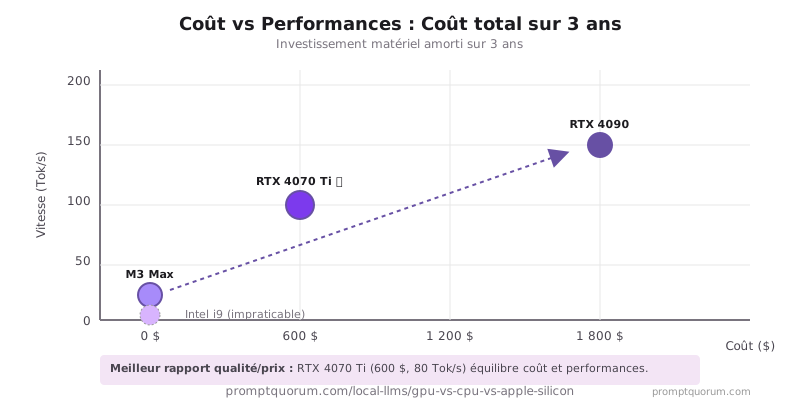
Quand Choisir Chaque Plateforme
Cadre de décision :
- Choisir GPU : Vous avez besoin d'un chat en temps réel (<1 seconde de latence), d'exécuter des modèles 24/7, ou de traiter par lot de grands ensembles de données.
- Choisir CPU seul : Vous êtes hors ligne, avez besoin de traiter par lot les documents la nuit, ou voulez zéro investissement matériel.
- Choisir Apple Silicon : Vous possédez un Mac, exécutez uniquement des modèles 7B, et appréciez une faible consommation d'énergie.
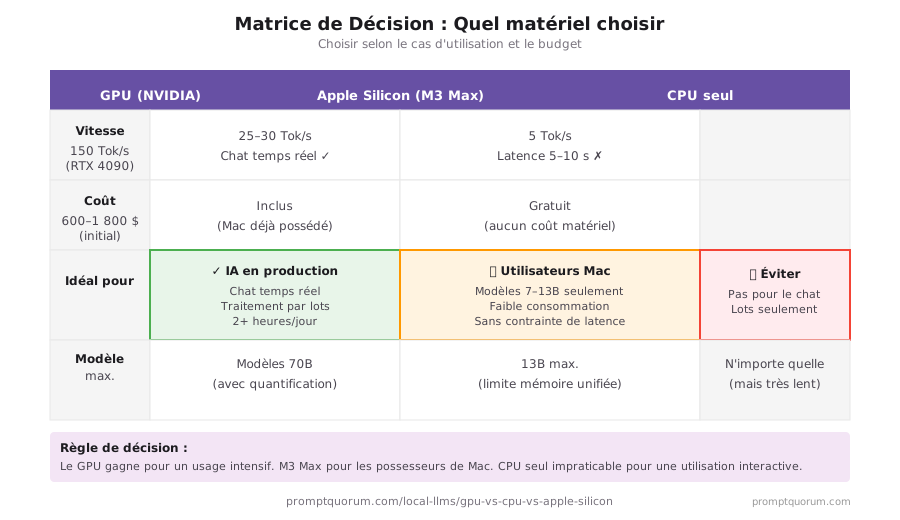
Erreurs Courantes dans le Choix du Matériel
- Penser que le CPU convient au chat. 5 secondes de latence par réponse n'est pas pratique. L'expérience utilisateur est inutilisable.
- Acheter un GPU de génération antérieure en s'attendant à des performances similaires. RTX 2080 est 10× plus lent que RTX 4070 Ti en raison des améliorations architecturales.
- Supposer que M5 Max peut traiter les modèles 70B. C'est impossible, même avec une quantification extrême. Limité par l'architecture mémoire unifiée.
- Ignorer les exigences d'alimentation et de refroidissement. RTX 4090 nécessite une alimentation 1 200 W et une bonne ventilation du boîtier, pas juste un "slot GPU".
Questions Fréquemment Posées
Le GPU ou le CPU est-il meilleur pour exécuter les LLM locaux ?
Le GPU est nettement meilleur pour l'inférence en temps réel. NVIDIA RTX 4090 exécute les modèles 7B à 150 tokens/s ; un CPU haut de gamme comme Intel i9 exécute le même modèle à 3–5 tokens/s. L'inférence CPU produit une latence de réponse de 5–10 secondes, ce qui rend le chat interactif impratique.
Apple Silicon peut-il exécuter les LLM locaux ?
Oui. La série Apple M (M3, M4) exécute les modèles 7B à 25–30 tokens/s avec mémoire unifiée – nettement meilleur que les systèmes x86 CPU seul, mais plus lent que les GPU NVIDIA discrets. Apple Silicon ne peut pas exécuter les modèles 70B en raison des limites de mémoire unifiée (RAM système maximale = limite mémoire du modèle).
Quel est la VRAM GPU minimale pour les LLM locaux ?
6 Go de VRAM exécutent les modèles 7B avec quantification Q4 (4,1 Go utilisés). 8 Go est le minimum pratique pour une expérience fluide avec les modèles 7B en Q5. 16+ Go de VRAM est nécessaire pour les modèles 13B. 24 Go traite les modèles 30B.
Combien de fois le GPU est-il plus rapide que le CPU pour l'inférence LLM ?
Les GPU NVIDIA sont 30–100× plus rapides que les CPU pour l'inférence LLM. RTX 4090 génère 150 tokens/s pour les modèles 7B ; Intel i9 génère 3–5 tokens/s. L'écart de vitesse provient du traitement parallèle CUDA et des cœurs Tensor spécialisés, pas seulement de la fréquence d'horloge.
Vaut-il la peine d'acheter un GPU juste pour les LLM locaux ?
RTX 4070 Ti (12 Go de VRAM, ~600 €) amorti sur 3 ans coûte moins cher que les frais API OpenAI pour les utilisateurs lourds fonctionnant 2+ heures par jour. À 80 tokens/s, il traite le chat en temps réel, l'assistance à la codification et le résumé de documents. Les utilisateurs légers (moins de 30 min/jour) sont mieux servis par l'API.
Puis-je utiliser plusieurs cœurs CPU pour accélérer l'inférence LLM ?
Plus de cœurs CPU aident marginalement. llama.cpp utilise tous les threads disponibles, mais le goulot d'étranglement est la bande passante mémoire (50–100 Go/s pour la RAM système vs 2 000+ Go/s pour la VRAM GPU). Plus de cœurs ne résolvent pas le problème de bande passante – seul un GPU ou une mémoire unifiée Apple M-series aide.
Qu'est-ce que la bande passante mémoire et pourquoi est-ce important pour les LLM ?
L'inférence LLM est limitée par la mémoire, pas par le calcul. La vitesse de génération de tokens dépend de la rapidité avec laquelle vous pouvez charger les poids du modèle à partir de la mémoire. RTX 5090 a 1 792 Go/s (GDDR7) ; la RAM DDR5 a 89 Go/s. Cet écart de bande passante explique pourquoi les GPU sont 30–40× plus rapides que le CPU pour l'inférence.
Quel chip Apple Silicon est le meilleur pour les LLM locaux ?
Mac Studio M2 Ultra (192 Go) pour exécuter les modèles 70B nativement à 35 Tok/s – avantage unique qu'aucun GPU grand public ne peut égaler. MacBook Pro M4 Max (128 Go) pour une utilisation portable à 35 Tok/s sur les modèles 8B. M5 Max (96 Go) convient aux modèles 7–13B. Évitez le M4/M3 de base (8 Go de RAM) pour un travail LLM sérieux.
Apple Silicon peut-il exécuter les modèles 70B ?
Mac Studio M2 Ultra avec 192 Go de mémoire unifiée exécute Llama 3.3 70B à 35 Tok/s nativement, sans déchargement. C'est unique – aucun GPU grand public ne peut le faire. Les petits modèles Mac déchargent partiellement sur RAM, créant une pénalité de vitesse 5–10×. Qualité 70B complète uniquement sur Mac Studio M2 Ultra.
RTX 5090 pour 2 000 € vaut-il la peine pour les LLM locaux ?
Seulement si vous exécutez régulièrement des modèles 70B ou des charges de travail productives. RTX 5090 (200 Tok/s sur 8B) est 2,5× plus rapide que RTX 4090 (2 310 €). Meilleure valeur : RTX 4070 Ti (600 €, 80 Tok/s) pour les modèles 8B–32B ; Mac Studio M2 Ultra (4 000 €) si vous avez besoin du support native 70B.
Sources
- Spécifications GPU NVIDIA — Spécifications GPU série RTX 40/50, VRAM, bande passante mémoire.
- Performance Apple M3 — Architecture mémoire unifiée M5 Max et performances d'inférence.
- Benchmarks vLLM — Benchmarks de débit d'inférence LLM production.