
Points clés
- Un moteur d'inférence est le logiciel C/C++/Python qui charge un fichier modèle et génère des tokens. Il est séparé de la couche UI ou API.
- llama.cpp = léger, efficace en CPU, alimente Ollama. Meilleur pour : portables consommateurs, mono-utilisateur, zéro dépendance.
- vLLM = production-grade, débit GPU maximal, supporte le batching et l'inférence distribuée. Meilleur pour : serveurs API, multi-utilisateur, haut débit.
- Text-Generation-WebUI = outil d'expérimentation riche en fonctionnalités avec UI web intégrée. Meilleur pour : ajustement fin, test LoRA, réglages avancés.
- En avril 2026, vLLM mène l'utilisation en production, llama.cpp mène l'utilisation consommateur, et Text-Generation-WebUI mène les workflows de recherche/ajustement fin.
Qu'est-ce qu'un moteur d'inférence ?
Un moteur d'inférence est le composant logiciel qui charge un fichier modèle pré-entraîné et exécute les opérations mathématiques nécessaires pour générer du texte. Il diffère d'une interface de chat (comme Open WebUI ou Enchanted UI) ou d'une couche API (comme l'API REST d'Ollama).
Un déploiement typique de LLM local comporte trois couches :
1. Fichier modèle (par exemple, llama-3.1-8b.gguf) -- les poids du réseau neuronal.
2. Moteur d'inférence (par exemple, llama.cpp, vLLM) -- charge le modèle et génère les tokens.
3. Interface ou API (par exemple, API REST, chat web, extension VS Code) -- vous permet d'interagir avec le moteur.
Ollama lui-même est principalement un wrapper autour de llama.cpp avec une API compatible OpenAI. vLLM est un moteur d'inférence sans UI intégrée. Text-Generation-WebUI est un moteur d'inférence avec une UI web intégrée.
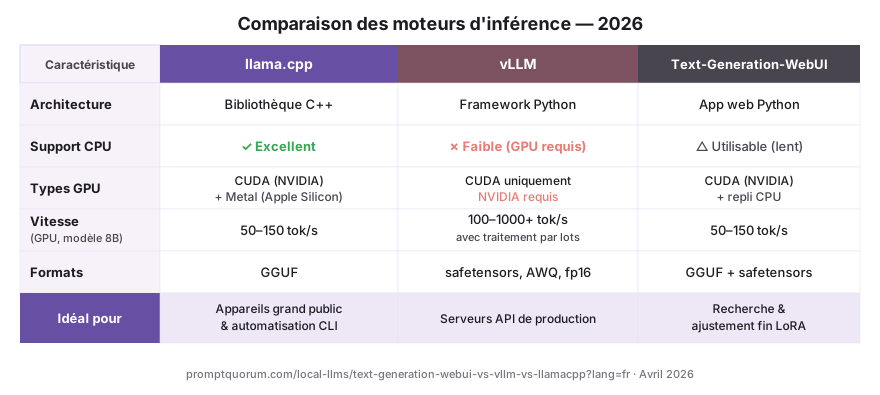
Comparaison des fonctionnalités : llama.cpp vs vLLM vs Text-Generation-WebUI
| Fonctionnalité | llama.cpp | vLLM | Text-Gen-WebUI |
|---|---|---|---|
| Type | Bibliothèque C++ (léger) | Framework Python (production) | App Python (expérimentation) |
| Support GPU | NVIDIA, AMD, Apple Metal | NVIDIA uniquement (meilleur support) | NVIDIA, AMD, CPU |
| Inférence CPU | Excellente | Faible | Bonne |
| Débit (tokens/s) | Moyen (1-100) | Très élevé (100-1000+) | Moyen (1-100) |
| Support batching | Limité | Complet (batches de 100+) | Limité |
| UI web intégrée | Non | Non | Oui |
| Ajustement LoRA | Pas directement | Limité | Intégré |
| Formats de quantification | GGUF, GGML | Précision complète, 8-bit, 4-bit | GGUF, safetensors, fp16 |
| Difficulté de configuration | Via Ollama (facile) | pip install (moyen) | Clone GitHub (moyen) |
| Prix | Gratuit | Gratuit | Gratuit |
Comprendre llama.cpp : La fondation
llama.cpp est une implémentation C++ de l'inférence LLM, écrite à l'origine pour exécuter le modèle Llama de Meta sur du matériel grand public sans accélération GPU. En avril 2026, c'est le moteur d'inférence le plus léger et portable.
Pourquoi llama.cpp domine l'utilisation consommateur :
- Surcharge mémoire minimale -- peut s'exécuter sur 8 Go de RAM uniquement avec CPU.
- Supporte plusieurs backends GPU (NVIDIA, AMD, Apple Metal, Intel).
- Format GGUF : un format de modèle quantifié qui compresse les modèles 70B à 20-40 Go.
- Alimente Ollama en interne -- vous utilisez llama.cpp chaque fois que vous lancez Ollama.
llama.cpp n'est pas une application complète ; c'est une bibliothèque. Vous interagissez avec elle via Ollama (le moyen le plus courant) ou via d'autres outils qui l'intègrent.
Comprendre vLLM : Le standard de production
vLLM est un framework Python conçu pour l'inférence haute capacité sur clusters GPU. Il optimise le service de modèles via API, avec support du batching, de l'inférence distribuée et de la planification avancée.
Pourquoi vLLM domine la production :
- Attention paginée : vLLM utilise une mise en page mémoire novatrice qui améliore l'utilisation GPU d'environ 20% à 70%, augmentant considérablement le débit.
- Traitement batch : peut traiter 50-100 invites simultanément, servant plus d'utilisateurs par GPU.
- Inférence distribuée : diviser automatiquement un modèle 70B sur plusieurs GPUs.
- Large support de modèles : fonctionne avec n'importe quel modèle HuggingFace (Llama, Qwen, Mistral, Phi, etc.).
En avril 2026, la plupart des déploiements LLM locaux en production dans les entreprises utilisent vLLM. Le compromis est que vLLM nécessite des GPUs NVIDIA ; il a une mauvaise performance CPU.
# Installer vLLM
pip install vllm

# Exécuter un modèle via API
vllm serve meta-llama/Llama-3.3-8B-Instruct \
  --host 0.0.0.0 --port 8000 \
  --gpu-memory-utilization 0.9

# Accessible maintenant à http://localhost:8000/v1/completions
Comprendre Text-Generation-WebUI : L'outil du chercheur
Text-Generation-WebUI (aussi appelé oobabooga) est une application Python complète avec une interface web pour expérimenter avec les modèles. Elle combine l'inférence avec des outils intégrés pour l'ajustement fin, l'entraînement LoRA, la génération d'embeddings et les tests d'invites avancés.
Pourquoi les chercheurs utilisent Text-Generation-WebUI :
- Ajustement LoRA intégré : entraîner des adaptateurs LoRA personnalisés sur des modèles de base sans scripts d'entraînement externes.
- Plusieurs moteurs d'inférence : peut basculer entre llama.cpp, GPTQ, exllama et autres backends.
- Roleplay de caractère : système intégré pour créer et tester des personas de caractères.
- Exposition API : expose une interface FastAPI pour une utilisation programmatique.
- Écosystème d'extensions : extensions construites par la communauté pour des workflows personnalisés.
Text-Generation-WebUI est plus un outil de recherche et d'expérimentation qu'un serveur de production. La configuration est plus impliquée (nécessite le clone GitHub et la gestion des dépendances Python), mais une fois en cours d'exécution, elle est extrêmement puissante pour le développement.
Quelle est la vitesse de chaque moteur ? Comparaison des débits
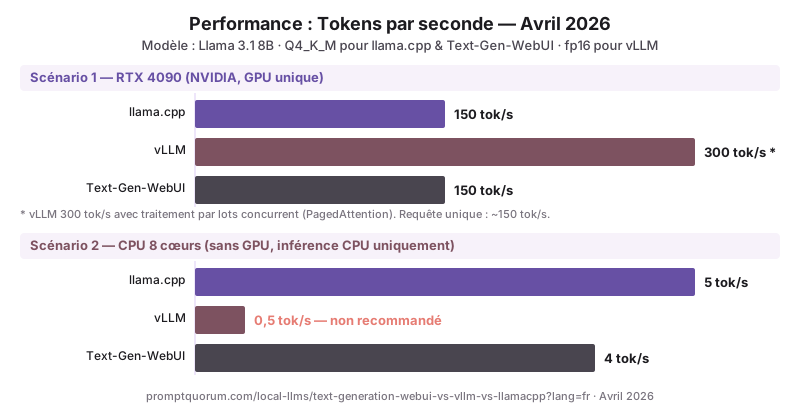
Le débit (tokens par seconde) dépend de la taille du modèle, du matériel et de l'optimisation du moteur. En avril 2026, voici les benchmarks du monde réel sur du matériel grand public :
| Scénario | llama.cpp | vLLM | Text-Gen-WebUI |
|---|---|---|---|
| Llama 3.1 8B sur RTX 4090 (GPU) | 150 tokens/s | 300 tokens/s (avec batching) | 150 tokens/s |
| Llama 3.1 8B sur CPU 8 cœurs | 5 tokens/s | 0.5 tokens/s (inutilisable) | 4 tokens/s |
| Llama 3.1 70B sur 2× RTX 4090 | 20 tokens/s (GPU unique) | 100 tokens/s (distribué) | 20 tokens/s |
| Phi-3 3.8B sur MacBook Pro M4 | 30 tokens/s | N/A (pas de support Metal) | 25 tokens/s |
Quel moteur pour les déploiements de production ?
vLLM est le standard de production en avril 2026. La plupart des entreprises exécutant des APIs LLM locales en production utilisent vLLM en raison de son optimisation de débit et de son support du batching. Une seule instance vLLM peut servir 50+ utilisateurs simultanés sur un GPU, contre 1-2 pour llama.cpp.
Cependant, le choix de production dépend de votre contrainte :
- Servir 100+ requêtes/jour avec GPU limité : utiliser vLLM (meilleur débit).
- Servir avec CPU uniquement ou Apple Silicon : utiliser llama.cpp via Ollama (meilleur support CPU).
- Utiliser les modèles Llama spécifiquement : llama.cpp ou vLLM fonctionnent ; vLLM est plus rapide.
- Utiliser des formats de modèles divers (GPTQ, GGUF, safetensors) : Text-Generation-WebUI supporte tous ; vLLM nécessite la précision complète ou des formats de quantification spécifiques.
Quand choisir chaque moteur ?
Utilisez ce cadre de décision :
- llama.cpp (via Ollama) : vous êtes un consommateur, non-développeur, ou déployant sur CPU/Apple Silicon. Meilleure facilité d'utilisation globale.
- vLLM : vous servez une API avec 50+ utilisateurs simultanés, vous avez des GPUs NVIDIA, et vous avez besoin du débit maximal. Standard de production.
- Text-Generation-WebUI : vous ajustez les modèles, testez les adaptateurs LoRA, ou expérimentez avec des réglages d'inférence avancés. Meilleur pour la recherche.
Choix du moteur d'inférence par région
Le choix du moteur d'inférence a des implications directes pour la conformité régionale et les déploiements en entreprise dans différentes juridictions réglementaires.
- UE / RGPD : Pour les déploiements en entreprise dans l'UE, vLLM s'exécutant sur site maintient toute l'inférence au sein de l'infrastructure de l'UE -- aucun token, prompt ou résultat ne quitte vos serveurs. Pour la conformité BSI IT-Grundschutz allemande, vLLM est le moteur de production recommandé car il fournit un enregistrement d'audit structuré via les métriques Prometheus (point de terminaison /metrics), et toutes les versions de modèles sont épinglables via les IDs de modèles HuggingFace pour la documentation de conformité. Les modèles Mistral (Mistral AI, France, Apache 2.0) sont le choix préféré de l'UE pour les déploiements de production vLLM -- origine de l'UE, licence propre, performance solide.
- Japon (METI) : la gouvernance IA METI exige de documenter l'infrastructure d'inférence. Les métriques Prometheus structurées de vLLM satisfont les exigences de piste d'audit mieux que l'enregistrement stdout de llama.cpp. Pour les déploiements en entreprise japonais, Qwen2.5 7B via vLLM est la pile recommandée -- tokenization native du japonais plus débit de production.
- Chine : selon la Loi sur la sécurité des données de Chine (数据安全法), toute l'inférence doit rester sur site pour les données sensibles. vLLM est compatible avec les instances GPU Alibaba Cloud A10 et A100. Les modèles Qwen2.5 (Alibaba) sont nativement optimisés pour vLLM et fournissent le meilleur débit en langue chinoise.
Erreurs courantes avec les moteurs d'inférence
- Penser que vous devez choisir entre Ollama et ces moteurs. Ollama utilise llama.cpp en interne. Vous ne choisissez pas Ollama vs vLLM ; vLLM est un *backend* alternatif à Ollama, pas une app de chat. Les deux ont leur utilité.
- Supposer que vLLM est plus rapide sur CPU. vLLM a une mauvaise performance CPU ; llama.cpp est 10× plus rapide sur CPU. Vérifiez votre disponibilité GPU avant de choisir vLLM.
- Exécuter vLLM sur un GPU portable. vLLM est optimisé pour les GPUs de centre de données (RTX 4090, A100). Sur les GPUs grand public, la surcharge du planificateur de batching de vLLM peut ralentir la performance de requête unique. Restez avec llama.cpp pour les portables.
- Oublier que le débit d'inférence n'est pas la même chose que la latence d'expérience utilisateur. vLLM peut traiter par batch 100 requêtes, mais chaque requête prend du temps pour générer ses tokens. Un débit élevé ne signifie pas une latence faible.
- Installer mal les dépendances pour Text-Generation-WebUI. Les instructions GitHub supposent que vous avez Git, Python 3.10+ et pip installés. Sur Windows, cela échoue souvent silencieusement. Vérifiez toujours la version de Python avant de cloner.
Questions fréquentes sur les moteurs d'inférence
Puis-je basculer entre les moteurs d'inférence sans changer mon modèle ?
Principalement oui. Les fichiers modèles au format GGUF fonctionnent avec llama.cpp (Ollama) et Text-Generation-WebUI. vLLM nécessite la précision complète ou des formats de quantification spécifiques. Les modèles HuggingFace safetensors fonctionnent avec les trois.
Quel moteur est meilleur pour Mac ?
llama.cpp via Ollama. Il a une excellente optimisation Apple Silicon (M-series). vLLM ne supporte pas Metal (GPU Apple), donc la performance CPU est faible. Text-Generation-WebUI fonctionne sur Mac mais est plus lent qu'Ollama.
vLLM fait-il partie d'Ollama ?
Non. Ollama utilise llama.cpp en interne. vLLM est un moteur d'inférence séparé par UC Berkeley. Ils servent des buts différents : Ollama pour la simplicité ; vLLM pour le débit de production.
Puis-je utiliser vLLM sans GPU ?
Techniquement oui, mais c'est inutilisablement lent. vLLM est conçu pour GPU. Pour les déploiements CPU uniquement, utilisez llama.cpp (Ollama).
Text-Generation-WebUI évolue-t-il vers la production ?
Non recommandé. Text-Generation-WebUI est un outil de recherche, pas un serveur de production. Il manque des fonctionnalités comme l'équilibrage de charge, la surveillance et l'inférence distribuée dont les services de production ont besoin. Utilisez vLLM pour la production.
Qu'est-ce que l'Attention paginée et pourquoi c'est important ?
L'Attention paginée est le système de gestion mémoire de vLLM qui emprunte des concepts de mémoire virtuelle aux systèmes d'exploitation. Au lieu d'allouer un bloc mémoire GPU contigu fixe par requête, elle alloue la mémoire en pages qui peuvent être partagées et réutilisées entre les requêtes. Cela améliore l'utilisation de la mémoire GPU d'environ 20% à 70%, permettant à vLLM de servir 3-4× plus d'utilisateurs simultanés par GPU.
Quel moteur dois-je utiliser si je n'ai que 8 Go de RAM ?
llama.cpp via Ollama. Avec 8 Go de RAM au total, un modèle 7B à Q4_K_M utilise environ 4.7 Go. llama.cpp gère cela bien à environ 5 tok/s sur CPU ou 80 tok/s sur un GPU dédié. vLLM nécessite beaucoup plus de surcharge et fonctionne mal sur la RAM grand public.
Puis-je exécuter vLLM et Ollama sur la même machine ?
Oui, si le VRAM est suffisant. Exécutez-les sur différents ports (vLLM par défaut : 8000, Ollama par défaut : 11434). Une configuration typique : Ollama gère les requêtes de chat mono-utilisateur rapides, vLLM gère les requêtes API batch. Cependant, les deux ne peuvent pas charger le même modèle simultanément sans doubler le VRAM.
Lectures connexes
- Comment installer Ollama -- Configurez le wrapper llama.cpp le plus populaire.
- Ollama vs LM Studio -- Les deux utilisent des moteurs d'inférence ; comparez leurs UIs.
- API locale LLM compatible OpenAI -- vLLM et Ollama exposent tous deux des APIs compatibles OpenAI.
- LLMs locaux avec VS Code et Cursor -- Intégrez votre moteur d'inférence avec votre éditeur.
- Meilleures interfaces LLM locales -- Les interfaces sont des couches UI au-dessus des moteurs d'inférence.
Sources
- Gerganov, G. (2024). "llama.cpp GitHub." https://github.com/ggerganov/llama.cpp -- Code source du moteur d'inférence C++ et documentation de quantification.
- vLLM Team. (2024). "vLLM GitHub." https://github.com/vllm-project/vllm -- Code source du moteur d'inférence de production et documentation du serveur API.
- Kwon et al. (2023). "Efficient Memory Management for Large Language Model Serving with PagedAttention." https://arxiv.org/abs/2309.06180 -- Article original sur l'Attention paginée expliquant l'approche de gestion mémoire de vLLM.
- oobabooga. (2024). "Text-Generation-WebUI GitHub." https://github.com/oobabooga/text-generation-webui -- Code source et guide d'installation pour Text-Generation-WebUI.