
Wichtigste Erkenntnisse
- Am meisten heruntergeladen: Llama 3.2 3B (Tutorials) und Llama 4 Scout (beste Qualität, MoE).
- Bestes Reasoning: DeepSeek-R1 7B und 14B – Chain-of-Thought, übertrifft größere Modelle bei Mathe und Logik.
- Bestes Coding: Kimi K2.6 (Frontier MoE), Qwen 3.6 27B (beste dicht), Devstral Small 24B (beste agentic).
- Beste Bildverarbeitung: Gemma 4 9B (Vision + Tool Calling) und Llama 3.2 Vision 11B.
- Ollama-Bibliothek Mai 2026: 4.500+ Modelle. Alle über `ollama pull <name>` verfügbar.
Was ist neu in Ollama — Juni 2026 Update
Aktuelle Ollama-Version: v0.22.1 (veröffentlicht 3. Mai 2026). Dies ist die neueste stabile Version auf ollama.com/download verfügbar.
Neueste Ausgabe (3. Mai 2026): Ollama v0.22.1 hat vollständige Gemma 4-Unterstützung mit Thinking und Tool-Calling-Funktionen hinzugefügt. Das Release enthielt verbesserte Quantisierungsverarbeitung und Modell-Inferenz-Optimierungen.
Neue Modelle hinzugefügt (Mai–Juni 2026):
- Kimi K2.6 (Moonshot AI, Mai 2026) — Erstes nicht-westliches Modell mit Tier A Coding-Benchmarks (87/100). MoE-Architektur. MIT-Lizenz.
- Qwen 3.6 27B (Alibaba, Mai 2026) — Bestes dichtes Coding-Modell mit 77,2% SWE-bench.
- GLM-5.1 (Zhipu AI, Mai 2026) — Führender Structured Code Generator.
- Gemma 4 (Google, 2. April 2026) — Erste Vision + Tool-Calling-Kombination mit 6 GB VRAM.
# Ollama auf die neueste Version aktualisieren
curl https://ollama.ai/install.sh | sh

# Oder auf Mac: brew upgrade ollama

# Aktuelle Version prüfen
ollama --version  # Ausgabe: ollama version 0.22.1
Die beliebtesten Modelle auf Ollama
Ollama verfügt über eine vollständig öffentlich zugängliche Download-Statistik. Nach Daten aus Mai 2026:
Llama 3.2 3B ist immer noch das am häufigsten heruntergeladene Modell insgesamt, großteils aufgrund seiner Verwendung als Standard-Testmodell beim ersten Install. Llama 4 Scout ist jedoch seit März 2026 schnell in den Rankings aufgestiegen und ist jetzt die bevorzugte Wahl für Qualität.
Qwen3 und Qwen 3.6 sind die am schnellsten wachsende Modellfamilie in der Ollama-Bibliothek, mit Qwen3 und dem neuen Qwen 3.6 dicht Variante schnell Qwen2.5 verdrängt. DeepSeek-R1 und die neue DeepSeek-R2 sahen große Spitzen nach Veröffentlichungen und bleiben hochgradig heruntergeladen für Reasoning-Aufgaben.
Llama 4 Scout wurde von Meta im April 2025 mit Scout (17B aktiv, 109B gesamt, MoE) und Maverick (17B aktiv, 400B gesamt) Varianten veröffentlicht. Llama 4 Scout ist jetzt stabil in der Ollama-Bibliothek (`ollama pull llama4:scout`). Die Llama 4 Familie nutzt Mixture-of-Experts (MoE) Architektur – nur 17B Parameter sind pro Token aktiv, was Scout auf ~10 GB VRAM lauffähig macht. Für leichte Setups (8 GB RAM) bleibt Llama 3.2 3B das einfachste Einstiegsmodell. Das Ollama-Ökosystem expandierte erheblich in späten April / frühen Mai 2026. Kimi K2.6 (Moonshot AI, MIT-Lizenz, 42B aktiv / 1T gesamt MoE) wurde das erste nicht-westliche Modell, das Tier A in Coding-Benchmarks erreichte (87/100). Qwen 3.6 27B erzielte 77,2% SWE-bench als das beste dichte Coding-Modell. Ollama v0.22.1 fügte Gemma 4 Unterstützung mit Thinking- und Tool-Calling-Verbesserungen hinzu. Die Ollama-Bibliothek referenziert jetzt 4.500+ Modelle.
Top-Modelle nach Kategorie
Die Qualität der Modellausgabe hängt stark davon ab, wie Sie prompten. Für strukturierte Techniken, die mit allen lokalen Modellen funktionieren — darunter Chain-of-Thought, Few-Shot-Beispiele und Output-Formatierung — siehe den Prompt-Engineering-Guide. Für Reasoning-Aufgaben verbessert Chain-of-Thought-Prompting erheblich DeepSeek-R1 und Qwen3 Output-Qualität. Für Quantisierungskompromisse dieser Modelle siehe den Quantisierungsleitfaden →. Um zu ermitteln, wie viel VRAM jedes Modell benötigt, siehe den VRAM-Anforderungsleitfaden →. Für Agent-Workflows mit Gemma 4 siehe Tree-of-Thought und ReAct. Sobald ein Tool-Calling-Modell aus dieser Liste in einer mehrstufigen Schleife mit Datei- und Datenbankzugriff läuft, siehe Lokale KI-Agenten mit MCP für das Open-Source-Orchestrierungsmuster.
- Allgemeines Chat (Anfänger): `ollama run llama3.2:3b` -- die meiste Dokumentation, am besten unterstütztes Einstiegsmodell.
- Allgemeines Chat (Qualität): `ollama run llama4:scout` -- MoE-Architektur, ~10 GB VRAM. Für 8 GB Maschinen `ollama run llama3.2:3b` verwenden.
- Codierung (7B): `ollama run qwen3:8b` -- 76% HumanEval, verbessert gegenüber Qwen2.5, mehrsprachig.
- Codierung (bestes Agentic, 24B): `ollama run devstral-small:24b` -- Bestes Agentic Coding-Modell (Multi-Datei-Edits, Debugging). 16 GB RAM. Von Mistral AI.
- Codierung (bestes Dicht, 27B): `ollama run qwen3.6:27b` -- 77,2% SWE-bench. Bestes dichtes Coding-Modell. 22 GB VRAM.
- Codierung (Frontier MoE): `ollama run kimi-k2.6` -- 87/100 Real-World-Codierung, Top-Tier. MoE (42B aktiv/1T gesamt). MIT-Lizenz. Benötigt Quantisierung für Consumer-Hardware.
- Agent-Aufgaben und Tool-Calling: `ollama run gemma4:9b` -- Veröffentlicht 2. April 2026. Built-in Tool-Calling + Vision-Unterstützung. Empfohlen für lokale Agenten, Function-Calling und strukturierte Ausgabe. 6 GB RAM.
- Reasoning und Mathematik: `ollama run deepseek-r1:7b` -- Chain-of-Thought-Modell, beste lokale Mathe-Leistung bei 7B.
- Mehrsprachig: `ollama run qwen3:7b` -- 29+ native Sprachen, stärkste nicht-englische Unterstützung, 76% HumanEval.
- Bildverarbeitung: `ollama run gemma4:9b` -- Vision + Tool Calling (Mai 2026). Oder `ollama run llama3.2-vision:11b` für dedizierte Vision.
- Schnell und leichtgewichtig: `ollama run gemma2:2b` -- schnellste CPU-Inferenz, 1,7 GB RAM.
- Hohe Qualität (16 GB RAM): `ollama run mistral-small3.1` -- nahe 70B Qualität bei 14 GB RAM.

DeepSeek-R1: Reasoning-Durchbruch
DeepSeek-R1 wurde im Januar 2025 veröffentlicht und verkörpert einen signifikanten Fortschritt im Reasoning auf lokalen Größen. Das Modell führt explizite Chain-of-Thought (CoT) Reasoning durch: Sie sehen die internen Gedankenketten des Modells, bevor die endgültige Antwort gegeben wird.
- Größen verfügbar: 1,5B (mobil), 7B, 70B. 1,5B ist für Bildungsgeräte ausreichend; 7B übertrifft Llama 3.1 13B bei Mathematik.
- Leistung auf Benchmarks: 52 % bei MATH (gegenüber 23 % Llama 3.1 8B), verbesserte Logik und mehrschrittige Problemlösung.
- RAM-Anforderungen: 1,5B: 2 GB, 7B: 6 GB, 70B: 44 GB (Q4-Quantisierung).
- Lizenz: Deepseek-Lizenzen (einige Einschränkungen bei Decompilation; überprüfen Sie vor Enterprise-Einsatz).
- EU-Datenhandhabung: Bei Einsatz in EU-Regionen verarbeitet DeepSeek-R1 Daten gemäß EU-Datenschutzbestimmungen. Lokale Ausführung auf privaten Servern oder Geräten gewährleistet Datensouveränität -- keine Cloud-Übertragung erforderlich.
ollama run deepseek-r1:7b
# Beispielprompt: "Wenn zwei Züge sich einer Station mit 100 km/h nähern, wann treffen sie sich?"
# DeepSeek-R1:7b antwortet mit sichtbaren Gedankenketten:
# <Gedanken>
# ...Pfade erkunden, Annahmen überprüfen...
# </Gedanken>
# Antwort: Sie treffen sich ...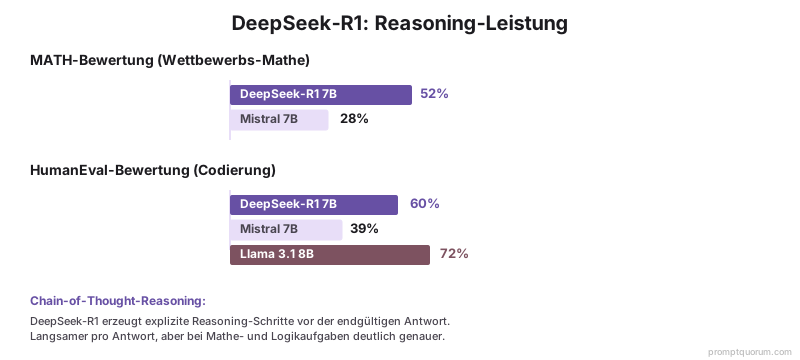
Vision-Modelle auf Ollama
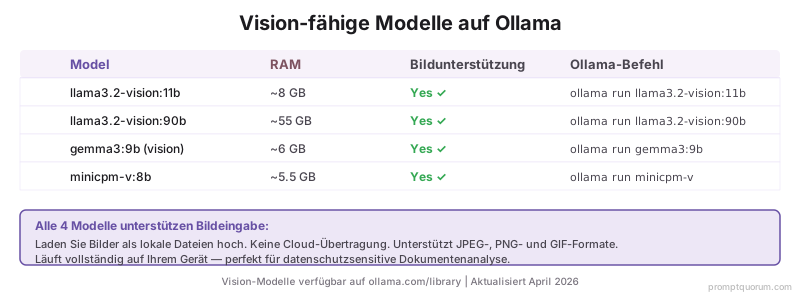
Mai 2026: Diese Modelle auf Ollama unterstützen Bildeingabe (multimodal). Gemma 4 unterstützt sowohl Vision ALS AUCH Tool Calling – einzigartig unter Vision-Modellen auf Ollama.
| Modell | RAM | Bildunterstützung | Ollama Befehl |
|---|---|---|---|
| llama3.2-vision:11b | ~8 GB | Ja | ollama run llama3.2-vision:11b |
| llama3.2-vision:90b | ~55 GB | Ja | ollama run llama3.2-vision:90b |
| gemma3:9b (vision) | ~6 GB | Ja | ollama run gemma3:9b |
| minicpm-v:8b | ~5,5 GB | Ja | ollama run minicpm-v |
| gemma4:9b | ~6 GB | Ja ✓ | ollama run gemma4:9b |
Vollständiger Top-10-Vergleich
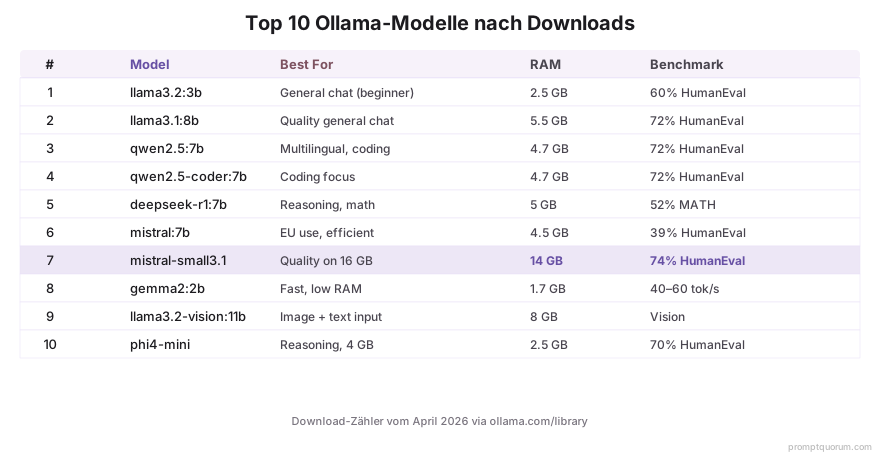
Download-Zählungen bevorzugen immer noch Llama 3.x und Qwen 2.5 aufgrund der Häufigkeit von Tutorials. Für neue Projekte im Mai 2026 sind Llama 4 Scout, Qwen3 und Gemma 4 zu bevorzugen.
| # | Modell | Beste für | RAM | HumanEval |
|---|---|---|---|---|
| 1 | Llama 3.2 3B | Einstiegsmodell, allgemeiner Chat | 2,5 GB | 60% |
| 2 | Llama 4 Scout 17B | Beste Gesamtqualität, MoE | ~10 GB | 85% |
| 3 | Qwen3 8B | Aktualisiert, mehrsprachig + Codierung | 5,5 GB | 76% |
| 4 | Devstral Small 24B | Agentic Codierung (Multi-Datei) | 16 GB | 80% |
| 5 | deepseek-r1:7b | Reasoning, Mathe | 5 GB | — |
| 6 | Mistral 7B v0.3 | EU-Einsatz, effizient | 4,5 GB | 39% |
| 7 | mistral-small3.1 | Qualität bei 16 GB | 14 GB | 74% |
| 8 | gemma2:2b | Schnell, niedriger RAM | 1,7 GB | — |
| 9 | gemma4:9b | Vision + Tool Calling | 6 GB | — |
| 10 | phi4-mini | Reasoning, 4 GB RAM | 2,5 GB | 70% |
Wie durchsuchen Sie die Ollama-Bibliothek?
Es gibt zwei Möglichkeiten, mit Ollama-Modellen zu arbeiten. Installierte Modelle wechseln: In der Ollama Mac-App klicken Sie auf den Modell-Dropdown-Button am unteren Rand des Chat-Eingabefeldes (zeigt den aktuellen Modellnamen, z. B. "llama4:scout"), um zwischen lokal installierten Modellen zu wechseln. Neue Modelle finden und herunterladen: Besuchen Sie ollama.com/library, um 4.500+ Modelle nach Kategorie zu durchsuchen, und nutzen Sie dann die CLI-Befehle unten zum Herunterladen.
- Öffnen Sie https://ollama.ai/library in einem Webbrowser für die vollständige durchsuchbare Bibliothek aller 4.500+ Modelle.
- Filteroptionen: Modellgröße, Lizenz, Veröffentlichungsdatum, Benchmarks (MMLU, HumanEval, MATH).
- Ratings pro Modell: Nutzer-Downloads, GitHub-Sterne (für das Basis-Modell), Ollama-Sterne.
- Neue Modelle: Ollamás Bibliothek wird kontinuierlich aktualisiert (neue Modelle erscheinen Tage nach der Veröffentlichung).
ollama list
# Zeigt alle installierten Modelle an

ollama pull llama4:scout
# Lädt Llama 4 Scout herunter (beste Qualität, MoE)

ollama pull qwen3.6:27b
# Lädt Qwen 3.6 27B herunter (Best Coding Model, 77,2% SWE-bench)

ollama run llama4:scout
# Startet eine interaktive Chat-Sitzung

ollama run -m deepseek-r1:7b "Lösen Sie 2^10"
# Löst Reasoning-Aufgaben mit CoT aus
Häufige Fehler bei der Auswahl von Ollama-Modellen
Ich habe einen großen Modell-Tag gepullt, aber mein RAM ist voll. Was ist passiert?
Zu schnell gepullt, ohne den RAM zu überprüfen. Verwenden Sie `ollama show [model-name]` BEVOR Sie pullen. Beispiel: `ollama show llama3.1:70b` zeigt RAM-Anforderungen an (~42-48 GB mit Q4-Quantisierung). Für Anfänger: Bleiben Sie bei 7B-13B-Modellen (unter 16 GB RAM). Löschen Sie mit `ollama rm [model-name]`.
Ich verwende ein Allzweck-Modell wie Llama 3.1, aber die Codierung ist langsam. Warum?
Llama 3.1 8B ist Allzweck-freundlich, aber Qwen2.5 oder Mistral 7B sind für technische Aufgaben spezialisiert. Für Codierung: Schalten Sie zu Qwen2.5 7B um (75,4 % HumanEval gegenüber 68,2 % für Llama). Beide laufen unter 8 GB RAM.
Ich habe ein Modell gepullt, sehe es aber nicht in der Liste. Wie überprüfe ich die Installation?
Führen Sie `ollama list` aus. Ollama speichert Modelle unter `~/.ollama/models/` (Mac) oder `%USERPROFILE%.ollamamodels` (Windows). Wenn sich das Modell dort befindet, aber nicht in der Liste angezeigt wird, neustarten Sie den Ollama-Daemon: Beenden Sie Ollama und öffnen Sie es erneut.
Häufig gestellte Fragen
Wie viel RAM brauche ich für ein lokales Modell?
7B-Modelle benötigen 6,5-8 GB RAM. 13B-Modelle: 11-14 GB. 70B-Modelle: 42-48 GB mit Quantisierung (Q4_K_M). Kleiner (3B): 2-3 GB. Überprüfen Sie mit `ollama show [model-name]` vor dem Herunterladen.
Kann ich Ollama-Modelle offline ausführen?
Ja. Nach dem initialen Download läuft jede Inferenz lokal, ohne Internetverbindung. Ollama überprüft gelegentlich Updates (aber nicht automatisch angewendet).
Welches Modell hat die beste deutsche Sprachunterstützung?
Qwen3 / Qwen 3.6 27B hat überlegene deutsche Unterstützung (trainiert auf CulturaX und DE-Wikitext). Llama 3.1 ist für Deutsch angemessen, aber Qwen ist präziser. Devstral Small 24B (Mistral AI, französisches Unternehmen, Apache 2.0) ist für Deutsch und Französisch kompetent.
Sind Ollama-Modelle wirklich kostenlos?
Ja. Alle auf Ollama verfügbaren Modelle sind Open-Source mit freien Lizenzen (Apache 2.0, Meta Llama 3 Community, Deepseek). Keine Abonnements, keine API-Gebühren. Laden Sie herunter, installieren Sie lokal, und verwenden Sie unbegrenzt.
Wie schnell ist DeepSeek-R1 wirklich?
Erzeugungsgeschwindigkeit: 15-25 Token/Sek. auf M1 Pro (ähnlich wie Llama 3.1 7B). Die Gesamtlatenz ist höher, weil Gedankenketten ausgegeben werden -- erwarten Sie 8-12 Sekunden für mittlere Anfragen. Für Echtzeit-Interaktion nutzen Sie Llama 3.1 oder Mistral.
Warum sollte ich Ollama verwenden und nicht einfach ChatGPT Plus?
Datenschutz: Keine Chats an OpenAI übertragen. Kosten: Kein monatliches Abonnement; eine GPU-Einmalinvestition. Offline: Funktioniert vollständig ohne Internet. Anpassbar: Systemprompte, Verhaltensrichtlinien und Modellparameter vollständig unter Ihrer Kontrolle.
Können Ollama-Modelle Bilder verarbeiten?
Ja. Llama 3.2 Vision, Qwen2-VL und Gemma 3 sind alle Multi-Modal. Laden Sie Bilder als lokale Dateien hoch; keine Cloud-Übertragung. Unterstützung: JPEG, PNG, GIF.
Wie aktualisiere ich auf neuere Ollama-Modellversionen?
Führen Sie `ollama pull [model-name]` erneut aus. Ollama lädt nur die Unterschiede herunter (Deduplizierung). Alte Versionen können gelöscht werden mit `ollama rm [model-name]:tag`.
Muss ich bei der Verwendung lokaler LLMs via Ollama die DSGVO beachten?
Ja. DSGVO Artikel 32 erfordert angemessene Sicherheitsmaßnahmen für personenbezogene Daten. Lokale Inferenz auf privaten Geräten oder Servern erfüllt Datenschutz-durch-Design-Anforderungen. Keine Cloud-Übertragung bedeutet: Datensouveränität, keine Datenexporte, Einhaltung von BSI-Grundschutz-Katalogen. Vorsicht: Wenn Sie ein Cloud-Modell verwenden, prüfen Sie zunächst die Datenverarbeitungsverträge.
Ist Ollama mit Open-Source-Modellen für den deutschen Mittelstand geeignet?
Ja. Kleine und mittlere Unternehmen (KMU) in Deutschland profitieren von: Datensouveränität (kein Cloud-Vendor Lock-in), Einhaltung von IT-Sicherheitsstandards (BSI IT-Grundschutz), Skalierbarkeit auf Standard-Hardware und Einsparungen durch keine API-Gebühren. Qwen2.5 7B läuft auf einer typischen Office-GPU; Llama 3.1 8B ist ein bewährtes Standard-Mittelstand-Modell für interne Tools, Customer-Service-Automation und Dokumentenverarbeitung.
Verwandte Lektüre
- Lokale LLMs mit VS Code und Cursor installieren -- VS Code und Cursor erkennen jetzt Ollama automatisch.
- So wählen Sie ein lokales Modell: Llama vs. Qwen vs. Mistral -- Vollständiger Vergleich für Anfänger.
- Ollama vs. LM Studio: Welches ist schneller? -- GPU-Benchmarks und Durchsatzvergleiche.
- Wie installieren Sie Ollama auf Windows/Mac -- Schritt-für-Schritt-Installations- und Umgebungskonfiguration.
- Hardware für lokale LLMs: GPU-Anforderungen 2026 -- Welche GPU, RAM und Speicher für Ihr Modell erforderlich ist.
- Troubleshooting: Ollama-Fehler und Lösungen -- CUDA, MPS, CPU-Fallback und häufige Fehler.
Quellen
- Ollama-Modellbibliothek -- Alle 4.500+ Modelle mit Live-Download-Statistiken.
- Ollama GitHub: Beliebte Modelle nach Downloads -- Monatliche Einträge zu Benutzern und Download-Trends (öffentliche Daten).
- DeepSeek-R1 Whitepaper -- "DeepSeek-R1: Incentivizing Reasoning Capability in LLMs via Reinforcement Learning" (Januar 2025).
- Gemma 3 Announcement -- Google Blog: Gemma 3 Multimodal, 128K Kontext, Februar 2026.