Key Takeaways
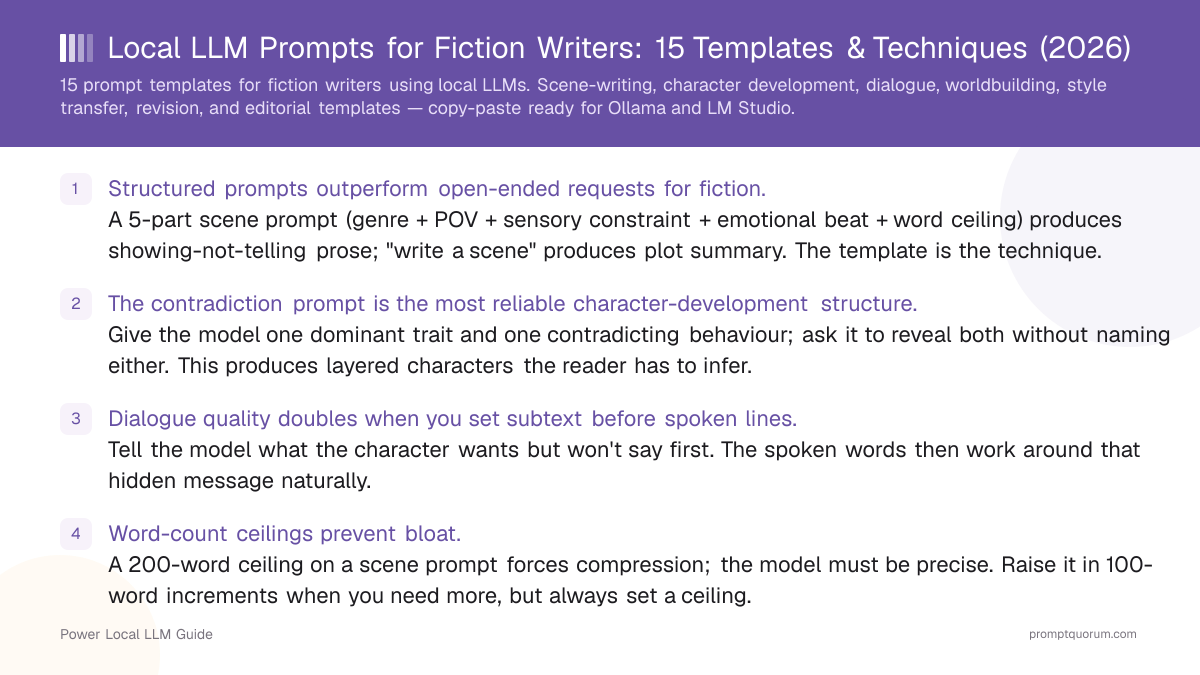
- Structured prompts outperform open-ended requests for fiction. A 5-part scene prompt (genre + POV + sensory constraint + emotional beat + word ceiling) produces showing-not-telling prose; "write a scene" produces plot summary. The template is the technique.
- The contradiction prompt is the most reliable character-development structure. Give the model one dominant trait and one contradicting behaviour; ask it to reveal both without naming either. This produces layered characters the reader has to infer.
- Dialogue quality doubles when you set subtext before spoken lines. Tell the model what the character wants but won't say first. The spoken words then work around that hidden message naturally.
- Word-count ceilings prevent bloat. A 200-word ceiling on a scene prompt forces compression; the model must be precise. Raise it in 100-word increments when you need more, but always set a ceiling.
- Revision prompts need a named problem. "Rewrite this" produces minimal change. "Rewrite: eliminate all passive voice, every sentence must start with a concrete noun or a strong verb" produces measurable improvement.
- Editorial templates operate at manuscript level. Plot Consistency Check, Pacing Analysis, and Exposition Smoothing work on completed scenes and chapters — run them after drafting, not during.
- Larger models maintain constraint adherence better over long completions. Llama 3.3 70B and Qwen3 32B follow 5-part scene constraints reliably; smaller models drift after ~200 tokens.
- The frontend matters less than the model and prompt. Ollama, LM Studio, SillyTavern, and Agnai all pass your prompt verbatim — the fiction quality difference is model + prompt, not frontend.
Quick Facts
- Templates covered: 15 total — scene-writing (2), character development (3), dialogue (2), worldbuilding (2), style transfer (2), revision (1), editorial (3).
- Tested on: Llama 3.3 70B, Qwen3 32B, Mistral Large — all via Ollama on Apple M5 Max 64 GB and NVIDIA RTX 4090 24 GB.
- Word-count ceilings: 150–400 words for scenes; 100–200 words for dialogue; 300–600 words for worldbuilding passages.
- Best all-round model for fiction: Llama 3.3 70B (strong instruction following, narrative coherence, long context).
- Best for style transfer: Mistral Large (consistent prose register; reproduces author voice patterns reliably).
- Best for dialogue: Command A+ or Hermes 3 (character voice differentiation; naturalistic spoken register).
- System prompt: set genre and POV in a system message, not in the user turn — it anchors every completion in the session.
Why Structured Prompts Matter for Fiction
The default failure mode of local LLMs in fiction is summarisation: the model tells you what happened instead of showing the scene. This happens because instruction-tuned models are optimised for task completion, not narrative immersion — and a vague prompt ("write a tense confrontation") triggers the summary heuristic. A structured prompt closes off that exit. When you specify POV, a sensory constraint, an emotional beat, and a word ceiling, the model has no room to summarise — it must render. The secondary failure mode is drift: the model starts in your specified genre and voice, then regresses toward a generic AI writing register after 200–300 tokens. Constraint anchors (POV, sensory focus, word ceiling) slow this drift; a system prompt that names the genre and voice arrests it entirely.
💡Tip: Set genre and POV in the system prompt for multi-turn sessions — see system prompt vs user prompt for why this anchors better than user-turn instructions. Put genre and POV in the system message, not the user turn. Every completion in the session inherits the constraint, so you do not have to repeat it. Example: "You are a literary fiction assistant. All prose you generate is written in close third-person, past tense, with a focus on sensory detail and subtext."
Before / After: What Structured Prompts Actually Do
The three pairs below show exactly what changes when you switch from a vague request to a structured prompt — each pair covers a different template category and describes the output you get from each prompt type.
Pair 1 — Scene Writing
❌ Vague scene prompt
“Write a tense confrontation scene in a kitchen.”
✅ Structured 5-part scene prompt
“Genre: literary fiction. POV: close third, Maya. Sensory anchor: the smell of burned coffee. Emotional beat: Maya realises her brother lied. Show without stating. Word ceiling: 200 words.”
- Vague output: 2–3 sentences of plot summary. "Maya confronted her brother in the kitchen. The tension between them was palpable. He shifted uncomfortably and looked away." The scene is told, not shown. The sensory world is absent.
- Structured output: a 180-word rendered scene where the burned coffee grounds the action — Maya sees grounds in the filter from that morning, registers that her brother was here when he said he wasn't, and the scene ends on the physical detail of her hands on the counter. The realisation emerges from the prose, not a stated emotion.
Pair 2 — Character Development
❌ Trait-list character prompt
“Elena is brave, sarcastic, and loyal.”
✅ Contradiction character prompt
“Elena is pathologically honest. She hides her sister's letters from their mother. Show both without naming either. 200 words.”
- Trait-list output: a character who illustrates each trait in sequence. "Elena walked into the room without hesitating — she was never one for fear. 'Sure,' she said drily. She'd do anything for the people she loved." Each trait is illustrated and ticked off.
- Contradiction output: a character the reader has to interpret. Elena volunteers the wrong coffee order without being asked (honest) while slipping an envelope into the kitchen drawer before her mother enters (hiding). The reader must infer the wound that produced the contradiction. That gap is the character.
Pair 3 — Dialogue
❌ Direct dialogue prompt
“Two friends argue about money.”
✅ Subtext-first dialogue prompt
“Subtext: A wants to ask B for a loan but won't say it. B knows but pretends not to. 4 exchanges, 'said' tags only, no action beats.”
- Direct output: characters who say exactly what they mean. "'You owe me money,' said James. 'I know, and I'm sorry,' said Paul." The subtext is the text. There is nothing for the reader to infer.
- Subtext-first output: four exchanges in which neither character mentions money or loans. A complains about his car needing repairs. B agrees the car is a problem. A says he might need to leave it in the garage a while longer. B says his garage is full. The need and the avoidance are both visible only in what is not said.
Scene-Writing Templates (Templates 1–2)
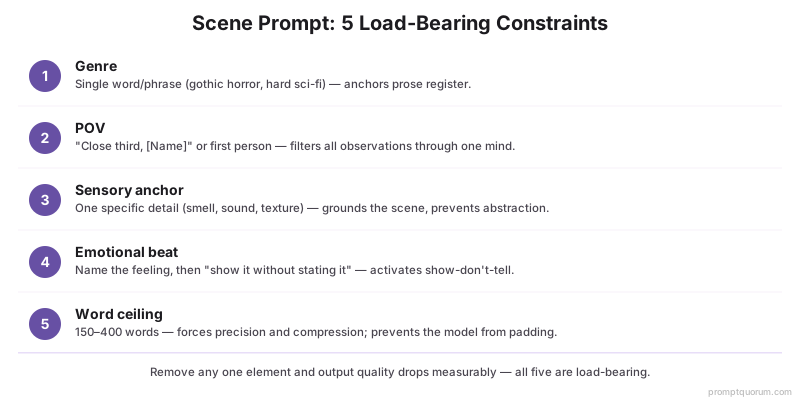
The 5-part scene template is the foundation: genre + POV + sensory anchor + emotional beat + word ceiling. Every element does specific work — remove any one and output quality drops measurably.
📍 In One Sentence
The most effective local LLM scene prompt specifies genre, POV, one sensory anchor, an emotional beat, and a word ceiling — these five constraints together force showing-not-telling prose and prevent the model's default summarisation mode.
💬 In Plain Terms
Instead of "write a tense confrontation scene", try: "Genre: thriller. POV: close third, Elena. Sensory anchor: the hum of the HVAC unit. Emotional beat: Elena realises she is wrong — show it without stating it. Word ceiling: 200 words." The model's output will be a specific scene, not a plot summary. The word ceiling is not optional — without it the model will pad.
- Genre marker — single word or phrase (e.g., "gothic horror", "cozy mystery", "hard sci-fi") anchors prose register.
- POV marker — "close third, [Name]" or "first person" sets the grammatical frame and filters all observations through one consciousness.
- Sensory anchor — one specific sensory detail (the smell of wet concrete, the sound of a clock ticking, the texture of worn carpet) grounds the scene in the physical world and prevents abstraction.
- Emotional beat — name the emotional state the scene should land on, then add "show it without stating it" — this activates the show-don't-tell constraint.
- Word ceiling — 150 words for a compressed moment; 250–300 words for a full scene beat; 400 words maximum before asking for a second scene rather than extending one.
Template 1 — Scene 5-Part Structure
The foundation template. All five elements are load-bearing — remove any one and output quality drops measurably.
Genre: [literary fiction / thriller / fantasy / horror / etc.]
POV: [first person / close third, character name]
Sensory anchor: [one specific sensory detail — smell, texture, sound]
Emotional beat: [what the POV character feels at the end of this scene — do not state it directly]
Word ceiling: [150–400 words]

Write the scene. Do not summarise. Every sentence must render a moment, not describe one.
Template 2 — Action / Fight Time Compression
Prevents the model from telescoping action or adding unnecessary breathing-room prose between beats. The "1 second per sentence" rule enforces mechanical precision and keeps the sequence kinetic.
Genre: [action / thriller / fantasy combat]
POV: [close third / first person, character name]
Sensory anchor: [one physical sensation — impact, sound, texture]
Time rule: every sentence represents exactly 1 second of story time
Word ceiling: [100–200 words]

Write the fight/action sequence. Enforce the time rule strictly — no sentence can span more than 1 second of story time.
Character Development Templates (Templates 3–5)
The contradiction prompt produces deeper characters than any trait-list approach. Giving a model a list of traits ("Elena is brave, sarcastic, and loyal") produces a character who illustrates those traits. Giving the model one dominant trait and one contradicting behaviour produces a character the reader has to interpret.
- One dominant trait, one contradicting behaviour — the contradiction is the character; the reader infers the wound or history that produced it.
- "Do not name or explain either" — this instruction prevents the model from editorialising ("She was contradictory by nature…") and forces the scene to carry the meaning.
- Relationship dynamic prompt: "Write a 200-word exchange between [Character A] and [Character B] in which A wants X and B wants Y — neither says what they actually want."
💡Tip: Use the character sheet as a system prompt for the whole session. Build a plain-text character sheet (name, dominant trait, contradicting behaviour, core wound, speech register) and paste it into the system message at the start of a writing session. Every character appearance in that session will be consistent. Update the sheet as the character evolves across chapters.
Template 3 — Character Contradiction Prompt
The most reliable character-development structure. Produces layered characters the reader has to infer, rather than characters who illustrate a trait list.
Character name: [Name]
Dominant trait: [one trait — "relentlessly optimistic", "pathologically honest", "obsessively controlled"]
Contradicting behaviour: [one specific action that contradicts the trait — "hides her sister's letters", "lies to the one person who believes in him"]

Write a scene (200 words max) in which both the trait and the behaviour are present and visible. Do not name or explain either.
Template 4 — Voice Isolation Prompt
Isolates a character's voice from plot and psychology. Useful for establishing speech register before writing dialogue, or for checking that a character sounds distinct from others in the same manuscript.
Character: [Name]
Task: a mundane activity — [making coffee / waiting for a bus / washing dishes]

Write 5 lines of [Character]'s internal monologue during this task. Do not include plot information. Do not explain the character's psychology. Use the character's specific speech register only.
Template 5 — Backstory Excavation
Shows the reader what made the character without showing the adult version. Backstory inferred from a childhood scene is more durable than backstory that is told.
Character (adult version): [Name — include dominant trait and contradicting behaviour in one sentence]

Write a 150-word scene from [Character]'s childhood that makes their adult behaviour inevitable — but do not show the adult version of the character. Do not name the trait or explain the connection. Show the event; let the reader infer the rest.
Dialogue Templates (Templates 6–7)
The subtext-first dialogue template produces naturalistic speech. Most models default to characters who say exactly what they mean — a dead giveaway of AI-generated dialogue. Setting the subtext before asking for spoken lines forces the model to construct the evasion.
- State the subtext explicitly — what each character wants but won't say, and why they won't say it.
- "No dialogue tags except 'said'" — removes the model's crutch of emotive tags ("he said angrily") and forces the spoken words to carry the emotion.
- "No action beats" — removes stage directions that the model uses to fill empty dialogue ("She crossed her arms. He sighed."). Strip these back in revision.
- Genre register prompt: "Write a 5-exchange argument between a [relationship] in [genre]. The argument is surface-level about [topic A], but the real argument is about [topic B]. Do not name topic B."
- Interruption prompt: "Character A is mid-sentence when Character B interrupts. Write it so the interruption reveals B's emotional state without B saying how they feel."
💡Tip: For multi-character dialogue, assign each character a "speech register" in the system prompt before generating. Example: "Elena: formal, precise, never contractions. Marcus: casual, interrupts, starts sentences with 'Look,' or 'Thing is.'" The model will maintain these registers without reminding it each turn.
Template 6 — Subtext-First Dialogue
Sets what each character wants but will not say before writing any spoken lines. Forces the model to construct the evasion rather than writing characters who say exactly what they mean.
Subtext (do not include this in the dialogue itself):
[Character A] wants [X] but will not ask for it directly because [reason].
[Character B] knows [X] is what A wants but pretends not to because [reason].

Scene: [brief setting — 10 words max]
Length: [number] exchanges

Write the dialogue. No dialogue tags except "said". No internal monologue. No action beats.
Template 7 — Voice Differentiation (3 Deliveries)
Tests whether character voices are distinct enough to identify without attribution. If all three deliveries sound the same, add speech register constraints to the system prompt before continuing the session.
Piece of news: [state the news in one sentence]

Write this news delivered by three different characters. Each delivery should make the character's class, education level, and emotional relationship to the news immediately apparent. No exposition — voice only.

Character 1: [Name — background and relationship to the news in one sentence]
Character 2: [Name — background and relationship to the news in one sentence]
Character 3: [Name — background and relationship to the news in one sentence]
Worldbuilding Templates (Templates 8–9)
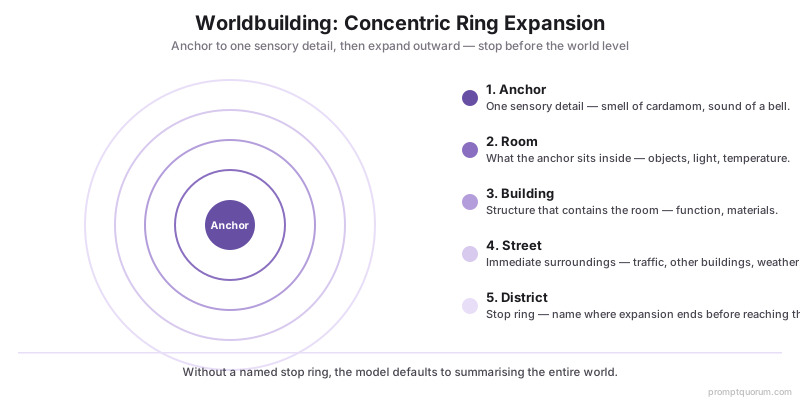
Worldbuilding prompts work best with the concentric ring structure: anchor to one sensory detail, expand outward. Starting with "describe my fantasy city" produces a catalogue. Starting with "the smell of the market at dawn" produces a world the reader inhabits.
📍 In One Sentence
Worldbuilding prompts anchored to a single sensory detail and structured as concentric rings (object → room → building → street → district) produce immersive world description instead of encyclopaedic catalogues.
💬 In Plain Terms
Start with something small and specific — the weight of a coin, the smell of a forge, the sound of a specific street vendor — and ask the model to expand outward from there. Stop before you reach the city level. Multiple short worldbuilding passages from different anchors build a richer world than one comprehensive description ever will.
- Anchor specificity — the more specific the anchor, the more specific the world. "The smell of the market" is vague. "The smell of cardamom and wet dog from the spice stall on the corner" produces a specific world.
- Stop ring — tell the model where to stop expanding (room, building, district, city). Without a stop, it will summarise the entire world.
- "Do not name the world" — prevents the model from inserting lore dumping and forces it to render the scene.
- "Do not explain the history" — removes the encyclopaedia reflex; history emerges from detail, not explanation.
- Implied technology prompt: "Describe a street in your world by naming every object a character touches within a 30-second walk. No narration — object names only, in sequence."
⚠️Warning: Avoid worldbuilding catalogues. If your worldbuilding prompt produces a bulleted list of facts about your world, the prompt is too abstract. Every response that is not rendered prose should be reprompted with a concrete anchor. Catalogues are a symptom of "describe my world" prompts — switch to "show me [specific location] from [specific POV] at [specific moment]."
Template 8 — Worldbuilding Concentric Rings
Anchors to one sensory detail and expands outward. Prevents encyclopaedic catalogues and produces immersive world description the reader inhabits rather than reads about.
Anchor: [one specific sensory detail — a smell, a sound, a texture]
POV: [observer character or omniscient]
Rings: expand from the anchor outward — object → room → building → street → district. Stop when you reach [ring level: room / building / street / district].
Word ceiling: [200–400 words]

Do not name the world. Do not explain the history. Show only what the POV character perceives in this moment.
Template 9 — Faction Culture Through Objects
Reveals worldbuilding through material culture rather than description or exposition. What a faction owns, uses, and keeps visible tells the reader more than any explanation of their beliefs.
Faction: [name and one-line description of their core belief or function]

Describe the interior of a building used by this faction — only through the objects in the room. Do not describe the people. Do not state their beliefs. Do not explain the purpose of any object. 150 words max.
Style Transfer Templates (Templates 10–11)
Style transfer works when you name the technique, not just the author. "Write like Cormac McCarthy" produces a generic approximation — sparse punctuation and Western themes. "Write using McCarthy's technique of nested subordinate clauses, concrete nouns only, no dialogue tags" produces something with actual structural fidelity. For a fuller framework on structuring prompts that produce specific creative outputs, see the CRAFT framework.
- Name the techniques specifically — "spare prose" is vague; "short declarative sentences, concrete nouns, no modifiers" is actionable.
- Paste a sample — 2–3 sentences of the actual author's prose activates pattern matching in the model more effectively than description alone.
- "Do not mimic the sample — replicate the technique" — prevents direct paraphrase of the sample passage.
- Tense and POV transfer: "Rewrite the following passage: change from third-person past to first-person present. Maintain all concrete sensory detail. Do not add new plot information. 200 words max."
- Register calibration: ask the model to name the techniques it sees in a passage you provide before asking it to replicate them — this surfacing step improves technique-naming accuracy.
💡Tip: Mistral Large for style transfer. Mistral Large maintains consistent prose register across long completions better than most locally-runnable models. For style transfer tasks where register consistency matters across multiple paragraphs, prefer Mistral Large over Llama 3.3 70B. For style transfer in shorter bursts (under 300 words), any 30B+ model performs adequately.
Template 10 — Technique-Named Style Transfer
Names specific techniques rather than the author's name alone. Produces structural fidelity rather than surface-level pastiche.
Target style: [Author name]
Techniques to replicate (name 2–3 specifically):
1. [Technique — e.g., "sentence fragments for interiority"]
2. [Technique — e.g., "concrete Anglo-Saxon vocabulary, no Latinate abstractions"]
3. [Technique — e.g., "em dashes for interruption, never ellipsis"]

Sample passage (2–3 sentences of the author's actual prose):
"[paste sample]"

Now write [scene description] using these techniques. 200 words. Do not mimic the sample — replicate the technique.
Template 11 — Genre Register Transfer
Moves existing prose between genre registers without altering plot information. Useful for finding the right register for a scene or for revision when the register does not match the genre.
Source register: [thriller / romance / horror / literary fiction / commercial fiction / etc.]
Target register: [literary fiction / commercial fiction / genre X]
Specific changes: [longer sentences / more interiority / less action description / etc.]

Rewrite the following passage in [target register]. Do not change any plot information. Word ceiling: same length as input.

[paste passage]
Revision Templates (Template 12)
Revision prompts need a named problem, not a general instruction to improve. "Make this better" produces minimal surface-level edits. "Eliminate every passive construction; every sentence must begin with a concrete noun or a strong active verb" produces measurable structural change.
- Always paste the draft, not a description. Revision prompts only work when you paste the actual draft text. Describing the problem without showing the prose produces generic advice rather than a rewritten passage.
- Name the specific problem. "Rewrite" is not enough. Identify one structural issue: passive voice, adverb overload, head-hopping, bloat, or info-dump.
- Head-hopping fix: "The following passage contains POV violations — we hear thoughts from multiple characters. Rewrite it strictly in close third [Character Name]. Remove all interior access to other characters."
- Dialogue naturalisation: "The following dialogue sounds written. Rewrite: characters may interrupt each other, speak in fragments, talk past each other. Keep the same information exchanged."
💡Tip: Always paste the draft, not a description. Revision prompts only work when you paste the actual draft text. Describing the problem without showing the prose produces generic advice rather than a rewritten passage. Paste the specific paragraph or exchange, name the specific problem, and specify the word ceiling for the rewrite.
Template 12 — Revision Toolkit (Compression, Passive Voice, Adverb Reduction)
Three revision instructions that name the specific problem. Run each separately — combining all three in one prompt produces inconsistent results as the model prioritises one instruction over the others.
--- COMPRESSION ---
The following scene is [N] words. Rewrite it in [N/2] words. Preserve the emotional beat and all sensory anchors. Cut dialogue tags, action beats, and transitions first:

[paste scene]

---

--- PASSIVE VOICE ELIMINATION ---
Rewrite the following paragraph: every sentence must use active voice. If the subject is not clear, invent a concrete subject. 150 words max:

[paste paragraph]

---

--- ADVERB REDUCTION ---
Rewrite the following: remove every adverb. Replace each adverb + weak verb pair with a single strong verb. Do not add new plot information:

[paste paragraph]
Editorial Templates (Templates 13–15)
Editorial templates operate at manuscript level rather than scene level. They help you catch continuity errors before they compound, identify pacing problems across a full chapter, and redistribute information dumps into rendered prose. Run these after drafting, not during.
💡Tip: Run editorial templates on completed drafts, not works-in-progress. Plot Consistency Check requires at least 3 scenes; Pacing Analysis requires a full chapter. Running them on incomplete passages produces false positives and wastes context window.
Template 13 — Plot Consistency Check
Identifies continuity errors before they compound across chapters. Run after every 3–4 new scenes to catch errors while they are still easy to fix.
[paste the last 3 scenes here]

Read these three scenes carefully. List every continuity error you detect: changed physical descriptions (eye colour, hair, height), location inconsistencies, timeline conflicts, object appearances that contradict earlier scenes, character knowledge they should not yet have.

Output only a flag list — one sentence per flag, 150 words maximum total. Do not summarise the scenes. Do not suggest fixes. Flag only.
Template 14 — Pacing Analysis
Maps pacing across a chapter to identify flat zones. Useful when a chapter reads correctly at the sentence level but feels slow overall — the pacing marks show where the drag originates.
[paste chapter here]

Read this chapter and mark each paragraph with: FAST / MEDIUM / SLOW.

After marking, list only the SLOW paragraphs with a one-sentence diagnosis for each: what is causing the pacing to drag (over-description, dialogue repetition, excessive interiority, unnecessary backstory insertion, etc.).

Output format: Paragraph [number]: [SLOW] — [one-sentence diagnosis]
No other commentary. No summaries. Diagnosis only.
Template 15 — Exposition Smoothing
Redistributes information-dump exposition across dialogue, action, and sensory detail without adding or removing any information. Use when a paragraph reads as a fact-delivery mechanism rather than a scene.
[paste paragraph with exposition]

This paragraph delivers exposition as a block. Rewrite it by distributing the same information across three channels:
1. A line of dialogue that reveals one piece of information through character reaction (not explanation).
2. One action beat that implies one piece of information without stating it.
3. One sensory detail that shows one piece of information without naming it.

Word ceiling: same length as the input paragraph. Do not add any new information. Do not remove any information that was in the original.
Model Recommendations for Fiction Writing
Model choice matters less than prompt structure, but it matters. A well-structured prompt on a 7B model will outperform a vague prompt on a 70B model — but given equivalent prompts, larger models maintain constraint adherence over longer completions and differentiate character voices more reliably.
General scene writing
- Recommended Model:
- Llama 3.3 70B
- Why:
- Strong instruction following, narrative coherence, best all-round for constrained prose
Style transfer
- Recommended Model:
- Mistral Large
- Why:
- Consistent prose register across long completions; best register fidelity of locally-runnable models
Dialogue / character voice
- Recommended Model:
- Command A+ or Hermes 3
- Why:
- Naturalistic speech register; differentiates character voices reliably across extended exchanges
Worldbuilding
- Recommended Model:
- Qwen3 32B
- Why:
- Strong at structured detail generation; maintains the concentric-ring expansion pattern reliably
Revision / editing
- Recommended Model:
- Llama 3.3 70B
- Why:
- Best at following specific structural rewrite instructions across a full paragraph
Dark / uncensored fiction
- Recommended Model:
- Hermes 3 Llama 3.3
- Why:
- Fine-tuned for fewer content refusals; no cloud terms-of-service constraints when run locally
💡Tip: Hardware minimums for fiction models. Llama 3.3 70B at Q4 quantisation requires ~40 GB VRAM or unified memory (NVIDIA RTX 4090 24 GB dual-GPU, or Apple M5 Max 64 GB). Qwen3 32B at Q4 runs on 20–24 GB. Mistral Large at Q4 requires ~24 GB. For 16 GB rigs, Qwen3 14B and Mistral Small are the practical ceiling — both follow scene templates reliably at shorter generation lengths.
Common Mistakes
- No word ceiling. Without a ceiling, the model pads — it adds transitional paragraphs, action beats, and summary sentences until it runs out of tokens. Always set a ceiling.
- Trait lists instead of contradictions. A list of five traits produces a character who illustrates each trait in turn. A contradiction between two traits produces a character the reader has to interpret. Use the contradiction structure.
- "Write like [Author]" without technique names. Author-name-only style transfer produces genre pastiche, not technique fidelity. Name the specific techniques you want replicated.
- No POV anchor. A scene prompt without a named POV produces head-hopping by default — the model accesses all characters' inner states because nothing forbids it. Always name the POV character.
- Revision prompts without a draft. Asking the model to "improve the pacing" of a scene you describe, but don't show, produces general advice. Paste the actual passage.
Sources
- Llama 3.3 70B model card and instruction-following benchmarks — Meta AI Research
- Qwen3 32B technical report — Alibaba Cloud / Qwen Team
- Mistral Large model documentation — Mistral AI
- Command A+ specification — Cohere
- Hermes 3 fine-tune methodology — Nous Research
Frequently Asked Questions
Can a local LLM replace a human writing partner for fiction drafting?
For specific sub-tasks — generating a first draft of a scene, producing dialogue variations, worldbuilding detail passes — local LLMs are fast and reliable drafting partners. They do not replace the strategic thinking of a human co-writer: they cannot evaluate whether the scene fits the story arc, whether the character's choice is emotionally earned, or whether chapter pacing is working. Use them for generation tasks; retain human judgment for structural decisions.
Which is better for fiction writing: Ollama, LM Studio, or SillyTavern?
For structured prompt templates where you send a complete prompt and receive a completion, Ollama (CLI or API) and LM Studio (OpenAI-compatible endpoint) are equivalent — the frontend does not affect output quality. SillyTavern adds value for multi-turn roleplay and character-card persistence, but for scene-writing and revision prompts, a simple chat UI or API call is sufficient.
Do these prompt templates work on smaller models (7B–14B)?
Yes, but constraint adherence degrades after ~150 tokens. Smaller models follow the first 2–3 constraints in a 5-part prompt, then drift toward their base register. For 7B–14B models: reduce the word ceiling (max 150 words), use fewer simultaneous constraints (3-part instead of 5-part), and expect to revise or reprompt more frequently. Qwen3 14B is the strongest small model tested for fiction-specific prompt following.
How do I maintain character voice consistency across a full novel session?
Build a plain-text character sheet (name, dominant trait, contradicting behaviour, speech register, 3 example lines of dialogue) and paste it into the system message at session start. For long sessions, summarise completed scenes into a running "session context" document and include the last 200–300 words of the most recent scene in every user turn. This combats context drift without exceeding the context window.
What is the best local LLM for writing dark or mature fiction?
Hermes 3 Llama 3.3, Dolphin 3.0 Mistral, or any model fine-tuned to reduce content refusals. When running locally, there are no cloud terms-of-service restrictions — the model's base fine-tune determines what it will and won't generate. See Best Local LLMs for Creative Writing 2026 for a full breakdown of uncensored model options and ethical framing.
Can I use these templates in SillyTavern or Agnai?
Yes. All templates in this guide are plain text — they work in any interface that passes text to a local model. In SillyTavern, place the genre and POV constraint in the system prompt field; use the user-turn for the scene-specific instructions. In Agnai, the setup is equivalent. The templates are frontend-agnostic.
How long should a scene prompt be?
A scene prompt of 50–100 words produces the best results in practice. Longer prompts (200+ words) can work for complex scenes but increase the chance the model ignores some constraints. For complex scenes, break the prompt into two passes: first generate the scene, then run a revision prompt that adds the constraint you withheld.
Do style transfer prompts violate copyright?
Replicating an author's technique (sentence structure, punctuation choices, narrative register) is not copyright infringement — style is not copyrightable. Reproducing substantial verbatim passages from copyrighted text is infringement. The templates in this guide use 2–3 sentence samples as technique anchors, which falls within standard educational fair use, and the generated output replicates technique rather than content.