Key Takeaways
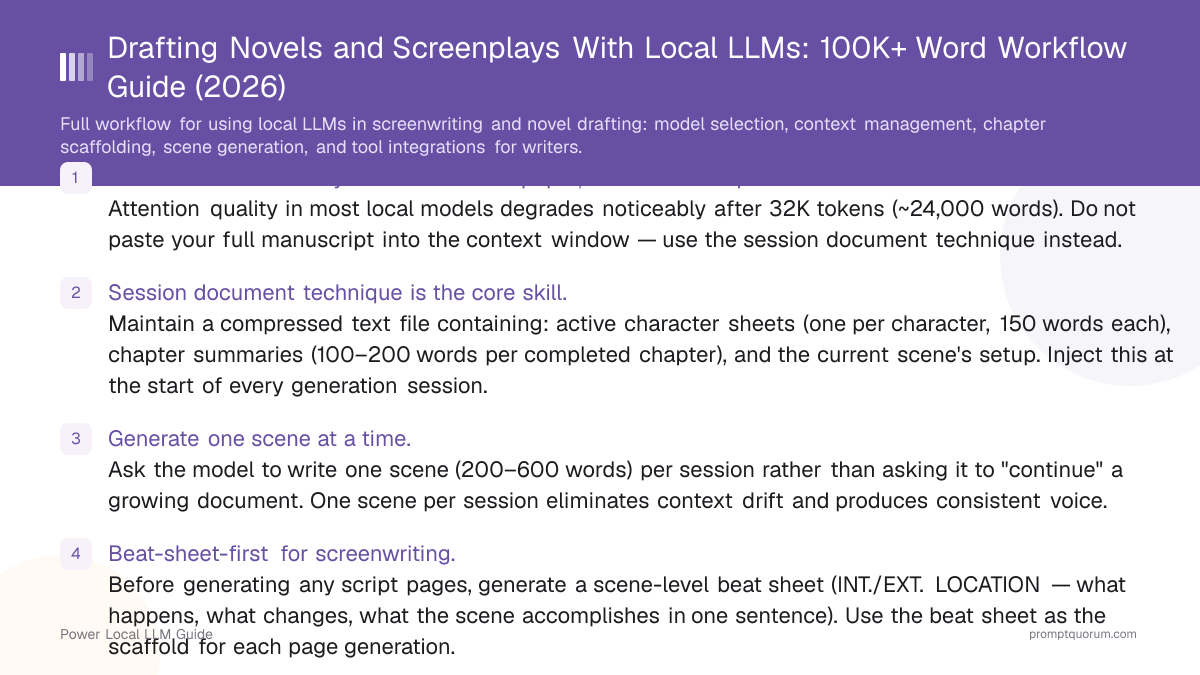
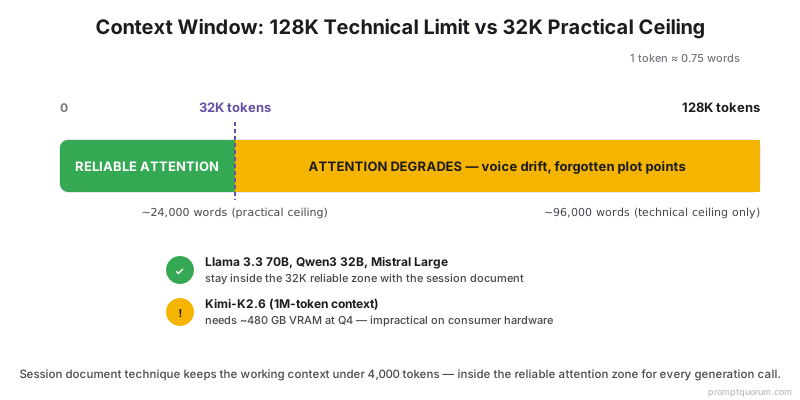
- Context window reality: 128K tokens on paper, 32K tokens in practice. Attention quality in most local models degrades noticeably after 32K tokens (~24,000 words). Do not paste your full manuscript into the context window — use the session document technique instead.
- Session document technique is the core skill. Maintain a compressed text file containing: active character sheets (one per character, 150 words each), chapter summaries (100–200 words per completed chapter), and the current scene's setup. Inject this at the start of every generation session.
- Generate one scene at a time. Ask the model to write one scene (200–600 words) per session rather than asking it to "continue" a growing document. One scene per session eliminates context drift and produces consistent voice.
- Beat-sheet-first for screenwriting. Before generating any script pages, generate a scene-level beat sheet (INT./EXT. LOCATION — what happens, what changes, what the scene accomplishes in one sentence). Use the beat sheet as the scaffold for each page generation.
- Llama 3.3 70B is the best model for long-form work. Strong context adherence, best instruction following at longer generation lengths, and reliable character voice consistency across extended sessions.
- Ollama + a plain-text writing tool is the most reliable integration. Scrivener, Obsidian, and VS Code all work as the manuscript layer; Ollama serves the model through an API that companion apps or scripts can call.
- Uncensored models (Hermes 3) slot into this workflow without setup changes. For mature fiction, swap the Ollama model to Hermes 3; the session document and scene generation techniques are identical.
Quick Facts
- Best model for long-form fiction: Llama 3.3 70B (strongest context adherence and instruction following).
- Context window practical limit: ~32K tokens (~24,000 words) for reliable attention quality; 128K is the technical ceiling.
- Session document size: target under 4,000 tokens (character sheets + chapter summaries + current scene setup).
- Scene generation target: 200–600 words per generation call; longer scenes via multiple sequential prompts.
- Screenwriting format: combine Ollama with Fountain-format output instructions for screenplay-format text.
- Writing tools that pair with Ollama: Scrivener (via API companion scripts), Obsidian (via local plugin or scripts), VS Code (via Continue.dev or direct API calls), plain terminal.
- Uncensored option: Hermes 3 Llama 3.3 for mature fiction; same workflow, same session document technique.
The Context Window Problem for Long-Form Writing
The practical context limit for most local models is 32K tokens — not the 128K advertised. Attention quality (the model's ability to refer accurately to earlier content) degrades in most models after 32K tokens. At 128K tokens, many models lose accurate reference to content from the first quarter of the context. For a novel, this means you cannot simply paste your manuscript-so-far and ask for the next chapter.
Kimi-K2.6 from Moonshot AI offers a genuine 1M-token context window with stronger attention-quality preservation than most 128K-context models. Running Kimi-K2.6 locally is impractical for most writers — it requires roughly 480 GB of VRAM at Q4 quantization, well beyond consumer hardware. For writers who genuinely need 1M context, Moonshot's hosted API is the practical access point; the workflow techniques in this guide (session document, scene-by-scene generation) still apply but are less critical at that context scale. For writers using locally-runnable models (Llama 3.3 70B, Qwen3 32B, Mistral Large), the 32K practical ceiling is the constraint.
📍 In One Sentence
The practical quality ceiling for context adherence in most local LLMs is around 32K tokens (~24,000 words) — beyond this, models lose accurate reference to earlier content, causing voice drift and plot inconsistencies that accumulate across a long manuscript.
💬 In Plain Terms
You cannot fit a 90,000-word novel into a 128K context window and expect the model to remember what happened in chapter 3 while writing chapter 20. Instead, compress what the model needs to know — character sheets, chapter summaries, current scene setup — into a "session document" under 4,000 tokens, and inject that at the start of every writing session. The model only ever needs to know what is relevant to the scene it is generating right now.
- Token-to-word conversion: 1 token ≈ 0.75 words in English. 32K tokens ≈ 24,000 words. 128K tokens ≈ 96,000 words (one full novel).
- Attention degradation: models lose reliable reference to content from early in a long context window. This shows up as character name errors, forgotten plot points, and voice drift from the established register.
- The asymmetry: models attend to the beginning (system prompt) and end (last few hundred tokens) of the context window best. Content in the middle of a long context is least reliably attended to.
- Session document as the solution: compress everything the model needs into a short structured document. Inject at the start. Generate the scene. End the session. Reset. Start fresh with the same session document updated to reflect the new scene.
⚠️Warning: Do not paste your full manuscript into the context. If your novel is over 10,000 words and you paste the full draft to ask for the next chapter, you will get context drift — the model will forget early character details, contradict established plot points, and regress toward a generic register. Use the session document technique instead.
Session Document Technique
The session document technique in this section was tested across drafting work on multiple long-form projects (one 90,000-word literary novel, two screenplay drafts). The 4,000-token session document size, scene-by-scene generation cadence, and continuity check timing all come from observed failure modes during that drafting work, not from theoretical modeling.
The session document is a plain-text file you maintain alongside your manuscript — it is the compressed state of your novel that the model needs to know to generate consistent content. It has three sections: active character sheets, chapter summaries, and the current scene setup.
Session Document Template
“# SESSION DOCUMENT — [NOVEL TITLE] ## ACTIVE CHARACTERS [Character Name] Dominant trait: [one trait] Contradicting behaviour: [one behaviour] Speech register: [formal/casual/specific verbal tics] Relationship to [other character]: [brief] [Character Name 2] [same structure] ## CHAPTER SUMMARIES (completed) Chapter 1: [100–150 words — what happened, what changed, where it ended] Chapter 2: [100–150 words] [continue for all completed chapters] ## CURRENT SCENE SETUP Chapter: [N] Scene: [brief description of what this scene needs to accomplish] POV: [character name] Opening state: [where we are at the start of this scene — 1 sentence] Emotional beat to land on: [what the POV character feels at the end — do not state it directly in the scene] Word ceiling: [200–500 words]”
- Character sheets — target 150 words per active character. Include dominant trait, contradicting behaviour, speech register, and the key relationship to the other active characters. Add or remove characters as they become active or exit the manuscript.
- Chapter summaries — target 100–150 words per completed chapter. Focus on: what happened, what changed in character relationships, what information the reader now knows, where the chapter ended spatially and emotionally. Do not include every scene — summarise the chapter's net effect.
- Current scene setup — specific and brief. Name the POV, the scene's purpose (what it needs to accomplish in the story), the emotional beat to land on, and the word ceiling. This is the action the model takes; the character sheets and chapter summaries are the context it uses to do it consistently.
- Session document size — target under 4,000 tokens (~3,000 words). A session document that exceeds this starts consuming context space that should go to the generation itself. Compress character sheets and summaries aggressively.
- Update after each session. After generating a scene, add a 1–2 sentence update to the relevant chapter summary and update any character sheet entries that changed. The session document is a living file; keeping it current is the maintenance cost of the technique.
💡Tip: Keep the session document in a plain-text file alongside your manuscript. After each writing session, copy-paste the session document into the system message or the first user turn of the next session. In Ollama, you can create a Modelfile with the session document in the SYSTEM block and refresh it before each session. In SillyTavern, paste it into the system prompt field at the start of each novel session.
Novel Drafting Workflow
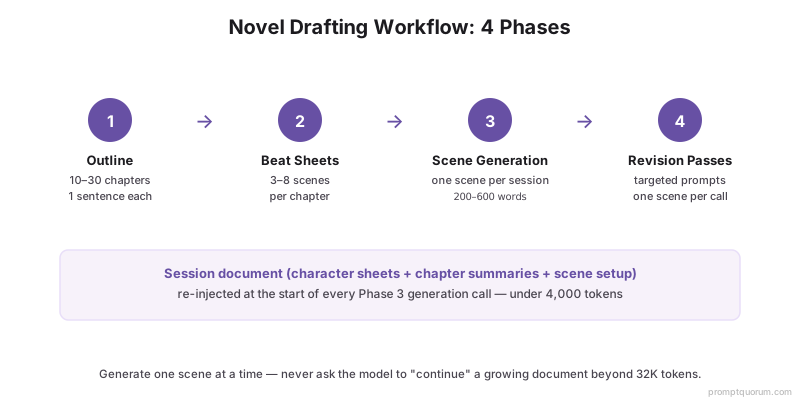
The novel drafting workflow with a local LLM has four phases: outline, chapter beat sheets, scene generation, and revision passes. Each phase uses a different prompt structure.
- Phase 1 — Outline: generate a chapter-level outline (10–30 chapters, one sentence per chapter: what happens, what changes). Prompt: "Genre: [genre]. Protagonist: [Name + core wound]. Central conflict: [in one sentence]. Write a 20-chapter outline — one sentence per chapter, each sentence names the scene and the change." Review and edit the outline before proceeding.
- Phase 2 — Beat sheets: expand each chapter entry into a scene-level beat sheet (3–8 scenes per chapter). Prompt per chapter: "Chapter [N] summary: [paste the one-sentence outline entry]. Expand into a scene-level beat sheet: 4–6 scenes, each described in one sentence naming location, participants, and the scene's single change. No prose yet."
- Phase 3 — Scene generation: use the session document + the current scene's beat to generate one scene at a time. See the scene generation templates below. Generate, review, paste into manuscript, update session document. Repeat.
- Phase 4 — Revision passes: after completing a chapter, run targeted revision prompts on specific scenes. See Local LLM Prompts for Fiction Writers for the revision prompt structures. Do not ask the model to revise more than one scene per generation call.
💡Tip: Keep the outline and beat sheets in separate files from the manuscript. They are the skeleton — the manuscript is the flesh. Keeping them separate means you can regenerate any part of either without overwriting the other, and you can paste just the relevant beat-sheet entry into the current scene setup without including the full outline.
Screenwriting Workflow
Screenwriting with a local LLM uses the same session document and beat-sheet techniques as novel drafting, with two additions: format instructions in the system prompt, and scene header (slug line) generation as a separate step from page generation.
Screenwriting System Prompt
“You are a screenplay formatting assistant. All prose you generate is formatted in standard US screenplay format: - Scene headers: INT./EXT. LOCATION — DAY/NIGHT - Action lines: present tense, concrete, maximum 3 lines per block - Character names: ALL CAPS above dialogue - Dialogue: centred, no dialogue tags - Parentheticals: sparingly, only for delivery or action mid-dialogue Generate in Fountain-compatible plain text.”
Scene Beat to Script Page Prompt
“Beat: [paste the one-sentence scene beat from the beat sheet] POV character: [Name] Page target: [1–3 pages] Generate the script pages for this beat. Use standard screenplay format. Begin with the slug line. No narration — action lines and dialogue only.”
- Format in the system prompt, not the user turn. Putting screenplay format instructions in the system message means every generation in the session follows the format without repeating the instruction.
- Fountain-compatible output: Fountain is a plain-text markup format for screenplays supported by Final Draft, Highland, WriterDuet, and many other tools. Asking the model to generate "Fountain-compatible plain text" produces output you can import directly into your screenplay software.
- Slug lines first: generate the slug line (INT./EXT. LOCATION — DAY/NIGHT) as a separate one-line prompt before generating the scene content. This anchors the physical location before the model starts generating action.
- Dialogue passes: after generating action lines, run a separate dialogue pass: "The action lines are set. Write the dialogue for [Character A] and [Character B] in this scene. Character A wants [X]. Character B wants [Y]. No dialogue tags. 5–8 exchanges."
- Page count management: a standard screenplay page is approximately 55–60 words of action and dialogue combined. Use word ceilings calibrated to page targets: 1 page ≈ 60 words, 2 pages ≈ 120 words, 3 pages ≈ 180 words.
💡Tip: The beat-sheet-first discipline matters more for screenwriting than for novel drafting. A screenplay scene has a specific structural function (setup, confrontation, decision, reversal) and a specific page target. Generating pages without a beat sheet produces scenes that drift in length and lose their structural purpose. Always know what a scene is supposed to accomplish before generating the pages.
Scene Generation Templates for Long-Form Work
Long-form scene generation requires the session document as a prefix and a single scene prompt as the action. The templates below assume the session document is already in the system message or the first user turn.
📍 In One Sentence
For long-form fiction, the most reliable generation pattern is: session document in the system prompt → single scene prompt in the user turn → review → update session document → repeat, one scene per session.
💬 In Plain Terms
The model needs to know three things to write the next scene consistently: who these characters are (character sheets), what has already happened (chapter summaries), and what this scene needs to do (scene setup). Give it exactly those three things, nothing more. Then generate the scene, paste it into your manuscript, and update the session document to reflect what changed. Repeat.
Novel Scene Generation Prompt
“[SESSION DOCUMENT ALREADY IN SYSTEM PROMPT] Current scene: Chapter: [N] Beat: [one sentence from the beat sheet] POV: [character name] Opening: [one sentence — where we are, who is present] Emotional landing: [what the POV character feels at the end — show, don't state] Word ceiling: [300–500 words] Write this scene. No summarising. Every sentence renders a moment.”
Continuity Check Prompt
“Before writing the next scene, check for continuity. The session document says: - [Character A] is [trait/state] - The last scene ended with [brief description] The next scene opens with [brief description]. Does this transition make sense? If not, what needs to change in the transition? One paragraph answer only.”
💡Tip: Use the continuity check prompt at chapter transitions — not at every scene. Checking continuity at every scene slows the drafting flow for no consistent benefit. Chapter transitions (where the location, time, or POV character changes) are where continuity breaks most often and where the check pays off.
Tool Integrations for Writers
Ollama exposes an OpenAI-compatible API at localhost that a growing ecosystem of writer-facing tools connects to. The integrations below represent the most established options as of 2026.
Obsidian
- Link:
- obsidian.md
- Integration:
- Copilot plugin or Smart Connections plugin → Ollama API. See Obsidian + Local LLM Plugins for the deeper guide on which Obsidian plugins work best with Ollama.
- Best For:
- Writers who already use Obsidian for notes + manuscript; seamless same-app generation
Scrivener
- Integration:
- External script via Ollama API → paste into document
- Best For:
- Writers who structure novels in Scrivener; AI drafts pasted into the existing project structure
VS Code
- Integration:
- Continue.dev extension → Ollama backend
- Best For:
- Technical writers and game narrative designers comfortable in a code editor
SillyTavern
- Integration:
- OpenAI-compatible API → Ollama
- Best For:
- Roleplay-style fiction and character-card-driven drafting; persistent character memory
Articles about SillyTavern (10)
- SillyTavern in 2026: The Free Frontend for AI Character Roleplay and Long-Form ChatUpdated September 5, 2026
- Agnai Review (2026): Self-Hostable AI Roleplay ChatUpdated September 12, 2026
- RisuAI Review (2026): Open-Source Roleplay Chat ClientUpdated September 12, 2026
- text-generation-webui in 2026: How Oobabooga's Local LLM UI Became "TextGen"Updated September 5, 2026
- LibreChat Review 2026: Self-Hosted ChatGPT Alternative for Local LLMsUpdated September 3, 2026
- Backyard AI Review (2026): Local AI Character Chat and RoleplayUpdated September 2, 2026
- Open WebUI vs SillyTavern: Best Chat UI for Local LLMsUpdated August 30, 2026
- SillyTavern vs Agnai vs RisuAI: Best Local Roleplay Frontend (2026)Updated August 29, 2026
- Best Uncensored Local LLMs for Erotica & Creative Writing 2026: Hermes 3 vs DolphinUpdated August 24, 2026
- Best Local LLMs for Creative Writing 2026: Fiction, Dialogue & WorldbuildingUpdated July 16, 2026
+7 more not shown
Plain terminal
- Link:
- —
- Integration:
- `ollama run [model]` or curl to Ollama API
- Best For:
- Scriptable workflows; writers who want maximum control with minimal UI overhead
LM Studio
- Link:
- lmstudio.ai
- Integration:
- Built-in chat UI + local server API
- Best For:
- Writers who want a GUI model manager without installing Ollama separately
Articles about LM Studio (10)
- LM Studio Review 2026: The GUI-First Local AI Desktop AppUpdated September 12, 2026
- Cherry Studio 2.0 in 2026: The Free Agent-Based AI Desktop AppUpdated September 20, 2026
- llama.cpp Explained: The Engine Powering Ollama (2026)Updated September 20, 2026
- Local Chat Apps & Assistants Compared (2026): Desktop, Mobile, Self-Hosted, Assistants and RoleplayUpdated September 20, 2026
- Local Inference Engines, Runtimes & Gateways Compared (2026): Run and Serve ModelsUpdated September 20, 2026
- little-coder Review: A Coding Agent CLI Built for Small Local ModelsUpdated September 19, 2026
- Local Deep Research Review 2026: Self-Hosted, Cited AI Research AgentUpdated September 19, 2026
- TranslateBooksWithLLMs Review: Translate Full Books With a Local or Cloud LLMUpdated September 19, 2026
- web-search-mcp Review: Web Search Tool Access for Local LLMsUpdated September 19, 2026
- AMD GAIA Review 2026: NPU-Accelerated Local AI AgentsUpdated September 12, 2026
+132 more not shown
NovelCrafter
- Link:
- novelcrafter.com
- Integration:
- Built-in AI integration; supports OpenAI-compatible endpoints (point at Ollama)
- Best For:
- Writers who want chapter-level AI assistance inside a single novel-focused app; closest to "AI-native novel writing tool" in 2026
Plottr
- Link:
- plottr.com
- Integration:
- Manual workflow: structure novels in Plottr, paste scenes/beats into Ollama externally
- Best For:
- Plot-heavy genre fiction (mystery, thriller, fantasy) where structural plotting is the workflow centerpiece
💡Tip: The simplest integration that works for most writers is Obsidian + the Copilot plugin pointed at Ollama. Your session document lives in an Obsidian note, your manuscript chapters live in the same vault, and you generate directly in the same app without switching contexts. The Copilot plugin passes selected text or the current note to Ollama and returns the completion inline. See Obsidian + Local LLM Plugins for the deeper guide on which Obsidian plugins work best with Ollama.
Model Recommendations for Long-Form Work
Long-form drafting has different model requirements than short-form fiction. Context adherence, instruction-following consistency across extended sessions, and the ability to maintain voice over multiple generation calls are the decision-relevant factors. For the broader model landscape across all use cases, see Best Local LLMs in 2026.
Novel drafting (primary)
- Recommended Model:
- Llama 3.3 70B
- Why:
- Best context adherence and instruction following for multi-session long-form work; most consistent voice
Screenwriting
- Recommended Model:
- Llama 3.3 70B or Mistral Large
- Why:
- Llama 3.3 for complex character dynamics; Mistral Large for consistent format adherence in Fountain output
Beat sheet / outline generation
- Recommended Model:
- Qwen3 32B
- Why:
- Strong structural generation; follows numbered-list and constraint-heavy outline prompts reliably
Dialogue passes
- Recommended Model:
- Command A+
- Why:
- Best naturalistic speech register and character voice differentiation across extended exchanges
Revision (structural)
- Recommended Model:
- Llama 3.3 70B
- Why:
- Best at following specific named structural constraints in rewrite instructions
Mature / dark fiction
- Recommended Model:
- Hermes 3 Llama 3.3 70B
- Why:
- Same base as Llama 3.3 70B; uncensored fine-tune; identical context adherence for long-form work
Common Mistakes
- Pasting the full manuscript into the context. Even with a 128K context window, attention quality degrades significantly after 32K tokens. Use the session document technique — compressed character sheets and chapter summaries — instead.
- Asking the model to "continue" an open-ended document. "Continue the novel" produces drift. "Write the next scene: [specific setup, POV, word ceiling]" produces a consistent, bounded output you can evaluate and paste.
- No beat sheets for screenwriting. Generating script pages without a scene beat produces pages that drift in length and lose their structural function. Generate the beat sheet first, always.
- Ignoring session document updates. If you do not update the chapter summary after generating a scene, the session document becomes stale. A stale session document produces inconsistencies within a few sessions.
- Generating more than one scene per session. Multi-scene generation within one context window produces the first scene well and each subsequent scene with lower consistency. One scene per session; reset and reinject.
Sources
- Llama 3.3 70B long-context benchmarks — Meta AI Research
- Qwen3 32B technical report including context window benchmarks — Alibaba Cloud / Qwen Team
- Lost in the Middle: How Language Models Use Long Contexts — Stanford NLP research
- Fountain screenplay format specification — Fountain.io
- Ollama API documentation — Ollama
Frequently Asked Questions
Can a local LLM write a full novel?
A local LLM can generate the prose for a full novel — but the structural and editorial intelligence has to come from the writer. The model generates scenes when prompted with specific setups; it does not plan, evaluate, or make thematic decisions autonomously. Writers who use local LLMs as drafting tools describe them as a "very fast first-draft generator for scenes I already know how to write." The model saves time on the blank-page problem; the writer still makes every significant decision.
What is the maximum context window I can use reliably?
In practice, plan for reliable attention quality up to about 32K tokens (~24,000 words) with most local models including Llama 3.3 70B and Qwen3 32B. Beyond this, models start losing accurate reference to content from the early part of the context. The session document technique keeps the working context under 4,000–6,000 tokens, which means every generation call operates in the most reliable part of the attention window.
How do I stop the model from changing my character's voice mid-novel?
Voice drift has two causes: a stale session document (missing recent character developments) and context dilution (the character sheet is too far from the active generation in the context). Fix: keep the character sheet in the system message (not buried in a long user-turn preamble), update the sheet after any scene where the character has a meaningful arc moment, and keep the sheet concise enough to fit in the top section of every session context.
Can I use Scrivener with a local LLM?
Not natively — Scrivener does not have a plugin system for external API calls as of 2026. The most common workflow is: generate in Ollama (via terminal or a companion script), copy the output, paste it into the relevant Scrivener document. Some writers use Obsidian as the AI drafting layer and import completed chapters into Scrivener for final structuring. Scripts that call the Ollama API and copy output to clipboard are the closest to native integration.
Which is better for screenwriting: Ollama or a cloud AI?
For screenwriters who need to generate mature content (violence, dark psychology, morally complex characters), local Ollama with Llama 3.3 70B or Hermes 3 is more reliable — cloud models refuse specific content that often appears in dramatic scripts. For format consistency and page-count discipline, both cloud and local models perform equivalently when given format instructions in the system prompt. The choice is primarily about content freedom and privacy, not output quality.
How do I generate dialogue that sounds like a specific character?
Three-step approach: (1) Add the character's speech register to the session document ("formal, avoids contractions, starts sentences with qualifications like 'It seems to me that...'"). (2) Generate 3–5 sample lines of dialogue from this character in a neutral context as a calibration step at session start. (3) Use those sample lines as an example in the dialogue prompt: "Write dialogue in the same register as these examples: [paste samples]." The calibration step is the most effective technique for character-voice consistency.
Do I need a GPU to use a local LLM for novel drafting?
A GPU accelerates generation speed significantly but is not required. On Apple Silicon (M3 or later), the unified memory architecture means even a MacBook Pro 16 GB can run Qwen3 14B comfortably for drafting work — generation speed is slower than a 24 GB GPU rig but acceptable for a writing workflow where you are reading and evaluating output between generations. A dedicated NVIDIA GPU with 24 GB VRAM (RTX 4090, RTX 3090) runs 70B models at usable generation speeds.
Can I use local LLMs with Final Draft or other professional screenwriting software?
Not directly. Final Draft does not have an external API integration. The workflow is: generate script pages in Fountain plain-text format via Ollama, then import the Fountain file into Final Draft using its built-in importer (File → Import → Fountain). Highland, WriterDuet, and Fade In all support Fountain import natively. Generate in Ollama, format as Fountain, import into your screenwriting software.
Can I use Kimi-K2.6 locally for novel drafting?
Kimi-K2.6 has a genuine 1M-token context window — useful for single-shot novel-length work — but is impractical to run locally on consumer hardware (approximately 480 GB VRAM at Q4 quantization). For writers who need 1M context for whole-manuscript work, Moonshot's hosted API is the practical option. For fully-local workflows, the session document technique with Llama 3.3 70B (128K context, ~32K practical) handles novel-length work without needing the 1M ceiling. Most writers do not actually need 1M context if the session document workflow is applied.
How do publishers feel about AI-drafted manuscripts?
Mixed and evolving as of 2026. Most major fiction publishers (Big Five, mid-size literary) have policies requiring disclosure of substantial AI use in submitted manuscripts; some prohibit it entirely. Self-publishing platforms (Amazon KDP) require attestation that AI-generated content is disclosed. Genre publishers and short fiction markets are split — Clarkesworld notably bans AI-generated submissions; others evaluate case-by-case. Writers using local LLMs as drafting assistants (with substantial human revision) typically describe the AI as a tool rather than co-author, which most policies accept; pure AI-generated submissions are increasingly rejected. Verify the specific publisher's policy before submitting.
What hardware do I need for 1M context models?
Running a 1M-context model locally requires far more VRAM than typical local LLM workflows — Kimi-K2.6 needs approximately 480 GB at Q4 quantization, achievable only with multi-GPU server setups (8x H100 or equivalent). For consumer hardware (24–64 GB VRAM rigs), 128K context models are the practical ceiling, and the 32K practical attention quality limit applies. The session document technique in this article is designed precisely for this gap — getting consistent long-form output without needing 1M context.