Key Takeaways
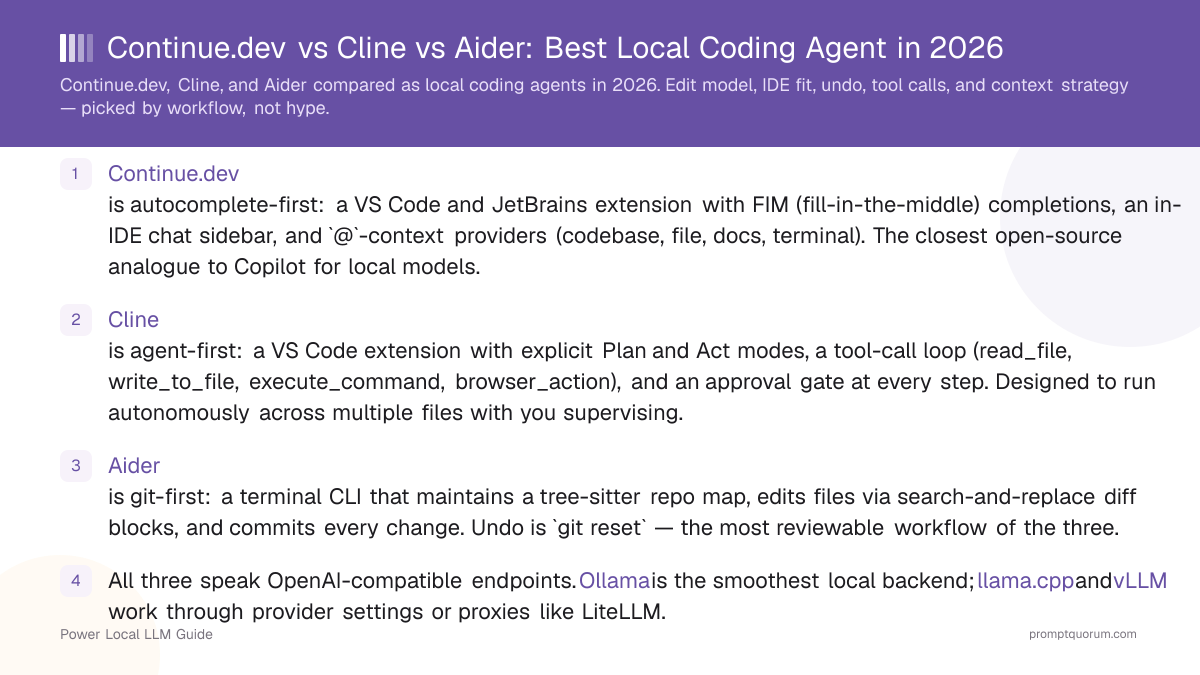
- Continue.dev is autocomplete-first: a VS Code and JetBrains extension with FIM (fill-in-the-middle) completions, an in-IDE chat sidebar, and
@-context providers (codebase, file, docs, terminal). The closest open-source analogue to Copilot for local models. Discontinued: final release v2.0.0, June 2026 - still runs, no longer updated. - Cline is agent-first: a VS Code extension with explicit Plan and Act modes, a tool-call loop (read_file, write_to_file, execute_command, browser_action), and an approval gate at every step. Designed to run autonomously across multiple files with you supervising.
- Aider is git-first: a terminal CLI that maintains a tree-sitter repo map, edits files via search-and-replace diff blocks, and commits every change. Undo is
git reset— the most reviewable workflow of the three. - All three speak OpenAI-compatible endpoints. Ollama is the smoothest local backend; llama.cpp and vLLM work through provider settings or proxies like LiteLLM.
- Tool-calling reliability depends on the model, not the harness. Qwen3-Coder 30B and DeepSeek Coder V3 are the most reliable tool-callers in May 2026; smaller models (7B class) regularly emit malformed tool calls regardless of which harness wraps them.
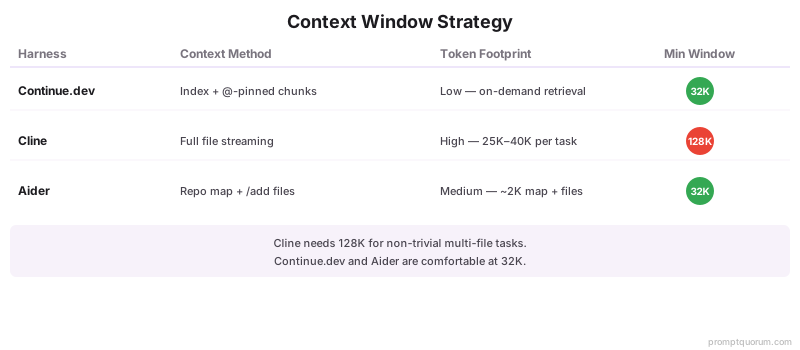
- Context window strategy differs sharply: Continue.dev relies on the embedded codebase index and
@-pinned context, Cline streams full file contents into the conversation (high token usage), Aider uses a tree-sitter repo map plus explicit/addand/dropto keep the working set small. - For a single developer, workflow fit dominates outcomes more than any benchmark. The harness you actually keep open is the one you should pick.
Quick Facts
- Continue.dev — autocomplete + chat, VS Code and JetBrains, lowest-friction install of the three. Discontinued: final release v2.0.0, June 2026 - still runs, no longer updated.
- Cline — autonomous agent with approval gates, VS Code only, highest capability and highest token usage.
- Aider — terminal CLI, git-native commits, every edit is reviewable and undoable through git.
- All three run against the same local backend — Ollama is the smoothest path; llama.cpp and vLLM also work via OpenAI-compatible config.
- Tool-call reliability is a model property, not a harness property. Qwen3-Coder 30B and DeepSeek Coder V3 are reliable in all three; 7B-class models fail in all three.
- Context budget: Continue.dev and Aider stay comfortable on a 32K-context model; Cline needs 128K for non-trivial multi-file tasks.
- Pick by editor: JetBrains → Continue.dev or Aider. Vim/Neovim or SSH → Aider. VS Code with autocomplete-heavy days → Continue.dev. VS Code with multi-file refactors → Cline.
How Continue.dev, Cline, and Aider Compare in 2026
All three harnesses are open source, free to run, and work with any local LLM endpoint. The structural differences below decide which one fits your workflow.
📍 In One Sentence
Continue.dev is Copilot-style autocomplete, Cline is an autonomous agent that edits across files, Aider is a terminal tool that commits every edit to git — pick by workflow, not by benchmark.
💬 In Plain Terms
Three free tools, the same local model, three completely different workflows. Continue.dev feels like Copilot — tab to accept suggestions inside your editor. Cline feels like a junior developer you supervise — it plans and edits across files while you approve each step. Aider feels like pair-programming in the terminal — you talk, it commits. Try the one that matches how you already work.
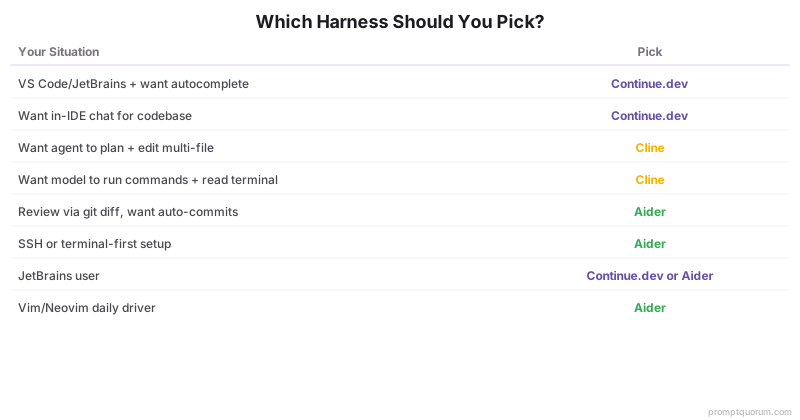
Feature | |||
|---|---|---|---|
| Primary surface | VS Code and JetBrains extension | VS Code extension | Terminal CLI (any editor on the side) |
| Workflow primitive | Autocomplete + in-IDE chat | Autonomous agent loop with approval gates | Git-native diff edits, every change a commit |
| Edit model | Inline FIM + apply-to-file from chat | Tool calls (read_file, write_to_file, replace_in_file) | Search-and-replace diff blocks; "whole" mode for tiny files |
| Multi-file edits | Manual: chat suggests, you apply per file | Native: agent edits across files in one task | Native: name files at the prompt, edits land in one commit |
| Undo / rollback | VS Code undo stack on applied edits | Per-edit revert in the agent UI; git for hard rollback | /undo reverses the last commit; full git history below |
| Tool call protocol | OpenAI tools (function-calling) in Agent mode | Custom XML tool blocks with strict schema | No tool calls; prompts the model to emit diff blocks |
| Codebase context | Local index (TF-IDF + embeddings) + @-providers | Streams full file contents into the conversation | Tree-sitter repo map + manual /add and /drop |
| Approval / safety | Diff preview before each apply | Per-step approval; auto-approve allow-lists configurable | Diff preview in terminal; commit step is automatic |
| Best for | Edit-as-you-type, in-IDE chat, autocomplete-heavy days | Multi-file refactors, exploratory debugging, repo tasks | Reviewable repo-wide changes, terminal-driven workflows |
Which One Should You Pick
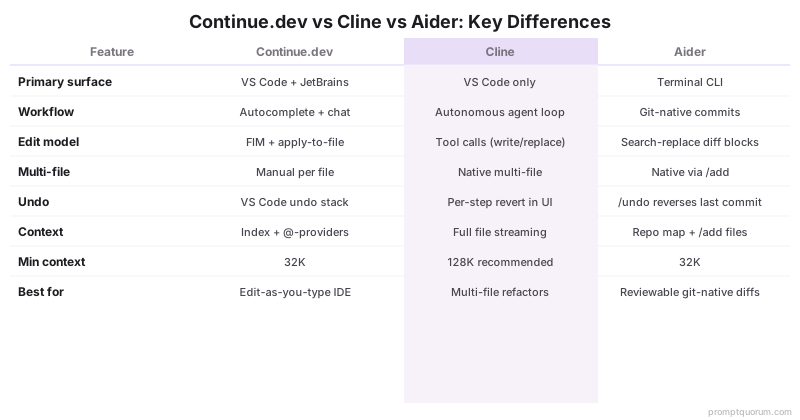
The right harness is decided by your editor, your tolerance for autonomous edits, and how you review changes. Use this shortcut.
Your situation | Pick |
|---|---|
| I live inside VS Code or a JetBrains IDE and want Copilot-style autocomplete | Continue.dev |
| I want a chat sidebar that can reach into my codebase without manual file uploads | Continue.dev |
| I want an agent that plans a refactor across multiple files and asks before each step | Cline |
| I want the model to be able to run commands and read terminal output as part of its loop | Cline |
I review changes through git diff and want every edit committed automatically | Aider |
| I work over SSH or in a terminal-first setup | Aider |
| I want all three workflows occasionally — pick the simplest first | Start with Continue.dev; add Aider when you need git-native diffs |
Continue.dev: The Autocomplete-First Pick
Continue.dev is the closest open-source analogue to GitHub Copilot for local models. Its primary surface is the editor: tab-completion as you type plus a chat sidebar that knows your codebase.
- Install path: VS Code Marketplace and JetBrains Marketplace. Configuration lives in
~/.continue/config.json(orconfig.yaml); model definitions, autocomplete settings, and@-context providers all live there. - Workflow primitive: autocomplete via FIM (fill-in-the-middle) plus an in-IDE chat sidebar. The chat panel can apply edits directly to open files; an Agent mode adds tool-call loops for multi-step tasks.
- Local model setup: native Ollama support is one config block. llama.cpp, LM Studio, and any OpenAI-compatible endpoint also work. Separate models for autocomplete (small, fast — Qwen3-Coder 1.5B class) and chat (larger — Qwen3-Coder 30B, DeepSeek Coder V3) is the standard pattern.
- Codebase context: local index (TF-IDF plus embeddings) sits in your project folder.
@codebase,@file,@folder,@docs,@terminal, and custom providers reach into the index from the chat panel. - Edit model: in chat, the model proposes a code block; clicking "Apply" diffs it against the open file and you accept or reject the change. Inline edits via Cmd/Ctrl+I rewrite a selection in place. Both flows show a diff preview before any write.
- Where it shines: keyboard-driven editing inside an IDE you already use, low cognitive overhead per edit, fast feedback loop. The tool you forget you installed.
- Where it falls short: multi-file refactors require you to drive the chat per file. Long-running autonomous tasks are not its native idiom — Agent mode is improving but is not the project's centre of gravity.
⚠️Warning: Status change, August 2026: Continue.dev is no longer actively developed. Cursor acquired the Continue team on 18 June 2026; the final release was v2.0.0 on 19 June 2026 and the continuedev/continue repository is now read-only. The extension still installs and runs against a local model, and the Apache 2.0 licence means it stays available - but there will be no further updates, and provider API changes will eventually break it. Treat it as a working tool with a fixed end date, and prefer Cline or Aider for anything you intend to depend on for years.
💡Tip: Run two models in your Continue.dev config: a small autocomplete model (Qwen3-Coder 1.5B at Q4_K_M needs ~1.5 GB VRAM) and a larger chat model (Qwen3-Coder 30B Q4_K_M, ~17 GB). Splitting them keeps autocomplete latency under 200 ms while leaving the chat panel useful for non-trivial questions.
Cline: The Autonomous Agent Pick
Cline treats coding as an agent task, not a series of edits. You give it an objective; it plans, reads files, edits them, runs commands, and asks you to approve each step.
- Install path: VS Code Marketplace (no JetBrains version). Configuration is GUI-driven inside the extension panel — provider, model, auto-approve settings, custom instructions.
- Workflow primitive: autonomous agent loop with explicit Plan and Act modes. Plan mode reasons about the task without writing files; Act mode executes the plan with tool calls. An approval gate appears between steps unless you place tools on an auto-approve allow-list.
- Local model setup: any OpenAI-compatible endpoint. Ollama is one click. For llama.cpp or vLLM, point Cline at the OpenAI-compatible server URL. The agent loop is token-heavy — reserve a model with at least a 32K context window (Qwen3-Coder 30B at 32K, DeepSeek Coder V3 at 128K).
- Tool surface:
read_file,write_to_file,replace_in_file,execute_command,list_files,search_files,browser_action,ask_followup_question,attempt_completion. The set is small and well-documented; tool schemas use a custom XML format the model must emit cleanly. - Edit model: for files under a few hundred lines, Cline writes the whole file. For larger files, it emits
replace_in_fileoperations with explicit search and replace blocks. Diffs are shown in the panel before each write. - Where it shines: multi-file refactors, "find why this test is flaky" exploratory tasks, "add a feature touching three layers" workflows. Strongest of the three on tasks with more than five file edits.
- Where it falls short: token consumption is high — full file contents stream into the conversation on every read. Long sessions exhaust 32K-context models; 128K-context models are recommended for non-trivial tasks. Tool-call reliability degrades sharply on smaller models (7B class) — they emit malformed XML and the loop stalls.
📌Note: Cline's auto-approve allow-list is the difference between a useful agent and a tedious one. Allow read_file, list_files, and search_files by default; keep write_to_file, replace_in_file, and execute_command gated until you trust the model on this codebase. Tighten or relax per project.
Aider: The Git-Native Pick
Aider is the only one of the three that treats your repository as the source of truth, not the conversation. Every edit lands as a git commit. Undo is git reset. The chat history is throw-away; the commit log is the artefact.
- Install path:
pip install aider-chatorpipx install aider-chat. CLI invocation:aider file1.py file2.py(files come in scoped to the conversation). Configuration via.aider.conf.ymland per-flag overrides. - Workflow primitive: terminal-first conversational editing. Type a prompt; Aider proposes a diff; if you accept, the change is committed.
/addand/dropmanage which files are in scope./undoreverts the last commit./diffshows the most recent change against HEAD. - Local model setup: any model reachable through LiteLLM — Ollama, OpenAI-compatible servers (llama.cpp, vLLM, LM Studio), or the model providers directly.
--model ollama_chat/qwen3-coder:30bis the typical local invocation. - Codebase context: tree-sitter repo map. Aider parses your repository for definitions (functions, classes, methods), summarises them by ranking proximity to the in-scope files, and includes the summary in the system prompt. The map fits in roughly 1K–4K tokens for small repos, more for large ones —
--map-tokenscaps the budget. - Edit model: two strategies. "Diff" mode emits search-and-replace blocks the model must produce verbatim — surgical, low-token, but breaks if the model paraphrases the search block. "Whole" mode rewrites entire files — robust on small files, expensive on large ones. Aider auto-selects per-model defaults that match the model's known strengths.
- Where it shines: repo-wide changes you want every step of in the commit log; pair-programming with code review built in (every commit is a discrete review unit); SSH and dev-container workflows where IDE extensions are not an option.
- Where it falls short: no autocomplete. No in-IDE preview by default (works fine in a VS Code terminal pane next to your editor, but is not integrated). The diff edit format is sensitive to model output quality — a model that paraphrases the search block instead of reproducing it will fail edits and you will see retry attempts in the terminal.
💡Tip: Set auto-commits: true (the default) and use git rebase -i to squash Aider's commits at the end of a feature. The fine-grained commits during work are valuable for /undo; the squashed final commit is what your team reviews. Aider documents this exact pattern.
Edit Model: How Each Harness Writes Code
The edit model is the single biggest determinant of how each harness feels. Same model, same task — three very different artefacts.
- Continue.dev — for autocomplete: FIM tokens around the cursor produce inline completions. For chat-driven edits: the model returns a fenced code block; "Apply" runs a diff against the open file and surfaces it for accept/reject. For inline edits (Cmd/Ctrl+I on a selection): the model rewrites the selection and the diff shows in place.
- Cline — every edit is a tool call.
write_to_filefor new files or full rewrites,replace_in_filefor surgical changes with explicit<<<<<<< SEARCH/>>>>>>> REPLACEblocks. Tool calls are validated against a schema; malformed ones get a "tool error" that the agent sees and retries. The conversation is structured tool calls and tool results, not free prose. - Aider — search-and-replace diff blocks rendered in plain prose, parsed at the CLI. The model emits something like a unified-diff fenced block; Aider applies it and commits. If the SEARCH block does not match the file verbatim, the edit is rejected and Aider asks the model to retry.
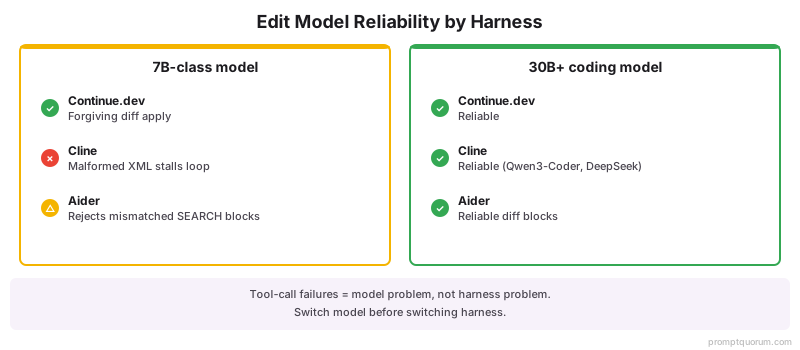
- Reliability ranking on a 7B-class model: Continue.dev > Aider > Cline. Continue.dev's "apply" is forgiving — small paraphrases get reconciled by the diff algorithm. Aider rejects outright on mismatched search blocks but the failure is loud and recoverable. Cline's XML tool format is the most brittle on small models — malformed tool calls stall the loop.
- Reliability ranking on a 30B+ tool-calling model (Qwen3-Coder 30B, DeepSeek Coder V3): all three converge — the model has the capacity to emit precise diff blocks and well-formed tool calls consistently.
- For structured prompting techniques that improve code generation regardless of which harness wraps them, see Write Better Code With AI.
Undo, Rollback, and the Question of "What Did the Agent Just Do"
Undo is the unglamorous feature you only notice when you need it. All three harnesses are recoverable; the difference is how much friction sits between "this was a mistake" and "the mistake is gone".
- Continue.dev — applied edits join the VS Code undo stack. Cmd/Ctrl+Z reverts the most recent apply per file. For multi-file rollback, your existing git workflow does the heavy lifting. There is no harness-level "undo this whole conversation" command.
- Cline — the agent UI shows each step as a card; per-edit revert is one click. The cards persist for the duration of the task. After the task ends, rollback is via git — Cline does not auto-commit, so you may have a pile of uncommitted changes after a long session.
- Aider —
/undoreverts the most recent commit; repeat to walk back further. Because every edit is a separate commit, the granularity matches the conversation step-by-step.git reflogrecovers anything/undocannot. - The practical implication: if you are inclined to let an agent run for 20 minutes unsupervised, Aider gives you the most reviewable artefact afterwards (a clean commit log) and Cline gives you the most legible in-progress audit trail (per-step cards, but no commits). Continue.dev assumes you stayed at the keyboard throughout.
💡Tip: For Cline sessions, run git stash before starting a non-trivial task. If the agent goes off the rails, git stash drop cleans up faster than reverting per file. For Aider, the existing commit log is the safety net — do nothing extra.
Context Window Strategy: Where Tokens Go
The three harnesses spend tokens differently. This is the most important budget decision when you have a model with a smaller context window (32K or under) and a non-trivial repo.
- Continue.dev — TF-IDF plus embedding index over the project. Retrieval is on-demand: only chunks relevant to the current chat message land in the prompt.
@codebasetriggers a semantic search;@file path/to/x.tsinjects the file verbatim. Token usage scales with what you pin, not with the size of the repo. - Cline — full file contents are streamed into the conversation as the agent reads them. A 500-line file consumes ~3K–5K tokens; an agent task that touches 8 files burns through 25K–40K tokens before any reasoning happens. Recommended minimum: 32K context window; 128K is comfortable.
- Aider — tree-sitter repo map (defaults to ~2K tokens, configurable via
--map-tokens) plus the contents of files explicitly/add-ed. The map is a definition-only summary, not full code, so it scales much better with repo size than streaming files./dropfiles when they are no longer in scope. - Practical implication for a 32K-context model: Continue.dev and Aider stay comfortable on most repos; Cline starts hitting context pressure on tasks that touch more than 5–6 files unless you switch to a 128K-context model.
- Practical implication for a 128K-context model: all three are comfortable. Cline's heavier consumption stops mattering; the deciding factor reverts to workflow primitive.
- For a deeper explanation of context windows and why models lose information mid-context, see Context Windows Explained: Why AI Forgets.
Tool Call Reliability Is a Model Property
Tool-calling failures are usually misattributed to the harness. In practice the model emits a malformed call, the harness validates strictly, and the loop stalls. Same model in a different harness produces the same failure mode.
- Models that tool-call reliably for these harnesses (May 2026): Qwen3-Coder 30B (best-in-class on Cline's XML format), DeepSeek Coder V3 (large context, strong on multi-step plans), Llama 3.3 70B (slow but reliable), Codestral 22B (fast, smaller plan horizon).
- Models that struggle: anything below 7B, most general-purpose models under 13B without coding fine-tunes, and quantizations harsher than Q4_K_M on the smaller end. Symptoms: malformed XML in Cline, paraphrased SEARCH blocks in Aider, fenced code that does not match the open file in Continue.dev.
- The fix is rarely "switch harness". It is "switch model" or "raise quantization". A Qwen3-Coder 30B at Q4_K_M tool-calls reliably across all three harnesses. A Llama 3.2 3B at Q4 will fail in all three.
- Continue.dev's Agent mode uses standard OpenAI tool-calling JSON. Most coding-tuned models handle this well.
- Cline's XML format is the most demanding — the model must produce exact XML structure. Coding-tuned models trained on diverse formats (Qwen3-Coder, DeepSeek Coder) handle this; general-purpose models often do not.
- Aider has no tool calls per se — it parses search-and-replace blocks from prose. The "reliability" question becomes "does the model reproduce SEARCH blocks verbatim", which most coding-tuned 22B+ models do well.
📌Note: When evaluating a new local model, test it in the harness you actually use, not in a generic tool-call benchmark. The relevant signal is whether your daily workflow stalls. A model that scores 85% on a public tool-call benchmark can still fail half your Cline tasks if it does not reliably emit Cline's specific XML.
IDE Integration and Editor Reach
Editor reach is where the three harnesses diverge most visibly. This is the dimension most readers actually care about; it is also the easiest to test in 10 minutes.
- Continue.dev — VS Code Marketplace and JetBrains Marketplace. The JetBrains build is real (IntelliJ, PyCharm, GoLand, WebStorm, etc.) and has feature parity with the VS Code build for autocomplete and chat. Cursor users can install the VS Code extension; behaviour matches VS Code.
- Cline — VS Code extension only. Works in Cursor (which is a VS Code fork) but is not officially tested there; the extension surface is identical and most users report no issues. JetBrains users are out of luck for now.
- Aider — terminal-first; integrates with any editor by sitting next to it. VS Code: open the integrated terminal, run Aider, edit in the editor pane while Aider commits. JetBrains: same pattern in the JetBrains terminal. Vim/Neovim: paired with
:e!to reload after Aider commits, this is a productive flow. Cursor: identical to VS Code. - Practical implication for JetBrains users: Continue.dev or Aider are your only options.
- Practical implication for Vim/Neovim users: Aider is the natural fit. Continue.dev has community Neovim integrations of varying maturity; the official surface is VS Code and JetBrains.
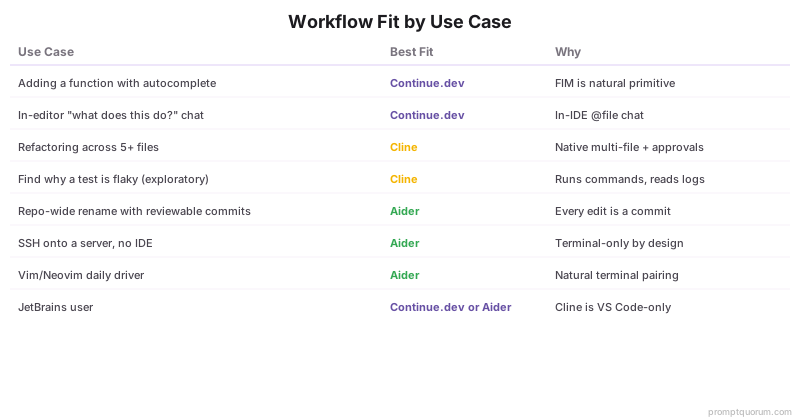
Workflow Fit by Use Case
The most useful frame is "what kind of day are you having". Match harness to day, not the other way round.
Use case | Best fit | Why |
|---|---|---|
| Adding a function to an existing file with autocomplete | Continue.dev | FIM autocomplete is the natural primitive; no chat needed |
| Asking "what does this function do" without leaving the editor | Continue.dev | In-IDE chat with @file is the lowest-friction path |
| Refactoring a feature across 5+ files | Cline | Native multi-file edits with per-step approval |
| "Find why this test is flaky" exploratory bug-hunt | Cline | Agent loop runs commands, reads logs, iterates |
| Repo-wide rename or API migration with reviewable commits | Aider | Every edit becomes a commit; trivial to review and undo |
| SSH onto a server, work without an IDE | Aider | Terminal-only by design |
| Vim or Neovim daily driver | Aider | Pairs naturally with terminal-driven editing |
| JetBrains IDE (IntelliJ, GoLand, PyCharm) user | Continue.dev or Aider | Cline is VS Code-only |
Decision Tree: Which Should You Pick
Five questions, in order, get most readers to the right pick.
- 1. Are you in JetBrains, Vim, or working over SSH? → If yes, you are between Continue.dev (JetBrains only) and Aider (Vim/SSH). Skip to Q4. If no, continue.
- 2. Do you want an autonomous agent that edits multiple files in one task? → Yes: Cline. No: continue.
- 3. Do you want autocomplete plus an in-IDE chat panel? → Yes: Continue.dev. No: continue.
- 4. Do you review changes through
git diffand want every edit auto-committed? → Yes: Aider. No: Continue.dev (the default). - 5. Still unsure? → Start with Continue.dev. It is the lowest-friction install, works in the editor you probably already use, and adding Aider later for terminal-driven work is straightforward. Cline is the most disruptive to add to a workflow; only adopt it once you know you want the agent loop.
Common Mistakes Picking a Local Coding Harness
- Mistake 1: picking the harness before the model. A 30B coding-tuned model in any of the three harnesses outperforms a 7B general-purpose model in the "best" harness. Pick the model first; the harness is the second decision.
- Mistake 2: using a single model for autocomplete and chat in Continue.dev. Autocomplete needs sub-200ms latency; chat tolerates seconds. Run a small autocomplete model and a larger chat model in the same config.
- Mistake 3: leaving Cline auto-approve fully open. A model loop with
execute_commandauto-approved can do real damage. Keep destructive tools gated until you trust the model on this codebase. - Mistake 4: using Aider on a model that paraphrases code. If the model cannot reproduce SEARCH blocks verbatim, every edit fails. Use a coding-tuned 22B+ model (Qwen3-Coder, DeepSeek Coder, Codestral) for reliable diff edits.
- Mistake 5: switching harnesses to fix a model problem. If tool calls fail in Cline, they will likely also fail in Continue.dev's Agent mode for the same reason. Diagnose the model first.
- Mistake 6: running Cline against a 32K-context model on multi-file tasks. Token consumption blows through the budget mid-task. Use a 128K-context model for non-trivial Cline work.
Sources
- Continue.dev Documentation — Official setup guide, model configuration,
@-context providers, and Agent mode reference. - Cline GitHub Repository — Source code, tool schemas, Plan/Act mode behaviour, and extension architecture.
- Aider Documentation — Official CLI reference, edit-format documentation, repo-map mechanics, and per-model defaults.
- Ollama Model Library — Available local models and quantization levels referenced for each harness.
- Qwen3-Coder Model Card — Architecture, supported context lengths, and tool-call training data for the recommended coding model.
Frequently Asked Questions
Which is best for VS Code users?
Any of the three works in VS Code, but Continue.dev and Cline are the native fits. Continue.dev for autocomplete-first and in-IDE chat; Cline for autonomous agent tasks. Aider works perfectly well from the VS Code integrated terminal but does not integrate with the editor surface itself — its UI is the terminal.
Does Cline support Cursor IDE?
Cursor is a VS Code fork and accepts VS Code extensions. Cline installs and runs in Cursor; the extension surface is identical. The Cline team does not officially target Cursor, so edge cases (specific Cursor APIs, future Cursor changes) are not guaranteed to be supported, but in practice users report no issues.
Can Aider work without git?
Yes, but you lose the workflow primitive that defines it. Aider runs in non-git directories with --no-git; edits still apply but there are no commits, so /undo is disabled and rollback falls back to the model's diff history within the session. For non-trivial work, initialise a git repo — even an ignored one — before starting.
Which has the best multi-file refactoring?
Cline for autonomous multi-file work — it plans across files, reads them as needed, and edits with per-step approval. Aider for reviewable multi-file work where you name the files explicitly and want every edit committed. Continue.dev requires manual driving per file; it is the weakest of the three on multi-file refactors.
Do these support local Ollama out of the box?
Yes. Continue.dev has a native Ollama provider with a one-block config. Cline lists Ollama in the provider dropdown. Aider supports Ollama through LiteLLM with --model ollama_chat/<model-name>. Ollama is the lowest-friction local backend for all three.
Which works best with Qwen3-Coder?
Qwen3-Coder 30B is reliable across all three harnesses in May 2026 — it handles Cline's XML tool format, Aider's search-and-replace blocks, and Continue.dev's autocomplete + chat workflows without measurable degradation. Smaller Qwen3-Coder variants (7B class) tool-call less reliably and do better in Continue.dev's autocomplete-only mode than in Cline's agent loop.
Can I use these with Cursor's local mode?
Cursor's built-in features (Tab autocomplete, Cmd+K) use Cursor's own model routing, not these harnesses. To use a local LLM in Cursor, install Continue.dev or Cline as VS Code extensions inside Cursor — they bring their own provider config independent of Cursor's. Aider runs in Cursor's integrated terminal the same way it runs in VS Code's.
Which is most stable for long sessions?
Aider, by virtue of having no in-process state to corrupt — every edit is a commit, and a session crash loses only the conversation, not the work. Continue.dev is stable across long IDE sessions. Cline's long sessions can hit context-window pressure on smaller models; restarting tasks between major refactors avoids the problem.
Do these support custom system prompts?
All three. Continue.dev: per-model systemMessage in config.json. Cline: "Custom Instructions" field in the extension settings. Aider: --system-prompt flag or per-model defaults in .aider.conf.yml. Custom prompts are particularly useful for Cline (steering Plan mode behaviour) and Aider (enforcing a coding style across commits).
Which has the best community and extension ecosystem?
Continue.dev has the largest user base and most third-party @-context providers (custom retrieval sources, plug-in tools). Cline has a smaller but very active community focused on agent workflows. Aider has the deepest documentation of any of the three — the project blog publishes detailed analyses of edit-format reliability and model behaviour. For a casual user, Continue.dev's ecosystem is the friendliest entry point.