Key Takeaways
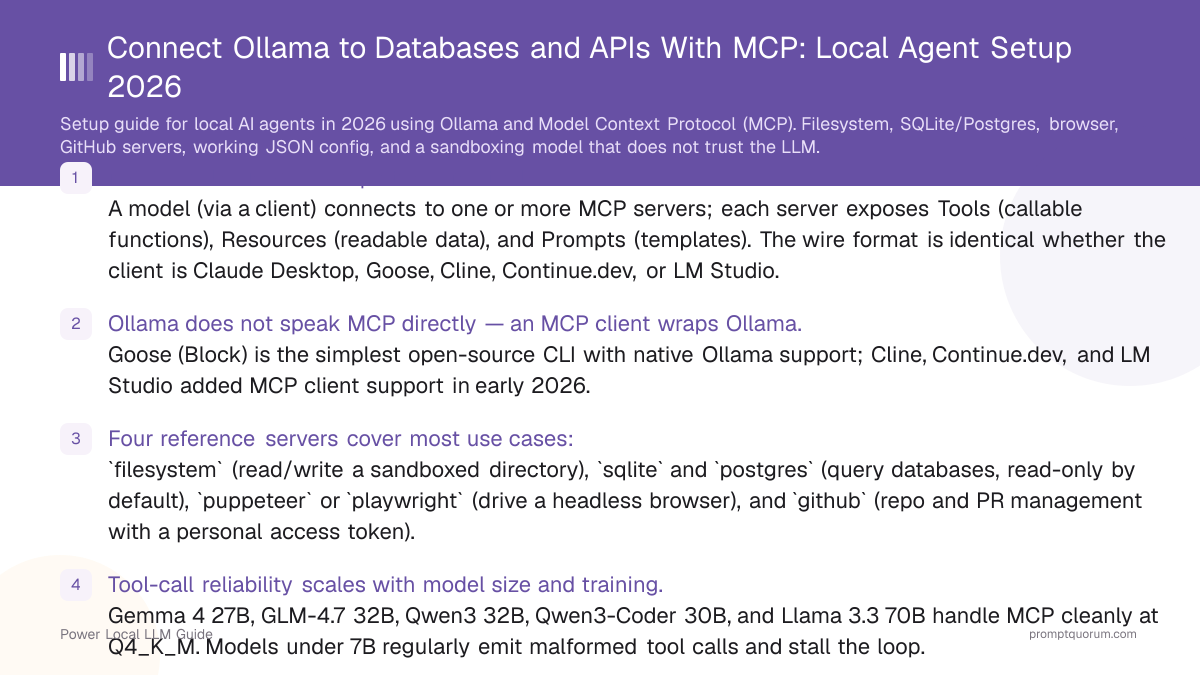
- MCP is a JSON-RPC 2.0 protocol for tools. A model (via a client) connects to one or more MCP servers; each server exposes Tools (callable functions), Resources (readable data), and Prompts (templates). The wire format is identical whether the client is Claude Desktop, Goose, Cline, Continue.dev, or LM Studio.
- Ollama does not speak MCP directly — an MCP client wraps Ollama. Goose (Block) is the simplest open-source CLI with native Ollama support; Cline, Continue.dev, and LM Studio added MCP client support in early 2026.
- Four reference servers cover most use cases:
filesystem(read/write a sandboxed directory),sqliteandpostgres(query databases, read-only by default),puppeteerorplaywright(drive a headless browser), andgithub(repo and PR management with a personal access token). - Tool-call reliability scales with model size and training. Gemma 4 31B, GLM-4.7 Flash, Qwen3 32B, Qwen3-Coder 30B, and Llama 3.3 70B handle MCP cleanly at Q4_K_M. Models under 7B regularly emit malformed tool calls and stall the loop.
- The security model assumes the model is untrusted. Sandbox the filesystem server to a single directory, run the database server with a read-only role, never auto-approve
execute_commandorwrite_filetools, and review the audit log after long sessions. - Local MCP vs Claude Desktop: identical protocol, identical server ecosystem. The local stack trades the cloud model for an offline one — privacy, no per-token cost, and no rate limits, at the cost of a smarter model and you owning the security configuration.
- Cost is $0 in API fees but real in tokens. Agent loops can consume 30K–80K tokens for a single multi-step task. Use a 32K-context model minimum; 128K is comfortable.
Quick Facts
- Protocol: JSON-RPC 2.0 over stdio (local subprocess) or HTTP/SSE (remote). Local agents use stdio almost exclusively.
- Maintained by: Anthropic (open-source spec); reference servers maintained in
modelcontextprotocol/serverson GitHub plus a growing third-party ecosystem. - Local clients in 2026: Goose (Block), Cline (VS Code extension), Continue.dev (VS Code/JetBrains), LM Studio (desktop app), plus several CLI tools.
- Compatible Ollama models: any model with native tool-call training. In August 2026: Gemma 4 31B, GLM-4.7 Flash, Qwen3 32B, Qwen3-Coder 30B, Llama 3.3 70B.
- Server transport defaults: stdio for local processes; HTTP/SSE only when you need to share a server across machines or agents.
- Configuration lives in one file:
~/.config/goose/config.yaml(Goose), the MCP block of~/.continue/config.json(Continue.dev), ormcpServersin Cline's settings UI. Same shape across all of them: server name, command, args, env vars. - No Claude Desktop required. The protocol predates Claude Desktop's exclusivity stories; every reference server is MIT/Apache-licensed and runs against any compliant client.
What MCP Actually Unlocks for a Local Model
A local LLM with no tools can only respond with text. With MCP, the same model can act on your machine. The shift is the difference between a chatbot and an agent.
- "Find every TODO in this repo, group them by file, and write a Markdown summary to
notes/todos.md." —filesystemserver reads, the model groups, the same server writes. One round trip end-to-end. - "Show me the top 10 customers by revenue this quarter, then chart it." —
postgresserver runs the SQL (read-only role), the model summarises, the model writes a CSV viafilesystemfor your charting tool. - "Open the Hacker News front page, find the top three AI stories, summarise them, and append to my reading list." —
puppeteerserver drives a headless browser, the model extracts and summarises,filesystemappends. - "Open a draft PR titled
chore: bump depsagainst my fork and link the failing CI run." —githubserver creates the PR, fetches the run, and writes the link in the description. - "Look at the last 100 rows of
events.dband tell me which user IDs are responsible for the new error spike." —sqliteserver queries; the model reasons; you read the answer in the chat panel. - Each of these is a sentence-to-action workflow that previously required either a cloud model with hosted tools or a hand-rolled script. MCP is the layer that lets you reuse the same servers across clients and the same model across servers.
How the Four Most-Used MCP Servers Compare
The reference servers below cover the long tail of "I want my local model to actually do something". All are open source and run as local subprocesses spawned by your MCP client.
📍 In One Sentence
Start with the filesystem server (5 minutes, low risk), add a SQLite server for data work, add a browser server only when you need it, and bring in GitHub once you trust the model on your machine.
💬 In Plain Terms
Four servers handle 90% of what you will want a local agent to do. The filesystem server reads and writes files in a folder you choose. The SQLite or Postgres server runs queries against a database. The browser server drives a real Chromium window so the model can read pages that need JavaScript. The GitHub server opens issues and PRs against your repos. They all install with one command, all run as subprocesses on your own machine, and none of them call out to the internet unless they explicitly need to (the browser does, the others do not).
MCP Server | What It Enables | Setup Difficulty | Risk Level | Best For |
|---|---|---|---|---|
| Filesystem | Read and write files inside a sandboxed directory | Easy (one path to allow-list) | Medium — scope it tightly | Personal automation, note-taking, repo summarisation |
| SQLite | Query a local SQLite database file | Easy (path to .db file) | Low when read-only; medium with writes | Data exploration, log analysis, prototyping |
| Postgres | Query a Postgres database over a connection string | Medium (role + URL) | Medium — use a read-only role | Production data exploration, reporting, BI prototypes |
| Puppeteer / Playwright | Drive a headless or visible Chromium for browsing, scraping, form-filling | Hard (browser binaries, selectors, latency) | High — can submit forms, click anything | Research, scraping, regression testing |
| GitHub | List repos, read files, open issues and PRs | Easy (PAT in env var) | Medium — scope token to specific repos | Dev workflows, triage, PR drafting |
| Custom | Anything you can express as JSON-RPC tools | Hard (write your own server) | Variable | Internal APIs, niche systems, glue code |
How the Pieces Fit Together
Three processes, one shared protocol. The model lives in Ollama, the client speaks MCP, and each server exposes a small set of tools. Every tool call hops client → server, runs locally, and returns JSON.
- Ollama runs as a background service on
127.0.0.1:11434and serves the model through an OpenAI-compatible API. It does not know what MCP is — it just answers chat completions and emits tool calls when the model asks for them. - MCP client (Goose, Cline, Continue.dev, LM Studio) is the bridge. It talks to Ollama for the model and to MCP servers for tools. When the model emits a tool call, the client routes it to the right server, gets the result, and feeds it back into the conversation.
- MCP servers are independent subprocesses, one per capability. They speak JSON-RPC 2.0 over stdio. Each server advertises a list of Tools, Resources, and Prompts; the client merges them into the tool surface presented to the model.
- Stdio transport keeps everything local. A server is launched by the client, communicates over its stdin/stdout, and exits when the client exits. Nothing routes through the network unless the server itself opens a connection (the browser server does; filesystem and database servers do not).
- The model sees one flat tool list. From the model's perspective there are no servers — just a list of tool names like
filesystem.read_file,sqlite.query,puppeteer.navigate. The client handles routing.
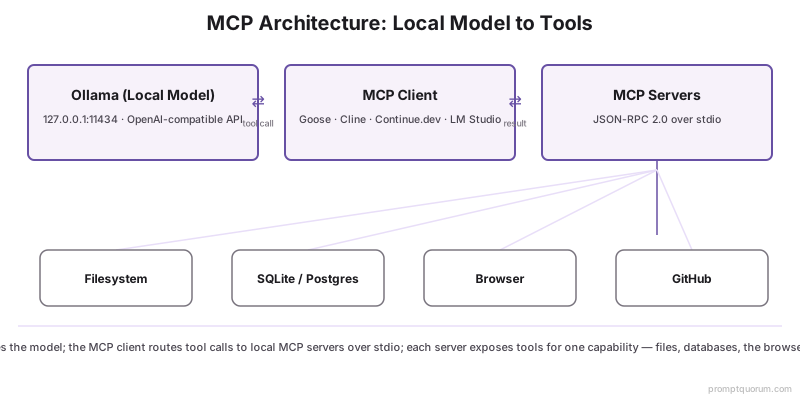
📌Note: The architecture is identical to Claude Desktop's. The differences are the model (a local Ollama model instead of Claude) and the client (Goose/Cline/Continue.dev/LM Studio instead of Claude Desktop). The MCP servers are the same servers — you can run the filesystem server underneath Claude Desktop today and it will still run unchanged underneath Goose tomorrow.
Setup: Ollama + Goose in 15 Minutes
Goose is the simplest path to a working local MCP agent in 2026. It is an open-source CLI from Block with native Ollama support, an interactive chat surface, and one config file for all your Model Context Protocol (MCP) servers. Continue.dev, Cline, and LM Studio work too — Goose has the lowest setup tax for a first run.
- Step 1 — install Ollama. Download from ollama.com/download (macOS/Windows/Linux). Confirm the service is running with
curl http://127.0.0.1:11434/api/tags. - Step 2 — pull a tool-calling model. Pick from Gemma 4 31B (
gemma4:31b), GLM-4.7 Flash (glm-4.7-flash), Qwen3 32B (qwen3:32b), or Llama 3.3 70B (llama3.3:70b). 32 GB unified memory or 24 GB VRAM handles 26B–32B at Q4_K_M comfortably. - Step 3 — install Goose.
pipx install goose-ai(macOS, Linux) or download the installer from the Goose releases page. The CLI installs asgoose. - Step 4 — configure Ollama as the provider. Run
goose configure, pickollamaas the provider, set the model to the one you pulled, and set the host tohttp://127.0.0.1:11434. Goose writes this to~/.config/goose/config.yaml. - Step 5 — add the filesystem MCP server. Edit
~/.config/goose/config.yamlto add amcpServersblock (config example below). Restartgoose sessionand ask it to list files in your test directory. The first turn confirms the server is wired up. - Step 6 — verify with a real task. Try
goose sessionand ask "Make a list of every Markdown file innotes/, with title and word count, and write the result tonotes/index.md." If the agent reads, summarises, and writes back, the loop works.
# 1. Pull a tool-calling model
ollama pull gemma4:31b

# 2. Install Goose
pipx install goose-ai

# 3. Configure Ollama as the provider
goose configure
# Provider: ollama
# Model:    gemma4:31b
# Host:     http://127.0.0.1:11434

# 4. Start a session — Goose reads ~/.config/goose/config.yaml
goose session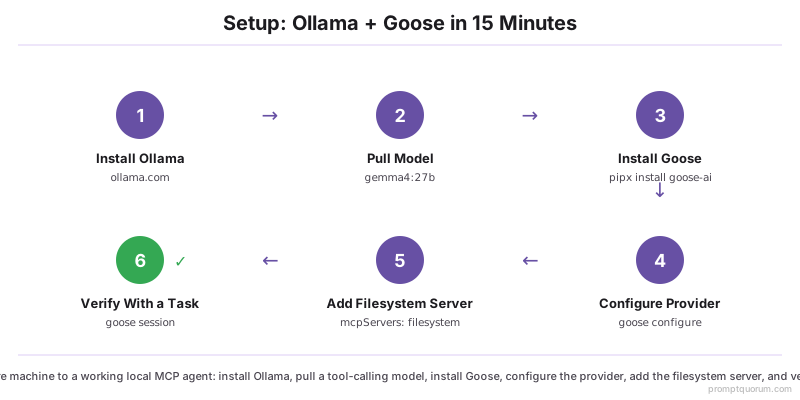
💡Tip: If you already use Cline or Continue.dev, skip Goose and use those — both added MCP server support in their early-2026 releases. Cline's "MCP Servers" panel installs reference servers with one click; Continue.dev reads mcpServers from ~/.continue/config.json (same shape as the Goose config block below). The model and the servers are the same; only the host application changes.
Filesystem Server: Read and Write a Sandboxed Directory
The filesystem server is the first one to install and the easiest to scope safely. It exposes read_file, write_file, list_directory, move_file, search_files, and create_directory — all restricted to one or more allow-listed paths.
- Install: the reference server is
@modelcontextprotocol/server-filesystem, run vianpx -y(no global install needed). Goose, Cline, and Continue.dev all auto-spawn it from the config block. - Allow-list paths: the server takes one or more directory arguments and refuses operations outside them. Always pass an explicit, narrow path — never
~or/. - Tools exposed:
read_file,read_multiple_files,write_file,edit_file(line-based replacements),list_directory,search_files,move_file,create_directory,directory_tree. The model sees this asfilesystem.read_fileand so on. - Quality-of-life:
directory_treereturns a JSON tree; ideal for the model to orient itself before reading specific files.search_filesdoes grep-like recursive search. - Risk surface: the server respects the allow-list, but inside that list it has full read/write. Treat the allow-list as the only barrier and pick a dedicated workspace directory rather than your home folder.
# ~/.config/goose/config.yaml
mcpServers:
  filesystem:
    command: npx
    args:
      - "-y"
      - "@modelcontextprotocol/server-filesystem"
      - "/Users/you/agent-workspace"
env: {}⚠️Warning: Never allow-list / or your home directory. Create a dedicated agent-workspace folder, put copies of the files you want the agent to touch in there, and let it operate only inside that folder. If the agent goes wrong, the blast radius stops at one directory.
SQLite and Postgres Servers: Query Real Data
The database servers turn the model into a junior analyst that can answer questions backed by real data — provided you keep it read-only. Both reference servers ship with a query tool and (optionally) a write_query tool.
- SQLite server (
@modelcontextprotocol/server-sqlite) takes a path to a.dbfile. Useful for log analysis, prototyping schemas, and exploring exports without spinning up a database. - Postgres server (
@modelcontextprotocol/server-postgres) takes a connection string. The recommended pattern is to create a dedicated read-only role for the agent and use that role's connection string. - Tools exposed:
query(SELECT only when configured read-only),list_tables,describe_table. The Postgres server addslist_schemas. Some forks addwrite_query— leave it disabled unless you trust the model on this database. - Schema awareness: ask the agent "list the tables and describe the most-used five" before asking analytical questions — the model is much more accurate when it has called
describe_tablethan when it guesses column names. - Cost: queries hit your database directly. A poorly-formed
SELECT *from a 100 M row table is the same accident here as it would be from a human — keep the role on a separate connection pool with a statement timeout.
# ~/.config/goose/config.yaml
mcpServers:
  sqlite:
    command: npx
    args:
      - "-y"
      - "@modelcontextprotocol/server-sqlite"
      - "--db-path"
      - "/Users/you/data/events.db"
    env: {}

  postgres:
    command: npx
    args:
      - "-y"
      - "@modelcontextprotocol/server-postgres"
      - "postgresql://agent_ro@127.0.0.1:5432/analytics"
    env:
PGPASSWORD: "${PG_AGENT_PASSWORD}"💡Tip: Create the Postgres role once and never give the agent anything else: CREATE ROLE agent_ro WITH LOGIN PASSWORD '…'; GRANT CONNECT ON DATABASE analytics TO agent_ro; GRANT USAGE ON SCHEMA public TO agent_ro; GRANT SELECT ON ALL TABLES IN SCHEMA public TO agent_ro; ALTER DEFAULT PRIVILEGES IN SCHEMA public GRANT SELECT ON TABLES TO agent_ro; Then add a statement_timeout = 30s to the role. The agent cannot write, cannot drop, and cannot run forever.
Browser Server: Drive Chromium With Puppeteer or Playwright
The browser server is the most powerful and the most dangerous of the four. It launches a real Chromium and exposes navigation, clicks, form-fills, and screenshots — i.e. it can do anything you can do in a browser, including submitting forms.
- Reference servers:
@modelcontextprotocol/server-puppeteer(lighter, headless by default) and@modelcontextprotocol/server-playwright(heavier, supports multiple browsers). For local agents, Puppeteer is enough. - Tools exposed:
navigate,screenshot,click,fill,select,evaluate(run JavaScript),get_page_content. The model usesget_page_contentto read structured text andscreenshotto confirm visually. - Latency: real browser sessions take 1–5 seconds per action. A multi-step browse easily consumes 30–60 seconds and tens of thousands of tokens because page content is large. Use a 32K+ context window.
- Selectors: the model has to pick CSS selectors. Smaller models guess wrong often; a 27B+ tool-calling model handles common patterns reliably. Keep tasks scoped — "extract the title and first paragraph of this URL" is much more reliable than "navigate the site and find the contact page".
- The right use cases: research (open the page, summarise it, append to notes), regression testing (navigate, click, screenshot), and form-filling on pages you control. The wrong use cases: anything where a misclick on the live web has consequences.
# ~/.config/goose/config.yaml
mcpServers:
  puppeteer:
    command: npx
    args:
      - "-y"
      - "@modelcontextprotocol/server-puppeteer"
    env:
      PUPPETEER_HEADLESS: "true"
      # Block obviously dangerous endpoints at the OS firewall level
# rather than relying on the agent to refuse them.⚠️Warning: Never give the browser server credentials. If you need an authenticated session, hand the agent a pre-authenticated browser profile (via userDataDir), and never let it navigate to high-impact sites (banking, email, cloud consoles, payment forms). The model has no judgment about what a button does — it sees text and clicks. Treat it like an intern with no context and no recourse.
GitHub Server: Repos, Issues, and PRs From a Local Model
The GitHub server turns natural-language repo work into API calls. It is the simplest of the four to configure and the easiest to scope tightly via personal access token (PAT) permissions.
- Install:
@modelcontextprotocol/server-github, run with a PAT in theGITHUB_PERSONAL_ACCESS_TOKENenv var. The token is the only auth — the server itself has no separate config. - Tools exposed:
search_repositories,get_file_contents,create_or_update_file,create_pull_request,list_issues,create_issue,add_issue_comment,merge_pull_request, plus dozens more. The full surface is large; most tasks use 5–10 tools. - Scope the PAT. Use a fine-grained PAT scoped to specific repos with the minimum permissions required (Read for browsing, Write for PR/issue creation). Do not use a classic PAT with
repofor an experimental agent. - Real workflows: triage ("read the last 20 open issues, group them, draft labels"), drafting ("read the README and open a PR fixing typos"), reporting ("which PRs are stale this week").
- Risk surface: the agent can create issues and PRs, comment on them, and (with write permissions) push commits. Disable merge tools unless you trust both the model and the workflow — a misclicked merge in a fine-grained-PAT repo is recoverable, but only if you notice quickly.
# ~/.config/goose/config.yaml
mcpServers:
  github:
    command: npx
    args:
      - "-y"
      - "@modelcontextprotocol/server-github"
    env:
      GITHUB_PERSONAL_ACCESS_TOKEN: "${GH_AGENT_PAT}"
      # Fine-grained PAT scoped to one or two test repos,
      # not your personal account-wide classic token.
A Security Model That Does Not Trust the Model
The right mental model is "the LLM is an untrusted intern with the keys you give it". Capabilities come from the servers and the surfaces you allow-list — not from the model's judgment.
- Sandbox the filesystem server to one directory. Never
~or/. Pick aagent-workspace/folder and put copies of the files the agent needs to touch in there. If the agent goes wrong, the worst case is one folder. - Run database servers read-only by default. A dedicated
agent_rorole withSELECT-only grants and a 30-second statement timeout removes a class of incidents entirely. - Gate every write or shell tool behind explicit approval. Goose, Cline, and Continue.dev each support per-tool approval rules. Allow read tools by default; require approval for
write_file,edit_file,execute_command,create_pull_request, and any browser action that submits forms. - Use the audit log. Every MCP client logs tool calls and results. After a long session, scan the log: you will catch the model trying things you did not expect (sometimes harmless, sometimes worth a permission tighten).
- Token-scope third-party access narrowly. GitHub PATs scoped to two test repos. Postgres roles read-only. Browser sessions without credentials. The model will eventually try things you did not anticipate; the limits on what it can do should not depend on the model getting it right.
- Air-gap the agent for sensitive data work. Disable network access on the host while running the agent (or use a network namespace) when working with private data. The local stack already has nothing leaving the machine, but defense-in-depth catches mistakes in third-party servers.
- Treat MCP server selection like any dependency choice. The reference servers are well-maintained; many third-party servers are not. Read the server's code before installing one that needs credentials.
📌Note: A useful failure-recovery habit: before a non-trivial agent task, git stash (or git checkout -b agent/<task>). After the task, review the diff, keep the parts you want, and discard the rest. This is the same practice that makes long Cline or Aider sessions safe — see the Continue.dev vs Cline vs Aider comparison for the broader pattern.
Local MCP vs Claude Desktop: What Changes, What Stays
The protocol and the servers are identical. Only the model and the client change. This is the entire reason MCP matters — your tooling investment ports cleanly between local and cloud setups.
Layer | Claude Desktop | Local Ollama + Goose |
|---|---|---|
| Model | Claude (Anthropic, cloud) | Gemma 4, GLM-4.7, Qwen3, or Llama 3.3 (local) |
| Client | Claude Desktop app | Goose, Cline, Continue.dev, or LM Studio |
| Servers | Same MCP servers | Same MCP servers |
| Protocol | MCP (JSON-RPC 2.0) | MCP (JSON-RPC 2.0) |
| Cost per request | Per-token API spend | $0 — local inference |
| Privacy | Conversation goes to Anthropic | Stays on the machine |
| Rate limits | API rate limits apply | Limited only by hardware throughput |
| Tool-call quality | Best-in-class | Good with 27B+ models; degrades fast under 7B |
| Internet required | Yes | Only if a server itself fetches (e.g. browser) |
| Setup time | 5 minutes | 15 minutes (one-time) |
Picking a Tool-Calling Model for Local MCP
Tool-call reliability scales with model size and training, not with the harness. A model that emits malformed tool calls in Cline will emit malformed tool calls in Goose for the same reason.
- Gemma 4 31B (
gemma4:31b) — Google's tool-call training is best-in-class for the size. Fits in 16 GB unified memory or 24 GB VRAM at Q4_K_M. Good general reasoning; somewhat conservative on chained tool calls. - GLM-4.7 Flash (
glm-4.7-flash) — Zhipu's model has very strong tool-call reliability and a 128K context window out of the box. Slightly heavier than Gemma 4; fits comfortably on a 24 GB GPU. - Qwen3 32B (
qwen3:32b) — well-rounded; the dense 32B handles MCP cleanly and is happy in a long agent loop. Qwen3-Coder 30B (qwen3-coder:30b) is the best pick if your agent work is code-shaped. - Llama 3.3 70B (
llama3.3:70b) — the highest ceiling but the heaviest. 48 GB+ unified memory or 2× 24 GB GPUs at Q4_K_M. Use only if your hardware accommodates it; the smaller models are usually enough. - Avoid for MCP work: anything under 7B and any general-purpose model without explicit tool-call training. They will emit malformed calls, the loop will stall, and you will blame the harness — but the harness is fine.
- For structured prompting techniques that improve tool-call quality on any model, see chain-of-thought prompting.
- For the head-to-head data, see Best Local Models for Tool Calling in 2026.
MCP vs Plain Function Calling: What Is the Difference
Function calling is what the model emits. MCP is the protocol that lets clients and tools find each other. They live at different layers and they cooperate; one does not replace the other.
- Function calling is the LLM-side capability: the model emits a structured JSON object describing the tool name and arguments. OpenAI tools, Anthropic tools, and Ollama's tool-call API all use the same idea with slightly different wire formats.
- MCP sits on top: it standardises how tools are described, discovered, invoked, and returned, across processes. A function-calling model on its own knows nothing about your filesystem; an MCP server makes filesystem operations available, the client maps them to the model's function-calling API, and the model can now call them.
- The benefit is interop. Write the filesystem server once; Claude Desktop, Goose, Cline, Continue.dev, and LM Studio all use it unchanged. Switch the model from Claude to Gemma 4; the server does not change.
- You can do agents with raw function calling. You will reimplement filesystem, database, and browser handlers per project. With MCP, those are out-of-the-box dependencies.
- For one-off scripts, raw function calling is simpler. For anything you want to reuse across projects or models, MCP is the lower-effort path within a few days.
Common Mistakes Setting Up Local MCP
- Mistake 1: using a small general-purpose model. Models under 7B (and most 7B–13B general-purpose models without tool-call fine-tuning) emit malformed tool calls. Use a 27B+ tool-call-tuned model and stop fighting the harness.
- Mistake 2: allow-listing your home directory. "Just for testing" allow-listings of
~survive into routine use. Create a dedicatedagent-workspacefrom the start. - Mistake 3: leaving the database server in read/write mode. A
DELETEquery authored by a confident agent on a real table is exactly the incident this avoids. Makeagent_royour default; spin up a separate writable role only for tasks that explicitly need it, and only for the duration of those tasks. - Mistake 4: auto-approving every tool. The "approve all" toggle is convenient and dangerous. Auto-approve read tools (
read_file,list_directory,query); always require approval for write/shell/PR tools. - Mistake 5: running a 32K-context model on multi-step browser work. Page content is large; an agent that browses three pages can blow through 32K tokens before reasoning. Use a 128K-context model for browser-heavy tasks.
- Mistake 6: assuming the agent has judgment. It does not. The model has no concept of "this is the production database" or "this PR will deploy". Permissions are your only barrier.
- Mistake 7: installing every reference server up front. More tools = larger system prompt = slower and less reliable tool selection. Start with
filesystem. Add the others only when you have a workflow that needs them.
Sources
- Model Context Protocol Specification — Official spec, JSON-RPC schema, transport and lifecycle definitions.
- modelcontextprotocol/servers GitHub repository — Reference servers (filesystem, sqlite, postgres, github, puppeteer, etc.) and their configuration documentation.
- Goose Project Documentation — CLI install, Ollama provider configuration, MCP server config syntax.
- Ollama Model Library — Available local models, tool-call support flags, and quantization levels referenced in this guide.
- Cline GitHub Repository — VS Code MCP client implementation, MCP servers panel.
- Continue.dev Documentation —
mcpServersconfig block reference for the Continue.dev client.
Frequently Asked Questions
What is MCP and why does it matter for local AI?
Model Context Protocol (MCP) is an open JSON-RPC 2.0 protocol that lets a client (Goose, Cline, Continue.dev, LM Studio, Claude Desktop) connect a language model to tool servers in a uniform way. It matters for local AI because it standardises the layer that turns a chat model into an agent — write a tool server once, use it under any client and any model, including a local Ollama model. Without MCP, every project reinvents file/database/browser tooling against its own client.
Does MCP work without Claude Desktop?
Yes. The protocol is open and entirely independent of Claude Desktop. As of 2026, Goose, Cline, Continue.dev, and LM Studio all ship MCP client implementations that work with local Ollama models. The reference servers (filesystem, sqlite, postgres, puppeteer, github) run unchanged under any compliant client.
Which local models support MCP best?
In August 2026, the most reliable picks are Gemma 4 31B, GLM-4.7 Flash, Qwen3 32B (or Qwen3-Coder 30B for code-shaped work), and Llama 3.3 70B. All four have explicit tool-call training and emit clean function-calling JSON that MCP clients can route. Models under 7B (and most general-purpose models without tool-call fine-tuning) regularly produce malformed tool calls.
Is MCP safe — can the agent delete my files?
It can if you let it. Safety comes from how you configure servers, not from the protocol. The filesystem server only operates inside paths you allow-list — scope it to a dedicated agent-workspace directory. The database server runs read-only when you use a SELECT-only role. Always require explicit approval for write, shell, and PR tools; auto-approve only read operations. The audit log shows you exactly what the agent did after the fact.
Can I write my own MCP server?
Yes — and the SDKs make it straightforward. The official TypeScript and Python SDKs (@modelcontextprotocol/sdk and mcp) handle the JSON-RPC plumbing. You define tools with their JSON Schemas and a handler function, and the SDK exposes them over stdio. A single-purpose server (one or two tools wrapping an internal API) is a 50–100 line file.
Does MCP work on Windows?
Yes. Ollama, Goose, Cline, Continue.dev, and LM Studio all run on Windows. MCP servers run as Node.js or Python subprocesses; both runtimes are fully supported on Windows. The only platform-specific edge is path handling — use forward slashes in config or escape backslashes properly. Otherwise the experience is identical to macOS and Linux.
How do I sandbox MCP tool calls?
Three layers cover most of the risk. First, scope each server narrowly at the config level: filesystem to one directory, database to a read-only role, GitHub to a fine-grained PAT against test repos. Second, use the client's per-tool approval rules: auto-approve reads, require approval for writes. Third, keep the agent inside a git stash-friendly workspace so anything destructive is undoable through git. For sensitive tasks, run on a host with no network access except for endpoints the servers explicitly need.
Can MCP agents make HTTP requests?
Yes, through specific servers. The browser server (puppeteer or playwright) drives a real Chromium that makes whatever requests the model navigates to. Several third-party servers expose http_get/http_post tools more directly. The filesystem and database servers do not make network requests; they operate only on local resources.
Does MCP work with Ollama natively or do I need a wrapper?
Ollama itself does not speak MCP — it serves an OpenAI-compatible chat API. You need a client (Goose, Cline, Continue.dev, LM Studio) to bridge Ollama's chat API to MCP servers. The client routes the model's tool calls to the right MCP server and feeds results back into the conversation. From the user's perspective there is no extra setup beyond installing the client and pointing it at Ollama.
What is the difference between MCP and function calling?
Function calling is the LLM emitting structured JSON that names a tool and its arguments — it is a model capability. MCP is the protocol that lets tool servers and clients describe, discover, invoke, and return those tools across processes — it is an interop layer. They cooperate: the client converts MCP tool definitions into the model's function-calling format, the model emits a function call, the client maps the call back to an MCP server, and the server runs it. Without MCP you can still do function calling; you reimplement filesystem/database/browser handlers per project. With MCP, the same servers work under any client.