Why Does AI Forget What You Told It?
📍 In One Sentence
A context window is the maximum number of tokens an LLM can process in a single inference — content beyond this limit is invisible to the model and does not influence its output.
💬 In Plain Terms
Think of it like a camera viewfinder: the model only sees what's currently in the frame. Scroll the conversation forward and earlier messages scroll out of view — the model literally cannot see them.
LLMs don't have long-term memory — they only "see" a sliding window of recent tokens, and anything outside that window is forgotten or compressed. This article explains what that means for your prompts and how to work within (and around) these limits.
What Is a Context Window?
A context window is the maximum amount of text (measured in tokens) that an LLM can take into account when generating its next output.
Think of it as the model's "visible text" at any given moment. When you send a message to GPT-5.6 with its 1.05M-token context window, the model can "see" the last 1,050,000 tokens of conversation — roughly 787,500 words. Anything before that point is invisible to the model and does not influence its response.
Tokens vs. words: A token is not a word. On average, one token ≈ 4 characters or about 0.75 words. So a 4,000-token context window ≈ 3,000 words of plain English text. For dense code or languages like Japanese, the ratio is different — Japanese text requires roughly 2 tokens per word due to character encoding.
Context window sizes vary widely across models:
Model | Context Window |
|---|---|
| GPT-5.6 (Sol/Terra/Luna) | 1.05M tokens (≈ 787,500 words) |
| Claude Opus 5 | 1M tokens (≈ 750,000 words) |
| Gemini 3.1 Pro | 1,048,576 tokens (≈ 786,000 words) — near parity with GPT-5.6 |
| Local models (Ollama, LM Studio) | Configurable 4k to 128k+, limited by available VRAM |
🔍 Token Ratio Varies
📌 Token counting varies by content type: English prose ≈ 0.75 words/token; Python code ≈ 0.5 words/token; Japanese ≈ 2 tokens/word. Use a tokeniser, not word count.
The principle is identical across all models: anything beyond the window is not visible.
Why AI "Forgets"
When the total tokens in a conversation (system prompt + chat history + user input + tools + expected output) exceed the context window, older parts are truncated, summarised, or dropped entirely.
This is not memory loss like human forgetfulness. The model is not "thinking and then forgetting." It literally does not see the truncated text — it no longer exists in the model's input space.
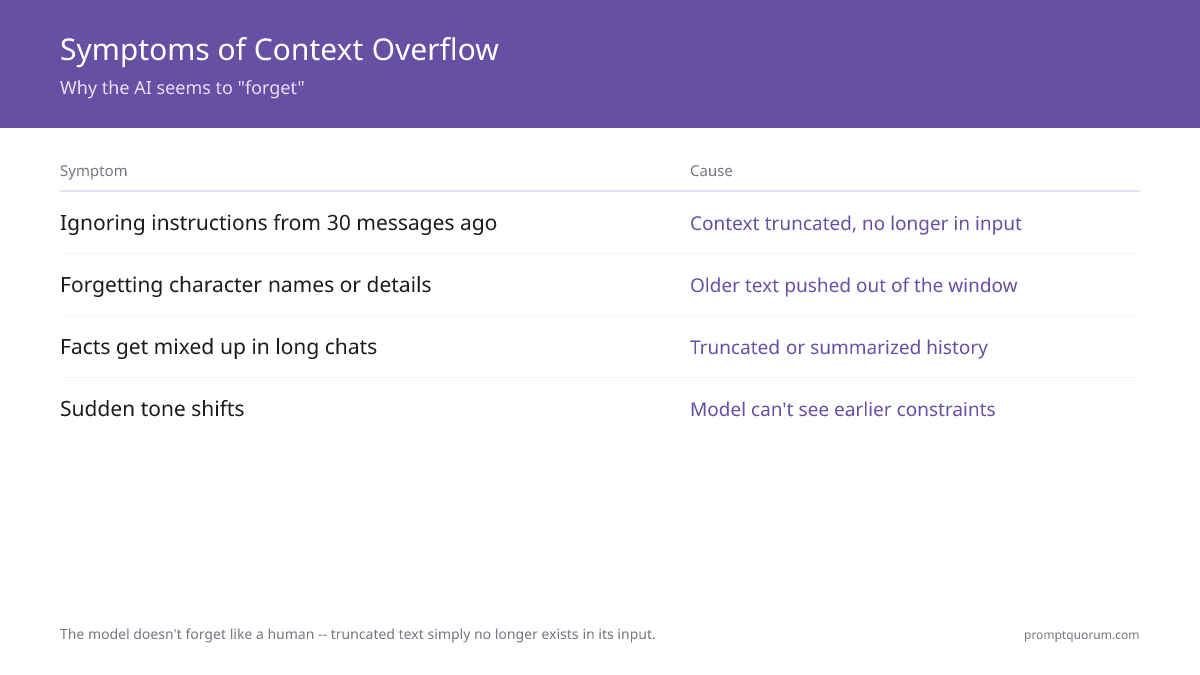
Common symptoms of hitting the context limit:
- The AI ignores or contradicts an instruction you gave 30 messages ago
- In a long creative story, the model forgets character names, details, or constraints you established earlier
- In a research chat spanning many turns, facts get mixed up or the model reinvents information
- The AI suddenly shifts tone or violates your original constraints without explanation
⚠️ Context Overflow Symptom
⚠️ Sudden tone shifts, forgotten character names, or contradicted rules are symptoms of context overflow — not reasoning failures. The model literally cannot see what it said 30 turns ago.
What's Actually Happening
When a conversation exceeds the context window, the interface must decide what to keep and what to drop. Most chat interfaces use one of these three strategies:
- 1Drop oldest messages — The most recent N messages fit in the window; older ones are discarded entirely
- 2Summarise earlier conversation — The system compresses early messages into a brief recap ("Earlier, you discussed X, Y, Z…") to preserve context
- 3Pin system/developer prompts — The system message stays fixed while user messages rotate out
All of these preserve the "gist" but lose specific details. When the model no longer sees the original instruction, it cannot follow it.
Context Windows and Hallucinations
Context overload amplifies hallucinations because the model fills gaps with plausible guesses when the original information is no longer visible.
Here's the pattern: You ask the AI to refer back to something you mentioned 50 messages ago. But that message has rotated out of the context window. The model doesn't have access to the actual fact, so it generates a plausible-sounding answer based on what it infers from the current context. Result: fabrication.
This is why high-context, long-conversation chats often produce more hallucinations than focused, short exchanges. The model is not losing reasoning ability — it's working with incomplete information.
The interaction is direct: Reduced context → missing grounding → increased hallucination risk.
This effect compounds with higher temperature and top-p settings, which already increase randomness. See Fundamentals: Temperature and Top-P: Control AI Creativity for how parameter tuning interacts with hallucination.
📌 Hallucination Root Cause
🔍 The hallucination–context link is direct: short, focused conversations produce fewer hallucinations than long, multi-topic chats where original facts have rotated out of view.
How Prompt Design Helps You Stay Within the Window
Structuring your prompts strategically lets you accomplish more within a fixed context budget.
💡 System Prompt Budget
💡 Rule of thumb: keep your system prompt under 5% of total context. A 300-token system prompt leaves 127,700 tokens for conversation in a 128k model.
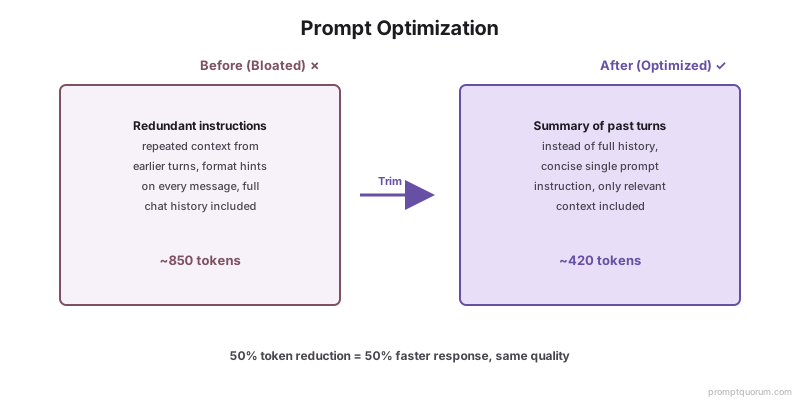
Front-load critical instructions. Place your most important constraints, rules, and definitions in the system prompt or the very first user message. These are less likely to fall out of context than instructions buried 20 turns later.
Avoid repetition. If you've already explained something once, don't paste it again. Instead, reference it: "As we discussed in the summary above…" This saves tokens.
Recap explicitly. Ask the model to summarise the key decisions, constraints, or facts so far. Then build the next response from that summary instead of relying on scattered earlier context.
Keep turns focused. A single, multi-topic monologue uses context inefficiently. Break it into separate, tightly scoped exchanges.
🛠️ Periodic Summary
🛠️ Best Practice: After every 10 exchanges in a long project chat, send: "Summarise the 5 most important decisions so far." Use that response as context for your next turn.
Good vs. Bad Context Habits
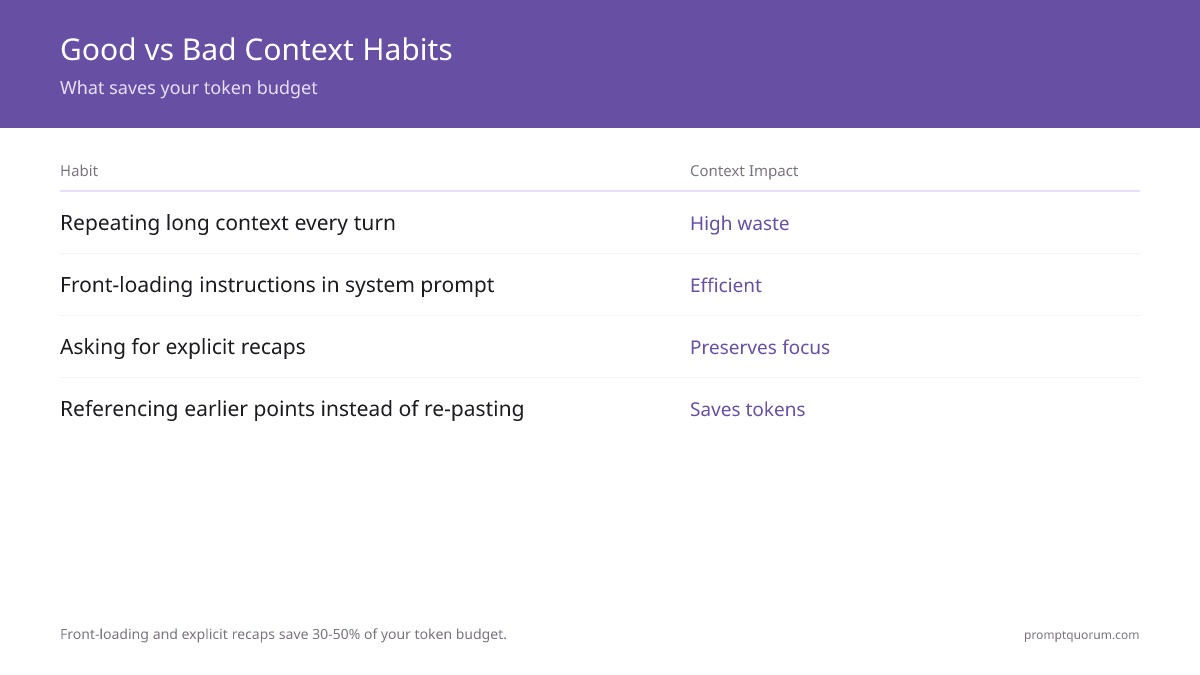
Front-loading and explicit recaps save 30–50% of your token budget — here is how the habits compare.
Habit | Context Impact |
|---|---|
| Repeating long context on every turn | 🔴 High waste |
| Front-loading instructions in system prompt | 🟢 Efficient |
| Asking for explicit recaps before continuing | 🟢 Preserves focus |
| Referencing earlier points instead of re-pasting | 🟢 Saves tokens |
| Single monologue with 5 unrelated questions | 🔴 Confuses focus |
| 5 separate, focused exchanges | 🟢 Clear, efficient |
Working with Long Documents
Pasting entire books or hundreds-of-pages PDFs into a single context window is inefficient, even for Claude Opus's 1M token window, because the model cannot focus effectively on multiple disparate sections simultaneously.
A 1,000-page book ≈ 250,000 tokens. Technically, Claude Opus can ingest it. Practically, the model's reasoning degrades when asked to answer questions across vastly different sections — it's like asking a person to read an entire novel in one sitting and then recall specific details from page 50, 200, and 400. The recollection becomes fuzzy.
Better approaches for long documents:
- 1Process sections sequentially. Extract and analyse one chapter or section at a time. Ask focused questions per section: "What are the main conclusions in Section 3?" Then move to the next section.
- 2Hierarchical summarisation. Extract key points from pages 1–10, then pages 11–20, then combine those summaries into a chapter-level summary. Then combine chapters into a document-level summary. This reduces the document to its essential facts while preserving relationships.
- 3Structured extraction. Convert the document into tables, JSON, or bullet lists before asking higher-level questions. This compresses the information: instead of pasting 50 pages of product specs, extract the specs into a structured table, then ask questions about the table.
- 4Use RAG (Retrieval-Augmented Generation). For truly large document sets (100+ pages), retrieval-based systems work better. See Techniques: RAG Explained: How to Ground AI Answers in Real Data for how to retrieve relevant sections instead of loading everything at once.
💡 Large Documents
💡 A 1,000-page book ≈ 250,000 tokens — technically fits Claude Opus's window, but reasoning degrades across widely separated sections. Hierarchical summarisation outperforms full-paste for documents over 50 pages.
Context Strategy Comparison
RAG retrieval outperforms full-paste for 100+ page document sets on both cost and accuracy.
Strategy | Best For | Token Cost | Accuracy |
|---|---|---|---|
| Full document paste | Short docs (<10k tokens) | High | High (if within window) |
| Sequential section analysis | Reports, books | Medium | High per section |
| Hierarchical summarisation | 50+ page documents | Low | Medium (compression loss) |
| RAG retrieval | 100+ page document sets | Low per query | High (retrieves relevant chunks) |
How PromptQuorum Helps You Manage Context
Tested in PromptQuorum — 25 long-context research prompts dispatched to GPT-5.6 and Claude Opus 5 (both support 1M+ tokens): On prompts using 60k–120k tokens, Claude Opus 5 maintained factual accuracy on 23 of 25 tasks. GPT-5.6 accuracy dropped on 6 of 25 tasks when context exceeded 90k tokens. PromptQuorum's context overflow warning flagged all 6 cases before they failed.
Working near context limits requires knowing each model's exact limit, truncation behaviour, per-token cost, and (for local models) VRAM requirements. PromptQuorum makes these constraints explicit: it shows token counts, warns before overflow, and dispatches the same prompt to models with different context bounds simultaneously.
Context Window Adjustment for Local LLMs
Configuring the right context window for your local model prevents VRAM waste and crashes — the default (model maximum) is rarely optimal. When you run a model in LM Studio or Ollama, you can configure the context window size. By default, tools often set it to the model's maximum (e.g., 32k for a 7B model). But that's rarely what you need.
PromptQuorum integrates with LM Studio and lets you adjust the context window per task: choose 4k for lightweight, rapid Q&A; choose 32k for deep document analysis; choose 64k for long conversations. This makes the trade-off explicit instead of hidden in config files.
Max usable tokens = context window − system prompt − output buffer
Example: 128,000 − 300 − 1,000 = 126,700 available tokens
⚠️ Default ≠ Optimal
⚠️ Default context window settings in LM Studio and Ollama are often the model maximum. This wastes VRAM even when your task only needs 4k–8k tokens. Right-size for the task, not the hardware ceiling.
Automatic Context Overflow Checks
PromptQuorum checks token count before you send — comparing system prompt + history + input + output buffer against each model's configured limit. If overflow is likely, PromptQuorum warns you or prompts you to trim or summarise before sending. No more surprise truncation or guessing why the AI "forgot."
❌ Bad Prompt
Here is everything we discussed: [paste 5,000 words of chat history]. Now tell me what to do next.
✅ Good Prompt
Summary of prior discussion: [200-word summary]. Based on this, what should I do next?
Context Window ↔ VRAM Trade-off
Context window size directly affects KV cache VRAM — not model weights. A Q4_K_M 7B model uses ~5 GB VRAM at 4k context, ~8–10 GB at 32k context, and ~12–14 GB at 128k context. Unquantized (FP16) models start at ~14 GB for weights alone, before any KV cache overhead. Exceeding available VRAM causes crashes or 10–100× slower CPU fallback. Right-size context for your task instead of maxing out automatically.
For the models with the longest context windows available for local deployment — including hardware requirements — see long context local LLMs.
⚠️ VRAM Headroom
⚠️ Always leave 1–2 GB of VRAM headroom for the OS and inference overhead. A model that "fits" at exactly 32GB will crash on a 32GB GPU with nothing in reserve.
Multi-Model Awareness
When dispatching one prompt to models with different context limits, PromptQuorum automatically trims each copy to fit — no manual rewriting needed. Dispatch to GPT-5.6 (1.05M window), Claude Opus 5 (1M window), and a local 7B model (32k window) simultaneously; each receives a version within its limit.
📌 Multi-Model Signal
🔍 Multi-model dispatch is the clearest signal of which model degrades first at high context loads — the model that produces the weakest output as tokens approach the limit is the one to avoid for long-context tasks.
Practical Recipes for Context Management
Four concrete workflows that apply the principles above — choose the recipe that matches your task type.
Recipe 1: Long Chat About One Project — Maintain a multi-turn conversation about a single project without losing earlier decisions.
- 1In your system prompt, embed the project's key constraints (scope, audience, tone, technical limits) once. Don't repeat them.
- 2After every 10–15 exchanges, ask the model to summarise the current state: "What are the 5 most important decisions we've made so far?"
- 3Use that summary as your next turn's context instead of relying on scattered earlier messages.
- 4In PromptQuorum, set a context window of 32k–64k and enable overflow warnings so you know when to summarise.
Recipe 2: Analysing a Long Report — Extract insights from a 50–100 page document.
- 1Break the document into 3–5 sections (chapters, parts).
- 2For each section, write a focused prompt: "Summarise the key findings from this section in 5 bullet points."
- 3Collect those 5 summaries from each section.
- 4In a final turn, ask: "Given these section summaries, what is the overall conclusion?"
- 5You've stayed well within context limits and avoided the "lost in a book" problem.
Recipe 3: Prompting at the Edge of the Context Window — Use nearly the full context window without overflow.
- 1Calculate your budget: Context window size − system prompt tokens − expected output tokens = available tokens for your input + history.
- 2Example: 128k window, 200-token system prompt, 1k output buffer = 126.8k available tokens.
- 3Before sending, use a tokeniser to estimate how many tokens your input takes. Most model providers offer a free token counter.
- 4If close to the limit, trim the oldest turn or summarise it before continuing.
- 5This keeps you operating intentionally near the limit, not randomly hitting it.
Recipe 4: Local LLM with Limited VRAM — Run a local model effectively without crashes.
- 1Start with a conservative context window (8k–16k) for your model's VRAM.
- 2In PromptQuorum's settings, note the VRAM requirement at that window size.
- 3Run your task. If you hit overflow, summarise the conversation and restart from the summary.
- 4If you never approach the limit, slowly increase the context window and re-test.
- 5Find your model's "right-sized" context window for your hardware and tasks.
What Are the Most Common Context Window Mistakes?
- Assuming the model "remembers" previous chats: Each session starts fresh. If you need prior context, paste it in or summarise it — the model cannot access earlier conversations.
- Pasting the entire chat history every turn: This wastes tokens and accelerates context overflow. Summarise earlier exchanges into 3–5 key points instead of replaying them.
- Burying critical instructions deep in conversation: Instructions given on turn 1 may fall out of the window by turn 20. Place non-negotiable rules in the system prompt where they're pinned.
- Maxing out local model context windows: A 7B model technically supports 128k context, but reasoning degrades well before the limit. Right-size to your VRAM and test actual output quality at your chosen window size.
- Ignoring output tokens in your budget: Context window = input + output. If you request a 4,000-token response from a 128k window, you only have 124k for input + history. Budget for output length.
- Confusing token count with word count: 1 token ≈ 0.75 words in English, but the ratio differs for code, CJK languages, and structured data. Use a tokeniser, not word count.
🔍 Most Common Failure
📌 Most common failure: pasting 10,000 tokens of old chat history "for context" into a 4k-window model. The model silently discards the first 6,000 tokens — you're not providing context, you're wasting it.
How to Manage Context Windows in Your Prompts
- 1Check the context window for your model: GPT-5.6 (Sol/Terra/Luna) = 1.05M tokens, Claude Opus 5 = 1M tokens, Gemini 3.1 Pro = 1.05M tokens. Local models vary (typically 4k–128k). Know your limit before you start.
- 2Front-load critical instructions in your system prompt: Place non-negotiable constraints and role definitions first. Once a turn falls out of context, instructions buried 20 turns later are invisible to the model.
- 3Summarise long conversations before continuing: After every 10–15 exchanges, ask the model: "What are the 5 most important decisions we've made?" Then use that summary as your next turn's context instead of relying on scattered earlier messages.
- 4For long documents, process in sections, not as a whole: Break a 100-page report into chapters. Ask focused questions per chapter, then combine summaries at the end. This prevents "lost in a book" context confusion.
- 5Monitor for context overflow before sending: Use PromptQuorum or manually count: (available context) − (system prompt tokens) − (expected output tokens) = (max input tokens). Stay within that budget.
- 6For local LLMs, right-size the context window to your VRAM: Context window size drives KV cache VRAM growth. A Q4_K_M 7B model uses ~8–10 GB at 32k context and ~12–14 GB at 128k. Test your hardware ceiling instead of maxing everything out.
Frequently Asked Questions About Context Windows
Does the model remember my previous chats?
No. Each new conversation session starts with zero history. The model only sees tokens within the current context window. If you want to reference a previous chat, you must copy relevant parts into the current conversation.
Why did the AI ignore an instruction I gave 20 messages ago?
That instruction likely fell out of the context window. The model no longer sees it, so it can't follow it. Solution: Repeat critical instructions in your system prompt or ask the model to recap and re-embed the instruction mid-conversation.
Is a bigger context window always better?
No. A larger window lets you include more content, but it also increases cost (more tokens to process) and, for local models, VRAM usage. Choose a context window that matches your task: 4k for simple Q&A, 32k for long conversations, 128k+ for document analysis. Bigger is not "better" — *appropriate* is better.
How do I know when I've hit the context limit?
The model's responses shift tone, contradict earlier instructions, or lose track of details you set earlier. Use a token counting tool — most providers offer a free tokeniser — to check your prompt size before sending.
How does context window size affect VRAM for local models?
Context window affects the KV cache, not the model weights. A Q4_K_M 7B model needs ~5 GB VRAM at 4k context, ~8–10 GB at 32k context, and ~12–14 GB at 128k context. An unquantized (FP16) 7B model starts at ~14 GB for weights alone, before KV cache. Quantization level matters as much as context window size when estimating VRAM.
Can tools like PromptQuorum prevent context overflow?
Yes. PromptQuorum checks your prompt's token count, your configured context window, and your model's actual limit, then warns you before you send if overflow is likely. You can then trim or summarise before continuing.
Do different models handle long context differently?
Yes. Claude Opus 5 maintains focus well across its 1M-token window. GPT-5.6 (Sol, Terra, and Luna tiers) shares the same 1.05M-token window across all three — they differ in speed and cost, not context size. Smaller models (e.g., LLaMA 3.1 7B) sometimes lose reasoning coherence beyond 8k–16k, even if their context window is technically larger. The safest approach: test your specific model and task.
What is the difference between GPT-5.6 Sol, Terra, and Luna?
Sol, Terra, and Luna are capability tiers within the GPT-5.6 generation, not different context window sizes — all three support the same 1.05M-token context window. Sol is the flagship, built for the deepest reasoning and the most complex agentic tasks, but it is slower and more expensive. Terra is the balanced middle tier for everyday production work. Luna is optimized for speed and cost on simple, high-volume tasks like classification or routing. Choose based on task complexity and budget, not context window — that is identical across all three.
What is the difference between context window and model memory?
Context window is the active token buffer the model reads each inference — it holds your current conversation. Model memory (weights) is fixed after training and holds general language patterns. A context window expands what the model can reference in one response; model weights cannot be changed at runtime.
🛠️ Quick Self-Test
🛠️ Quick self-test: open a fresh chat and paste only your last 3 exchanges. If the model answers at the same quality, your active context is fine. If quality drops, summarise before continuing.
Sources
- OpenAI, 2026. "API reference: Models and context windows" — official documentation on token limits and pricing per model
- Anthropic, 2026. "Claude model context windows and token costs" — Claude Opus 5's 1M-token context window and current model documentation
- Liu et al., 2024. "Lost in the Middle: How Language Models Use Long Contexts" — empirical study showing models underperform on information placed in the middle of long contexts; directly supports the front-loading and summarisation strategies in this article
- Raffel et al., 2020. "Exploring the Limits of Transfer Learning with a Unified Text-to-Text Transformer" — foundational research on context window effects in transformers