Key Takeaways
- All major 2026 local models — Qwen3, Gemma 4, Llama 3.1, Mistral Small 3.1 — support 128K tokens natively. Long context is no longer a differentiator; it is table stakes.
- Winner for most users: Qwen3 14B at Q4_K_M. Handles 128K tokens in ~12 GB RAM at 15-25 tok/s on Apple M5 Pro. On 8 GB machines, use Qwen3 4B — same 128K context, lower quality, fully usable.
- RAM scales with context length AND model size. A 7B Q4_K_M model needs ~6 GB at 4K context and ~14 GB at 128K. Qwen3 14B Q4_K_M uses ~12 GB at 128K on Apple Silicon (unified memory helps).
- Lost in the Middle still applies: LLMs miss details from middle sections of the context. Mitigation: keep critical info at prompt start, use RAG for search, or process in overlapping chunks.
- Long context excels for holistic analysis of complete documents (codebases, contracts, books). RAG excels for search-heavy tasks across many documents. Choose by task type, not context size alone.
- Ollama's Modelfile spec defaults num_ctx to 2048, but the current runtime picks a VRAM-tiered default (4K under 24 GiB, 32K from 24–48 GiB, 256K above) -- not 128K. Set num_ctx explicitly in a Modelfile to access full context. Apple M5 (16-32 GB, 200 GB/s) and M5 Pro (36-64 GB, 307 GB/s) handle 128K inference well.
📍 In One Sentence
All major 2026 local LLMs support 128K tokens natively; Qwen3 14B Q4_K_M handles 128K in ~12 GB RAM at 15–25 tok/s — but Ollama's Modelfile spec defaults num_ctx to 2048, and the current runtime picks a VRAM-tiered default (4K under 24 GiB, 32K from 24–48 GiB, 256K above), so always set num_ctx explicitly in a Modelfile.
💬 In Plain Terms
Context length is how much text an AI can "see" at once. 128K tokens ≈ 96,000 words — enough for a full novel. The catch: models lose accuracy on information buried in the middle of very long inputs (called "Lost in the Middle"). Put your most important facts at the start of the prompt.
What Is Context Length and Why Does It Matter for Local LLMs?
Context length is the maximum number of tokens a model can process in a single inference call -- the combined size of the input (your document, conversation history, system prompt) and the output (the model's response). One token ≈ 0.75 words in English; 128K tokens ≈ 96,000 words.
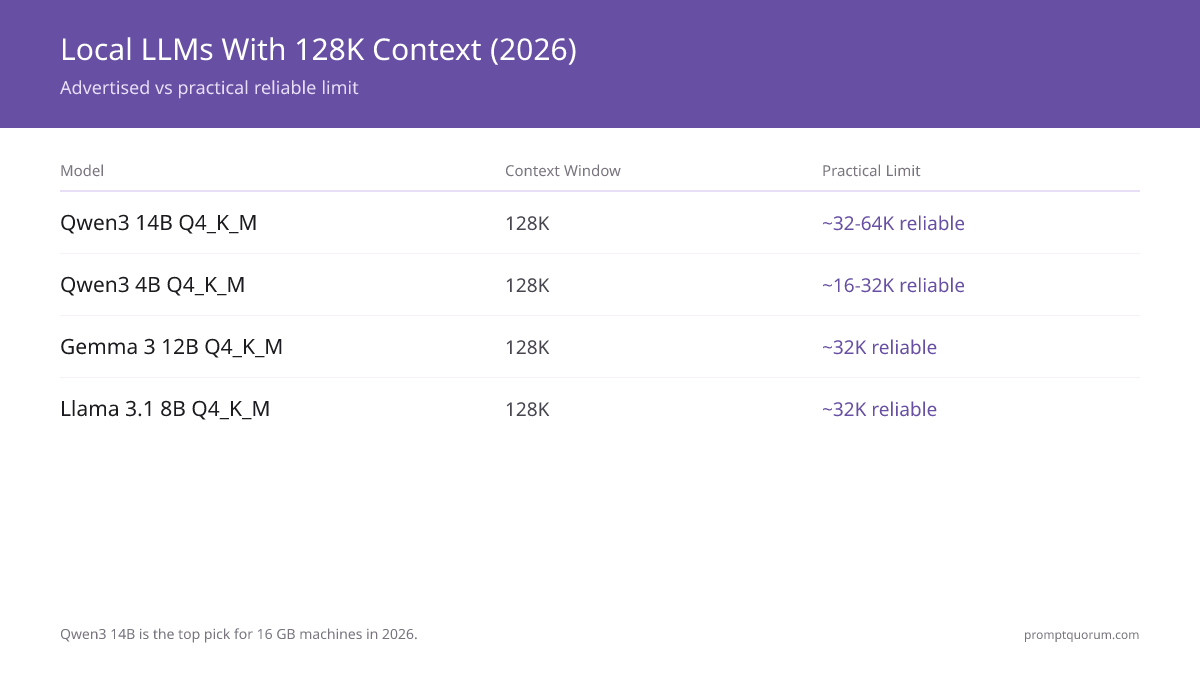
For most users, Qwen3 14B is the best long-context local model — 128K tokens, strong reasoning, fits 16 GB. On 8 GB, use Qwen3 4B — same context length, lower quality, fully usable.
For local LLM use cases, long context enables: summarizing entire books or long reports, analyzing full codebases in one prompt, processing hours of meeting transcripts, and maintaining long conversation histories without losing earlier context.
The key distinction is between the advertised context length (what the model architecture supports) and the practical context length (where quality stays reliable). A model may technically support 128K tokens but show degraded quality on information presented at the 100K token mark.
Which Local LLMs Support 128K Token Context in 2026?
Model | Context Window | Practical Limit | Ollama Command |
|---|---|---|---|
| Qwen3 14B Q4_K_M | 128K | ~32-64K reliable | ollama run qwen3:14b |
| Qwen3 4B Q4_K_M | 128K | ~16-32K reliable | ollama run qwen3:4b |
| Gemma 4 26B-A4B Q4_K_M | 128K | ~32K reliable | ollama run gemma4:26b-a4b |
| Llama 3.1 8B Q4_K_M | 128K | ~32K reliable | ollama run llama3.1:8b |
| Llama 3.2 3B | 128K | ~16K reliable | ollama run llama3.2:3b |
| Mistral Small 3.1 24B | 128K | ~32K reliable | ollama run mistral-small3.1 |
| Qwen3 8B Q4_K_M | 128K | ~32K reliable | ollama run qwen3:8b |
| DeepSeek-R1 14B Q4_K_M | 128K | ~32K reliable | ollama run deepseek-r1:14b |
How Much RAM Does Long Context Processing Require?
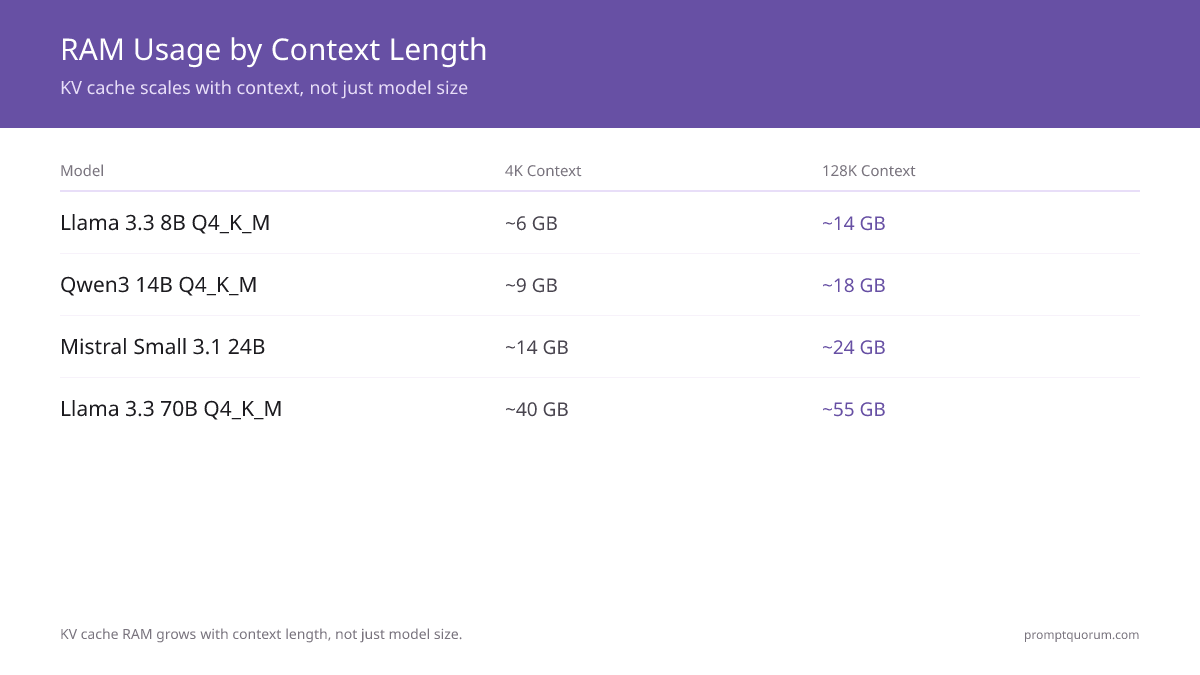
RAM usage scales with both model size and context length. The KV cache (key-value cache) stores attention states for all processed tokens -- this grows linearly with context length.
A 7B model at Q4_K_M with 4K context uses ~6 GB RAM. The same model with 32K context uses ~8-9 GB RAM. With 128K context: ~12-16 GB RAM.
Model | 4K Context | 32K Context | 128K Context |
|---|---|---|---|
| Llama 3.1 8B Q4_K_M | ~6 GB | ~9 GB | ~14 GB |
| Qwen3 14B Q4_K_M | ~9 GB | ~12 GB | ~18 GB |
| Mistral Small 3.1 24B Q4_K_M | ~14 GB | ~17 GB | ~24 GB |
| Llama 3.3 70B Q4_K_M | ~40 GB | ~45 GB | ~55 GB |
Why Is Practical Context Length Shorter Than the Advertised Maximum?
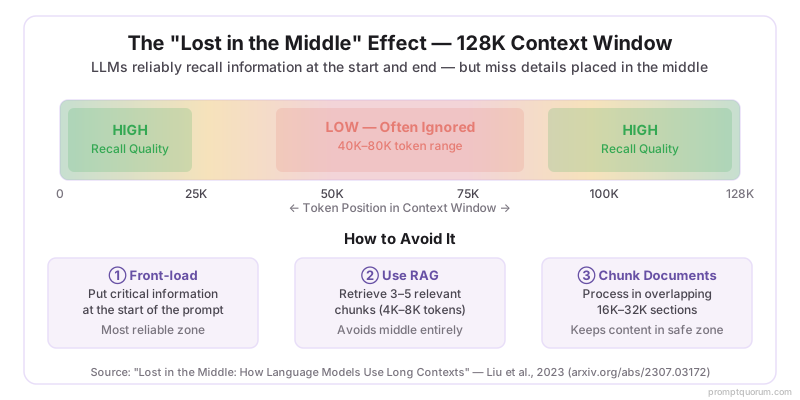
LLMs trained with RoPE positional encodings (used by Llama, Qwen, Mistral) can technically process tokens up to their maximum context length, but quality degrades in a known pattern called the "lost in the middle" effect.
Research shows that language models are best at using information at the beginning and end of the context window. Information placed in the middle of a very long context is retrieved less reliably. In practice, this means a model with a 128K context window may reliably answer questions about content in the first 32K tokens and last 16K tokens, but miss details from the 40K-80K token range.
For local models specifically, the practical reliable limit scales with model size: 3B models ≈ 8K-16K reliable; 7B-8B models ≈ 16K-32K reliable; 70B models ≈ 64K reliable. These are approximate -- the actual limit depends on the specific task and how "important" the retrieved information is.
Long context windows enable more input, but prompt structure determines whether the model uses that context effectively. Techniques like RAG, prompt chaining, and context window management strategies are covered in the prompt engineering guide.
How Do You Set Context Length in Ollama?
Ollama's Modelfile spec defaults num_ctx to 2048, but the current runtime picks a VRAM-tiered default (4K under 24 GiB, 32K from 24–48 GiB, 256K above) of context unless configured otherwise. To use a model's full context window:
Context window size determines how much text a model can process, but prompt structure determines how effectively it uses that context. For a deep dive into why models lose track of earlier input and strategies to mitigate it, see context windows explained: why AI forgets.
# Set context length at runtime
ollama run llama3.2 --ctx 32768

# Or create a custom model with a Modelfile
cat << EOF > Modelfile
FROM llama3.1:8b
PARAMETER num_ctx 32768
EOF
ollama create llama3.1-32k -f Modelfile
ollama run llama3.1-32k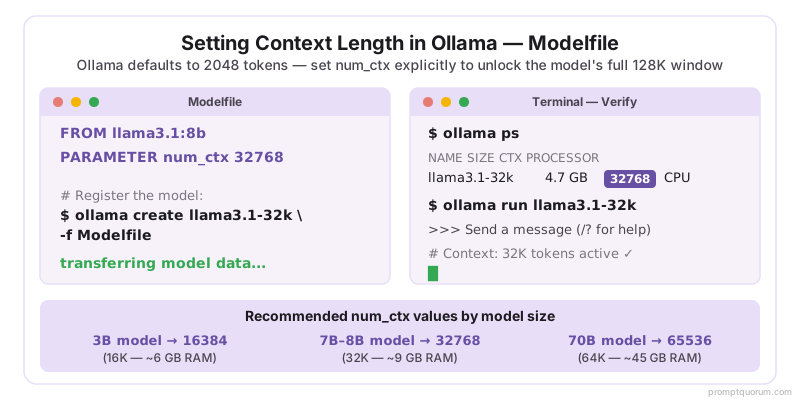
Long Context Local LLMs: Regional Context
EU / GDPR + AI Act: The EU AI Act (effective February 2025) classifies AI systems processing personal data at scale as potentially high-risk. Long-context local inference for legal document analysis, medical record summarization, or HR document processing sits in this risk tier. Running locally eliminates the third-party data processor risk under GDPR Article 28 -- no data leaves the organization.
For German BSI compliance on AI systems processing sensitive documents locally: the recommended configuration in June 2026 is Qwen3 14B at Q4_K_M with 32K context (~12 GB RAM). Apple M5 Pro (36-64 GB, 307 GB/s) and M5 Max (64-128 GB, 460-614 GB/s) run this at 15-25 tok/s on-premises. Qwen3 14B and Mistral Small 3.1 are the recommended EU compliance choices for long-context document processing.
For French CNIL guidelines on AI and personal data: local inference via Ollama with no external API calls satisfies the requirement that personal data not be processed by third-party AI providers without a valid legal basis.
Japan (METI): Japanese documents require 1.5-2× more tokens than equivalent English documents due to tokenizer differences. A 50-page Japanese report may consume 25K-35K tokens -- within the reliable range of Qwen3 8B (32K practical limit) but requiring explicit context configuration in Ollama: PARAMETER num_ctx 32768. For Japanese legal and financial documents, Qwen3 14B at Q4_K_M with 32K context (~12 GB RAM) provides the best quality-per-RAM for Japanese long-context processing. Qwen3's native Japanese tokenizer processes Japanese text 30-40% more efficiently than Llama.
China: Under China's Data Security Law (数据安全法), processing sensitive documents through cloud APIs requires additional regulatory compliance. Local long-context inference via Qwen3 (Alibaba) keeps all document content on-premises. For Chinese enterprise document processing, Qwen3 72B with 32K context on a local workstation (~45 GB RAM) provides near-cloud quality at full data sovereignty. Qwen3's native Chinese tokenizer makes it 30-40% more token-efficient than Llama for Chinese-language documents.
Common Mistakes with Long Context Local LLMs
- Assuming 128K context works as well as 4K: The "lost in the middle" effect means information presented 30K-80K tokens ago is retrieved less reliably than information at the start or end. For critical document analysis, chunk long documents into 16K-32K sections and process each separately rather than feeding an entire 100K document at once.
- Relying on the VRAM-tiered runtime default instead of setting num_ctx explicitly: Ollama's Modelfile spec defaults num_ctx to 2048, and while the current runtime picks a VRAM-tiered default (4K under 24 GiB, 32K from 24–48 GiB, 256K above), multi-turn conversations that exceed that limit will truncate earlier messages. Always set num_ctx explicitly: add PARAMETER num_ctx 32768 to your Modelfile or use --ctx at runtime.
- Running long context on insufficient RAM: A 7B model with 128K context on 8 GB RAM total causes severe swap usage. Model weights (~4.5 GB) plus 128K KV cache (~8+ GB) exceed 8 GB. Reduce context to 32K (fits ~9 GB) or use 16+ GB RAM for 128K context inference.
- Forgetting that generation speed is not the only latency factor at long context: At 32K context, the time-to-first-token (TTFT) can be 5-15 seconds on consumer hardware -- the model must process all 32K input tokens before generating a single output token. This prefill phase scales linearly with context length. For interactive use, limit context to 8K-16K. Reserve 32K+ contexts for batch processing where TTFT is acceptable.
- Using RAG when long context is the correct tool (and vice versa): RAG is better for document search across many documents. Long context is better when you need the model to reason over a complete, coherent document -- a contract, a codebase, a book chapter -- where missing any part would break the analysis. Splitting a 10-page legal contract into RAG chunks can cause cross-reference errors that long context avoids. Choose by task type, not by default preference.
Frequently Asked Questions
Can I summarize an entire book with a local LLM?
A typical 300-page book is 90,000-120,000 words -- approximately 120K-160K tokens. This exceeds the practical reliable context of most 7B models and requires either a 70B model (64K reliable) or chunked processing. For 7B models, split the book into 20K-word chapters and summarize each, then summarize the chapter summaries.
How many pages of text fit in 32K tokens?
Approximately 50-70 pages of standard English text (250 words per page). A 32K token context holds a short novel, a full research paper with appendices, or a complete technical specification document.
Does increasing context length slow down inference?
Yes -- processing a 32K context takes approximately 3-4× longer than processing a 4K context on the same hardware, due to the quadratic scaling of attention computation. Generation speed (tokens per second) is not significantly affected, but the time to first token (TTFT) scales with input length.
Which local LLM handles RAG better than long context?
For document search and retrieval tasks, RAG (retrieval-augmented generation) is often more effective than feeding entire documents as context. RAG retrieves the 3-5 most relevant chunks from a large document set and provides only those to the model. This uses 4K-8K tokens of context and avoids the "lost in the middle" problem. Tools like GPT4All LocalDocs and LlamaIndex implement local RAG.
What is the KV cache and why does it grow with context length?
The KV cache (key-value cache) stores attention states for every token processed in the context window. Each token requires a fixed amount of memory for its key and value vectors -- so a 32K context requires 8× more KV cache memory than a 4K context. This is why a 7B model at Q4_K_M needs ~6 GB for 4K context but ~9 GB for 32K context. The model weights stay the same -- only the KV cache grows.
Can local models handle 1M token contexts like Gemini 3.1 Pro?
The mainstream local models in June 2026 top out at 128K tokens, which covers most real-world use cases. 1M-token local inference requires specialized hardware (150+ GB VRAM). For the vast majority of long-document tasks, Qwen3 14B at 128K context is the practical answer.
What is the "lost in the middle" problem and how do I avoid it?
Research shows LLMs reliably retrieve information from the beginning and end of the context window, but miss details from the middle. For a 128K context, content placed at the 40K-80K token mark is most likely to be ignored. To avoid this: either keep important information at the start of the prompt, use RAG to retrieve only relevant chunks, or process long documents in overlapping 16K-32K sections.
How do I check what context length Ollama is using?
Run `ollama show <model>` -- the output lists the parameters including num_ctx. If it shows 2048, Ollama is using the default, not the model's full context window. To change it persistently, create a Modelfile with PARAMETER num_ctx 32768 and run ollama create <name> -f Modelfile. Check active sessions with ollama ps.
Is long context or RAG better for document question-answering?
RAG is usually more effective and RAM-efficient than long context for document Q&A. RAG retrieves 3-5 relevant chunks (4K-8K tokens total) from a large corpus and avoids the "lost in the middle" problem. Long context is better when the model needs to understand the entire document structure or when exact ordering and relationships between sections matter. For most practical document Q&A, start with RAG.
Which Ollama models have the largest context window?
Qwen3 (all sizes 4B–30B), Gemma 4 (E2B/26B-A4B/31B), Llama 3.1 (8B/70B), and Mistral Small 3.1 (24B) all support 128K tokens natively. Qwen3 14B Q4_K_M is the recommended choice for 16 GB machines. Ollama's Modelfile spec defaults num_ctx to 2048, but the current runtime picks a VRAM-tiered default (4K under 24 GiB, 32K from 24–48 GiB, 256K above) -- set num_ctx explicitly in a Modelfile to access long contexts.
How do I run a local LLM with 128K context on 16 GB RAM?
On 16 GB RAM, Mistral Small 3.1 24B at Q4_K_M with 32K context uses ~17 GB -- exceeds 16 GB. Use Llama 3.1 8B at Q4_K_M with 32K context (~9 GB) or 128K context (~14 GB) for a comfortable fit. Set num_ctx in a Modelfile: PARAMETER num_ctx 32768.
Sources
- Lost in the Middle: How Language Models Use Long Contexts -- Liu et al., 2023
- Ollama Context Length Configuration -- Ollama documentation
- Llama 3.3 Technical Report -- Meta AI, 2024
- EU AI Act Official Text -- European Parliament, 2024