Key Takeaways
- 7B Q4 rule of thumb: a 7B model at Q4_K_M quantization needs about 4-5 GB of VRAM (or system RAM for CPU inference) — roughly 0.6 GB per billion parameters at 4-bit. This is the fastest way to estimate memory for any 7B-class model without doing the full VRAM math below.
- VRAM math: (Model size in GB) ÷ Quantization = VRAM needed. Example: 70B at Q4 = 70 ÷ 8 = 8.75 GB × parameters ≈ 39 GB total.
- 12 GB VRAM (RTX 4070 Ti): Best model: Llama 3.1 8B Q8 (~9 GB, 80 tok/sec). Also: Qwen3 8B (~8 GB, best multilingual + coding). Note: Llama 4 Scout (17B active / 109B total MoE) needs ~55 GB at Q4 and does NOT fit 12 GB.
- 16 GB VRAM (RTX 5080 / RTX 5070 Ti): Best model: Mistral Small 3.1 24B Q4_K_M (~13 GB, 55 tok/sec). Also: Devstral Small 24B Q4_K_M for agentic coding. Mistral Small 4 (March 2026) is the newer one-model successor that folds in reasoning, vision, and coding.
- 24 GB VRAM (RTX 4090 / RTX 5090): Most 70B models at Q4_K_M (~40 GB) do NOT fit. Best option: Qwen3.6 27B Q4_K_M (~16 GB, 77.2% SWE-bench, best dense coder) or DeepSeek-R1 32B Q4_K_M (~19 GB, 60 tok/sec).
- CPU-only (16 GB system RAM): Llama 3.2 3B Q8 (20 tok/sec) or Phi-4 Mini Q4_K_M (25 tok/sec). A used RTX 4060 8 GB (~$280) or new RTX 5060 Ti 16 GB (~$585) is 5-10× faster.
- MacBook on 8 GB RAM: run 3-4B models only — Phi-4 Mini, Llama 3.2 3B, or Gemma 3 4B at Q4_K_M via llama.cpp/Ollama (Metal). 7B is borderline on 8 GB; 16 GB is the comfortable Mac minimum.
- Apple M5 Max (128 GB unified): runs 70B models at Q4_K_M comfortably (~12-15 tok/sec) in a laptop or Mac Studio — alongside Mac Studio and 128 GB AMD Strix Halo systems that also hold a 70B model. None of these fit GLM-5.3 (needs ~239 GB even at 2-bit).
- Current prices: the GDDR7 shortage has worsened, not eased — RTX 5090 street pricing has climbed past $4,300–$5,000+, and the RTX 4090 remains discontinued. Budget-conscious buyers should also check AMD's RX 9070 XT (16 GB GDDR6, ~$690–740) — GDDR6 has dodged most of the shortage, making it noticeably cheaper than the RTX 5070 Ti at similar VRAM. Buy from in-stock listings; check live prices before purchase.
- llama.cpp speed tip: Always set `--n-gpu-layers 99`. This alone doubles speed on RTX 4070 Ti from ~40 to ~85 tok/sec.
- Quick reference: 7B@Q4_K_M = 4-5 GB | 70B@Q4_K_M = 40 GB | GLM-5.3@2-bit = ~239 GB | RTX 4070 Ti = ~80 tok/s | RTX 4090 = ~150 tok/s | CPU-only 16 GB = 12-28 tok/s
📍 In One Sentence
Local LLM hardware is determined by VRAM: 7B models need 8 GB, 13B–14B need 12–16 GB, and 70B models need 35–48 GB — a used RTX 4060 8 GB (~$280) is the best entry-level GPU in 2026.
💬 In Plain Terms
VRAM is the dedicated memory on your graphics card. The bigger the AI model, the more VRAM it needs. Rule of thumb: divide the model's size in gigabytes by its compression level (Q4 = divide by 8) to estimate VRAM. More VRAM means bigger models and faster responses.
Local LLM Hardware Requirements 2026
The minimum hardware to run a local LLM in 2026 is an 8 GB VRAM GPU — or an Apple Silicon Mac with 16 GB unified memory — for 7B-class models. Requirements then scale with model size: 14B needs 12 GB, 24B needs 16 GB, 32B needs 24 GB, and a 70B model needs ~40 GB at Q4_K_M. GPU VRAM is the hard limit: it decides which models load at all. CPU and system RAM affect load time and CPU-only fallback speed, but not which model fits on the GPU.
Use this table as the direct answer to "what hardware do I need" — find your model size or VRAM tier, then jump to the per-tier model picks below.
Model size | VRAM at Q4_K_M | GPU example (2026) | Best model | Speed |
|---|---|---|---|---|
| 3-4B | 4-5 GB | Any 8 GB / Mac 8 GB | Phi-4 Mini, Gemma 3 4B | 60-90 tok/s |
| 7-8B | 5-9 GB | RTX 5060 Ti, RTX 4060 (8 GB) | Llama 3.1 8B, Qwen3 8B | 50-80 tok/s |
| 14B | ~9 GB | RTX 5070 (12 GB) | Qwen3 14B | ~80 tok/s |
| 24B | ~14 GB | RTX 5070 Ti / 5080 (16 GB) | Mistral Small 3.1 24B | ~55 tok/s |
| 27-32B | 16-19 GB | RTX 4090 / 5090 (24-32 GB) | Qwen3.6 27B, DeepSeek-R1 32B | 55-60 tok/s |
| 70B | ~40 GB | Dual RTX 5090, A100, Mac M5 Max 128 GB | Llama 3.3 70B | 10-60 tok/s |
•KeyPoint: In one sentence: match the model to your VRAM — 8 GB runs 7B, 12 GB runs 14B, 16 GB runs 24B, 24 GB runs 32B, and only 40 GB+ runs a 70B model at usable Q4_K_M quality.
•ProTip: Add headroom for the KV cache (conversation context): budget 25% on top of model weights for 8K context and up to 100% for 32K. See the KV cache section below.
Best GPUs to Buy — 2026 Recommendations
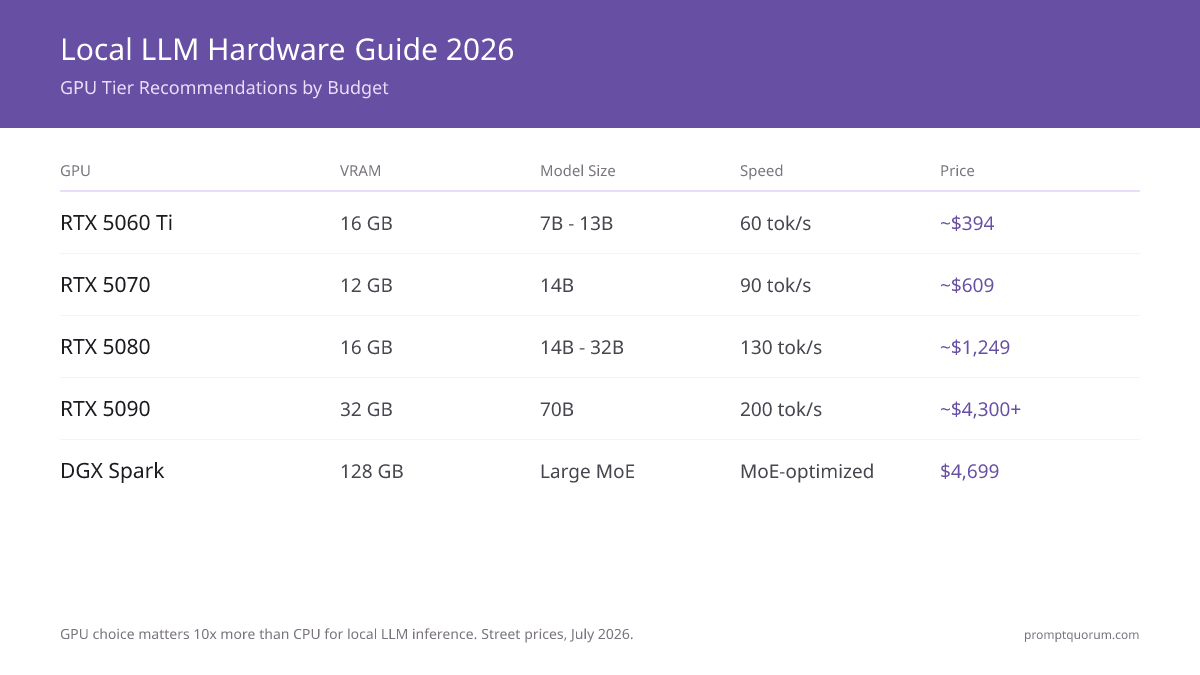
The in-stock choice for local LLMs is the NVIDIA RTX 50-series (Blackwell): 5060 Ti, 5070, 5070 Ti, 5080, 5090. The RTX 40-series (4060, 4070 Ti, 4090) is discontinued and now sells scarce and above its old prices on the used market. The 2026 GDDR7/memory shortage has continued to worsen, pushing even 50-series cards further above MSRP, so treat every figure below as a typical street price and check live listings before buying. Recommendations by use case:
- For 7B Models (Mistral, Phi-4, Llama 3.1) — Budget: RTX 5060 Ti 16 GB (~$585, about 40% over its $429 MSRP) or a used RTX 4060 8 GB (~$280). Runs any 7B model at Q4_K_M (~4-5 GB). Speed: 50–70 tok/sec. Tier: Budget enthusiasts.
- For 14B Models (Qwen3 14B, DeepSeek-R1) — Mainstream: RTX 5070 (12 GB, ~$880). Best price-to-performance new card. Qwen3 14B Q4_K_M runs well with headroom. Speed: 85–110 tok/sec. Tier: Most popular.
- For 24-32B Models (Qwen3.6, Mistral Small) — Mid-Range: RTX 5070 Ti (16 GB, ~$979) or RTX 5080 (16 GB, ~$1,450). Runs Mistral Small 3.1 24B and Devstral Small 24B Q4_K_M. Speed: 110–150 tok/sec. Tier: Professional developers. Budget alternative: AMD RX 9070 XT (16 GB GDDR6, ~$690–740) — GDDR6 has largely dodged the shortage, so it now undercuts the RTX 5070 Ti by $150–250 at similar VRAM, though ROCm has narrower local-LLM tooling support than CUDA.
- For 70B Models (Llama 3.3) — High-End: RTX 5090 (32 GB, ~$2,000 MSRP but ~$4,300–5,000+ street and still climbing) fits 70B at Q4_K_M with light CPU offload. A used RTX 4090 (24 GB, ~$2,300) runs 70B only at Q2_K. For full Q4_K_M, use dual RTX 5090. Speed: ~200 tok/sec (5090, smaller models). Tier: Research + production.
- For GLM-5.3 (744B MoE, 40B active) — Extreme: no single consumer GPU is enough. The 2-bit dynamic GGUF still needs ~239 GB combined VRAM/RAM. Realistic local paths: a 4× RTX 3090/4090 rig with 192 GB+ system RAM, or a 512 GB Mac Studio (M5 Ultra), both around 3–9 tok/sec via CPU/GPU hybrid offload.
- Best Value 2026: a single RTX 5070 Ti or 5080 (16 GB) is the sweet spot — it runs everything up to 32B at Q4_K_M without the 50-series price gouging on the 5090.
- For Apple Users: Mac M5 Max (128 GB unified memory, ~$6,000) runs 70B at Q4_K_M at ~12-15 tok/sec — slower than a multi-GPU desktop, but silent, power-efficient, and portable.
GPU | Best For | Price | Speed | Tier |
|---|---|---|---|---|
| RTX 5060 Ti (16 GB) | 7-13B models | ~$585 | 50–70 tok/s | Budget |
| RTX 5070 (12 GB) | 14B models | ~$880 | 85–110 tok/s | Mainstream |
| RX 9070 XT (16 GB) | 24-32B models | ~$690–740 | 90–130 tok/s | Budget alternative |
| RTX 5070 Ti / 5080 (16 GB) | 24-32B models | ~$979–1,249 | 110–150 tok/s | Professional |
| RTX 4090 (24 GB, used) | 32B, 70B (Q2) | ~$2,300 | 150–180 tok/s | EOL / used |
| RTX 5090 (32 GB) | 70B (Q4, light offload) | ~$2,000 MSRP (~$4,300–5,000+ street) | ~200 tok/s | High-end |
| Dual RTX 5090 | 70B (Q4) full | ~$8,600–10,000 | 300+ tok/s | Enterprise |
| Mac M5 Max 128GB | 70B (Q4) | ~$6,000 | ~12–15 tok/s (70B) | Pro laptop |
| 4× RTX 3090/4090 + 192GB RAM | GLM-5.3 (2-bit) | ~$6,000–9,000 | 3–9 tok/s | Extreme MoE |
⚠️Warning: GPU pricing is volatile and still worsening. The GDDR7 shortage has pushed the RTX 5090 street price past $4,300–$5,000+ — more than double its $1,999 MSRP — and the discontinued RTX 4090 now costs more used than it did new. The prices above are typical street figures — always check current listings before buying. AMD's GDDR6-based RX 9070 XT is a notable exception: it has largely avoided the price spike.
How Do You Calculate VRAM Requirements?
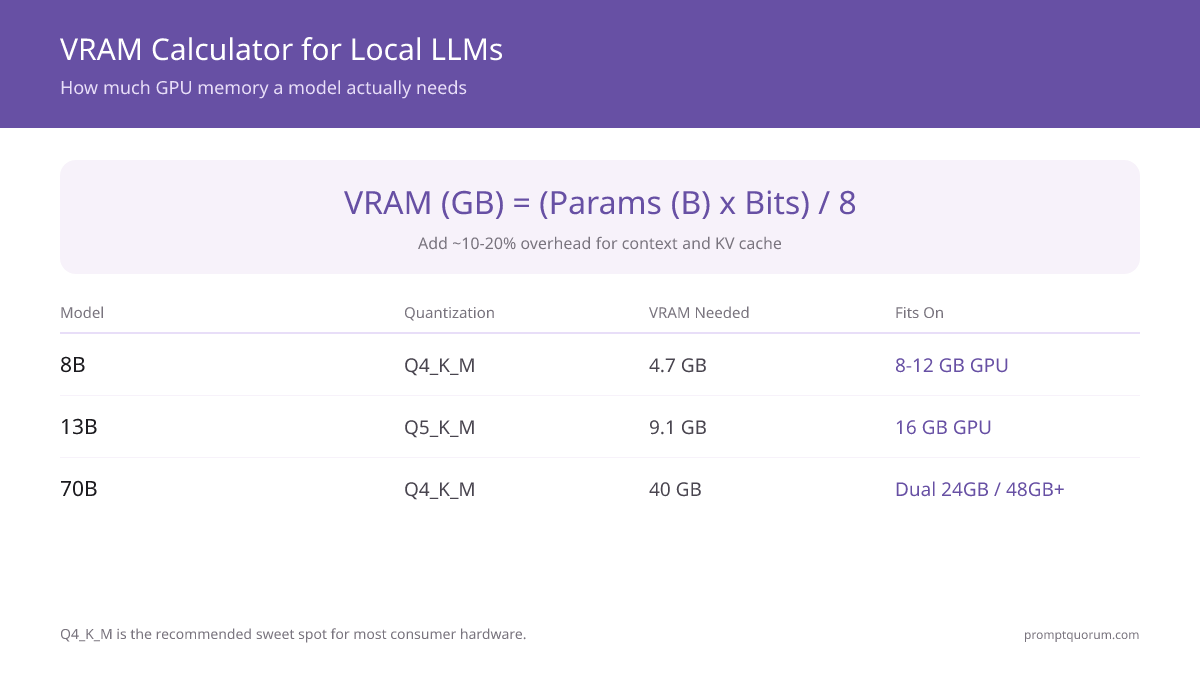
VRAM requirements depend on three factors: model size (parameters), quantization (bits per weight), and inference mode. Use this formula to determine if your GPU has enough memory. For an interactive calculator, see the VRAM calculator for local LLMs.
Formula:
```text VRAM (GB) = (Model Size × Quantization Bits) ÷ 8 ```
Quantization values: FP16 = 16 bits, Q8_0 = 8 bits, Q5_K_M = 5 bits, Q4_K_M = 4 bits. The practical sweet spot is Q4_K_M -- it uses 4-bit weights with K-quantization, which NVIDIA GPUs accelerate more efficiently than the older Q4_0 format.
Model | FP16 | Q8_0 | Q5_K_M | Q4_K_M |
|---|---|---|---|---|
| Llama 4 Scout (109B total MoE) | ~218 GB | ~109 GB | ~68 GB | ~55 GB |
| Llama 3.1 8B | 16 GB | 8.5 GB | 5.7 GB | 4.7 GB |
| Qwen 3.6 27B | ~54 GB | ~28 GB | ~19 GB | ~16 GB |
| Qwen3 8B | ~16 GB | ~8.5 GB | ~5.7 GB | ~5 GB |
| Llama 3.3 70B | 140 GB | 70 GB | 48 GB | 40 GB |
| Qwen3 32B | 64 GB | 33 GB | 22 GB | 19 GB |
| Mistral Small 3.1 24B | 48 GB | 25 GB | 17 GB | 14 GB |
| Phi-4 Mini 3.8B | 7.6 GB | 4.1 GB | 2.7 GB | 2.3 GB |
Q4_K_M is the recommended default for consumer hardware -- 90-95% of FP16 quality at 25-30% of the VRAM cost. Llama 4 Scout uses MoE architecture with 17B active parameters out of 109B total. All 109B experts must be loaded into memory, so Scout needs ~55 GB at Q4 (fits 24 GB only at 1.78-bit). MoE reduces compute per token, not VRAM footprint.
•KeyPoint: In one sentence: VRAM is the GPU's dedicated memory pool -- the single number that determines which AI models you can run locally and at what quality.
KV Cache: The Hidden VRAM Cost
The VRAM formula (Model Size × Bits ÷ 8) covers model weights only -- KV cache adds significant additional VRAM that most guides ignore.
The KV cache stores attention state for every token in your context window. It grows linearly with context length and stays in VRAM throughout the session.
KV cache VRAM formula: `KV cache ≈ layers × heads × head_dim × 2 × context_length × 2 bytes`
These figures assume fp16 (2 bytes per element) for the K and V tensors. Quantized KV cache (e.g. `--cache-type-k q8_0` in llama.cpp) uses roughly half the VRAM shown in the table.
Model | 4K context | 32K context | 128K context |
|---|---|---|---|
| Llama 3.1 8B | 0.5 GB | 4 GB | 16 GB |
| Llama 3.3 70B | 1.25 GB | 10 GB | 40 GB |
| Qwen3 32B | 1 GB | 8 GB | 32 GB |
•KeyPoint: In one sentence: KV cache is temporary VRAM used to store conversation context -- it grows with every token you generate and is separate from model weight storage.
⚠️Warning: A Llama 3.1 8B at Q4_K_M needs 4.7 GB for weights -- but add a 32K context window and total VRAM rises to ~8.7 GB. On an 8 GB card, this causes OOM errors.
•KeyPoint: Rule of thumb: this percentage shrinks as model size grows -- KV cache scales with layer count, while model weight size scales with total parameters, and layers grow more slowly than parameters as models get larger. Llama 3.1 8B (32 layers): a 32K-context cache is ~4 GB against ~4.7 GB of Q4_K_M weights (~85%). Llama 3.3 70B (80 layers): a 32K-context cache is ~10 GB against ~40 GB of Q4_K_M weights (~25%). Ollama default context is 2,048 tokens. To set higher: PARAMETER num_ctx 32768 in your Modelfile.
Which GPU Tier Matches Your Workload?
NVIDIA GPUs deliver the highest tokens/sec for local LLM inference across all price points. The sections below each tier give specific model recommendations. For a detailed benchmark comparison, see the best GPUs for local LLM guide.
Tier | GPU | VRAM | Best For | Speed |
|---|---|---|---|---|
| Budget (~$585) | RTX 5060 Ti | 16 GB | 7-13B models | ~60 tok/s |
| Mainstream (~$880) | RTX 5070 | 12 GB | 7-14B models | ~90 tok/s |
| Mid (~$979) | RTX 5070 Ti | 16 GB | 14-32B models | ~110 tok/s |
| High (~$1,450) | RTX 5080 | 16 GB | 14-32B models | ~130 tok/s |
| Top (~$4,300–5,000+ street) | RTX 5090 | 32 GB | 70B (Q4, light offload) | ~200 tok/s |
| Server ($7,000+) | RTX 6000 Ada / A100 | 48-80 GB | Multi-user, 70B+ | Production |
| Desktop AI ($4,699) | NVIDIA DGX Spark | 128 GB | Large MoE models (not GLM-5.3) | ~3 tok/s (dense 70B) |
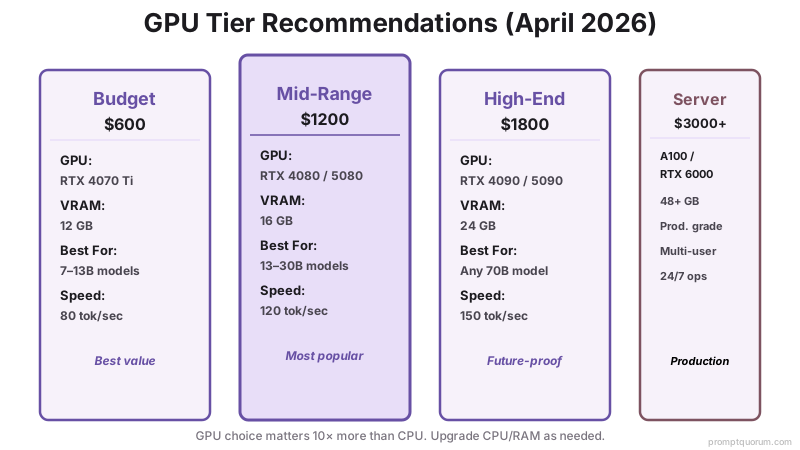
•KeyPoint: The RTX 50-series (Blackwell) is the current generation and the only NVIDIA consumer cards still in production — the RTX 40-series is discontinued. The RTX 5090 (32 GB) is the card to buy for 70B work, though the worsening memory shortage has pushed street prices to more than double its $1,999 MSRP.
Best Local LLMs by VRAM Tier
Use this as a quick lookup by your GPU's VRAM tier:
All models listed below are open-weights — downloadable, fine-tunable, and free to run locally. If you're choosing between open-weights and proprietary APIs, see our open-source vs proprietary LLMs comparison for cost and performance trade-offs at different token volumes.
Hardware determines which models you can run; prompt engineering determines how well they perform. A well-structured prompt on a 7B model often outperforms a lazy prompt on a 70B model. See the complete prompt engineering guide for techniques that maximise output quality at any parameter count.
- 8 GB VRAM (RTX 5060 Ti, RTX 4060, Intel B580): Llama 3.1 8B Q4_K_M (4.7 GB, ~70 tok/s) -- recommended. Qwen3 8B (5 GB, best multilingual + coding). Phi-4 Mini 3.8B (2.3 GB, fastest). Gemma 3 4B (~3 GB, current-gen Google small model, multimodal). Avoid 13B+ models.
- 12 GB VRAM (RTX 4070 Ti, RTX 5070, Intel B770): Llama 3.1 8B (4.7 GB, fast with headroom). Qwen3 14B Q4_K_M (8.5 GB, better reasoning on budget). Qwen3 8B (5 GB, best multilingual + coding). DeepSeek-R1 8B (5 GB, best reasoning). Avoid 30B+ and MoE models like Llama 4 Scout (~55 GB at Q4).
- 16 GB VRAM (RTX 4080, RTX 5070 Ti, RTX 5080): Mistral Small 3.1 24B Q4_K_M (14 GB, best quality at tier). Devstral Small 24B Q4_K_M (~16 GB) for agentic coding. Qwen3 14B (9 GB, fast with context headroom). Llama 3.3 70B at Q2_K (17 GB, possible but degraded quality).
- 24 GB VRAM (RTX 5090, RTX 4090, Tesla L40): Qwen 3.6 27B Q4_K_M (~16 GB, 77.2% SWE-bench, best dense coding model). DeepSeek-R1 32B Q4_K_M (~19 GB, best reasoning). Qwen3 32B Q5_K_M (~21 GB). Llama 3.3 70B needs 2× 24 GB GPUs at Q4_K_M.
- 32 GB VRAM (RTX 5090): Llama 3.3 70B Q4_K_M (40 GB -- needs minimal CPU offload for last layers). Qwen3 32B (19 GB, fits entirely with 13 GB spare). For agentic coding, the Kimi K2 line (MoE, 1T total / 32B active, Modified MIT) is the heavyweight pick -- Kimi K2.7 Code (June 2026) is the latest, with K2.6 the prior general release; both need quantization and heavy offload at this tier. RTX 5090 is the first single consumer GPU that fits a dense 70B with minimal offload.
- 48+ GB VRAM (RTX 6000 Ada, A100, DGX Spark): Llama 3.3 70B Q4_K_M (40 GB, fits entirely). Llama 4 Scout (17B active / 109B total MoE, ~55 GB at Q4 -- best long-context 10M-token / multimodal pick). Llama 4 Maverick (17B active, 400B total, MoE). Llama 3.3 70B Q8_0 (70 GB -- needs 80 GB A100). NVIDIA DGX Spark (128 GB unified) fits every open-weight model up to and including 70B at Q8_0 with 58 GB to spare -- but not the newest frontier MoE models: GLM-5.3 (744B total, 40B active) needs ~239 GB even at aggressive 2-bit quantization, well beyond the DGX Spark or a single 128 GB Mac Studio.
Interactive VRAM Calculator
Use this calculator to compute exact VRAM requirements for any combination of model, quantization, context, and batch size. Select your configuration and see which GPUs fit.
Popular Models
Base Model
6.50 GB
Context OH
1.50 GB
Batch OH
0.00 GB
System OH
1.00 GB
Total Minimum
9.00 GB
Recommended (with 25% safety margin)
11.25 GB
👉 Look for a GPU with at least 11.25 GB VRAM
Compatible GPUs
RTX 3060 (12 GB)
0.8 GB headroom
RTX 4060 Ti (16 GB)
4.8 GB headroom
RTX 4070 Ti Super (16 GB)
4.8 GB headroom
RTX 4080 Super (16 GB)
4.8 GB headroom
RTX 4090 (24 GB)
12.8 GB headroom
RTX 5090 (32 GB)
20.8 GB headroom
Mac Mini M6 (32 GB) (32 GB)
20.8 GB headroom
Mac Mini M5 Pro (64 GB) (64 GB)
52.8 GB headroom
Mac Studio M5 Max (128 GB) (128 GB)
116.8 GB headroom
Mac Studio M5 Ultra (96 GB+) (96 GB)
84.8 GB headroom
💡 Pro Tips:
- Always use the "with safety margin" figure when buying a GPU
- Q4 gives 90-95% quality with 25% size reduction. Q5 is better if you have room
- Context overhead grows with conversation length. Budget 1-3 GB for typical usage
- Batch size matters for multi-user APIs. Single-user chat can ignore batch overhead
📋 Share this configuration:
Best Local LLMs for 16 GB VRAM (2026)
The best local LLM for a 16 GB VRAM GPU in 2026 is Mistral Small 3.1 24B at Q4_K_M: it uses ~13 GB, runs at 55 tok/sec, and is the strongest general model that fits with context headroom. 16 GB cards (NVIDIA RTX 5080, RTX 5070 Ti, RTX 4080 used, or an RTX 4090 laptop) top out at 14-24B models — a 70B model needs ~40 GB and does not fit.
For agentic coding, Devstral Small 24B Q4_K_M fits at ~16 GB; for reasoning, DeepSeek-R1 14B Q8_0 is the pick. The newer Mistral Small 4 (March 2026) is a single model that folds reasoning, vision, and coding together and is the natural successor as 16 GB-class default. The table below shows what fits and what does not — the "Does NOT fit" rows are the most common mistake 16 GB owners make.
Model | Quantization | VRAM Used | Speed (RTX 4080) | Best For | Fits 16 GB? |
|---|---|---|---|---|---|
| Mistral Small 3.1 24B | Q4_K_M | ~13 GB | 55 tok/sec | General chat | ✅ Yes |
| Devstral Small 24B | Q4_K_M | ~16 GB | 45 tok/sec | Agentic coding | ✅ Tight |
| Qwen3 14B | Q8_0 | ~15 GB | 45 tok/sec | Coding + reasoning | ✅ Yes |
| DeepSeek-R1 14B | Q8_0 | ~15 GB | 40 tok/sec | Math + analysis | ✅ Yes |
| Llama 3.1 8B | FP16 | ~16 GB | 70 tok/sec | Fastest responses | ✅ Tight |
| Llama 3.3 70B | Q4_K_M | ~39 GB | -- | -- | ❌ No (needs 39 GB) |
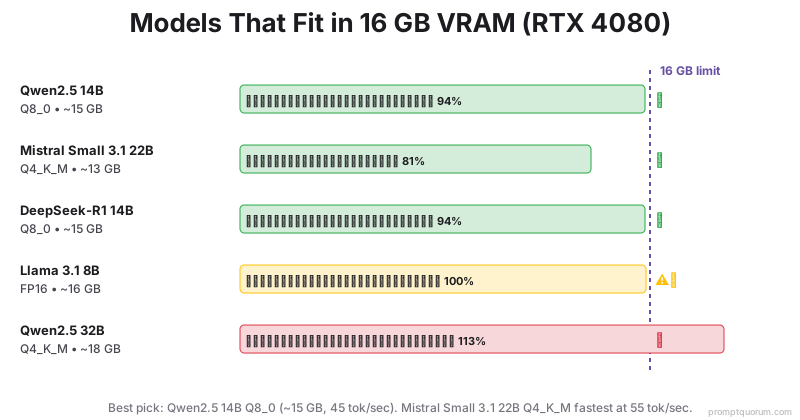
•ProTip: 🏆 Best overall for 16 GB: Mistral Small 3.1 24B Q4_K_M at ~13 GB, 55 tok/sec. For agentic coding, use Devstral Small 24B (Mistral AI, France) at 45 tok/sec. Best reasoning: DeepSeek-R1 14B Q8_0 at 40 tok/sec.
⚠️Warning: RTX 4090 laptop GPUs have 16 GB VRAM (not 24 GB). They share the same model ceiling as the RTX 4080 desktop.
•KeyPoint: When to upgrade to 24 GB (RTX 4090 desktop): only if you need 32B+ models at Q8, or want to run two models simultaneously without reloading.
Which Local LLMs Run Best on 12 GB VRAM?
On a 12 GB VRAM GPU (NVIDIA RTX 5070, RTX 4070 Ti, or RTX 3060 12 GB), you can run 7-8B models at Q8 or 14B at Q4_K_M. Note: MoE models like Llama 4 Scout do NOT fit here -- although Scout activates only 17B parameters per token, all 109B total experts must be loaded into memory, requiring ~55 GB at Q4.
Llama 3.1 8B at Q8_0 is the most reliable choice for conservative setups: 9 GB VRAM, 80 tok/sec, and full instruction-following quality. Qwen3 14B at Q4_K_M also fits at ~8.5 GB and delivers notably better reasoning than the 8B tier.
Model | Quantization | VRAM Used | Speed (RTX 4070 Ti) | Best For | Fits 12 GB? |
|---|---|---|---|---|---|
| Llama 3.1 8B | Q8_0 | ~9 GB | 80 tok/sec | Best overall, general chat + coding | ✅ Yes |
| Qwen3 14B | Q4_K_M | ~8.5 GB | 65 tok/sec | Better reasoning on budget | ✅ Yes |
| Llama 3.2 11B Vision | Q5_K_M | ~8 GB | 65 tok/sec | Image + text tasks | ✅ Yes |
| Qwen3 8B | Q8_0 | ~8 GB | 85 tok/sec | Best multilingual + coding | ✅ Yes |
| Mistral Small v0.3 | FP16 | ~14 GB | -- | -- | ❌ No (needs 14 GB at FP16) |
| Llama 4 Scout (109B total MoE) | Q4_K_M | ~55 GB | -- | -- | ❌ No (all 109B experts must load) |
•ProTip: 🏆 Best overall for 12 GB: Llama 3.1 8B Q8_0 at ~9 GB, 80 tok/sec. For better reasoning on the same card, use Qwen3 14B Q4_K_M at ~8.5 GB. Llama 4 Scout does not fit -- its 109B total MoE experts need ~55 GB at Q4.
•KeyPoint: RTX 3060 12GB is the budget entry point (~$285 used). It runs all 12 GB models but at ~60-70 tok/sec vs ~80-90 tok/sec on RTX 4070 Ti due to older memory architecture.
Which 70B Models Actually Fit in 24 GB VRAM (RTX 4090)?
The hardware requirement to run a 70B model locally at usable Q4_K_M quality is ~40 GB of VRAM — so a single 24 GB RTX 4090 is not enough. Your real options for 70B in 2026 are: 2× RTX 5090 (64 GB combined), an RTX 5090 (32 GB) with light CPU offload, a 48-80 GB server GPU (RTX 6000 Ada / A100), or an Apple M5 Max / 128 GB unified-memory system. The common misconception is that "Q4 is small" — at 70B parameters, even Q4 needs ~40 GB.
On a single 24 GB card, the better strategy is a 27-32B model, which delivers strong quality and fits comfortably with context headroom. Qwen3.6 27B at Q4_K_M is the best dense coding model (77.2% SWE-bench); DeepSeek-R1 32B is the best reasoning pick. A 24 GB GPU can only hold 70B at Q2_K, where quality drops noticeably. See how to run 70B models on 24 GB VRAM for offload and dual-GPU techniques.
Model | Quantization | VRAM Required | Fits 24 GB? | Speed (RTX 4090) | Notes |
|---|---|---|---|---|---|
| Qwen 3.6 27B | Q4_K_M | ~16 GB | ✅ Yes | 55 tok/sec | Best dense coding model, 77.2% SWE-bench |
| DeepSeek-R1 32B | Q4_K_M | ~19 GB | ✅ Yes | 60 tok/sec | Best reasoning, strong overall quality |
| Qwen3 32B | Q5_K_M | ~21 GB | ✅ Yes | 55 tok/sec | High quality, excellent coding + instruction |
| Qwen3 32B | Q8_0 | ~34 GB | ❌ No | -- | Requires 48 GB GPU |
| Llama 3.3 70B | Q2_K | ~24 GB | ⚠️ Barely | 30 tok/sec | Fits but Q2 quality is noticeably degraded |
| Llama 3.3 70B | Q4_K_M | ~39 GB | ❌ No | -- | Needs 2× RTX 4090 or A100 80 GB |
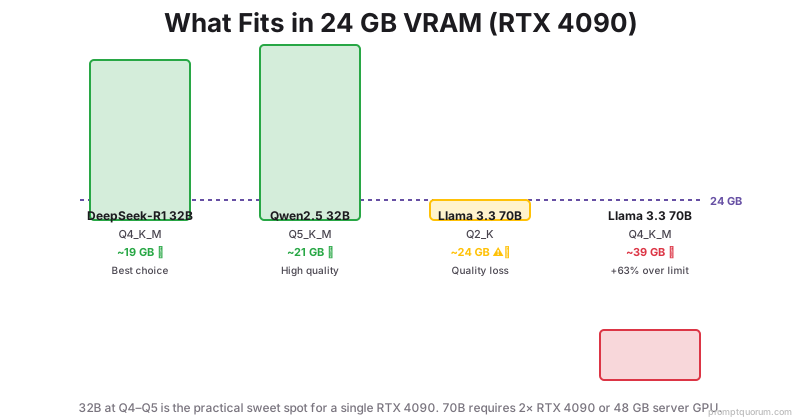
•KeyPoint: 🏆 Best for RTX 4090 (24 GB): Qwen 3.6 27B Q4_K_M (~16 GB, 77.2% SWE-bench) for best dense coding model. For reasoning: DeepSeek-R1 32B Q4_K_M (~19 GB, 60 tok/sec). Better than Llama 3.3 70B Q2_K at far less VRAM.
⚠️Warning: If you specifically need 70B quality at Q4+, the RTX 4090 is not the right GPU. You need 2× RTX 4090 (48 GB combined via tensor parallelism) or an RTX 6000 Ada (48 GB). Running 70B at Q2_K on a single 4090 noticeably hurts output quality.
What CPU and RAM Do You Need?
With a dedicated GPU, CPU and RAM are secondary components. The GPU handles matrix math; CPU/RAM manage context preparation. For a full comparison of GPU vs CPU vs Apple Silicon inference speeds, see the GPU vs CPU vs Apple Silicon guide.
Minimum CPU: 8-core processor (Intel Core i7 14th gen, AMD Ryzen 7 7700X, or newer). Older CPUs add 20%+ latency.
RAM: 16 GB minimum (with GPU). If running without GPU, 32+ GB recommended. RAM does not directly limit model size when GPU is present.
Storage: 500 GB SSD for model files and OS. M.2 NVMe is preferred (faster model loading).
Which Models Run Well on 16 GB System RAM Without a GPU?
Without a GPU, a machine with 16 GB system RAM can run 3B-7B models at 8-20 tokens/sec using CPU inference. The bottleneck is memory bandwidth, not RAM capacity -- CPUs have far lower bandwidth than GPUs, which is why inference is 5-10× slower.
On 16 GB system RAM, the practical rule is: model file size + 4 GB OS overhead ≤ 16 GB. A 7B model at Q4_K_M (4.9 GB) fits, but leaves little headroom for long contexts. The table below shows realistic options.
For a complete speed-optimized model guide covering CPU-only, 4 GB, 6 GB, and 8 GB VRAM tiers with real benchmarks, see Fastest Local LLMs for Low-End PCs.
Model | Quantization | RAM Used | Speed (Ryzen 9 7950X) | Best For | Notes |
|---|---|---|---|---|---|
| Gemma 2 2B | Q8_0 | ~2.7 GB | 28 tok/sec | Fastest, minimal RAM | Leaves 13 GB free for OS |
| Phi-4 Mini 3.8B | Q4_K_M | ~2.5 GB | 25 tok/sec | Coding on CPU | Best quality-per-RAM ratio |
| Llama 3.2 3B | Q8_0 | ~3.8 GB | 20 tok/sec | General chat, low RAM | Reliable, widely supported |
| Llama 3.1 8B | Q4_K_M | ~4.9 GB | 12 tok/sec | Best CPU quality | 12 tok/sec is slow but usable for batch tasks |
| Llama 3.1 8B | Q8_0 | ~9 GB | 8 tok/sec | Max quality on CPU | Too slow for interactive use on most CPUs |
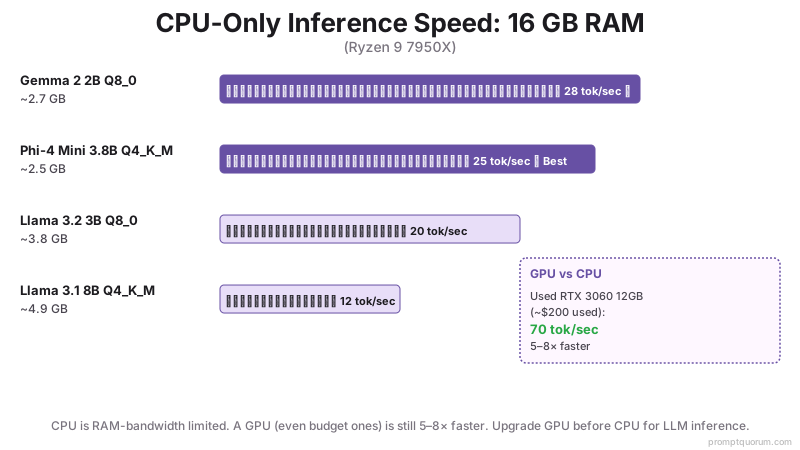
•ProTip: 🏆 Best for 16 GB RAM, no GPU: Phi-4 Mini 3.8B Q4_K_M (2.5 GB, 25 tok/sec). Delivers surprisingly strong coding and reasoning for its size.
•KeyPoint: CPU vs GPU speed reality: A used NVIDIA RTX 3060 12 GB (~$285) runs Llama 3.1 8B at 70+ tok/sec -- 5-8× faster than the Ryzen 9 7950X at CPU-only inference. If speed matters, buy a GPU before adding RAM.
⚠️Warning: Running a 7B model on 16 GB RAM with CPU-only leaves fewer than 7 GB for the OS and browser. With long conversation contexts (32k+ tokens), the model file grows beyond its base size and can cause RAM exhaustion. Keep context size under 4096 on 16 GB CPU-only machines.
How Much Storage Do You Need?
Model files are large: a 7B model at 4-bit quantization is 4-5 GB. Plan storage around the number and size of models you want to keep locally.
- 500 GB SSD: OS + 1-2 small models (3B, 7B)
- 1 TB SSD: OS + 3-5 models (mix of 7B and 13B)
- 2 TB SSD: OS + 10+ models (various sizes)
- 4 TB NVMe RAID: Production setup, fast model loading
What Hardware Build Should You Buy?
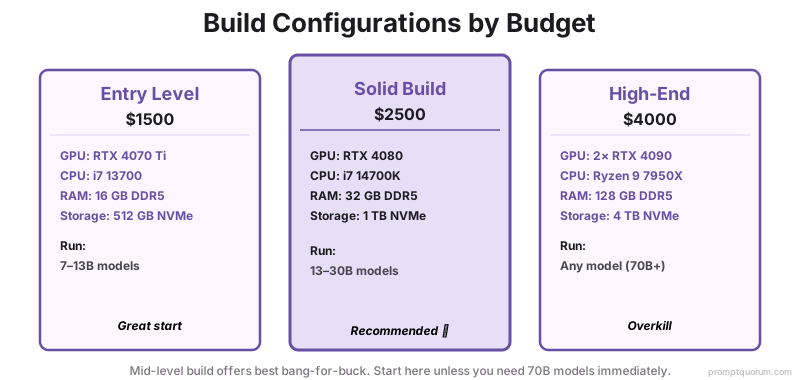
Building a local LLM machine from scratch means prioritizing GPU first, then CPU and RAM. Here are three realistic configurations. For multi-GPU builds, see the multi-GPU local LLM guide. For home automation setups, compact mini PCs are often a better fit than full desktop builds — see the best Mini PC for Home Assistant with local AI →.
Budget | GPU | CPU | RAM | Models | Cost |
|---|---|---|---|---|---|
| $1500 (entry) | RTX 4070 Ti | i7 13700 | 16 GB | 7-13B | Realistic |
| $2500 (solid) | RTX 4080 | i7 14700K | 32 GB | 13-30B | Recommended |
| $4000 (high-end) | 2× RTX 4090 | Ryzen 9 7950X | 128 GB | Any (70B+) | Overkill for personal |
What If You Can't Afford the Hardware?
If a $280–400 GPU is outside your budget, or your laptop is too old to support modern inference engines, local LLMs may not be cost-effective for you in 2026.
Calculate the real cost:
- Local: $800–2,000 upfront hardware + electricity + maintenance over 2–3 years
- Cloud: $5–50/month for typical developer use (Llama API or GPT-5.5 mini)
For light users (< 100,000 tokens/month), cloud APIs cost $5–10/month and require zero hardware. For heavy users (> 10M tokens/month), local breaks even in 6–12 months.
Compare full local vs cloud cost and performance trade-offs to find your break-even point. Many developers discover cloud is cheaper for their actual usage pattern.
Already shopping below the recommended VRAM tiers? See Best Local AI App for a Low-End PC for which model and app combinations actually run on 8 GB or less.
How Do You Maximize llama.cpp Speed on RTX 4070 Ti?
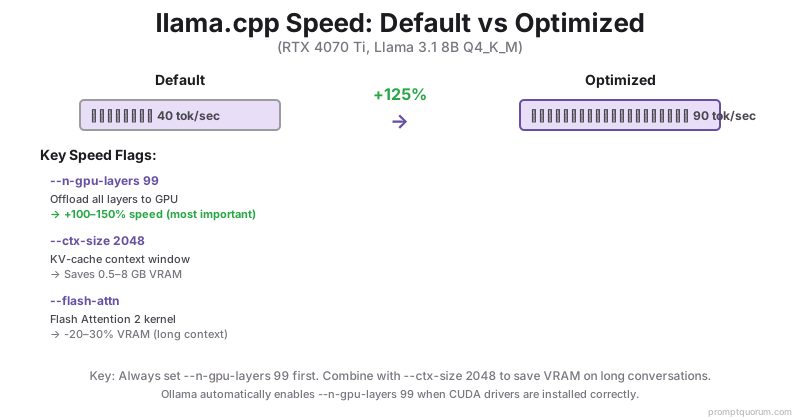
With correct settings, llama.cpp on an RTX 4070 Ti achieves 85-95 tokens/sec on Llama 3.1 8B Q4_K_M -- more than double the default out-of-box speed. The single most impactful flag is `--n-gpu-layers 99`, which offloads all model layers to the GPU. Without it, layers fall back to CPU, creating a severe bottleneck.
These settings apply to llama.cpp directly and to Ollama (which uses llama.cpp internally). Ollama sets `--n-gpu-layers 99` automatically on NVIDIA hardware if drivers are installed correctly.
- Q4_K_M beats Q4_0 by 15-20% on RTX 4070 Ti. The K_M variant uses mixed quantization that NVIDIA tensor cores accelerate more efficiently. Always choose Q4_K_M over Q4_0 when both are available.
- IQ4_XS is the smallest format (~8% smaller than Q4_K_M) with minimal quality loss. Useful for fitting Qwen3 14B into 12 GB VRAM when Q4_K_M is borderline.
- Q5_K_M runs at nearly the same speed as Q4_K_M on NVIDIA GPUs (< 5% slower) while providing noticeably better output quality. Worth using when you have 20% VRAM headroom.
Flag | What It Does | Impact | Default | Notes |
|---|---|---|---|---|
| --n-gpu-layers 99 | Offloads all layers to GPU | +100-150% speed | 0 (CPU only) | Most important flag -- always set this first |
| --threads [cores] | CPU threads for prompt processing | +10-15% speed | All threads (including HT) | Set to physical core count only. Hyperthreading hurts inference. |
| --ctx-size 2048 | KV cache / context window size | Saves 0.5-8 GB VRAM | 4096 | 2048 = ~0.5 GB extra VRAM. 32768 = ~8 GB extra. Only increase if needed. |
| --n-batch 512 | Prompt processing batch size | +5-10% throughput | 512 | Good default. Increase to 1024 for batch workloads if VRAM allows. |
| --flash-attn | Flash Attention 2 kernel | -20-30% VRAM at long ctx | Disabled | Available since llama.cpp b2900. Reduces VRAM for contexts > 8k tokens. |
•ProTip: Run `ollama ps` to confirm your model is loaded on GPU. If GPU utilization shows 0% in `nvidia-smi` while generating, drivers are not correctly routing to CUDA. Reinstall NVIDIA CUDA Toolkit and restart Ollama.
•KeyPoint: RTX 4070 Ti speed reference: Llama 3.1 8B Q4_K_M = 85-95 tok/sec. Llama 3.3 13B Q4_K_M = 60-70 tok/sec. Qwen3 8B Q8_0 = 90-95 tok/sec. These assume --n-gpu-layers 99 and --ctx-size 2048.
⚠️Warning: Increasing --ctx-size beyond 8192 on a 12 GB GPU will cause model layer offloading back to CPU if the KV cache exhausts remaining VRAM. If speed drops suddenly on long conversations, reduce context size or use --flash-attn.
Can Mac Hardware Run Local LLMs?
Apple Silicon (M-series) runs local LLMs efficiently using unified memory shared between CPU and GPU. The base M5 launched October 2025; the M5 Pro and M5 Max followed in March 2026. Apple measures up to 4× faster LLM prompt processing (time-to-first-token) on M5 Pro/Max vs the M4 generation, though token-generation gains are more modest.
The M5 Max with 128 GB unified memory (up to 614 GB/s) runs 70B models at Q4_K_M comfortably — roughly 12-15 tok/sec — in a laptop or Mac Studio form factor. The M5 Pro (up to 64 GB unified, 307 GB/s) handles 32B models with generous headroom for KV cache and multitasking. Note the M5 Max still falls far short of the ~239 GB GLM-5.3 needs even at 2-bit -- an area where Apple's unified memory ceiling matters more than raw speed.
Apple refreshed the Mac mini and Mac Studio lineup on August 25, 2026, shipping September 22, 2026. The Mac mini now comes in M6 (from $899, 32 GB max unified memory, 170 GB/s) and M5 Pro (from $1,699, 64 GB max, 307 GB/s) configurations. The Mac Studio steps up to M5 Max (from $2,499, 128 GB max) and M5 Ultra (from $5,499 at 96 GB, up to 256 GB or 512 GB in the top configuration -- the 512 GB build ships late October 2026 and is expected to cost well above $10,000). The outgoing M4 Mac mini (from $599) and M4 Pro Mac mini (up to $2,299, 64 GB max), plus the previous Mac Studio M4 Max / M3 Ultra, are now the prior generation.
No independent tok/sec benchmarks exist yet for the M6 or M5 Ultra chips -- Apple has not published third-party-verified inference figures for either as of this writing. For the first time, a single Mac can theoretically hold GLM-5.3 (744B MoE, ~239 GB at 2-bit) in unified memory: the top-configuration 512 GB Mac Studio M5 Ultra exceeds that footprint with room to spare. Until real-world benchmarks land, a 4× RTX 3090/4090 rig remains the better-documented local path for GLM-5.3-class models.
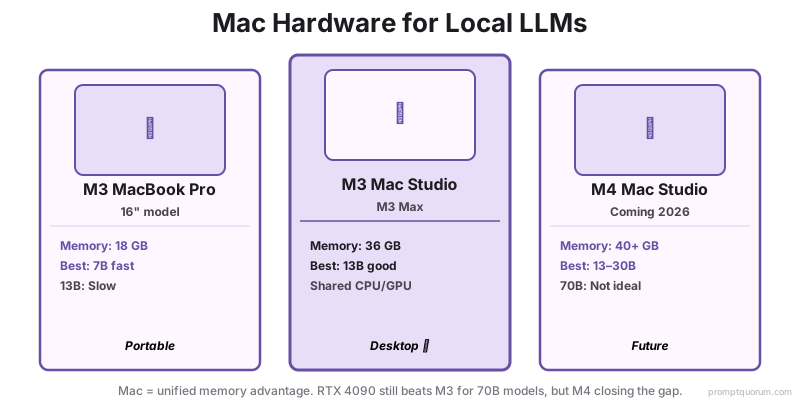
On a MacBook with 8 GB RAM, stick to 3-4B models. With unified memory shared between the OS and the model, 8 GB realistically fits Phi-4 Mini 3.8B, Llama 3.2 3B, or Gemma 3 4B at Q4_K_M via Ollama or llama.cpp (both use the Metal GPU backend automatically). A 7B model is borderline at 8 GB and will swap under load; 16 GB is the comfortable minimum for 7-8B models on a Mac.
Mac | GPU Memory | Best For | Limitation |
|---|---|---|---|
| M-series 8 GB (Air / base) | 8 GB unified | 3-4B models (Phi-4 Mini, Gemma 3 4B) | 7B borderline; OS competes for RAM |
| M3 Pro MacBook Pro 16" | 18 GB unified | 7-8B models (fast) | Can run 14B slowly |
| Mac mini M6 (from $899) | 32 GB unified, 170 GB/s | 8-14B models | No 32B+ headroom |
| M5 Pro (MacBook Pro / Mac mini, from $1,699) | 64 GB unified, 307 GB/s | 32B models comfortably | Llama 4 Scout runs well |
| M5 Max (MacBook Pro / Studio, from $2,499) | 128 GB unified, up to 614 GB/s | 70B models at Q4_K_M | ~12-15 tok/sec on 70B |
| Mac Studio M5 Ultra (from $5,499) | 96-512 GB unified | 70B+ and large MoE capacity | 512 GB ships Oct 2026; no benchmarks yet |
When Should You Use Server vs Consumer Hardware?
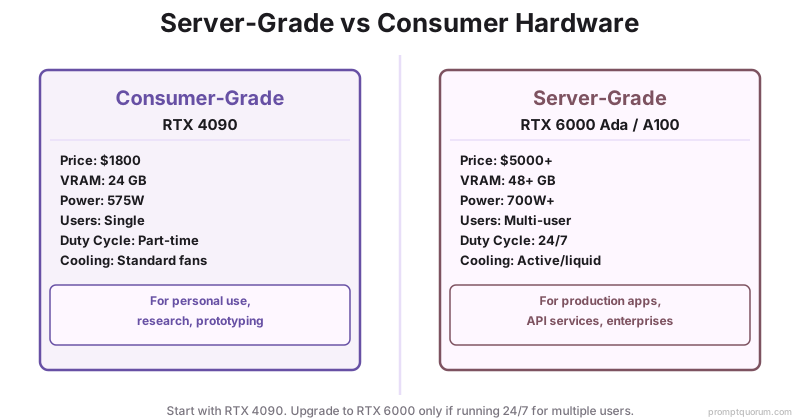
For production deployment (24/7 operation, multiple users), server-grade hardware is recommended over consumer GPUs. Consumer hardware is optimized for gaming, not sustained inference.
- Consumer (RTX 5090): ~$2,000 MSRP (~$4,300–5,000+ street), 32 GB VRAM, single-user, prone to thermal throttling under sustained load.
- Server (RTX 6000 Ada): ~$7,000, 48 GB VRAM, designed for 24/7 use, better cooling, error correction.
- Recommendation: Start with an RTX 5090. If running 70B models 24/7 for multiple users, upgrade to dual A100 or RTX 6000 Ada.
NVIDIA DGX Spark: 128 GB Desktop AI Computer
The NVIDIA DGX Spark ($4,699, up from its $3,999 launch price) is a compact 128 GB desktop AI computer that can hold Llama 3.3 70B at Q8_0 entirely in unified memory. Apple Mac Studio / MacBook Pro with 128 GB and AMD Strix Halo 128 GB systems can do the same, so it is not unique — but it ships with NVIDIA's CUDA software stack.
Built on the GB10 Grace Blackwell Superchip, the DGX Spark launched in October 2025 with 128 GB LPDDR5x unified memory. Note: its real memory bandwidth is ~273 GB/s, so dense 70B token generation is slow — independent testing (LMSYS) measured roughly 3 tok/sec on Llama 70B. The headline FP4 compute figure does not translate into fast single-stream decoding. The DGX Spark is best suited to large mixture-of-experts models (Llama 4 Scout/Maverick, Kimi K2) where only a fraction of parameters activate per token -- but its 128 GB ceiling is not unlimited: GLM-5.3 (744B total, 40B active, released June 2026) needs ~239 GB even at 2-bit quantization and does not fit a single DGX Spark.
Spec | Value |
|---|---|
| Unified memory | 128 GB LPDDR5x |
| Llama 3.3 70B at Q4_K_M | ✅ fits (40 GB) |
| Llama 3.3 70B at Q8_0 | ✅ fits (70 GB) |
| GLM-5.3 at 2-bit (~239 GB) | ❌ does not fit |
| Inference speed (70B) | ~3 tok/s |
| Price | $4,699 |
| OS | DGX OS (Ubuntu), Ollama pre-installed |
| Memory bandwidth | ~273 GB/s (real) |
| vs RTX 5090 | 4× more memory, but far lower bandwidth |
•KeyPoint: A discrete GPU (RTX 5090, or dual 5090) generates tokens much faster than the DGX Spark on dense models because of far higher memory bandwidth. Choose the DGX Spark for capacity — holding very large MoE models in one box — not for single-stream 70B speed.
What Are the Most Common Hardware Mistakes?
- Buying CPU-only when GPU is available. A $600 RTX 4070 Ti will outperform a $2000 CPU. GPU dominates LLM speed.
- Not accounting for VRAM overhead. Model file size + system overhead + context = total VRAM used. Always buy 25% more than the model size.
- Assuming all 70B models fit in 40GB VRAM. They do, barely, in Q4 (4-bit) quantization only. Q5 requires 45+ GB.
- Ignoring power supply and cooling. RTX 4090 draws 575W. Need a 1200W PSU and good case airflow.
- Thinking an old GPU will work. RTX 2080 is 10× slower than RTX 4070 Ti. Modern GPU architecture significantly outperforms prior generations.
- Not accounting for KV cache VRAM on top of model weights: A 7B model at Q4_K_M is 4.7 GB of weights -- but with a 32K context window, the KV cache adds ~4 GB more, totalling ~8.7 GB. On an 8 GB card this causes OOM errors. Always add 25-100% to model size depending on context length.
- Treating hardware cost as the only cost: If you cannot afford 16+ GB RAM or a dedicated GPU, cloud APIs cost less for low-volume use ($0.01–0.05 per 1K tokens). See Local LLM vs Cloud: Cost Analysis for the full trade-off.
What Regional Compliance Rules Apply to Local LLM Hardware?
EU (GDPR + EU AI Act): Running LLMs locally keeps all inference data within your infrastructure, eliminating cross-border data transfer concerns under GDPR Article 44. The EU AI Act's obligations for stand-alone high-risk AI systems (Annex III) were originally set to apply from August 2, 2026, but the "Digital Omnibus on AI" — provisionally agreed in May 2026 and awaiting formal adoption — pushes that date to December 2, 2027 (with high-risk AI embedded in regulated products deferred to August 2, 2028). The AI Act's Article 50 transparency duties still apply on the original schedule. Local hardware satisfies data residency requirements by default.
Japan (APPI): Japan's 2022 APPI amendment tightened breach-notification and cross-border-transfer rules but does not impose an AI-specific data-minimization requirement (it relies on general purpose-limitation duties). More relevant to AI are Japan's 2025 APPI reform package and its first AI law — the AI Promotion Act (in force since June 2025), an innovation-first framework with no penalties. On-premises LLM hardware keeps personal data inside your infrastructure for document processing and customer-support automation.
China: China's Cyberspace Administration of China (CAC) Interim Measures for Generative AI Services (effective August 2023) require providers with public-opinion influence to complete a CAC security assessment and algorithm filing. Since September 1, 2025, China also mandates labeling of AI-generated content under the CAC labeling Measures and national standard GB 45438-2025. Running local hardware with open-weight models avoids API-based compliance exposure for internal enterprise use.
Common Questions About Local LLM Hardware
Can I run a 70B model on a laptop?
Only with heavy quantization (Q2, 2-bit) and CPU fallback. Impractical. Laptops are suited for 7B models — see how to run a local LLM on a laptop for RAM tiers and thermals. For 70B, use a desktop with RTX 4090+.
Is RTX 4090 overkill for personal use?
Not if you run 70B models or multiple models simultaneously. For just 7B chat, RTX 4070 Ti suffices. RTX 4090 is future-proof if you want flexibility.
Should I buy RTX 5090 or wait for RTX 6090?
RTX 5090 is available (early 2026). RTX 6000 Ada server GPUs are also solid. Unless you have unlimited budget, RTX 5090 or 4090 are excellent.
How does quantization affect quality?
FP16 = 100% quality (baseline), Q8 = 99%, Q5 = 95%, Q4 = 90-95%. For most tasks, Q4 is indistinguishable from FP16.
Can I upgrade GPU later?
Yes. Start with RTX 4070 Ti now, upgrade to RTX 5090 in 2 years if needed. GPU is the most replaceable component.
How much RAM do I need to run a 7B model locally?
8 GB RAM is the absolute minimum for a 7B model. 16 GB is recommended for comfortable use alongside browser and OS. 32 GB gives headroom for larger context windows and multitasking.
Can I run local LLMs on Apple Silicon (M1/M2/M3/M4/M5)?
Yes. Apple Silicon uses unified memory shared between CPU and GPU. M5 Pro (64 GB, 307 GB/s) runs 32B models well. M5 Max (128 GB, up to 614 GB/s) runs 70B at Q4_K_M at roughly 12-15 tok/sec. On an 8 GB Mac, stick to 3-4B models.
What are the best llama.cpp models for a MacBook with M3 and 8 GB RAM?
On a MacBook M3 with 8 GB RAM, run 3-4B models at Q4_K_M: Phi-4 Mini 3.8B, Llama 3.2 3B, or Gemma 3 4B. Use Ollama or llama.cpp — both use the Metal GPU backend automatically. A 7B model is borderline and will swap under load; keep context under 4096 tokens. For comfortable 7-8B use on a Mac, 16 GB unified memory is the practical minimum.
What CPU is best for local LLMs without a GPU?
High-core-count CPUs with large L3 cache: AMD Ryzen 9 7950X or Intel Core i9-14900K. Expect 5-15 tokens/sec for 7B models. CPU inference is 3-5× slower than GPU.
Does storage speed affect local LLM performance?
Yes, at model load time. NVMe SSD (3-7 GB/s) loads a 7B model in 2-5 seconds vs. 20-60 seconds on HDD. Inference speed after loading is unaffected by storage.
Can I use multiple GPUs to run larger models?
Yes, via tensor parallelism. Two RTX 5090s (32 GB each) provide 64 GB VRAM, enough for a 70B model at Q4_K_M. Ollama and llama.cpp support multi-GPU via --n-gpu-layers split across cards.
What are the best local LLMs for 16 GB VRAM in 2026?
Mistral Small 3.1 24B Q4_K_M (13 GB, 55 tok/sec) is the best overall for RTX 5080 / RTX 5070 Ti / RTX 4090 laptop. For agentic coding: Devstral Small 24B Q4_K_M (16 GB, 45 tok/sec). For reasoning: DeepSeek-R1 14B (15 GB, 40 tok/sec). The newer Mistral Small 4 (March 2026) is the one-model successor. Llama 3.3 70B does not fit -- it requires ~40 GB at Q4_K_M.
Can a single RTX 4090 run a 70B model at good quality?
No -- not at Q4_K_M quality. Llama 3.3 70B at Q4_K_M requires ~39 GB VRAM. The RTX 4090 has 24 GB. You can run it at Q2_K (~24 GB) but quality drops noticeably. Better options: Qwen 3.6 27B Q4_K_M (~16 GB, 77.2% SWE-bench, best dense coding) or DeepSeek-R1 32B Q4_K_M (~19 GB, best reasoning).
What is the best local LLM for 16 GB system RAM without a GPU?
Phi-4 Mini 3.8B Q4_K_M (2.5 GB RAM, ~25 tok/sec on Ryzen 9 7950X) is the best option for CPU-only inference on 16 GB system RAM. Gemma 2 2B Q8 is the fastest at ~28 tok/sec. Llama 3.1 8B Q4_K_M (4.9 GB) also fits but runs at ~12 tok/sec -- slow for interactive use.
What is the memory rule of thumb for a 7B model at Q4 quantization?
A 7B model at Q4_K_M quantization needs about 4-5 GB of VRAM (or system RAM for CPU-only inference) -- roughly 0.6 GB per billion parameters at 4-bit precision. This scales linearly: a 14B model needs ~9 GB, a 32B model needs ~19 GB, and a 70B model needs ~40 GB, all at Q4_K_M.
What hardware do I need to run GLM-5.3 locally?
GLM-5.3 (Z.ai, released June 2026) is a 744B-parameter MoE model with 40B active per token. Even the most aggressive 2-bit dynamic GGUF needs ~239 GB of combined VRAM/RAM -- too large for a single RTX 5090 (32 GB), a 128 GB DGX Spark, or a 128 GB Mac Studio. Realistic local paths are a 4× RTX 3090/4090 rig with 192 GB+ system RAM, or a 512 GB Mac Studio (M5 Ultra), both running at roughly 3-9 tokens/sec via CPU/GPU hybrid offload. For most users, GLM-5.3 is effectively cloud-only.
Does more RAM help local LLMs beyond VRAM?
System RAM supports OS and multitasking but does not increase model capacity beyond GPU VRAM (for GPU-accelerated inference). With a GPU, 16 GB system RAM is sufficient. Without a GPU, 32+ GB RAM helps, but inference speed will be 3-5× slower than GPU-based.
Can you run a 30B parameter model on an RTX 5080 vs Mac Mini M4 Pro?
RTX 5080 (16 GB VRAM): 30B fits at Q4_K_M (~16 GB) with 80-120 tokens/sec. Mac Mini M4 Pro (36 GB unified): 30B runs at Q8 (28 GB) with 20-30 tokens/sec. RTX 5080 is 4-6× faster but less portable; Mac is energy-efficient but slower.
What are the hardware requirements for running a local coding LLM in 2026?
For good coding performance: RTX 4080+ (16 GB VRAM) with DeepSeek-Coder 33B Q4 or Mistral Large 24B Q4 for code generation. Minimum: RTX 4070 Ti (12 GB) with Mistral Small 3.1 24B Q4. CPU: 8+ cores. RAM: 16 GB system RAM. 500 GB SSD.
Is an RTX 3060 12GB still worth it for local LLMs in 2026?
RTX 3060 (12 GB) is dated (2021 architecture). It handles 7B-13B models at Q4 but produces 40-60 tokens/sec. A used one runs ~$285; a new RTX 5070 (~$880) or RTX 5060 Ti 16 GB (~$585) runs 2-3× faster. The RTX 3060 is only worth keeping as a secondary GPU for multi-card setups.
How much VRAM do you need for 7B, 13B, and 30B models?
7B models: 8-10 GB at Q4, 9-11 GB at Q5, 16 GB at FP16. 13B models: 12-14 GB at Q4, 16-18 GB at Q5, 26 GB at FP16. 30B models: 16-20 GB at Q4, 22-26 GB at Q5, 60 GB at FP16. Q4 is the recommended quantization level for 2026 hardware.
What is the best GPU configuration for enterprise LLM deployment in 2026?
For enterprise: 2× RTX 5090 (64 GB total VRAM) for redundancy and load distribution, or A100 (80 GB) for multi-tenant systems. RTX 5090 is $2,000 per unit; A100 is $10,000+. Docker-based orchestration (vLLM, Ollama Serve) enables multi-model serving and concurrent user handling.
Does an RTX 4070 laptop support LLM quantization?
Yes. RTX 4070 laptops (8 GB VRAM) support Q4 and Q5 quantization for 7-13B models at 50-70 tokens/sec. Higher-end laptops with the RTX 4090 mobile GPU (16 GB) handle up to 24B models. Quantization is essential for laptop inference—without it, only 3-7B models fit in 8 GB VRAM.
What specs should an AI PC have to run local LLMs fully offline?
Start from VRAM, then system RAM, then CPU cores — in that order, because that is the order in which they stop you. A 16GB-VRAM card covers most models people actually want; 24GB is where 32B-class models stop needing awkward compromises. System RAM matters second, and 32GB is a sensible floor for an AI PC that also does other work. CPU cores matter least for inference, though they decide how fast a model loads. Running fully offline is a software question rather than a hardware one: once the weights are on disk, Ollama and LM Studio both run with networking off, so nothing in this build needs an internet connection to answer a prompt. The tables above give exact system requirements per model size.
Sources
- NVIDIA. (2026). "GeForce GPU Specifications." www.nvidia.com/en-us/geforce/graphics-cards/ -- Official VRAM and bandwidth specs for RTX 40-series and RTX 50-series GPUs.
- Apple. (2026). "Apple M5 Chip." www.apple.com/mac/ -- M5 Pro/Max specifications, memory bandwidth, LLM performance claims. M5 is the first Mac that comfortably runs 70B models at Q4_K_M.
- NVIDIA. (2025). "DGX Spark Product Page." www.nvidia.com/en-us/products/workstations/dgx-spark/ -- Official specs for GB10 Grace Blackwell Superchip and 128 GB unified memory.
- Meta AI. (2024). "Llama 3.3 Model Card." llama.meta.com/ -- Official Llama 3.3 70B specifications and VRAM requirements.
- Meta AI. (2025). "Llama 4 Model Card." llama.meta.com/ -- Llama 4 Scout/Maverick MoE architecture, VRAM requirements.
- Z.ai. (2026). "GLM-5.3: Built for Long-Horizon Tasks." huggingface.co/blog/zai-org/glm-52-blog -- Official GLM-5.3 model card: 744B total / 40B active MoE architecture, MIT license, release date.