Key Takeaways
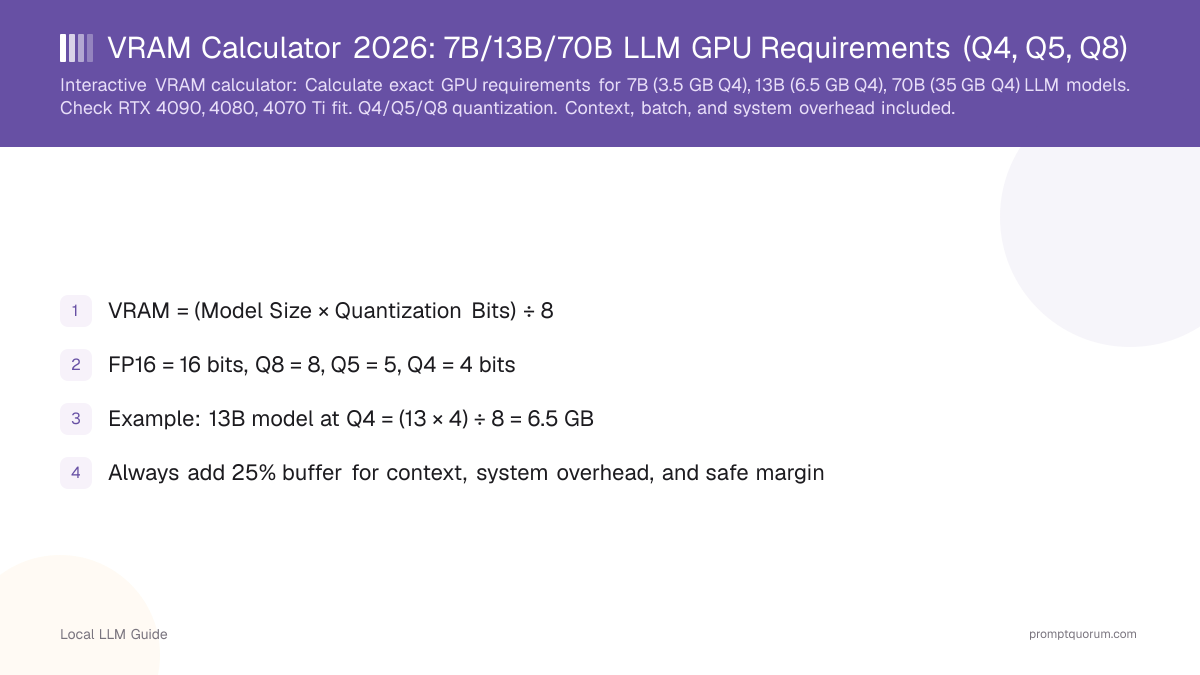
- VRAM = (Model Size × Quantization Bits) ÷ 8
- FP16 = 16 bits, Q8 = 8, Q5 = 5, Q4 = 4 bits
- Example: 13B model at Q4 = (13 × 4) ÷ 8 = 6.5 GB
- Always add 25% buffer for context, system overhead, and safe margin
- This formula is accurate within ±10%
Quick Facts: VRAM Requirements by GPU
- RTX 5090 (32 GB): a 7B model at Q4 (3.5 GB), a 13B model at Q5 (8.1 GB), a 70B model at Q4 (35 GB) without offloading
- RTX 4090 (24 GB): a 7B model at Q4 (3.5 GB), a 13B model at Q5 (8.1 GB), a 70B model at Q4 with offloading
- RTX 5070 Ti (16 GB): a 7B model at Q4 (3.5 GB), a 13B model at Q5 (8.1 GB), a 32B model at Q4 (16 GB)
- M5 Max Mac (36 GB unified): a 13B model at FP16 (26 GB), 70B not possible without extreme quantization
- Rule of thumb: Always budget 25–40% extra VRAM for context, batching, and system overhead beyond the formula result
In One Sentence
VRAM required (GB) equals model parameters in billions multiplied by quantization bits (16 for FP16, 8 for Q8, 4 for Q4, etc.), divided by 8.
In Plain Terms
Think of VRAM like bookshelf space. Bigger books (models with more parameters like 70B) take more shelf space. Smaller books (Q4 quantization) take less space than larger ones (FP16). The formula tells you exactly how many "shelves" (GB) you need. Always leave extra empty shelves for conversations, multiple requests at once, and system software.
What Is the VRAM Formula?
The formula for VRAM requirement is deceptively simple:
💡 Pro Tip: This formula calculates model weights only. Real VRAM usage is 25–40% higher due to context, batching, and system overhead. Always add a safety margin.
VRAM (GB) = (Model Size in Billions × Quantization Bits) ÷ 8

Example:
- 7B model at 4-bit quantization
- (7 × 4) ÷ 8 = 3.5 GB

- 13B model at 5-bit quantization
- (13 × 5) ÷ 8 = 8.125 GB

- 70B model at 8-bit quantization
- (70 × 8) ÷ 8 = 70 GB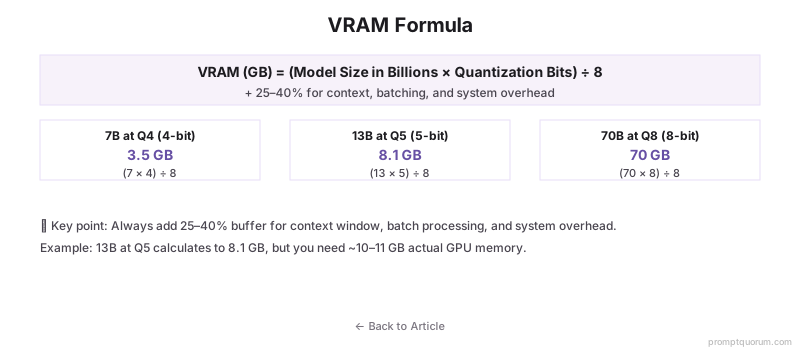
Interactive VRAM Calculator
Use this calculator to compute exact VRAM requirements for any combination of model, quantization, context, and batch size. Select your configuration and see which GPUs fit.
Popular Models
Base Model
6.50 GB
Context OH
1.50 GB
Batch OH
0.00 GB
System OH
1.00 GB
Total Minimum
9.00 GB
Recommended (with 25% safety margin)
11.25 GB
👉 Look for a GPU with at least 11.25 GB VRAM
Compatible GPUs
RTX 3060 (12 GB)
0.8 GB headroom
RTX 4060 Ti (16 GB)
4.8 GB headroom
RTX 4070 Ti Super (16 GB)
4.8 GB headroom
RTX 4080 Super (16 GB)
4.8 GB headroom
RTX 4090 (24 GB)
12.8 GB headroom
RTX 5090 (32 GB)
20.8 GB headroom
Mac Mini M6 (32 GB) (32 GB)
20.8 GB headroom
Mac Mini M5 Pro (64 GB) (64 GB)
52.8 GB headroom
Mac Studio M5 Max (128 GB) (128 GB)
116.8 GB headroom
Mac Studio M5 Ultra (96 GB+) (96 GB)
84.8 GB headroom
💡 Pro Tips:
- Always use the "with safety margin" figure when buying a GPU
- Q4 gives 90-95% quality with 25% size reduction. Q5 is better if you have room
- Context overhead grows with conversation length. Budget 1-3 GB for typical usage
- Batch size matters for multi-user APIs. Single-user chat can ignore batch overhead
📋 Share this configuration:
What Do Quantization Levels Mean?
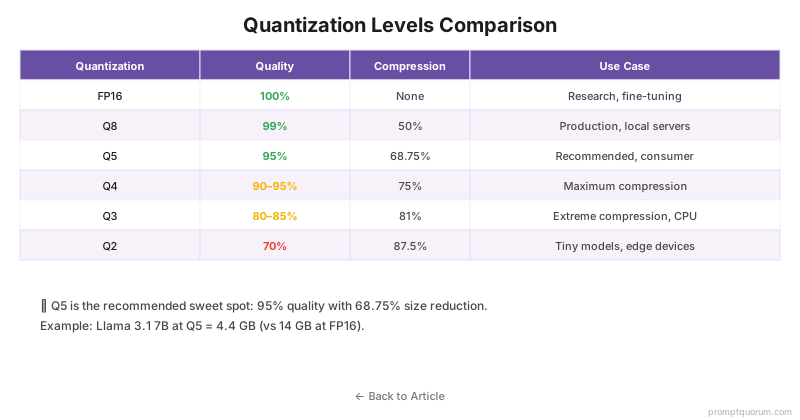
🔍 Key Insight: Quantization trades file size for quality. Q5 is the sweet spot (95% quality, 68% smaller). Q4 is acceptable for most users. Q3 and below are only for edge devices or when VRAM is critically constrained.
Quantization | Size Reduction | Quality | Speed | Use Case |
|---|---|---|---|---|
| FP16 (16-bit) | None (baseline) | 100% (perfect) | Baseline | Research, fine-tuning |
| Q8 (8-bit) | 50% | 99% (imperceptible) | Baseline | Production, local servers |
| Q6 (6-bit) | 62.5% | 98% (negligible) | Baseline | Balanced use |
| Q5 (5-bit) | 68.75% | 95% (minor loss) | Baseline | Good compression, consumer |
| Q4 (4-bit) | 75% | 90-95% (acceptable) | Baseline | Maximum compression |
| Q3 (3-bit) | 81% | 80-85% (noticeable loss) | Faster | Extreme compression, CPU |
| Q2 (2-bit) | 87.5% | 70% (visible loss) | Fastest | Tiny models, edge devices |
Quick Reference Table: VRAM by Model and Quantization
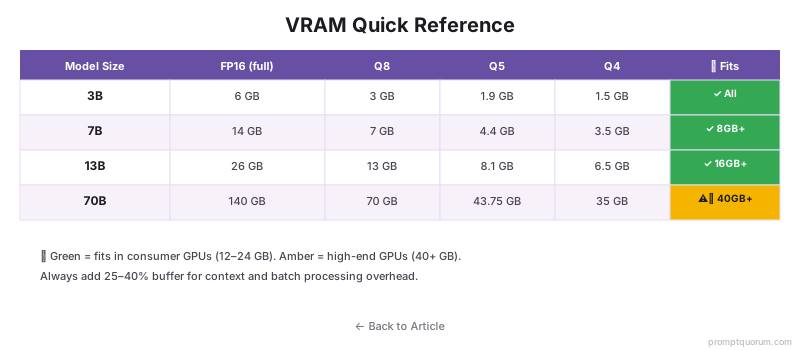
Model | FP16 | Q8 | Q5 | Q4 |
|---|---|---|---|---|
| 3B | 6 GB | 3 GB | 1.9 GB | 1.5 GB |
| 7B | 14 GB | 7 GB | 4.4 GB | 3.5 GB |
| 13B | 26 GB | 13 GB | 8.1 GB | 6.5 GB |
| 32B | 64 GB | 32 GB | 20 GB | 16 GB |
| 70B | 140 GB | 70 GB | 43.75 GB | 35 GB |
Real-World Examples
Practical VRAM calculations for common scenarios:
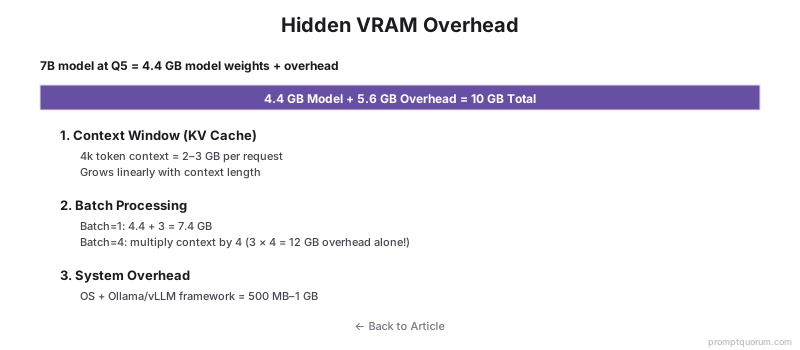
⚠️ Warning: These calculations are for model weights only. Add 25–40% for context, batch processing, and system overhead. Example: 13B Q5 = 8.1 GB model + 2–3 GB overhead = 10–11 GB actual.
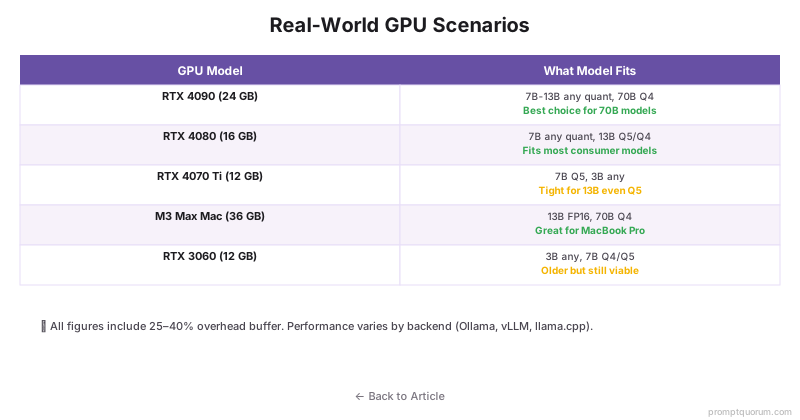
- RTX 5070 Ti (16 GB): a 7B model at Q4 = 3.5 GB ✓ (plenty of room). A 13B model at Q5 = 8.1 GB ✓ (comfortable, room for context/batching).
- RTX 5090 (32 GB): a 70B model at Q4 = 35 GB ✗ (still tight, needs Q3 or a bit of offloading). A 32B model at Q5 = 20 GB ✓ (comfortable). RTX 4090 (24 GB, previous gen) needs offloading for 70B at Q4 (slow, 3-5 tok/sec).
- M5 Max Mac (36 GB): a 13B model at FP16 = 26 GB ✓ (works). A 70B model = impossible (even at Q2, ~70% quality loss).
Which Local LLM Fits Your GPU? 2026 Guide
Use the interactive calculator above to find your exact fit. Below are common GPU scenarios and recommended models.
- RTX 5070 (12 GB): Best model: Qwen3 8B Q5 (5 GB) ✓. Alternative: a 7B model Q4 (3.5 GB) ✓. Not possible: 32B+ models.
- RTX 4070 (12 GB, previous gen): Best model: Qwen3 14B Q4 (7 GB) ✓. With headroom: a 8B model Q5 (5 GB) ✓. Not possible: 32B models.
- RTX 5070 Ti (16 GB): Best model: Qwen3 14B Q5 (8.75 GB) ✓ comfortable. Tight fit: a 13B model Q4 (6.5 GB) ✓. Good for: light batch processing.
- RTX 4080 (16 GB, previous gen): Best model: Qwen3 32B Q4 (16 GB) ✓ tight. Comfortable: Mistral Small Q5 (~15 GB) ✓. Recommended: a 13B model Q8 (13 GB) ✓.
- RTX 4090 (24 GB): Best model: Qwen3 32B Q5 (20 GB) ✓. With offload: a 70B model Q4 (35 GB – needs offloading). Comfortable: Any 32B at Q5/Q8.
- RTX 5090 (32 GB): Best model: a 70B model Q4 (35 GB – tight fit, Q3 recommended for headroom). Comfortable: 32B+ at Q5/Q8 with batching room to spare.
How Accurate Is the Formula?
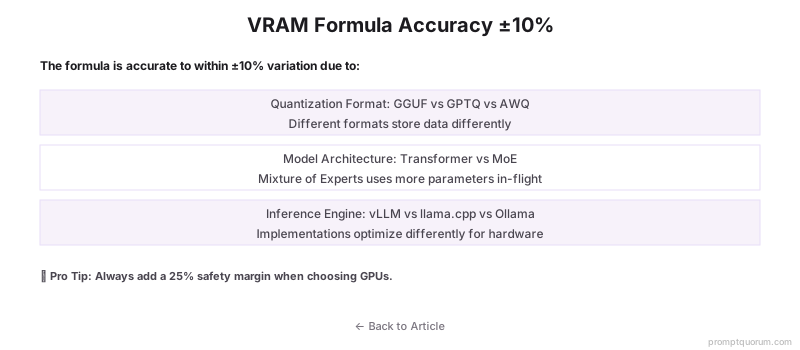
The formula is accurate within ±10% for most cases. Real-world VRAM usage varies based on implementation, model architecture, and inference engine optimizations.
Sources of variation include: different quantization formats (GGUF vs. safetensors vs. AWQ), model architecture (Transformer vs. non-Transformer), and inference engine-specific optimizations (vLLM, llama.cpp, Ollama).
Treat the formula as a conservative estimate. Always add a 25% safety margin when purchasing GPUs to account for context overhead, batching, and system processes.
Common Mistakes in VRAM Calculation
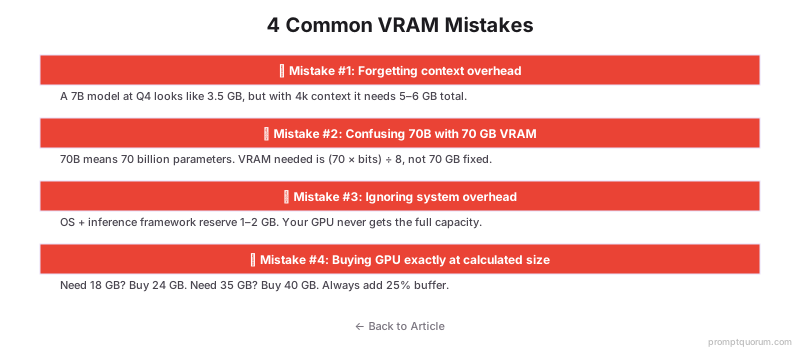
- Forgetting the context overhead. A 7B model at Q4 is 3.5 GB, but with 4k context, it needs 5-6 GB total.
- Using model size from HuggingFace without considering quantization. 70B means 70 billion parameters, not 70 GB VRAM.
- Not accounting for system overhead. Models never get the full GPU VRAM. Reserve 1-2 GB for the OS and inference engine.
- Buying GPU exactly at calculated size. Always buy 25% more. A calculated 18 GB need means get a 24 GB GPU.
Regional Deployment Considerations
European Union (GDPR): Local inference (on-premises) ensures data residency compliance under GDPR. Running models on your own GPU keeps user data in-country. This VRAM calculator helps you size hardware for privacy-first deployments.
Japan (APPI): The Act on Protection of Personal Information (APPI) requires careful data handling. On-device LLM inference reduces data transfer and processing outside Japan. Use this calculator to size systems for Japanese enterprise deployments.
China (Data Security Law): China's 2021 Data Security Law mandates data residency within Chinese borders. Local LLM inference on domestic servers (Alibaba Cloud, Tencent Cloud) is compliant. This formula applies to sizing those deployments with Chinese-optimized models like Qwen3.
In all regions, local inference provides stronger data privacy guarantees than cloud APIs. This VRAM calculator is essential for designing compliant, privacy-preserving AI systems.
FAQ: VRAM and GPU Requirements
Does the formula work for all model types?
Yes. The formula (Model Billions × Quantization Bits) ÷ 8 applies to all Transformer-based models (Llama, Qwen, Mistral, Claude, etc.). Non-Transformer architectures (RNNs, etc.) are rare and may require adjustment.
What quantization should I use?
For most use cases: Q5 offers the best balance (95% quality, 68% size reduction). For consumer GPUs: Q4 is standard (90-95% quality, 75% reduction). For production: Q8 if VRAM allows (99% quality). Avoid Q3 and below unless you have no choice.
How much system RAM do I need?
Minimum 16 GB for offloading. If using VRAM offloading (CPU spillover), system RAM becomes the fallback. For batch processing, add 8–16 GB system RAM beyond model offload requirements. For single-user chat, 16 GB is sufficient.
Does batch size affect VRAM calculation?
Yes. The formula calculates single-request VRAM. Batch size adds additional VRAM linearly: each concurrent request adds ~500 MB–2 GB depending on context length. If running batch=4, add 2–8 GB to the calculated amount.
Can I run a 70B model on a 12 GB GPU?
Only with extreme quantization (Q2, ~70% quality loss) and CPU offloading (very slow, 1–3 tokens/sec). Not practical. Better option: use a 13B model at Q4 (same VRAM, much faster and better quality).
What if my actual VRAM usage is lower than calculated?
The formula is conservative and includes overhead. Lower actual usage means more headroom for batch processing, longer contexts, or safety margin. Use nvidia-smi to measure real usage, then benchmark your model to confirm performance.
Should I buy a GPU exactly at the calculated VRAM size?
No. Always buy 25% more VRAM than calculated. If you calculate 18 GB need, buy a 24 GB GPU. This safety margin accounts for context growth, batching, and system processes. Exact-fit purchases leave no headroom and cause out-of-memory errors.
What is the best GPU for 13B models in 2026?
RTX 5070 Ti (16 GB) for single-user chat at Q4-Q5. RTX 4080 (16 GB, previous gen) if you want Q8 quality or batch processing and don't need the newest card. M5 Max (36 GB) if using Mac. All three comfortably run 13B-class models from the Qwen3 and Mistral families.
Sources
- GGUF Specification -- ggerganov/ggml documentation on quantized file format.
- Transformers Quantization Docs -- Hugging Face official guide to quantization methods.
- Ollama Documentation -- Official Ollama guides for model management.
- vLLM Performance Guide -- vLLM framework optimization documentation.
- Your VRAM limits model size, but model size isn't the only limit on output quality. Larger context windows enable better responses: context windows explained covers how to work within constraints.