Key Takeaways
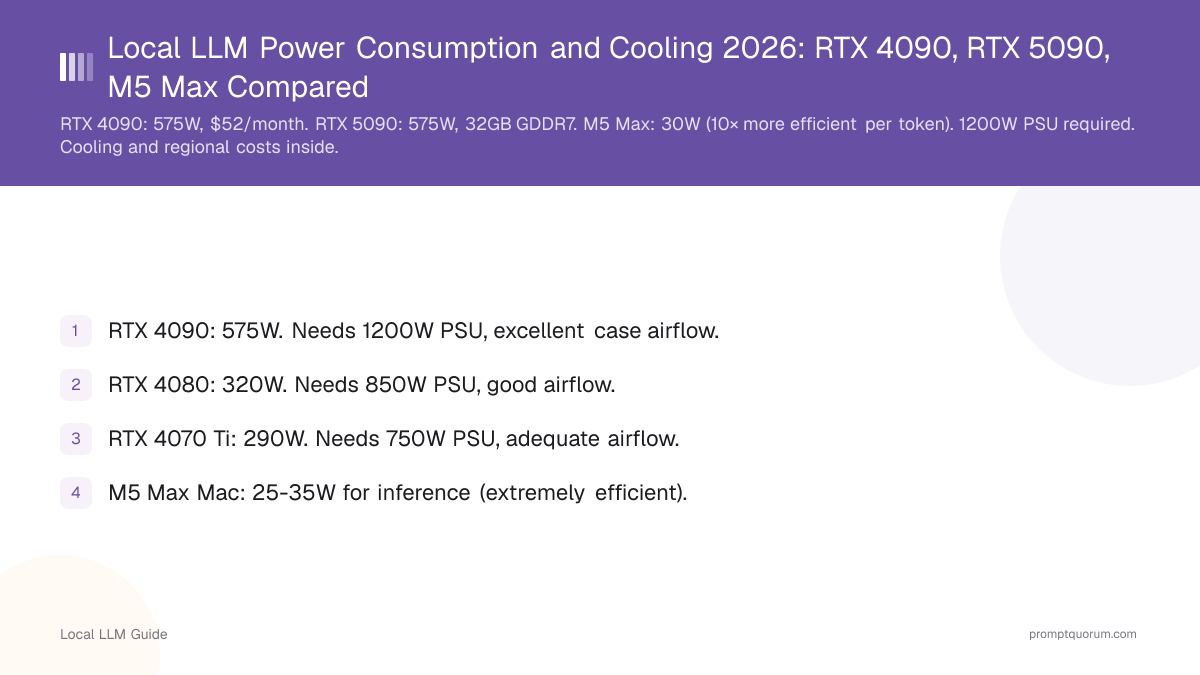
- RTX 4090: 450W (NVIDIA-rated TBP). Needs 850W+ PSU, excellent case airflow.
- RTX 4080: 320W. Needs 850W PSU, good airflow.
- RTX 4070 Ti: 290W. Needs 750W PSU, adequate airflow.
- M5 Max Mac: 25-35W for inference (extremely efficient).
- Running 24/7 costs: RTX 4090 = ~$39/month, RTX 4070 Ti = $20-25/month.
- Cooling is critical. Poor airflow reduces lifespan and throttles performance.
How Much Power Does Each GPU Draw for LLM Inference?
RTX 5090 draws 575W at full load, the highest tier available for local LLMs; RTX 4090 is rated at 450W (NVIDIA's own TBP spec). GPU power draw is the dominant factor in your PSU choice and electricity bill.
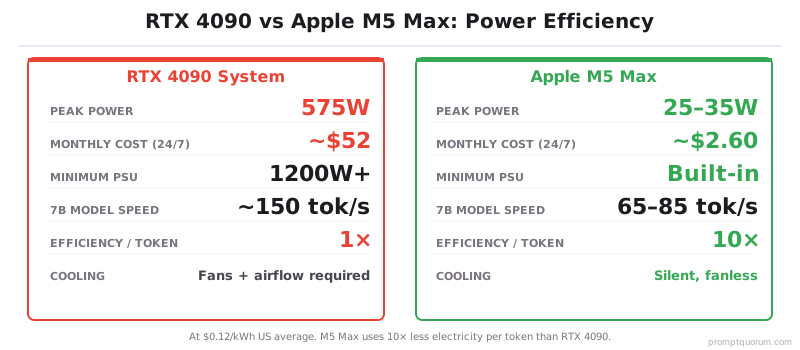
Note: Both cards are power-limited by their BIOS to their rated TBP under normal sustained inference load -- brief transient spikes above rated TBP can occur but are not the sustained draw to plan a PSU around. AMD RX 7900 XTX is the strongest non-NVIDIA discrete GPU for local LLMs at 355W with 24 GB VRAM. Apple M5 Max draws roughly 10x less power per token than RTX 4090 -- the most efficient choice for sustained 24/7 inference.
GPU | Power | Idle | PSU |
|---|---|---|---|
| RTX 5090 | 575W | 20W | 1200W+ |
| RTX 4090 | 450W | 10W | 850W+ |
| RTX 5080 | 360W | 15W | 1000W |
| RTX 4080 | 320W | 8W | 850W+ |
| RTX 5070 | 250W | 12W | 800W |
| RTX 4070 Ti | 285W | 7W | 750W+ |
| RTX 4070 | 200W | 6W | 650W |
| AMD RX 7900 XTX | 355W | 25W | 850W |
| Apple M5 Max (GPU) | 25–35W | 1W | Built-in |
| Apple M5 Pro (GPU) | 20–28W | 1W | Built-in |
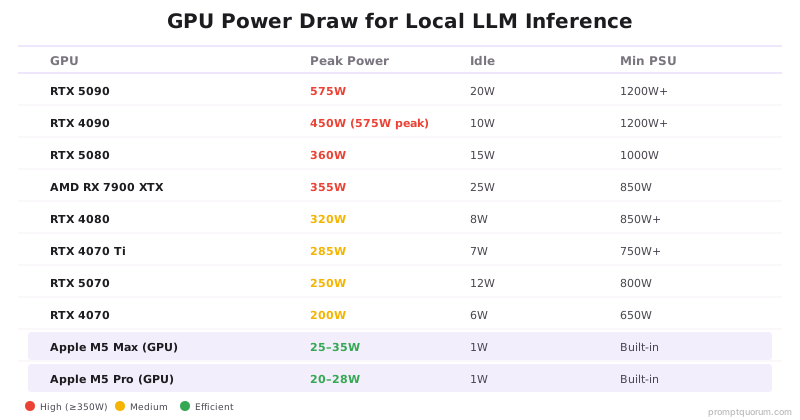
⚠️Warning: RTX 5090 TDP: NVIDIA rates it at 575W but real-world peaks can hit 600W+ depending on power limit settings. RTX 4090 is rated at 450W and does not need 1200W-class headroom -- an 850W (minimum) to 1000W (comfortable) PSU is the correct target.
How Much Total Power Does a Local LLM PC Use?
The GPU is not the only power consumer. Factor in CPU, RAM, storage, and motherboard:
Component | Power | Notes |
|---|---|---|
| GPU (RTX 4090) | 450W | Peaks at 100% utilization |
| CPU (Ryzen 9 7950X) | 170W | Under load |
| Motherboard + RAM + SSD | 100W | Typical |
| Cooling fans, PSU overhead | 50-100W | Safety margin |
| Total system load | ~770-820W | Needs 850W PSU minimum, 1000W comfortable |
•Keypoint: GPU is 55-58% of total system power. CPU, cooling, and overhead are the remaining 42-45%.
What Does It Cost to Run a Local LLM 24/7?
Assuming $0.12/kWh (US average):
💬 In Plain Terms
kWh (kilowatt-hour): One thousand watts of power used for one hour. At $0.12/kWh, running a 450W RTX 4090 for 24 hours uses 10.8 kWh, costing $1.30/day.
GPU | Daily Cost | Monthly | Annual |
|---|---|---|---|
| RTX 4090 (450W avg) | $1.30 | $39 | $467 |
| RTX 4080 (350W avg) | $1.01 | $30 | $360 |
| RTX 4070 Ti (300W avg) | $0.86 | $26 | $315 |
| M5 Max Mac (30W avg) | $0.09 | $2.60 | $32 |
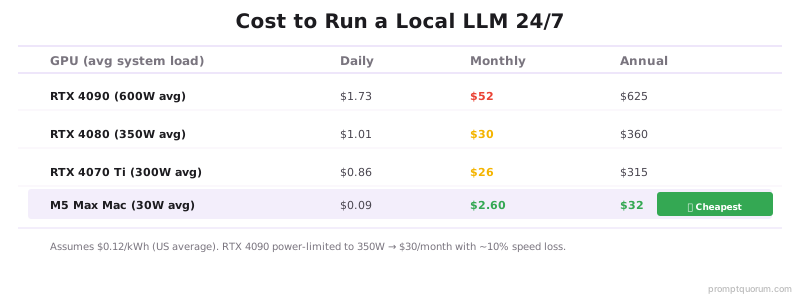
💡Tip: Power limiting RTX 4090 to 350W saves about 22% electricity (from its 450W rated TBP) with only ~5-10% speed loss -- a reasonable efficiency setting for sustained inference at scale.
What Cooling Do You Need for Local LLM Inference?
Proper cooling is critical for GPU lifespan (5+ years) and preventing thermal throttling.
Adequate case airflow: Front fans pull cool air in, rear/top fans exhaust hot air. RTX 4090 needs large case with 3+ fans.
Ambient temperature: Ideally 18-24°C. In hot climates (30°C+), cooling becomes critical.
Thermal paste: Replace every 2-3 years for optimal heat transfer (if applicable).
Monitoring: Use GPU-Z or nvidia-smi to monitor temperatures. Keep under 80°C sustained.
📍 In One Sentence
Thermal throttling: Automatic clock speed reduction when GPU detects unsafe temperatures, protecting the chip from heat damage at the cost of inference speed.
⚠️Warning: GPU throttles above 83°C — performance drops 10–20%. Poor airflow causes sustained throttling even at 75°C in hot rooms.
🛠️Practice: Use `nvidia-smi -q -d TEMPERATURE` to monitor GPU temperature continuously. Set up alerts at 75°C to prevent throttling.
Quick Facts
- RTX 4090 peak draw: 450W (GPU alone, NVIDIA-rated TBP)
- Required PSU: 850W minimum for RTX 4090 system, 1000W comfortable
- 24/7 cost at $0.12/kWh: ~$39/month (RTX 4090)
- Apple M5 Max total draw: 25–35W
- Efficiency ratio: M5 Max uses roughly 10x less power per token than RTX 4090
- Safe GPU temp: Keep below 83°C for sustained inference
💡Tip: Apple Silicon vs NVIDIA: efficiency winner. M5 Max achieves 65–85 tok/sec — 4× faster than M4 generation while using the same power on just 25–35W, while RTX 4090 requires 450W for 150 tok/sec on the same model.
Common Power and Cooling Mistakes
- Undersizing the PSU. RTX 4090 with a PSU under 850W risks instability under sustained load, especially with a high-end CPU in the same system. Budget for the GPU's rated TBP plus your full system load and headroom.
- Ignoring case airflow. Poor airflow causes thermal throttling (~10% performance loss) and shortens GPU lifespan.
- Running 24/7 without considering costs. RTX 4090 costs roughly $39/month in electricity at US average rates. Not practical for personal use unless you run inference constantly.
- Not monitoring GPU temperature. Cards can silently throttle due to thermal stress. Monitor with nvidia-smi.
- Forgetting cooling overhead in TCO calculations. Cooling is the second-largest cost after the GPU itself. Running a dual-GPU rig in a hot climate (30°C+ ambient) requires ~$200–400/year in additional A/C costs to maintain 22°C room temperature. Apple Silicon eliminates this: M5 Max draws 30W and produces minimal heat, no extra cooling needed.
⚠️Warning: An undersized PSU paired with a RTX 4090 can trigger random shutdowns under sustained inference. Real-world transient power spikes can exceed a marginal PSU's capacity, tripping automatic shutdown to protect components -- stay above the 850W minimum.
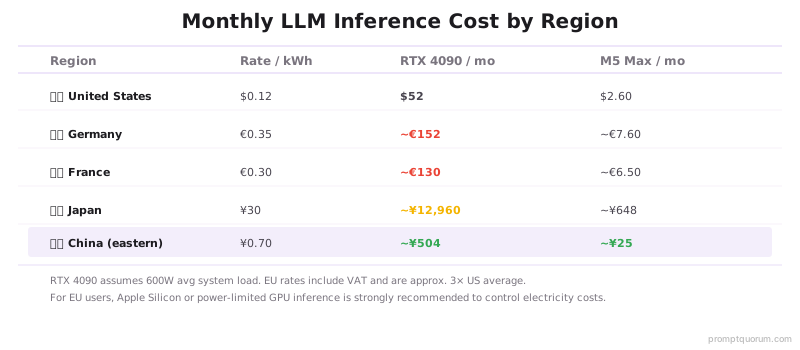
Power Costs by Region
EU (Germany/France): €0.30–0.40/kWh — 3× the US average. Running an RTX 4090 24/7 at its 450W rated draw costs roughly €95–125/month (~€113/month at the midpoint rate). GDPR encourages on-premise deployment but energy costs make Apple Silicon or power-limited GPU inference essential for EU users.
Japan: ¥27–30/kWh (~$0.18–0.20/kWh). An RTX 4090 at its 450W rated draw costs roughly ¥8,700–9,700/month (~¥9,200/month at the midpoint rate) — 50–70% higher than the US average. METI's 2024 AI efficiency guidelines favor energy-efficient hardware for corporate deployments.
China: ¥0.5–0.8/kWh ($0.07–0.11/kWh) in eastern cities. An RTX 4090 at its 450W rated draw costs roughly ¥162–260/month (~¥211/month at the midpoint rate). Lower electricity costs favor NVIDIA GPU deployments. China Data Security Law requirements make on-premise inference common for enterprises.
Power & Cooling FAQ
🔍Insight: Power-limited inference is a common data center practice. RTX 4090 at 350W (78% of its 450W rated TBP) delivers most of peak performance with roughly 22% lower electricity costs and less cooling load.
How much power does running a local LLM use?
Power draw depends on GPU tier. RTX 4090: 450W rated TBP (~770-820W system total). RTX 4080: 320W GPU (450W system). RTX 4070 Ti: 290W GPU (400W system). Apple M5 Max Mac: 25–35W total — the most energy-efficient option by far. Inference loads the GPU to 90–100% utilization continuously.
How much does it cost to run a local LLM 24/7?
At $0.12/kWh (US average): RTX 4090 costs ~$39/month at its rated 450W draw. RTX 4080 system: ~$30/month. RTX 4070 Ti system: ~$26/month. Apple M5 Max Mac: ~$2.60/month. Electricity rates vary — in Germany (~$0.35/kWh), roughly 3× the US rate. Running inference only during work hours (8h/day) reduces costs by ~67%.
What PSU wattage do I need for an RTX 4090?
NVIDIA's own minimum recommendation is 850W; 1000W gives comfortable headroom for a full high-end system. The RTX 4090 draws 450W at its rated TBP. Add CPU (150–170W), motherboard/RAM/storage (100W), and a safety margin — total system load reaches ~770-820W. A PSU under 850W risks instability under sustained LLM inference load. Always buy from reputable PSU brands (Seasonic, Corsair, EVGA).
Is Apple Silicon more efficient than NVIDIA for local LLMs?
Yes — by a large margin. M5 Max (128 GB unified, Mar 2026) runs 7B models at 65–85 tok/sec on 25–35W total system power. An RTX 4090 runs the same model at 150 tok/sec on 450W (its rated TBP). M5 Max uses roughly 10x less power per token than RTX 4090, plus offers 4× larger memory pool (128 GB vs 32 GB) for 70B models.
What GPU temperature is safe for sustained LLM inference?
Keep GPU temperature below 83°C for sustained inference. RTX 4090 thermal throttle triggers at 83°C, reducing clock speeds and inference speed by 10–20%. Ideal operating range: 65–75°C. Use `nvidia-smi -q -d TEMPERATURE` to monitor. If temperatures exceed 80°C, improve case airflow or add/replace thermal paste.
How do I reduce power consumption without losing inference speed?
Power limit the GPU (NVIDIA) without reducing clock speeds. RTX 4090: setting power limit to 350W (from its 450W rated TBP) reduces power by roughly 22% with only a small speed loss — a reasonable efficiency setting. Use `nvidia-smi -pl 350` to set power limit. Apple Silicon users: no tuning needed, the hardware is already optimized.
What is TDP and why does it matter for local LLMs?
TDP (Thermal Design Power) is the maximum heat a GPU generates at peak load, measured in watts. NVIDIA rates RTX 4090 at 450W TBP (RTX 5090 is rated at 575W). TDP matters because it determines your minimum PSU size and cooling requirements. Higher TDP = larger PSU, more electricity cost, more cooling needed.
Does running a local LLM damage my GPU?
No — sustained inference will not damage a healthy GPU if cooling is adequate. GPUs are designed to run at 100% utilization 24/7 (data centers do this). The real risks are: (1) poor cooling causes throttling and shortens lifespan, (2) power spikes from undersized PSU can trigger shutdowns, (3) dust/bad airflow degrades performance over years. Monitor temperatures and maintain good airflow, and your GPU will last 5+ years.
Sources
- NVIDIA GPU Power Specifications
- US Electricity Rates — U.S. Energy Information Administration
- GPU Temperature Monitoring with nvidia-smi
- Power efficiency gains speed, but speed doesn't guarantee quality output. Temperature and sampling settings can offset energy consumption with better results: temperature and top-p explains how these parameters trade off speed and consistency.