Key Takeaways
- 7B models: ~4GB weights at Q4, ~5GB at Q5, ~7GB at Q8. Add 1-2GB headroom for a real GPU buy-target of 6-8GB.
- 13B models: ~8GB weights at Q4, ~9GB at Q5, ~14GB at Q8. 12GB VRAM is comfortable, not "barely enough."
- 70B models: ~42GB weights at Q4, ~50GB at Q5, ~74GB at Q8. Budget extra for multi-user setups.
- Quantization (Q4, Q5, Q8) reduces VRAM by roughly 50-85% vs. full precision (FP32), verified against real GGUF file sizes on Hugging Face.
- Always over-allocate by 1-2GB for overhead (KV cache, optimizer state, system OS).
- Batch size ≠ VRAM per inference. Single inference uses same VRAM regardless of batch (batch processes sequentially).
- More VRAM doesn't speed up single-prompt inference. It only helps with multi-user/multi-request setups.
VRAM Rule of Thumb — Quick Reference
Don't have time for the formula? Use these simple rules:
Once you know your VRAM budget, see which GPUs fit each tier →
📍 In One Sentence
For 4-bit quantization, budget 0.6 GB VRAM per billion parameters — a 7B model fits in 5 GB, a 70B model needs 42 GB.
💬 In Plain Terms
Divide your model size in billions by roughly 1.7 to get the minimum VRAM in GB at Q4 (4-bit). A 7B model needs about 4–5 GB, a 13B about 8–9 GB, and a 70B about 40–48 GB. For CPU-only setups without a GPU, double those numbers since system RAM is slower and you need headroom.
- 3B models (Phi, StableLM): ~2 GB weights at Q4, 4 GB VRAM buy-target with headroom
- 7B models (Llama, Mistral, Qwen): ~4 GB weights at Q4, 6-8 GB VRAM buy-target
- 13B models (Llama 3.3, Mistral): ~8 GB weights at Q4, 10-12 GB VRAM buy-target
- 22B models (Qwen3, Gemma): ~13 GB weights at Q4, 16 GB VRAM buy-target
- 70B models (Llama 3.3, Qwen 3.6): ~42 GB weights at Q4, 48 GB VRAM buy-target, 50+ GB at Q5
- MoE models: VRAM scales with weights you must hold in memory, not active parameters. Example: Qwen 3.6 35B-A3B (3B active) fits a tiny ~2 GB footprint, while Llama 4 Scout (17B active / 109B total) still needs ~55 GB at Q4 because all experts stay resident
# Quick VRAM formula (memorize this)
VRAM (GB) ≈ Model Size (B) × 0.6  # at Q4 quantization

# Examples:
7B × 0.6 = 4.2 GB
70B × 0.6 = 42 GB

# For other quantizations (bytes per parameter):
Q8 (8-bit): Model Size × 1.05
Q5 (5-bit): Model Size × 0.7
FP32 (full): Model Size × 4

# Verified against real GGUF file sizes (Hugging Face):
# Llama-2-7B Q4_K_M = 4.08 GB, Mistral-Small-24B Q4_K_M = 14.33 GB,
# Llama-3.3-70B Q4_K_M = 42.52 GB
What Is the VRAM Formula for LLMs?
VRAM (GB) = Model Size in Billions × Bytes per Parameter
- Model size: Number of parameters (7B, 13B, 70B, etc.)
- Bytes per parameter: 4.0 (FP32, full precision), ~1.05 (Q8, 8-bit), ~0.7 (Q5, 5-bit), ~0.6 (Q4, 4-bit)
- These figures are verified against real GGUF file sizes on Hugging Face, not just the theoretical bit-width — real quantization formats like Q4_K_M carry a small amount of overhead above the raw 4-bit (0.5 bytes/param) minimum.
Example: Llama 3.3 70B, FP32, no quantization:
70 billion × 4.0 bytes = 280 GB. Impractical on consumer hardware.
Llama 3.3 70B, Q4 (4-bit) quantization:
70 billion × 0.6 bytes = 42 GB. (The real Llama-3.3-70B-Instruct Q4_K_M GGUF is 42.52 GB.)
MoE Models (Sparse): Active parameters drive compute, but all experts must stay loaded in VRAM. Example: Llama 4 Scout has 109B total parameters with 17B active per token. At Q4 it still needs ~55 GB of VRAM to hold every expert — it only squeezes into a 24 GB GPU at an aggressive 1.78-bit quant (~20 tok/s). Compute is cheap; memory is the constraint.
How Much VRAM Does Each Model Size Need?
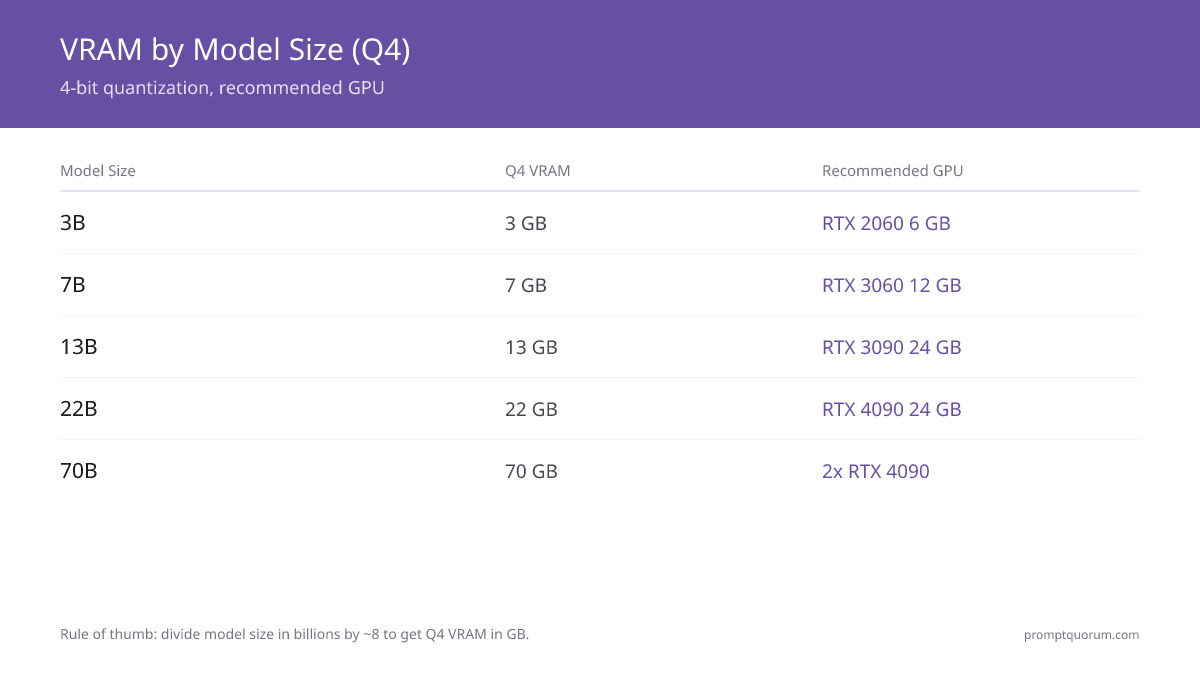
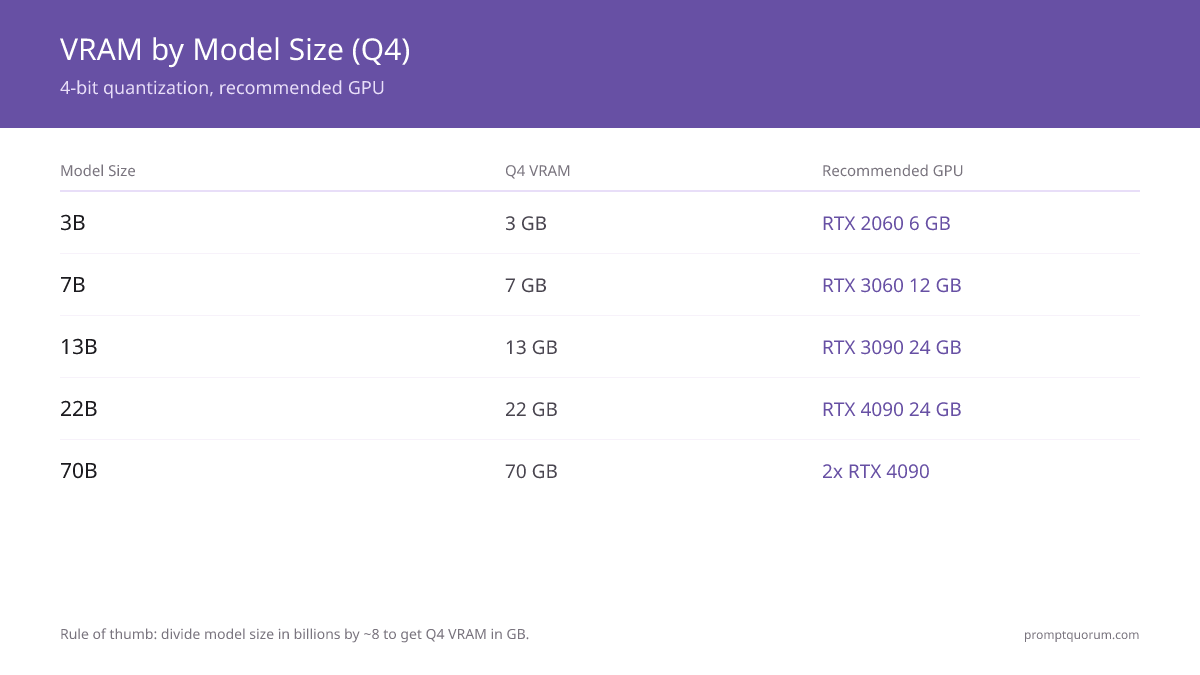
Model Size | FP32 (No Quantization) | Q8 (8-bit) | Q5 (5-bit) | Q4 (4-bit) | Recommended GPU |
|---|---|---|---|---|---|
| 3B (Phi, StableLM) | 12 GB | 3 GB | 2 GB | 2 GB | RTX 3050 4 GB or RTX 2060 6 GB |
| 7B (Llama 3.3, Mistral) | 28 GB | 7 GB | 5 GB | 4 GB | RTX 4060 8 GB or RTX 3060 12 GB |
| 13B (Llama 3.3, Mistral) | 52 GB | 14 GB | 9 GB | 8 GB | RTX 3060 12 GB or RTX 4070 12 GB |
| 22B (Qwen, Gemma) | 88 GB | 23 GB | 15 GB | 13 GB | RTX 4080 16 GB or RTX 4090 24 GB |
| 70B (Llama 3, Qwen) | 280 GB | 74 GB | 50 GB | 42 GB | 2× RTX 4090 (24 GB each), or 1× H100 80 GB |
| Qwen 3.6 35B-A3B (3B active, MoE)* | 12 GB | 3 GB | 2 GB | 2 GB | RTX 2060 6 GB or RTX 5070 12 GB |
| DeepSeek V4-Flash (13B active / 284B total, MoE)* | 52 GB | 14 GB | 9 GB | 8 GB | RTX 3060 12 GB or RTX 5070 12 GB |
| Llama 4 Scout (17B active / 109B total, MoE)† | 436 GB | 114 GB | 76 GB | 55 GB | 2× RTX 4090 (48 GB) — fits 24 GB only at 1.78-bit (~20 tok/s) |
| gpt-oss:20b (3.6B active / 21B total, MoE)* | 84 GB | 22 GB | 15 GB | 12 GB | RTX 5070 12 GB or any 16 GB GPU |
| Kimi K2.6 (32B active / 1T total, MoE)* | 128 GB | 34 GB | 22 GB | 19 GB | 2× RTX 4090 or RTX 5090 32 GB (Q4 only) |
Figures are bare weight sizes, verified against real GGUF file sizes on Hugging Face (e.g. Llama-2-7B Q4_K_M = 4.08 GB, Mistral-Small-24B Q4_K_M = 14.33 GB, Llama-3.3-70B Q4_K_M = 42.52 GB) -- add 1-2 GB for context/KV-cache headroom on top. * MoE models: VRAM is calculated from active parameters only, not total model size. † Llama 4 Scout keeps all 109B parameters resident, so it needs ~55 GB at Q4 despite only 17B active per token.
Best Local LLM by VRAM Tier
Most people already know their GPU's VRAM and want the reverse lookup: "I have 12 GB — what's the best model?" Use this table instead of the formula.
📍 In One Sentence
Match your GPU's VRAM to the largest model tier it fits at Q4, then check the by-model-size table above for the exact model.
💬 In Plain Terms
If you already know how much VRAM your GPU has, skip the model-size math — find your card's VRAM in the table below and use the model tier next to it.
VRAM Tier | Best-Fit Model (Q4) | Example GPUs | What Fits |
|---|---|---|---|
| 4 GB | Llama 3.2 3B or Phi-3.5-mini (~1.5-2 GB) | RTX 3050 4 GB, GTX 1650 | 3B-class only — 7B models will OOM |
| 6 GB | Qwen3 4B, or Llama 3.1 8B at aggressive Q4 (~3-4 GB) | RTX 2060 6 GB, RTX 3050 Ti | 4B comfortably; 8B is tight |
| 8 GB | Llama 3.1 8B or Qwen3 8B (~3.5-5 GB) with real headroom | RTX 4060 Ti 8 GB, RTX 3070 | The most common sweet spot for 7-8B models |
| 12 GB | Qwen3 14B (~6.5 GB), or 7-8B at Q5/Q8 for higher quality | RTX 3060 12 GB, RTX 4070 | 14B comfortably, room for larger context |
| 16 GB | Qwen3 14B at Q5/Q8, or 22B-class (Gemma, Qwen) at Q4 (~11 GB) | RTX 4060 Ti 16 GB, RTX 4080 | 22B is the practical ceiling at this tier |
| 24 GB | 22-32B comfortably at full Q8; 70B only at sub-4-bit with quality loss | RTX 4090, RTX 3090 | 70B genuinely needs ~42 GB — this tier is not enough |
| 32 GB | 22-32B at full precision, or as one card in a dual-GPU 70B setup | RTX 5090 | Still short of a full 70B Q4 alone (~42 GB needed) |
| 48 GB | 70B models comfortably at Q4 (~42 GB), tightly at Q5 (~50 GB) | 2× RTX 4090, RTX 6000 Ada | First tier that fits 70B without quality-losing quantization tricks |
| 64 GB+ (unified memory) | 70B comfortably at Q4/Q5, no multi-GPU rig needed | Mac Studio M5 Max/Ultra (128–256 GB) | Only consumer option that fits 70B without a discrete-GPU rig |
These are Q4 buy-target figures with realistic overhead included — see the by-model-size table above for bare compute-minimum numbers per quantization level. Apple Silicon unified memory (Mac Studio M5 Max/Ultra) is a discrete-GPU alternative for the 48 GB+ tiers — see Running 70B Models on Apple Silicon M5 Max for exact tok/s at each quantization level.
MoE Models Need Far Less VRAM Than Their Size Suggests
Mixture-of-Experts (MoE) models split their parameters across many "expert" sub-networks and activate only a fraction for each token. Active parameters cut compute and speed up inference, but for most MoE models every expert must still be loaded into VRAM — so memory usage tracks total parameters, not active ones.
Dense model rule: VRAM = total_params × bytes_per_param
MoE model rule (compute): active_params drive tokens/sec — but VRAM still scales with total resident weights.
Example: Llama 4 Scout has 109B total parameters with only 17B active per token. It runs fast for its size, but at Q4 it still needs ~55 GB of VRAM to hold all experts — out of reach for a single 24 GB GPU except at an aggressive 1.78-bit quant (~20 tok/s on an RTX 4090).
Some runtimes can stream or offload inactive experts to system RAM, trading speed for a smaller VRAM footprint. The headline takeaway: do not assume an MoE model fits in active-parameter-sized VRAM — check the actual on-disk size at your quant level.
How Does Quantization Reduce VRAM Requirements?
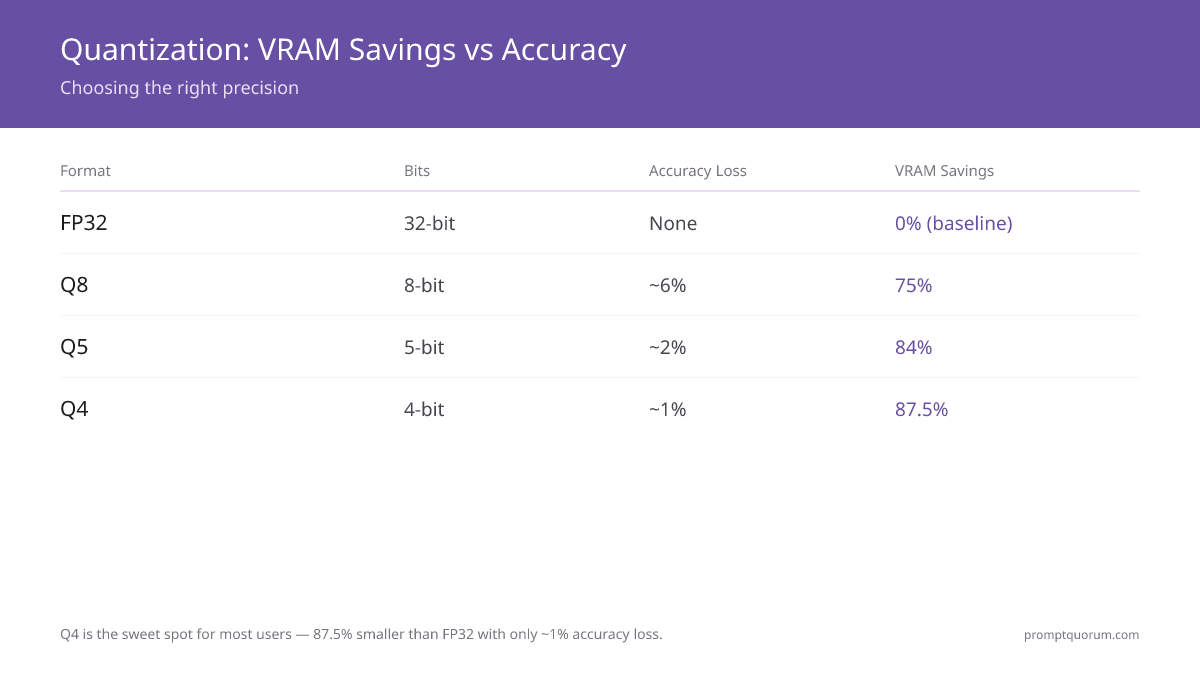
Quantization reduces the number of bits needed to represent each model parameter.
- FP32 (32-bit float): Full precision. 1 parameter = 4 bytes. No loss. Slowest.
- Q8 (8-bit): 1 parameter = 1 byte. ~6% accuracy loss. 75% VRAM savings.
- Q5 (5-bit): 1 parameter = 0.625 bytes. ~2% accuracy loss. 84% VRAM savings.
- Q4 (4-bit): 1 parameter = 0.5 bytes. ~1% accuracy loss. 87.5% VRAM savings.
For most users, Q4 is the sweet spot: imperceptible accuracy loss, 87% smaller VRAM footprint.
Q4 is standard. Q5 and Q8 are available if you have extra VRAM and want marginal quality gains.
VRAM determines model size, but prompt design determines output quality. Techniques like chain-of-thought and few-shot prompting can close the quality gap between smaller and larger models. Explore the full prompt engineering toolkit to get more from the models your hardware supports. If you have 12–16 GB VRAM and want a concrete coding workload to put that toolkit against, Replace GitHub Copilot With a Local LLM maps the Continue.dev + Ollama + Qwen3-Coder stack onto exactly those VRAM tiers.
What About Batch Size and Multi-User Inference?
Batch size affects throughput (tokens per second), not single-inference latency.
A single user prompting "What is 2+2?" uses the same VRAM whether batch size is 1 or 32.
Batch size = 32 means processing 32 prompts in parallel. This uses ~32× more VRAM, but generates 32 responses faster.
For single-user (typical local LLM usage): Batch size = 1. VRAM is model size + 1-2GB overhead.
For multi-user server: Allocate batch size × model VRAM. A 70B model at batch=4 needs ~160-192GB (40-48GB × 4).
Do You Need More VRAM Than the Model Size?
Yes. Beyond the model weights, add:
- KV cache (key-value cache for context): ~5-10% extra VRAM.
- Optimizer state (if fine-tuning): 2-4× model size (only relevant for training, not inference).
- System overhead (OS, drivers, Ollama/LM Studio runtime): ~1-2GB.
Rule: A 70B model Q4 (40-48GB) + KV cache (4GB) + system (2GB) = ~46-54GB allocated.
Always buy GPUs with at least 1-2GB headroom above theoretical minimums.
Common VRAM Misconceptions
- More VRAM = faster inference. False. VRAM size doesn't affect speed. Memory bandwidth (GB/sec) does, and that's fixed per GPU.
- Batch size = sequential token limit. False. Batch size = parallel requests. Single inference uses batch=1 regardless of VRAM size.
- You need only 24GB for any 70B model. False. Q4 needs ~42GB. Q8 needs ~74GB. Depends on quantization.
VRAM Calculator
Select your model size and quantization to estimate VRAM requirements.
Popular Models
Base Model
6.50 GB
Context OH
1.50 GB
Batch OH
0.00 GB
System OH
1.00 GB
Total Minimum
9.00 GB
Recommended (with 25% safety margin)
11.25 GB
👉 Look for a GPU with at least 11.25 GB VRAM
Compatible GPUs
RTX 3060 (12 GB)
0.8 GB headroom
RTX 4060 Ti (16 GB)
4.8 GB headroom
RTX 4070 Ti Super (16 GB)
4.8 GB headroom
RTX 4080 Super (16 GB)
4.8 GB headroom
RTX 4090 (24 GB)
12.8 GB headroom
RTX 5090 (32 GB)
20.8 GB headroom
Mac Mini M6 (32 GB) (32 GB)
20.8 GB headroom
Mac Mini M5 Pro (64 GB) (64 GB)
52.8 GB headroom
Mac Studio M5 Max (128 GB) (128 GB)
116.8 GB headroom
Mac Studio M5 Ultra (96 GB+) (96 GB)
84.8 GB headroom
💡 Pro Tips:
- Always use the "with safety margin" figure when buying a GPU
- Q4 gives 90-95% quality with 25% size reduction. Q5 is better if you have room
- Context overhead grows with conversation length. Budget 1-3 GB for typical usage
- Batch size matters for multi-user APIs. Single-user chat can ignore batch overhead
📋 Share this configuration:
Frequently Asked Questions
Can I run Mistral Small on a 6GB GPU?
No. Mistral Small is a 22-24B model — even at Q4 it needs about 13-14GB of VRAM for weights alone. A 6GB or 8GB GPU will OOM. Budget 16GB for a comfortable buy-target, or drop to a 7B-8B model for a 6-8GB card.
How much VRAM do I need for fine-tuning a 7B model?
For LoRA: 12-16GB. Full fine-tuning: 28GB+. Fine-tuning requires optimizer state (2-4× model VRAM), not just inference.
Is 12GB enough for Llama 3 13B?
Yes, comfortably. A 13B model needs about 8GB at Q4, so 12GB leaves real headroom for context and other overhead. At Q5 (~9GB) it is still fine; at Q8 (~14GB) it is tight.
Do I need 24GB for a 70B model?
No, but you need close to it. A 70B model needs about 42GB at Q4 for its weights, so 24GB is not enough at any quantization level — you need at least 42-48GB (e.g. 2× 24GB GPUs, or one 48GB card).
Does increasing batch size reduce VRAM for single inference?
No. Single inference always uses batch=1 VRAM. Batch size only helps throughput (multi-user scenarios).
What's the best quantization for accuracy?
Q8 is nearly imperceptible loss. Q5 is ~2% loss. Q4 is ~1% loss. For most, Q4 is the sweet spot.
Can I offload some VRAM to CPU RAM?
Yes, via layer-splitting (NVLink). Llama.cpp and Ollama support this. Performance drops 30-50% but it works. Under 8 GB VRAM? See which models run fastest on your exact hardware tier — CPU-only, 4 GB, 6 GB, and 8 GB VRAM benchmarks with real tok/sec numbers.
What quantization level has the best accuracy?
Q8 is nearly imperceptible quality loss. Q5 is ~2% degradation. Q4 is ~1% degradation. For most tasks, Q4 is the sweet spot between VRAM savings and quality.
What is the VRAM formula for LLMs?
VRAM (GB) = model parameters (billions) × bytes per parameter + overhead. At Q4 (4-bit): 7B × 0.5 bytes + 1GB overhead ≈ 4.5GB weights + 2GB KV cache = ~7GB total.
How much more VRAM does Q8 need vs Q4?
Q8 uses 2× the VRAM of Q4. A 7B model at Q4 needs ~4-5GB; at Q8, ~8-9GB. Always check quantization level before buying a GPU.
Can I run a 70B model on two GPUs?
Yes. Two RTX 5090s (24GB each) combine for 48GB VRAM -- enough for a 70B model at Q4. llama.cpp and Ollama support multi-GPU via tensor parallelism and --n-gpu-layers.
Sources
- NVIDIA CUDA memory architecture and shared memory model documentation
- Ollama and LM Studio official documentation: model VRAM requirements and quantization specs
- llama.cpp project GitHub: quantization levels (Q4, Q5, Q8) and memory calculations