TL;DR
- 16GB: 7B models only (tight)
- 36GB: 13B comfortably, 34B Q4 tight
- 64GB: 34B Q5 comfortably
- 128GB: 70B Q5 comfortably
- Cannot upgrade after purchase — buy maximum at purchase time
Key Takeaways
- Unified memory = shared between CPU and GPU — all of it available to LLM models.
- RTX 4070 has 12GB VRAM + 32GB RAM (separate). Mac has unified = all available.
- 64GB Mac has ~56–60GB for LLMs after macOS overhead (4–8GB).
- Swap exists: macOS uses SSD if model exceeds free memory. Works but 5–10× slower.
- Model size in GB varies by quantization: Llama 3.1 8B is 16GB FP16, 5GB Q4, 8.5GB Q8.
- Rule: Buy maximum memory — cannot upgrade after purchase. Memory cost at sale is 5–10%; full Mac replacement later is 100%.
📍 In One Sentence
For Apple Silicon local LLMs: 16 GB handles 7B only (tight), 36 GB handles 13B comfortably, 64 GB handles 70B Q3 (tight) or 34B Q5 (comfortable), 128 GB handles 70B Q5 comfortably — buy maximum at purchase time as memory cannot be upgraded.
💬 In Plain Terms
Unified memory on a Mac is shared between the CPU, GPU, and AI engine — all of it is available for your model. Rule of thumb: a 7B model at Q4 needs about 5 GB; a 14B model needs about 9 GB; a 70B model at Q4 needs about 42 GB. Add 8 GB for the OS. If the model doesn't fit, it swaps to disk, which is 100× slower.
How Unified Memory Works for LLMs
Unified memory is shared between CPU and GPU — all of it available to the model. Unlike discrete GPU (RTX 4070 has 12GB VRAM + 32GB RAM separate), Apple Silicon shares one pool. 64GB Mac = 64GB available to model. macOS and apps use 4–8GB, leaving 56–60GB for LLM.
Is Unified Memory the Same as VRAM?
Yes — on Apple Silicon, unified memory *is* the GPU's VRAM. There is no separate, fixed VRAM pool like on a discrete GPU. The CPU, GPU, and Neural Engine on an M-series chip read and write the same physical memory, so nearly the entire unified memory pool — not a fraction of it — is available to the GPU for running an LLM.
- Discrete GPU (RTX 4070): 12GB VRAM is a hard ceiling for model weights, even if the PC has 64GB of separate system RAM.
- Apple Silicon: the GPU can address the full unified memory pool minus macOS overhead (4–8GB) — a 64GB Mac gives the GPU ~56–60GB, not a fixed 12–24GB VRAM slice.
- This is why a 64GB Mac can run a 34B model comfortably while a 64GB PC with a 12GB GPU cannot — the PC's GPU-accessible memory is capped at its VRAM, not its total RAM.
- "Shared memory" and "unified memory" describe the same architecture: one pool, addressable by CPU and GPU alike, with no manual VRAM allocation step.
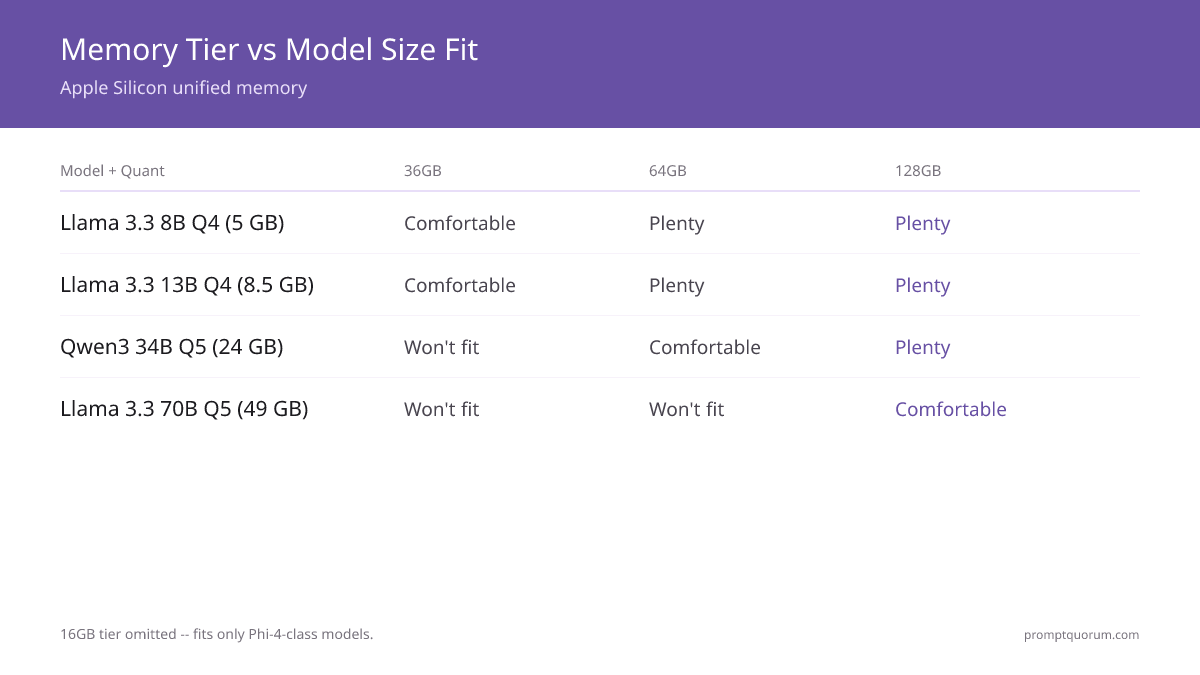
The Master Table: Memory Tier vs Model Size
Model | Parameters | Q3_K | Q4_K_M | Q5_K_M | Q8 | FP16 |
|---|---|---|---|---|---|---|
| Phi-4 | 3.8B | 2.1 GB | 2.5 GB | 2.9 GB | 4.0 GB | 7.6 GB |
| Mistral Small | 7B | 3.8 GB | 4.5 GB | 5.2 GB | 7.5 GB | 14 GB |
| Llama 3.1 8B | 8B | 4.2 GB | 5.0 GB | 5.8 GB | 8.5 GB | 16 GB |
| Gemma 3 12B | 12B | 6.5 GB | 7.8 GB | 9.0 GB | 12.9 GB | 24 GB |
| Qwen3 34B | 34B | 17 GB | 20 GB | 24 GB | 36 GB | 68 GB |
| Llama 3.3 70B | 70B | 36 GB | 42 GB | 49 GB | 74 GB | 140 GB |
| Llama 3.3 405B | 405B | 200+ GB | 240 GB | 280 GB | 410 GB | 810 GB |
Add 4-8 GB for macOS overhead when calculating fit on your Mac.
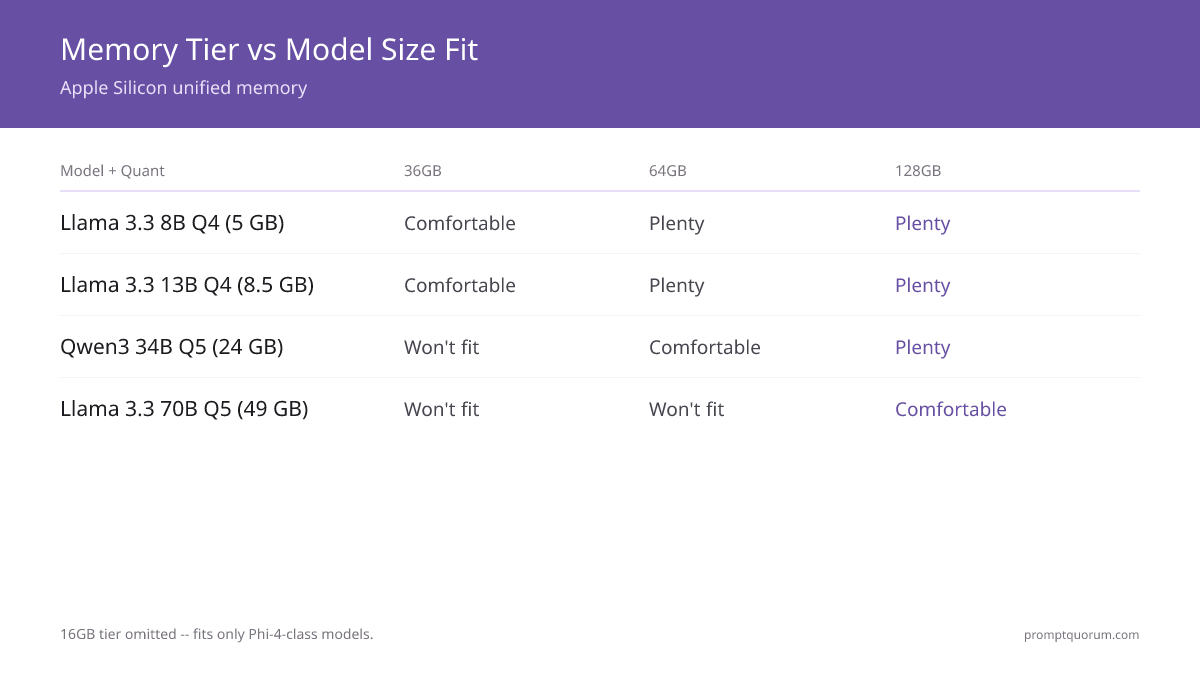
Fits / Doesn't Fit Matrix
Model + Quant | 16GB | 36GB | 64GB | 128GB |
|---|---|---|---|---|
| Phi-4 Q4 (2.5 GB) | ✓ Plenty | ✓ Plenty | ✓ Plenty | ✓ Plenty |
| Llama 3.1 8B Q4 (5 GB) | ⚠️ Tight | ✓ Comfortable | ✓ Plenty | ✓ Plenty |
| Llama 3.1 8B Q8 (8.5 GB) | ✗ Won't fit | ✓ Comfortable | ✓ Plenty | ✓ Plenty |
| Gemma 3 12B Q4 (7.8 GB) | ✗ Won't fit | ✓ Comfortable | ✓ Plenty | ✓ Plenty |
| Qwen3 34B Q4 (20 GB) | ✗ Won't fit | ⚠️ Tight | ✓ Comfortable | ✓ Plenty |
| Qwen3 34B Q5 (24 GB) | ✗ Won't fit | ✗ Won't fit | ✓ Comfortable | ✓ Plenty |
| Llama 3.3 70B Q3 (36 GB) | ✗ Won't fit | ✗ Won't fit | ⚠️ Tight | ✓ Comfortable |
| Llama 3.3 70B Q4 (42 GB) | ✗ Won't fit | ✗ Won't fit | ⚠️ Very tight | ✓ Comfortable |
| Llama 3.3 70B Q5 (49 GB) | ✗ Won't fit | ✗ Won't fit | ✗ Won't fit | ✓ Comfortable |
| Llama 3.3 70B Q8 (74 GB) | ✗ Won't fit | ✗ Won't fit | ✗ Won't fit | ✓ Fits |
✓ Plenty = 4+ GB free | ✓ Comfortable = 2-4 GB free | ⚠️ Tight = under 2 GB free | ✗ Won't fit = uses swap or crashes
What Fits in Each Memory Tier (Practical)
- 116 GB (M5 base, MacBook Air)
Why it matters: Llama 3.1 8B Q4 fits (5GB model + 8GB OS = 13GB) ✓ but tight. Llama 8B Q8 won't fit without swapping. Whisper small fits alongside. - 236 GB (M5 Pro base)
Why it matters: Llama 3.1 8B Q8 fits comfortably. Llama 13B Q4 fits. Qwen3 34B Q4 barely fits (20GB + 8GB OS = 28GB). Multi-model: Whisper + LLaVA + TTS fit ✓ - 364 GB (M5 Pro max)
Why it matters: Qwen3 34B Q5 fits comfortably (24GB). Llama 70B Q3 barely fits. Multi-model stacks have plenty of room. - 4128 GB (M5 Max)
Why it matters: Best model for 128GB: Llama 3.3 70B Q5 (49GB) — the largest mainstream model that fits with room to spare. 70B Q8 fits (74GB) for near-lossless quality. Multi-modal: Whisper + 90B vision model + 8B LLM fit simultaneously ✓
Multi-Model Stack Memory Requirements
Stack Use Case | Memory Needed |
|---|---|
| LLM only (Llama 8B Q4) | 5 GB + OS = 13 GB |
| LLM + STT (Llama 8B + Whisper large-v3) | 8 GB + OS = 16 GB |
| LLM + STT + TTS (voice assistant) | 9 GB + OS = 17 GB |
| LLM + Vision (Llama 8B + LLaVA 7B) | 11 GB + OS = 19 GB |
| Full multimodal (LLM + Vision + STT + TTS) | 14 GB + OS = 22 GB |
| LLM + RAG (Llama 8B + embeddings + ChromaDB) | 8 GB + OS = 16 GB |
| Heavy multimodal (Llama 70B Q4 + Vision 90B) | 100+ GB |
Stacks above 22 GB need 36GB minimum Mac. Stacks above 50 GB need 64GB minimum Mac. The heavy multimodal stack only works on 128GB M5 Max.
Context Window Adds Memory Overhead
KV cache scales with context length — the longer the context window, the more memory your model uses at runtime. This is a common gotcha that can push a tight setup into swap.
- Llama 3.1 8B at 8K context: +0.5 GB
- Llama 3.1 8B at 32K context: +2 GB
- Llama 3.1 8B at 128K context: +8 GB
- Llama 3.3 70B at 32K context: +6 GB
- Llama 3.3 70B at 128K context: +24 GB
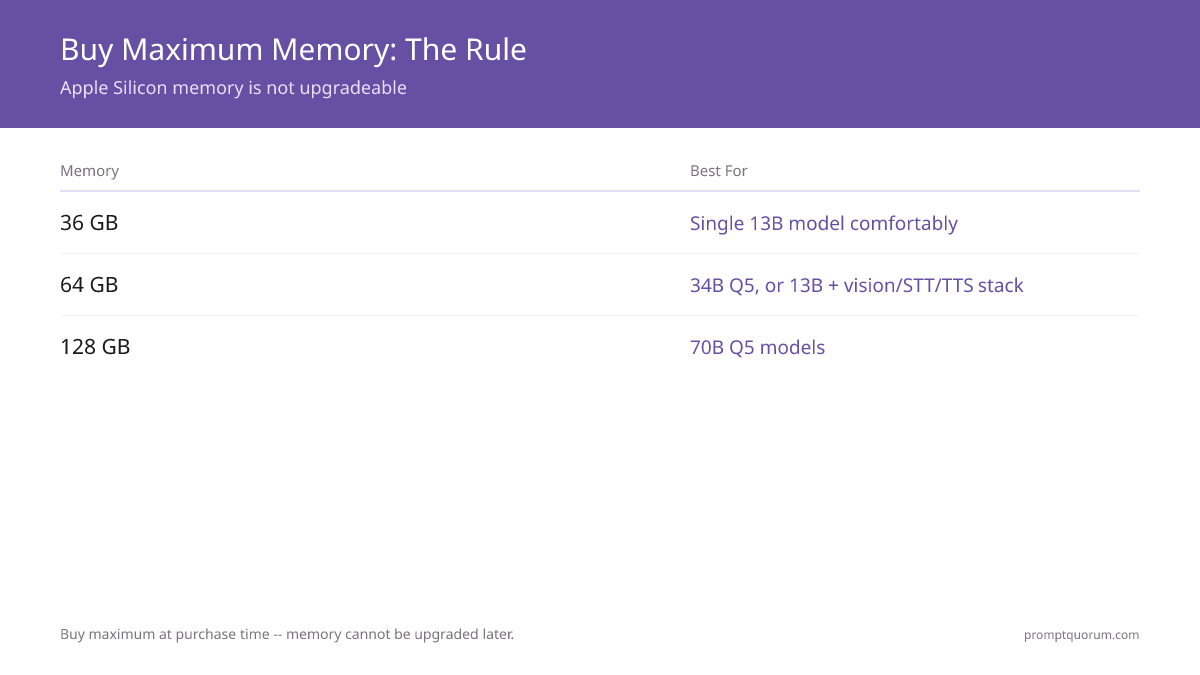
Buy Maximum Memory — Here's Why
- Cannot upgrade Apple Silicon memory after purchase.
- Model sizes are growing: 8B today → 13–34B sweet spot in 2027.
- 16GB is already marginal for LLMs — 36GB minimum recommended.
- Price difference: 36GB→64GB costs ~$200 at purchase, saves buying new Mac in 2 years when models outgrow 36GB.
- Example: M5 Pro 36GB today costs $999; 64GB costs $1,199. Buying new Mac in 2 years: $1,500+ for same M5 Pro 64GB config (if available).
- Cheapest way to get 36GB+ unified memory: the base M5 Pro Mac mini ($999, 36GB) is the lowest-cost Mac with enough memory to run 13B models comfortably — cheaper than any Mac Studio or MacBook Pro configuration with equivalent memory.
- Apple refreshed the Mac mini and Mac Studio lineup on August 25, 2026, adding tiers above this guide's 128GB ceiling: Mac mini M6 (32GB max, $899), Mac mini M5 Pro (64GB max, $1,699), Mac Studio M5 Max (128GB max, $2,499), and Mac Studio M5 Ultra (256GB or 512GB, from $5,499). The 512GB configuration ships late October 2026 above $10,000. For the model sizes this guide covers (up to 70B), 64–128GB is still the practical range — 256GB+ only matters for models larger than 70B or running several large models at once.
Quantization Impact on Quality
Q4_K_M (4-bit): ~1–2% quality loss vs FP16. Imperceptible for most uses. Best default.
Q5_K_M (5-bit): ~0.5–1% quality loss. Negligible. Recommended if you have spare memory.
Q8 (8-bit): ~0.1% quality loss. Essentially lossless.
Q3_K (3-bit): 3–5% quality loss. Noticeable on complex reasoning. Acceptable only for space-constrained scenarios.
Should I get 36GB or 64GB?
Get 64GB if budget allows ($200 more). 36GB works today but will feel tight in 12 months as models grow. 64GB is future-proof through 2027–2028.
Can I upgrade memory later?
No. Apple Silicon memory is soldered and non-upgradeable. Buy maximum at purchase time.
Why is 16GB not enough?
16GB for LLM + 4–8GB for macOS = 8–12GB available. Llama 8B Q4 needs 5GB, leaving no room for Whisper or other tasks. Too tight.
Do I really need 128GB?
Only if you regularly run 70B models or need simultaneous vision + LLM + STT. Otherwise, 64GB is plenty.
Is 48GB enough for local LLMs?
Yes — 48GB (available on M4 Pro and some M5 Pro configs) is a comfortable middle ground. Runs all 34B models, 70B Q3 at the edge, and full multimodal stacks. Better than 36GB, but if you can afford 64GB, the future-proofing is worth it.
How much memory for running Llama 3.3 70B locally?
Minimum 48GB (Q3 quantization, noticeable quality loss). Recommended 64GB (Q4 quantization, tight fit). Comfortable 128GB (Q5/Q8 quantization, high quality). The 64GB tier requires careful memory management; 128GB is the only worry-free option for 70B.
Do I need 128GB for local AI in 2026?
Only if you're running 70B models regularly or need simultaneous vision + LLM + STT stacks. For everyday LLM use (8B-34B models, RAG, coding assistance), 64GB M5 Pro is the sweet spot. 128GB is a 2-3× price jump for marginal benefit unless you specifically need 70B.
Is Apple Silicon unified memory the same as VRAM?
Yes. Unlike a discrete GPU with a fixed, separate VRAM pool (e.g., 12GB on an RTX 4070), Apple Silicon's GPU reads and writes the same physical memory as the CPU. The GPU can access nearly all of a Mac's unified memory — a 64GB Mac gives the GPU ~56-60GB after macOS overhead, not a fixed VRAM slice.
What's the largest LLM that fits in 128GB unified memory?
Llama 3.3 70B at Q5_K_M quantization (49GB) is the largest mainstream model that fits comfortably, leaving ~70GB free for context and overhead. At Q8 (74GB) it still fits with room for macOS. A 405B model needs 240GB+ even at Q4 — beyond any single Mac's unified memory, so 70B is the practical ceiling on one machine.
How much storage does a local LLM need, separate from memory?
Memory (RAM) and disk storage are different: memory holds the model while it runs; storage holds the downloaded model file permanently. A Q4 8B model needs ~5GB of both memory and disk. A 70B Q5 model needs ~49GB of memory and ~49GB of disk — the same file. Running several models locally (e.g., 8B, 34B, 70B, plus a vision model) needs 100-150GB of free disk space, independent of your Mac's memory tier.
Can I get more than 128GB of unified memory on a Mac?
Yes. Apple's August 25, 2026 refresh added the Mac Studio M5 Ultra with 256GB and 512GB unified memory configurations, starting at $5,499. The 512GB tier ships in late October 2026 and costs well above $10,000. That's far beyond what running 70B-class models requires — the 16GB–128GB tiers in this guide cover the practical range for nearly all local LLM use. 256GB+ only matters if you're running models larger than 70B or serving multiple large models simultaneously. No independent benchmarks exist yet for the M5 Ultra.