Key Takeaways
- Apple refreshed Mac mini (M6, M5 Pro) and Mac Studio (M5 Max, M5 Ultra) on August 25, 2026 — all ship September 22, 2026 (512GB M5 Ultra config ships late October 2026).
- Apple Silicon removes VRAM limits — unified memory from 32 GB (Mac mini M6) up to 512 GB (Mac Studio M5 Ultra top config) is available to models. RTX 4090 maxes out at 24GB discrete VRAM.
- M5 Pro (64GB) runs 8B models at 45–55 tok/s and 34B models at 15–20 tok/s. M5 Max (128GB) runs 70B models at 12–18 tok/s. M5 Ultra's memory ceiling opens up 120B+ models for the first time on consumer hardware.
- Annual electricity for 24/7 LLM inference: $35–55 on Mac Mini M6 vs $300–400 on desktop RTX 4090 — a 10× cost reduction in operating expenses.
- Metal GPU acceleration works automatically in Ollama, MLX, llama.cpp. Zero driver configuration needed.
- Unified memory bandwidth (Mac mini M6 170 GB/s, M5 Pro 307 GB/s, M5 Max 460–614 GB/s) is the bottleneck, not GPU cores. Apple has not yet published M5 Ultra bandwidth.
- Buy maximum memory at purchase time — cannot upgrade after. 36GB minimum recommended; 64GB+ future-proof for 2027–2028.
- M5 Pro is the value-performance sweet spot. M5 Max or M5 Ultra justify the premium only if you regularly need 70B+ models or multimodal stacks (vision + LLM + TTS simultaneously).
- M5 Ultra (Mac Studio, from $5,499) is now shipping, not a projection — up to 512GB unified memory enables 70B FP16 (lossless quality) and 120B+ models. No independent benchmarks exist yet; treat any tok/s figures for M6/M5 Ultra as unverified until third-party testing ships alongside the hardware in September/October 2026.
📍 In One Sentence
Apple's August 25, 2026 refresh brought the M6 chip to Mac mini ($899, max 32GB) and M5 Max/M5 Ultra (up to 512GB) to Mac Studio; M5 Pro (64 GB) runs 8B models at 45–55 tok/s and 34B at 15–20 tok/s, M5 Max (128 GB) runs 70B at 12–18 tok/s — all at 25–70W with no VRAM limits thanks to unified memory.
💬 In Plain Terms
Unified memory means the CPU, GPU, and AI engine all share the same pool of memory — so a Mac Studio with the top M5 Ultra configuration can use up to 512 GB for a model, unlike a GPU which is capped at its VRAM (max 24 GB for RTX 4090). That's why Macs can run 70B- and now 120B+-parameter models that no NVIDIA consumer GPU can fit.
- All M-series chips use unified memory (GPU + CPU share same RAM pool).
- M6 (Mac mini) and M5 Pro/M5 Max/M5 Ultra (Mac mini and Mac Studio) are the 2026 recommendations after Apple's August 25, 2026 refresh; M4 and earlier are still viable but less future-proof.
- Metal is Apple's GPU programming framework; it's built into macOS and requires no external libraries.
- Framework choice (Ollama, MLX, llama.cpp) affects speed by 0–25% but doesn't change which models fit.
- Mac Mini M6 is the cheapest entry ($899 base, max 32GB) and silent even under load.
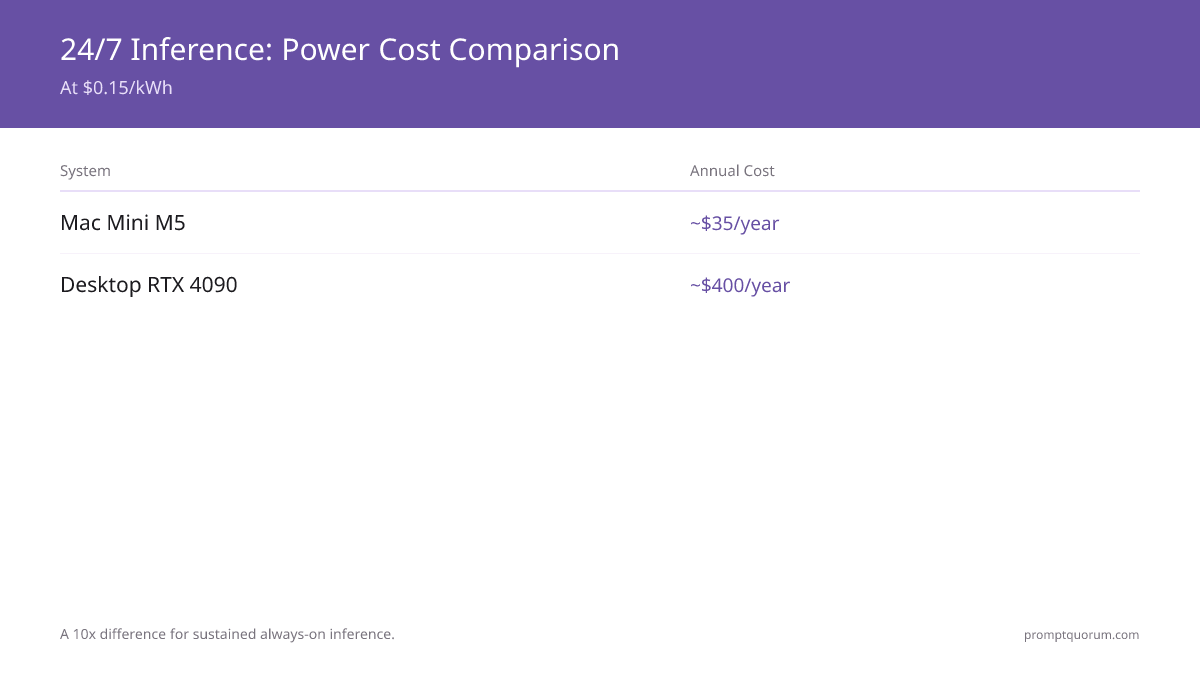
- Average yearly electricity cost: Mac Mini M6 ($35) vs desktop RTX 4090 ($400) — a 10× difference.
Why Apple Silicon for Local LLMs?
Apple Silicon excels at local LLM inference for one reason: unified memory. When you buy a Mac with 64GB RAM, all 64GB is available to your LLM model. A discrete GPU like RTX 4090 has 24GB VRAM (separate from your system RAM) — models larger than 24GB simply do not fit without complex multi-GPU setups.
This single architectural difference is transformative:
- Unified memory: entire RAM available (32–128GB). RTX 4090: discrete VRAM only (24GB hard limit).
- Metal acceleration: GPU inference without CUDA dependency or proprietary drivers.
- Power efficiency: 30–70W under load vs 300W+ for desktop GPU. Enables fanless or near-silent operation.
- Silence: Mac Mini and MacBook Air are fanless at idle and under light loads. Desktop GPU towers are 70+ dB under load.
- No driver management: Metal works out of the box on macOS. No CUDA version conflicts, no NVIDIA driver updates.
- Hardware cost: M5 Pro Mac Mini ($1,699) with 64GB config vs dual-GPU setup ($4000+) for equivalent model capacity.
Apple Silicon Chips for LLMs — Complete Comparison
Chip | Max Memory | Memory Bandwidth | GPU Cores | LLM Sweet Spot | Released |
|---|---|---|---|---|---|
| M1 | 16 GB | 68 GB/s | 8 | 7B Q4 | Nov 2020 |
| M1 Pro | 32 GB | 200 GB/s | 16 | 13B Q4 | Oct 2021 |
| M1 Max | 64 GB | 400 GB/s | 32 | 34B Q4 | Oct 2021 |
| M1 Ultra | 128 GB | 800 GB/s | 64 | 70B Q4 | Mar 2022 |
| M2 | 24 GB | 100 GB/s | 10 | 7–13B Q4 | Jun 2022 |
| M2 Pro | 32 GB | 200 GB/s | 19 | 13B Q4 | Jan 2023 |
| M2 Max | 96 GB | 400 GB/s | 38 | 34–70B Q4 | Jan 2023 |
| M2 Ultra | 192 GB | 800 GB/s | 76 | 70B+ Q4 | Jun 2023 |
| M3 | 24 GB | 100 GB/s | 10 | 7–13B Q4 | Oct 2023 |
| M3 Pro | 36 GB | 150 GB/s | 18 | 13–34B Q4 | Oct 2023 |
| M3 Max | 128 GB | 400 GB/s | 40 | 70B Q4 | Oct 2023 |
| M4 | 32 GB | 120 GB/s | 10 | 13B Q4 | May 2024 |
| M4 Pro | 48 GB | 273 GB/s | 20 | 34B Q4 | Oct 2024 |
| M4 Max | 128 GB | 546 GB/s | 40 | 70B Q4 | Oct 2024 |
| M5 (base) | 32 GB | ~150 GB/s | 10 | 13B Q4 | Oct 2025 |
| M6 (Mac mini) | 32 GB | 170 GB/s | 12 | 13B Q4 | Aug 2026 |
| M5 Pro | 64 GB | 307 GB/s | ~20 | 34B Q5 | Aug 2026 |
| M5 Max | 128 GB | 460–614 GB/s | ~40 | 70B Q5 | Aug 2026 |
| M5 Ultra | 512 GB | Not yet published | Not yet published | 120B+ Q4 / 70B FP16 | Aug 2026 |
M5 Pro debuted in MacBook Pro (Mar 2026); the Aug 25, 2026 refresh brought it to Mac mini alongside the all-new M6. M5 Max and M5 Ultra are new to Mac Studio as of Aug 25, 2026. All four ship Sept 22, 2026, except the 512GB M5 Ultra configuration, which ships late Oct 2026. Apple has not published GPU core count or memory bandwidth for M5 Ultra as of this writing.
August 2026 Refresh: Mac mini M6/M5 Pro, Mac Studio M5 Max/M5 Ultra
Apple announced a Mac mini and Mac Studio refresh on August 25, 2026. Both machines ship September 22, 2026 (the top M5 Ultra memory configuration ships late October 2026). No independent benchmarks exist yet for any of the four new chips — treat performance figures below as Apple's own claims, clearly marked as such, not measured results.
- Mac mini M6: $899 starting. 12-core CPU, 12-core GPU, dual 16-core Neural Engine, 170 GB/s memory bandwidth, max 32GB unified memory. Apple claims roughly 40% faster CPU and up to 4x AI performance versus M4 — Apple's figures, not independently verified.
- Mac mini M5 Pro: $1,699 starting. Up to 18-core CPU, 20-core GPU, 307 GB/s memory bandwidth, max 64GB unified memory, Thunderbolt 5.
- Mac Studio M5 Max: $2,499 starting. Max 128GB unified memory.
- Mac Studio M5 Ultra: $5,499 starting, base 96GB unified memory, scaling up to 256GB and 512GB in the top configuration. The 512GB configuration ships late October 2026 and is expected to price well above $10,000.
- M6 is built on a newer, more advanced process node than M4 per public reporting — it is a genuinely new chip generation in the lineage below, not a minor refresh of M5.
- The outgoing M4 Mac mini/M4 Pro Mac mini and Mac Studio M4 Max/M3 Ultra are now the previous generation.
- M5 Ultra's 512GB ceiling is the largest unified memory Apple has shipped in any consumer Mac, and is what enables 120B+ parameter models to run locally for the first time on consumer hardware.
Memory Bandwidth Matters More Than Memory Size
LLM inference is memory-bandwidth-bound, not compute-bound. This means token generation speed scales linearly with bandwidth, not GPU cores.
M5 Max at 614 GB/s vs RTX 4090 at 1,008 GB/s looks like NVIDIA wins on raw bandwidth. But Apple Silicon users have ALL memory available (no discrete VRAM limit), so they can load larger models that NVIDIA cannot fit into 24GB. The real comparison: M5 Max at 614 GB/s running a 70B model vs RTX 4090 unable to load the 70B model at all.
Within the M-series lineup, bandwidth differences directly translate to token/sec:
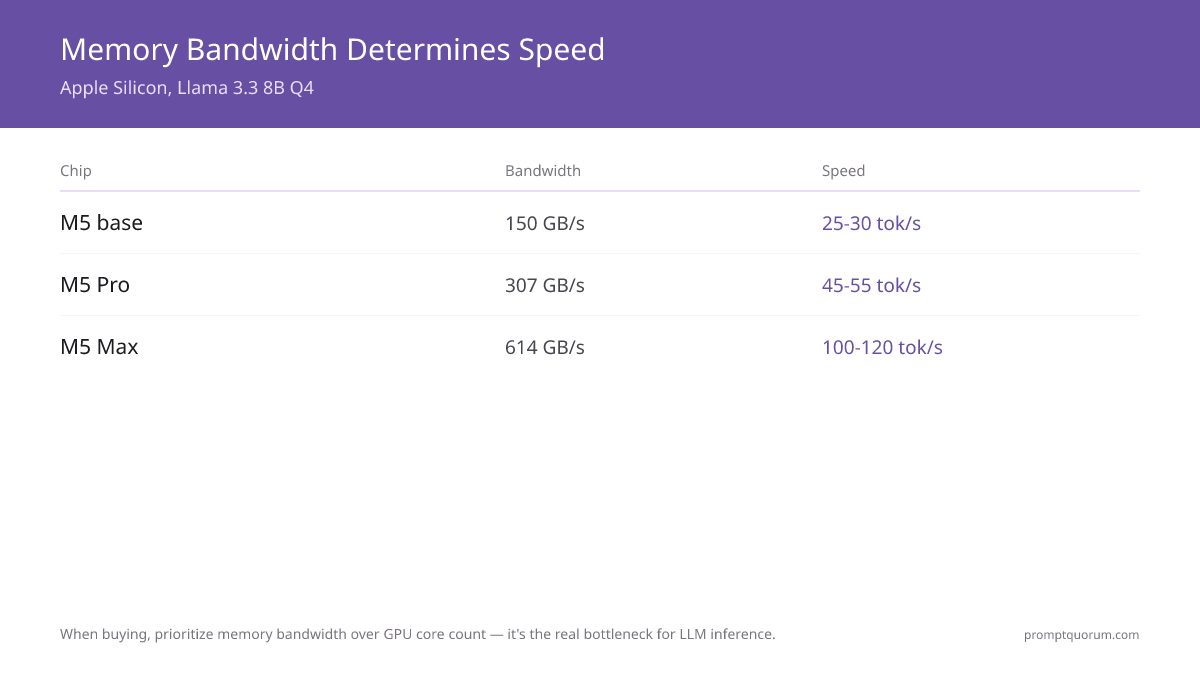
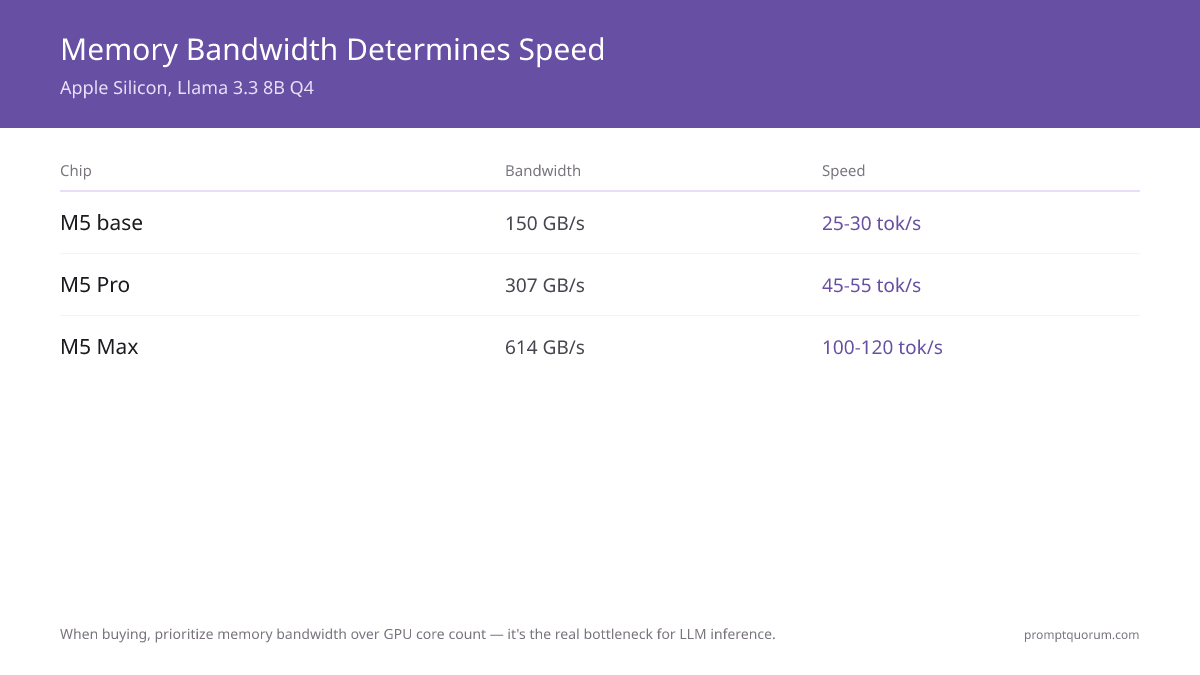
- M5 base (150 GB/s) → ~25–30 tok/s on Llama 3.1 8B Q4
- Mac mini M6 (170 GB/s) → in the same range as M5 base, slightly higher due to higher bandwidth. No independent benchmarks exist yet as of this writing — Apple has not published tok/s figures either.
- M5 Pro (307 GB/s) → ~45–55 tok/s on Llama 3.1 8B Q4 (2× M5 base due to 2× bandwidth)
- M5 Max (614 GB/s) → ~100–120 tok/s on Llama 3.1 8B Q4 (but uses different GPU, so speed scales with architecture too)
- M5 Ultra: Apple has not published memory bandwidth for M5 Ultra. Do not treat any tok/s estimate for M5 Ultra as verified until independent benchmarks ship alongside the hardware.
- Lesson: M5 Pro is exactly 2× faster than M5 base on the same model because bandwidth doubled. When buying, prioritize bandwidth over GPU core count.
Power Efficiency and Thermals — The Silent Advantage
Setup | Power (idle) | Power (LLM load) | Noise | Heat |
|---|---|---|---|---|
| Mac Mini M6 | 5W | 25–35W | Silent (fanless) | Warm |
| MacBook Air M5 | 3W | 20–30W | Silent (fanless) | Warm |
| Mac Mini M5 Pro | 5W | 40–60W | Quiet (fan rarely spins) | Cool |
| Mac Studio M5 Max | 10W | 60–100W | Quiet | Cool |
| Mac Studio M5 Ultra | 10W | Not yet published | Quiet | Cool |
| Desktop RTX 4090 | 50W | 350–450W | Loud (3 fans) | Hot |
| Desktop RTX 3060 | 30W | 170–200W | Moderate | Warm |
Annual electricity cost at $0.15/kWh, 24/7 AI server: Mac Mini M6 (~$35/year) vs Desktop RTX 4090 (~$400/year). Mac Studio M5 Ultra load power not yet published by Apple.
Real User Scenarios on Apple Silicon
- 1Coding Agent
Why it matters: Llama 3.1 8B on M5 Pro delivers 45–55 tok/s, code completion in 1–2 seconds. Runs silently in background on MacBook Pro. - 2RAG Pipeline
Why it matters: Embedding model + Llama 3.1 8B + ChromaDB fits entirely in 36GB M5 Pro unified memory. No GPU limitations. - 3Voice Assistant
Why it matters: Whisper Metal + Ollama Llama + Piper TTS = 1.2s latency on M5 Pro. Fanless Mac Mini suitable for always-on setup. - 4Multimodal
Why it matters: Whisper + LLaVA 7B vision + Llama 3.1 8B reasoning = all fit in 36GB, simultaneous processing. - 5Private Writing
Why it matters: Llama 3.3 70B Q5 on M5 Max 128GB = highest quality, fully offline, no API costs, zero privacy leakage. On the new Mac Studio M5 Ultra (up to 512GB), 120B+ models become possible for users who need maximum quality.
Which Mac Should You Buy for Local LLMs?
Decision matrix: match your use case to the right Mac configuration, updated for Apple's August 25, 2026 Mac mini and Mac Studio refresh.
Your Need | Mac to Buy | Memory | Approximate Cost |
|---|---|---|---|
| Just trying local LLMs | Mac Mini M6 | 16GB | $599 |
| 7–13B models daily | Mac Mini M6 | 32GB | $899 |
| 13–34B models, silent server | Mac Mini M5 Pro | 64GB | $1,699 |
| Portable AI workstation | MacBook Pro M5 Pro | 48GB | $2,500 |
| 70B models, max quality | Mac Studio M5 Max | 128GB | $2,499 |
| Multi-model stacks (vision + LLM + TTS) | Mac Studio M5 Max | 128GB | $2,499 |
| 120B+ models, max memory | Mac Studio M5 Ultra | Up to 512GB | $5,499+ |
Critical: always buy maximum memory — cannot upgrade after purchase. Memory cost at sale is 5–10% of total; replacing entire Mac later costs 100%. Mac mini M6/M5 Pro and Mac Studio M5 Max ship Sept 22, 2026; Mac Studio M5 Ultra ships Sept 22, 2026 for 96–256GB configs and late Oct 2026 for the 512GB config, which is expected to price well above $10,000.
Getting Started: Framework Overview
Three production-ready frameworks run LLMs on Apple Silicon Metal GPU:
- Ollama: easiest setup (one-click install), automatic Metal detection, no configuration. REST API included. Best for beginners.
- MLX: Apple's native framework, fastest inference (15–25% faster than Ollama), Python integration, LoRA fine-tuning support. Steeper learning curve.
- llama.cpp: cross-platform C++, most model format support (GGUF), Metal backend available via build flag. Best for integration into larger applications.
Frequently Asked Questions
What did Apple announce for Mac mini and Mac Studio on August 25, 2026?
Apple refreshed Mac mini with the new M6 chip ($899, max 32GB) and M5 Pro ($1,699, max 64GB), and refreshed Mac Studio with M5 Max ($2,499, max 128GB) and M5 Ultra ($5,499, up to 512GB in the top configuration). All ship September 22, 2026, except the 512GB M5 Ultra configuration, which ships late October 2026.
Is M5 Pro or M5 Max better for local LLMs?
M5 Pro (64GB) is the best value — runs 34B models well and starts at $1,699. M5 Max ($2,499+) is only necessary if you frequently need 70B models or multi-modal stacks. Most users are happy with M5 Pro.
Can I upgrade memory after buying a Mac?
No. Apple Silicon memory is soldered and not upgradeable. Buy the maximum memory you can afford at purchase time.
How does M5 Pro compare to RTX 4090 for LLMs?
On models that fit in 24GB VRAM, RTX 4090 is 20–30% faster. On 70B models, M5 Pro wins decisively because RTX 4090 cannot load them (24GB limit). See Apple Silicon vs NVIDIA GPU for LLMs.
Do I need Ollama, MLX, or llama.cpp?
Start with Ollama (easiest). If you need faster inference or fine-tuning, switch to MLX. If you need cross-platform compatibility, use llama.cpp. All three work on Apple Silicon.
Does M5 Ultra with up to 512GB memory change anything?
Yes. M5 Ultra (Mac Studio, from $5,499, up to 512GB in the top configuration, shipping September 22 / late October 2026) runs 70B models in FP16 (zero quality loss) and enables 120B+ models for the first time on consumer hardware. No independent benchmarks exist yet — this article will be updated once third-party tok/s numbers are available after launch.
Is Apple Silicon worth it for local LLMs in 2026?
Yes, especially for 34B+ models. Apple Silicon is the only consumer hardware that runs 70B models without complex multi-GPU setups, and the new Mac Studio M5 Ultra is the only consumer hardware that fits 120B+ models. For 8B models that fit in NVIDIA VRAM, RTX 4090 is faster but costs more to operate. Most local LLM users settle on Mac mini M5 Pro 64GB ($1,699) as the value-performance sweet spot.
Can I run Apple Silicon LLMs on a MacBook Air?
Yes, with limitations. MacBook Air M5 (16–32GB) runs 7–13B models comfortably. Thermal throttling kicks in after 10–15 minutes of sustained inference on the fanless design. For occasional use: fine. For always-on inference: Mac Mini M5 Pro is a better fit.
Can a MacBook Air run local LLMs, and how does M3 Ultra compare to M5 Max?
Yes. A MacBook Air is fanless, so it will thermally throttle on a long generation where a MacBook Pro holds its clocks, but for chat-length responses the difference is small and the Air runs the same models. Unified memory is what decides which models fit: a 24GB Air is comfortable up to the mid sizes, and 32GB opens up more. On the M3 Ultra question, an Ultra-tier chip of the previous generation still beats an M5 Max on memory capacity, which is what lets it hold the largest models; the M5 Max is the faster chip per token. A 48GB M5 Pro sits between them and is the sweet spot for most people who want headroom without Ultra pricing.
Benchmark Methodology and Freshness
- M5 Pro/Max numbers for MacBook Pro configurations based on community benchmarks from March–May 2026
- M6, and the Mac mini/Mac Studio M5 Pro/M5 Max/M5 Ultra configurations announced August 25, 2026, have no independent benchmarks yet — hardware ships September 22, 2026 (512GB M5 Ultra late October 2026). Any performance figures for these specific configurations are Apple's own claims, clearly labeled as such, not measured results.
- Last verified: 2026-08-26
- Performance improves with framework updates (Ollama, MLX, llama.cpp release monthly)
- This article will be re-benchmarked quarterly, and updated with independent M6/M5 Ultra benchmarks as soon as they are available after the September/October 2026 ship dates