Key Takeaways
- Ollama: easiest setup, best for beginners
- MLX: fastest on Apple Silicon (15–25% faster)
- llama.cpp: most model formats, cross-platform
- Most users: start Ollama, switch to MLX if you need speed
📍 In One Sentence
Ollama is the easiest (auto Metal, REST API, 2-minute setup); MLX is 15–25% faster and supports Python + fine-tuning; llama.cpp is the most cross-platform with widest GGUF model support — most Mac users start with Ollama and switch to MLX when they need speed.
💬 In Plain Terms
These are three open-source programs that let your Mac run AI models locally. "Metal" means they use your Mac's GPU (graphics chip) for fast AI processing. GGUF is the most common file format for downloadable AI models. LoRA fine-tuning lets you train a model on your own data without retraining from scratch.
Head-to-Head Comparison
Feature | |||
|---|---|---|---|
| Setup time | 2 min | 5 min | 10 min |
| Metal GPU | Automatic | Native | Supported |
| Model format | GGUF | MLX format | GGUF |
| API | REST (localhost:11434) | Python native | CLI + HTTP |
| Speed (8B Q4) | 45–50 tok/s | 55–65 tok/s | 45–55 tok/s |
| Speed (70B Q4) | 12–16 tok/s | 18–22 tok/s | 14–18 tok/s |
| Fine-tuning | No | Yes (LoRA) | No |
| Best for | Beginners, API | ML developers | Cross-platform |
Ollama on Apple Silicon
- One-command install: `brew install ollama`
- Metal GPU automatic — no configuration needed
- REST API for integration (any language)
- Model management: `ollama pull`, `ollama list`, `ollama rm`
- Limitation: no fine-tuning, no custom quantization
- Limitation: slightly slower than MLX due to GGUF overhead
- Best for: beginners, API users, Whisper integration
Ollama Supported Models (100+ curated)
- Llama 3.3 (1B, 3B, 8B, 70B, 405B)
- Mistral Small, Mixtral 8x22B/22B
- Qwen3 (0.5B through 72B)
- Phi-3, Phi-4
- Gemma 3 (4B, 12B, 27B)
- DeepSeek Coder V2
- Vision: Llama 3.2 Vision, LLaVA
- Embedding: nomic-embed-text, mxbai-embed-large
MLX — Apple's Native Framework
- Built by Apple specifically for Apple Silicon
- NumPy-like Python API: `import mlx.core as mx`
- Lazy evaluation + unified memory = optimal utilization
- MLX-LM: dedicated package for LLM inference and fine-tuning
- Fastest inference on Apple Silicon (10–25% faster than Ollama)
- Fine-tuning support: LoRA and QLoRA directly on Mac
- Limitation: MLX-format models only (growing library)
- Limitation: macOS only — code not portable
- Best for: ML developers, maximum speed, fine-tuning
MLX Supported Models (mlx-community on HuggingFace)
- All major LLMs (Llama, Mistral, Qwen, Gemma, Phi)
- Quantization versions (Q3, Q4, Q5, Q6, Q8)
- Vision models: Llama 3.2 Vision, LLaVA, Qwen2-VL
- Note: requires conversion to MLX format (community converts most)
llama.cpp on Apple Silicon
- Cross-platform C/C++ — same binary runs Mac, Linux, Windows
- Metal support via build flag: `make LLAMA_METAL=1`
- GGUF format: largest model library
- Server mode: `./llama-server -m model.gguf` — REST API
- Whisper.cpp by same author — Metal STT support
- Limitation: build from source (no one-click install)
- Limitation: slower than MLX, comparable to Ollama
- Best for: cross-platform projects, maximum model format support
llama.cpp Supported Models (any GGUF)
- Every GGUF on HuggingFace works (10,000+ models)
- Largest ecosystem of fine-tuned and custom models
- Original/experimental models often appear here first
- For mainstream models (Llama, Mistral, Qwen), all three frameworks have you covered. For obscure or experimental models, llama.cpp wins by ecosystem size.
Setup Comparison: 5 Lines of Code to Run Llama 3.1 8B
Ollama (2 commands):
```bash
brew install ollama
ollama run llama3.1:8b "Hello, world"
```
MLX (4 lines Python):
```python
from mlx_lm import load, generate
model, tokenizer = load("mlx-community/Llama-3.1-8B-Instruct-4bit")
response = generate(model, tokenizer, prompt="Hello, world", max_tokens=100)
print(response)
```
llama.cpp (5 commands):
```bash
git clone https://github.com/ggerganov/llama.cpp
cd llama.cpp
make LLAMA_METAL=1
wget https://huggingface.co/ggml-org/models/resolve/main/llama-3.1-8b-q4.gguf
./main -m llama-3.1-8b-q4.gguf -p "Hello, world"
```
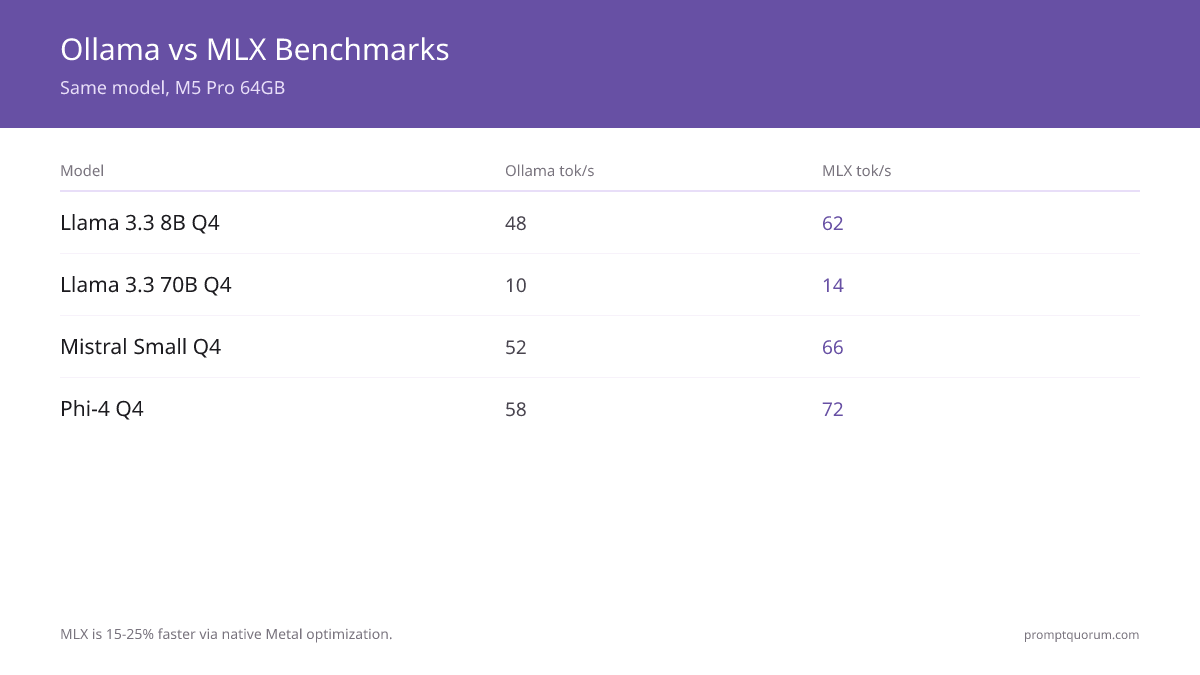
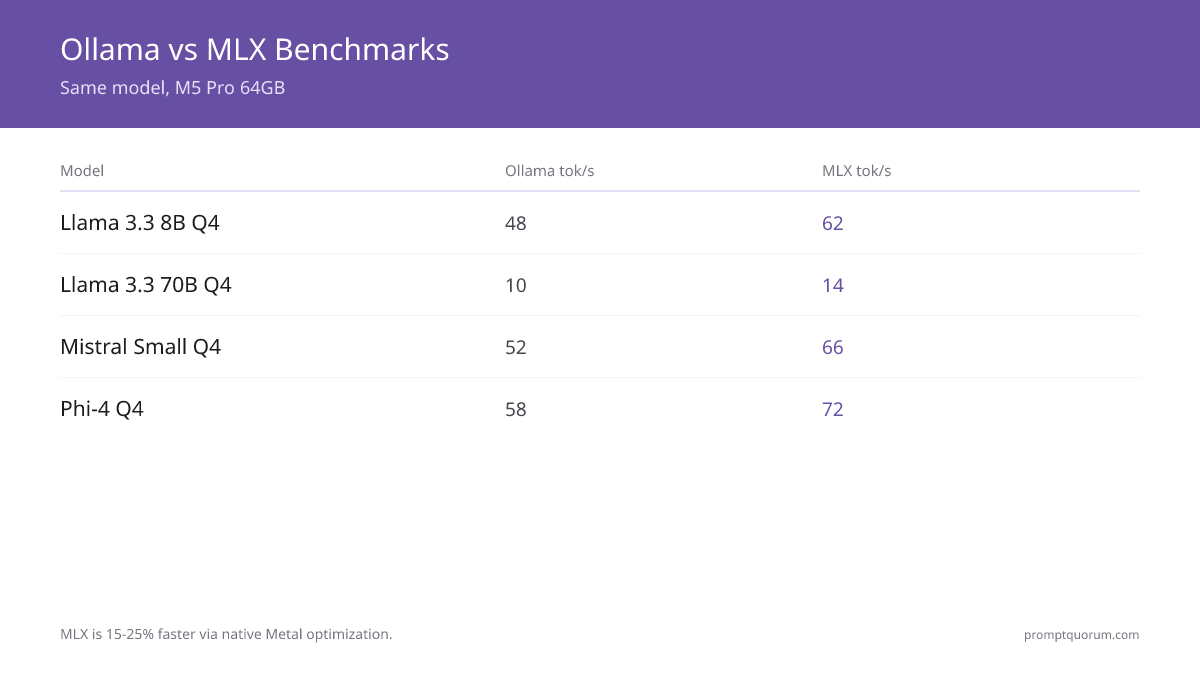
Benchmarks: Same Model, Three Frameworks, M5 Pro 64GB
Model | |||
|---|---|---|---|
| Llama 3.1 8B Q4 | 48 | 62 | 52 |
| Llama 3.1 8B Q8 | 38 | 48 | 40 |
| Llama 3.3 70B Q4 | 10 | 14 | 11 |
| Mistral Small Q4 | 52 | 66 | 55 |
| Phi-4 Q4 | 58 | 72 | 60 |
MLX is 15–25% faster due to native Metal optimization. Early benchmarks — framework improvements expected.
Memory Usage: Same Model, Three Frameworks (M5 Pro 64GB)
Model | |||
|---|---|---|---|
| Llama 3.1 8B Q4 | 5.2 GB | 4.8 GB | 5.0 GB |
| Llama 3.3 70B Q4 | 43 GB | 41 GB | 42 GB |
| Mistral Small Q4 | 4.6 GB | 4.3 GB | 4.4 GB |
MLX uses 5–10% less memory than Ollama for the same model due to unified memory optimization. On tight memory tiers (16GB, 36GB), this can be the difference between a model fitting and going to swap.
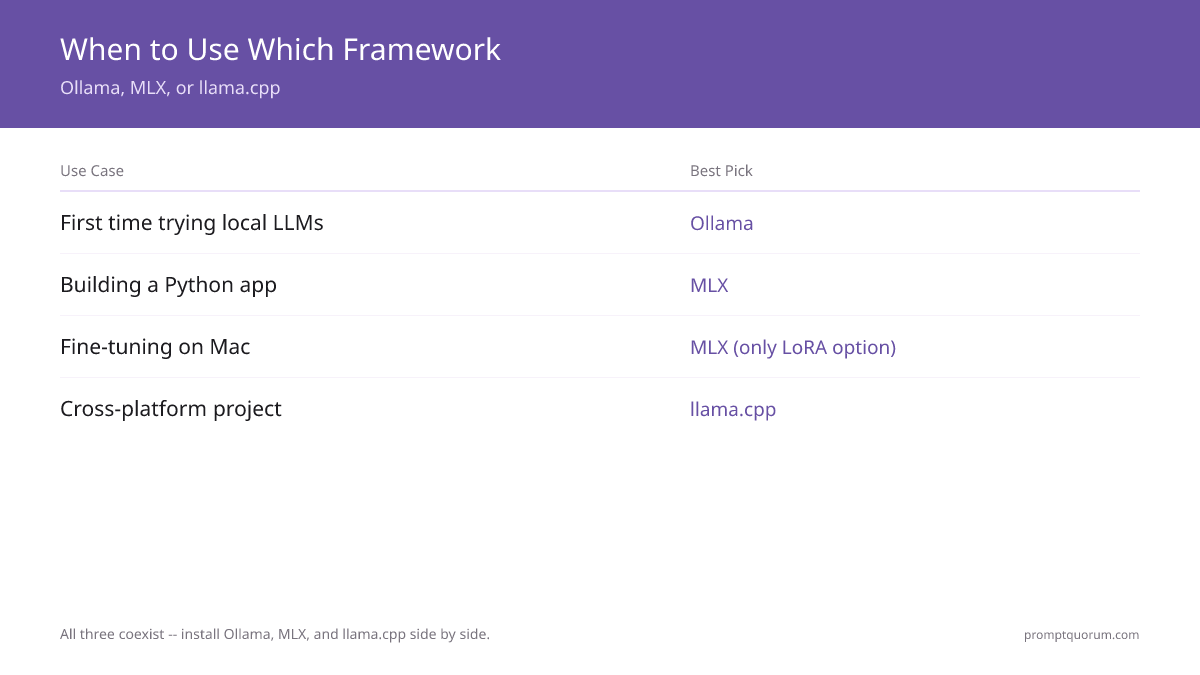
Decision Matrix: When to Use Which
- 1Just getting started
Why it matters: Ollama — 2-minute setup, works immediately. - 2Building Python app
Why it matters: MLX — native Python, fastest speed. - 3Need REST API
Why it matters: Ollama — built-in API server. - 4Fine-tuning on Mac
Why it matters: MLX — only option with LoRA support. - 5Cross-platform project
Why it matters: llama.cpp — same code on Mac + Linux + Windows. - 6
- 7Maximum speed needed
Why it matters: MLX — 15–25% faster than alternatives. - 8Obscure models
Why it matters: llama.cpp — largest GGUF model library.
When NOT to Use Each Framework
Don't use Ollama if:
• You need fine-tuning (not supported)
• You need every last drop of speed (15–25% slower than MLX)
• You want fully custom quantization (limited control)
Don't use MLX if:
• You need cross-platform deployment (macOS only)
• You're not comfortable with Python
• You need a REST API out of the box (need to wrap)
• You need vision models in production (smaller selection)
Don't use llama.cpp if:
• You want a one-click experience (build required)
• You need fine-tuning (not supported)
• You don't want to manage your own model downloads
Can You Use Multiple Frameworks?
Yes — they don't conflict. Install all three. Common pattern: Ollama for daily use, MLX for speed-critical tasks, llama.cpp for models not in Ollama/MLX. They share same underlying models (different formats).
What does MLX mean?
MLX is Apple's own machine-learning framework, built specifically for Apple Silicon. It gives you a NumPy-like Python API, lazy evaluation, and unified-memory optimization, plus native LoRA/QLoRA fine-tuning. It is not related to Ollama or llama.cpp — those are separate inference engines. On Apple Silicon, MLX is typically 10–25% faster than Ollama, but it only runs MLX-format models and only on macOS.
Which framework is fastest?
MLX, 15–25% faster than Ollama on Apple Silicon. llama.cpp is comparable to Ollama. Speed difference only matters for large models (70B+); for 8B, all are fast enough.
Can I switch frameworks later?
Yes. You can install Ollama today, switch to MLX tomorrow. Models are compatible (just in different formats). No lock-in.
Is MLX only for Python?
MLX has Python native API, but you can call it from other languages via subprocess or HTTP server wrapper. Best used from Python.
Does Ollama have a GUI?
Ollama itself is CLI-only. Use open-source frontends like Open-WebUI for chat interface.
Can I run Ollama and MLX simultaneously?
Yes. They use separate model directories and don't conflict. Many developers run Ollama as a background service for API access and use MLX for Python notebook experimentation. They can even run the same model in memory simultaneously if you have enough unified memory.
Does MLX work on Intel Macs?
No. MLX is built specifically for Apple Silicon (M1+). Intel Mac users must use Ollama or llama.cpp. Both work on Intel but without Metal GPU acceleration — significantly slower than Apple Silicon.
Which framework supports vision models best?
Ollama has the cleanest vision model integration via `ollama run llama3.2-vision`. MLX supports vision models but requires more setup. llama.cpp has vision support but uses a separate llava executable. For multimodal work, start with Ollama.
Does Ollama use MLX on Apple Silicon?
No. Ollama bundles llama.cpp internally and runs inference via its own Metal kernels, not Apple's MLX framework. Ollama on Apple Silicon is fast (Metal-accelerated), but it is not the same as the mlx-lm Python package. Some model names on the Ollama Hub include "mlx" in the tag — this means the model was quantized using MLX tools before upload, but Ollama still runs it via llama.cpp/GGUF internally.
Does llama.cpp support MLX?
No. llama.cpp and MLX are separate inference engines that each use Apple Metal GPU acceleration independently. llama.cpp runs GGUF-format models via its own Metal kernels. MLX runs mlx-format models via Apple's mlx-lm library. You cannot load an MLX model into llama.cpp or vice versa — they are not interchangeable.
What is the difference between MLX and Metal?
Metal is Apple's low-level GPU API (similar to CUDA or Vulkan). MLX is a high-level ML framework built on top of Metal. Both Ollama/llama.cpp and the MLX framework use Metal for GPU acceleration, but MLX adds a NumPy-like Python API, lazy evaluation, and automatic differentiation on top of it.
Framework versions and freshness
• Ollama: tested with version 0.32.0 (latest)
• MLX: tested with mlx-lm 0.22
• llama.cpp: tested with build from June 2026
• Last verified: 2026-08-28
• Framework performance improves monthly — re-benchmark quarterly for current numbers