Why 70B Matters: The Quality Jump from 8B
The leap from 8B to 70B parameters is the most significant quality threshold in local AI. Industry benchmark scores:
📍 In One Sentence
The Apple M5 Max (64 GB) runs 70B models locally via Ollama — DeepSeek-R1-Distill-Llama-70B and Llama 3.3 70B both fit comfortably with ~40 GB Q4 requirement.
💬 In Plain Terms
64 GB M5 Max = comfortable 70B inference. The model needs ~40 GB in Q4 quantization; that leaves headroom for the OS and Ollama overhead.
Benchmark | Llama 3.1 8B | Llama 3.3 70B Q5 | GPT-5.6 |
|---|---|---|---|
| MMLU (general knowledge) | 73.0 | 86.1 | 88.7 |
| HumanEval (code) | 72.6 | 80.5 | 90.2 |
| GSM8K (math) | 84.5 | 95.1 | 95.8 |
| BBH (reasoning) | 71.0 | 85.3 | 88.9 |
| Average | 75.3 | 86.8 | 90.9 |
70B Q5 closes 75% of the quality gap between 8B and GPT-5.6 — while running locally for $0/month.
What Hardware Runs 70B Models
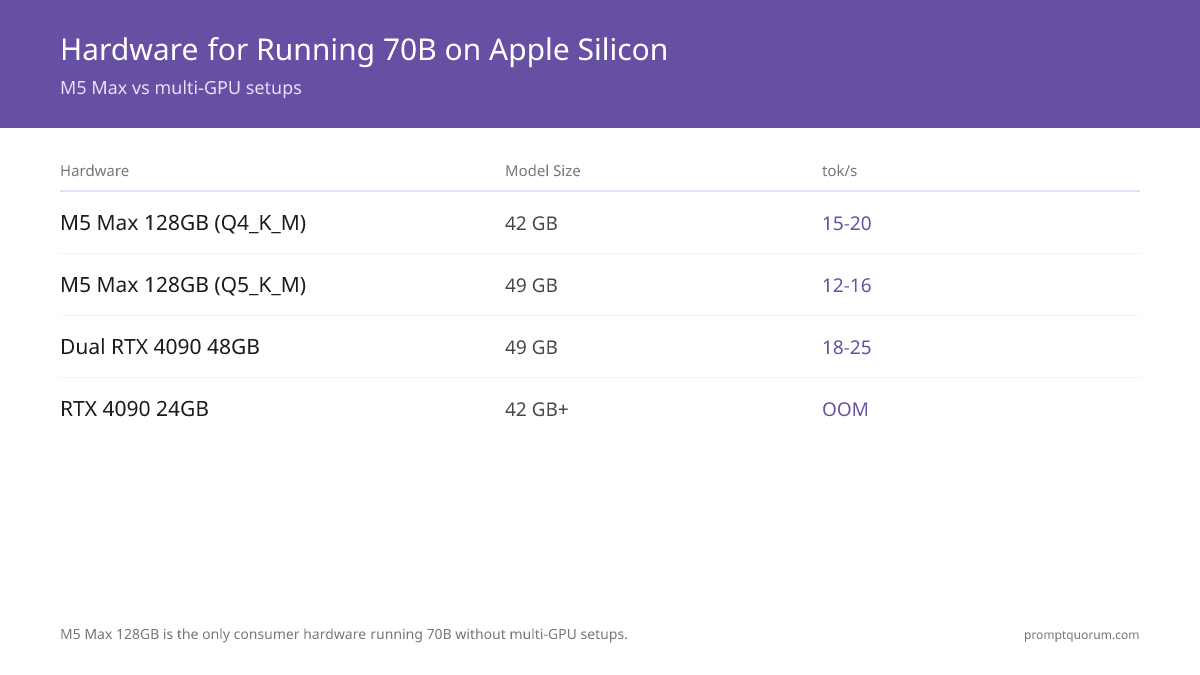
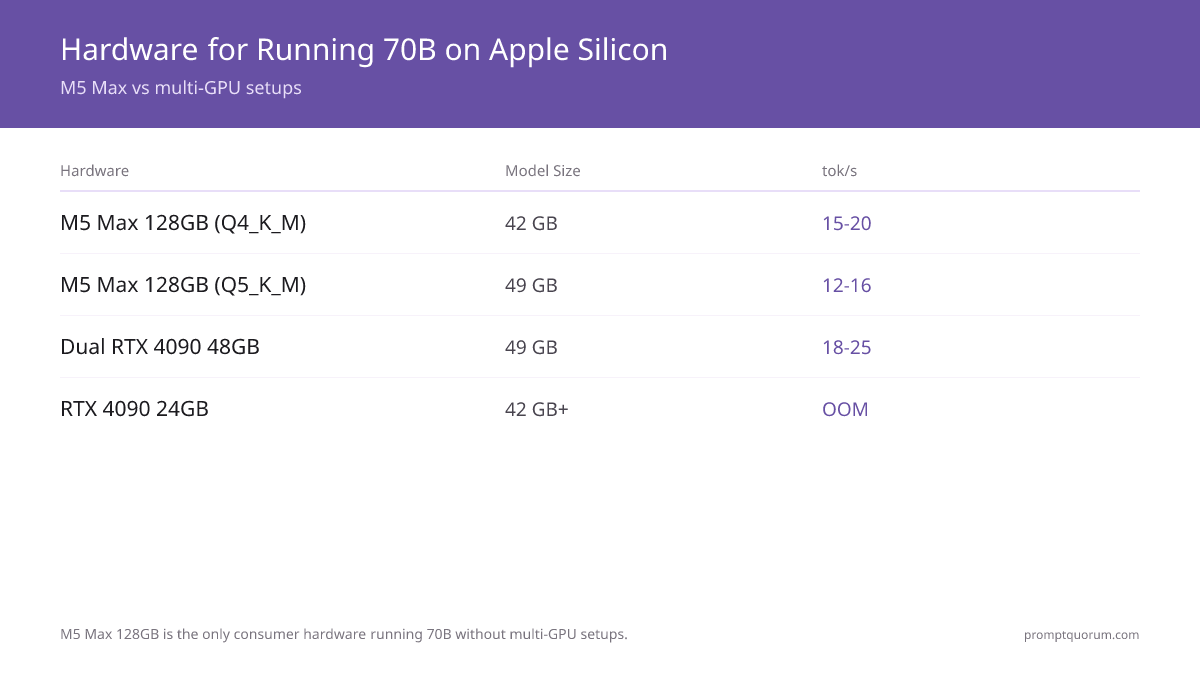
Hardware | Quantization | Model Size | tok/s | Quality | Fits? |
|---|---|---|---|---|---|
| M3 Max 96GB | Q4_K_M | 42 GB | 9–13 | Good | ✓ Yes |
| M3 Max 128GB | Q5_K_M | 49 GB | 8–12 | Very good | ✓ Yes |
| M4 Max 128GB | Q5_K_M | 49 GB | 10–14 | Very good | ✓ Yes |
| M5 Max 128GB | Q4_K_M | 42 GB | 15–20 | Good | ✓ Yes |
| M5 Max 128GB | Q5_K_M | 49 GB | 12–16 | Very good | ✓ Yes |
| M5 Max 128GB | Q8_0 | 74 GB | 8–12 | Lossless | ✓ Yes |
| M5 Ultra 256GB (projected) | FP16 | 140 GB | 14–18 | Perfect | ✓ Yes |
| RTX 4090 24GB | Any | 42 GB+ | — | — | ✗ OOM |
| Dual RTX 3090 48GB | Q4_K_M | 42 GB | 12–15 | Good | ✓ Yes (complex) |
| Dual RTX 4090 48GB | Q5_K_M | 49 GB | 18–25 | Very good | ✓ Yes ($5,000+) |
| 4× RTX 3090 96GB | Q8_0 | 74 GB | 12–16 | Lossless | ✓ Yes (expensive) |
M5 Max 128GB is the only consumer hardware that runs 70B models without complex multi-GPU setups. M5 Max ships in two form factors: the MacBook Pro (available since March 2026) and, as of Apple's August 25, 2026 Mac Studio refresh, the Mac Studio desktop — both use the same chip and top out at 128GB unified memory and 614GB/s bandwidth. Mac Studio (M5 Max) starts at $2,499, with the 128GB configuration priced higher; that desktop config still replaces $5,000–8,000 NVIDIA multi-GPU rigs. For sustained 70B+ inference, prefer the Mac Studio over the MacBook Pro: desktop thermals sustain clocks longer under continuous load, and there is no battery to manage during long inference sessions. M5 Max specs: 14-core CPU, up to 128 GB unified memory, 460–614 GB/s memory bandwidth. The M5 Max with 64 GB memory runs 70B models in Q4_K_M quantization — fitting comfortably within the memory budget (~40 GB needed). Inference speed is approximately 20–30+ tokens/second depending on quantization level.
Step-by-Step: Running 70B on M5 Max 128GB
Step 1: Verify your hardware. Step 2: Install and configure Ollama.
# Step 1: Verify unified memory (must show 128 GB)
system_profiler SPHardwareDataType | grep Memory
# → Memory: 128 GB

# Step 2: Install Ollama
brew install ollama
brew services start ollama

# Step 3: Configure for 70B (keep model loaded, avoid 60-sec warmup on each request)
echo 'export OLLAMA_KEEP_ALIVE=1h' >> ~/.zshrc
echo 'export OLLAMA_NUM_PARALLEL=1' >> ~/.zshrc
source ~/.zshrc
brew services restart ollama
Step 3: Pull the 70B Model
Download time on 100 Mbps: 45–90 minutes. On 1 Gbps: 5–10 minutes.
# Recommended: Q5_K_M — best quality/speed balance (49 GB download)
ollama pull llama3.1:70b-instruct-q5_K_M

# Alternative: Q4 — max speed, 42 GB download
ollama pull llama3.1:70b-instruct-q4_K_M

# Alternative: Q8 — lossless quality, 74 GB download
ollama pull llama3.1:70b-instruct-q8_0
Step 4–6: First Run, Verify Metal, Check Memory
First request takes 30–60 seconds to load 49 GB into unified memory. Subsequent requests are instant.
# Step 4: First run (wait 30-60 sec for model load)
ollama run llama3.1:70b-instruct-q5_K_M "Write a 200-word essay on local AI"

# Step 5: Verify Metal GPU acceleration is active
ollama run llama3.1:70b-instruct-q5_K_M --verbose
# Expected: ggml_metal_init: found device: Apple M5 Max

# Step 6: API access for your applications
curl http://localhost:11434/api/chat -d '{
  "model": "llama3.1:70b-instruct-q5_K_M",
  "messages": [{"role": "user", "content": "Explain quantum computing"}]
}'
Quality Comparison: 8B vs 70B vs GPT-5.6
A stack overflow happens when too many function calls exceed memory.
Prompt: "Explain why a stack overflow happens in recursive functions, then write a Python function that detects infinite recursion before it crashes."
Llama 3.1 8B Q4 response (runs on any 16GB+ Mac):
def detect_recursion(func):
    count = 0
    try:
        func()
    except RecursionError:
        count += 1
    return count > 0
Llama 3.3 70B Q5 Response (M5 Max 128GB)
Stack overflow in recursion occurs when the call stack exceeds the OS-imposed limit (typically 1MB–8MB). Each recursive call adds a stack frame containing local variables and return address. Python's default limit is 1000 calls.
import sys
import functools

def detect_recursion(threshold=900):
    def decorator(func):
        depth = 0
        @functools.wraps(func)
        def wrapper(*args, **kwargs):
            nonlocal depth
            depth += 1
            try:
                if depth > threshold:
                    raise RecursionError(
                        f"Detected potential infinite recursion at depth {depth}"
                    )
                return func(*args, **kwargs)
            finally:
                depth -= 1
        return wrapper
    return decorator
Quantization Deep Dive for 70B Models
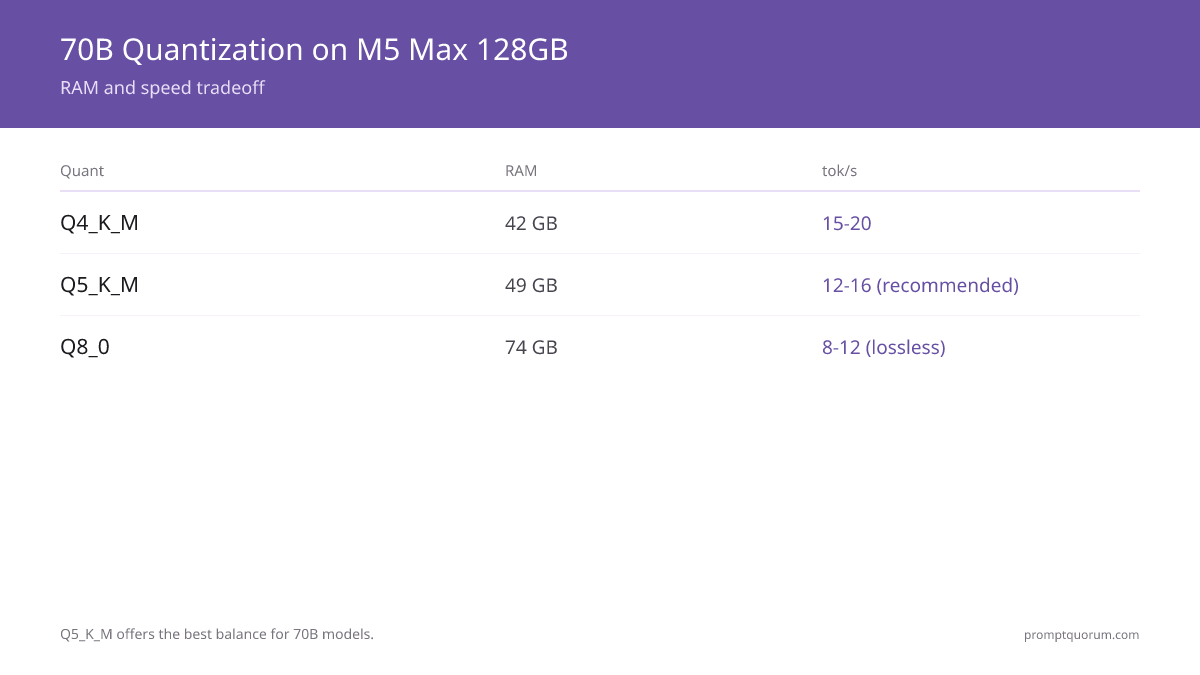
- Q4 vs Q5 quality difference is LARGER on 70B than on 8B. Q4: ~3–5% quality loss. Q5: ~0.5–1% loss vs FP16.
- On 8B models, Q4 vs Q8 is barely noticeable. On 70B, Q4 vs Q8 is significant for complex reasoning and code.
- Recommendation: Q5_K_M is the best balance. If speed is critical (chat, autocomplete), use Q4. If output quality is critical (legal, code review), use Q8.
- Memory: Q4 = 42 GB, Q5 = 49 GB, Q8 = 74 GB. All fit in M5 Max 128GB. Leave headroom for OS (~8 GB) and apps.
- Practical tok/s: Q4 = 15–20, Q5 = 12–16, Q8 = 8–12. At 12 tok/s, a 500-word response takes ~40 seconds.
Alternative 70B+ Models for Apple Silicon
Model | Size (Q5) | Best For | tok/s on M5 Max |
|---|---|---|---|
| Llama 3.3 70B Instruct | 49 GB | General use, reasoning | 12–16 |
| DeepSeek-R1-Distill-Llama-70B | 49 GB | Reasoning, chain-of-thought | 12–16 |
| Qwen2.5-72B Instruct | 51 GB | Multilingual, math, code | 11–15 |
| DeepSeek 67B | 47 GB | Coding excellence | 12–16 |
| Llama 3.3 70B Coder | 49 GB | Pure coding tasks | 13–17 |
| Mixtral 8x22B (MoE) | — | High-quality reasoning | 18–22 |
| Cohere Command A+ 104B | — | RAG, 128K context | 8–12 |
Recommendations by use case: General reasoning → Llama 3.3 70B Q5. Chain-of-thought reasoning → DeepSeek-R1-Distill-Llama-70B (Llama 3-based distill of DeepSeek-R1; the full R1 at 671B does not fit). Code → DeepSeek 67B. Non-English → Qwen2.5-72B. Document Q&A → Command A+. Maximum speed → Mixtral 8x22B (MoE uses fewer active params). The M5 Max with 64 GB memory runs all Q4_K_M 70B models comfortably — ~40 GB needed, leaving headroom for OS and Ollama overhead.
Pull Alternative Models
ollama pull qwen2.5:72b-instruct-q5_K_M
ollama pull deepseek-coder:67b-q5_K_M
ollama pull mixtral:8x22b
70B Local vs Cloud APIs — Detailed Comparison
Metric | 70B Q5 Local (M5 Max) | GPT-5.6 API | Claude Sonnet 5 | Gemini 3.5 Pro |
|---|---|---|---|---|
| Quality (MMLU) | 86.1 | 88.7 | 88.7 | 85.9 |
| Speed (tok/s) | 12–16 | 50–80 | 50–80 | 60–100 |
| First token latency | 1–2 sec | 0.3–0.8 sec | 0.4–0.9 sec | 0.5–1 sec |
| Cost per 1M tokens | $0 | $2.50/$10.00 | $3.00/$15.00 | $1.25/$5.00 |
| Cost/month (5M tokens) | $0 | $50–150 | $75–200 | $30–80 |
| Privacy | 100% local | Sent to OpenAI | Sent to Anthropic | Sent to Google |
| Internet required | No | Yes | Yes | Yes |
| Rate limits | None | Tier-based | Tier-based | Tier-based |
| Customization | Full (fine-tune locally) | Limited | Limited | Limited |
70B Q5 local matches cloud quality within 3% on MMLU. At $4,000 hardware cost and $50–150/month cloud savings, payback period is 27–80 months depending on usage. Privacy-sensitive work (medical, legal, financial) has no cloud alternative.
Practical Use Cases for 70B Local Inference
- 1Confidential Document Analysis
Why it matters: Legal contracts, medical records, financial statements, M&A due diligence. Cloud APIs not acceptable under HIPAA, GDPR, or NDA. 70B Q5 on M5 Max delivers cloud-quality analysis with zero data exfiltration. - 2High-Volume Coding Assistance
Why it matters: Solo developer using Copilot 8h/day: ~$10/month. Team of 10 using 70B Coder locally: $0/month. Code never leaves the company network. M5 Max as shared inference server pays back in 3 months for a 10-person team. - 3Long-Form Content Generation
Why it matters: 5,000-word blog posts, technical documentation. 70B produces dramatically better long-form than 8B. Local: no token limits, no rate limits. Generate 50,000 words/day for $0 vs $50–100 in API costs. - 4Research and Academic Use
Why it matters: Process thousands of papers for literature review, generate hypotheses across many domains. 70B reasoning quality is required. Cloud costs are prohibitive for student and postdoc budgets. - 5Privacy-First Personal AI
Why it matters: Personal journal analysis, family financial planning, health reflection with private data. Replaces ChatGPT Plus for an entire household. Zero data sent to third parties. - 6Offline Critical Workflows
Why it matters: Field journalists in restrictive regions, medical professionals in remote areas, travel without reliable internet, secure facilities with no external network access.
Speed Optimization: MLX vs Ollama
MLX is Apple's native ML framework and runs 15–25% faster than Ollama on the same model. M5 Max with 70B Q5: Ollama = 12–16 tok/s, MLX = 18–22 tok/s.
from mlx_lm import load, generate

# Load 70B Q5 model (MLX-converted version from Hugging Face)
model, tokenizer = load("mlx-community/Llama-3.1-70B-Instruct-Q5")

# Streaming generation — user sees first word in 1-2 sec
from mlx_lm import stream_generate
for chunk in stream_generate(model, tokenizer, "Explain quantum computing", max_tokens=500):
    print(chunk, end="", flush=True)
Additional Speed Tips
- Keep model warm: set OLLAMA_KEEP_ALIVE=1h (or 24h for always-on Mac Mini) to avoid the 30–60 second reload on each request.
- Use streaming: user sees first token in 1–2 seconds instead of waiting 25–40 seconds for full response.
- Lower max_tokens: if you need 200-word answers, set max_tokens=200. At 14 tok/s: 200 tokens = 14 sec vs 36 sec for 500 tokens.
- Q4 vs Q5 speed tradeoff: Q4 = 15–20 tok/s (+25% faster than Q5). Quality difference is ~2–3% on most tasks. For chat use Q4, for critical reasoning use Q5.
- Avoid running other GPU-intensive apps during inference — Activity Monitor GPU History shows if other processes compete for Metal bandwidth.
M5 Ultra: Confirmed August 25, 2026 in the Mac Studio Refresh
Apple confirmed M5 Ultra on August 25, 2026 alongside a refreshed Mac Studio that also brought M5 Max to the desktop. M5 Ultra combines two M5 Max dies via Apple's UltraFusion architecture. Base configuration: 96 GB unified memory, 36-core CPU, 80-core GPU, starting at $5,499. Configurable up to 256 GB or 512 GB unified memory. Base configurations ship September 22, 2026; the 512 GB configuration ships late October 2026 and is expected to price well above $10,000. The 512 GB tier fits unified memory large enough for MoE models with total parameter counts far beyond 70B (though far fewer parameters are active per token than the total suggests). No independent benchmarks exist yet for the Mac Studio M5 Max or M5 Ultra — the tok/s figures below are projections based on memory-bandwidth scaling from M5 Max, not measured results, and PromptQuorum has not tested this hardware.
Model | M5 Max 128GB | M5 Ultra 256GB (projected) |
|---|---|---|
| Llama 3.3 70B Q5 | 12–16 tok/s | 24–32 tok/s |
| Llama 3.3 70B Q8 | 8–12 tok/s | 16–24 tok/s |
| Llama 3.3 70B FP16 (lossless) | ✗ Does not fit | 14–18 tok/s |
| Qwen2.5-72B Q8 | 8–12 tok/s | 16–24 tok/s |
| Mixtral 8x22B Q5 | 14–18 tok/s | 28–36 tok/s |
| Llama 3.3 405B Q3 | ✗ Does not fit | 4–6 tok/s |
| Llama 3.3 405B Q4 (~200 GB) | ✗ Does not fit | 3–5 tok/s |
M5 Ultra unlocks: (1) Lossless 70B FP16 — first on consumer hardware, from the 256 GB configuration up. (2) 405B-class parameter models. (3) Two simultaneous 70B models. (4) At 512 GB, headroom for MoE models far larger than 70B in total parameters. Confirmed price: $5,499 starting (96 GB base); 256 GB and 512 GB configurations cost more, with the 512 GB tier expected well above $10,000. Base configurations ship September 22, 2026; 512 GB ships late October 2026.
Frequently Asked Questions
Is 70B Q4 good enough for most tasks?
Yes. Q4 is the industry standard quantization. The ~3–5% quality loss vs Q5 is unnoticeable for most chat, writing, and general-purpose tasks. Use Q5 or Q8 only when output quality is critical (legal analysis, code review, medical use).
Can I run 70B Q5 and another model simultaneously?
Yes, with one smaller model. 70B Q5 = 49 GB. 128 GB minus 8 GB OS overhead = 120 GB. You can load 70B Q5 (49 GB) + a 7–8B model (5 GB) = 54 GB total — well within budget. Two simultaneous 70B models require M5 Ultra 256 GB.
Should I buy Mac Studio M5 Max now or wait for M5 Ultra?
M5 Ultra is now confirmed (announced August 25, 2026, base configurations shipping September 22, 2026, starting at $5,499 for a 96 GB configuration). Choose M5 Ultra if: (1) you need lossless 70B FP16, (2) you need 405B-class models, or (3) you plan to run models needing more than 128 GB — the 512 GB configuration, shipping late October 2026, fits very large MoE models. Buy Mac Studio M5 Max now (starting at $2,499) if 70B fits your needs today and your budget is under $5,000 — M5 Ultra's 256 GB and 512 GB tiers cost significantly more.
How much faster will 70B be on M5 Ultra vs M5 Max?
Approximately 2× faster, based on doubled memory bandwidth (~1,200 GB/s vs 614 GB/s). M5 Max runs 70B Q5 at 12–16 tok/s; M5 Ultra is projected at 24–32 tok/s. This is a bandwidth-based projection — no independent Mac Studio M5 Ultra benchmarks exist yet. M5 Ultra will also run 70B FP16 (lossless quality) from its 256 GB configuration up, which M5 Max cannot fit.
Can I run two 70B models at the same time on M5 Max 128GB?
No, not two full 70B models. Two 70B Q4 models = 84 GB plus OS overhead = ~95 GB, which is tight on 128 GB. M5 Ultra 256 GB easily handles two simultaneous 70B models or one 70B + one 34B.
What disk space do I need for 70B models?
Each 70B model takes 42 GB (Q4), 49 GB (Q5), or 74 GB (Q8) on disk. If you keep 3 quantizations of one model for comparison: 165 GB. For serious 70B work with multiple models, get 1 TB or 2 TB SSD on Mac Studio.
Is 70B local actually as good as GPT-5.6 for my specific use case?
70B Q5 scores 86.1 on MMLU vs GPT-5.6 at 88.7 — a 3% gap on benchmarks. For complex reasoning and nuanced writing, GPT-5.6 still leads slightly. For privacy-sensitive work, heavy usage ($50+/month), or offline use, local wins automatically. Test with your own prompts to verify for your workflow.
Will Llama 4 or newer 70B models work on M5 Max?
Yes. M5 Max 128 GB fits any 70B model in Q4/Q5/Q8 quantization regardless of architecture. New 70B releases (Llama 4, Qwen3, etc.) typically appear on Ollama within days of release. Run ollama pull with the new model name.