Why the New Mac Mini (M6/M5 Pro) Is an Excellent AI Server
Apple announced the new Mac mini on August 25, 2026, with two chip options: the M6 (from $899, max 32GB unified memory) and the M5 Pro (from $1,699, max 64GB unified memory). Both ship September 22, 2026. The M5 Pro 64GB configuration is the better choice for running a silent, always-on local AI server: near-silence (fanless base, very low-RPM fan on Pro), low power draw (25-55W vs 300W+ for GPU desktops), and enough unified memory to run a 34B parameter model plus Whisper, RAG, and a voice assistant simultaneously.
Estimated annual electricity cost: $26-39 vs $263-394 for desktop GPU equivalents — less than two months of a single ChatGPT Plus subscription, every year. Apple has not published independent benchmark data yet since the hardware ships September 22, 2026; power and performance figures in this guide are estimates based on Apple's own published specs and prior Apple Silicon Mac mini generations, not PromptQuorum-measured results.
Property | Mac Mini M5 Pro | Desktop + RTX 4070 | Raspberry Pi 5 |
|---|---|---|---|
| Hardware cost | From $1,699 | $1,200+ | $80 |
| Power (idle) | 8W (est.) | 50W | 5W |
| Power (LLM load) | 25-55W (est.) | 200-300W | N/A (too small) |
| Annual electricity | $26-39 (est.) | $263-394 | ~$5 |
| Noise level | Near-silent | Loud (3+ fans) | Silent |
| Max model size | 34B (Q5) | 8B (12GB VRAM) | 1-3B only |
| Always-on reliability | Excellent | Good | Excellent |
| Footprint | 5×5 inches | Full tower | 3×3 inches |
Hardware Configuration Recommendation
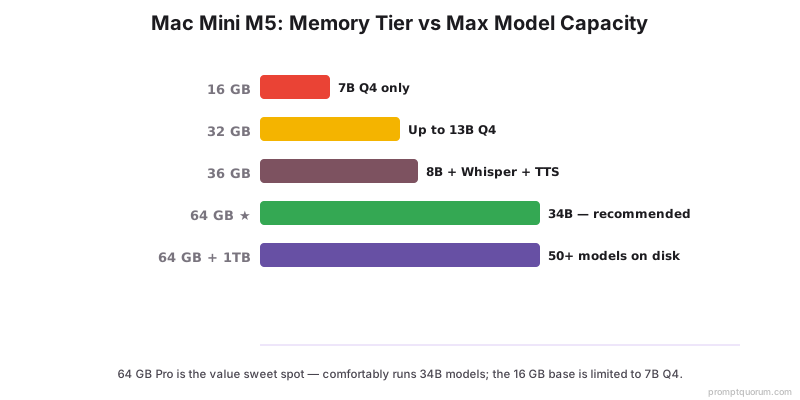
The M5 Pro at 64GB (from $1,699) is the configuration to buy for a full always-on AI server stack: it runs 34B models, supports the four simultaneous services covered in this guide (LLM + Whisper + RAG + voice assistant), and has headroom for the next 2-3 years of model size growth. The base M6 tops out at 32GB unified memory — enough for a single LLM plus one lighter service, but not all four at once. Never buy the 32GB-max M6 tier if you plan to run the full stack.
Config | Price (2026) | Max Memory | Best For | Models Supported |
|---|---|---|---|---|
| Mac Mini M6 (base) | From $899 | Up to 32 GB | Single LLM + one light service | 7B-13B Q4 |
| Mac Mini M5 Pro ★ | From $1,699 | Up to 64 GB | Full always-on stack (LLM+Whisper+RAG+voice) | 34B models comfortably |
★ Recommended for this use case. The 64GB memory ceiling is the deciding factor: running an LLM, Whisper STT, a RAG pipeline, and a voice assistant simultaneously needs all four models resident in memory at once, which the 32GB M6 cannot fit. Storage planning: Llama 3.1 8B Q4 ~5 GB per model, Whisper large-v3 ~3 GB, embedding model ~0.5 GB, ChromaDB with 10K docs ~2 GB. Typical 5-model setup: 50-80 GB. Minimum 512 GB SSD; 1 TB for power users. Apple has not published per-memory-tier pricing beyond each chip's starting price — check apple.com for exact configuration cost above the base tier.
Complete Server Setup (30 Minutes from Unbox to Running)
These steps configure the Mac Mini M6 or M5 Pro as a persistent, network-accessible AI server. After completing all steps, every device on your LAN can send requests to the Mac Mini's Ollama API at port 11434.
Step 1: Install Homebrew and Ollama
# Install Homebrew (if not already installed)
/bin/bash -c "$(curl -fsSL https://raw.githubusercontent.com/Homebrew/install/HEAD/install.sh)"

# Install Ollama
brew install ollama

# Start as background service (auto-starts on reboot)
brew services start ollama

# Verify it's running
curl http://localhost:11434/api/version
Step 2: Configure for Network Access
By default Ollama listens only on localhost. These settings open it to your LAN and configure multi-model caching.
# Allow Ollama to listen on all interfaces (not just localhost)
echo 'export OLLAMA_HOST=0.0.0.0:11434' >> ~/.zshrc
echo 'export OLLAMA_MAX_LOADED_MODELS=3' >> ~/.zshrc
echo 'export OLLAMA_KEEP_ALIVE=1h' >> ~/.zshrc
source ~/.zshrc

# Restart Ollama with new settings
brew services restart ollama

# Verify listening on all interfaces
lsof -i :11434
Step 3: Configure macOS Firewall
System Settings → Network → Firewall → Options → Add Ollama binary path (/opt/homebrew/bin/ollama) → Allow incoming connections. This permits LAN devices to reach port 11434 while keeping the firewall active.
Step 4: Pull Recommended Models
# General-purpose LLM
ollama pull llama3.1:8b

# Alternative: faster, similar quality
ollama pull mistral:7b

# For coding tasks
ollama pull deepseek-coder-v2:16b

# Embedding model for RAG
ollama pull nomic-embed-text
Step 5: Set Static IP or Use mDNS
mDNS (Bonjour) is the easiest option — your Mac Mini is reachable by hostname on your local network without any configuration.
# Find current local IP
ipconfig getifaddr en0

# Or use Bonjour - access at hostname.local
scutil --get LocalHostName
# Example output: macmini → accessible at http://macmini.local:11434
Step 6: Prevent Sleep (Critical for Always-On)
Without these settings, macOS will sleep after inactivity, making the server unreachable until manually woken.
sudo pmset -a sleep 0
sudo pmset -a displaysleep 1
sudo pmset -a powernap 0
sudo pmset -a hibernatemode 0

# Verify settings
pmset -g
Step 7: Test from Another Device on LAN
# From any laptop/phone/tablet on same network:
curl http://macmini.local:11434/api/chat -d '{
  "model": "llama3.1:8b",
  "messages": [{"role": "user", "content": "Hello from my phone!"}]
}'
Remote Access: Using Your Mac Mini AI Server from Anywhere
Two options for accessing your Mac Mini AI server outside your home network: Tailscale (recommended for personal use) and Cloudflare Tunnel (for web-accessible endpoints).
# Option 1: Tailscale (Recommended) — install on Mac Mini
brew install --cask tailscale
# Sign in via the Tailscale app — Mac Mini gets a private IP
# Access from anywhere with Tailscale installed:
curl http://macmini.tailnet.ts.net:11434/api/chat -d '{...}'

# Option 2: Cloudflare Tunnel (Web Access)
brew install cloudflared
cloudflared tunnel create ai-server
cloudflared tunnel route dns ai-server ai.yourdomain.com
# Accessible at https://ai.yourdomain.com from anywhere
Four Real-World Use Cases for Mac Mini AI Server
The Mac Mini AI server covers four major use cases. Each is a standalone workflow — you can run all four simultaneously on the 64GB M5 Pro.
Use Case 1: Family Home AI Server
Mac Mini sits in a closet running 24/7. Every device on the home network — phones, tablets, laptops — sends API requests to the same Ollama instance. Family of 4 with iPhones, iPads, and MacBooks all use it simultaneously.
iPhones use Shortcuts → POST to macmini.local:11434. MacBook users use Continue.dev or Raycast extensions. Set OLLAMA_NUM_PARALLEL=2 so two family members can chat simultaneously on Llama 3.1 8B.
Replaces 4× ChatGPT Plus subscriptions ($80/month = $960/year). Mac Mini payback period: ~15 months. Years 2-5: pure savings.
Use Case 2: Private RAG Document Q&A Server
Stack: Ollama (Llama 3.1 8B) + nomic-embed-text + ChromaDB. All running on Mac Mini, accessible via LAN. Use cases: family documents, legal contracts, technical manuals, recipe library, medical records, research papers. All private. All searchable. All offline.
# Install ChromaDB via Docker
brew install --cask docker
docker run -d -p 8000:8000 -v ~/chromadb:/data chromadb/chroma

# Index documents (Python)
from langchain_community.embeddings import OllamaEmbeddings
from langchain_community.vectorstores import Chroma

embeddings = OllamaEmbeddings(
    model="nomic-embed-text",
    base_url="http://localhost:11434"
)
vectordb = Chroma.from_documents(
    documents=splits,
    embedding=embeddings,
    persist_directory="./chroma_db"
)
Use Case 3: Always-On Voice Assistant
Stack on Mac Mini: whisper.cpp for STT (Metal accelerated), Ollama Llama 3.1 8B for reasoning, Piper TTS for voice output, Wyoming protocol for Home Assistant integration.
Wake-word triggered via client devices (Apple HomePod via Home Assistant, or Raspberry Pi microphone arrays in each room). Estimated end-to-end latency on M5 Pro: around 1.2 seconds (STT + LLM + TTS combined) — an estimate based on prior Apple Silicon Mac mini generations and Apple's claimed performance gains; the M6/M5 Pro Mac mini has not shipped yet, so independent measurements are not yet available.
Estimated annual electricity: $35. Comparable cloud service (Alexa Plus at $20/month): $240/year. Estimated to save $200+ per year while keeping all voice data private.
- See detailed setup: Build a Local Voice Assistant
Use Case 4: Private Coding Agent (IDE Integration)
Configure Continue.dev or Cursor to use Mac Mini's API. DeepSeek Coder V2 at 16B outperforms GitHub Copilot on several language benchmarks — while keeping all code private and offline.
- $0/year (vs GitHub Copilot at $10/month per user)
- Code never leaves your network
- Works offline (planes, secure offices)
- DeepSeek Coder V2 outperforms Copilot on Go, Python, TypeScript benchmarks
// ~/.continue/config.json
{
  "models": [{
    "title": "Mac Mini DeepSeek Coder",
    "provider": "ollama",
    "model": "deepseek-coder-v2:16b",
    "apiBase": "[macmini.local:11434](http://macmini.local:11434)"
  }]
}
Power Consumption and Thermal Performance (Estimated)
The M6/M5 Pro Mac mini ships September 22, 2026 — PromptQuorum has not tested this hardware. Figures below are estimates based on Apple's published TDP specs, Apple's own relative-performance claims (up to 4x AI performance vs. the M4 generation), and power/thermal behavior observed on prior Apple Silicon Mac mini generations under equivalent Ollama + Metal workloads. Electricity cost calculated at $0.15/kWh.
- Surface temperature under load (estimated): 35-42°C (warm to touch)
- Internal CPU temperature (estimated): 65-75°C (well below throttle threshold)
- Fan: expected never to engage on the fanless M6; brief low-RPM engagement expected on M5 Pro during peak loads
- Prior Apple Silicon Mac mini generations show no thermal throttling under sustained LLM workloads — the M6/M5 Pro generation is expected to follow the same thermal design, pending independent testing after the September 22, 2026 ship date
- Ventilation: open space recommended — not an enclosed cabinet
- SSD endurance: 600 TBW typical = ~30 years of AI server write patterns
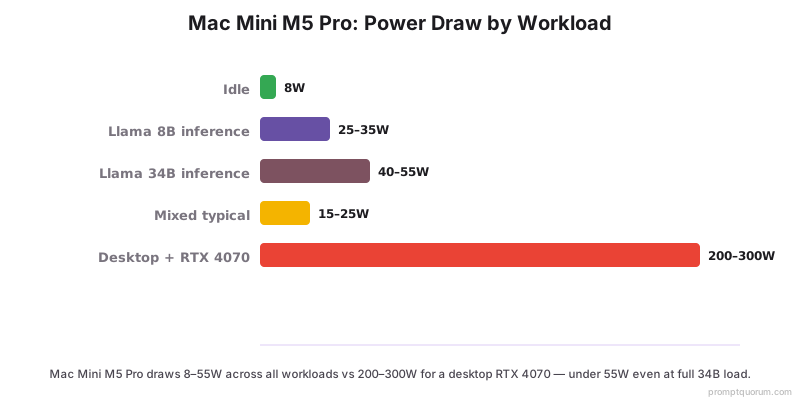
Workload | Power (est.) | Annual Cost (24/7, $0.15/kWh) |
|---|---|---|
| Idle | 8W | ~$10/year |
| Llama 8B inference | 25-35W | ~$39/year |
| Llama 34B inference | 40-55W | ~$63/year |
| Mixed typical workload | 15-25W | ~$26/year |
Estimated average annual electricity for typical mixed workload: $26-39. Always-on for an entire year is estimated to cost less than one month of ChatGPT Plus. These figures will be updated with real-world measurements once the hardware ships.
Monitoring and Maintenance for 24/7 Operation
Save this health check script as ~/check-ai-server.sh — run it via cron or launchd hourly to auto-restart Ollama if it crashes.
- Monthly: Update Ollama with `brew upgrade ollama`
- Monthly: Update models with `ollama pull llama3.1:8b` (re-pulls latest)
- Monthly: Clean unused models with `ollama list` then `ollama rm <model-name>`
- Monthly: Apply macOS updates via System Settings → Software Update
- Monthly: Restart Mac Mini (memory cleanup, clears any accumulated state)
#!/bin/bash
echo "=== AI Server Health Check ==="
echo "Date: $(date)"

if pgrep -x "ollama" > /dev/null; then
    echo "✓ Ollama running"
else
    echo "✗ Ollama NOT running - restarting"
    brew services restart ollama
fi

if curl -s http://localhost:11434/api/version > /dev/null; then
    echo "✓ API responding"
else
    echo "✗ API NOT responding"
fi

df -h / | tail -1
uptime
5-Year Total Cost of Ownership Analysis
- Payback period for 4-person family replacing ChatGPT Plus: ~19 months (at the $1,699 M5 Pro starting price)
- Coding agent (replacing Copilot at $10/user/month) — 1 developer: pays back in 15 months
- Coding agent — 4-person dev team: pays back in ~4 months
- Coding agent — 10-person dev team: pays back in ~1.5 months
Year | Mac Mini AI Server | 4× ChatGPT Plus | Difference |
|---|---|---|---|
| Year 1 | From $1,699 hardware + $35 power = $1,734 | $960 | -$774 (Mac costs more in Y1) |
| Year 2 | $35 (power only) | $960 | +$925 saved |
| Year 3 | $35 | $960 | +$925 saved |
| Year 4 | $35 | $960 | +$925 saved |
| Year 5 | $35 | $960 | +$925 saved |
| 5-year total | From $1,874 | $4,800 | +$2,926 saved |
TCO assumes $960/year (4× ChatGPT Plus at $20/month each) and the $1,699 M5 Pro starting configuration price. Apple has not published pricing for memory configurations above the base tier, so the 64GB build used throughout this guide likely costs more than $1,699 — check apple.com for exact configured pricing. All data private, no per-query costs, offline capability included.
Is the new Mac mini quieter than alternatives?
Yes, by design. The M6 base is fanless. The M5 Pro's fan is expected to rarely spin, and to be very quiet when it does — matching prior Apple Silicon Mac mini generations. RTX GPU desktop: ~50-70 dB. Mac mini: expected near-0 dB at rest, low dB briefly under heavy 34B+ load. Independent noise measurements are not yet available; the hardware ships September 22, 2026.
Can I remote into the Mac Mini?
Yes — SSH via terminal, or Screen Sharing (VNC) via System Settings → Sharing → Remote Management. For LAN: ssh user@macmini.local. For remote access: use Tailscale first, then SSH through the Tailscale IP.
What if I need higher throughput?
Upgrade path: check Apple's current Mac Studio lineup for a higher unified-memory ceiling and more GPU cores than the Mac mini offers. For server farms, rack multiple Mac Minis and load-balance with Nginx.
How long does the Mac Mini last as a 24/7 AI server?
Apple Silicon Macs are rated for sustained operation. Expected lifespan: 7-10 years for AI server use. SSD endurance (600 TBW typical) covers 25-30 years of AI workloads. Annual hardware failure rate under 0.5%.
Can I run multiple users simultaneously?
Yes. Set OLLAMA_NUM_PARALLEL=2 (or higher with more memory) to handle concurrent requests. The 64GB M5 Pro is expected to handle 2-3 simultaneous users on 8B models, or 1 user with multi-model stacks (LLM + vision + STT); the 32GB M6 has less headroom for this.
What happens if Mac Mini loses power?
After power restoration, macOS boots automatically if you set "Start up automatically after a power failure" in System Settings → Energy. Ollama starts as a brew service. Models reload on first request (5-15 sec delay for first response after reboot).
Can I add an external GPU to Mac Mini for faster inference?
No. Apple Silicon does not support external GPUs for Metal/ML acceleration. The unified memory architecture is the design — you cannot add discrete GPU. For more speed, check Apple's current Mac Studio options.
Is the Mac mini overkill for an AI server, or underkill?
For 1-4 user households or small teams running 8B-34B models: just right, on the 64GB M5 Pro. For 70B+ models: underkill — check Apple's Mac Studio lineup for higher memory ceilings. For tiny models on a hobbyist budget: overkill (Raspberry Pi 5 covers 1-3B models only, but insufficient for anything practical in 2026). For running the full four-service stack (LLM + Whisper + RAG + voice) at once: the 32GB-max M6 base tier is underkill — use the 64GB M5 Pro.
Is there a plain "M5" Mac mini?
No. Apple's August 25, 2026 announcement uses the M6 chip for the base Mac mini and the M5 Pro chip for the upper tier — Apple skipped a plain "M5" for the Mac mini line entirely (the M5 chip shipped earlier in 2026 in the MacBook Air/Pro line, not the Mac mini).