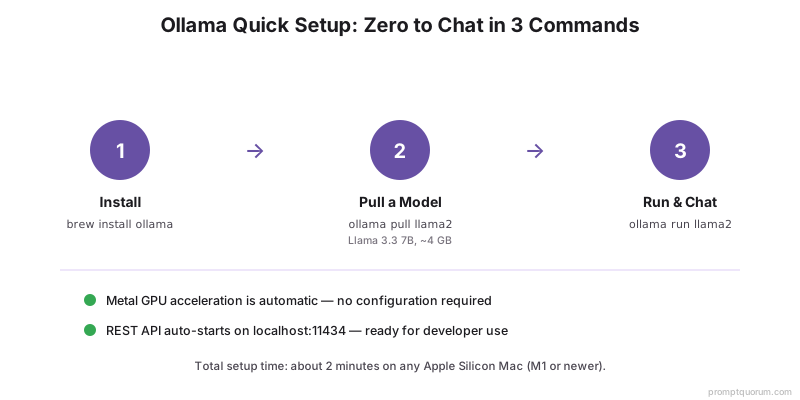
Quick Setup (3 Commands)
- 1Install Ollama
Why it matters: `brew install ollama` — one-click installation. - 2Pull a model
Why it matters: `ollama pull llama3.1` — downloads Llama 3.1 8B. - 3Start chatting
Why it matters: `ollama run llama3.1` — interactive chat interface.
Metal GPU Verification
Metal GPU acceleration is automatic in Ollama on macOS. No configuration needed. To verify Metal is working:
- 1Run with verbose output
Why it matters: `ollama run llama3.1:8b --verbose` and look for `ggml_metal_init: found device: Apple M[X]` in the console output. - 2Check speed during inference
Why it matters: Observe token generation rate: should be 20–60 tok/s depending on Mac (M5 Pro: ~50 tok/s on Llama 3.1 8B). CPU-only fallback: ~1–5 tok/s. - 3Monitor GPU utilization
Why it matters: Open Activity Monitor (Applications → Utilities) and check GPU section. Should show 80-100% GPU utilization during inference if Metal is working.
Model Management
- 1`ollama pull <model>`
Why it matters: Download model. Example: `ollama pull mistral`. - 2`ollama list`
Why it matters: List all downloaded models. - 3`ollama run <model>`
Why it matters: Start interactive chat with model. - 4`ollama rm <model>`
Why it matters: Delete model to free space.
Memory Optimization for Apple Silicon
- OLLAMA_MAX_LOADED_MODELS: Number of models to keep in memory. Default: 1. Set to 2–3 for multi-model setups.
- GPU layers: By default, Ollama uses all available unified memory. For sub-optimal memory, set `num_gpu_layers` in Modelfile.
- Whisper: Combine with embedding model and LLM — fits in 64GB M5 Pro with Ollama.
Running Multiple Models Simultaneously
Need to run Whisper STT + Llama 3.1 8B + LLaVA Vision at the same time? Configure Ollama to keep all loaded in memory.
export OLLAMA_MAX_LOADED_MODELS=3
export OLLAMA_KEEP_ALIVE=1h
brew services restart ollama

# Now pull all models you need
ollama pull llama3.1:8b
ollama pull llava:7b

# Send requests to each — they stay loaded
curl http://localhost:11434/api/chat -d '{"model": "llama3.1:8b", "messages": [{"role": "user", "content": "Hello"}]}'
curl http://localhost:11434/api/chat -d '{"model": "llava:7b", "messages": [{"role": "user", "content": "Describe this image"}]}'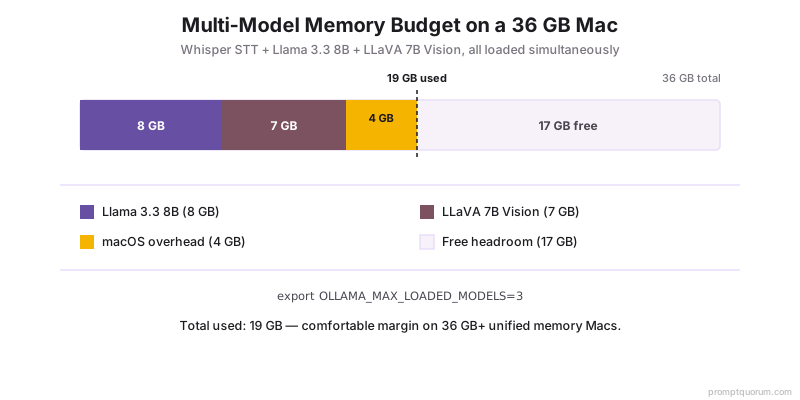
Auto-Start on Login
Ollama can automatically start when you log in to your Mac via brew services.
# Enable auto-start
brew services start ollama

# Check status
brew services list | grep ollama

# Disable auto-start (optional)
brew services stop ollama
API Setup for Developers
Ollama exposes an OpenAI-compatible REST API at `localhost:11434`. Start the server with `ollama serve` or use brew services. Then send requests from any programming language.
# Chat endpoint (streaming)
curl http://localhost:11434/api/chat -d '{
  "model": "llama3.1:8b",
  "messages": [{"role": "user", "content": "Write a Python function"}],
  "stream": false
}'

# Python example
import requests
response = requests.post(
  "http://localhost:11434/api/chat",
  json={
    "model": "llama3.1:8b",
    "messages": [{"role": "user", "content": "Hello"}],
    "stream": False
  }
)
print(response.json()["message"]["content"])
Modelfile Customization
Create custom models with system prompts and parameters.
- `ollama create llm-expert -f Modelfile` — builds custom model
- `ollama run llm-expert` — starts interactive chat with your custom model
- `ollama run llm-expert "Code review this function"` — send prompt directly
FROM llama3.1
SYSTEM "You are an expert software engineer reviewing code for security and performance issues. Provide actionable feedback."
PARAMETER temperature 0.7
PARAMETER top_p 0.9
Common Issues and Fixes
- Metal not detected: Verify with `ollama run llama3.1:8b --verbose` and look for `ggml_metal_init: found device: Apple M[X]`. If missing, restart: `brew services restart ollama` or `pkill ollama && ollama serve &`.
- Slow inference (CPU fallback): Cause: Metal failed to initialize, model running on CPU. Check Activity Monitor — GPU usage should be 80-100% during inference. If GPU shows 0%: restart Ollama and check Metal not detected above.
- Out of memory (OOM): Model crashes or response truncates. Cause: model + context + macOS overhead exceeds RAM. Fixes: (1) Use smaller quantization (`ollama pull llama3.1:8b-q4_K_M`), (2) Reduce context (`OLLAMA_NUM_CTX=2048 ollama run llama3.1:8b`), (3) Use smaller model (`ollama pull phi4` — 2.5 GB).
- Model download stalls: Cause: network throttling or HuggingFace rate limits. Fix: `pkill ollama && ollama pull llama3.1:8b` (resumes from previous progress).
- Port 11434 already in use: Another Ollama instance is running or different service uses port. Find: `lsof -i :11434`. Fix: `pkill ollama` then restart.
- Model produces gibberish / random characters: Cause: Modelfile parameters out of range or wrong template. Fix: Pull official model `ollama pull llama3.1:8b` (overwrites custom), then test: `ollama run llama3.1:8b "Hello, how are you?"`.
- Storage filling up: Models stored in `~/.ollama/models/`. Check size: `du -sh ~/.ollama/`. Remove unused: `ollama rm <model-name>`.
Is Ollama free?
Yes. Ollama is open-source. Models (Llama, Mistral) are licensed free. No charges.
Can I use Ollama without GPU?
Yes, but slow. CPU-only: ~1–5 tok/s on 7B models. GPU (Metal on Mac): 20–60 tok/s depending on Mac.
Which model should I start with?
Mistral Small or Llama 3.1 8B. Both run on any M1+ Mac, produce good output. About 4GB each.
Can multiple people use Ollama API simultaneously?
Yes. `ollama serve` on one machine, everyone on LAN can access REST API on that machine's IP:11434.
Where does Ollama store downloaded models on Mac?
Default location: `~/.ollama/models/`. Each model is several GB. Check total disk usage: `du -sh ~/.ollama/`. To change location, set `OLLAMA_MODELS=/path/to/models` environment variable before starting Ollama.
Can I run Ollama on Intel Macs?
Yes, but without Metal GPU acceleration. Performance will be CPU-only: 1-5 tok/s on 7B models vs 20-60 tok/s on Apple Silicon. Workable for testing but not for production use.
Does Ollama work offline after installation?
Yes. Once models are downloaded, Ollama runs fully offline. No internet connection required for inference. Only model pulls (`ollama pull`) require internet access.