Best Model Recommendations by Mac Memory
Last verified: 2026-08-27. Apple's August 25, 2026 refresh: Mac mini ships in M6 (32GB max, from $899) and M5 Pro (64GB max, from $1,699) configurations; Mac Studio ships in M5 Max (128GB max, from $2,499) and M5 Ultra (up to 512GB, from $5,499). All ship September 22, 2026 (the 512GB configuration ships late October 2026). Model recommendations may shift as new models release. We update this page quarterly.
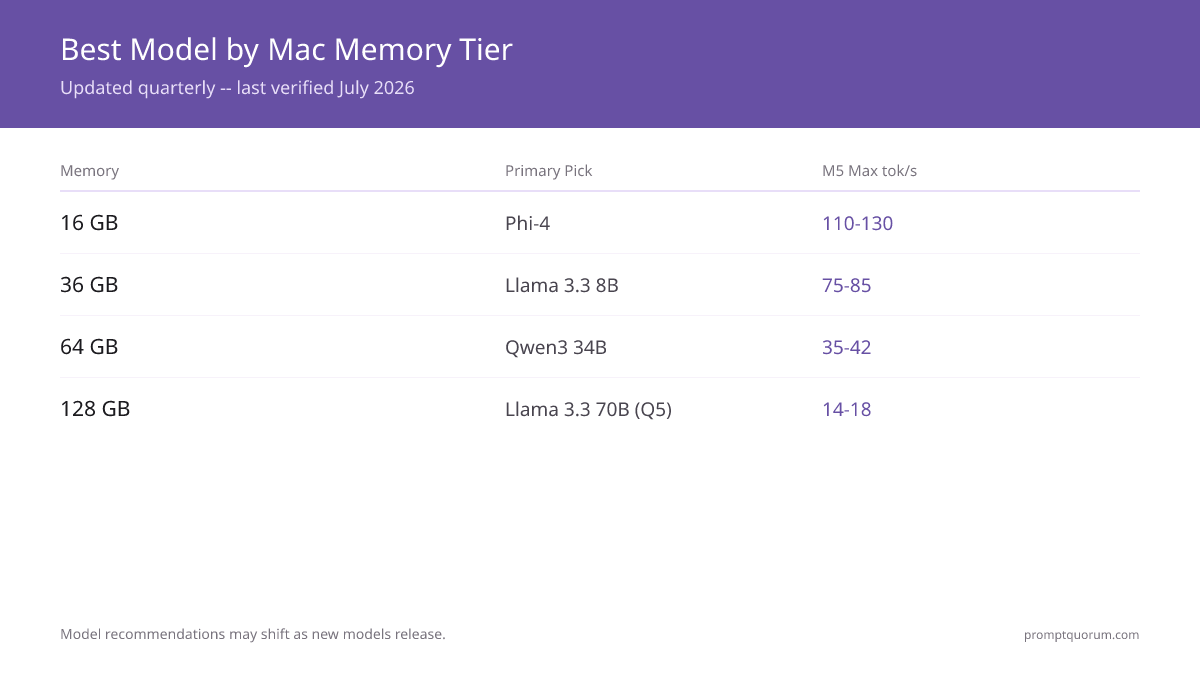
Memory | Primary Pick | Quantization | Size | M5 Pro tok/s | M5 Max tok/s | Alternative |
|---|---|---|---|---|---|---|
| 16 GB | Phi-4 | Q4_K_M | 2.5 GB | 60–70 | 110–130 | Llama 3.1 8B Q4 (tight) |
| 36 GB | Llama 3.1 8B | Q8 | 8.5 GB | 38–45 | 75–85 | Qwen3 14B Q4 (8.5 GB) |
| 48 GB | Qwen3 14B | Q8 | 16 GB | 25–30 | 50–60 | Mixtral 8x7B Q4 (26 GB) |
| 64 GB | Qwen3 32B | Q5 | 24 GB | 18–22 | 35–42 | Mixtral 8x7B Q5 (33 GB) |
| 96 GB | Llama 3.3 70B | Q4 | 42 GB | 10–13 | 20–25 | — |
| 128 GB | Llama 3.3 70B | Q5 | 49 GB | 8–11 | 14–18 | — |
| 128 GB | Llama 3.3 70B | Q8 | 74 GB | N/A | 9–12 | Best quality, M5 Max only |
Sizes are GGUF format. MLX 4-bit equivalents are comparable. The 36GB tier maps to entry MacBook Pro M-Pro/M-Max configurations rather than Mac mini or Mac Studio — as of the August 2026 refresh, Mac mini and Mac Studio jump directly from 32GB to 64GB. tok/s figures are estimates; not independently benchmarked by PromptQuorum.

Model Quality Benchmarks (2026 standard tests)
Model | MMLU | HumanEval | GSM8K | Avg | Notes |
|---|---|---|---|---|---|
| Llama 3.1 8B | 73.0 | 72.6 | 84.5 | 76.7 | Solid all-rounder |
| Qwen3 14B | 79.7 | 83.5 | 90.2 | 84.5 | Strong reasoning |
| Qwen3 32B | 83.3 | 88.4 | 93.0 | 88.2 | Best mid-size |
| Mixtral 8x7B | 70.6 | 40.2 | 60.4 | 57.1 | MoE architecture |
| Llama 3.3 70B | 86.0 | 80.5 | 95.1 | 87.2 | Best general |
Indicative values; check each model card. PromptQuorum has not independently run these benchmarks.

Best Models by Use Case (2026)
Use Case | Best for 36GB Mac | Best for 64GB Mac | Best for 128GB Mac |
|---|---|---|---|
| Coding (general) | Llama 3.1 8B | DeepSeek Coder V2 16B | Llama 3.3 70B |
| Coding (Python) | DeepSeek Coder V2 Lite | DeepSeek Coder V2 16B | DeepSeek Coder V2 236B |
| Long-form writing | Llama 3.1 8B Q8 | Qwen3 32B Q5 | Llama 3.3 70B Q5 |
| Chat / conversation | Mistral Small | Mixtral 8x7B | Llama 3.3 70B |
| Reasoning / math | Qwen3 14B | Qwen3 32B | Qwen3 32B |
| RAG / Q&A | Llama 3.1 8B + nomic-embed | Llama 3.1 8B + bge-large | Llama 3.3 70B + bge-large |
| Vision / multimodal | LLaVA 7B | Llama 3.2 Vision 11B | Llama 3.2 Vision 90B |
| Translation | Qwen3 14B | Qwen3 32B | Aya Expanse 32B |
| Summarization | Llama 3.1 8B | Qwen3 32B | Llama 3.3 70B |
| Code review | DeepSeek Coder V2 Lite | DeepSeek Coder V2 16B | Llama 3.3 70B |
Specialized models often outperform general models at specific tasks.
Real-World Setups by User Type
💡Tip: Indie Developer (Mac Mini M5 Pro 64GB, $1,699) - Coding: DeepSeek Coder V2 Lite (16B Q4, 10 GB) - Writing: Llama 3.1 8B Q8 (8.5 GB) for docs and emails - Always-on: both models stay warm with `OLLAMA_MAX_LOADED_MODELS=2` - Daily cost: $0 (vs $30–100/mo for Copilot + ChatGPT)
💡Tip: Privacy-Focused Professional (MacBook Pro M5 Pro 48GB, $2,500) - Primary: Llama 3.1 8B Q8 for general work - Sensitive: Qwen3 14B Q5 for legal/medical/financial docs - Travel: works offline on planes, in secure facilities - Inference runs locally; the app may still check for updates unless configured otherwise - General information, not legal, medical or financial advice; a qualified person decides
💡Tip: Researcher / ML Engineer (Mac Studio M5 Max 128GB, $2,499) - Primary: Llama 3.3 70B Q5 (49 GB) for quality - Specialized: Qwen3 32B Q4 for non-English research - Coding: DeepSeek Coder V2 16B - Vision: Llama 3.2 Vision 11B for paper figures - All four models loaded simultaneously
💡Tip: Family AI Server (Mac Mini M5 Pro 64GB, always-on) - Voice assistant: Llama 3.1 8B + Whisper + Piper - RAG: family document Q&A with embeddings - Coding help for family members via REST API - Power cost: ~$35/year - Replaces: ChatGPT Plus for 4 people = $1,000/year
Models to Avoid in 2026 (and Why)
⚠️Warning: Llama 2 (any size) no longer recommended — superseded by Llama 3.3; standard leaderboards show notably weaker results compared to newer releases. Still appears in older tutorials — do not follow them. Replace with: Llama 3.1 8B.
⚠️Warning: Avoid Vicuna, Alpaca, WizardLM — 2023-era community fine-tunes. Modern base models (Llama 3.3, Qwen3) already match or exceed their performance. Replace with: Qwen3 14B or Llama 3.1 8B.
⚠️Warning: Avoid Falcon 180B — Does not fit on consumer Apple Silicon. Llama 3.3 70B (smaller) outperforms it. Replace with: Llama 3.3 70B Q5.
⚠️Warning: Avoid FP16 quantization on consumer hardware — Llama 3.3 70B FP16 = 140 GB, does not fit on any Mac. Quality gain over Q5 is less than 1%. Replace with: Q4_K_M or Q5_K_M.
⚠️Warning: Avoid pure base models (no instruct variant) — Base models complete text but do not follow instructions. Look for "-instruct" or "-chat" suffix. Replace with: the instruct variant of the same model.
⚠️Warning: Use caution with models showing low recent development activity — StableLM, RedPajama, MPT, Pythia: low recent commit activity (as of mid-2026). Use models from Meta, Alibaba, Mistral, Microsoft with regular updates.
Model Format Quick Reference
Format | Used by | Size vs original |
|---|---|---|
| GGUF Q4_K_M | Ollama, llama.cpp | ~30% of FP16 |
| GGUF Q5_K_M | Ollama, llama.cpp | ~35% of FP16 |
| GGUF Q8_0 | Ollama, llama.cpp | ~50% of FP16 |
| MLX 4-bit | MLX framework | ~30% of FP16 |
| MLX 8-bit | MLX framework | ~50% of FP16 |
| FP16 (original) | All frameworks | 100% |
Sizes in this article are GGUF Q4_K_M unless specified. MLX 4-bit equivalents are similar size. For exact bytes, check the model card on HuggingFace. llama.cpp runs GGUF directly on the Metal backend and is what Ollama uses under the hood — MLX is Apple's own framework and tends to be faster for MLX-native builds on the same chip. LM Studio supports both GGUF and MLX and lets you switch backends per model from its UI.
Quick Reference: Downloading These Models
# 16 GB Mac
ollama pull phi4

# 36 GB Mac (pick one)
ollama pull llama3.1:8b
ollama pull qwen3:14b
ollama pull mistral-small

# 64 GB Mac
ollama pull qwen3:32b
ollama pull mixtral:8x7b

# 128 GB Mac
ollama pull llama3.3:70b

# Specialty models
ollama pull deepseek-coder-v2:16b   # coding
ollama pull llama3.2-vision:11b     # vision
ollama pull aya-expanse:32b # translationCan I run two different models simultaneously?
Yes, set `OLLAMA_MAX_LOADED_MODELS=2` in env. 64GB can run 8B + 32B simultaneously.
Which model is best for beginners?
Llama 3.1 8B. Widely available, good output quality, proven track record. Runs on any M1+ Mac.
Is Mixtral 8x7B faster than Llama 8B?
Probably not: Mixtral 8x7B is a much larger download (about 26 GB at Q4 versus 8.5 GB for Llama 3.1 8B Q8), so expect lower tok/s than the Llama 3.1 8B Q8 figures in the table above (estimates for M5 Pro; not independently benchmarked by PromptQuorum). Which one is better depends on the task.
What is the best local LLM in 2026?
For most users on Apple Silicon: Qwen3 (any size that fits your Mac) is a strong choice, and Llama 3.3 70B is another strong option for 128GB Macs. For under 16GB: Phi-4 is a capable small option.
Can I run Llama 3.1 405B on a Mac?
Only with very large unified memory. Llama 3.1 405B requires 200+ GB even at Q4 quantization. Earlier 512GB Mac Studio configurations can also hold 405B at Q4; Apple's Mac Studio M5 Ultra, announced August 25, 2026 (shipping September 22, 2026; the 512GB configuration ships late October 2026), offers up to 512GB of unified memory starting at $5,499 and adds bandwidth headroom.
Is Qwen better than Llama for local use?
Results depend on the task and model size; compare the model cards for your use case. Llama has wider community support and more fine-tunes available. Most users will not notice the difference — pick based on availability and fine-tune ecosystem.
What is the smallest model that is actually useful?
Phi-4 Mini at 3.8B parameters. For chat and Q&A it is capable for its size. For coding or complex reasoning, jump to Llama 3.1 8B or Qwen3 14B.
Does vLLM run on Apple Silicon?
vLLM's Metal support is limited compared to its CUDA path — throughput and batching optimizations that make vLLM attractive on Nvidia GPUs largely do not apply on Mac. For Apple Silicon, Ollama (llama.cpp/Metal) or LM Studio (GGUF/MLX) give better single-user tok/s and easier setup. Consider vLLM only if you are serving many concurrent requests from a Linux/Nvidia box alongside your Mac.
What can a MacBook Air M5 run?
The MacBook Air M5 ships with a fanless design and typically 16–32 GB of unified memory, so treat it as a 16 GB or 36 GB tier Mac from the table above: Phi-4 comfortably, Llama 3.1 8B Q8 if you have 24 GB+. Sustained long generations may throttle slightly without a fan — expect the lower end of the M5 Pro tok/s ranges in this article.
What is the best setup for a MacBook Pro M5 Max with 128GB RAM?
Llama 3.3 70B Q5 (49 GB) for daily use, with headroom to keep a second model — Qwen3 14B Q5 or DeepSeek Coder V2 16B — loaded simultaneously via `OLLAMA_MAX_LOADED_MODELS=2`. Expect ~14–18 tok/s on 70B Q5. If you want maximum quality and can tolerate ~9–12 tok/s, Llama 3.3 70B Q8 (74 GB) also fits.