Key Takeaways
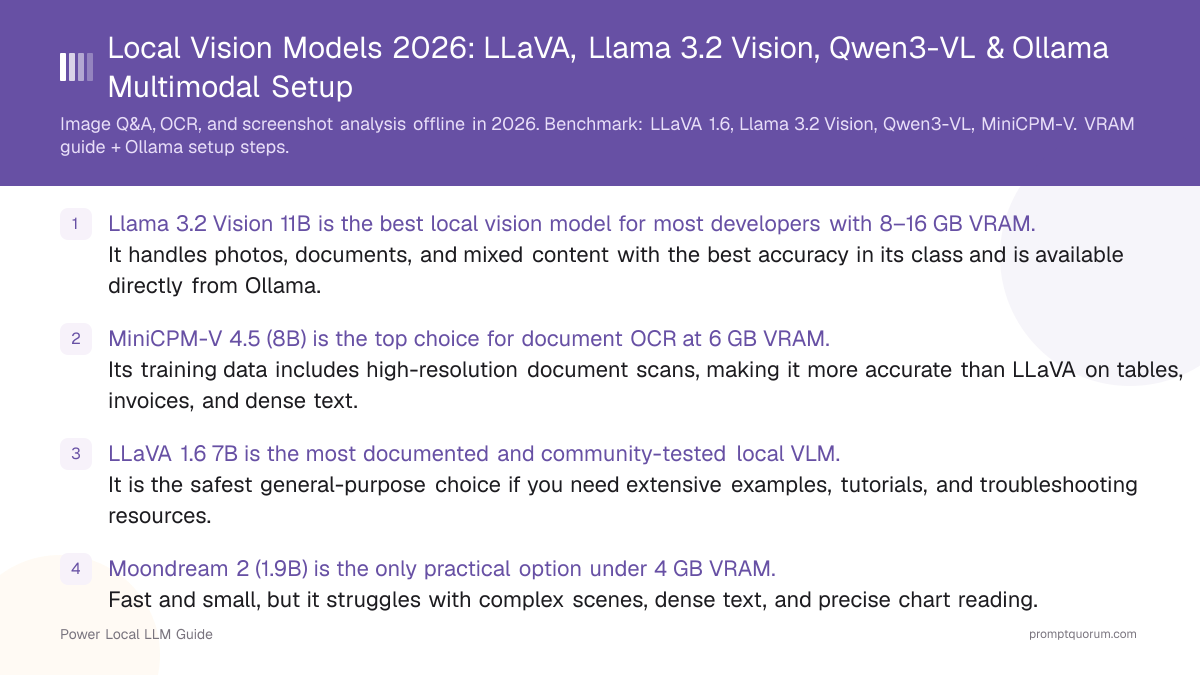
- Llama 3.2 Vision 11B is the best local vision model for most developers with 8–16 GB VRAM. It handles photos, documents, and mixed content with the best accuracy in its class and is available directly from Ollama.
- MiniCPM-V 4.5 (8B) is the top choice for document OCR at 6 GB VRAM. Its training data includes high-resolution document scans, making it more accurate than LLaVA on tables, invoices, and dense text.
- LLaVA 1.6 7B is the most documented and community-tested local VLM. It is the safest general-purpose choice if you need extensive examples, tutorials, and troubleshooting resources.
- Moondream 2 (1.9B) is the only practical option under 4 GB VRAM. Fast and small, but it struggles with complex scenes, dense text, and precise chart reading.
- InternVL 2.5 (8B) is the strongest for code screenshots and UI analysis. Its training included GitHub screenshots, UI mockups, and code execution outputs — the others have weaker performance here.
- All models are available via Ollama with a single
pullcommand. No model conversion, quantization, or Python setup required. CLI and HTTP API work out of the box. - None of these models approach GPT-5.5 Vision quality. Local VLMs in 2026 are a strong tier-2 option — excellent for structured documents and clear photos, weaker on ambiguous scenes, handwriting, and complex infographics.
Quick Facts
- What VLMs do: Accept image + text input → produce text output. Not image generators — these are image *understanders*.
- Ollama support: All models in this comparison have official or community Ollama integration.
- Smallest usable model: Moondream 2 at 1.9B parameters, ~2 GB VRAM.
- Largest practical local model: Llama 3.2 Vision 90B at ~64 GB unified memory (Apple M-series or multi-GPU).
- Image input format: JPEG, PNG, WebP accepted. Max resolution varies by model (typically 1024×1024 to 4096×4096).
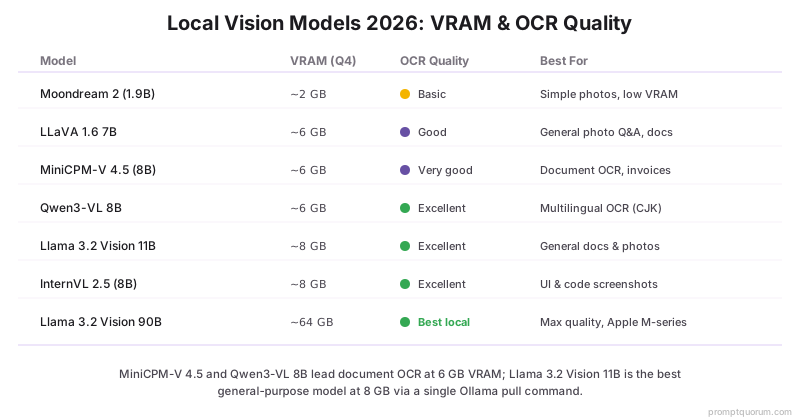
- OCR strength: Qwen3-VL 8B ≈ MiniCPM-V 4.5 > Llama 3.2 Vision 11B > LLaVA 1.6 13B > LLaVA 1.6 7B > Moondream 2.
- Multimodal ≠ fast: Vision models add a vision encoder on top of the LLM — expect ~30–60% slower token generation than a text-only model of the same parameter count.
What Are Vision-Language Models (VLMs)?
A vision-language model (VLM) is a neural network that processes image and text inputs simultaneously and produces text output. The standard architecture pairs a vision encoder (typically CLIP or SigLIP) with a language decoder (an LLM), connected by a projection layer that maps image features into the token space the LLM understands.
- How they differ from image generators: Stable Diffusion, FLUX, and DALL-E 3 are text-to-image generators — they produce images from text prompts. VLMs are image-to-text models — they describe, analyze, and answer questions about images.
- How they differ from OCR-only tools: Traditional OCR (Tesseract, PaddleOCR) extracts text from structured documents using pattern recognition. VLMs understand context — they can describe what a table means, answer questions about a chart, or identify objects in a photograph.
- Why run them locally: Private documents (medical records, legal scans, financial statements), proprietary screenshots (internal dashboards, source code), or any workflow where sending images to cloud APIs raises compliance or confidentiality concerns.
- What they cannot do: Generate images, execute code shown in screenshots, or access the internet. VLMs only produce text output based on what's visible in the image.
Available Local Vision Models — Comparison Table
Comparison of the five most capable local vision models available via Ollama or direct inference in May 2026. VRAM figures for 4-bit quantized (Q4) variants unless noted.
📍 In One Sentence
For 6–8 GB VRAM: MiniCPM-V 4.5 for document OCR, Llama 3.2 Vision 11B for general image Q&A — both run locally via Ollama.
💬 In Plain Terms
Llama3.2-Vision is the best overall; MiniCPM-V 4.5 leads for document OCR; Qwen3-VL is best for CJK and multilingual text; Moondream is the ultra-light option under 4 GB VRAM.
Model | Parameters | VRAM (Q4) | Image Types | Quality | Via Ollama? |
|---|---|---|---|---|---|
| Moondream 2 | 1.9B | ~2 GB | Simple photos | Basic | Yes |
| LLaVA 1.6 7B | 7B | ~6 GB | Photos, docs, charts | Good | Yes |
| LLaVA 1.6 13B | 13B | ~10 GB | Photos, docs, charts | Very good | Yes |
| MiniCPM-V 4.5 | 8B | ~6 GB | Photos, docs, OCR | Very good | Yes |
| Llama 3.2 Vision 11B | 11B | ~8 GB | Photos, docs | Excellent | Yes |
| Llama 3.2 Vision 90B | 90B | ~64 GB | Photos, docs, complex | Best local | Yes |
| InternVL 2.5 8B | 8B | ~8 GB | Docs, charts, UI, code | Excellent (UI/charts) | Community |
| Qwen3-VL 8B | 7B | ~6 GB | Photos, docs, OCR, multilingual | Excellent | Yes |
| Qwen3-VL 72B | 72B | ~48 GB | Photos, docs, complex | Best (open-source) | Yes |
| PaliGemma 2 3B | 3B | ~3 GB | Photos, docs | Good | Community |
| SmolVLM 2.2B | 2.2B | ~2 GB | Simple photos, captions | Basic+ | Community |
Real-World Accuracy Test: Invoice Extraction
Comparison of local vision model accuracy on a structured document extraction task. Test: extract 5 fields (vendor name, date, total, tax amount, line item count) from the same sample invoice.
Model | Vendor | Date | Total | Tax | Line Items | Score |
|---|---|---|---|---|---|---|
| Moondream 2 | ✓ | ✓ | ✗ | ✗ | ✗ | 2/5 |
| LLaVA 1.6 7B | ✓ | ✓ | ✓ | ✗ | ✓ | 4/5 |
| MiniCPM-V 4.5 | ✓ | ✓ | ✓ | ✓ | ✓ | 5/5 |
| Qwen3-VL 8B | ✓ | ✓ | ✓ | ✓ | ✓ | 5/5 |
| Llama 3.2 11B | ✓ | ✓ | ✓ | ✓ | ✓ | 5/5 |
| GPT-5.5 Vision | ✓ | ✓ | ✓ | ✓ | ✓ | 5/5 |
📌Note: Results from a single test invoice. Your accuracy will vary with document quality, font, and layout complexity. Always verify extracted numbers against source documents.
Multi-Image Support
Not all local vision models accept multiple images in a single request. Multi-image support matters for document processing (send all pages of a multi-page PDF) and visual comparison tasks (compare two product photos).
- MiniCPM-V 4.5 accepts up to 4 images per prompt; Qwen3-VL handles up to 8. LLaVA and Moondream accept only single images per request.
- When multi-image matters: Send all pages of a multi-page PDF for full-document extraction. Compare two product photos side by side. Analyze before/after screenshots in a single prompt.
Feature | Moondream | LLaVA 7B | MiniCPM-V | Qwen3-VL | LLaVA 13B | Llama 3.2 Vision | InternVL |
|---|---|---|---|---|---|---|---|
| Multi-image input | No | No | Yes (up to 4) | Yes (up to 8) | No | Yes (multi-page) | Yes |
Setup via Ollama — Step by Step
Ollama is the easiest way to run local vision models. Once Ollama is installed, vision models work with a single pull command and accept images via CLI flag or HTTP API.
- Step 1 — Install Ollama: Download from ollama.com for macOS, Linux, or Windows. Installation takes under 2 minutes.
- Step 2 — Pull a vision model:
ollama pull llama3.2-vision(11B, ~8 GB download) orollama pull moondream(1.9B, ~2 GB) for low-VRAM setups. - Step 3 — Transcribe from CLI:
ollama run llama3.2-vision "What is in this image?" --image /path/to/photo.jpg - Step 4 — Use the HTTP API: POST to
http://localhost:11434/api/generatewith the image as a base64-encoded string in theimagesarray. - Step 5 — Python example: Use the
requestslibrary with base64 encoding — see code block below.
import base64
import requests

def ask_vision_model(image_path: str, prompt: str, model: str = "llama3.2-vision") -> str:
    with open(image_path, "rb") as f:
        image_b64 = base64.b64encode(f.read()).decode("utf-8")

    response = requests.post(
        "http://localhost:11434/api/generate",
        json={
            "model": model,
            "prompt": prompt,
            "images": [image_b64],
            "stream": False,
        },
    )
    return response.json()["response"]

# Example usage
result = ask_vision_model("invoice.png", "Extract all line items and totals from this invoice.")
print(result)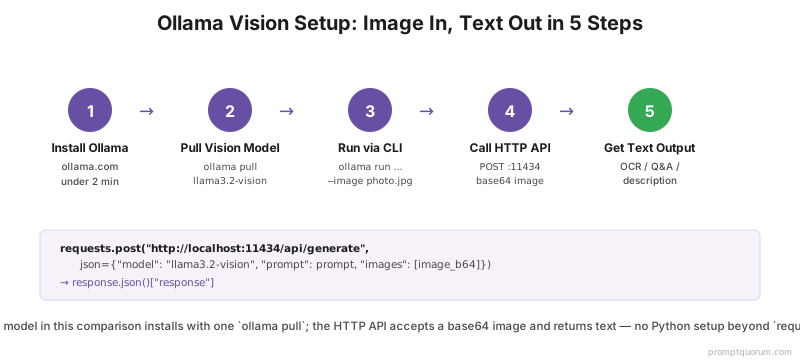
Use Case 1: Document OCR and Extraction
VLMs outperform traditional OCR for semi-structured documents — invoices, receipts, contracts, and tables where layout matters as much as the text itself. Traditional OCR (Tesseract) extracts characters; VLMs understand what those characters mean in context.
- What works well: Scanned invoices, PDF screenshots, handwritten notes (printed, not cursive), tables with clear borders, business cards.
- What works less well: Handwritten cursive text, low-DPI scans (< 150 DPI), heavily compressed JPEGs, overlapping text.
- Best models for OCR: MiniCPM-V 4.5 (highest OCR accuracy in 6 GB class), Llama 3.2 Vision 11B (best for mixed document types).
- Prompt engineering for OCR: "Extract all text from this document exactly as written, preserving line breaks." Or: "Return the contents of this invoice as JSON with fields: vendor, date, line_items[], total."
- Vs. traditional OCR: VLMs are slower but more semantic. Tesseract is faster for pure text extraction from clean documents. Use VLMs when you need structured data extraction, not just raw text.
Use Case 2: Image Q&A and Description
For general scene understanding, product descriptions, and visual Q&A, Llama 3.2 Vision 11B is the recommended local model. It produces natural, detailed descriptions and handles nuanced questions about photo content.
- Scene description: "What is in this photo?" — objects, people, activities, setting, mood.
- Product cataloguing: Feed product photos with a prompt template like "Describe this product: color, shape, material, condition." Useful for e-commerce inventory without cloud APIs.
- Accessibility: Generate alt text for images at scale. Accurate enough for accessibility compliance on standard product photos.
- Best models: LLaVA 1.6 13B or Llama 3.2 Vision 11B for general photo Q&A. LLaVA 1.6 7B for volume processing where speed matters more than accuracy.
- Speed consideration: On a 6 GB GPU, Llama 3.2 Vision 11B Q4 generates ~8–12 tokens/second for image responses — processing 100 images takes ~2–5 minutes depending on description length.
Use Case 3: Screenshot and UI Analysis
For analyzing application screenshots, error messages, and dashboards, InternVL 2.5 is the strongest local model — its training data emphasized software UI, GitHub screenshots, and code execution outputs.
- Developer workflows: Pipe screenshots of error messages to the model: "What is wrong in this screenshot and how would you fix it?"
- Bug report generation: Automatically generate bug report descriptions from screenshots with a structured prompt.
- Dashboard monitoring: Analyze screenshots of monitoring dashboards for anomalies — "Are there any warning-level metrics in this Grafana screenshot?"
- Accessibility testing: Compare screenshots before and after UI changes to verify visual accessibility properties.
- Best models: InternVL 2.5 8B (best UI understanding), MiniCPM-V 4.5 (second best, with Ollama support).
Use Case 4: Chart and Graph Reading
Extracting data from bar charts, line graphs, and tables is achievable but requires careful prompting. All local VLMs are weaker on chart reading than on photo description — always verify numbers extracted from charts against the source data.
- What works: Reading axis labels, identifying trends, comparing relative bar heights, reading table values in clear fonts.
- What is unreliable: Precise numeric extraction from continuous charts (e.g., "the Q3 bar is 43.7 units"), pie chart percentages without explicit labels.
- Prompt strategy: "Describe the trend shown in this line chart" works better than "What is the exact value at March 2026?"
- Best models for charts: InternVL 2.5 (best chart understanding), Llama 3.2 Vision 11B (good on clearly labeled charts).
- Limitation note: No local VLM in 2026 reliably extracts precise numbers from visually complex charts. For structured chart data, extract via the underlying data source if possible.
Use Case 5: Video Frame Analysis
Local vision models can analyze video by processing individual frames — extract frames using ffmpeg, feed each to the vision model, then chain with a text LLM to summarize across frames. Not real-time: expect 1 frame per 0.5–3 seconds depending on model and hardware.
- Frame extraction: Use ffmpeg to extract at 1fps:
ffmpeg -i video.mp4 -vf fps=1 frames/frame_%04d.jpg - Per-frame analysis: Run each frame through the vision model with a consistent prompt (e.g., "Describe what is happening in this frame in one sentence").
- Cross-frame summarization: Collect all frame descriptions and pass them to a text LLM with a summarization prompt.
- Use cases: Security camera review (flag frames with unusual activity), lecture recording analysis (generate slide-by-slide notes), manufacturing quality inspection (flag frames where defects appear).
- Best models for video frames: Llama 3.2 Vision 11B for quality, LLaVA 1.6 7B for speed (higher frame throughput).
- Speed reality: At 1 frame/second extraction and ~1 second per frame inference on an RTX 4070, a 10-minute video takes ~20–30 minutes to process fully.
import base64
import subprocess
import os
import requests

def extract_frames(video_path: str, output_dir: str, fps: int = 1) -> list[str]:
    os.makedirs(output_dir, exist_ok=True)
    subprocess.run([
        "ffmpeg", "-i", video_path,
        "-vf", f"fps={fps}",
        f"{output_dir}/frame_%04d.jpg",
        "-y"
    ], check=True)
    return sorted([
        os.path.join(output_dir, f)
        for f in os.listdir(output_dir)
        if f.endswith(".jpg")
    ])

def analyze_frame(image_path: str, model: str = "llama3.2-vision") -> str:
    with open(image_path, "rb") as f:
        image_b64 = base64.b64encode(f.read()).decode("utf-8")
    response = requests.post(
        "http://localhost:11434/api/generate",
        json={
            "model": model,
            "prompt": "Describe what is happening in this frame in one sentence.",
            "images": [image_b64],
            "stream": False,
        },
    )
    return response.json()["response"]

frames = extract_frames("lecture.mp4", "frames/", fps=1)
descriptions = [analyze_frame(f) for f in frames]
print("\n".join(f"[{i+1}s] {d}" for i, d in enumerate(descriptions)))
VRAM and Performance Reality Check
Local vision models add a vision encoder on top of the base LLM, which increases both VRAM requirements and inference time compared to text-only models.
Model | VRAM (Q4) | Tokens/sec (RTX 4070) | Tokens/sec (M5 Pro 36GB) | Practical for production? |
|---|---|---|---|---|
| Moondream 2 (1.9B) | ~2 GB | ~25–35 | ~30–40 | Yes — for simple tasks |
| LLaVA 1.6 7B | ~6 GB | ~15–20 | ~18–25 | Yes — general purpose |
| MiniCPM-V 4.5 (8B) | ~6 GB | ~12–18 | ~15–20 | Yes — OCR and docs |
| Llama 3.2 Vision 11B | ~8 GB | ~10–14 | ~12–16 | Yes — best general quality |
| LLaVA 1.6 13B | ~10 GB | ~8–12 | ~10–14 | Yes — with 12 GB GPU |
| Llama 3.2 Vision 90B | ~64 GB | N/A (needs multi-GPU or M-Max) | N/A (needs M5 Max 128GB+) | High-end Apple Silicon only |
📌Note: Token generation speed for vision models is slower than for text-only models of the same size because the vision encoder adds significant computational overhead on the first image token. Subsequent text tokens generate at near-normal speed.
📌Note: Apple Silicon unified memory enables running larger models (up to 90B on M5 Max 128GB) that won't fit in discrete GPU VRAM. Speed is slightly slower than equivalent NVIDIA GPU but no VRAM limitation.
How Local Vision Models Compare to GPT-5.5 Vision
Local VLMs have closed the gap significantly on structured documents but remain behind GPT-5.5 Vision on complex and ambiguous tasks.
- Structured documents (invoices, forms): Local models at 80–90% of GPT-5.5 quality — good enough for production use on clean, well-formatted documents.
- Complex scenes, ambiguous imagery: Local models at 50–70% of GPT-5.5 — noticeable quality gap on images with unusual context, lighting, or ambiguous content.
- Handwriting recognition: Local models significantly weaker, especially on cursive. GPT-5.5 Vision handles handwriting substantially better.
- Chart data extraction: Unreliable on both local models and GPT-5.5, but GPT-5.5 is more accurate on precise numeric values.
- Cost: GPT-5.5 Vision at $0.01–0.03 per image vs $0 for local. 10,000 images/month = $100–300 saved with local models.
- Privacy: Local models process images on-device — no data leaves the machine. GPT-5.5 sends images to OpenAI servers.
- Speed: Local models at 10–20 tok/sec vs GPT-5.5 at 30–80 tok/sec, but local has no network latency for batch processing.
📌Note: For production invoice and form processing with clean input, local VLMs (Llama 3.2 Vision 11B, Qwen3-VL 8B) can replace GPT-5.5 Vision at zero cost. For anything involving handwriting, complex scene analysis, or ambiguous content, GPT-5.5 still leads.
LLaVA Deep Dive
LLaVA (Large Language and Vision Assistant) is the foundational open-source VLM architecture. Released by the University of Wisconsin-Madison and Microsoft Research in 2023, it established the CLIP encoder + LLM decoder pattern that most modern local VLMs follow.
- Architecture: CLIP ViT-L/14 vision encoder + Llama-2 or Mistral text decoder, connected by a simple linear projection layer.
- LLaVA 1.5 vs 1.6: Version 1.6 (released early 2024) added support for higher-resolution input via dynamic patching, significantly improving OCR and chart reading accuracy.
- Training: Instruction-tuned on LLaVA-Instruct-150K — a dataset of visual conversations generated from image captions and object detection annotations.
- Strengths: Broad general knowledge, well-documented, large community, extensive Ollama integration.
- Weaknesses: Weaker OCR than MiniCPM-V 4.5, weaker UI analysis than InternVL 2.5, outperformed overall by Llama 3.2 Vision 11B on quality benchmarks.
- Why still recommended: LLaVA 1.6 has the largest community, the most tutorials, and the most example prompts of any local VLM. If you run into problems, help is easier to find.
- Full review: LLaVA Review (2026) — PromptQuorum's dedicated review, including its Apache-2.0-plus-base-model license nuance and real Ollama commands.
Qwen3-VL — Best Multilingual and OCR Performance
Qwen3-VL is Alibaba's vision-language model and the strongest open-source option on document benchmarks in 2026. The 8B variant is competitive with Llama 3.2 Vision 11B at lower VRAM, and the 72B variant tops most open-source VLM leaderboards.
- Architecture: Dynamic resolution support up to 4096×4096 — significantly higher than LLaVA 1.6 (672×672) or Llama 3.2 Vision (1120×1120). This enables reading high-DPI scans without downsampling.
- Multilingual OCR: Best-in-class for Chinese, Japanese, Korean, and English OCR. Training data included large-scale multilingual document corpora — a significant advantage over LLaVA and Llama 3.2 Vision for non-English documents.
- 8B vs 72B: The 8B fits in ~6 GB VRAM (Q4) and is competitive with Llama 3.2 Vision 11B on most document tasks. The 72B uses ~48 GB and leads most open-source benchmarks.
- Ollama install:
ollama pull qwen3-vl— available directly from the Ollama model library. - Multi-image support: Accepts up to 8 images per request — highest multi-image capacity of any model in this comparison.
- Model page: Qwen3-VL on Hugging Face
How to Choose Your Vision Model
A VRAM-first decision tree for selecting the right local vision model:
📍 In One Sentence
Pick your model by VRAM first (2→4→6→8→16 GB), then refine by use case (OCR, UI, general Q&A, or maximum quality).
💬 In Plain Terms
Under 4 GB: Moondream only. 6 GB: MiniCPM-V for documents, LLaVA 7B for photos. 8–16 GB: Llama 3.2 Vision 11B for almost everything. 64+ GB: Llama 3.2 Vision 90B for the best local quality.
- Under 4 GB VRAM: Moondream 2 (1.9B) — only viable option at 2 GB. Beyond Moondream 2, PaliGemma 2 (3B) and SmolVLM (2.2B) are viable alternatives. PaliGemma 2 has stronger document understanding than Moondream at a slight VRAM cost (~3 GB). SmolVLM trades quality for extreme efficiency. None are suitable for dense text OCR.
- 6 GB VRAM: MiniCPM-V 4.5 for document OCR and invoice processing. LLaVA 1.6 7B for general photo Q&A where community support matters. Qwen3-VL 8B for multilingual OCR or when the highest OCR accuracy matters.
- 8–16 GB VRAM: Llama 3.2 Vision 11B is the clear recommendation — best overall quality at this VRAM tier, wide Ollama support.
- 16+ GB VRAM: LLaVA 1.6 13B adds more capacity for complex scene understanding vs. the 7B variant. InternVL 2.5 8B if your primary use case is UI or code screenshots.
- 64+ GB unified memory (Apple M-Max/Ultra, multi-GPU): Llama 3.2 Vision 90B for the best local VLM quality available, approaching cloud-tier performance for document tasks. Qwen3-VL 72B is an alternative with top open-source benchmark scores.
- Always verify numbers: Regardless of model, cross-check any numeric values extracted from charts or tables against the source data. Local VLMs hallucinate precise numbers from visual charts.
Frequently Asked Questions
Can I use LLaVA or Llama 3.2 Vision without Ollama?
Yes. You can run LLaVA and Llama 3.2 Vision directly using llama.cpp (with vision support), the transformers library (with the appropriate model card), or LM Studio (which has a GUI for vision models). Ollama is recommended for simplicity — it handles model download, quantization selection, and API hosting automatically.
Does Llama 3.2 Vision support PDF input directly?
No local VLM accepts PDF input directly. You must first convert PDF pages to images (using pdf2image, pypdfium2, or similar) and then send each page as a separate image request. For a 10-page PDF, you send 10 separate image queries and concatenate or summarize the results.
How do local vision models compare to GPT-5.5 Vision?
GPT-5.5 Vision is still meaningfully better on ambiguous scenes, handwriting, complex infographics, and tasks requiring world knowledge. Llama 3.2 Vision 11B approaches GPT-5.5 on structured documents (invoices, forms, clear photos) but falls behind on nuanced or ambiguous imagery. See the full comparison above for cost, privacy, and speed breakdown.
What image resolution do local VLMs support?
LLaVA 1.6 supports up to 672×672 effective resolution (with dynamic patching). MiniCPM-V 4.5 supports up to 1792×1792 — one reason it outperforms LLaVA on high-DPI document scans. Llama 3.2 Vision supports variable resolution up to 1120×1120. For best OCR results, send document images at 150+ DPI.
Can I fine-tune a local vision model on my own images?
Yes, but fine-tuning VLMs is more resource-intensive than fine-tuning text-only LLMs — you need to process both image and text training pairs through the full forward pass. LLaVA fine-tuning is well-documented using the original training codebase. MiniCPM-V supports fine-tuning via its official training scripts on Hugging Face. For most use cases, prompt engineering alone is sufficient without fine-tuning.
What is the best local vision model for 8 GB VRAM?
Llama 3.2 Vision 11B (Q4 quantized fits in ~8 GB) for general use. Qwen3-VL 8B if multilingual OCR is the primary need. Both are available via Ollama with a single pull command.
LLaVA vs MiniCPM-V — which is better for OCR?
MiniCPM-V 4.5 is more accurate on document OCR, especially dense tables and high-DPI scans. LLaVA 1.6 is better documented and has more community support. For pure OCR accuracy, pick MiniCPM-V. For community resources and troubleshooting, pick LLaVA.
Can local vision models read handwriting?
Printed handwriting (block letters): yes, with moderate accuracy on Llama 3.2 Vision 11B and MiniCPM-V 4.5. Cursive handwriting: unreliable on all local models. GPT-5.5 Vision is significantly better at cursive. For production handwriting OCR on cursive documents, cloud APIs are still recommended.
Sources
- LLaVA project page — LLaVA 1.5 and 1.6 model cards, architecture details, and training dataset description.
- Llama 3.2 Vision on Hugging Face — Meta's official model release, model card, and benchmark figures.
- MiniCPM-V 4.5 on Hugging Face — OpenBMB model card, OCR benchmarks, and fine-tuning instructions.
- Moondream on GitHub — Architecture description, inference scripts, and model download.
- InternVL 2.5 on Hugging Face — OpenGVLab model card, benchmark scores on document and UI tasks.
- Ollama documentation — Vision model support, API reference, and model library.
- Qwen3-VL on Hugging Face — Alibaba's Qwen3-VL model card, architecture details, and multilingual OCR benchmarks.
- PaliGemma 2 on Hugging Face — Google's PaliGemma 2 3B model card.
- SmolVLM on Hugging Face — HuggingFace's SmolVLM model card and inference instructions.