Key Takeaways
- Piper is the correct choice for speed and embedded use. It runs entirely on CPU, produces real-time speech on a Raspberry Pi 5, and supports 20+ languages via downloadable voice packs. No GPU, no Python complexity, GPL-3.0-or-later license (changed from MIT in a 2025 relicense).
- XTTS v2 is the best local voice cloning option in 2026 — but it is non-commercial. Give it 6 seconds of reference audio and it clones the voice in 17 languages (4–6 GB GPU VRAM). The CPML license is non-commercial, and since Coqui shut down (Jan 2024) no commercial license is on sale — treat XTTS v2 as non-commercial only. Accept the CPML non-interactively in Docker/CI with
COQUI_TOS_AGREED=1. - F5-TTS is the fastest-growing alternative for zero-shot voice cloning. It uses a flow-matching architecture instead of GPT, clones a voice from ~3 seconds of reference audio, and achieves quality competitive with XTTS v2 at faster inference speeds. License: CC-BY-NC-4.0 (non-commercial).
- Coqui TTS is the most flexible open-source TTS toolkit. It supports multiple backends (Tacotron2, VITS, XTTS), voice cloning, and 20+ languages under an MPL 2.0 license. Note: the Coqui company shut down in January 2024; the project is now community-maintained.
- Bark is the only local TTS that generates non-speech audio. It can produce laughter, coughing, sighs, music snippets, and ambient sound effects alongside speech — useful for creative audio, podcast production, and interactive fiction. Its outputs are slow and non-deterministic.
- StyleTTS 2 achieves the highest mean opinion score (MOS) of any open-source English TTS engine. Its diffusion-based style transfer produces near-human naturalness on English narration. It is English-only and does not support voice cloning.
- License decides commercial use — and the split is clean. Free for commercial products: Piper (GPL-3.0-or-later since 2025, not MIT), Bark, StyleTTS 2 (MIT) and Kokoro, Tortoise (Apache 2.0). Commercial with conditions: Coqui TTS toolkit (MPL 2.0, disclose toolkit modifications). Non-commercial only: XTTS v2 (CPML) and F5-TTS (CC-BY-NC-4.0) — both need a separate agreement. For commercial voice cloning, use Tortoise (Apache 2.0) or the Coqui toolkit on a VITS backend (MPL 2.0). Factual reference, not legal advice.
- None of these match commercial TTS quality at scale. ElevenLabs, Google Text-to-Speech, and Azure TTS still outperform local engines on consistency, naturalness, and latency across all use cases. Local TTS is the right choice when privacy, cost, or offline operation matters more than absolute quality.
Quick Facts
- Fastest local TTS: Piper — real-time on Raspberry Pi 5, ~10× faster than real-time on modern desktop CPU.
- Best voice cloning quality: XTTS v2 — 6 seconds of reference audio, cross-lingual cloning in 17 languages.
- Fastest zero-shot voice cloning (newer arch): F5-TTS — ~3 seconds of audio, flow-matching, ~3–5× real-time on RTX 4070.
- Most flexible open-source toolkit: Coqui TTS — supports VITS, Tacotron2, XTTS backends, 20+ language models.
- Only generative audio (non-speech sounds): Bark — laughter, sighs, music, ambient. Slowest of all.
- Best English narration quality: StyleTTS 2 — diffusion-based style transfer, near-human MOS on LJSpeech benchmark.
- Free for commercial use: Piper (GPL-3.0-or-later since 2025, not MIT), Bark, StyleTTS 2 (MIT); Kokoro, Tortoise (Apache 2.0); Coqui TTS toolkit (MPL 2.0, with conditions). Non-commercial: XTTS v2 (CPML), F5-TTS (CC-BY-NC-4.0).
- XTTS v2 voices and languages: No fixed voice list — you supply a 6-second reference clip and it clones that voice. Built-in speaker presets ship with the model, and it generates in 17 languages: en, es, fr, de, it, pt, pl, tr, ru, nl, cs, ar, zh-cn, ja, hu, ko, hi.
- XTTS v2 VRAM: ~2 GB model weights; 4 GB minimum to run, 4–6 GB recommended for real-time inference.
- Accept the CPML in CI/Docker:
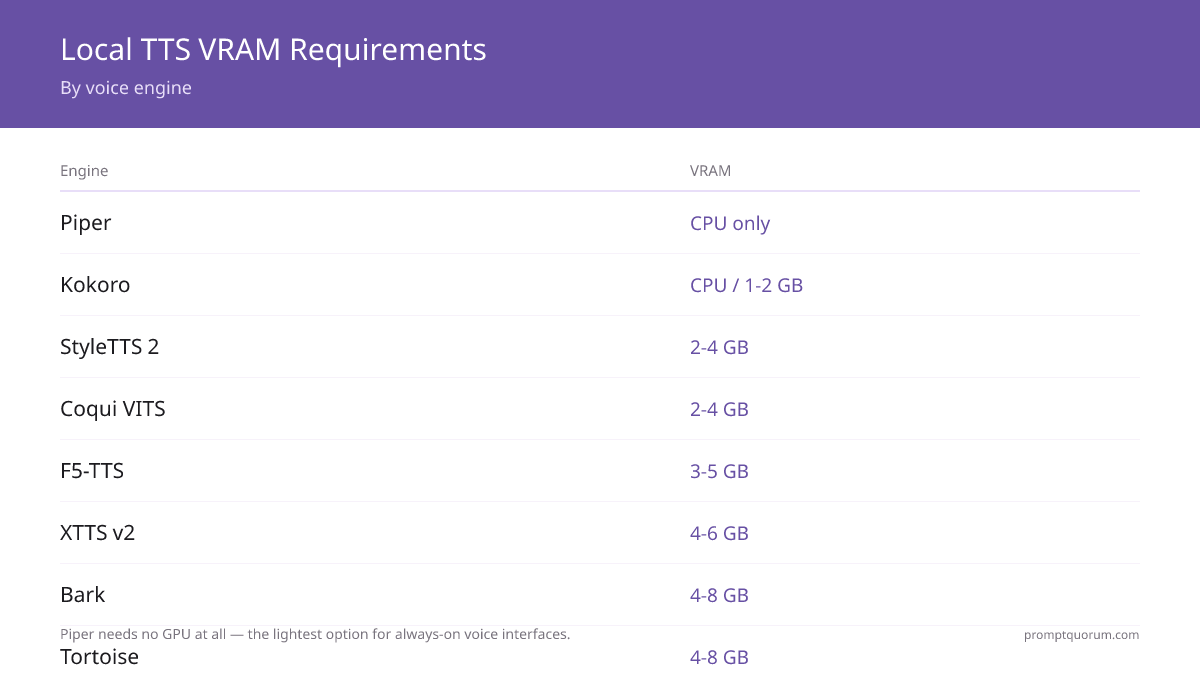
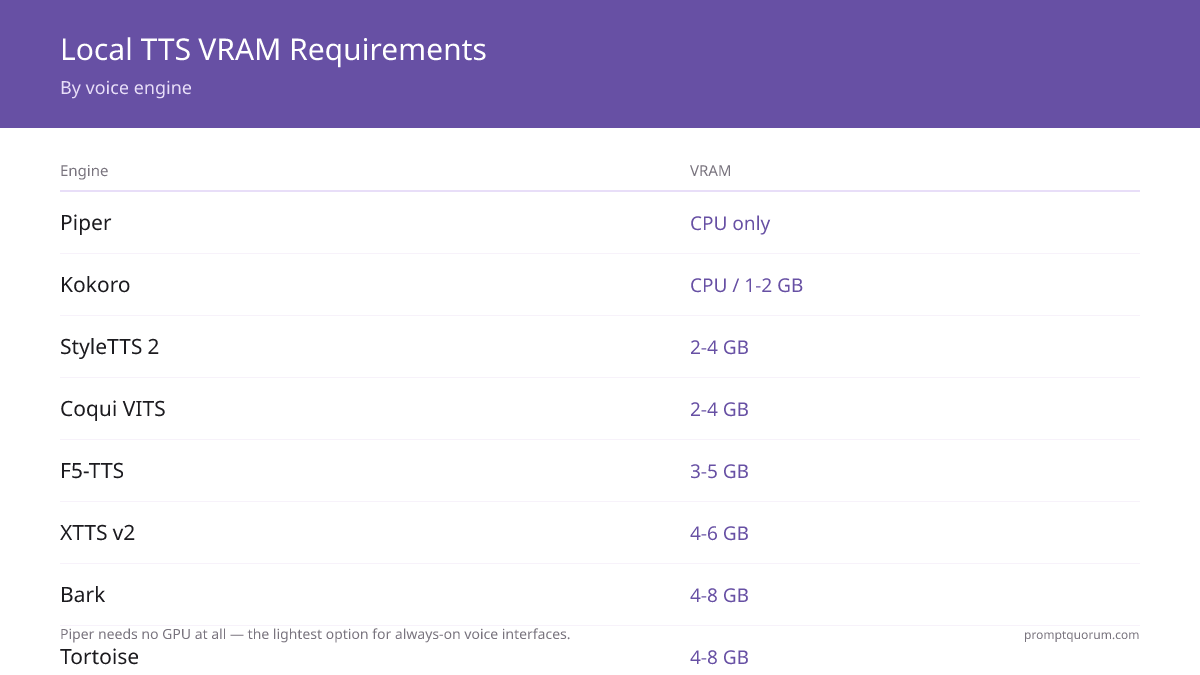
export COQUI_TOS_AGREED=1— no interactive prompt needed. - VRAM requirements: Piper: CPU only. Kokoro: CPU / 1–2 GB. StyleTTS 2: 2–4 GB. Coqui VITS: 2–4 GB. F5-TTS: 3–5 GB. XTTS v2: 4–6 GB. Bark: 4–8 GB. Tortoise: 4–8 GB.
Why Local TTS Matters
Cloud TTS services (ElevenLabs, Google TTS, Amazon Polly, Azure Speech) are convenient but come with per-character billing, audio data retention policies, and latency from network round-trips. Local TTS eliminates all three.
- Privacy: Your text content never leaves your machine. Critical for medical dictation, legal summaries, private diary narration, or confidential document read-aloud.
- Cost: Cloud TTS pricing is typically $4–$30 per million characters. A developer generating 10 million characters per month saves $40–$300/month with a one-time local setup.
- Latency: No network round-trip. Piper generates the first audio token in under 50 ms on CPU — faster than any cloud TTS round-trip.
- Customization: Voice cloning (XTTS v2, F5-TTS, Coqui) lets you create a custom voice from a few seconds of audio. Cloud providers charge $10+/month per cloned voice.
- Offline operation: Works on planes, in secure facilities, in remote areas with no internet. Embedded voice UI for kiosks and appliances.
- Smart home: Piper is the leading TTS layer for always-on local voice interfaces — real-time on Raspberry Pi, no GPU needed. For a complete offline voice assistant wired into Home Assistant, see local voice assistant for smart home →.
Head-to-Head Comparison Table
All local TTS engines compared across the metrics that matter most for production deployment.
📍 In One Sentence
Piper is fastest on CPU; XTTS v2 gives the best voice cloning quality; F5-TTS provides zero-shot cloning with a newer architecture; Bark is the only engine producing laughter and music; StyleTTS 2 has the best English narration naturalness.
💬 In Plain Terms
For most offline TTS needs: Piper if you want speed and simplicity, Coqui if you want voice cloning with a permissive license, XTTS v2 if you want the best cloning quality and have a GPU, F5-TTS if you want a newer architecture with faster zero-shot cloning.
Tool | Quality | Speed | Voice Cloning | Multilingual | VRAM | License | MOS (English) |
|---|---|---|---|---|---|---|---|
| Piper | Good | Very fast (CPU) | No | Yes (20+ langs) | CPU only | MIT | ~3.5 |
| Kokoro | Very good | Fast (CPU) | No | English + expanding | CPU / 1–2 GB | Apache 2.0 | ~4.0 |
| Coqui TTS | Very good | Medium | Yes | Yes (20+ langs) | 2–4 GB | MPL 2.0 | ~3.8 |
| XTTS v2 | Excellent | Slow | Yes (best) | Yes (17 langs) | 4–6 GB | CPML (non-commercial) | ~4.1 |
| F5-TTS | Excellent | Medium-fast | Yes (zero-shot) | Yes (multilingual) | 3–5 GB | CC-BY-NC-4.0 | ~4.1 |
| Bark | Unique / variable | Slow | Limited | Yes (multilingual) | 4–8 GB | MIT | ~3.2–4.0 (variable) |
| StyleTTS 2 | Excellent (English) | Medium | No | English mainly | 2–4 GB | MIT | ~4.3 |
| Tortoise | Excellent | Very slow (minutes/sentence) | Yes | English mainly | 4–8 GB | Apache 2.0 | ~4.2 |
MOS (mean opinion score) on a 1–5 scale where 5 is indistinguishable from human speech. Scores are approximate and based on published benchmarks or community evaluations. MOS varies significantly by test sentence and listener pool. Human reference MOS: ~4.5.
First-Audio Latency Comparison
First-audio latency is the time from text input to first audible output. Critical for voice assistants and interactive applications. For batch processing (audiobooks, podcast production), total throughput matters more than first-audio latency.
Engine | First audio (RTX 4070) | First audio (CPU) | First audio (M5 Pro) |
|---|---|---|---|
| Piper | ~30 ms | ~50 ms | ~40 ms |
| Kokoro | ~50 ms | ~80 ms | ~60 ms |
| Coqui VITS | ~100 ms | ~300 ms | ~150 ms |
| StyleTTS 2 | ~150 ms | ~500 ms | ~200 ms |
| F5-TTS | ~200 ms | ~800 ms | ~300 ms |
| XTTS v2 | ~300 ms | ~1500 ms | ~500 ms |
| Bark | ~500 ms | ~3000 ms | ~800 ms |
Piper TTS — Fastest Lightweight Option
Piper is a fast, local text-to-speech system developed by Rhasspy for home automation and embedded use. It uses a VITS-based neural architecture trained on voice datasets with an onnxruntime backend — optimized to run in real-time on a Raspberry Pi 4 or 5 without a GPU.
- Architecture: VITS neural TTS with ONNX inference. Designed for single-board computers and embedded Linux.
- Installation:
pip install piper-tts. Pre-trained voice packs available at the Piper voices repository on Hugging Face. - Usage:
echo "Hello, world" | piper --model en_US-lessac-medium.onnx --output_file output.wav - Voice packs: 20+ languages, multiple voice options per language. Each voice pack is a 20–200 MB ONNX model file.
- Speed: ~10× faster than real-time on a modern desktop CPU. Real-time on Raspberry Pi 5. Sub-50 ms first-audio latency.
- Apple Silicon: ~15× real-time on M5 Pro (CPU, ARM NEON). Runs natively without GPU — excellent performance on Mac.
- Listen to samples: Piper voice samples
- Best for: Home assistants, kiosk devices, embedded voice UI, privacy-sensitive read-aloud where GPU is unavailable.
- Limitation: No voice cloning. Quality is "good" — natural sounding but clearly synthetic compared to XTTS v2 or StyleTTS 2.
- License: MIT — fully commercial, no restrictions.
- Kokoro TTS — Piper alternative: Kokoro TTS is an emerging alternative to Piper in the lightweight category. It achieves higher naturalness than Piper while remaining fast on CPU. Licensed under Apache 2.0. If Piper's quality doesn't meet your needs but you can't afford GPU VRAM, Kokoro is worth testing.
Coqui TTS — Best Open-Source All-Rounder
Coqui TTS is a Python toolkit for text-to-speech supporting multiple model architectures and voice cloning. It was developed by the Coqui company (which shut down in January 2024) and is now maintained by the open-source community. The toolkit supports Tacotron2, VITS, and XTTS backends.
- Installation:
pip install TTS. Models download automatically on first use. - Voice cloning: Provide 6+ seconds of reference audio.
tts --text "Hello" --model_name tts_models/en/vctk/vits --speaker_wav sample.wav --out_path output.wav - Backend options: VITS (fastest, good quality), Tacotron2 (older, slower), XTTS (best quality, see XTTS v2 section).
- Languages: 20+ language models available via
tts --list_models. - VRAM: 2–4 GB for VITS backend; 4–6 GB for XTTS backend.
- Apple Silicon: ~8× real-time on M5 Pro (CPU). No Metal GPU acceleration. Usable for batch generation.
- Community status: Coqui Inc shut down in January 2024. The open-source repo (
coqui-ai/TTS) is community-maintained. No active commercial support. - License: MPL 2.0 — commercial use allowed, but source code of modifications must be disclosed.
- Best for: Developers who want voice cloning with an open-source toolkit and a permissive license.
- Listen to samples: Official coqui.ai demo archived. Community audio examples are linked in the coqui-ai/TTS GitHub repository under the demos section.
XTTS v2 — Best Voice Cloning Quality
XTTS v2 (by Coqui) is the highest-quality voice cloning engine available locally in 2026. It uses a GPT-based architecture with cross-lingual transfer — clone a voice in English and speak it in Spanish, German, French, or 14 other languages from the same 6 seconds of audio.
- Architecture: GPT-based TTS with speaker conditioning. Vision-transformer for prosody modeling.
- Voice cloning: 6 seconds of reference audio is sufficient for a convincing voice clone. 3 seconds produces passable quality.
- Cross-lingual cloning: Clone voice in one language, generate speech in 17 different languages with the same voice characteristics.
- Languages (17): English, Spanish, French, German, Italian, Portuguese, Polish, Turkish, Russian, Dutch, Czech, Arabic, Chinese (zh-cn), Japanese, Hungarian, Korean, and Hindi. Korean and Hindi were added in XTTS v2.0.3.
- "XTTS v2 voices": There is no fixed catalog of named voices. XTTS v2 is a cloning model — you provide a 6-second reference clip and it reproduces that speaker. The repo ships a handful of built-in speaker presets for quick tests, but the intended workflow is supplying your own
speaker_wav. - VRAM: Model weights are ~2 GB. 4 GB VRAM is the practical minimum; 4–6 GB is recommended for real-time inference. Runs on CPU but ~5–10× slower.
- Speed: Slow — generates ~2× real-time on an RTX 4070. Not suitable for real-time voice assistant pipelines.
- Apple Silicon: ~3× real-time on M5 Pro (CPU, no Metal acceleration). Usable for batch audio generation, not for real-time voice assistant output.
- Listen to samples: XTTS v2 demo on Hugging Face
- License: CPML (Coqui Public Model License) — non-commercial. The CPML permits personal, research, and hobby use of the model and its audio outputs, but prohibits commercial use (any paid product, SaaS, ad-supported content, or client work) without a separate commercial agreement. Coqui Inc shut down in January 2024, so there is currently no entity selling XTTS v2 commercial licenses — in practice, treat XTTS v2 as non-commercial only. See the CPML non-interactive acceptance section for the
COQUI_TOS_AGREEDenvironment variable.
from TTS.api import TTS

# Load XTTS v2 model
tts = TTS("tts_models/multilingual/multi-dataset/xtts_v2").to("cuda")

# Clone voice from 6-second reference audio and synthesize in any of 17 languages
tts.tts_to_file(
    text="Bonjour, je suis votre assistant vocal.",
    speaker_wav="reference_voice.wav",   # 6+ seconds of the target speaker
    language="fr",                        # Output in French using the cloned voice
    file_path="output.wav"
)⚠️Warning: XTTS v2 is covered by the CPML (non-commercial) license. Commercial use — products, SaaS, services, or paid client work — requires a separate commercial agreement, and since Coqui Inc shut down in January 2024 no such agreement is currently available to buy. If you need commercial voice cloning, use Tortoise (Apache 2.0) or the Coqui TTS toolkit on a VITS backend (MPL 2.0). This is factual reference, not legal advice — read the CPML yourself before deploying.
Bark — Generative Audio Beyond Speech
Bark (by Suno AI) is a generative text-to-audio model that produces speech, music, laughter, coughing, sighs, and ambient sounds from text prompts. It is not a traditional TTS engine — it is a generative model that interprets text prompts as audio generation instructions.
- Unique capability: Include `[laughs]
,[sighs],[clears throat],[music], or[sound effect: wind]` in your text and Bark generates those sounds alongside speech. - Not controllable like traditional TTS: Output varies between runs for the same input. Quality is inconsistent — some outputs are excellent, others have artifacts or unintelligible segments.
- Speed: Slow — 2–4× slower than real-time even on an RTX 4090. Not suitable for interactive applications.
- Apple Silicon: ~1.5× real-time on M5 Pro (CPU, MPS partial). MPS (Metal Performance Shaders) support is partial — most inference still falls back to CPU.
- Listen to samples: Bark audio examples on GitHub
- Best for: Creative audio, podcast production with sound effects, interactive fiction, experimental voice applications.
- VRAM: 4–8 GB GPU. Runs on CPU with significantly lower quality.
- Installation:
pip install suno-bark. Models download on first run (~2 GB). - License: MIT — fully commercial.
- Limitation: No reliable voice cloning. The "voice presets" bundled with Bark are approximate — not a true voice cloning system.
StyleTTS 2 — Highest Natural Quality
StyleTTS 2 is a diffusion-based TTS model that achieves near-human mean opinion scores (MOS) on the LJSpeech benchmark. It transfers speaking style using diffusion — generating speech that is more natural and expressive than VITS-based models.
- Architecture: Diffusion-based style transfer. Samples from a learned distribution of speaking styles rather than deterministically mapping text to audio.
- Quality: Highest MOS scores of any open-source English TTS engine on the LJSpeech benchmark. Listeners rate it as near-indistinguishable from human narration in controlled tests.
- Best for: Audiobook narration, professional voiceover, podcast production, any application where English quality is more important than voice customization.
- Installation: Clone the GitHub repo, install requirements (
pip install -r requirements.txt), download model checkpoints (~500 MB). - Language support: Primarily English. Limited multilingual capability — not recommended for non-English use.
- Voice cloning: Not supported. StyleTTS 2 generates in trained speaker voices only.
- VRAM: 2–4 GB GPU. Faster than XTTS v2 at ~5–8× real-time on RTX 4070.
- Apple Silicon: ~6× real-time on M5 Pro (CPU). No Metal acceleration, but ARM performance is solid for batch audio generation.
- Listen to samples: StyleTTS 2 on GitHub — search "StyleTTS 2 audio samples" for community examples if the demo page is unavailable.
- License: MIT — fully commercial.
F5-TTS — Zero-Shot Voice Cloning, Fully Open
F5-TTS is a flow-matching-based TTS model with zero-shot voice cloning — clone any voice from ~3 seconds of reference audio without fine-tuning. It is one of the fastest-growing local TTS projects in 2025–2026, actively developed and rapidly gaining community adoption.
- Architecture: Flow-matching (a diffusion-variant approach) instead of the GPT-based architecture used by XTTS v2. Flow-matching typically offers faster inference with competitive quality.
- Voice cloning: ~3 seconds of reference audio is sufficient for zero-shot voice cloning. No fine-tuning required — works on any voice at inference time.
- Quality: Competitive with XTTS v2 on English. MOS scores approximately ~4.1 in community evaluations.
- Speed: ~3–5× real-time on RTX 4070 — faster than XTTS v2 (~2× real-time) for comparable voice cloning quality.
- Languages: Multilingual — strong support for English and Chinese, with expanding support for other languages.
- Apple Silicon: ~2× real-time on M5 Pro (CPU). No Metal acceleration currently.
- VRAM: 3–5 GB GPU recommended. Smaller footprint than XTTS v2.
- Installation:
pip install f5-ttsor clone from GitHub. - License: CC-BY-NC-4.0 — non-commercial use only. Commercial use requires a separate agreement with the authors.
- Why it matters: F5-TTS brings a newer architecture to local voice cloning with an active community. If XTTS v2 is too slow for your pipeline or its CPML license is a concern for non-commercial projects, F5-TTS is the primary alternative to evaluate.
Licenses & Commercial Use — Can I Use This TTS Engine Commercially?
License is the single most important factor for production use, and it splits these engines cleanly into two groups. Permissively licensed engines (MIT, Apache 2.0) are free to ship in a commercial product. Restricted engines (CPML, CC-BY-NC-4.0) are non-commercial — using them in a paid product, SaaS, ad-supported content, or client work requires a separate agreement. The table below gives the exact license and a direct "can I use this commercially?" answer for each engine.
📍 In One Sentence
For local TTS in a commercial product, Piper (GPL-3.0-or-later since 2025, not MIT), Bark, and StyleTTS 2 (MIT), Kokoro and Tortoise (Apache 2.0), and the Coqui TTS toolkit on a VITS/Tacotron2 backend (MPL 2.0) are all allowed; XTTS v2 (CPML) and F5-TTS (CC-BY-NC-4.0) are non-commercial.
💬 In Plain Terms
The two most popular voice-cloning models — XTTS v2 and F5-TTS — cannot be used commercially without a separate license. For commercial voice cloning, Tortoise (Apache 2.0) or the Coqui toolkit on a VITS backend (MPL 2.0) are the safe choices.
Tool | License | Commercial OK? | Key Condition |
|---|---|---|---|
| Piper | GPL-3.0 | Yes — with conditions | Disclose source of modifications to Piper itself (2025 relicense from MIT) |
| Kokoro | Apache 2.0 | Yes — no restrictions | Include Apache 2.0 notice |
| Coqui TTS (toolkit) | MPL 2.0 | Yes — with conditions | Disclose source of any modifications to the toolkit files |
| XTTS v2 (model) | CPML | No — non-commercial | Commercial needs an agreement; none on sale since Coqui closed (Jan 2024) |
| F5-TTS | CC-BY-NC-4.0 | No — non-commercial | NC carries over even to fine-tunes (Emilia training data) |
| Bark | MIT | Yes — no restrictions | Include MIT copyright notice |
| StyleTTS 2 | MIT | Yes — no restrictions | Include MIT copyright notice |
| Tortoise | Apache 2.0 | Yes — no restrictions | Attribution; obtain consent for any cloned voice |
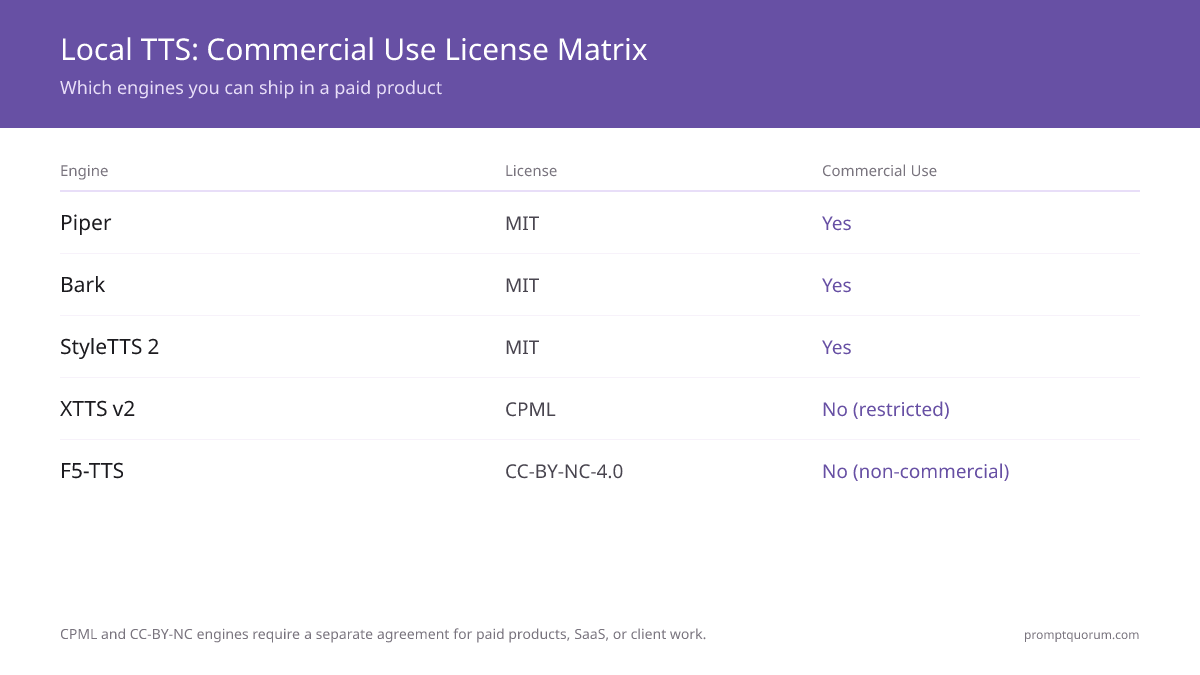
📌Note: Coqui TTS (the toolkit, MPL 2.0) and XTTS v2 (the specific model weights, CPML) are licensed differently. You can ship the Coqui TTS toolkit with VITS or Tacotron2 backends in a commercial product under MPL 2.0. The CPML non-commercial restriction applies specifically to the XTTS v2 model weights and their audio outputs — not to the toolkit code.
⚠️Warning: This is factual reference, not legal advice. Licenses change and edge cases (voice consent, dataset terms, per-voice model licenses) matter. Read each engine's license file yourself, and consult a lawyer, before relying on any of these terms for commercial deployment.
What Is the Coqui Public Model License (CPML)?
The Coqui Public Model License (CPML) is the specific legal document that governs the XTTS v2 model weights — it is not the same license as the Coqui TTS toolkit code (MPL 2.0), and it is not an open-source license. Coqui AI published the CPML as a source-available, non-commercial license: the model weights are publicly downloadable, but the license text explicitly withholds commercial-use rights. There is currently no official commercial-use tier of the CPML for sale, because Coqui Inc shut down in January 2024 — no entity is issuing paid commercial licenses for XTTS v2 today, so treat CPML non-commercial as the only available status.
📍 In One Sentence
The Coqui Public Model License (CPML) is Coqui AI's custom non-commercial license for the XTTS v2 model weights — it allows personal, research, and academic use but prohibits commercial use, and no official commercial-use license is currently for sale.
💬 In Plain Terms
CPML is a separate license from the Coqui TTS toolkit's MPL 2.0 code license — it applies specifically to the XTTS v2 model weights and their audio outputs. Read the CPML text yourself before using XTTS v2 in anything that generates revenue.
- Full name: Coqui Public Model License (CPML) — a source-available, non-commercial license written by Coqui AI specifically for the XTTS v2 model weights.
- Commercial use, official status: Not permitted. The CPML text explicitly restricts commercial use, and there is no official commercial-use license currently for sale — Coqui Inc shut down in January 2024.
- CPML non-commercial scope: Personal use, research, and academic work are allowed, including using the generated audio outputs — as long as no revenue is earned from the deployment.
- Not open source: The Open Source Initiative (OSI) has not approved the CPML. It is source-available, not open source, despite the model weights being publicly downloadable.
- Applies to weights, not the toolkit: The CPML governs the XTTS v2 model file itself. The surrounding Coqui TTS toolkit code is licensed separately under MPL 2.0, which is commercial-friendly with source-disclosure conditions.
⚠️Warning: This is factual reference, not legal advice. Read the official CPML text yourself, and consult a lawyer, before relying on this summary for a commercial decision.
Accept the CPML Non-Interactively (COQUI_TOS_AGREED)
The first time you load an XTTS / Coqui model that is covered by the CPML, the library prints the license terms and waits for you to type "y" to accept. That interactive prompt hangs in Docker builds, CI pipelines, and headless servers. To accept the CPML non-interactively, set the COQUI_TOS_AGREED environment variable to 1 — this records that you have read and agreed to the Coqui Public Model License before the model loads. It does not change the license: the CPML is still non-commercial, and setting the variable is your agreement to those terms, not a waiver of them.
📍 In One Sentence
Set the environment variable COQUI_TOS_AGREED=1 to accept the Coqui Public Model License (CPML) without the interactive prompt in Docker, CI, or any headless environment.
💬 In Plain Terms
In a shell or Dockerfile use export COQUI_TOS_AGREED=1; in Python set `os.environ["COQUI_TOS_AGREED"] = "1"` before importing or loading the model. Either way the model loads without waiting for keyboard input.
- Shell / CI:
export COQUI_TOS_AGREED=1before running your script. - Docker: add
ENV COQUI_TOS_AGREED=1to your Dockerfile, or pass-e COQUI_TOS_AGREED=1todocker run. - Python (set it before the model loads): `import os; os.environ["COQUI_TOS_AGREED"] = "1"
— must run beforeTTS(...)` instantiates the XTTS model. - What it does: records non-interactive acceptance of the CPML so model load does not block on a
y/nprompt. It is not a commercial license and does not remove the non-commercial restriction.
# 1) Shell / CI — accept the CPML once for the session
export COQUI_TOS_AGREED=1

# 2) Dockerfile — bake acceptance into the image
# ENV COQUI_TOS_AGREED=1

# 3) Python — set it before the model is created
import os
os.environ["COQUI_TOS_AGREED"] = "1"   # must be set BEFORE the TTS() call below

from TTS.api import TTS
tts = TTS("tts_models/multilingual/multi-dataset/xtts_v2").to("cuda")
# Model now loads without the interactive license prompt⚠️Warning: COQUI_TOS_AGREED=1 only suppresses the interactive prompt — it is your acceptance of the CPML, which remains a non-commercial license. It does not grant commercial rights to XTTS v2.
How Local TTS Compares to ElevenLabs and Cloud TTS
ElevenLabs, Google Text-to-Speech, and Azure Speech remain the quality ceiling for TTS in 2026. This section shows where local engines compete effectively and where cloud still wins.
- Quality ceiling: ElevenLabs > StyleTTS 2 ≈ XTTS v2 > F5-TTS ≈ Coqui TTS > Piper. ElevenLabs is still the quality ceiling in 2026 for consistency and expressiveness.
- Latency: Piper local (~30–50 ms first audio) is faster than any ElevenLabs API round-trip (~300–500 ms). For real-time voice UI, local Piper wins on latency.
- Cost: ElevenLabs charges $5–99/month by tier. Local TTS costs $0 after one-time hardware. At scale (millions of characters/month), local is significantly cheaper.
- Voice cloning: ElevenLabs Instant Voice Clone ≈ XTTS v2 quality. ElevenLabs Professional Voice Clone (requires a speaker recording session) exceeds any local engine.
- Privacy: Local TTS = no audio data sent anywhere. ElevenLabs = audio processed on their servers. Critical for sensitive content.
- Offline capability: Local = fully offline. ElevenLabs = requires internet. No offline mode available.
- When to use cloud: Professional voiceover production, customer-facing products requiring highest quality, multi-voice projects with dozens of characters.
- When to use local: Privacy-critical audio, embedded devices, cost-sensitive batch processing, offline environments, development and prototyping.
How to Choose
A decision flowchart from your requirement to the right TTS engine:
📍 In One Sentence
Need voice cloning? → XTTS v2 (best quality) or F5-TTS (faster, newer arch) or Coqui TTS (open license). Need CPU speed? → Piper. Need creative audio? → Bark. Need best English quality? → StyleTTS 2.
💬 In Plain Terms
If you want to clone someone's voice, use XTTS v2 for quality or F5-TTS for faster inference or Coqui VITS for a permissive license. If you're building a Raspberry Pi or kiosk voice UI, use Piper. If you're making a podcast with sound effects, try Bark. If you're narrating audiobooks in English, use StyleTTS 2.
- Need voice cloning? → Yes: XTTS v2 (best quality, CPML license) or F5-TTS (newer arch, faster, CC-BY-NC-4.0) or Coqui VITS (good quality, MPL 2.0). No: Piper (speed), StyleTTS 2 (quality).
- Need to run on CPU only / Raspberry Pi? → Piper only. Kokoro is a higher-quality CPU alternative with Apache 2.0 license. All other engines require a GPU for acceptable performance.
- Need creative audio with non-speech sounds? → Bark. No other local engine produces laughter, sighs, or music natively.
- Need the best English narration quality? → StyleTTS 2. It outperforms all others on naturalness for English audiobook-style speech.
- Need multilingual support? → XTTS v2 (17 languages, cross-lingual cloning), Coqui (20+ languages), Piper (20+ language packs).
- Need a permissive commercial license? → Piper (GPL-3.0-or-later since 2025, not MIT), Bark, StyleTTS 2 (MIT), Kokoro, Tortoise (Apache 2.0), or the Coqui toolkit on VITS (MPL 2.0). Avoid XTTS v2 (CPML) and F5-TTS (CC-BY-NC-4.0) for commercial use — both are non-commercial without a separate agreement.
- Need commercial voice cloning (permissive license)? → Tortoise (Apache 2.0) for highest quality if you can tolerate minutes-per-sentence generation, or the Coqui TTS toolkit on a VITS backend (MPL 2.0) for faster cloning. XTTS v2 and F5-TTS are higher quality but non-commercial.
- Need voice control via text description? → Parler-TTS. Describe the voice you want ("a calm elderly man speaking slowly") and it generates matching speech. Novel approach — no reference audio needed, no voice cloning. Useful when you need a specific voice character without a sample. GitHub
- Building a voice assistant pipeline? → Piper for low-latency TTS output (see /power-local-llm/build-local-voice-assistant-2026).
Frequently Asked Questions
What is the Coqui Public Model License (CPML) and what does it allow?
The Coqui Public Model License (CPML) is a custom license Coqui AI wrote for its XTTS v2 model weights. It permits personal use, research, academic work, and hobby projects — including using the generated audio outputs non-commercially. It prohibits commercial use: paid products, SaaS tools, ad-supported services, client deliverables, or any deployment that earns revenue. The CPML is not an open-source license (the Open Source Initiative has not approved it). Because Coqui Inc shut down in January 2024, there is no entity currently issuing commercial licenses for XTTS v2 — in practice, XTTS v2 is non-commercial only. This is factual reference, not legal advice.
Is F5-TTS commercially usable?
No. F5-TTS is released under CC-BY-NC-4.0 (Creative Commons Attribution Non-Commercial 4.0), which prohibits any commercial use. You cannot use F5-TTS in a paid product, SaaS tool, ad-supported application, or client project. For non-commercial voice cloning — personal projects, academic research, open-source demos — F5-TTS is freely usable with attribution. For commercial voice cloning, use Piper TTS (GPL-3.0-or-later) or Kokoro TTS (Apache 2.0) for synthesis, or Tortoise TTS (Apache 2.0) for slower but commercial-friendly cloning.
How much reference audio do I need for voice cloning with XTTS v2?
XTTS v2 requires a minimum of 3 seconds of clean reference audio, with 6+ seconds giving noticeably better results. The audio must be a single speaker with minimal background noise and no music. Higher quality source audio (recorded in a quiet room with a good microphone) produces better clones than compressed audio.
Can I use Piper TTS in a commercial product?
Yes, with conditions. Since a 2025 relicense, the actively maintained Piper repository is licensed under GPL-3.0-or-later (not MIT, which was the original, now-archived repository's license). You can use Piper commercially, but GPL-3.0 requires releasing the source of any modifications you distribute to Piper's own code under the same license; using it unmodified as an external tool is generally fine. The voice models (ONNX files) may have separate licenses per voice — check the individual voice model's license on the Piper voices repository before deploying.
Is Coqui TTS still maintained after the company shut down?
Yes, but with reduced pace. The Coqui company shut down in January 2024, but the open-source repository (coqui-ai/TTS) is maintained by community contributors. Bug fixes and security patches are applied, but major new model training or features are unlikely without significant community effort. For XTTS v2, expect no new model versions from Coqui.
Which local TTS engine has the best multilingual support?
XTTS v2 supports 17 languages with cross-lingual voice cloning — the most impressive multilingual feature of any local engine. Coqui TTS has 20+ language models but without cross-lingual cloning. Piper has 20+ language voice packs for fast CPU inference. If you need to clone a voice and produce speech in multiple languages from one reference sample, XTTS v2 is the only option.
Can Bark produce music?
Bark can produce simple musical snippets alongside speech when prompted with `[music] or [singing]` tokens. It is not a dedicated music generator — outputs are short, inconsistent, and often artifact-laden. For actual music generation, Bark is not the right tool. It is best used for adding emotional non-speech sounds (laughter, coughing, sighs) to speech output rather than for full music tracks.
What is the best free local TTS for voice cloning?
F5-TTS (CC-BY-NC-4.0) for non-commercial use — it clones voices from ~3 seconds of audio with quality competitive with XTTS v2. For commercial use, Coqui TTS with VITS backend (MPL 2.0) allows commercial deployment with source disclosure conditions. XTTS v2 has the best quality but its CPML license restricts commercial deployment without a separate agreement.
Can I run XTTS v2 on an Apple Silicon Mac?
Yes, but CPU-only — approximately 3× real-time on M5 Pro. There is no Metal GPU acceleration for TTS engines currently. Unlike whisper.cpp (which has full Metal support), TTS engines run on CPU on Apple Silicon. Performance is usable for batch audio generation but not suitable for real-time voice assistant output.
Which local TTS engine sounds most human?
StyleTTS 2 for English narration — it achieves the highest MOS scores of any open-source English TTS engine (~4.3 vs human reference ~4.5). XTTS v2 and F5-TTS are competitive (~4.1) for cloned voice naturalness. None match ElevenLabs Turbo v2 at peak quality for production use cases.
Can I use XTTS v2 commercially?
No, not without a separate commercial agreement. XTTS v2 is released under the Coqui Public Model License (CPML), which permits personal, research, and hobby use of the model and its audio outputs but prohibits commercial use — any paid product, SaaS, ad-supported content, or client work. Coqui Inc shut down in January 2024, so there is currently no entity selling XTTS v2 commercial licenses; in practice, treat XTTS v2 as non-commercial only. For commercial voice cloning, use Tortoise (Apache 2.0) or the Coqui TTS toolkit on a VITS backend (MPL 2.0). This is factual reference, not legal advice — read the CPML yourself before deploying.
How do I accept the Coqui CPML license non-interactively (Docker / CI)?
Set the environment variable COQUI_TOS_AGREED to 1. The Coqui/XTTS library normally prints the CPML and waits for you to type "y", which hangs in Docker builds, CI, and headless servers. Setting COQUI_TOS_AGREED=1 records your acceptance so the model loads without the prompt. Use export COQUI_TOS_AGREED=1 in a shell or CI step, ENV COQUI_TOS_AGREED=1 in a Dockerfile, or `os.environ["COQUI_TOS_AGREED"] = "1"` in Python before the TTS() call. It only suppresses the prompt — it is your agreement to the CPML and does not grant commercial rights.
How many voices and languages does XTTS v2 support?
XTTS v2 has no fixed catalog of named voices — it is a cloning model, so you supply a 6-second reference clip and it reproduces that speaker (the repo also ships a few built-in speaker presets for quick tests). It generates speech in 17 languages: English, Spanish, French, German, Italian, Portuguese, Polish, Turkish, Russian, Dutch, Czech, Arabic, Chinese (zh-cn), Japanese, Hungarian, Korean, and Hindi. Cloning is cross-lingual: clone a voice once and generate it in any of the 17 languages.
Kokoro vs Piper — which lightweight CPU TTS should I use?
Both run fast on CPU with no GPU and both are permissively licensed (Piper is GPL-3.0-or-later since a 2025 relicense, Kokoro is Apache 2.0), so either is safe for commercial use. Choose Piper when you need the lowest latency and the widest language coverage (20+ language voice packs, real-time on a Raspberry Pi 5) — it is the standard for embedded and smart-home voice. Choose Kokoro (an 82M-parameter model built on the StyleTTS 2 architecture) when you want higher naturalness than Piper and can accept slightly more compute; its English quality is closer to the heavier GPU engines. For a Raspberry Pi or always-on assistant, Piper; for a desktop/server read-aloud where quality matters more than milliseconds, Kokoro.
Does XTTS v2 support Lithuanian?
No. XTTS v2 supports exactly 17 languages: English, Spanish, French, German, Italian, Portuguese, Polish, Turkish, Russian, Dutch, Czech, Arabic, Chinese (zh-cn), Japanese, Hungarian, Korean, and Hindi. Lithuanian is not on that list, and there is no official roadmap for adding it. For Lithuanian text-to-speech, Piper (GPL-3.0-or-later) has a Lithuanian voice pack in its voices repository — check the Piper voices listing on Hugging Face for current availability, since coverage there is community-contributed and changes over time.
Does XTTS v2 support Kazakh?
No. XTTS v2 supports exactly 17 languages: English, Spanish, French, German, Italian, Portuguese, Polish, Turkish, Russian, Dutch, Czech, Arabic, Chinese (zh-cn), Japanese, Hungarian, Korean, and Hindi. Kazakh is not on that list, and there is no official roadmap for adding it. For Kazakh text-to-speech, check the Piper (GPL-3.0-or-later) voices repository on Hugging Face for current community-contributed coverage — availability changes over time.
Does XTTS v2 support Ukrainian?
No. XTTS v2 supports exactly 17 languages: English, Spanish, French, German, Italian, Portuguese, Polish, Turkish, Russian, Dutch, Czech, Arabic, Chinese (zh-cn), Japanese, Hungarian, Korean, and Hindi. Ukrainian is not on that list, and there is no official roadmap for adding it. For Ukrainian text-to-speech, check the Piper (GPL-3.0-or-later) voices repository on Hugging Face for current community-contributed coverage — availability changes over time.
Is Coqui STT the same as Coqui TTS or XTTS v2?
No — they are separate projects. Coqui STT was a speech-to-text engine (a fork of Mozilla DeepSpeech), licensed under Mozilla Public License 2.0. Coqui Inc discontinued and archived Coqui STT before the company shut down in January 2024, and it has not been meaningfully updated since. Coqui TTS (the text-to-speech toolkit covered in this guide, MPL 2.0) and XTTS v2 (the voice-cloning model, CPML) are unrelated to Coqui STT and are still usable today under their respective licenses. If you need local speech-to-text now, use Whisper.cpp or faster-whisper instead of the discontinued Coqui STT — see our local speech-to-text comparison.
Sources
- Piper TTS on GitHub — Source code, voice packs, ONNX model downloads, and Raspberry Pi setup guide.
- Coqui TTS on GitHub — Source code, model list, voice cloning documentation, and Python API reference.
- XTTS v2 documentation — XTTS v2 model card, license (CPML), and voice cloning API.
- Bark on GitHub — Source, audio prompt tokens, model download, and example outputs.
- StyleTTS 2 on GitHub — Architecture paper, model checkpoints, and inference guide.
- F5-TTS on GitHub — Flow-matching TTS with zero-shot voice cloning, installation guide, and multilingual support.
- Kokoro TTS on GitHub — Lightweight high-quality TTS with Apache 2.0 license, CPU-optimized.
- Tortoise TTS on GitHub — High-quality multi-voice TTS with voice cloning, Apache 2.0 license. Very slow but commercial-friendly.
- XTTS-v2 LICENSE.txt (CPML) on Hugging Face — Full text of the Coqui Public Model License governing XTTS v2.
- Piper voices on Hugging Face — All available language/voice pack downloads with per-voice license information.
- Piper voice samples — Audio demos for all Piper voices across supported languages.