Key Takeaways
- Best pick by budget: Under $250 — RX 6700 XT 12GB ($175–250, cheapest 12 GB, AMD setup friction). $270–300 used — RTX 3060 12GB (best used overall). $570–600 new — RTX 5060 Ti 16GB (best new-card pick, more VRAM headroom). $550–700 — RTX 4070 Super 12GB (fastest at 25–30 tok/s).
- RTX 3060 12GB ($270–300 used): Runs every 7B-8B model at Q4/Q5 and most dense 13B-14B at Q4. Best used budget pick.
- RTX 5060 Ti 16GB ($570–600 new): Current-generation card with 4 GB more VRAM than the 3060 — comfortably fits 13B-14B models with headroom for larger context windows. Best new-card budget pick, though it now trades roughly 40% above its $429 launch MSRP.
- Prices moved, hardware did not: the 2026 DRAM/GDDR7 shortage lifted street prices across the board. Every tok/sec figure on this page still holds — only what you pay has changed. Workstation cards that used to be budget bargains (RTX A4000, RTX A2000) are now $440–850 used and no longer belong on a budget list.
- RTX 3060 6GB: Limited to 3B models (Phi-4 Mini, Llama 3.2 3B). Too tight for 7B.
- Best overall model on 12GB: Qwen3 14B at ~9 GB VRAM, 9–12 tok/sec. Best dense quality that fits comfortably.
- Best coding model on 12GB: Qwen3 8B at 16–20 tok/sec.
- Best reasoning model on 12GB: DeepSeek-R1 7B at 10–12 tok/sec. Chain-of-thought.
- Skip if: You want 70B models, Llama 4 Scout (needs ~55 GB), or 13B at Q8 — you need 24GB+ (RTX 4090).
📍 In One Sentence
RTX 3060 12 GB ($270–300 used) runs Qwen3 14B at 9–12 tok/s and is the best budget GPU for local LLMs in 2026.
💬 In Plain Terms
A budget GPU for AI means a graphics card with enough video memory (VRAM) to run a capable AI model at a usable speed on your own computer. A worldwide memory shortage has pushed that entry point from about $200 to about $300 during 2026.
What Can You Run on RTX 3060 12GB?
The RTX 3060 12GB is the best budget GPU for local LLMs in 2026. 12GB VRAM fits every 7B model at Q4/Q5 quantization, and most 13B models at Q4. For detailed guidance on VRAM requirements across model sizes, see the VRAM requirements guide →. Here are the exact models and speeds you can expect:
📍 In One Sentence
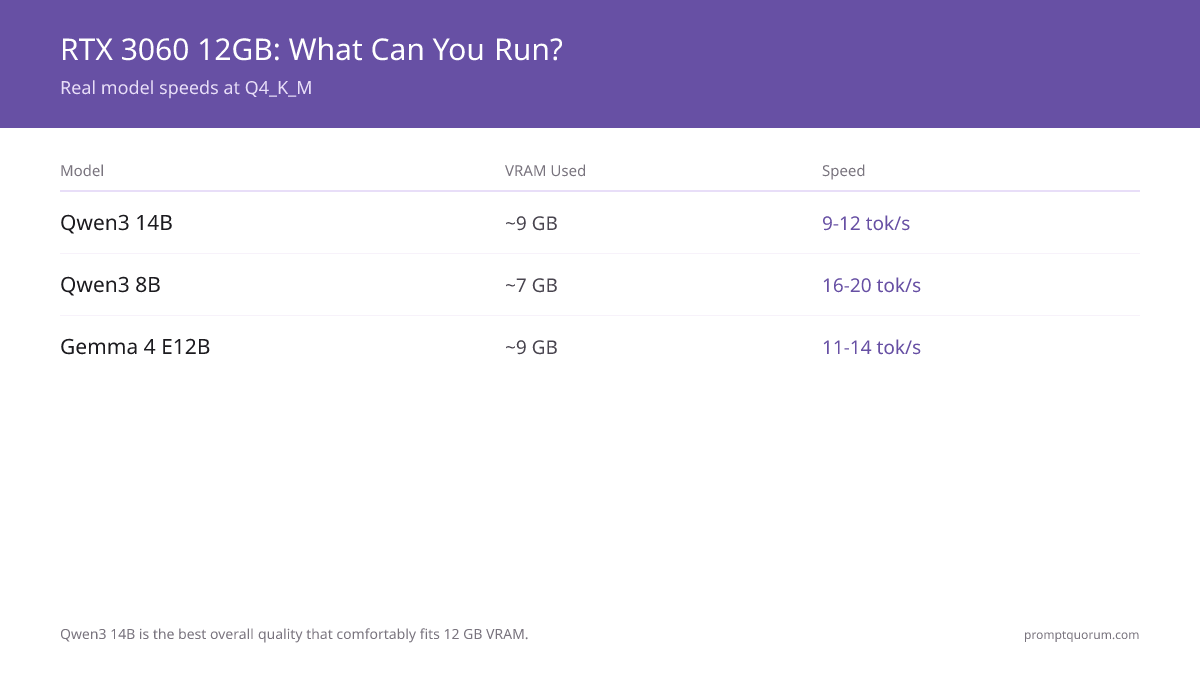
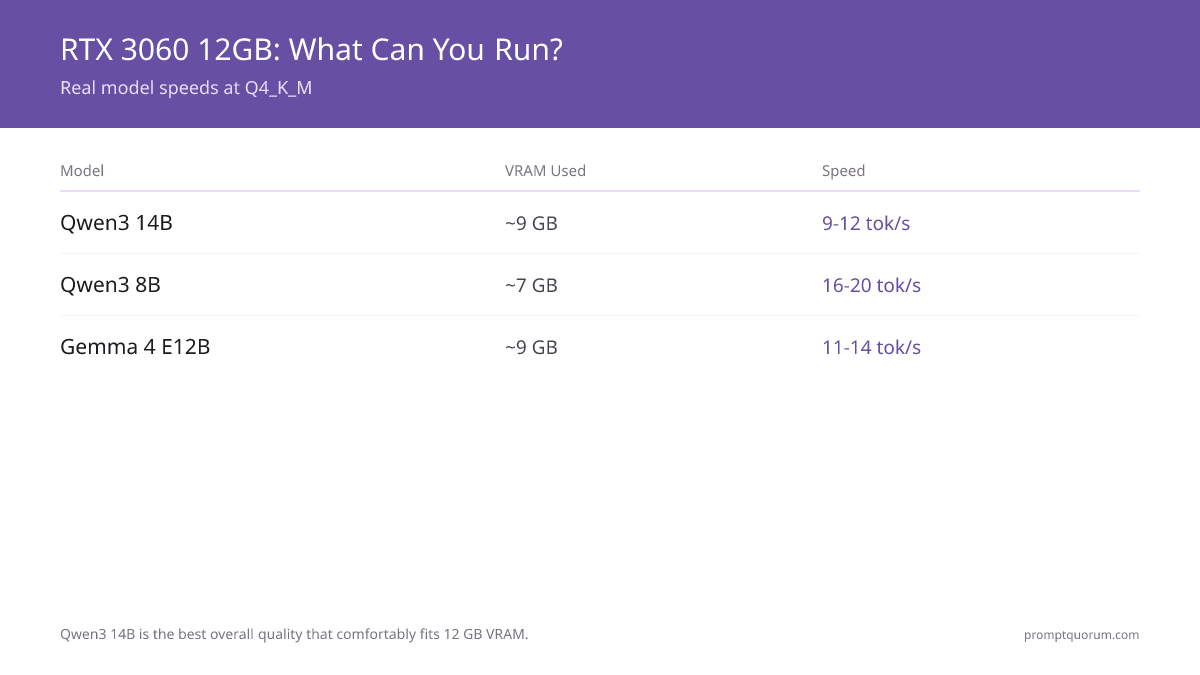
RTX 3060 12 GB runs Qwen3 14B at Q4 (9 GB, ~9–12 tok/s), Qwen3 8B (5.5 GB, ~16–20 tok/s), and all 7B models comfortably.
💬 In Plain Terms
The RTX 3060 12 GB has 12 gigabytes of video memory — enough for AI models up to about 14 billion parameters. Larger models will not fit and will run slowly.
Model | Size | Quantization | VRAM Used | Speed | Best For |
|---|---|---|---|---|---|
| Qwen3 14B | 14B (dense) | Q4_K_M | ~9 GB | 9–12 tok/sec | Best overall quality that fits |
| Qwen3 8B | 8B | Q4_K_M | ~7 GB | 16–20 tok/sec | Coding, all-round |
| Gemma 4 E12B | 26B MoE | Q4_K_M | ~9 GB | 11–14 tok/sec | Vision, multimodal |
| Mistral Small v0.3 | 7B | Q4_K_M | ~7 GB | 18 tok/sec | Instruction following |
| DeepSeek-R1 7B | 7B | Q4_K_M | ~7 GB | 10–12 tok/sec | Reasoning, math |
| Gemma 4 E4B | E4B (multimodal) | Q4_K_M | ~5 GB | 18–22 tok/sec | Light vision, fast chat |
| Llama 3.2 13B | 13B | Q4_K_M | ~11 GB | 8–10 tok/sec | Higher quality chat (Q4 only, tight fit) |
Qwen3 14B (dense) is the best-quality model that fits an RTX 3060 12GB comfortably at Q4_K_M, using ~9 GB. `ollama pull qwen3:14b`. Note: Llama 4 Scout (17B active / 109B total MoE, 10M-token context, multimodal) needs ~55 GB at Q4 and does not fit 12 GB normally — it is a long-context / large-multimodal pick for high-VRAM rigs, not a budget-GPU recommendation. gpt-oss:20b (21B total / 3.6B active MoE) needs 16 GB, so it is just out of reach on a 12 GB card. All speeds measured with Ollama on RTX 3060 12GB, 16GB system RAM, Ryzen 7 7700X. Q4_K_M quantization. Speeds vary ±15% depending on prompt length and context window.
What Can You Run on RTX 3060 6GB?
The 6GB variant is severely limited. Only 3B models fit comfortably. 7B models at Q4 need ~7GB — more than you have. CPU offloading works but cuts speed by 50–70%.
- Phi-4 Mini 3.8B (Q4): ~3GB VRAM, 20–25 tok/sec. Best reasoning at this size. Strong for math and logic.
- Llama 3.2 3B (Q4): ~2.5GB VRAM, 25–35 tok/sec. Fastest option. Good for simple chat and Q&A.
- Gemma 2 2B (Q4): ~1.7GB VRAM, 35–45 tok/sec. Lightest model. Good for testing setups.
- 7B with offloading: Possible but slow. Llama 7B with CPU offload = ~5–8 tok/sec. Usable for non-interactive batch work only.
- Recommendation: If you have a 6GB card, upgrade to 12GB used ($270–300) before investing time in workarounds. The speed and model quality improvement is worth it.
How Does RTX 3060 Compare to Other Budget GPUs?
GPU | VRAM | Price (Used) | 7B Speed | Max Model | Verdict |
|---|---|---|---|---|---|
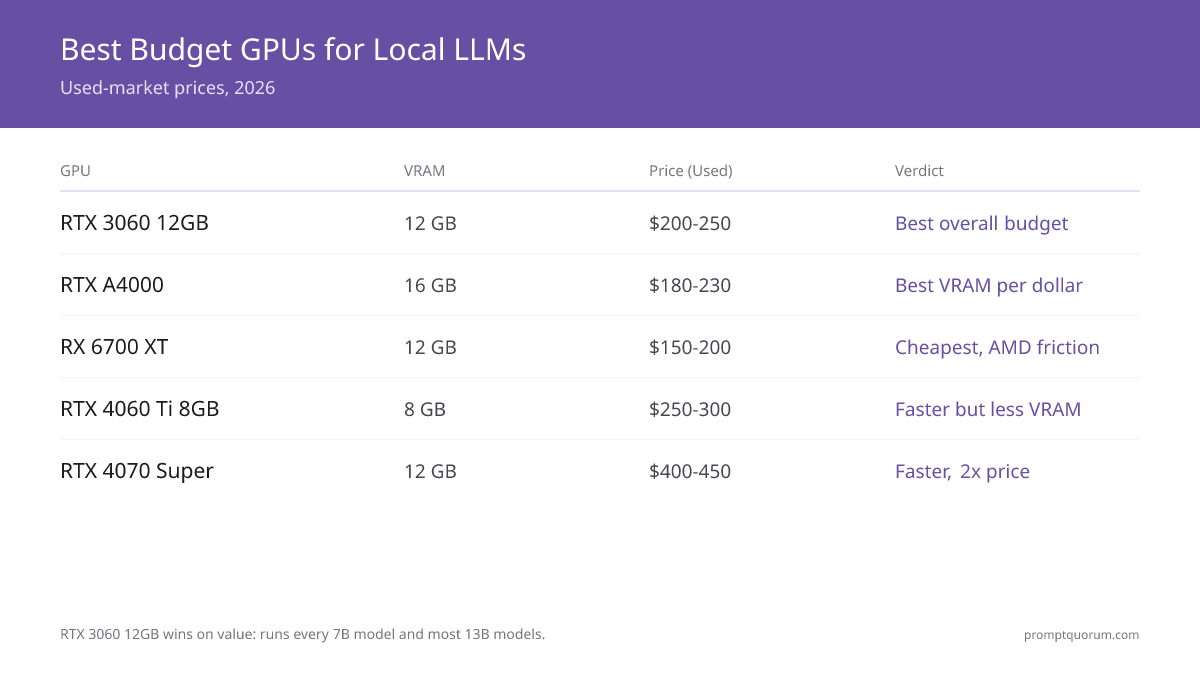
| RTX 3060 12GB ★ | 12 GB | $270–300 | 15–20 tok/sec | 13B (Q4) | Best used budget |
| RX 6700 XT | 12 GB | $175–250 | 10–14 tok/sec | 13B (Q4) | Cheapest 12 GB, AMD friction |
| RTX 4060 Ti 8GB | 8 GB | ~$270 ($420+ new) | 20–25 tok/sec | 7B (Q5 max) | Faster but less VRAM |
| RTX 5060 Ti 16GB | 16 GB | $570–600 new | 25–30 tok/sec | 20B (Q4) | Best new-card budget pick |
| RTX 4070 Super | 12 GB | $550–700 new | 25–30 tok/sec | 13B (Q5) | Fastest 12 GB, 2× price |
| RTX A4000 | 16 GB | $790–850 | 12–15 tok/sec | 13B (Q5) | No longer a budget card |
RTX 3060 12GB wins on used value: 12GB VRAM at $270–300 runs every 7B model and most 13B. If buying new, the RTX 5060 Ti 16GB ($570–600) is the current-generation pick with more VRAM headroom, though it sells roughly 40% above its $429 MSRP. The RX 6700 XT is the cheaper 12 GB route at $175–250 used if you are willing to work through AMD ROCm setup. The RTX A4000 used to be the VRAM-per-dollar winner here; at $790–850 used it no longer is, and it has been demoted accordingly.
How Much VRAM Do You Need for 7B Models?
7B models quantized at Q4 (4-bit) require 6-8GB VRAM; Q5 (5-bit) requires 8-10GB; Q8 (8-bit) requires 14-16GB.
In practice: 8GB is the bare minimum for comfortable inference on 7B models at Q4 with room for batch processing.
6GB cards (RTX 2060) technically work but require aggressive optimization and leave no headroom for higher batches.
If you're stuck with less than 8 GB VRAM, you can still run local LLMs effectively — see speed-optimized models for 4–8 GB hardware.
GPU cost is one side of the economics; token cost is the other. Local inference eliminates per-token API fees, but prompt length still affects latency and throughput. For the full cost picture — tokens, pricing tiers, and optimisation strategies — see tokens, costs and limits: the economics of AI prompting.
Which Models Run Best on RTX 3060 by Use Case?
Pick your model based on what you actually need, not parameter count. Here are the best choices for each use case on RTX 3060 12GB:
Budget hardware runs smaller models — but skilled prompting closes the quality gap. The prompt engineering guide covers techniques like chain-of-thought and structured output that help smaller models punch above their weight. A concrete workload that fits the RTX 3060 12 GB tier is automated pull-request review — see Local LLM Code Review in CI/CD for the GitHub Actions pattern that runs Qwen3 8B against PRs on this exact hardware.
- Chat / Q&A: `ollama run qwen3:14b` — dense 14B, ~9 GB VRAM, best quality on 12 GB. For a lighter option: `ollama run qwen3:8b` at ~7 GB.
- Coding: `ollama run qwen3:8b` — strong all-round coding. ~7 GB VRAM. 16–20 tok/sec.
- Reasoning / Math: `ollama run deepseek-r1:7b` — Chain-of-thought reasoning. 10–12 tok/sec. Slower but significantly more accurate on multi-step problems.
- Writing / Creative: `ollama run mistral:7b` — Best instruction following. 18 tok/sec. Clean, structured output. Good for drafting and rewriting.
- Vision / Images: `ollama run gemma4:e12b` — Multimodal (accepts images). 11–14 tok/sec. Uses ~9GB VRAM. For a lighter pick, `ollama run gemma4:e4b` at ~5 GB. Describe photos, read screenshots, analyze charts.
- Privacy / Offline: Any of the above. All run 100% locally. Zero data leaves your machine. No internet required after model download.
- Home automation / always-on AI: `ollama run phi4-mini` — Phi-4 Mini (3.8B, ~3 GB VRAM) handles Home Assistant voice queries on a mini PC without a discrete GPU. See best hardware for local smart home AI →.
Used vs. New: Where Should You Buy?
- Used ($150-300 cheaper than new): eBay, Facebook Marketplace, Craigslist, local computer repair shops. Higher risk of dead cards or bad VRAM. Always test before committing. The gap between used and new has widened sharply during the 2026 memory shortage, so used is now where most of the value sits.
- New ($420-700): Newegg, Amazon, Best Buy, Microcenter. Warranty included. No surprises. Prices are not stable — new-card street prices have climbed through 2026 and some SKUs, such as the RTX 4060 Ti 16GB, go out of stock at major retailers for stretches. Good for risk-averse buyers who accept paying above MSRP.
- Mined cards (crypto, dirt cheap): Extreme risk. VRAM degradation common. Only buy if you can fully bench-test on-site.
What Are the Most Common Budget GPU Mistakes?
- Buying a 4GB RTX 2060 and expecting smooth 7B inference--you'll hit out-of-memory errors constantly.
- Pairing a $300 GPU with a $30 PSU (power supply)--voltage sag kills stability. Budget 80+ Gold certified, 650W minimum.
- Assuming DDR5 RAM and i9 CPU speed up LLM inference--they don't. GPU VRAM bandwidth is the only bottleneck that matters for inference speed.
- Assuming Llama 4 Scout fits 12 GB. Scout is a 17B-active / 109B-total MoE that needs ~55 GB at Q4 (it only squeezes into 24 GB at 1.78-bit, ~20 tok/s). On a 12 GB RTX 3060, run dense models instead: Qwen3 14B (~9 GB), Qwen3 8B, or Gemma 4 E12B.
- Buying a 16 GB card just for 13B models. A 12 GB RTX 3060 already runs Qwen3 14B at Q4. Step up to 16 GB only if you specifically need gpt-oss:20b (16 GB), dense 20B+ models, or more context headroom.
Next steps
- Best AMD GPUs for Local LLMs — Considering AMD? Full AMD vs NVIDIA breakdown →
- Best Open-Source Ollama Models — See which models run best on a budget GPU →
- How Much VRAM Do I Need? — Match your GPU to your model size →
How Do Regional Privacy Laws Affect GPU Choice for Local LLMs?
EU GDPR: Budget GPU local inference is fully compliant — no cloud, no data transfer. Running Qwen3 or Gemma 4 on an RTX 3060 keeps all inference on-device. GDPR Article 25 (privacy by design) and Article 32 (technical security) are satisfied by default. European freelancers, legal firms, and healthcare providers increasingly use budget NVIDIA setups for document processing that cannot touch cloud APIs.
Japan APPI and Asia-Pacific: Local GPU inference eliminates cross-border data transfer. Under Japan's amended APPI, sensitive personal data cannot be transferred to servers outside Japan without explicit consent. A €280 RTX 3060 running Ollama locally removes this concern entirely — inference happens on-device with no network requests.
US and global SMBs: Budget GPU setups reduce API cost and eliminate vendor lock-in. For small businesses, an RTX 3060 ($270–300 used) pays back its cost in roughly 3–4 months compared to GPT-4o API usage at comparable token volumes, with no per-token costs thereafter.
Frequently Asked Questions
Is RTX 3060 12GB still worth buying in 2026?
Yes. It's 4+ years old, but 12GB VRAM is timeless. Runs Qwen3 14B, Qwen3 8B, Gemma 4 E12B, and Mistral Small smoothly at Q4. It fits every 7B-8B model and most dense 13B-14B models.
Should I buy RTX 5060 Ti or RTX 4060 Ti for local LLMs?
RTX 5060 Ti 16GB ($570–600) is still the better buy: 8 GB more VRAM than the 8 GB RTX 4060 Ti and 10-15% faster per generation. It is the current-generation budget pick for a new card, though the 2026 memory shortage has pushed it roughly 40% above its $429 MSRP. If budget-constrained, the 8 GB RTX 4060 Ti is still solid for 7B models at $420–530 new or about $270 used. Avoid base 4060/5060 (8GB) and 4070 (12GB) if you plan to run 13B+ models — poor VRAM headroom.
Can I use an AMD RX 7900 XT or RX 7900 XTX instead?
Yes, but driver support for AMD is weaker than NVIDIA + CUDA. HIP/ROCm setup requires more effort. RTX is safer for beginners.
Is 12GB VRAM enough for 13B models?
Barely, at Q4 quantization. Q5 or Q8 will cause OOM errors. If you want 13B comfort, aim for 16GB.
Should I buy a used enterprise GPU like RTX A4000?
Not any more. The RTX A4000 was a genuine budget bargain when it sold for $180-230 used, but the 2026 memory shortage has pushed it to $790-850 used — roughly three times an RTX 3060 12GB for 4 GB more VRAM and slower inference. The same is true of the RTX A2000 12GB at $440-615. Buy a used RTX 3060 12GB or a new RTX 5060 Ti 16GB instead.
What PSU wattage should I buy with a $300 GPU?
650W, 80+ Gold minimum. A $300 GPU + CPU + motherboard doesn't exceed 400W draw, but you want headroom for spikes.
Can I run Ollama with a $300 budget GPU?
Yes. Ollama is lightweight. A 4-year-old RTX 3060 with Ollama will run Qwen3 14B at 9-12 tok/sec or Qwen3 8B at 16-20 tok/sec — totally usable for interactive chat and coding assistance.
Can I run Llama 4 Scout on an RTX 3060 12GB?
Not normally. Llama 4 Scout is a 17B-active / 109B-total MoE that needs ~55 GB VRAM at Q4 — far beyond a 12 GB card. It only squeezes into 24 GB at an extreme 1.78-bit quant (~20 tok/sec). On an RTX 3060 12GB, run dense models instead: `ollama pull qwen3:14b` (best quality that fits), Qwen3 8B, or Gemma 4 E12B. Scout is a long-context (10M-token) / large-multimodal pick for 48 GB+ rigs.
What is the best budget GPU under $200?
Under $200 you are now limited to 8 GB cards — realistically a used RTX 2080 8GB at $110-195, which runs 7B models at Q4 and nothing larger. The 12 GB options that used to sit under $200 have all moved above it during the 2026 memory shortage: the RX 6700 XT 12GB is $175-250 used and the RTX A2000 12GB is $440-615. If you can stretch to $250, the RX 6700 XT is the cheapest honest 12 GB card; at $270-300 the RTX 3060 12GB is the better buy.
How do I test a used GPU for VRAM defects before buying?
Run VRAM stress tests: gpu-burn (Linux), HWiNFO64 memory stress test (Windows), or load a large model in Ollama and watch for OOM errors. Test before returning the card.
Can I upgrade my current GPU to run larger models later?
Yes, GPU upgrades are straightforward in desktop PCs. Start with RTX 3060 12GB, then upgrade to RTX 4090 or 5090 later. PCIE slot is backward-compatible across generations.
What is the best budget NVIDIA GPU for local LLM inference?
RTX 4060 Ti (8 GB, $420-530 new) for 7B models, or RTX 4070 Super (12 GB, $550-700 new) for 13B models. For used: RTX 3060 12GB ($270–300) runs 7-13B models smoothly at Q4. Best value is RTX 3060 12GB used; the RTX 5060 Ti 16GB at $570-600 is the best new card.
How does the AMD 6800XT compare to the RTX 4070 for AI inference?
AMD RX 6800 XT (16 GB) beats RTX 4070 (12 GB) on VRAM and gaming performance but lags on LLM inference speed (15-20% slower). ROCm driver setup for llama.cpp is also more complex than CUDA. For pure LLM work, RTX 4070 is easier; for gaming + LLMs, 6800 XT offers better value.
What is the best price-per-GB VRAM GPU for local LLMs in 2026?
Used RX 6700 XT (12 GB, $175-250) = $15-21 per GB. Used RTX 3060 (12 GB, $270-300) = $23-25 per GB. Used RTX 3090 (24 GB, $850-1,050) = $35-44 per GB. New RTX 4070 Super (12 GB, $550-700) = $46-58 per GB. Best value: RX 6700 XT if you accept ROCm setup, otherwise RTX 3060 12GB. Note that the 2026 memory shortage has pushed used RTX 3090 pricing well above its old levels, so it is no longer the capacity bargain it was.
Can I use an AMD RX 6700 or 6800 XT instead of NVIDIA for local LLMs?
Yes, but AMD ROCm driver support for ONNX Runtime is weaker than NVIDIA CUDA. Expect more setup friction. NVIDIA is safer for budget builds.
What is the cheapest GPU for LLM inference?
The RTX 3060 12GB at roughly $270–300 used, and nothing else on the affordable end comes close on cost per usable GB of VRAM. Cheaper cards exist, but below 12GB the model sizes worth running stop fitting, so a cheaper card is not a cheaper way to run local AI — it is a card that cannot do the job. If you want new rather than used, the RTX 5060 Ti 16GB at roughly $570–600 is the most cost-effective new option. One scope note: this page ranks consumer cards for a single machine. Cheapest GPU inference at production scale is a different question, decided by throughput per watt and per rack unit rather than sticker price.
Sources
- Meta AI. (2025). "Llama 4 Model Card." — Scout MoE architecture, VRAM requirements
- Qwen Team. (2026). "Qwen3 Technical Report." — Qwen3 8B specifications
- TechPowerUp GPU Database: RTX 3060 / RTX 4060 Ti / RTX 4070 Super specs and power consumption
- NVIDIA CUDA Capability Matrix: GPU memory bandwidth and theoretical throughput for inference workloads
- Ollama Model Requirements: VRAM recommendations for Llama 4 Scout, Qwen3, and Mistral Small quantization levels