Key Takeaways
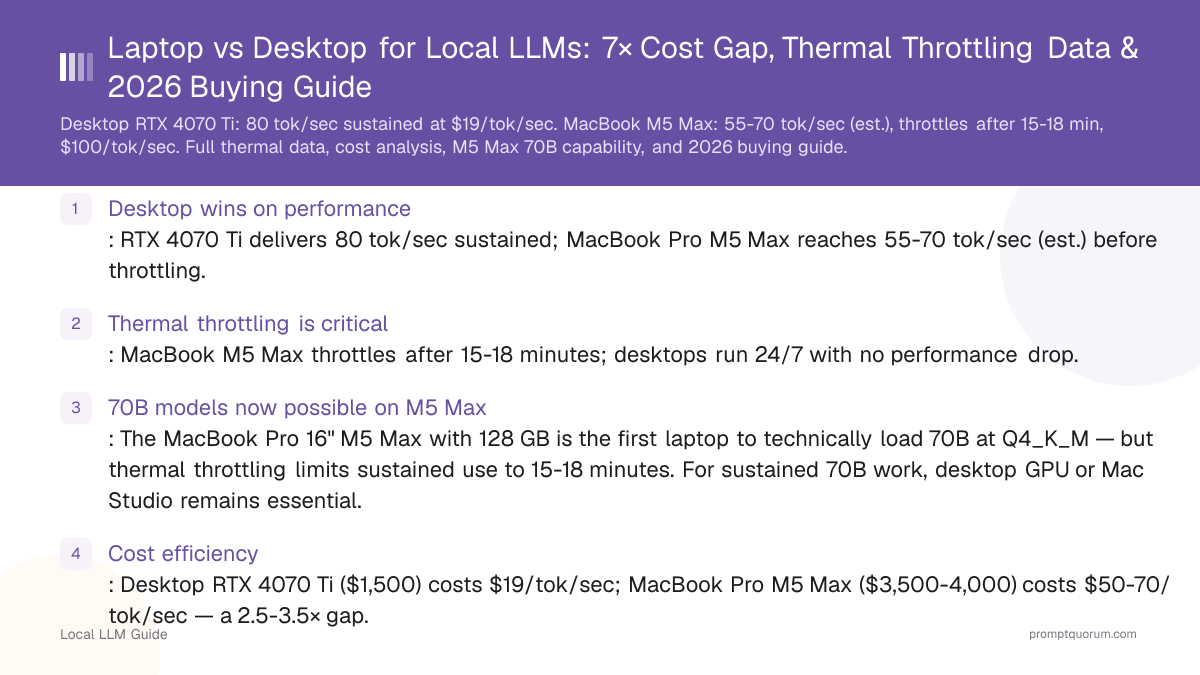
- Desktop wins on performance: RTX 4070 Ti delivers 80 tok/sec sustained; MacBook Pro M5 Max reaches 55-70 tok/sec (est.) before throttling.
- Thermal throttling is critical: MacBook M5 Max throttles after 15-18 minutes; desktops run 24/7 with no performance drop.
- 70B models now possible on M5 Max: The MacBook Pro 16" M5 Max with 128 GB is the first laptop to technically load 70B at Q4_K_M — but thermal throttling limits sustained use to 15-18 minutes. For sustained 70B work, desktop GPU or Mac Studio remains essential.
- Cost efficiency: Desktop RTX 4070 Ti ($1,500) costs $19/tok/sec; MacBook Pro M5 Max ($3,500-4,000) costs $50-70/tok/sec — a 2.5-3.5× gap.
- Best hybrid approach: Desktop RTX 5090 at home ($2,000) + MacBook Air M5 for travel ($1,200) = $3,200 total, delivers 120-180 tok/sec at home with full portability.
📍 In One Sentence
Laptops are portable but thermally limited to 7-13B models at around 15 tokens/sec before throttling within 15-20 minutes, while desktops scale to any model size at 100+ tokens/sec with no throttling, at roughly $19 per tok/sec versus $100+ per tok/sec on a laptop.
💬 In Plain Terms
A laptop is great if you need to run a model on the go, but its cooling system can't sustain full speed for long -- expect it to slow down after 15-20 minutes of heavy use. A desktop has no such limit and costs far less per unit of speed, since laptop chips carry a steep premium for fitting into a thin, battery-powered chassis. Pick a laptop for mobility, a desktop if raw performance and value matter more.
Quick Facts
- MacBook Pro M5 Max speed (est.): 55-70 tok/sec on Llama 4 Scout (throttles after 15-18 min)
- MacBook Pro M4 Max speed: 35 tok/sec on Llama 3.2 8B (throttles after 18 min)
- Desktop RTX 4070 Ti speed: 80 tok/sec on Llama 4 Scout (sustained, no throttle)
- Desktop RTX 5090 speed (new): 120-180 tok/sec on Llama 4 Scout (32 GB VRAM)
- Cost efficiency: $50-70/tok/sec (M5 Max) vs $19/tok/sec (RTX 4070 Ti) vs $17/tok/sec (RTX 5090)
- Laptop thermal throttle onset: 15-18 min (MacBook M5), 18-20 min (MacBook M4), 30–45 min (gaming laptops)
- First laptop to load 70B: MacBook Pro M5 Max (128 GB) can load Llama 3.3 70B at Q4 (~40 GB), but throttling limits sustained use
How Does Laptop Performance Compare to Desktop?
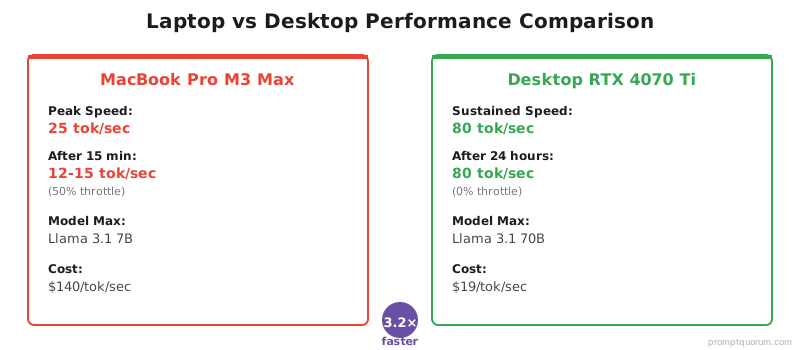
Desktops outperform laptops 2–6× for local LLMs due to full-power GPUs and no thermal throttling. A desktop RTX 4070 Ti delivers 80 tok/sec continuously; a MacBook Pro M4 Max hits 35 tok/sec before throttling after 18 minutes.
Hardware | Model | Speed | Throttle |
|---|---|---|---|
| MacBook Pro 16" M5 Max | Llama 4 Scout | 55-70 tok/sec (est.) | After 15-18 min |
| MacBook Pro 16" M4 Max | Llama 3.2 8B | 35 tok/sec | After 18 min |
| Framework Laptop 16" + RTX 4070 | Llama 4 Scout | 50 tok/sec | After 20 min |
| Desktop RTX 4070 Ti | Llama 4 Scout | 80 tok/sec | None (24/7) |
| Desktop RTX 5090 | Llama 4 Scout | 120-180 tok/sec (est.) | None (24/7) |
Do Thermal Constraints Make Laptops Impractical?
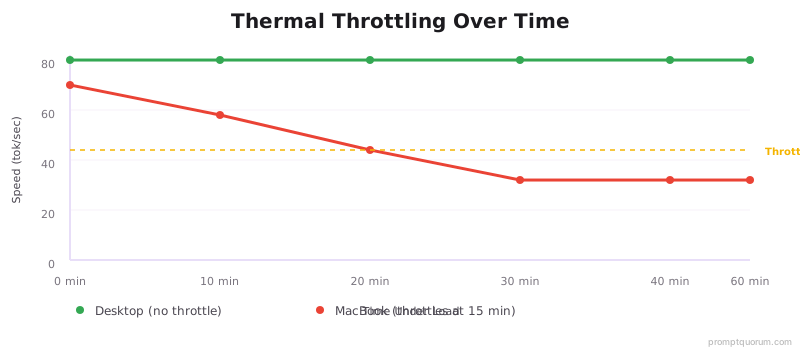
Laptops have limited cooling. CPU + GPU at full load = high temperature, throttling. MacBook Pro M5 Max: Thermal throttles after 15-18 minutes (est.); M4 Max: 18-22 minutes. See how much VRAM local LLMs need for model-specific requirements.
Gaming laptops: Better cooling, but still throttle after 30-45 minutes of sustained load.
Solution: Use laptop for short bursts (chat, experimentation), not 24/7 services. The M5 Max extends the window to 15-18 min, a modest improvement over M4 Max (18-22 min sustained, but faster peak speed).
What Is the True Cost of Laptop vs Desktop for AI?
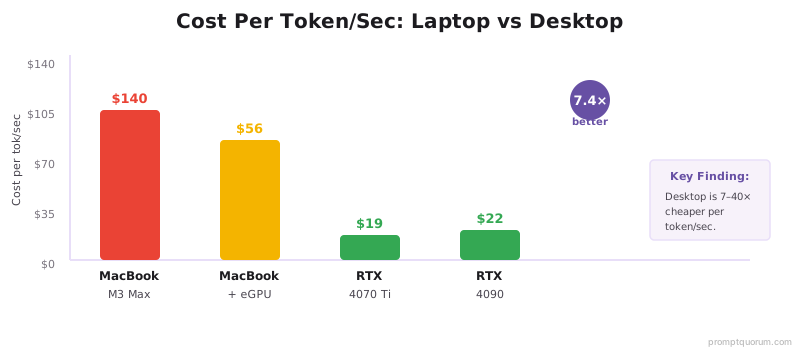
Desktops deliver 2.5–7× better cost efficiency per token/sec than laptops. A $1,500 desktop RTX 4070 Ti costs $19 per tok/sec; a MacBook Pro M5 Max ($3,500-4,000) with M5's superior speed costs $50-70 per tok/sec — still 2.5-3.5× more expensive. The new RTX 5090 ($2,500-3,000) delivers $17-25 per tok/sec for 70B models.
Option | Cost | LLM Speed | Cost/tok/sec |
|---|---|---|---|
| MacBook Pro 16" M5 Max (128 GB) | $3,500-4,000 | 55-70 tok/sec (est.) | $50-70 |
| MacBook Pro 16" M4 Max (48 GB) | $3,500+ | 35 tok/sec | ~$100 |
| Desktop RTX 4070 Ti | $1,500 | 80 tok/sec | $19 |
| Desktop RTX 5090 (32 GB) | $2,500-3,000 | 120-180 tok/sec (est.) | $17-25 |
When to Choose Laptop vs Desktop?
Choose laptop if:
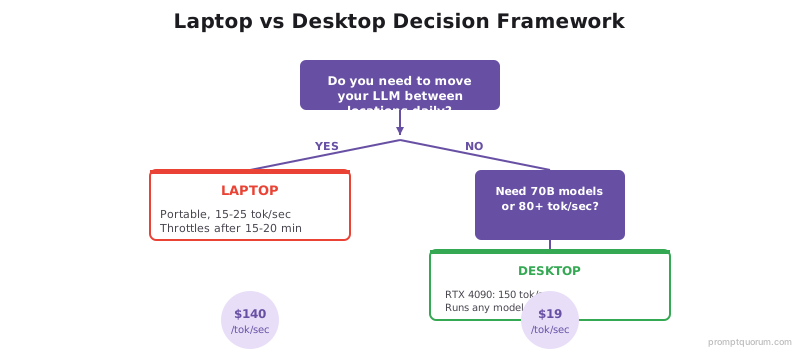
- You need portability and work from multiple locations.
- You run short inference sessions (chat, experimentation).
- You already own a high-end MacBook or gaming laptop. Check the local LLM hardware guide to verify your device meets requirements.
When to Choose Desktop?
Choose desktop if:
- You run 70B models or need 80+ tok/sec. The best GPUs for local LLMs guide covers RTX 4070 Ti through 4090.
- You run services 24/7 (APIs, batch processing).
- You prioritize cost efficiency.
- You want to avoid thermal throttling.
2026 Buying Guide: Which Hardware to Buy?
Choose based on workflow, not brand preference. If you run short sessions or need portability, a MacBook Pro M5 Max (128 GB, ~$3,500-4,000) delivers 55-70 tok/sec (est.) for 15-18 minutes. If you run 70B models or daily batch jobs, a $1,500 desktop RTX 4070 Ti delivers 80 tok/sec 24/7, or a $2,500-3,000 RTX 5090 delivers 120-180 tok/sec for sustained 70B work.
Recommended laptops (May 2026):
- MacBook Pro 16" M5 Max (128 GB) — $3,500-4,000 — First laptop to load 70B: 55-70 tok/sec (est.) on Llama 4 Scout, throttles after 15-18 min. Technically supports Llama 3.3 70B at Q4 (~40 GB), but sustained performance is limited by thermal throttling.
- MacBook Pro 14" M5 Pro (64 GB) — $2,800 — Best value Mac for 2026: 40-50 tok/sec (est.), handles 30B models, major speed upgrade over M4 Pro.
- MacBook Pro 16" M4 Max (48 GB) — $3,500 — Previous generation: 35 tok/sec on Llama 3.2 8B, still a capable option if M5 not available.
- Framework Laptop 16 + RTX 4070 — $2,800 — Best Windows option: 50 tok/sec (est.), modular design, 20-minute throttle window
- Recommended desktops (August 2026):
- RTX 4070 Ti 12GB desktop — $1,500 — Best ROI: 80 tok/sec on any 7B–13B model, runs 24/7, no throttle
- RTX 5090 32GB desktop — $2,500-3,000 — Best new option: 32 GB VRAM fits 70B at Q4 on single GPU without CPU offloading. Estimated 120-180 tok/sec on Llama 4 Scout, sustained.
- RTX 4090 24GB desktop — $3,300 — Best mid-range: 150 tok/sec on Llama 3.3 70B with CPU offloading.
- Mac mini M6 (up to 32 GB) — from $899 — Entry Apple desktop, no thermal throttling; ships Sept 22, 2026. Independent LLM benchmarks not yet available.
- Mac mini M5 Pro (up to 64 GB) — from $1,699 — Compact desktop for models up to ~30B at Q4, no throttle; ships Sept 22, 2026.
- Mac Studio M5 Max (up to 128 GB) — from $2,499 — Runs 70B models natively at Q4 with no thermal throttling; ships Sept 22, 2026. Replaces the previous-generation Mac Studio.
- Mac Studio M5 Ultra (96 GB–256/512 GB) — from $5,499 — For larger MoE or multi-model workloads; the 512 GB configuration ships late October 2026 at a significantly higher price.
- Hybrid option (best value): $2,000 RTX 5090 desktop at home + $1,200 MacBook Air M5 for travel = $3,200 total, better sustained performance than any single laptop, with full portability.
Apple Silicon for Local LLMs: M3 vs M4 vs M5 vs Mac Studio
Apple unified memory architecture changes the laptop vs desktop equation. Unlike discrete GPUs, Apple Silicon uses shared RAM/VRAM — a 128 GB MacBook Pro M5 Max has 128 GB of usable LLM memory. But thermal limits still apply to laptops; only Mac Studio avoids throttling.
M5 Pro and M5 Max (2026): M5 Pro features 64 GB unified memory with 307 GB/s bandwidth — capable of 40-50 tok/sec on Llama 4 Scout. M5 Max offers up to 128 GB unified memory with 460-614 GB/s bandwidth — capable of 55-70 tok/sec (est.), making it the first laptop that can technically load Llama 3.3 70B at Q4_K_M (~40 GB). However, thermal throttling limits sustained 70B use to 15-18 minutes. For sustained 70B work, Mac Studio M5 Max or a desktop RTX 5090 remains the recommended choice.
Mac mini and Mac Studio refresh (Sept 2026 shipping): Apple updated its desktop Apple Silicon lineup on August 25, 2026. Mac mini now starts at $899 with the M6 chip (32 GB max unified memory, 170 GB/s bandwidth) or $1,699 with M5 Pro (64 GB max, 307 GB/s). Mac Studio starts at $2,499 with M5 Max (128 GB max) or $5,499 with M5 Ultra (96 GB base, up to 256 GB — a 512 GB configuration ships late October 2026 at a substantially higher price). All four ship September 22, 2026 (except the 512 GB Mac Studio M5 Ultra). No independent LLM benchmarks exist yet for these chips — figures below are memory-based capacity estimates, not measured speeds.
Chip | RAM Options | Speed (8B) | Max Model | Throttles? |
|---|---|---|---|---|
| M3 (laptop) | 8–24 GB | 10–15 tok/sec | 7B Q4 | After 10 min |
| M5 Pro (laptop) | 24–64 GB | 40-50 tok/sec (est.) | 30B Q4 | After 15-18 min |
| M5 Max (laptop) | 36–128 GB | 55-70 tok/sec (est.) | 70B Q4 (first laptop) | After 15-18 min |
| M4 Pro (laptop) | 24–48 GB | 22–28 tok/sec | 13B Q5 | After 15 min |
| M4 Max (laptop) | 36–128 GB | 30–35 tok/sec | 32B Q5 | After 18 min |
| Mac mini M6 (desktop) | Up to 32 GB | Not yet benchmarked | 13B Q4 | None |
| Mac mini M5 Pro (desktop) | Up to 64 GB | Not yet benchmarked | 30B Q4 | None |
| Mac Studio M5 Max (desktop) | Up to 128 GB | Not yet benchmarked | 70B Q4 native | None |
| Mac Studio M5 Ultra (desktop) | 96–256/512 GB | Not yet benchmarked | 70B+ / large MoE | None |
🔍 Pro Tip: The Hybrid Setup Wins Every Time
The hybrid setup (desktop + cheap laptop) almost always beats a single expensive laptop. A $2,000 RTX 5090 desktop + $1,200 MacBook Air M5 = $3,200 total, with 120-180 tok/sec sustained at home and full portability. A $3,500-4,000 MacBook Pro M5 Max gives you 55-70 tok/sec that throttles after 15-18 minutes. The math is clear: hybrid setup delivers more performance, better reliability, and greater flexibility at lower total cost.
•💡: Use the desktop for heavy workloads (70B models, APIs, batch jobs) and the MacBook for quick inference and mobile work.
⚠️ Warning: Unified Memory ≠ Unlimited VRAM
Apple's "128 GB unified memory" does NOT mean 128 GB of dedicated VRAM. Unified memory is shared between CPU, GPU, OS, and user applications. A 70B model at Q4 requires ~40 GB. With macOS, background apps, and Ollama overhead, a 128 GB M5 Max has ~90-100 GB available for model weights — tight but workable. A 64 GB M5 Pro cannot run 70B at all; max practical model size is 30B at Q4.
•⚠️: Always subtract 30-40 GB from the advertised unified memory when estimating available LLM memory.
🔍 Did You Know: Uneven Throttling Creates Bad UX
Thermal throttling doesn't just slow down inference — it degrades it unevenly. The first 500 tokens generate at full speed; tokens 500-2000 progressively slow. This means a 2,000-token response starts fast and ends slow — creating an inconsistent user experience that's worse than a steady slower speed. Desktop GPUs maintain consistent speed throughout, providing predictable performance.
•💡: If you need consistent performance for user-facing applications, a desktop is non-negotiable. Laptops are only suitable for development and short offline work.
Regional Considerations for Local LLM Hardware
EU (GDPR): Local inference means no personal data leaves your device, eliminating GDPR Article 28 processor agreements with cloud providers. EU enterprises in regulated sectors (healthcare, finance, legal) increasingly use local LLMs on desktop workstations to satisfy data residency obligations.
Japan (APPI): Japan's Act on the Protection of Personal Information requires data minimization and restricts cross-border transfers for sensitive data. On-premises desktops running local LLMs are the standard deployment pattern for enterprise AI in Japan as of 2026.
China: The Cyberspace Administration of China (CAC) regulates generative AI services. Local inference on in-country hardware avoids CAC registration requirements for public-facing AI services.
Common Mistakes When Choosing a Platform for Local LLMs
- 1Buying a laptop expecting desktop performance. Laptops thermally throttle after 15–20 minutes. For sustained inference (APIs, batch jobs), a desktop is the only practical choice.
- 2Assuming Apple Silicon beats everything. MacBook Pro M5 Max reaches 55-70 tok/sec (est.) on Llama 4 Scout. A $1,500 desktop RTX 4070 Ti runs 80 tok/sec on the same model — comparable or faster at less cost. An RTX 5090 reaches 120-180 tok/sec — far superior for 70B work.
- 3Comparing M5 Max to M4 Max using the same model. M5 Max has 4× faster LLM prompt processing (Apple claim) and higher memory bandwidth (460-614 GB/s vs M4 Max 410 GB/s). Benchmarks using Llama 3.2 8B on M4 Max don't predict M5 Max performance — use the same model on both to compare, or scale estimates accordingly.
- 4Assuming 70B is now practical on laptops. M5 Max can load 70B at Q4 (~40 GB out of 128 GB), but thermal throttling limits sustained use to 15-18 minutes. For actual 70B workflows, a desktop GPU or Mac Studio is essential.
- 5Ignoring thermal throttling in performance benchmarks. Many benchmarks measure peak speed, not sustained speed. Always check 30-minute sustained performance, not 1-minute bursts.
- 6Using a desktop for on-the-go work. If you travel frequently or work from multiple locations, a high-end laptop (MacBook Pro M5 Max or gaming laptop with 16+ GB unified/dedicated memory) is the correct tradeoff.
Common Questions: Laptop vs Desktop for Local LLMs
Should I buy a laptop or desktop for running local LLMs?
Buy a desktop if performance and cost efficiency matter: a $1,500 RTX 4070 Ti desktop runs Llama 3.2 8B at 80 tok/sec with no throttling. Buy a laptop if portability is essential — a MacBook Pro M4 Max runs the same model at 35 tok/sec for 18 minutes before throttling.
Can a MacBook Pro run large language models locally?
Yes. MacBook Pro M5 Max (64-128 GB unified memory) runs Llama 4 Scout at 55-70 tok/sec (est.) and can load Llama 3.3 70B (first laptop to do so). MacBook Pro M4 Max runs Llama 3.2 8B at 35 tok/sec. Thermal throttling kicks in after 15-18 minutes (M5) or 18-20 minutes (M4). For short sessions and portability, M5 is a capable option; for sustained work, a desktop is more practical.
What is thermal throttling and how does it affect local LLMs?
Thermal throttling is when a processor automatically reduces its clock speed to prevent overheating. For local LLMs, this means speed drops progressively during long inference sessions: a MacBook Pro M4 Max throttles from 35 tok/sec to 18–22 tok/sec after 18 minutes. Desktops have larger cooling systems and do not throttle under normal conditions.
How much faster is a desktop than a laptop for local LLMs?
A desktop RTX 4070 Ti runs Llama 4 Scout at 80 tok/sec sustained. A MacBook Pro M5 Max reaches 55-70 tok/sec (est.) before throttling — roughly equivalent or slightly slower at a higher cost ($1,500 desktop vs $3,500-4,000 MacBook). A new RTX 5090 desktop reaches 120-180 tok/sec (est.) on Llama 4 Scout — 2× faster than M5 Max, with better cost efficiency per tok/sec ($17-25 vs $50-70).
Can a laptop run 70B models locally?
The MacBook Pro 16" M5 Max (128 GB unified memory) is the first laptop that can technically load Llama 3.3 70B at Q4 quantization (~40 GB required). However, thermal throttling limits sustained inference to 15-18 minutes — making it impractical for real-world 70B work. A Mac Studio M5 Max (128 GB, from $2,499, shipping Sept 22, 2026) can run 70B natively with no thermal throttling; independent benchmarks for this chip are not yet available. For sustained 70B performance, a desktop with RTX 5090 (32 GB VRAM) is the most practical solution.
Is it worth buying a desktop just for local LLMs?
Yes, if you run LLMs regularly. A $1,500 desktop RTX 4070 Ti costs $19 per tok/sec — compared to $50-70 per tok/sec for a MacBook Pro M5 Max (2.5-3.5× more expensive). A new $2,500-3,000 RTX 5090 costs $17-25 per tok/sec and handles 70B models with sustained performance. For daily use, batch processing, or serving a local API, a desktop delivers superior reliability and cost efficiency. For occasional 15-minute sessions and portability, a high-end MacBook M5 is sufficient.
Sources
- MacBook Pro M4 Specifications — Apple official M3/M4 chip and memory specs.
- Framework Laptop 16 Specifications — Framework modular laptop with GPU module options.
- RTX 4070 Ti vs RTX 4090 Benchmarks — TechPowerUp GPU specifications and performance data.
- Llama 3.2 & 3.3 Model Card — Meta official model specifications and quantization guidelines.