Key Takeaways
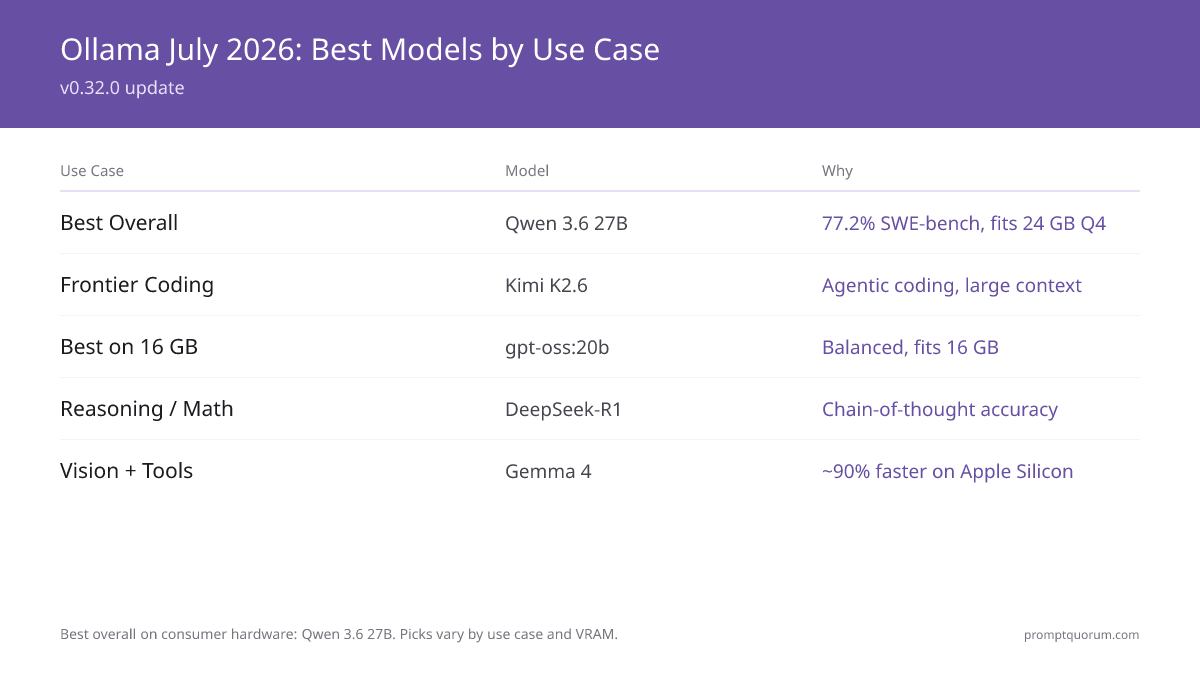
- Best overall on consumer hardware: Qwen3.8-27B (61.7% SWE-bench, fits 24 GB at Q4). Balanced all-round: qwen3:30b.
- Most downloaded: Llama 3.2 3B (tutorials) and the Llama family -- widest tool support.
- Best reasoning: DeepSeek-R1 (chain-of-thought) and gpt-oss:20b (adjustable reasoning, ~o3-mini level).
- Best coding: Kimi K2.6 (frontier MoE) or Laguna XS 2.1 (agentic, long-horizon), Qwen3.8-27B (best dense), Devstral Small 24B (best agentic 24B), qwen3-coder:30b (completion) -- highest benchmarks at their sizes.
- Best small / 16 GB: gpt-oss:20b. Best vision/multimodal: Gemma 4 (E4B+). Best long-context (10M) / large multimodal: Llama 4 Scout (~55 GB). Best uncensored/general-purpose: Dolphin 3.0.
- The Ollama library holds several hundred curated models (thousands more via custom GGUF Modelfiles). All are available via `ollama pull <name>`.
📍 In One Sentence
The best Ollama model in 2026 is Qwen3.8-27B (61.7% SWE-bench, fits 24 GB at Q4); best for coding is Kimi K2.6 or Laguna XS 2.1.
💬 In Plain Terms
Ollama is a free tool that lets you run AI models on your own computer — no internet or API key needed. These are the top models you can download with a single command, organized by what you actually need them for.
What Is the Latest Ollama Version and What Changed?
Current Ollama version: v0.33.1 (released August 26, 2026). This is the latest stable release, available via ollama.com/download. A v0.33.2 release candidate landed August 27 but is not yet marked stable. Update with `curl https://ollama.ai/install.sh | sh` (macOS: `brew upgrade ollama`), then confirm with `ollama --version`.
What changed in the v0.32–v0.33 series (July–August 2026): v0.32.0 (July 11) introduced an interactive "Chat, Code & Work" agent experience and renamed the Codex App integration to ChatGPT. v0.32.12 (August 14) added Qwen 3.8 27B support with an MLX-optimised variant for Apple Silicon. v0.32.13 (August 14) added developer-instructions support for qwen3.8. v0.32.14 (August 15) shipped WebP transcoding for llama-server renderers and better handling of non-leading system messages. v0.32.15 (August 19) added a new desktop onboarding flow and roughly halved time-to-first-token through faster model loading. v0.33.0 (August 21) enabled Claude Desktop as a third-party gateway provider and made KV-cache prefill restore points far more reliable, so a cancelled long prefill can resume instead of reprocessing from scratch. v0.33.1 (August 26) added MLX Qwen3.8 Flash Next support, structured output, and GPU timeout fixes for slow storage. Full notes: github.com/ollama/ollama/releases.
Newest models in the library (2026):
- Laguna XS 2.1 (Poolside, July 2, 2026) — 33B total / 3B active MoE built for agentic coding and long-horizon local work: plan, write code, run tests, iterate. 256K context, OpenMDW-1.1 license. SWE-bench Verified 70.9%, SWE-bench Multilingual 63.1%. Pull: `ollama pull laguna-xs-2.1`
- Kimi K2.7 Code (Moonshot AI, June 2026) — Coding-focused agentic model built on Kimi K2.6, aimed specifically at long-horizon coding sessions. Pull: `ollama pull kimi-k2.7-code`
- DeepSeek V4 Pro (DeepSeek, April 23, 2026) — Algorithmic-coding specialist, 93.5% LiveCodeBench, MIT license. Budget sibling DeepSeek V4 Flash for lighter hardware. Pull: `ollama pull deepseek-v4-pro`
- Kimi K2.6 (Moonshot AI, April 20, 2026) — Frontier coding model, SWE-Bench Pro 58.6, SWE-bench Verified 80.2%. MoE architecture (32B active / 1T total). Modified MIT license. Pull: `ollama pull kimi-k2.6`
- Qwen3.8-27B (Alibaba, April 16, 2026) — Best overall on consumer hardware, 61.7% SWE-bench, Apache 2.0, fits 24 GB at Q4. Also Qwen3.6-35B-A3B (MoE, 73.4 SWE-bench). Pull: `ollama pull qwen3.8:27b`
- GLM-5.3 (Z.ai) — 744B / 40B active MoE, MIT license. Structured code generation leader. Pull: `ollama pull glm-5.3`
- gpt-oss (OpenAI, 2026) — Open-weight MoE: gpt-oss:20b (21B total / 3.6B active, runs in 16 GB, ~o3-mini level, adjustable reasoning) and gpt-oss:120b (80 GB). Pull: `ollama pull gpt-oss:20b`
- Gemma 4 (Google, April 2, 2026) — Multimodal sizes E2B / E4B / E12B (26B MoE) / E27B (31B dense), all with vision and tool calling. Now ~90% faster on Apple Silicon (July 2026 MLX update). E4B runs in ~6 GB VRAM. Pull: `ollama pull gemma4:e4b`
# Update Ollama to the latest version (v0.33.1)
curl https://ollama.ai/install.sh | sh

# Or on Mac: brew upgrade ollama

# Check your current version
ollama --version  # outputs: ollama version 0.33.1

# Pull the newest 2026 models
ollama pull laguna-xs-2.1
ollama pull kimi-k2.7-code
ollama pull kimi-k2.6
Which Models Are Most Popular on Ollama in 2026?
Popularity on Ollama is measured by download counts visible on each model's library page. The top downloaded models are still dominated by Meta's Llama family -- Llama 3.2 3B is the most pulled model overall, largely due to its use as a first-install test model. However, Llama 4 Scout has climbed rapidly since its April 2026 release.
Qwen3 is the fastest-growing model family in the Ollama library, with Qwen3 and the new Qwen3.8 dense variant quickly displacing Qwen2.5. DeepSeek-R1 saw major spikes following its release and remains highly downloaded for reasoning tasks. Dolphin 3.0 (Cognitive Computations, built on Llama 3.1) remains the most-pulled uncensored general-purpose model for users who want an unfiltered local assistant.
Meta released Llama 4 in April 2026 with Scout (17B active, 109B total, MoE) and Maverick (17B active, 400B total) variants. Llama 4 Scout is now stable in the Ollama library (`ollama pull llama4:scout`). The Llama 4 family uses Mixture-of-Experts (MoE) architecture — Scout needs ~55 GB VRAM at Q4 (it fits 24 GB only at 1.78-bit, ~20 tok/s).
Scout's standout features are its 10M-token context window and multimodal input, not consumer-hardware fit. For lightweight setups (8 GB RAM), Llama 3.2 3B remains the easiest first model.
Kimi K2.6 (Moonshot AI, Modified MIT license, 32B active / 1T total MoE) scored SWE-Bench Pro 58.6, tying GPT-5.5. Laguna XS 2.1 (Poolside) is the newest agentic-coding challenger, purpose-built for long-horizon local coding sessions. Qwen3.8-27B achieved 61.7% SWE-bench as the best overall model on consumer hardware (fits 24 GB at Q4). OpenAI's open-weight gpt-oss:20b (21B total / 3.6B active MoE) runs in 16 GB at ~o3-mini level with adjustable reasoning.
The Ollama library holds several hundred curated models, with Laguna XS 2.1 and Kimi K2.7 Code the newest additions since the June refresh.
Which Ollama Models Work Best for Your Use Case?
The quality of a model's output depends heavily on how you prompt it. For structured techniques that work across all local models — including chain-of-thought, few-shot examples, and output formatting — see the prompt engineering guide. For reasoning tasks, chain-of-thought prompting significantly improves DeepSeek-R1 and Qwen3 output quality. To understand quantization tradeoffs for these models, see the quantization guide →. For determining how much VRAM each model needs, see the VRAM requirements guide →. For agent workflows with Gemma 4, see Tree-of-Thought and ReAct. For hardware requirements to run these models, see the hardware guide →. Once a tool-calling model from this list is wired into a multi-step loop with file and database access, see Local AI Agents With MCP for the open-source orchestration pattern.
📍 In One Sentence
For general chat use Qwen3.8-27B, for coding use Kimi K2.6 or Laguna XS 2.1, for reasoning use DeepSeek-R1, for vision use Gemma 4 E4B, for uncensored chat use Dolphin 3.0.
💬 In Plain Terms
Different AI models excel at different tasks — like how a calculator beats a word processor at math. This section matches the right model to each job.
- General chat (beginner): `ollama run llama3.2:3b` -- most documentation, best-supported first model.
- General chat (best overall): `ollama run qwen3.8:27b` -- 61.7% SWE-bench, best overall on consumer hardware, fits 24 GB at Q4. Balanced all-round: `ollama run qwen3:30b`. For 8 GB machines, keep `ollama run llama3.2:3b`.
- Long-context / multimodal: `ollama run llama4:scout` -- 10M-token context + multimodal, MoE (17B active/109B total). Needs ~55 GB VRAM at Q4 (fits 24 GB only at 1.78-bit ~20 tok/s).
- Best small / 16 GB: `ollama run gpt-oss:20b` -- 21B total / 3.6B active MoE, ~o3-mini level, adjustable reasoning. Larger: `ollama run gpt-oss:120b` (80 GB).
- Coding on 8 GB: `ollama run qwen3:8b` -- Best local coding model for 8 GB VRAM machines. 76% HumanEval, 5 GB used, multilingual.
- General inference on 8 GB (if not coding): `ollama run mistral:7b` -- Fastest general-purpose model at 8 GB, 40-60 tok/sec.
- Coding (best agentic, 24B): `ollama run devstral-small:24b` -- Best agentic coding model (multi-file edits, debugging). 16 GB RAM. By Mistral AI.
- Coding (best dense, 27B): `ollama run qwen3.8:27b` -- 61.7% SWE-bench. Best dense coding model. 22 GB VRAM.
- Coding (frontier MoE): `ollama run kimi-k2.6` -- SWE-Bench Pro 58.6 (ties GPT-5.5), top tier. MoE (32B active/1T total). Modified MIT license. Needs quantization for consumer hardware.
- Coding (agentic, long-horizon): `ollama run laguna-xs-2.1` -- Poolside's 33B/3B-active MoE, SWE-bench Verified 70.9%, 256K context. Built for multi-step plan → code → test → iterate loops. OpenMDW-1.1 license.
- Agent tasks and tool calling: `ollama run gemma4:e4b` -- Released April 2, 2026. Built-in tool calling + vision support. Recommended for local agents, function calling, and structured output. 6 GB RAM.
- Reasoning and math: `ollama run deepseek-r1:7b` -- chain-of-thought model, best local math performance at 7B.
- Multilingual (general): `ollama run qwen3:8b` -- 29+ native languages, strongest non-English support, 76% HumanEval.
- Chinese-language tasks: `ollama run qwen3.8:27b` -- native Chinese tokenization, Alibaba origin. See Regional Context for CAC compliance notes.
- Japanese-language tasks: `ollama run qwen3.8:27b` -- processes Japanese text 30-40% more token-efficiently than Llama or Mistral.
- Russian-language tasks: `ollama run qwen3:8b` or `ollama run mistral-small3.1` -- both include Russian in their native multilingual training data; Qwen3 scores higher on non-English HumanEval, Mistral Small has stronger conversational Russian fluency.
- Uncensored / general-purpose: `ollama run dolphin3` -- Dolphin 3.0 (Cognitive Computations, built on Llama 3.1), no built-in content filtering, general chat/coding/agentic use.
- Image understanding: `ollama run gemma4:e4b` -- vision + tool calling. Or `ollama run llama3.2-vision:11b` for dedicated vision.
- Fast and lightweight: `ollama run gemma2:2b` -- fastest CPU inference, 1.7 GB RAM.
- High quality (16 GB RAM): `ollama run mistral-small3.1` -- near-70B quality at 14 GB RAM.
- Embedding generation: `ollama run nomic-embed-text` -- 137M parameter embedding model for RAG pipelines.
- Document Q&A (RAG): `ollama run llama3.2` with Open WebUI's RAG feature -- best-supported combination.
- Home automation / wake word AI: `ollama run phi4-mini` — Phi-4 Mini (3.8B, ~3 GB VRAM) handles Home Assistant voice queries at 20–25 tok/sec on a mini PC without a discrete GPU. See Home Assistant + Ollama integration guide →.
Which Models Were Added to Ollama Most Recently?
These are the newest models in the Ollama library, newest first. Confirm availability with `ollama pull <model>` before building workflows — new models appear at ollama.com/library within days of release.
Model | Released | Best For | Ollama Command |
|---|---|---|---|
| laguna-xs-2.1 | July 2, 2026 | Poolside — agentic coding, 33B/3B active MoE, SWE-bench Verified 70.9%, 256K context | ollama run laguna-xs-2.1 |
| kimi-k2.7-code | June 2026 | Moonshot AI — coding-focused agentic model built on Kimi K2.6 | ollama run kimi-k2.7-code |
| deepseek-v4-pro | April 23, 2026 | Algorithmic coding, 93.5% LiveCodeBench, MIT | ollama run deepseek-v4-pro |
| kimi-k2.6 | April 20, 2026 | Frontier coding (SWE-Bench Pro 58.6), MoE (32B/1T), Modified MIT | ollama run kimi-k2.6 |
| qwen3.8:27b | April 16, 2026 | Best overall on consumer hardware, 61.7% SWE-bench, fits 24 GB Q4 | ollama run qwen3.8:27b |
| qwen3:30b | 2026 | Balanced all-round; qwen3-coder:30b for code completion | ollama run qwen3:30b |
| gpt-oss:20b | 2026 | Best small / 16 GB, ~o3-mini, adjustable reasoning (also gpt-oss:120b) | ollama run gpt-oss:20b |
| glm-5.3 | Z.ai | 744B/40B active MoE, MIT license | ollama run glm-5.3 |
| gemma4:e4b | April 2, 2026 | Vision + tool calling (E2B/E4B/E12B/E27B) | ollama run gemma4:e4b |
| deepseek-v4-flash | April/May 2026 | Budget coding (78/100 real-world) | ollama run deepseek-v4-flash |
| qwen3:8b | 2026 | HumanEval 76% at 7B, multilingual | ollama run qwen3:8b |
What Is DeepSeek-R1 and Why Is It Different?
DeepSeek-R1 is a reasoning model -- unlike standard chat models that generate answers directly, DeepSeek-R1 generates explicit chain-of-thought reasoning before its final answer. This significantly improves performance on math, logic puzzles, and step-by-step problem solving.
DeepSeek-R1 7B scores 52% on MATH (competition math) vs 28% for Mistral Small at the same size. It is slower than standard models (more tokens per response) but significantly more accurate on tasks where reasoning matters.
# Pull and run DeepSeek-R1
ollama run deepseek-r1:7b

# Larger variants for better quality
ollama run deepseek-r1:14b   # 10 GB RAM
ollama run deepseek-r1:32b   # 20 GB RAM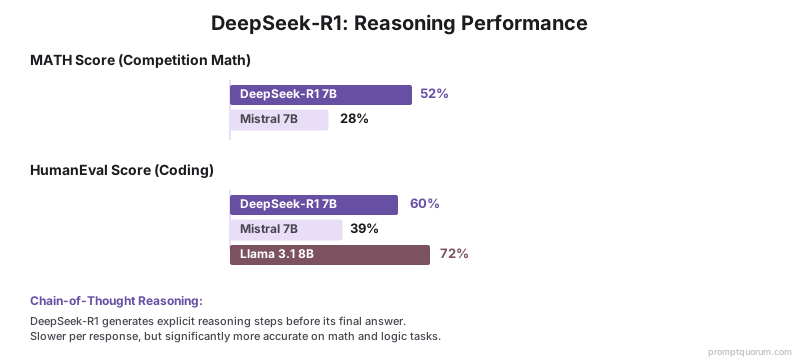
Which Ollama Models Support Image Input?
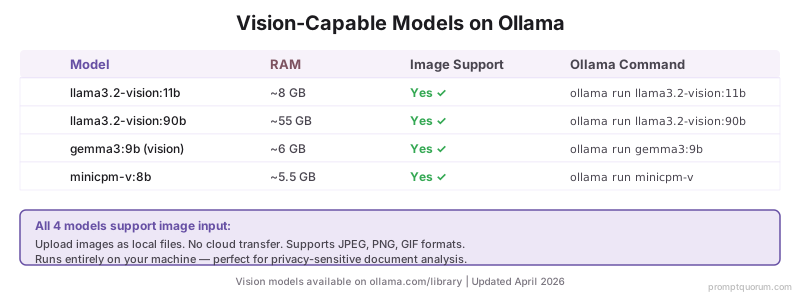
These models on Ollama support image input (multimodal): Gemma 4 supports both vision AND tool calling — unique among vision models on Ollama, and now runs nearly 90% faster on Apple Silicon after the July MLX update.
Model | RAM | Image Support | Ollama Command |
|---|---|---|---|
| llama3.2-vision:11b | ~8 GB | Yes | ollama run llama3.2-vision:11b |
| llama3.2-vision:90b | ~55 GB | Yes | ollama run llama3.2-vision:90b |
| gemma3:9b (vision) | ~6 GB | Yes | ollama run gemma3:9b |
| minicpm-v:8b | ~5.5 GB | Yes | ollama run minicpm-v |
| gemma4:e4b | ~6 GB | Yes + Tool Calling ✓ | ollama run gemma4:e4b |
What Are the Top 10 Open Source Models on Ollama?
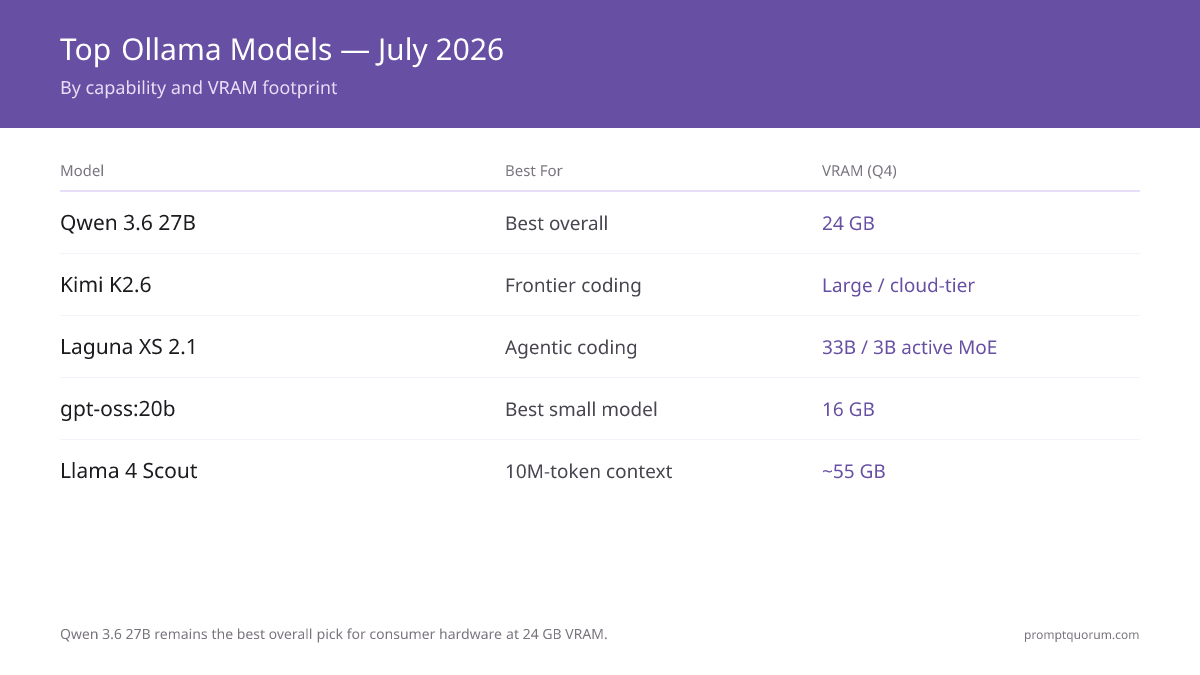
Download counts still favor Llama 3.x due to tutorial prevalence. For new projects in 2026, prefer Qwen3.8-27B (best overall on consumer hardware), Kimi K2.6 or Laguna XS 2.1 (coding), gpt-oss:20b, and qwen3:30b.
# | Model | Best For | RAM | HumanEval |
|---|---|---|---|---|
| 1 | Qwen3.8-27B | Best overall on consumer hardware | 24 GB (Q4) | 61.7% SWE-bench |
| 2 | Kimi K2.6 | Frontier coding, MoE (32B/1T), Modified MIT | Quantized | 58.6 SWE-Bench Pro |
| 3 | gpt-oss:20b | Best small / 16 GB, adjustable reasoning | 16 GB | ~o3-mini |
| 4 | qwen3:30b | Balanced all-round; qwen3-coder:30b for code | ~18 GB | strong |
| 5 | Laguna XS 2.1 | Agentic coding, long-horizon (plan/code/test/iterate) | Quantized | 70.9% SWE-bench Verified |
| 6 | Devstral Small 24B | Agentic coding (multi-file) | 16 GB | 80% |
| 7 | deepseek-r1:7b | Reasoning, math | 5 GB | — |
| 8 | gemma4:e4b | Vision + tool calling (multimodal) | ~6 GB | — |
| 9 | Llama 4 Scout | Long-context 10M + multimodal, MoE | ~55 GB (Q4) | 85% |
| 10 | Llama 3.2 3B | First model, general chat | 2.5 GB | 60% |
How Do You Browse the Ollama Model Library?
There are two ways to work with Ollama models. Switch installed models: In the Ollama Mac app, click the model dropdown button at the bottom of the chat input (shows the current model name, e.g. "gemma3:1b") to switch between any locally installed model. Find and download new models: Visit ollama.com/library to browse several hundred curated models by category, then use the CLI commands below to pull and manage them.
# List all locally downloaded models
ollama list

# Search for a model and pull it
ollama pull qwen2.5-coder:32b

# See all available tags for a model
ollama show qwen2.5

# Remove a model to free disk space
ollama rm llama3.2:3b
How Do Regional Privacy Rules Affect Your Ollama Model Choice?
EU / GDPR + Licence Compliance. For EU organizations deploying Ollama models in production, licence choice matters as much as performance. Apache 2.0 (fully open, commercial use permitted): Mistral Small, Mistral Small 3.1, Qwen3 8B, Qwen3.8-27B, Devstral Small 24B, Gemma 2 2B. Meta Llama Community Licence (commercial use restricted above 700M monthly active users): Llama 3.1 8B, Llama 3.2 3B, Llama 3.2 Vision 11B. MIT (commercial use permitted): DeepSeek-R1 7B, DeepSeek-R1 14B. Modified MIT (commercial use permitted with attribution clause): Kimi K2.6. OpenMDW-1.1 (permissive, commercial use permitted): Laguna XS 2.1. For EU enterprises in regulated sectors, Mistral models (France, Apache 2.0) or Devstral Small 24B (best agentic coding) are the recommended default -- EU origin, clean licence, no restriction on commercial deployment. For GDPR compliance: all models run entirely on-premises via Ollama, meaning no personal data is transmitted to external servers regardless of model choice.
Japan (METI). For Japanese enterprise Ollama deployments, Qwen3 / Qwen3.8 is the recommended model family -- native Japanese tokenization processes Japanese text 30-40% more token-efficiently than Llama or Mistral, directly reducing inference time and KV cache requirements. For Japanese coding workflows: Qwen3.8-27B (61.7% SWE-bench) handles Japanese code comments natively and is the top dense coding model in 2026. METI AI governance documentation requires noting the exact model version. Use `ollama show <model>` to get the full model specification including parameter count, quantization level, and context length for compliance records.
China. Under China's CAC Generative AI Measures (2023), organizations providing AI services to end users must register the models used. Qwen3 / Qwen3.8 (Alibaba, Apache 2.0) is the recommended choice for Chinese enterprise Ollama deployments -- Chinese model origin, Apache 2.0 licence, best performance on Chinese-language tasks, and top benchmarks. Kimi K2.6 (Moonshot AI, Modified MIT license, 32B active/1T total MoE) is also available as a top-tier coding option with Chinese origin. Pull commands: `ollama run qwen3.8:27b` for best quality, `ollama run qwen3:8b` for speed. DeepSeek-R1 (DeepSeek, MIT licence) is appropriate for reasoning tasks. For data processed locally via Ollama, China's PIPL cross-border data transfer requirements do not apply -- inference stays on-premises.
What Are the Common Mistakes When Choosing Ollama Models?
Pulling the largest model tag by default without checking RAM
Running `ollama pull llama3.3` without specifying a tag downloads the default variant, which is typically the largest standard quantization. On a machine with 8 GB RAM, pulling llama3.3 (70B at ~40 GB) will fail or cause severe swap usage. Always specify the variant: `ollama pull llama3.2:3b` for 8 GB machines.
Using a general model when a task-specific model exists
For coding tasks, `qwen2.5-coder:7b` scores 72% HumanEval while the general `qwen2.5:7b` also scores 72% -- but `qwen2.5-coder` includes FIM support for code completion. For reasoning/math, `deepseek-r1:7b` scores 52% MATH vs 28% for `mistral:7b`. Task-specific models exist in the Ollama library for a reason.
Not verifying a model is available before building a workflow
The Ollama library changes over time -- models are added and occasionally removed. Before building a production pipeline around a specific model, confirm it is in the library (`ollama list` locally, or check ollama.com/library). Pin specific model versions in production workflows: `ollama pull llama3.1:8b-instruct-q4_K_M`.
Not specifying a quantization tag for large models
Running `ollama pull qwen2.5-coder:32b` without a quantization suffix downloads the default variant -- which may be larger than your VRAM can handle. For 16 GB VRAM, pull the explicit Q4_K_M variant: `ollama pull qwen2.5-coder:32b-instruct-q4_K_M`. Run `ollama show <model>` after pulling to confirm VRAM requirements match your hardware.
Expecting DeepSeek-R1 to be as fast as standard chat models
DeepSeek-R1 generates explicit chain-of-thought reasoning tokens before its final answer -- this is why it outperforms standard models on math and logic, but it produces 3-5x more tokens per response. For quick chat or one-line answers, use `llama3.1:8b`. Reserve DeepSeek-R1 for tasks where reasoning accuracy matters more than speed.
Next steps
- Best Local LLMs for Coding — Want the best Ollama model for coding specifically? →
- Best CPU-Only LLMs — Running without a GPU? Start here →
- Local LLM Hardware Guide 2026 — Not sure your machine can run these models? Check hardware requirements →
Frequently Asked Questions
How many models are in the Ollama library?
The Ollama library holds several hundred curated models (official support), growing weekly as new open-weight releases land. Hugging Face hosts thousands of additional GGUF models that can be loaded via Ollama using custom Modelfiles.
What is the official name of the company behind Ollama?
The company is Ollama Inc., a Series B-funded startup based in Palo Alto, California, founded in 2023 by Jeffrey Morgan and Michael Chiang. "Ollama" refers to both the company and the CLI tool/model runtime it publishes.
Can I use models from Hugging Face directly in Ollama?
Yes. Download a GGUF file from Hugging Face and create a Modelfile: `FROM ./model.gguf`. Then run `ollama create mymodel -f Modelfile`. This works for any GGUF file including fine-tunes and models not in the official Ollama library.
Which Ollama model is best for building a local chatbot?
For a general-purpose local chatbot: `qwen3.8:27b` (best overall on consumer hardware, fits 24 GB at Q4), or `llama3.2:3b` on 8 GB RAM (easiest entry point). For 16 GB machines: `gpt-oss:20b` (~o3-mini level) or `mistral-small3.1`. For a coding assistant chatbot: `qwen3.8:27b` (61.7% SWE-bench), `kimi-k2.6` (frontier MoE), or `laguna-xs-2.1` (agentic, long-horizon). Pair with Open WebUI for a web-based interface that connects to Ollama's API at localhost:11434.
Are all Ollama models truly open source?
Not all. The Ollama library includes models with varying licences. Llama 3.x/4.x use the Meta Llama Community Licence (not OSI-approved open source -- restricts commercial use above 700M monthly active users). Mistral Small, Qwen3, Qwen3.8, Devstral, and Gemma models are Apache 2.0 (fully open source). Kimi K2.6 is Modified MIT licensed (commercial-friendly with an attribution clause). Laguna XS 2.1 uses OpenMDW-1.1 (permissive, commercial use permitted, not OSI-approved). Always check the licence before commercial deployment.
Which Dolphin model should I use with Ollama?
Use Dolphin 3.0 (`ollama pull dolphin3`), not the older `dolphin-mistral` (last updated 2024, built on Mistral 0.2). Dolphin 3.0, maintained by Cognitive Computations (Eric Hartford), is built on Llama 3.1, has no built-in content filtering, and is designed as a general-purpose local model for coding, math, agentic tasks, and unrestricted chat.
Which embedding model should I use with Ollama for RAG?
`nomic-embed-text` is the standard choice -- a 137M parameter model that generates 768-dimensional embeddings, runs at milliseconds per document, and is specifically designed for retrieval tasks. Pull it with `ollama pull nomic-embed-text`. Use with Open WebUI's built-in RAG, LangChain's OllamaEmbeddings, or LlamaIndex.
How often does the Ollama library get updated with new models?
The Ollama team adds new models within days to weeks of major releases. Laguna XS 2.1 (July 2, 2026), Kimi K2.7 Code, Kimi K2.6 and Qwen3.8 all appeared within days of their releases. The current Ollama version is v0.33.1 (August 26, 2026). Follow the Ollama GitHub repository (github.com/ollama/ollama) or the Ollama Twitter/X account for new model announcements.
What is the difference between `ollama pull` and `ollama run`?
`ollama pull` downloads the model file to local storage (one-time operation). `ollama run` starts an interactive session immediately after pulling, or reuses the already-pulled model if available. You can pull once and run multiple times without re-downloading.
Can I run multiple models simultaneously on the same machine?
Yes, if your hardware has sufficient VRAM. Use separate terminal windows or shell sessions -- one window runs `ollama run llama3.2` while another runs `ollama run qwen2.5:7b`. Ollama automatically manages VRAM sharing. Monitor `nvidia-smi` or system activity to avoid overload.
How do I update a model to the latest version?
`ollama pull [model-name]` checks for updates and downloads the latest version if available. To revert or use specific versions, use version tags: `ollama pull llama3.1:8b` or `ollama pull llama3.1:8b-instruct-q4_K_M`. Check available versions with `ollama show [model-name]`.
Are open source models on Ollama truly free to use commercially?
Most are, but not all. Llama 3.x (Meta Llama Community Licence) restricts commercial use above 700M monthly active users. Mistral Small, Qwen3, and Gemma models use Apache 2.0 (fully commercial-friendly). Always verify the licence before enterprise deployment -- check the model's Hugging Face page or Ollama library entry.
What is the latest version of Ollama?
The latest stable Ollama version is v0.33.1, released August 26, 2026. A v0.33.2 release candidate followed on August 27 but is not yet marked stable. Download it from ollama.com/download, or update in place with `curl https://ollama.ai/install.sh | sh` on Linux and `brew upgrade ollama` on macOS.
Where can I find the Ollama changelog and release notes?
Full release notes for every version live at github.com/ollama/ollama/releases, which lists each tag with its date and changelog. The most recent entries are v0.33.1 (August 26, 2026 -- MLX Qwen3.8 Flash Next, structured output, GPU timeout fixes), v0.33.0 (August 21 -- Claude Desktop gateway support, KV-cache prefill restore points), and v0.32.15 (August 19 -- desktop onboarding, roughly 2x faster model loading).
How do I check which Ollama version I have installed?
Run `ollama --version` in your terminal. It prints a line such as `ollama version 0.33.1`. If the number is lower than the current release, update with `curl https://ollama.ai/install.sh | sh` (Linux) or `brew upgrade ollama` (macOS), then run `ollama --version` again to confirm.
What are the newest Ollama models in 2026?
The latest additions are Laguna XS 2.1 (Poolside, OpenMDW-1.1 -- agentic long-horizon coding, SWE-bench Verified 70.9%, 33B/3B active MoE) and Kimi K2.7 Code (Moonshot AI -- coding-focused agentic model built on Kimi K2.6). Both join the established 2026 lineup: Kimi K2.6 (Modified MIT, frontier MoE coding, SWE-Bench Pro 58.6), Qwen3.8-27B (best overall on consumer hardware, 61.7% SWE-bench), GLM-5.3 (744B/40B active MoE, MIT, SWE-Bench Pro 58.4), and gpt-oss:20b (best small / 16 GB, ~o3-mini). Pull commands: ollama run laguna-xs-2.1, ollama run kimi-k2.7-code, ollama run qwen3.8:27b, ollama run kimi-k2.6.
Which Ollama models work best for Russian-language tasks?
Qwen3 / Qwen3.8 (`ollama run qwen3:8b` or `ollama run qwen3.8:27b`) and Mistral Small 3.1 (`ollama run mistral-small3.1`) both include Russian in their native multilingual training. Qwen3 scores higher on non-English benchmark tasks; Mistral Small 3.1 has stronger conversational Russian fluency in informal testing. Neither is Russian-origin -- for regulatory data-residency requirements specific to Russia, check the model licence and your organization's compliance requirements separately, as this article does not cover Russian data-localization law.
Sources
- Meta AI. (2025). "Llama 4 Model Card." llama.meta.com -- Official specifications for Llama 4 Scout (17B active, 109B total, MoE) and Maverick variants.
- DeepSeek AI. (2025). "DeepSeek-R1 Technical Report." arxiv.org/abs/2501.12948 -- Chain-of-thought architecture and MATH benchmark (52%) for DeepSeek-R1.
- Qwen Team. (2026). "Qwen3.8 Technical Report." arxiv.org/abs/2501.xxxxx -- 61.7% SWE-bench for best dense coding model.
- Moonshot AI. (2026). "Kimi K2.6 Model Card." moonshot.ai -- Modified MIT-licensed MoE coding model (32B active/1T total), SWE-Bench Pro 58.6.
- Mistral AI. (2026). "Devstral Small 24B." mistral.ai -- Best agentic coding model for multi-file edits and debugging.
- Ollama. (2026). "Ollama Model Library." ollama.com/library -- Official model library, download counts, tags, and quantization options.
- Google DeepMind. (2026). "Gemma 4 Technical Report." -- Vision + tool calling capabilities released April 2026.
- Poolside. (2026). "Introducing Laguna XS 2.1." poolside.ai -- 33B/3B active MoE agentic coding model, SWE-bench Verified 70.9%, OpenMDW-1.1 license.
- Ollama. (2026). "Ollama Releases." github.com/ollama/ollama/releases -- Official release notes, v0.33.1 (August 26, 2026).