Key Takeaways
- A local LLM frontend is the chat interface you use to talk to your model. Ollama provides the API; the frontend is the UI.
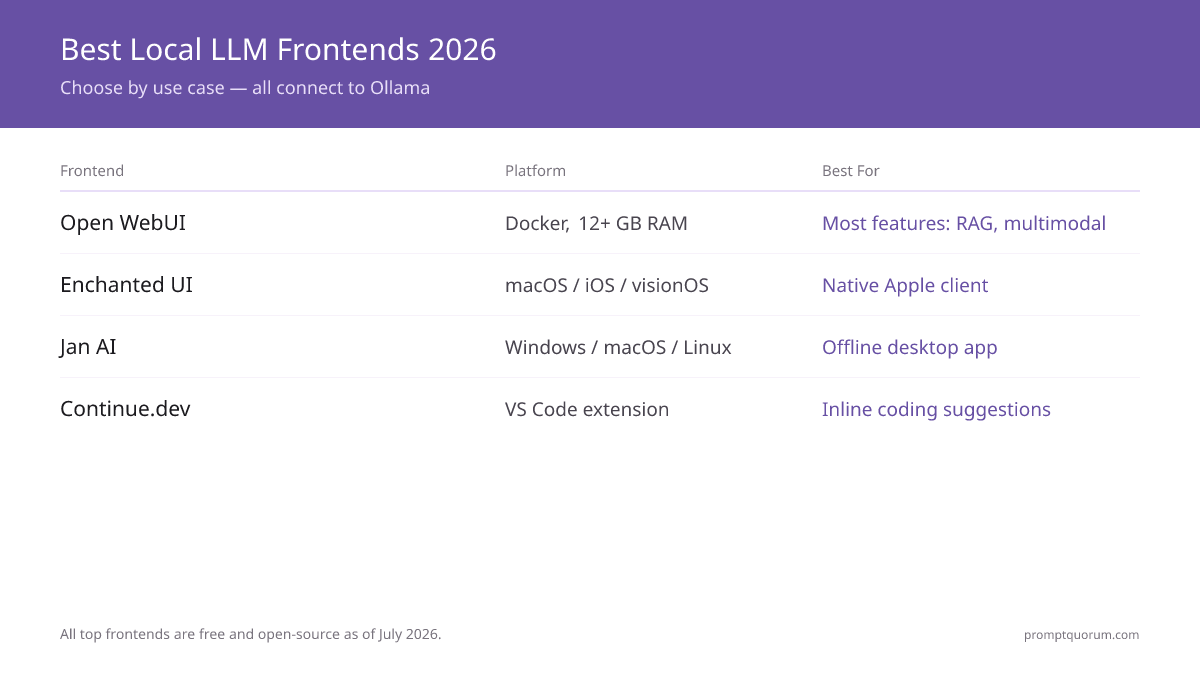
- Open WebUI is the most feature-rich (RAG, multimodal, knowledge bases, function calling) with 140,000+ GitHub stars. Requires Docker. 12 GB RAM+ recommended.
- Enchanted UI is a native iOS, macOS, and visionOS app (not a browser tool), available on the App Store. Best for Apple users who want a polished ChatGPT-style client for Ollama.
- Jan AI is a desktop app (Windows, macOS, Linux) with offline sync. No server setup. Popular with non-technical users.
- Continue.dev is a VS Code extension for inline code suggestions from your local Ollama model — development stopped after Cursor acquired the project in June 2026, so the extension still works but gets no further updates.
- All top frontends are open-source and free.
📍 In One Sentence
The best local LLM frontends in July 2026: Open WebUI (most features, RAG, Docker, 12 GB RAM+, 140,000+ GitHub stars), Enchanted UI (native macOS/iOS/visionOS app), Jan AI (offline desktop app) — all free and open-source.
💬 In Plain Terms
A "frontend" is the chat window you type in — it connects to Ollama or LM Studio running in the background. Open WebUI is the most powerful but needs Docker installed. Enchanted UI is the simplest way to chat on a Mac or iPhone — install the app and point it at your Ollama server.
Top 8 Local LLM Frontends: Feature Comparison
Frontend | Type | Best For | Setup Time | RAM Required | Open Source |
|---|---|---|---|---|---|
| Open WebUI | Web app (Docker) | Feature-rich, RAG, teams | 5 min (with Docker) | 12 GB+ | Yes |
| Enchanted UI | Native app (iOS/macOS/visionOS) | Apple users, native chat client | ~2 min (App Store) | 8 GB+ | Yes |
| Jan AI | Desktop app | Non-technical users, offline | 3 min (install) | 8 GB+ | Yes |
| Continue.dev | VS Code extension | Code completion (development stopped mid-2026) | 2 min (install extension) | 8 GB+ | Yes |
| Lobe Chat | Web app | Privacy, user customization | 5 min | 8 GB+ | Yes |
| Gradio | Python library | Custom interfaces, ML teams | 5 min (Python) | 8 GB+ | Yes |
| Streamlit | Python framework | Data scientists, dashboards | 5 min (Python) | 8 GB+ | Yes |
| TextGen (formerly Text-generation-webui) | Web (complex) | Experimentation, advanced users | 15 min | 12 GB+ | Yes |
What Makes Open WebUI the Most Popular Frontend?
Open WebUI is the most downloaded local LLM frontend on GitHub with 140,000+ stars -- it packs RAG, multimodal, web search, and multi-user collaboration into a single Docker container. It works with Ollama, LM Studio, or any OpenAI-compatible API.
Key features:
- RAG (Retrieval-Augmented Generation): Upload documents (PDFs, text files) and have the model answer questions about them.
- Multimodal support: Upload images and ask questions about them.
- Web search integration: The model can search the web for current information.
- Knowledge bases: Create persistent collections of documents that the model references.
- Function calling and tools: Build workflows where the model can call functions or tools.
- Team collaboration: Multiple users can share the same instance.
- Model marketplace: Browse and download models directly from the UI.
The main limitation is that Open WebUI requires Docker, which adds a 5-minute setup overhead. Once running, it adds RAG, multimodal, multi-user, and web search -- features unavailable in lightweight alternatives.
# Run Open WebUI with Docker (5 min setup)
docker run -d -p 3000:8080 --add-host=host.docker.internal:host-gateway \
  -e OLLAMA_BASE_URL=http://host.docker.internal:11434 \
  --name open-webui ghcr.io/open-webui/open-webui:latest

# Then open http://localhost:3000 in your browser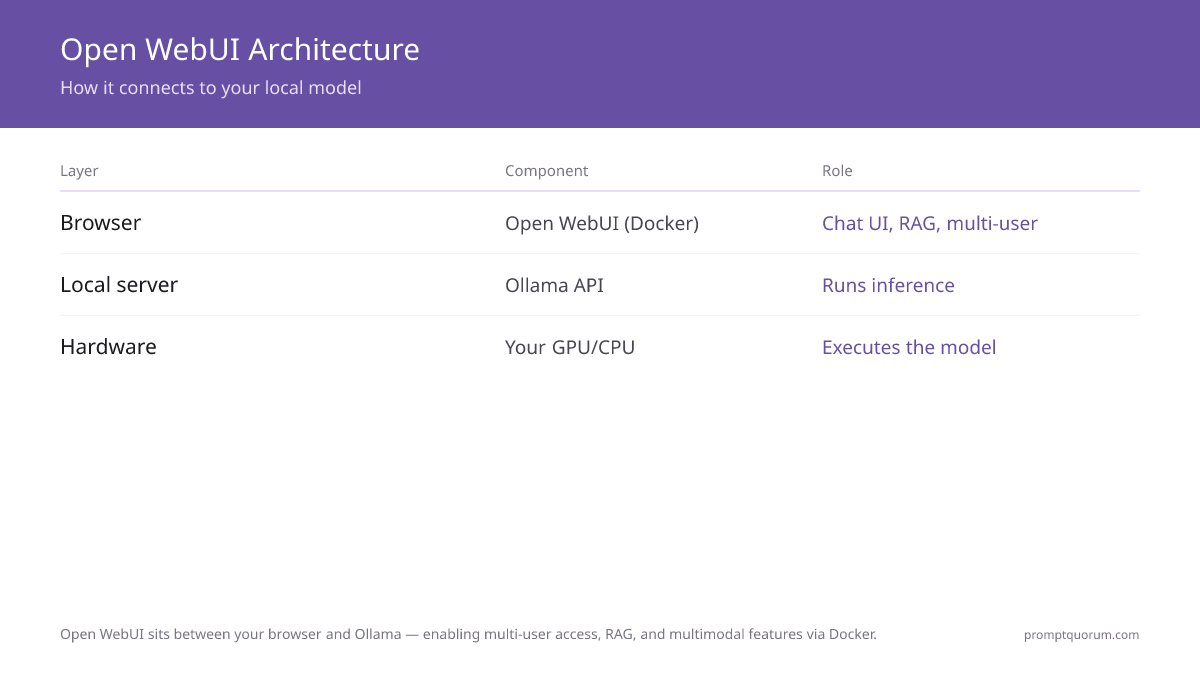
•⚠️ Warning: Open WebUI requires Docker. If Docker is not installed, add 10-15 minutes to your setup time. Run `docker --version` to check before starting.
•💡 Pro Tip: Set WEBUI_AUTH=true in your Docker command to require user login. This is required for any multi-user or team deployment.
Why Choose Enchanted UI for a Native Apple App?
Enchanted UI is a native iOS, macOS, and visionOS app for chatting with your local Ollama model -- install it from the App Store or build it from source, then point it at your Ollama server address. The open-source project has 6,000+ GitHub stars and ships under the Apache-2.0 license, making it the most polished native option for Apple hardware in this guide.
Key features:
- Native Apple app: Runs on iPhone, iPad, Mac, and Apple Vision Pro with a ChatGPT-style interface -- not a browser tab.
- Multimodal input: Supports voice prompts and image attachments in addition to text.
- Private: Conversation history stays on your device; no data leaves your machine.
- macOS Spotlight integration and dark mode: Launch chats from Spotlight; clean, modern interface.
Enchanted UI is perfect for Apple users who want a native, ChatGPT-like app instead of a browser tab or Docker container. It lacks RAG and knowledge bases, but for everyday chat on iPhone, iPad, Mac, or Vision Pro, it is the most polished option in this guide.
# 1. Start your Ollama model
ollama run llama3.2:3b

# 2. Install Enchanted UI from the App Store (iOS/macOS/visionOS)
# or build from source: https://github.com/gluonfield/enchanted

# 3. In Enchanted UI settings, enter your Ollama server address
# (localhost:11434 on the same Mac, or the Mac's LAN IP from iOS/visionOS)•💡 Pro Tip: On macOS, Enchanted UI defaults to Ollama at localhost:11434. On iOS or visionOS, you must manually enter your Mac's network address (e.g. http://192.168.1.x:11434) in Settings, since the phone or headset cannot reach "localhost" on a different machine. Always run `ollama serve` (or start the Ollama app) first.
Why Is Jan AI Best for Desktop Users?
Jan AI is a desktop app (Windows, macOS, Linux) that bundles model management, inference, and chat into one offline application -- no server or Docker setup needed. It is similar to LM Studio but with stronger offline support and a community-driven approach.
Key features:
- Offline-first: Models sync to your device; no internet required to chat.
- GPU and CPU fallback: Automatically uses GPU if available (including AMD ROCm/HIP acceleration on Linux, added in v0.8.2), falls back to CPU.
- Private by default: No account required, no telemetry.
- Extension marketplace: Add plugins like RAG, web search, or tools.
Jan is best for non-technical users who want a polished desktop app. Jan AI has 41,000+ GitHub stars and full native support on Windows, macOS, and Linux -- it is a mature LM Studio alternative with strong community support.
•📌 Key Point: Jan AI stores models at ~/jan/models -- separate from Ollama's model cache. If you use both, downloaded models are not shared and disk usage doubles for any model used in both apps.
How Do You Use Continue.dev for Code Completions?
Continue.dev turns your local Ollama model into inline code suggestions inside VS Code or JetBrains -- setup takes 2 minutes and requires no cloud API key. When you start typing, Continue suggests completions based on your local model.
Cursor acquired Continue in June 2026, and the Continue team shipped a final v2.0.0 release on June 19, 2026 before the GitHub repository went read-only -- the VS Code extension and JetBrains plugin still install and work with a local Ollama model, but no further updates are planned.
Setup (2 minutes):
1. Install Continue from the VS Code marketplace.
2. Point it to your Ollama instance (Config → Configure Continue → Add localhost:11434).
3. Start typing code and press Tab or Ctrl+Shift+\ to get completions.
Continue still works well for developers who want code suggestions without sending code to cloud APIs, but if you want a tool that keeps receiving updates, Tabby is a self-hosted, open-source alternative built specifically for local code completion. For coding tasks, Ollama with Qwen2.5-Coder 7B or Llama Code models produces reasonable suggestions with either extension.
•⚠️ Warning: Cursor acquired Continue in June 2026 and the continuedev/continue GitHub repository is now read-only -- the extension still works with Ollama, but expect no new features or bug fixes. For ongoing development, evaluate Tabby as a self-hosted alternative.
•💡 Pro Tip: For code completion, Qwen2.5-Coder 7B (`ollama run qwen3-coder:7b`) outperforms general models like Llama 3.2 on code tasks. Switch the model in Continue's config.json after setup.
Should You Self-Host or Use a Cloud Frontend?
All frontends in this guide run on your machine or server -- no prompt data leaves your device, and there are no API costs. The alternative is cloud frontends like ChatGPT, Claude, or Gemini, which connect to remote servers.
- Choose self-hosted if: you have sensitive data, you want zero API costs, you want to customize the interface, or you are offline.
- Choose cloud if: you need the best model quality, you do not want to manage infrastructure, or you are low-volume.
- Use both in parallel: Tools like PromptQuorum let you dispatch a prompt to both your local model and cloud APIs simultaneously, so you can compare results side-by-side.
•📌 Key Point: All frontends can point to the same Ollama instance -- localhost:11434 on the same machine, or your machine's LAN IP for mobile apps like Enchanted UI. Switching frontends requires no model re-download -- Ollama keeps all downloaded models regardless of which frontend you use.
How Do Regional Compliance Rules Affect Your Frontend Choice?
EU / GDPR
For EU organizations deploying local LLM frontends, data sovereignty is the primary driver. All 8 frontends in this guide run entirely on-premises -- no prompt content, conversation history, or uploaded documents leave your infrastructure. This satisfies GDPR Article 5 (data minimization) and eliminates the Article 28 data processor relationship.
For regulated EU sectors (healthcare, legal, finance): Open WebUI is the recommended frontend because it logs all conversations locally with exportable audit trails. BSI-Grundschutz (BSI IT-Grundschutz Kompendium, OPS.1.1.4) recommends local processing for sensitive document workloads; CNIL guidance on AI and GDPR notes that local inference eliminates the Article 28 third-party data processor relationship. These guidance documents do not constitute formal regulatory approval for your specific deployment — consult your sector-specific DPA or legal counsel for binding compliance requirements. As a technical hygiene measure, enable authentication in Open WebUI (`WEBUI_AUTH=true` in Docker) and restrict access to authorized users. Your DPO determines whether this satisfies GDPR Article 32 for your specific processing activities.
Japan (METI)
METI AI governance guidelines require documenting AI tool versions in production deployments. Open WebUI version is visible in Settings → About, and Docker image tags provide exact version pinning for compliance records. For Japanese enterprise teams, Open WebUI with Qwen3 8B (`ollama run qwen3:8b`) is the recommended stack -- native Japanese tokenization provides better quality for Japanese document Q&A in the RAG feature.
China
Under China's Data Security Law (数据安全法), all frontends in this guide satisfy local data residency requirements when deployed on-premises or on domestic cloud providers (Alibaba Cloud, Tencent Cloud). Open WebUI on Docker is compatible with Chinese cloud VM instances. For Chinese enterprise RAG deployments, pair Open WebUI with Qwen3 14B for optimal Chinese-language document analysis.
•⚠️ Warning: For EU regulated sectors (healthcare, legal, finance): Open WebUI's default Docker setup has no authentication. Add WEBUI_AUTH=true before exposing to any internal or external network — authentication is a necessary technical measure under GDPR Article 32, but your organisation's full Article 32 compliance requires a broader technical and organisational measures (TOMs) assessment. Consult your DPO.
•🔍 Did You Know?: METI AI governance guidelines require documenting AI tool versions in production. Open WebUI version is visible in Settings → About, and pinning Docker images to a specific release tag (instead of :latest) provides exact version records for compliance.
What Are the 5 Most Common Mistakes When Choosing a Frontend?
- Assuming you need the most feature-rich frontend. Open WebUI has the most features, but if you only want to chat, Enchanted is faster. Choose based on your actual needs, not feature count.
- Not realizing you can switch frontends easily. Your Ollama model and models are separate from the frontend. Switch from Open WebUI to Enchanted UI to Jan AI without re-downloading models -- they all share the same Ollama instance.
- Trying to run Open WebUI on a 8 GB RAM machine without GPU. Open WebUI + model inference requires 12+ GB total. On limited hardware, use Enchanted UI or a lightweight alternative.
- Ignoring model quantization and frontend requirements. A 13B model in 8-bit format is 13 GB alone. Open WebUI adds overhead. Do the math: model size + frontend overhead + OS = total RAM needed.
- Not setting up Ollama as a background service first. Many new users try to run multiple frontends simultaneously without realizing Ollama needs to be running. Set up Ollama first (as a service via `ollama serve` in the background), then add your chosen frontend.
•⚠️ Warning: Running Open WebUI + model inference on 8 GB RAM frequently causes out-of-memory crashes. The minimum for a smooth experience is 16 GB total system RAM -- 12 GB for the model, 4 GB for the OS and Docker.
Common Questions About Local LLM Frontends
Can I run multiple frontends simultaneously?
Yes. All frontends connect to the same Ollama API (localhost:11434). You can have Open WebUI, Enchanted UI, and Continue.dev all running and using the same model simultaneously. This does not double the VRAM usage -- they all share the same model instance.
Which frontend is best for RAG?
Open WebUI has the most mature general-purpose RAG implementation among the frontends in this guide -- upload documents and the model answers questions about them. If document Q&A is your primary use case rather than a secondary feature, AnythingLLM (60,000+ GitHub stars) is purpose-built around RAG workspaces and is worth evaluating separately. For advanced RAG workflows, see Best Local RAG Tools.
Do I need a frontend at all?
No. Ollama provides a REST API at localhost:11434. You can write Python, JavaScript, or bash scripts to interact with the model directly via the API, with no frontend. A frontend is just for convenience and visual interaction.
Which frontend works on Linux?
Open WebUI, Jan AI, Lobe Chat, and Gradio/Streamlit all work on Linux. Jan AI added AMD ROCm/HIP GPU acceleration on Linux in v0.8.2 (June 2026), so Linux is no longer a beta platform for it. Enchanted UI is iOS/macOS/visionOS only and has no Linux version. Continue.dev works via VS Code on all platforms, though the project stopped active development in June 2026 after Cursor acquired it.
Can I host a frontend on a remote server?
Yes. All frontends are web apps (or can be containerized). You can run Ollama on a server and Open WebUI in Docker, then access it from your laptop via HTTP. Be sure to secure the interface with authentication or a firewall.
Which frontend uses the least RAM?
Enchanted UI adds minimal RAM overhead as a native app (well under 200 MB) since it has no Docker or database layer. Jan AI and Continue.dev also add minimal overhead (under 200 MB). Open WebUI in Docker adds approximately 500 MB-1 GB overhead. If RAM is constrained, use Enchanted UI on Apple devices or Continue.dev for code.
Can I use these frontends with LM Studio instead of Ollama?
Yes. Open WebUI works with any OpenAI-compatible API, including LM Studio's API at localhost:1234. LM Studio's REST API has reached a stable v1 release (no longer beta) and also added an Anthropic-compatible endpoint, so either Ollama or LM Studio works as a reliable backend. Change the base URL in settings.
Which frontend is best for a team of 5+ developers?
Open WebUI. It is the only frontend in this list designed for multi-user deployment: authentication, separate conversation histories per user, shared knowledge bases, and admin controls. Deploy it on a shared server with Docker and all team members access it via browser. Requires 12+ GB RAM on the host server.
Sources
- Open WebUI Contributors. (2026). "Open WebUI GitHub." -- Source code and Docker setup documentation for Open WebUI.
- Jan AI. (2026). "Jan AI Official Site." -- Desktop app documentation and model management guide.
- Enchanted Contributors. (2026). "Enchanted GitHub." -- Source code for the native iOS/macOS/visionOS Ollama client.
- Continue.dev. (2026). "Continue GitHub Repository." -- VS Code and JetBrains extension source; repository went read-only after the June 2026 Cursor acquisition.
- Lobe Chat Contributors. (2024). "Lobe Chat GitHub." -- Privacy-focused chat UI source code and deployment guide.
- Frontend choice affects user experience, not model output. Output quality depends on prompts, not interfaces: prompt engineering guide works across all frontends.