Key Takeaways
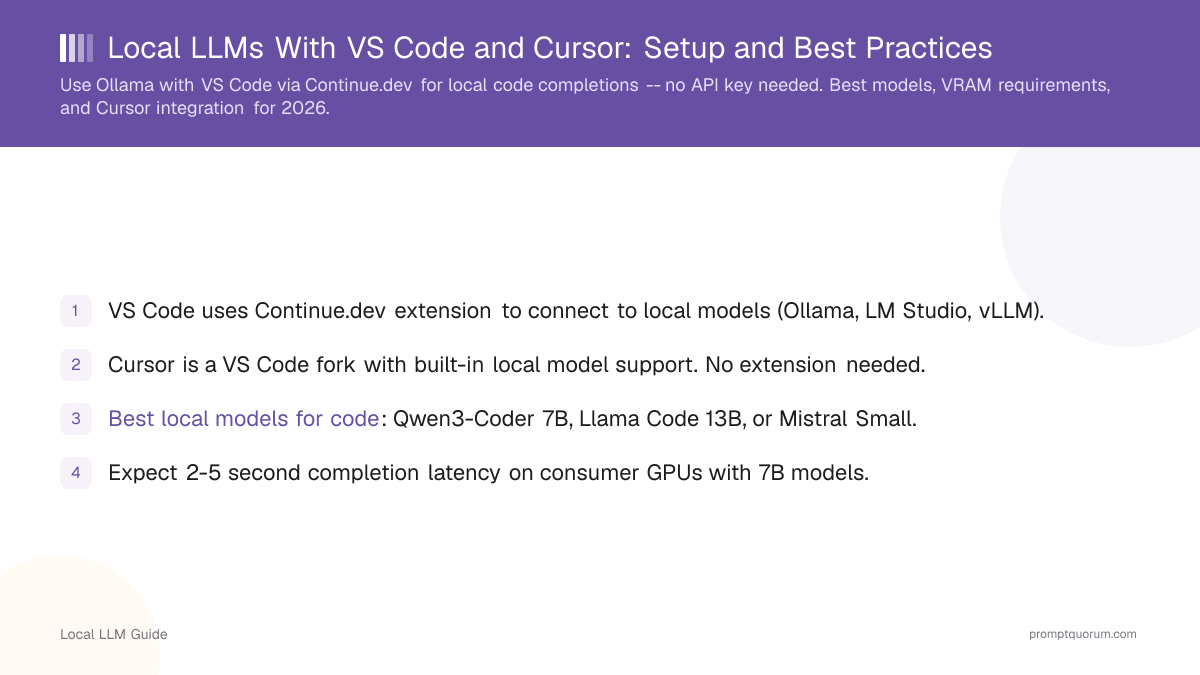
- VS Code uses Continue.dev extension to connect to local models (Ollama, LM Studio, vLLM).
- Cursor is a VS Code fork with built-in local model support. No extension needed.
- Best local models for code: Qwen2.5-Coder 7B, Code Llama 13B, or Mistral Small.
- Expect 2-5 second completion latency on consumer GPUs with 7B models.
- Local code completions are practical for personal use today, though not yet production-grade for teams.
📍 In One Sentence
VS Code (via the Continue.dev extension) and Cursor can both use local LLMs like Qwen2.5-Coder 7B or Code Llama 13B for private code completions, running entirely on your own GPU with no API key or cloud connection.
💬 In Plain Terms
Instead of sending your code to a cloud AI service, you can run the AI model on your own computer and connect it to your code editor. VS Code needs the free Continue.dev extension; Cursor supports this natively. You get autocomplete-style suggestions with your code never leaving your machine, though it's a bit slower than cloud tools like GitHub Copilot.
How to Set Up Continue.dev in VS Code?
Continue.dev is a VS Code extension for local and cloud code completions.
# 1. Install Continue from VS Code marketplace
# Search "Continue" and click Install

# 2. Make sure Ollama is running
ollama serve

# 3. Open Continue settings (Ctrl+Shift+P → Continue: Open Settings)
# config.json opens

# 4. Configure for your local model:
# Replace the default settings with:
{
  "models": [{
    "title": "Ollama",
    "provider": "ollama",
    "model": "qwen2.5-coder:7b",
    "apiBase": "http://localhost:11434"
  }],
  "tabAutocompleteModel": {
    "title": "Ollama",
    "provider": "ollama",
    "model": "qwen2.5-coder:7b"
  }
}

# 5. Start typing code and press Tab for completions
# Or Ctrl+Shift+\ to manually trigger completions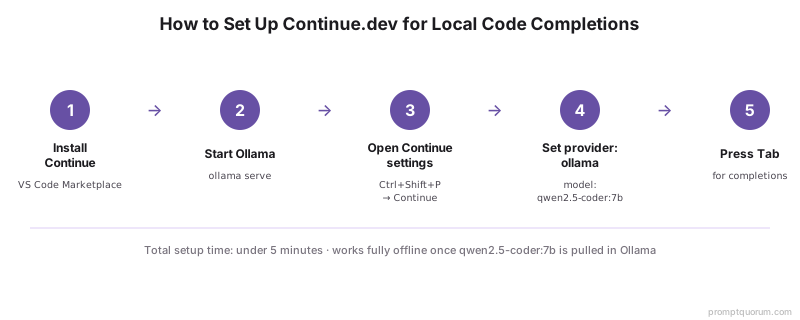
How to Use Local Models in Cursor?
Cursor is a VS Code fork optimized for AI-assisted coding. It has built-in support for local models via Ollama.
# 1. Download Cursor from cursor.sh
# 2. Make sure Ollama is running
ollama serve

# 3. Open Cursor Settings (Cmd/Ctrl + ,)
# 4. Search "Model" and set:
#    - Model Provider: "Ollama"
#    - Model: "qwen2.5-coder:7b" (or your choice)
#    - API Base: "http://localhost:11434"

# 5. Type code and press Tab for inline completions
# 6. Ctrl+K for multi-line completions
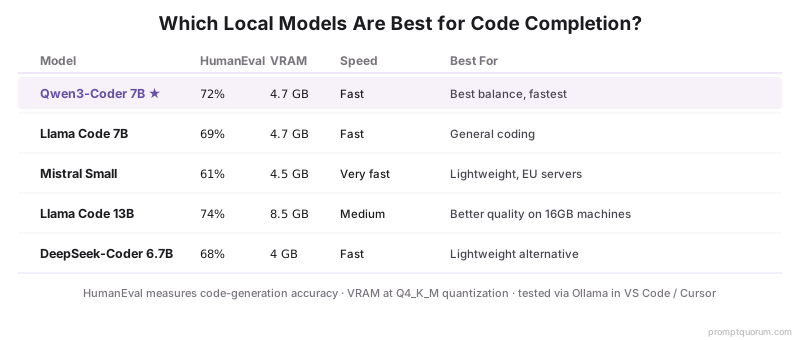
Which Models Are Best for Code?
Model | HumanEval | VRAM | Speed | Best For |
|---|---|---|---|---|
| Qwen2.5-Coder 7B | 72% | 4.7 GB | Fast | Best balance, fastest |
| Code Llama 7B | 69% | 4.7 GB | Fast | General coding |
| Mistral Small | 61% | 4.5 GB | Very fast | Lightweight, EU servers |
| Code Llama 13B | 74% | 8.5 GB | Medium | Better quality on 16GB machines |
| DeepSeek-Coder 6.7B | 68% | 4 GB | Fast | Lightweight alternative |
What Latency and VRAM Should You Expect?
Completion latency (time to first token) is critical for IDE experience. Here are typical numbers:
Hardware | Model | Latency | Throughput |
|---|---|---|---|
| RTX 4090 GPU | Qwen2.5-Coder 7B | 0.3-0.5 seconds | 150 tokens/sec |
| RTX 4070 GPU | Qwen2.5-Coder 7B | 0.8-1.5 seconds | 80 tokens/sec |
| M3 MacBook Pro | Qwen2.5-Coder 7B | 2-3 seconds | 20 tokens/sec |
| 8-core CPU only | Qwen2.5-Coder 7B | 5-10 seconds | 3 tokens/sec |
Advanced Configuration for Code Completions
Fine-tune the experience with these settings:
# config.json advanced settings
{
  "tabAutocompleteModel": {
    "contextLength": 2048,     # How much code context to send
    "maxTokens": 50            # Max tokens per completion
  },
  "completionOptions": {
    "maxContextTokens": 1024,
    "maxSuggestionsCount": 5,
    "debounceWaitMs": 200      # Wait before showing completions (ms)
  },
  # For faster inference, use smaller context:
  "models": [{
    "contextLength": 1024      # Smaller context = faster
  }]
}

# For best speed on 8GB machines:
# - Use 7B model (not 13B)
# - Set maxTokens to 30
# - Set debounceWaitMs to 500 (less flickering)
Common Mistakes With Local Code Completions
- Not tuning debounce latency. If completions feel "laggy", increase debounceWaitMs (e.g., to 400 ms) to avoid showing incomplete suggestions.
- Using a model too large for your VRAM. A 13B model + editor overhead can use 12+ GB. On 8GB machines, stick with 7B models.
- Expecting cloud-level code quality. GPT-5.6 is significantly better at code than any 7B model. Local completions are 70-80% of cloud quality.
- Running inference on CPU. CPU completions are impractical (5-10 second latency). GPU is required for usable completions.
Common Questions About Local Code Completions
Which model is best for code completions with Ollama?
Qwen2.5-Coder 7B is the best balance of speed and quality, scoring 72% on HumanEval and requiring only 4.7 GB VRAM. For 16 GB+ VRAM, Code Llama 13B (74% HumanEval, 8.5 GB VRAM) improves quality further.
Does Cursor support local LLMs natively?
Yes. Cursor supports custom OpenAI-compatible endpoints. Set the base URL to http://localhost:11434/v1 and enter any API key (Ollama does not require authentication). Select your Ollama model from the model dropdown and Cursor will route requests to your local model.
What is the minimum VRAM for usable local code completions?
8 GB VRAM is the minimum for usable code completions with a 7B model at Q4_K_M quantization (~4.5 GB). With only 8 GB, you have little headroom. 12 GB or more is recommended for comfortable use with Qwen2.5-Coder 7B or Code Llama 7B.
How do I set up Continue.dev in VS Code?
Install the Continue extension from the VS Code marketplace, then configure it to use Ollama: open the Continue sidebar, click the model selector, choose "Ollama" as provider, select your model (e.g., qwen2.5-coder:7b), and save. Continue will connect to Ollama at localhost:11434 automatically.
Is local code completion faster than cloud?
No. Cloud completions (GitHub Copilot) are faster due to optimized servers. Local completions have higher latency but zero cost and zero privacy risk.
Can I use local completions with other IDEs (PyCharm, Neovim)?
Yes, but setup varies. PyCharm has an Ollama plugin. For Neovim, use cmp-ollama (completion plugin). Always check the IDE community for integrations.
Can I use cloud models in Continue or Cursor?
Yes. Configure Continue to use OpenAI, Claude, or Gemini. You can also mix (local for fast, cloud for complex code).
Does local code completion work offline?
Yes. If you have pulled the model in Ollama, completions work entirely offline.
Can I use local LLMs for code review and chat in VS Code?
Yes. Continue.dev provides both tab completion and an inline chat mode. Highlight code in your editor, press Cmd/Ctrl+I, and type a question or instruction. The local model responds within the editor context. This works for code review, refactoring suggestions, and explanation requests.
What happens if Ollama is not running when I open VS Code?
Continue.dev will display a connection error and completions will not appear. Start Ollama with `ollama serve` in a terminal before opening VS Code. On macOS, you can set Ollama to start automatically at login in the Ollama menu bar settings.
Sources
- Continue.dev -- continue.dev
- Cursor Editor -- cursor.sh
- Continue GitHub -- github.com/continuedev/continue
- Qwen3-Coder -- github.com/QwenLM/Qwen3-Coder
- IDE integration is only half the problem. Writing effective prompts for code generation requires a different mindset than chatting. Learn prompt engineering for developers: best prompt engineering IDEs compares tools and techniques.