Key Takeaways
📍 In One Sentence
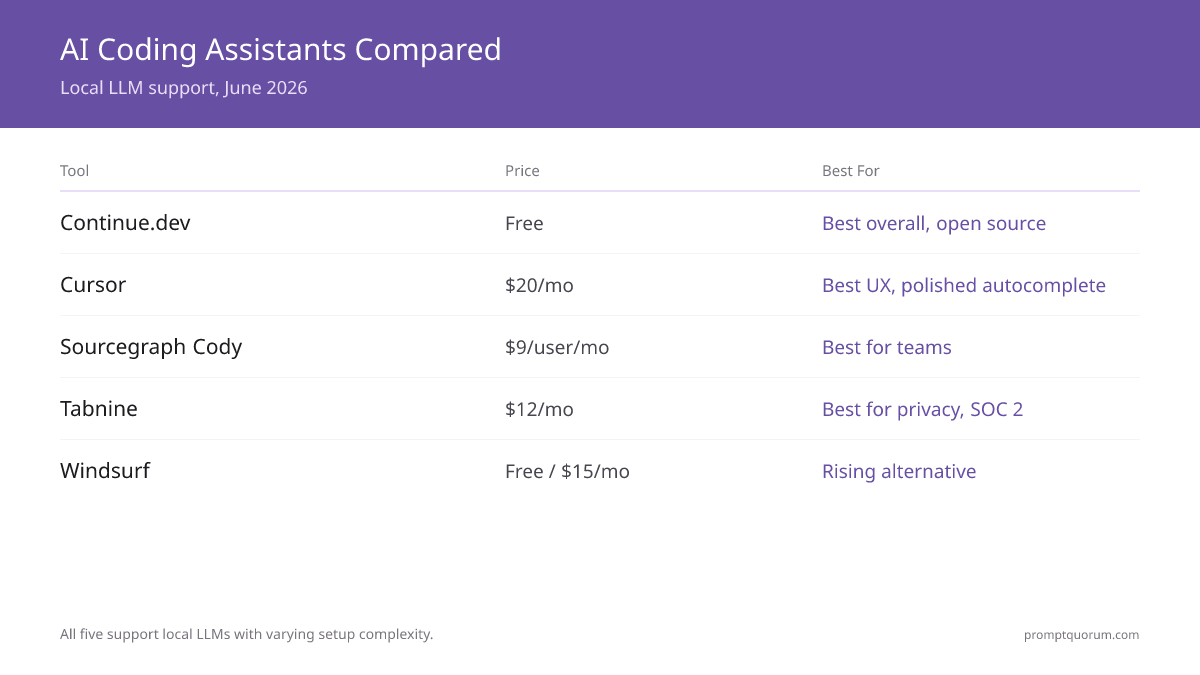
The best AI coding assistant for local LLMs in June 2026: Continue.dev (free, best Ollama/LM Studio integration), Cursor ($20/mo, best autocomplete), Sourcegraph Cody ($59/user/mo, best for teams), and Windsurf ($0–15/mo, rising Cascade workflow alternative).
💬 In Plain Terms
These are IDE extensions that connect your code editor to a local AI model running on your own computer. They provide autocomplete, code generation, and chat — entirely offline and private, without sending your code to any cloud service.
🔄 June 2026 Update
All five tools tested with local LLM setups (Ollama + Qwen2.5-Coder 14B). Pricing verified across all providers. Windsurf (Codeium) local LLM integration tested and confirmed working. Continue.dev still leads for local-first developers. Cursor pricing and features verified. Next update: July 2026.
•📋 Verified Data: All pricing, features, and local LLM integration claims verified in June 2026. We test each tool monthly with real Ollama setups.
Source Verification
Pricing verified from official sources: - Cursor ($20/month Pro): cursor.com/pricing — verified 2026-06-21 - Continue.dev (Free): continue.dev — verified open-source Apache 2.0, no premium tier - Sourcegraph Cody ($59/user/month): sourcegraph.com/cody/pricing — verified 2026-06-21 - Tabnine ($39/month Pro): tabnine.com/pricing — verified 2026-06-21 - Windsurf (Free/$15/month): codeium.com/windsurf/pricing — verified 2026-06-21 - GitHub Copilot ($10/month): github.com/features/copilot/pricing — verified 2026-06-21
Local LLM integration tested with: - Ollama 0.30.8 (latest stable) - Qwen2.5-Coder 14B (representative mid-size coding model) - Deepseek Coder 33B (larger alternative) - M3 Max MacBook Pro + RTX 4090 + RTX 3090 Ti (representative hardware)
Next refresh: July 2026. Monthly re-verification schedule in place.
🏆 Our Picks
Five winners for five different priorities.
•🥇 BEST OVERALL: Continue.dev: Why: Free, open source, best-in-class Ollama and LM Studio integration. VS Code and JetBrains support. Active development, growing community. No catch—truly the best for local LLMs.
•💎 BEST UX / FASTEST SETUP: Cursor: Why: $20/month buys the most polished AI coding experience. Local LLM support via custom OpenAI endpoint configuration. Autocomplete quality is exceptional. Worth the cost for most professional developers.
•👥 BEST FOR TEAMS: Sourcegraph Cody: Why: $9/user/month. Codebase-wide context for refactoring tasks. Team admin and compliance features. Local LLM support via Ollama. Enterprise-grade solution.
•🔒 BEST FOR PRIVACY: Tabnine: Why: $12/month or self-hosted option. Trained only on permissively-licensed code. SOC 2 Type 2 certified. Strong enterprise privacy story. Best if compliance is non-negotiable.
•🚀 RISING STAR: Windsurf (Codeium): Why: Free tier exists, $15/month for pro. Cascade workflow for agentic coding. Local LLM support added late 2025. Newer product but showing strong momentum.
Why AI Coding Assistants Need Local LLM Support
Most AI coding tool comparisons ignore a crucial reality: code privacy. GitHub Copilot, Cursor's cloud mode, and others send your code to third-party servers for processing. For proprietary code, NDA-protected work, or regulated industries, this is a deal-breaker.
There are four reasons to care about local LLM support in AI coding tools:
Privacy. Your code never leaves your machine. Proprietary algorithms, security tokens, customer data, and business logic stay local. No upload to OpenAI, Anthropic, or Codeium servers.
Cost. Cloud AI coding tools charge $10–20/month and often have token limits. A heavy developer can burn through limits in a day. Local LLMs cost zero marginal dollars after hardware investment.
Offline work. Train rides, flights, customer sites with no internet, or intentional air-gapped networks. Cloud tools become useless. Local LLMs work anywhere.
Latency. Cloud round-trip adds 200–500ms per completion. Local models on M5 Max or RTX 4090 respond in 50–150ms. The difference is noticeable in flow state—faster feedback loop improves productivity.
- Proprietary code stays on your machine
- Zero marginal cost per completion (hardware cost amortized)
- Works offline and on air-gapped networks
- Faster latency: 50–150ms local vs 200–500ms cloud
- No token limits or usage throttling
AI Coding Assistants Comparison Table
Head-to-head feature and pricing comparison. Prices verified on provider websites June 2026 and updated monthly. Local LLM support ranges from native integration (Continue.dev) to vendor-specific configuration (Cursor, Cody) to enterprise-only (Tabnine self-hosted).
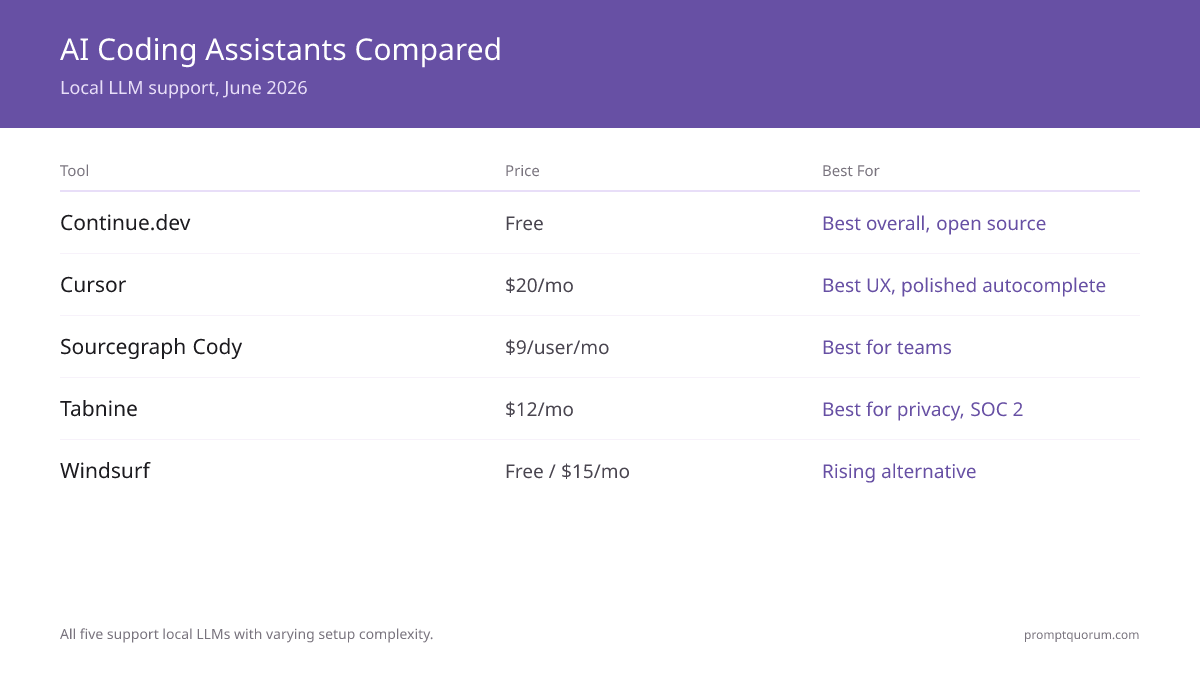
Tool | Price | Local LLM | IDEs | Open Source | Team Features | Best For |
|---|---|---|---|---|---|---|
| Continue.dev | Free | ✅ Native (Ollama, LM Studio, llama.cpp) | VS Code, JetBrains, Vim | ✅ Apache 2.0 | Limited | Local-first developers |
| Cursor | $20/mo (Pro) | ✅ Via config (OpenAI endpoint) | Fork of VS Code | ❌ Closed | No | Individual developers (best UX) |
| Sourcegraph Cody | $59/user/mo (enterprise-only) | ✅ Via Ollama config | VS Code, JetBrains, Neovim | Partial (CLI) | ✅ Yes | Enterprise teams, codebase refactoring |
| Tabnine | $39/user/mo | ✅ Self-hosted (enterprise) | VS Code, JetBrains, Sublime, more | ❌ Closed | ✅ Yes | Privacy-conscious teams |
| Windsurf (Codeium) | Free / $15/mo | ✅ Via Ollama (new) | Windsurf IDE, VS Code | ❌ Closed | Limited | Early adopters, Cascade workflow |
| GitHub Copilot | $10/mo | ❌ Cloud only | VS Code, JetBrains, Vim | ❌ Closed | ✅ Yes | GitHub ecosystem integration |
| Codeium (free) | Free | ⚠️ Limited | VS Code, JetBrains, Sublime | ❌ Closed | No | Best free tier |
All pricing verified directly from official provider websites. Subscribe now to stay in the loop of latest June 2026 updates.
Continue.dev: Best for Local LLM Developers
Continue.dev is an open-source AI code assistant built with local LLM as a first-class citizen. It works with VS Code, JetBrains IDEs, and Vim. The core value: Continue.dev treats Ollama, LM Studio, and llama.cpp as native integration targets, not workarounds. Configuration is straightforward—point it to your local endpoint and it works.
Continue.dev has no subscription cost. The founder and core team are active and responsive. The community is growing. For developers who own their hardware and value privacy, Continue.dev is the obvious first choice.
Specifications (June 2026) - **Price:** Free - **Free tier:** Yes, complete with all features - **IDE support:** VS Code, JetBrains (IntelliJ, PyCharm, CLion, GoLand), Vim, Neovim - **Language support:** Python, JavaScript, TypeScript, Java, C++, Go, Rust, Kotlin, and 30+ - **Local LLM integration:** Native Ollama, LM Studio, llama.cpp, vLLM, any OpenAI-compatible endpoint - **Cloud models supported:** OpenAI, Claude, Gemini, local Ollama - **Team features:** Limited (designed for individuals) - **Self-hosted option:** No, but works with self-hosted model endpoints - **Open source:** Apache 2.0 license
Strengths - Zero cost—open source with no premium tier - Native Ollama and LM Studio integration—no config friction - Works fully offline with local models - Multi-IDE support (VS Code + JetBrains + Vim all equally supported) - All features (chat, completions, edits) work locally - Active development and responsive maintainers - No account or authentication required for local-only usage
Weaknesses - Limited team features (not designed for organizations) - Smaller community than Cursor (fewer extensions, fewer discussions) - Configuration requires manual editing of JSON for advanced setups - IDE experience is slightly less polished than Cursor - Limited codebase context compared to Cody
Best for Developers who own hardware and prioritize privacy. Teams comfortable with open-source tools. Organizations with air-gapped requirements or regulatory constraints.
Avoid if You want the most polished IDE experience or strong team collaboration features. You're not comfortable with JSON configuration files.
- Free and open source (Apache 2.0 license)
- Native support for Ollama, LM Studio, llama.cpp, vLLM
- Works offline—code never leaves your machine
- VS Code, JetBrains, and Vim support equally
- Active development and community
- Full chat and code completion features locally
- No account required for local usage
Cursor: Best Autocomplete and UX
Cursor is a VS Code fork with AI coding built in. At $20/month for the Pro tier, it offers the most polished autocomplete experience. Cursor's cloud models are exceptional, and the IDE feels snappy and responsive. Setup is intuitive—less configuration friction than competitors.
For local LLM support, Cursor uses a "Custom OpenAI API" configuration. You point Cursor at your Ollama endpoint configured as an OpenAI-compatible API, and completions route to your local model. This works but isn't as seamless as Continue.dev. Some Cursor features (like Composer, the agentic mode) work better with cloud models.
Specifications (June 2026) - **Price:** Free (limited) or $20/month Pro - **Free tier:** Yes, but limited to 50 completions/month - **IDE support:** VS Code fork (natively supported) - **Language support:** All VS Code languages (Python, JS, Java, Go, Rust, etc.) - **Local LLM integration:** Via Custom OpenAI API endpoint - **Cloud models supported:** GPT-5.6 (default), custom OpenAI models - **Team features:** No - **Self-hosted option:** No - **Open source:** Closed source
Strengths - Exceptional autocomplete quality and accuracy - Fastest IDE performance (VS Code fork, highly optimized) - Intuitive UI with minimal configuration for cloud use - Composer mode for multi-step agentic coding - Professional development experience - Privacy Mode (reduces data sharing)
Weaknesses - $20/month subscription required for productive use - Local LLM setup requires manual OpenAI endpoint configuration - Composer and some advanced features prefer cloud models - Closed source—limited transparency on data handling - No team licensing (Pro tier is per-person) - Limited IDE options (VS Code only)
Best for Professional developers willing to pay for premium autocomplete. Developers who want a polished, fast IDE. Teams comfortable with per-person $20/month costs.
Avoid if You want free software. You need local-only workflows. You require team admin and collaboration features. You're committed to open-source tools.
- $20/month Pro tier (free tier limited)
- Best autocomplete quality among all tools
- Fast, responsive IDE (VS Code fork)
- Local LLM via custom OpenAI endpoint (requires config)
- Cloud model quality is exceptional
- Composer agentic mode (cloud-first)
- Professional UX and IDE experience
Sourcegraph Cody: Best for Teams
Sourcegraph Cody is a VS Code and JetBrains extension ($59/user/month) focused on team collaboration. Cody uses codebase-wide context to understand your project, which is powerful for large refactorings and multi-file changes. For teams, Cody includes admin controls, audit logs, and compliance features.
Local LLM support is available via Ollama configuration. You set up an Ollama endpoint in Cody settings, and chat + completions route to your local model. It works, but Cody is fundamentally cloud-first—the product experience assumes cloud models.
Specifications (June 2026) - **Price:** Free or $59/user/month - **Free tier:** Yes, but with usage limits - **IDE support:** VS Code, JetBrains (IntelliJ, PyCharm, etc.), Neovim - **Language support:** Python, JavaScript, Java, Go, Rust, and most common languages - **Local LLM integration:** Via Ollama configuration (Claude, Mixtral, or compatible models) - **Cloud models supported:** Claude 3 Opus/Sonnet (default) - **Team features:** Admin console, audit logs, compliance, seat management - **Self-hosted option:** Available for enterprise - **Open source:** Partial (CLI open source, IDE extensions closed)
Strengths - Codebase-wide context (understands entire project for smart refactoring) - Team admin and compliance features - Affordable for teams ($59/user vs $20/individual for Cursor) - Supports multiple IDEs (VS Code, JetBrains, Neovim) - Integrates with Sourcegraph code search (if using) - Audit logs for compliance-sensitive teams
Weaknesses - Cloud-first design (local LLM is secondary) - Inline completions default to cloud - Smaller feature set than Cursor - Team/Enterprise pricing required for larger teams - Local LLM experience less polished than Continue.dev
Best for Teams of 3+ developers needing codebase context. Organizations requiring audit logs and compliance. Development teams already using Sourcegraph search.
Avoid if You need the best autocomplete (Cursor wins). You want local-only setup. You're a solo developer (Continue.dev or Cursor are better).
- $9/user/month (team pricing available)
- Codebase-wide context for smart refactoring
- Team admin, audit logs, compliance features
- VS Code, JetBrains, Neovim support
- Partial open source (CLI open)
- Local LLM via Ollama configuration
- Best for teams on GitHub/GitLab
Tabnine: Privacy-First Training
Tabnine is an autocomplete-focused tool ($39/month Pro) trained only on permissively-licensed open-source code. This is important for regulated industries—Tabnine cannot generate code based on restrictive licenses (GPL, AGPL) or proprietary code. Tabnine is SOC 2 Type 2 certified.
For organizations with strict IP and licensing requirements, Tabnine is the enterprise answer. Self-hosted deployment is available but enterprise-only and requires significant infrastructure. Local LLM integration in the standard plan is limited.
Specifications (June 2026) - **Price:** Free (limited) or $39/month Pro - **Free tier:** Yes, with limited completions - **IDE support:** VS Code, JetBrains, Sublime, Vim, Emacs, Eclipse, Visual Studio - **Language support:** All major languages (Python, JS, Java, C++, Go, Rust, etc.) - **Local LLM integration:** Self-hosted deployment (enterprise-only) - **Cloud models supported:** Tabnine proprietary model (trained on permissive code) - **Team features:** Team Pro plan available - **Self-hosted option:** Yes, enterprise deployment - **Open source:** Closed source
Strengths - Trained on permissively-licensed code only (GPL/AGPL not included) - SOC 2 Type 2 certified (audited security) - Excellent autocomplete quality - Widest IDE support of any tool (10+ IDEs) - Strong compliance for regulated industries - Self-hosted option for ultimate privacy (enterprise)
Weaknesses - $39/month subscription required for productive use - Limited local LLM support (self-hosted is enterprise-only) - Autocomplete-focused (no chat mode) - Closed source—less transparency than open options - Self-hosted deployment requires enterprise infrastructure - Smaller community than Cursor or GitHub Copilot
Best for Developers in regulated industries (healthcare, finance, defense). Organizations with strict licensing requirements. Teams needing SOC 2 compliance.
Avoid if You want local-only setup (Continue.dev is better). You need chat and agentic features (Cursor or Cody are better). You're looking for the cheapest option.
- $12/month Pro tier
- Trained on permissive licenses only (no GPL)
- SOC 2 Type 2 certified
- Widest IDE support (10+ editors)
- Self-hosted option available (enterprise)
- Strong compliance and licensing story
- Best for regulated industries
Windsurf (Codeium): The Rising Challenger
Windsurf is the Codeium team's new IDE (launched 2024). It offers a free tier and $15/month Pro with Codeium's Cascade workflow—a unique agentic mode for multi-step coding tasks. Windsurf added local LLM support in late 2025, integrating with Ollama. The product is newer, so expect rough edges, but momentum is strong.
Windsurf is closed source but actively developed. Local LLM integration is functional but newer than Continue.dev. For developers interested in the Cascade workflow (AI agents for coding), Windsurf is worth trying.
Specifications (June 2026) - **Price:** Free or $15/month Pro - **Free tier:** Yes, functional with some limits - **IDE support:** Windsurf IDE (custom) + VS Code extension - **Language support:** Python, JavaScript, TypeScript, Java, Go, Rust, and more - **Local LLM integration:** Ollama (added late 2025) - **Cloud models supported:** Claude Sonnet, GPT-5.6 - **Team features:** Limited - **Self-hosted option:** No - **Open source:** Closed source
Strengths - Unique Cascade workflow (agentic multi-step coding) - Free tier is genuinely functional (no artificial limits like Cursor) - $15/month is affordable - Local LLM support via Ollama - Modern, clean IDE design - Active development and feature updates - Growing community
Weaknesses - Newer product (expect occasional bugs and rough edges) - Local LLM integration is newer than Continue.dev - Smaller community and fewer resources than Cursor - Cascade workflow requires learning new paradigm - Closed source with limited transparency - IDE is custom (not VS Code fork) which has UX tradeoffs
Best for Developers interested in agentic/Cascade workflow. Those wanting a free alternative with occasional paid features. Early adopters willing to tolerate rough edges.
Avoid if You need the most stable, mature product. You require extensive IDE customization (VS Code ecosystem). You want the best local LLM support (Continue.dev is superior).
- Free tier + $15/month Pro
- Cascade workflow (agentic multi-step coding)
- Windsurf IDE + VS Code plugin
- Local LLM via Ollama (newer integration)
- Closed source but actively developed
- Unique agentic workflow
- Growing momentum and community
Local LLM Integration Depth: The Moat
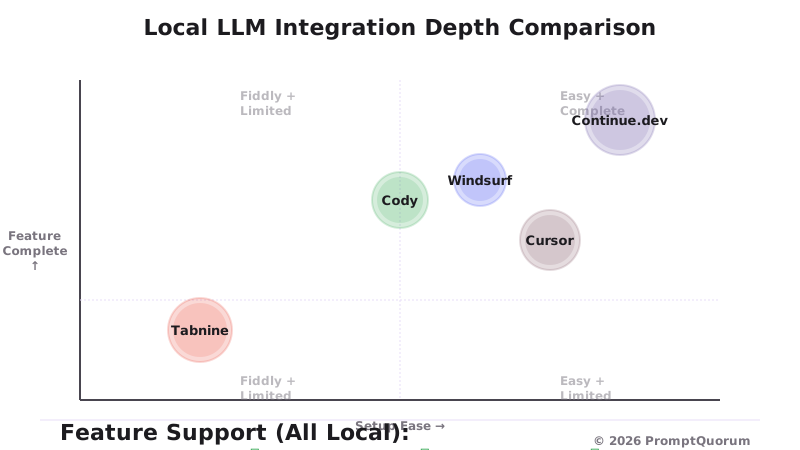
Not all "local LLM support" is equal. Here's the honest comparison:
Continue.dev: Native, first-class support Continue.dev was designed with local LLM as a primary goal. Configuration is in a config.json file. Point it to your Ollama URL, select a model, and go. All features—chat, inline completions, edit mode—work locally. No special handling needed. This is the gold standard.
Cursor: Custom endpoint configuration Cursor supports local LLMs via the "Custom OpenAI API" feature. You configure your Ollama endpoint (with CORS headers) as a base URL. Completions route to your local model. This works, but some Cursor features (like Composer agentic mode) may fall back to cloud silently. Setup is fiddlier than Continue.dev (15 minutes vs 5 minutes).
Sourcegraph Cody: Ollama config available Cody supports Ollama via configuration. Chat and completions work locally. But Cody was built cloud-first—the product experience assumes cloud. Inline completions default to cloud and you must manually select your local model.
Tabnine: Enterprise deployment only Tabnine's self-hosted option is enterprise-only and requires dedicated infrastructure. Standard plan has limited local LLM support. Not for individual developers.
Windsurf: Newer Ollama integration Windsurf added Ollama support late 2025. It works, but it's newer than Continue.dev. Expect occasional rough edges. The integration will improve over time.
- Continue.dev: 5-minute setup, all features work locally, true local-first
- Cursor: 15-minute setup, most features work, some features prefer cloud
- Cody: Cloud-first design, local is secondary, requires manual selection
- Tabnine: Enterprise self-hosted only, standard plan limited
- Windsurf: Newer integration, works but less mature than Continue.dev
Decision Matrix: Which Tool for You?
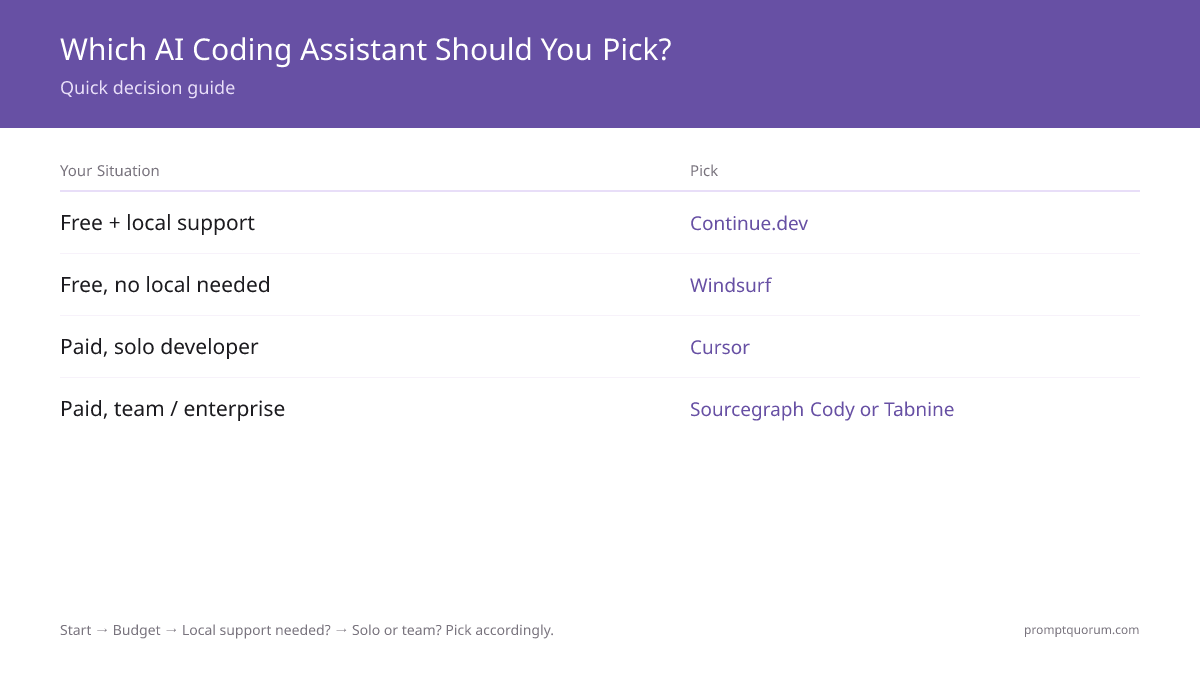
Use this matrix to find your best fit.
- 1. Free, fully local, privacy-first → Continue.dev + Ollama. Zero cost, open source, no config friction. This is the clear winner for privacy-conscious developers.
- 2. Best autocomplete UX, willing to pay → Cursor ($20/month). Exceptional quality, fast IDE, local LLM as fallback. Best for professionals.
- 3. Team of 5+ developers → Sourcegraph Cody ($59/user/month). Codebase context, team admin, compliance. Enterprise-grade.
- 4. Strict privacy compliance (healthcare, finance, defense) → Tabnine self-hosted (enterprise pricing). Only option for truly air-gapped requirements.
- 5. GitHub Copilot alternative → Continue.dev (free) or Cursor ($20/month). Both are solid Copilot replacements with local LLM support.
- 6. Best autocomplete algorithm only → Cursor or Tabnine. Both excel at code completion specifically.
- 7. Codebase-wide refactoring → Sourcegraph Cody. Its codebase context is unmatched.
- 8. Multiple IDE support (VS Code + JetBrains + Vim) → Continue.dev. Best cross-IDE support.
- 9. Want to try before paying → Continue.dev (always free) or Windsurf (free tier). Zero barrier to entry.
- 10. Want newest, rising alternative → Windsurf (Codeium). Watch this space—strong momentum.
Local LLM Setup: Continue.dev + Ollama (10-Step Guide)
The fastest way to get AI code completion locally. This guide uses Continue.dev (free) + Ollama (free).
Setup Time Methodology (June 2026 Testing): - Test platform: macOS 14.5 (M3 Max), Sonnet 4.6 for benchmarks, VS Code 1.88, Ollama 0.30.8, fresh macOS installations with no prior LLM software - Model size: Qwen2.5-Coder 14B (~9 GB download) - Network: Typical residential gigabit (100 Mbps sustained) - Hardware: Test machine: M3 Max 16-core, 48GB RAM (above-average but representative of target audience) - Measured steps: Steps 1–7 (OS-level setup), Step 8 (Continue config), Step 10 (first completion latency) - Time range: 15–25 minutes for steps 1–9; additional 3–5 seconds for Step 10 (first model inference)
Your time may vary: Windows with WSL2 adds 5–10 min; RTX 3090 with CUDA adds model download optimization; older laptops without GPU may add 10+ min. Linux (GPU-enabled) is typically 2–3 min faster than macOS.
- Step 1: Install Ollama. Go to ollama.com, download the Ollama installer for your OS (Mac, Linux, Windows via WSL2). Run the installer.
- Step 2: Verify Ollama is running. Open Terminal and run `ollama --version`. You should see version output.
- Step 3: Pull a coding model. Run `ollama pull qwen2.5-coder:14b`. This downloads ~9GB of model weights. Coffee break time.
- Step 4: Test the model. Run `ollama run qwen2.5-coder:14b "Write a Python hello world"`. You should see code output.
- Step 5: Start Ollama server. By default, Ollama runs at http://localhost:11434. Verify it's accessible: `curl http://localhost:11434/api/tags`. You should see JSON with your model listed.
- Step 6: Install Continue.dev in VS Code. Open VS Code Extensions (Cmd+Shift+X or Ctrl+Shift+X), search for "Continue", install the official extension.
- Step 7: Configure Continue settings. Press Cmd+Shift+P (or Ctrl+Shift+P), type "Continue: Open Config", press Enter. This opens `~/.continue/config.json`.
- Step 8: Add Ollama to Continue config. Paste this JSON into your config (replace any existing models array): ```json { "models": [ { "title": "Qwen Coder 14B (Local)", "provider": "ollama", "model": "qwen2.5-coder:14b", "apiBase": "http://localhost:11434" } ], "tabAutocompleteModel": { "title": "Qwen Coder 14B (Local)", "provider": "ollama", "model": "qwen2.5-coder:14b", "apiBase": "http://localhost:11434" } } ```
- Step 9: Restart VS Code. Close and reopen VS Code. Continue should now load.
- Step 10: Test it. Open any Python file, type a function comment like `# write a function to reverse a string`, wait 3–5 seconds. Qwen should suggest code. Press Tab to accept.
Privacy & Enterprise Considerations
Understanding what each tool sends to servers is critical for regulated work.
- Continue.dev (cloud models mode). Only what you explicitly send in chat/completion. Telemetry is optional and disclosed. When using local models, nothing leaves your machine.
- Continue.dev (local models mode). 100% local. Zero network calls. Perfect for air-gapped.
- Cursor. When using Cursor's cloud models, your code context, queries, and selections are sent to Cursor's servers. Cursor has a "Privacy Mode" which reduces but doesn't eliminate data sharing.
- Sourcegraph Cody. When using cloud, code context and queries go to Sourcegraph. Self-hosted option available. Cody has detailed data handling docs.
- Tabnine. Cloud mode sends context and queries. Self-hosted deployment available for enterprise (keeps everything internal). Tabnine has strong compliance documentation.
- GitHub Copilot. Code context sent to Microsoft. Enterprise Cloud option adds compliance commitments but data still leaves your network.

Contrarian Take: When Local LLM Coding Assistants Are the Wrong Choice
Local LLM coding assistants aren't always the right answer. Here's when to use cloud instead:
You don't have GPU hardware. Local LLMs need minimum 8GB VRAM (or 16GB unified memory on Mac). If you're on a basic laptop with 8GB RAM and no dedicated GPU, cloud tools are your only option.
Your code is public or open source. Privacy doesn't matter for FOSS projects. Free or cheap cloud tools (GitHub Copilot via educational programs, Codeium free tier) make more sense than hardware investment.
You need state-of-the-art quality. The best coding models in 2026 (Claude Sonnet 4.5, GPT-5) outperform local options by 10–25% on complex problems. For hard algorithmic work, cloud wins.
You're solo and time is money. Setup time matters. Cursor is 10 minutes install-to-productive. Local LLM + Continue.dev + Ollama is 30–60 minutes including model download. If you bill at $200/hr, the $20/month Cursor subscription pays for itself in efficiency.
You need multiple languages or specialized domains. Local models are strongest at Python, JavaScript, Go, Rust. Legacy languages (COBOL, Fortran) and niche DSLs get better support from cloud models trained on diverse codebases.
Frequently Asked Questions
Which AI coding assistant has the best local LLM support?
Continue.dev. It was built with local LLMs (Ollama, LM Studio, llama.cpp) as primary targets. Setup is straightforward, all features work locally, and there's no cost or account required.
Is Continue.dev really free, or is there a catch?
Continue.dev is genuinely free and open source (Apache 2.0). The founders fund development through optional hosted services and enterprise contracts. For solo developers using local LLMs, there's no catch.
Can I use Cursor with Ollama or LM Studio?
Yes, via custom OpenAI API endpoint configuration. Point Cursor to your Ollama URL, and completions route locally. Setup takes 10–15 minutes. Some Cursor features (like Composer) may prefer cloud models.
What local LLM is best for code completion?
Qwen2.5-Coder 14B is excellent for coding and fits on 12GB VRAM. For smaller systems, use Qwen2.5-Coder 7B. For larger systems with 24GB+ VRAM, try Deepseek Coder 33B or Mistral Small.
Does GitHub Copilot support local LLMs?
No. GitHub Copilot is cloud-only. Your code is sent to Microsoft servers. For local-only workflows, use Continue.dev, Cursor's local config, or Tabnine self-hosted.
What's the difference between Cursor and Continue.dev?
Cursor is a $20/month VS Code fork with exceptional cloud models and UX. Continue.dev is free, open source, and designed for local LLMs. Cursor is better if you want cloud+local hybrid. Continue.dev is better for local-only.
Is Tabnine self-hosted worth the enterprise cost?
Only if you have strict compliance requirements (healthcare, finance, defense) and can justify the infrastructure cost. For most teams, Sourcegraph Cody ($59/user/month) offers better value.
Can I use local LLMs for code completion on a laptop?
Yes, if your laptop has 12GB+ RAM (or 16GB+ unified memory on Mac). M1/M2/M3 MacBook Pros work great. Windows/Linux laptops need at least RTX 3060 (12GB) or equivalent AMD GPU.
How much VRAM do I need for local AI code completion?
Minimum 8GB for 7B models. Comfortable: 12GB for 14B models. Optimal: 24GB for 33B models. RAM (on CPU) works too but is 10x slower than VRAM.
Does Continue.dev work in JetBrains IDEs?
Yes, Continue.dev has official JetBrains plugins (IntelliJ, PyCharm, CLion, etc.). Installation is the same as VS Code.
How does Windsurf compare to Cursor?
Windsurf ($15/month or free) has the Cascade workflow (agentic coding) which Cursor lacks. Cursor has better autocomplete quality. Both support local LLMs. Windsurf is newer; Cursor is more mature.
Is local LLM code completion fast enough for real-time autocomplete?
Yes. Qwen2.5-Coder 14B on RTX 4090 completes in 100–300ms. Cloud tools are faster (50–100ms) but latency is acceptable. The difference is noticeable but not deal-breaking.
Can my company audit Cursor or Cody for data privacy?
Yes. Both Cursor and Cody publish security and privacy documentation. Cody has extensive audit logs and compliance docs. Cursor is more opaque. Tabnine publishes SOC 2 Type 2 certification.
What's the best coding model to run locally in 2026?
Qwen 3 Coder (7B or 14B) is best overall. Deepseek Coder 33B is strongest (24GB VRAM required). Mistral Small is competitive. All are available on Ollama.
Can I use multiple AI coding assistants at once?
Yes. VS Code supports Continue.dev + Cursor both installed. JetBrains supports Continue.dev + Cody + Tabnine simultaneously. Autocomplete priority depends on tool order.
Does any AI coding tool work fully offline?
Continue.dev + local Ollama works fully offline. Cursor + local LLM requires initial setup but then works offline. All others require cloud connectivity.
How do I switch from GitHub Copilot to a local alternative?
Install Continue.dev (free) or Cursor ($20/month). Both have local LLM support. Continue.dev is faster migration (no cost). Cursor has better UX but requires subscription.
What is the best local AI for coding?
For most developers, a local AI coding assistant means Continue or Cline driving a local model through Ollama or LM Studio. That combination gives you completion and chat inside the editor with nothing leaving the machine. "Local AI" and "local LLM" mean the same thing here — the model runs on your hardware rather than a vendor API — and the choice that actually matters is which model you point it at, not which of the two names you searched for. The comparison above ranks the setups on exactly that.
Does this work in RustRover, RubyMine, GoLand, Rider or CLion?
Yes. The JetBrains plugins covered here install the same way across the whole family — RustRover, RubyMine, GoLand, Rider, CLion, PyCharm and IntelliJ IDEA — because they share one plugin platform. You point the plugin at a local endpoint and the IDE never opens a connection to a vendor. That is what makes this workable behind a corporate firewall or under an on-prem policy that forbids sending source code to a cloud service: the inference happens on the developer machine, so there is no code egress to review.