Key Takeaways
- Best coding models (July 2026): Kimi K2.6 (58.6 SWE-Bench Pro, MoE, best overall), Qwen3.8-27B (61.7% SWE-bench, best dense model), Devstral Small 24B (best agentic coding), Codestral 22B (best IDE autocomplete), Qwen3 8B (best for 8 GB VRAM).
- Speed: 2-5 seconds per suggestion for the largest models (Kimi K2.6, Qwen3.8-27B); under 2 seconds for FIM autocomplete (Codestral 22B, Qwen3 8B). Slower than GitHub Copilot (~300ms).
- Privacy: Code never leaves your machine. Critical for proprietary codebases.
- Use cases: Boilerplate generation, code review, test writing, documentation. Not suitable for complex architectural decisions.
- SWE-bench (real-world GitHub issue resolution) has replaced HumanEval as the primary coding benchmark. Local coding AI is practical for solo developers and small teams.
📍 In One Sentence
Kimi K2.6 (58.6 SWE-Bench Pro, MoE) is the top local coding model, with Qwen3.8-27B (61.7% SWE-bench) as the best dense alternative -- both run locally via Ollama for private code generation, review, and testing.
💬 In Plain Terms
You can use free, open AI models running on your own computer to help write, review, and test code -- similar to GitHub Copilot, but your code never leaves your machine and there's no subscription fee. It's a bit slower than cloud tools, but works well for boilerplate, code review, and test writing.
Which Models Work Best for Local Coding?
The best local coding models balance accuracy, speed, and memory usage. Kimi K2.6 leads in SWE-bench accuracy (58.6 SWE-Bench Pro), while Qwen3 8B offers the best speed/quality balance on 5 GB VRAM.
Model | SWE-bench | HumanEval (legacy) | VRAM | Speed | Best For |
|---|---|---|---|---|---|
| Kimi K2.6 | 58.6 (SWE-Bench Pro) | — | Varies (quantized) | Slow (3-5 sec) | Maximum accuracy, MoE |
| Qwen3.8-27B | 61.7% | — | 22 GB | Slow (3-5 sec) | Best dense model |
| Devstral Small 24B | High (agentic) | — | 16 GB | Medium (2-4 sec) | Agentic, multi-file edits |
| Codestral 22B | — | — | 14 GB | Fast (<2 sec, FIM) | IDE autocomplete |
| Qwen3 8B | — | ~76% | 5 GB | Very fast (<2 sec) | 8 GB VRAM tier |
💡Tip: Pro Tip: Start with Qwen3 8B if you have 5–8 GB VRAM (~76% HumanEval, FIM autocomplete support). For agentic multi-file workflows, use Devstral Small 24B (16 GB VRAM). For maximum SWE-bench accuracy, use Kimi K2.6 quantized (58.6 SWE-Bench Pro) or Qwen3.8-27B (61.7% SWE-bench, 24 GB VRAM, dense).
How Do You Generate Code With Local LLMs?
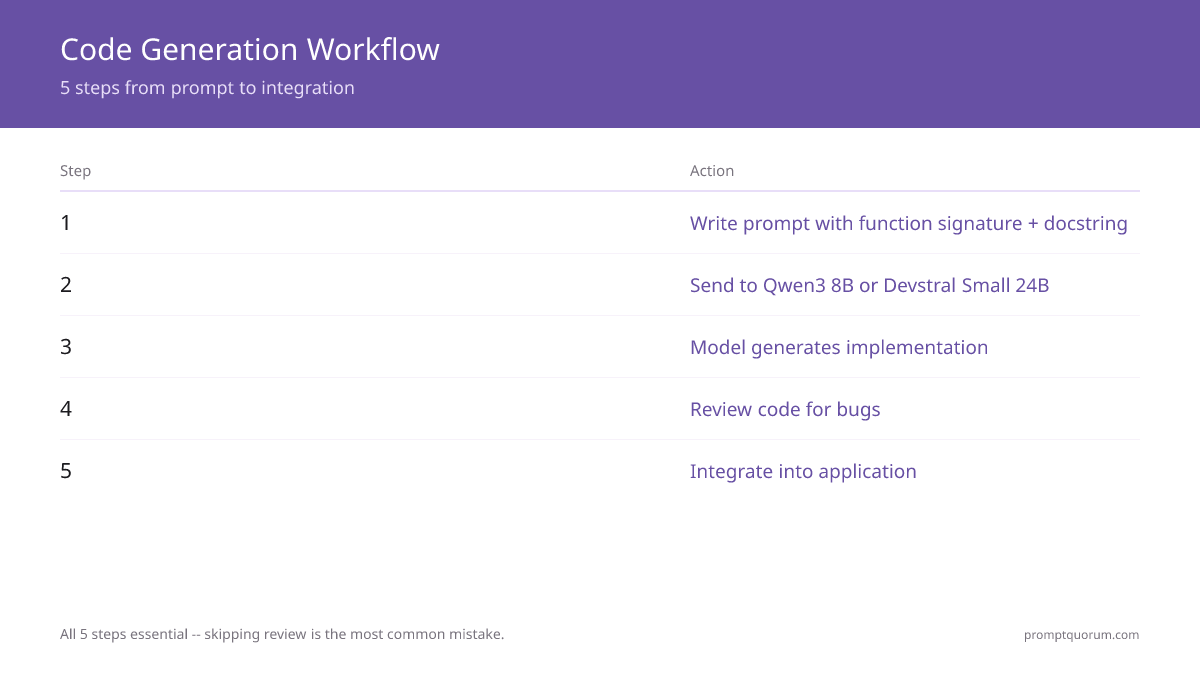
Provide function signature + docstring, and let the model generate implementation. Code quality depends heavily on prompt context.
❌ Bad Prompt
“Generate code for merging arrays”
✅ Good Prompt
“Implement merge_sorted_arrays(arr1: List[int], arr2: List[int]) -> List[int] using a two-pointer algorithm. Docstring: Merge two sorted arrays into a single sorted array.”
# Prompt design for code generation
prompt = """
Implement the following function:

def merge_sorted_arrays(arr1: List[int], arr2: List[int]) -> List[int]:
    \"\""
    Merge two sorted arrays into a single sorted array.
    Args:
        arr1: First sorted array
        arr2: Second sorted array
    Returns:
        Merged sorted array
    \"\""
    # Implementation:
"""

# Model outputs implementation
# Expected: Two-pointer merge algorithm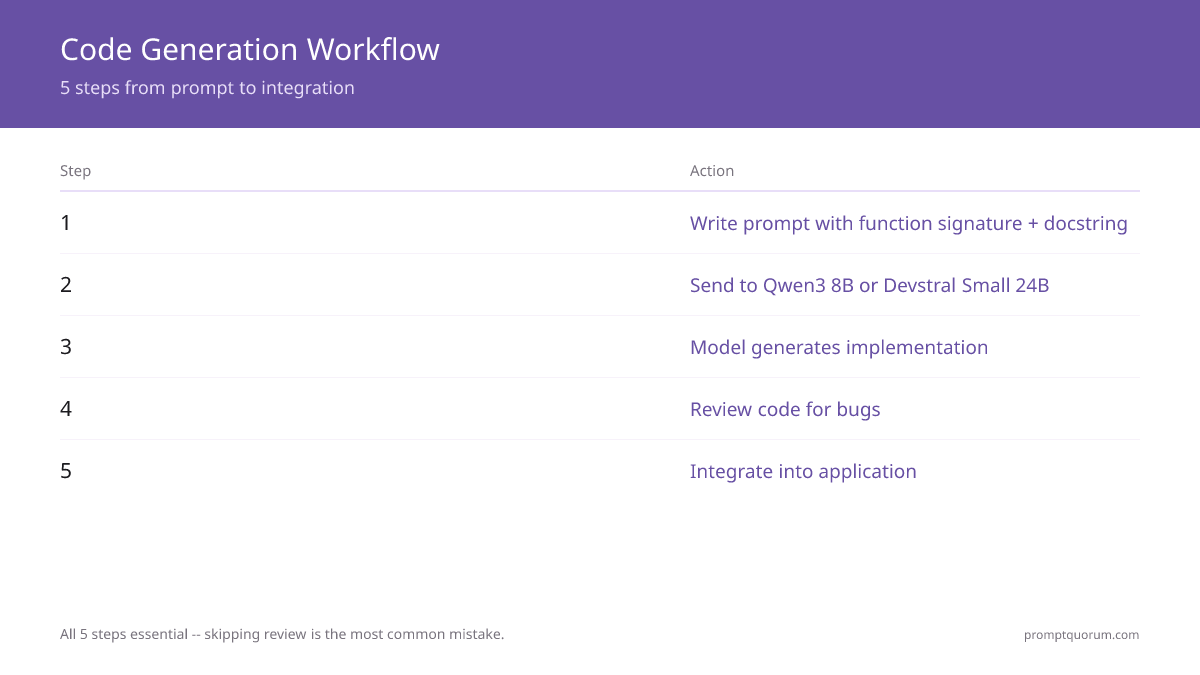
🔍Insight: 📍 Key Insight: Function signatures matter more than prose. Include types, docstrings, and example input/output to guide the model.
How Do You Review Code With Local LLMs?
Prompt the model to review code for bugs, style, and performance. Local models excel at catching common mistakes but struggle with architectural decisions.
- Prompt: "Review this code for bugs, security issues, and performance." + code snippet.
- Model identifies: unused variables, potential None errors, inefficient loops.
- Limitations: Cannot understand complex domain logic or architectural patterns.
⚠️Warning: ⚠️ Warning: Local models understand individual functions, not system architecture. Use for lint-like checks, not design review.
How Do You Generate Tests?
Feed the function code to the model with a prompt for unit tests. Include edge cases and error conditions in your prompt.
# Prompt for test generation
prompt = """
Write comprehensive unit tests for this function:

[function code]

Generate tests covering:
- Normal cases
- Edge cases
- Error cases

Use pytest format:
"""

# Model generates test_* functions with assertions🛠️Practice: 🛠️ Best Practice: Request tests covering normal cases, edge cases, and error cases. Example: "Write pytest tests with 3 normal, 3 edge, 2 error cases."
How Do You Set Up IDE Integration?
Use VS Code with Continue.dev or switch to the Cursor editor for native local LLM support. Both allow inline code suggestions triggered by keyboard shortcuts.
- VS Code + Continue.dev: Install extension, point to local Ollama server (http://localhost:11434).
- Cursor editor: Built-in support for Ollama. No setup required.
- Inline completions: Ctrl+Shift+\\ (VS Code) or Cmd+Shift+\\ (Mac) triggers local LLM suggestion.
) → Install Continue.dev VS Code extension → Configure localhost:11434 → Select Codestral 22B or Qwen3 8B model → Use Ctrl+Shift+\ to trigger inline suggestions. 3-step setup complete.](/images/local-llms-for-coding-workflows-ide-setup-hero-en.webp)
📌Note: 📌 Note: Continue.dev requires running Ollama locally. Cursor editor (based on VS Code) has built-in Ollama support — no extra setup needed.
What Are Common Mistakes?
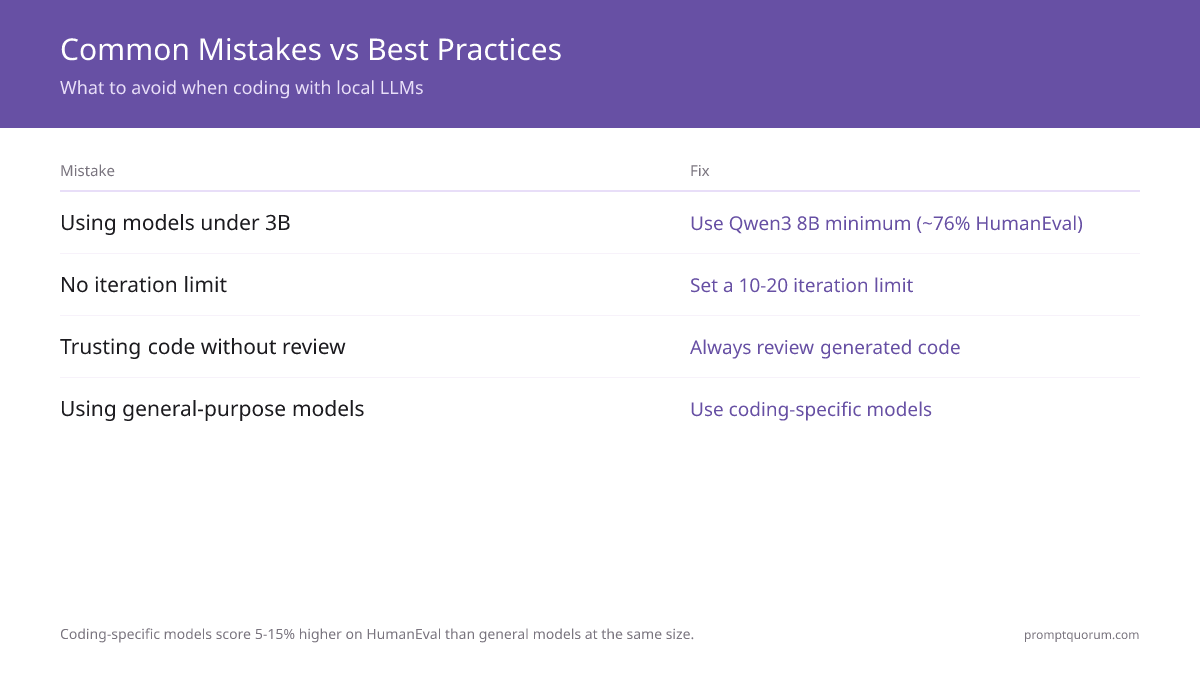
- Trusting generated code without review. Generated code can have bugs. Always review.
- Using models too small. Qwen3 8B (5 GB VRAM) is the minimum for practical coding. 3B models produce poor code.
- Not providing context. Code quality depends on prompt context. Provide function signature, types, docstrings.
- Expecting it to understand architecture. Local models understand individual functions, not system design.
- Not using a coding-specific model. Coding-specific models score 5–15% higher on HumanEval than general-purpose models at the same size — Llama 3.1 8B scores 72% on HumanEval, competitive but still behind dedicated coding models. Always use a model trained or fine-tuned specifically for code. In Ollama: `ollama pull qwen3:8b` — not `ollama pull llama3.1:8b` for coding tasks.
Frequently Asked Questions
Which local LLM is best for coding in 2026?
Kimi K2.6 (58.6 SWE-Bench Pro, MoE) for maximum accuracy. Qwen3.8-27B (61.7% SWE-bench) for the best dense-model quality on 24 GB VRAM. Devstral Small 24B for agentic multi-file coding. Codestral 22B for IDE autocomplete. Qwen3 8B for 8 GB VRAM. For MacBook users with Apple Silicon: Qwen3 8B via Ollama runs well on M1 Pro+.
What is Qwen3's HumanEval score for coding?
Qwen3 8B scores approximately 76% on HumanEval (legacy single-function benchmark). The coding-specialized Qwen2.5-Coder 32B variant scores 87% on HumanEval. As of 2026, SWE-bench (real-world GitHub issue resolution) has replaced HumanEval as the primary benchmark for coding LLMs — on SWE-bench, Qwen3.8-27B scores 61.7% and Kimi K2.6 scores 58.6 on SWE-Bench Pro.
How does Kimi K2.6 compare to GitHub Copilot?
Kimi K2.6 scores 58.6 on SWE-Bench Pro, competitive with several frontier cloud models on real-world issue resolution. GitHub Copilot does not publish directly comparable SWE-bench scores. Speed: local is 2–5 seconds per suggestion vs Copilot's ~300ms (cloud advantage). Privacy: local keeps code on-device. Cost: local is $0/month after hardware; Copilot is $19/month ($228/year).
Can I use a local coding LLM in VS Code?
Yes — install the Continue.dev extension (free, open source). Configure it to connect to Ollama at localhost:11434. Inline completions trigger with Tab or Ctrl+Shift+\\. Continue.dev supports Kimi K2.6, Qwen3.8-27B, Devstral Small 24B, Codestral 22B, Qwen3 8B, and all Ollama models.
Is Copilot or local LLM better for a proprietary codebase?
Local LLM. With Copilot, your code is sent to Microsoft/OpenAI servers for inference. With a local model on Ollama, code never leaves your machine. For regulated industries (finance, healthcare, defense), local is the only compliant option. The quality gap versus cloud models has narrowed significantly since SWE-bench-tuned models like Kimi K2.6 and Qwen3.8-27B became available.
How much VRAM do I need for a local coding LLM?
Minimum: 5 GB VRAM for Qwen3 8B. Recommended: 16 GB for Devstral Small 24B or Qwen3.8-27B. Premium: 20+ GB for Kimi K2.6 (quantized), best overall quality. RTX 4060 Ti (8 GB) runs Qwen3 8B. RTX 4070/4070 Ti (12–16 GB) runs Devstral Small 24B or Codestral 22B. RTX 4090/5090 (24–32 GB) runs Qwen3.8-27B or Kimi K2.6 quantized.
Does local coding LLM support autocomplete like Copilot?
Yes — via Continue.dev or Cursor editor. Both support fill-in-the-middle (FIM) mode where the model sees code above and below the cursor and generates the middle. Codestral 22B and Qwen3 8B support FIM natively. Response time: under 2 seconds on GPU (vs Copilot's 200–300ms cloud).
Can I fine-tune a coding model on my codebase?
Yes — use LoRA/QLoRA with Unsloth. Prepare 500+ code examples from your codebase in instruction format (input: function signature + docstring, output: implementation). Fine-tuning Qwen3 8B takes 1–2 hours on 8 GB VRAM. Typical accuracy improvement: 10–15% on your specific code patterns.
Which coding LLM supports the most programming languages?
Qwen3.8-27B and Kimi K2.6 both support 90+ languages including Python, JavaScript, TypeScript, Rust, Go, Java, C++, SQL, Bash, and Ruby. Devstral Small 24B and Codestral 22B are strongest on Python, JavaScript, TypeScript, Go, and Rust. For niche languages (Haskell, Erlang, Elixir), Qwen3.8-27B and Kimi K2.6 have the broadest coverage.
Sources
- HumanEval Benchmark — Official code generation benchmark from OpenAI (legacy single-function benchmark, still cited for Qwen3 8B/Qwen3-Coder comparison)
- Moonshot AI. (2026). "Kimi K2.6" — MoE architecture, Modified MIT license, 58.6 SWE-Bench Pro
- Qwen Team. (2026). "Qwen3.8 Technical Report" — 61.7% SWE-bench, dense architecture
- Mistral AI. (2026). "Devstral Small 24B" and "Codestral 22B" — agentic coding and FIM-optimized models
- Continue.dev IDE Extension — Open-source IDE support for local and cloud LLMs
- Local LLMs excel at code generation, but code quality depends on prompt quality. Learn coding-specific prompt techniques: write better code with AI covers testing, review, and iteration.