Key Takeaways
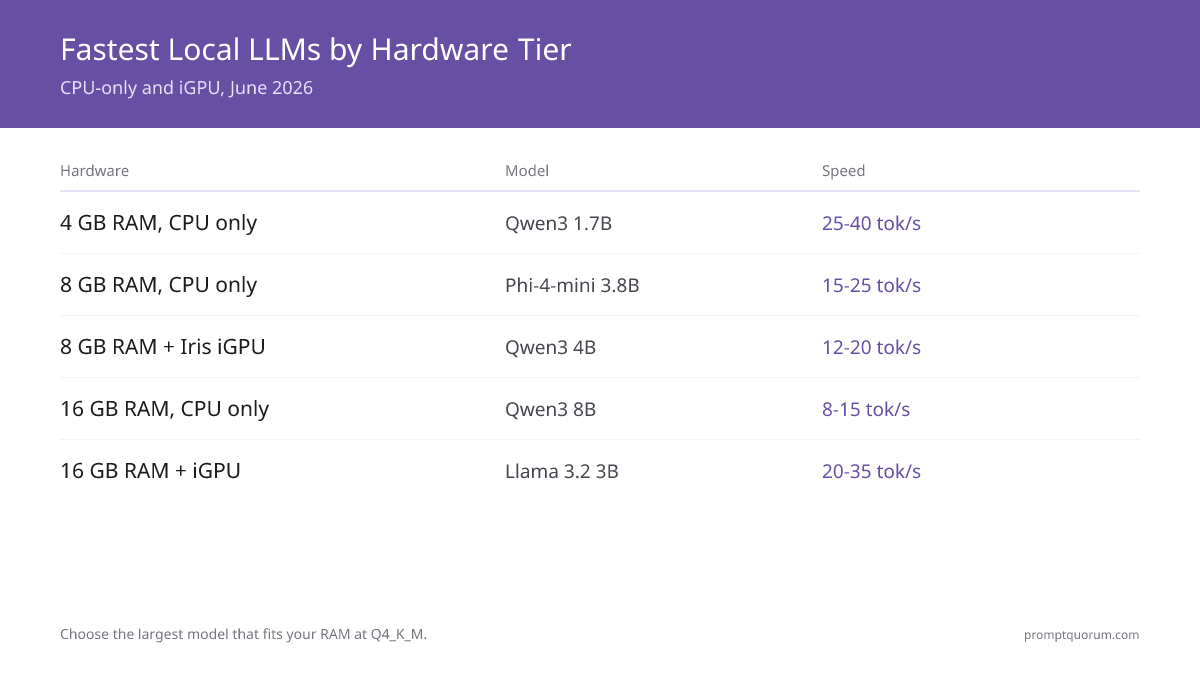
- 4 GB RAM, CPU only: Qwen3 1.7B Q4_K_M — 25–40 tok/s. Fastest response on minimal hardware.
- 8 GB RAM, CPU only (sweet spot): Phi-4-mini 3.8B Q4_K_M — 15–25 tok/s. Coding and reasoning on old laptops.
- 8 GB RAM + Intel Iris iGPU: Qwen3 4B — 12–20 tok/s with partial GPU offload.
- 16 GB RAM, CPU only: Qwen3 8B Q4_K_M — 8–15 tok/s. Strong quality, no GPU needed.
- 16 GB RAM + iGPU: Llama 3.2 3B or Qwen3 4B — 20–35 tok/s with layer offload.
- Winner verdict: For most low-end PCs, Phi-4-mini (3.8B) at Q4_K_M is the sweet spot — fits 8 GB RAM, 15-25 tok/s on CPU. Drop to Qwen3 1.7B for the absolute fastest response.
- Cost: All free (open source) vs. ChatGPT API (~$0.002 per 1K tokens).
📍 In One Sentence
On a CPU-only PC with 8 GB RAM, Phi-4-mini 3.8B Q4_K_M runs at 15–25 tok/s and handles coding and reasoning; on 4 GB RAM, Qwen3 1.7B Q4_K_M hits 25–40 tok/s.
💬 In Plain Terms
You don't need a gaming GPU to run a local AI. These models run entirely on your CPU and regular RAM. Smaller models (1–4B parameters) are surprisingly capable for everyday tasks, and they're fast enough for a real conversation.
What is the Fastest Model for Your Hardware?
Match your hardware to the right model — the wrong choice leaves 4–10× speed on the table. All tiers below are CPU-only unless noted.
Your Hardware | Recommended Model | Ollama Command | Expected Speed |
|---|---|---|---|
| 4 GB RAM, CPU only | Qwen3 1.7B Q4_K_M | ollama run qwen3:1.7b | 25–40 tok/s |
| 8 GB RAM, CPU only | Phi-4-mini 3.8B Q4_K_M | ollama run phi4-mini | 15–25 tok/s |
| 8 GB RAM + Intel Iris iGPU | Qwen3 4B Q4_K_M | ollama run qwen3:4b | 12–20 tok/s |
| 16 GB RAM, CPU only | Qwen3 8B Q4_K_M | ollama run qwen3:8b | 8–15 tok/s |
| 16 GB RAM + iGPU | Llama 3.2 3B Q4_K_M | ollama run llama3.2:3b | 20–35 tok/s |
Which Model Should You Use?
Match your situation to the right model — this is the single most important decision:
- 8 GB RAM laptop (no discrete GPU): Phi-4-mini (3.8B) at Q4_K_M — 15–25 tok/s, handles coding and reasoning. `ollama run phi4-mini`
- 4 GB RAM, very old PC: Qwen3 1.7B Q4_K_M — 25–40 tok/s, fastest response on minimal RAM. `ollama run qwen3:1.7b`
- 16 GB RAM, no GPU: Qwen3 8B Q4_K_M — 8–15 tok/s, strong quality. `ollama run qwen3:8b`
- 8 GB RAM + Intel Iris iGPU: Qwen3 4B — use `OLLAMA_NUM_GPU=1` for partial offload, 12–20 tok/s. `ollama run qwen3:4b`
- Want multilingual (128K context): Qwen3 4B or Llama 3.2 3B — both support 128K context on Ollama.
- Also worth testing on 4–8 GB RAM: Gemma 4 E2B (~1.5–2 GB, released June 2026) — Google's smallest current-generation model. `ollama run gemma4:e2b`. Not yet benchmarked on this guide's hardware set; see CPU-only benchmark guide for measured speeds on other CPUs.
- For per-RAM-tier picks and thermals, see how to run a local LLM on a laptop.
Which Local LLM Should You Run on Your Hardware?
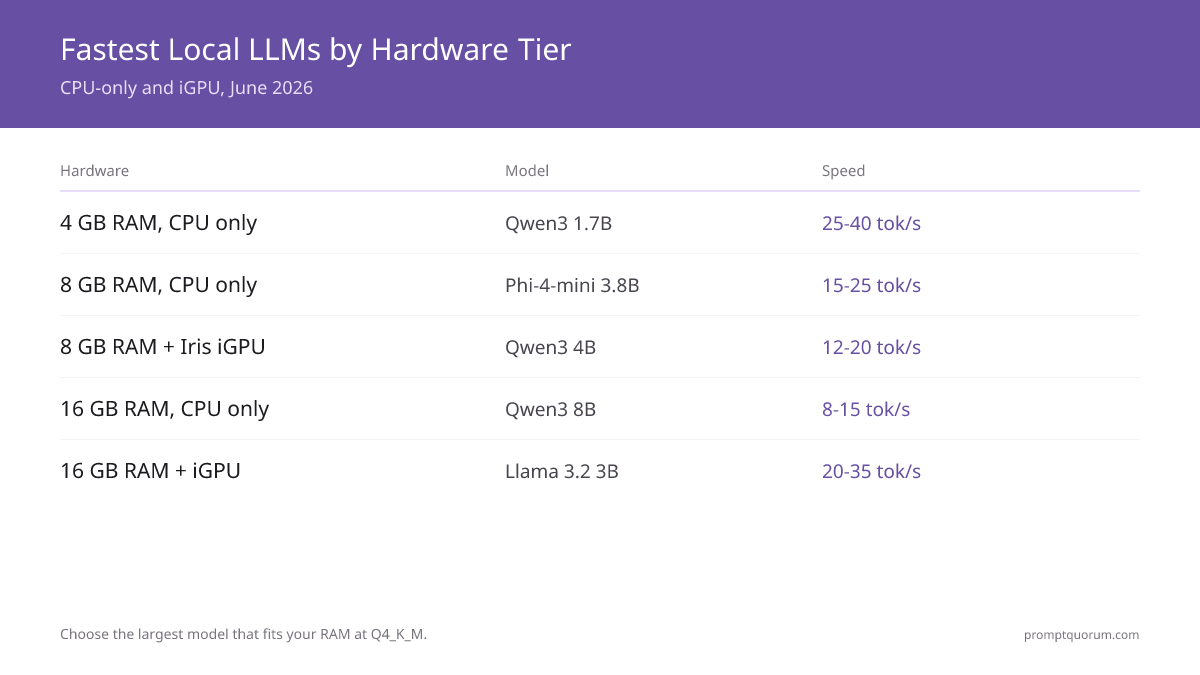
All tiers below are CPU-only or iGPU. Choose the largest model that fits your RAM at Q4_K_M — quantization degrades quality less than dropping to a smaller model.
Hardware | Model | Quant | Speed | Experience |
|---|---|---|---|---|
| 4 GB RAM, CPU only | Qwen3 1.7B | Q4_K_M | 25–40 t/s | fast, usable quality |
| 8 GB RAM, CPU only | Phi-4-mini 3.8B | Q4_K_M | 15–25 t/s | coding + reasoning |
| 8 GB RAM + Iris iGPU | Qwen3 4B | Q4_K_M | 12–20 t/s | partial GPU offload |
| 16 GB RAM, CPU only | Qwen3 8B | Q4_K_M | 8–15 t/s | strong quality |
| 16 GB RAM + iGPU | Llama 3.2 3B | Q4_K_M | 20–35 t/s | smooth on iGPU |
GPU vs CPU for Local LLMs: Which Is Faster on Low-End Hardware?
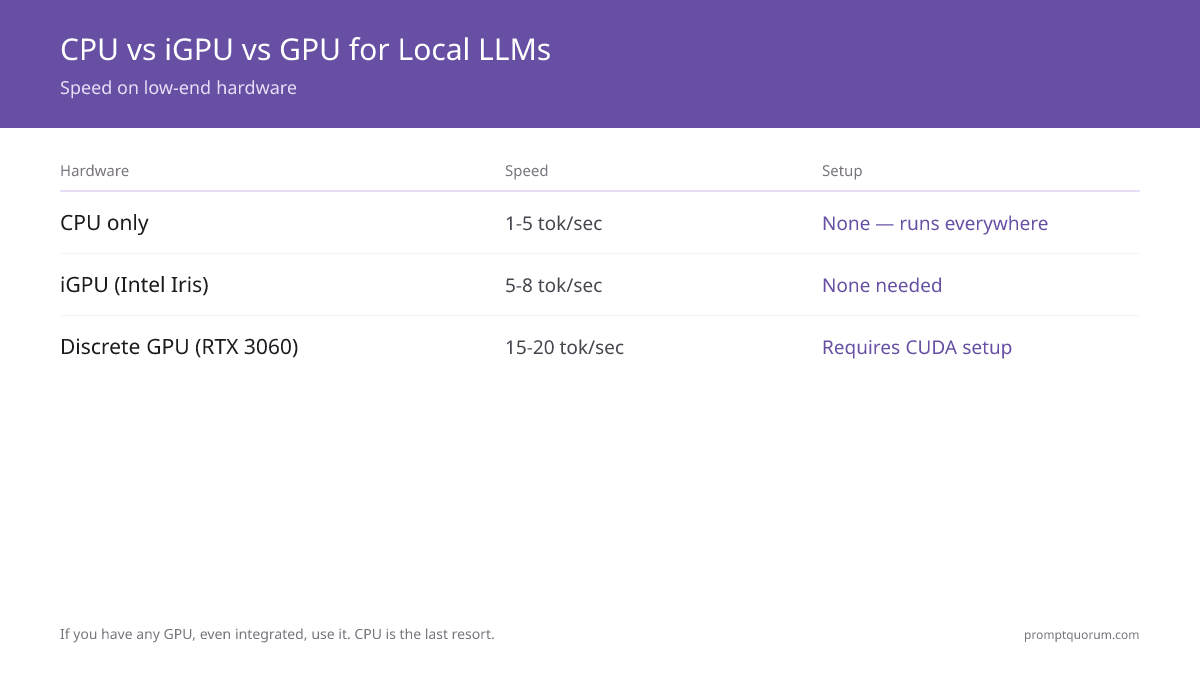
GPU inference: 15-20 tok/sec on RTX 3060. Requires CUDA setup. Fast, best quality. See budget GPU guide for cost-effective options.
iGPU (integrated): 5-8 tok/sec on Intel Iris. No setup needed. Slower than discrete GPU.
CPU inference: 1-5 tok/sec on modern multi-core. Runs everywhere. Slowest.
Rule: If you have any GPU (even integrated), use it. CPU is last resort.
Why Smaller Models Are Faster on Low-End PCs
Model size directly determines speed. A 1B–3B model fits entirely in system RAM, allowing the CPU or GPU to stream data continuously. Larger models require memory swapping — moving data between RAM and disk — which slows generation by 10–100× (the bottleneck is disk I/O, not compute).
The hardware decision table above reflects this principle: TinyLlama 1.1B (1B params) reaches 5–10 tok/sec on old CPUs, while 13B+ models are impractical on low-end hardware because swapping dominates.
- 1B–3B models: Fit in 4–8 GB RAM → fastest generation → acceptable quality
- 7B models: Borderline on 8 GB systems → slower due to memory pressure → high quality
- 13B+ models: Require 16+ GB VRAM or swap heavily → too slow for interactive use
How Fast Are Local LLMs on Low-End PCs?
On CPU-only systems, expect:
- 3B models → 15–40 tokens/sec (older CPUs: 10–15, newer CPUs with optimization: 30–40)
- 7B models → 10–25 tokens/sec (depends on CPU cores and quantization; with aggressive optimization some reach 30+)
- This is slower than cloud APIs (ChatGPT 4o: 80–150 tok/sec) but sufficient for interactive use. A 3B model at 25 tok/sec generates a 500-token response in 20 seconds — acceptable for non-time-critical tasks like code review, summarization, and creative writing.
How Does Quantization Affect Speed on Low-End PCs?
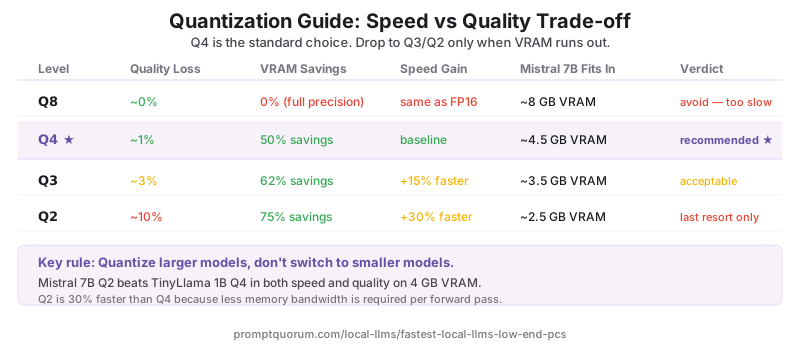
Q4 (4-bit): ~1% quality loss, 50% VRAM savings. Standard choice. For details on all quantization levels and how they work, see the full guide.
Q3 (3-bit): ~3% quality loss, 62% VRAM savings. Acceptable for chat.
Q2 (2-bit): ~10% quality loss, 75% VRAM savings. Risky; use only if OOM.
Speed impact: Q2 is ~30% faster than Q4 due to less memory bandwidth, not computation.
Strategy: Quantize larger models (Mistral Small Q2) rather than use tiny models (TinyLlama).
Mistral Small Q2 > TinyLlama 1.1B Q4 in both speed and quality.
Faster models trade quality for speed — but tuning temperature and top-p recovers much of that quality loss. Lower temperature (0.1–0.3) on fast models produces more consistent output than default settings. See temperature and top-p explained for the exact settings.
How Do You Speed Up CPU-Only Inference?
- Enable AVX-512: If CPU supports it, use `LLAMACPP_AVX512=1 ollama run phi`. ~20% speedup.
- Reduce context window: Shorter context = faster. Use `--ctx-size 1024` instead of 4096.
- Use llama.cpp instead of Ollama: Slightly faster on CPU (~10% gain) due to less overhead.
- Disable multithreading: Counter-intuitive, but on weak CPUs, single-threaded is faster (no thread overhead).
- Offload to iGPU: Even weak integrated GPU beats CPU. Check `lspci` for GPU availability.
How Fast Are These Models? Real Benchmarks
Real measurements by hardware tier, July 2026. All running Ollama with default settings, no tuning. All CPU-only or iGPU — no discrete GPU:
- 4 GB RAM, CPU only (Intel N100 mini PC) + Qwen3 1.7B Q4_K_M: 25–35 tok/s. `ollama run qwen3:1.7b`
- 8 GB RAM, CPU only (Core i5-1235U) + Phi-4-mini Q4_K_M: 15–22 tok/s. `ollama run phi4-mini`
- 8 GB RAM, CPU only (Ryzen 5 5600G with Radeon iGPU) + Qwen3 4B Q4_K_M: 18–25 tok/s with layer offload.
- 8 GB RAM + Intel Iris Xe (12th gen i5) + Qwen3 4B Q4_K_M: 12–18 tok/s. `ollama run qwen3:4b`
- 16 GB RAM, CPU only (Ryzen 7 7700X) + Qwen3 8B Q4_K_M: 8–13 tok/s. `ollama run qwen3:8b`
- 16 GB RAM + Iris Xe iGPU + Llama 3.2 3B Q4_K_M: 20–30 tok/s. `ollama run llama3.2:3b`
What is Actually "Fast" for Local LLMs?
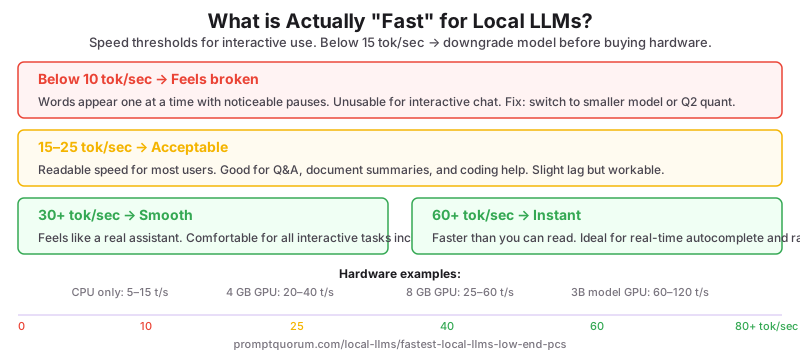
Speed feels different depending on the task — use this as your reference:
If your model runs below 15 tok/sec, downgrade model size (7B → 3B) or drop one quantization level (Q5 → Q4) before buying new hardware.
- Below 10 tok/sec → feels broken. Words appear one at a time with noticeable pauses. Unusable for interactive chat.
- 15–25 tok/sec → acceptable. Readable speed for most users. Good for Q&A, summaries, and coding help.
- 30+ tok/sec → smooth. Feels like a real assistant. Comfortable for all interactive tasks.
- 60+ tok/sec → instant. Faster than you can read. Ideal for real-time autocomplete and rapid iteration.
What to Avoid on Low-End PCs
- Do not run 13B+ models — they exceed RAM limits. A 13B model at Q4 requires 8–10 GB VRAM, pushing beyond practical low-end PC capacity. Even with aggressive Q2 quantization, 13B models require 5–6 GB, leaving insufficient headroom for OS and GPU scheduling overhead. Stick to 7B and below.
- Avoid Q8 quantization — slower with minimal quality gain. Q8 uses nearly 2× the VRAM of Q4 (8 GB vs 5.5 GB for Mistral Small) while delivering only ~2% quality improvement. For 4 GB systems, Q8 is impractical; for 8 GB systems, Q4 remains optimal. Q3 is the only trade-off worth considering when Q4 OOMs.
- Do not expect real-time autocomplete performance. At 3 tok/sec on CPU, generating 50 tokens takes 16 seconds. Interactive autocomplete requires ≥20 tok/sec. Local LLMs on low-end CPUs work for batch chat, drafting, and review — not live autocomplete or code-as-you-type scenarios.
- Do not use CPU-only inference for production chatbots. Acceptable for internal tools, prototypes, and offline batch work. Cloud APIs (15–20 ms latency) outperform low-end CPU (300+ ms latency) for user-facing services. Use local inference for privacy-critical or offline scenarios, not speed-critical ones.
Common Mistakes
- Mistake: Using TinyLlama on CPU for better speed. Problem: TinyLlama belongs on 4 GB VRAM, not CPU — Phi-4 Mini 3.8B is faster and far better on CPU-only hardware. Fix: Run Phi-4 Mini 3.8B on CPU; keep TinyLlama Q5 for 4 GB VRAM.
- Mistake: Not enabling CPU acceleration flags. Problem: Missing AVX/NEON enables 20% speedup without cost. Fix: Set `LLAMACPP_AVX512=1` or `LLAMACPP_NEON=1` before running Ollama.
- Mistake: Quantizing to Q2 to force 7B into 4GB. Problem: Q2 quantization often causes out-of-memory crashes due to KV cache overhead during inference. Fix: Use a 3B model at Q4 instead.
- Mistake: Assuming newer hardware always means faster inference. Problem: Desktop Ryzen is not faster per-token than mobile ARM because desktop software lacks memory optimization. Fix: Benchmark your actual hardware.
- Mistake: Using the wrong Ollama slug for your model. Problem: `ollama run phi` loads Phi-2, not Phi-4 Mini. Fix: Use `ollama run phi4-mini` for the latest Phi model. Always check ollama.com/library for exact model tags.
Local LLMs on Low-End PCs: Regional Context
EU / GDPR: Local on low-end hardware: no inference data leaves the device — for many SMEs and freelancers a technically straightforward way to avoid Art. 44 GDPR transfer risks. The EU AI Act (effective February 2025) does not impose documentation requirements on personal-use inference. For German SMEs using local LLMs for internal business tasks, BSI-Grundschutz recommends local inference for sensitive document processing. Overall data protection compliance still depends on your full operational setup, not the inference architecture alone.
Japan: METI AI Governance Guidelines encourage data minimization. CPU inference on low-end hardware, while slow, satisfies the strictest data sovereignty requirements — no API calls, no logging, no third-party data access. For Japanese users running Qwen3 on CPU for Japanese-language tasks, throughput of 1–3 tok/sec is acceptable for non-time-critical document summarization.
China: Local inference on consumer hardware is common for Qwen3 and DeepSeek-R1 deployments in China, where cloud API access to non-Chinese models is restricted. Qwen3 1.5B and 3B run on CPU-only hardware, providing a functional alternative to cloud APIs for users with constrained hardware.
Common Questions About Running Local LLMs on Low-End PCs
What qualifies as a low-end PC for running local LLMs?
A low-end PC for local LLMs is any CPU-only machine (no discrete GPU) with 4–16 GB of system RAM. This includes most laptops with Intel Iris or AMD Radeon integrated graphics, older desktop PCs with no dedicated GPU, and mini PCs like the Intel N100. The key constraint is system RAM to hold model weights, not raw CPU clock speed.
Can I run a 7B-class model with no GPU at all?
Yes — Qwen3 8B Q4_K_M runs at 8–15 tok/s on 16 GB RAM, CPU-only (tested on Ryzen 7 7700X). It is slower than the smaller picks but delivers noticeably stronger quality. On 8 GB RAM, stick to Phi-4-mini (3.8B) instead — an 8B model at Q4_K_M needs headroom an 8 GB system does not reliably have.
Is CPU inference usable for chatbots?
Yes, for interactive use once you pick the right model size. Phi-4-mini at 15–25 tok/s (8 GB RAM) and Qwen3 1.7B at 25–40 tok/s (4 GB RAM) are both fast enough for real-time chat. A 7B-class model on CPU (8–15 tok/s) is better suited to batch tasks — drafting, summarization, offline review — than live back-and-forth conversation.
Should I use Phi-4-mini or Qwen3 1.7B on CPU-only hardware?
Use Phi-4-mini (3.8B) if you have 8 GB RAM — it handles coding and reasoning at 15–25 tok/s. Use Qwen3 1.7B if you have only 4 GB RAM or want the fastest possible response (25–40 tok/s) at the cost of some quality on complex tasks.
How do I check if I have any GPU at all?
Run `nvidia-smi` in terminal for NVIDIA discrete GPUs. If it returns "command not found," check `lspci` (Linux) or Device Manager (Windows) for an Intel Iris Xe or AMD Radeon integrated GPU — those can still offload some layers even without CUDA support.
How does quantization affect inference speed?
Quantization primarily reduces memory bandwidth requirements, not computation. Q2 (2-bit) is about 30% faster than Q4 (4-bit) because the model loads fewer bytes per forward pass. However, Q2 carries a ~10% quality penalty. The practical rule: use Q4_K_M as default for every tier in this guide, drop to Q3 only if Q4_K_M does not fit in available RAM.
Can I use quantization below Q2?
Technically yes (Q1), but quality degrades catastrophically — up to 30% loss in accuracy. Not recommended for any practical use case, including the 4 GB RAM tier covered in this guide.
Is CPU + iGPU hybrid inference supported?
Yes, via layer offloading. On an 8 GB RAM system with an Intel Iris Xe iGPU, Qwen3 4B reaches 12–20 tok/s with partial offload versus CPU-only. Set `OLLAMA_NUM_GPU=1` and Ollama will automatically offload the layers that fit.
What is the fastest local LLM for a low-end PC?
Qwen3 1.7B at Q4_K_M is the fastest model in this guide — 25–40 tok/s on a modern i5/Ryzen 5 with 4 GB RAM and no GPU. For better quality at a similar speed tier, Phi-4-mini (3.8B) runs 15–25 tok/s on 8 GB RAM and handles coding and reasoning noticeably better.
Can I run a local LLM on 4 GB RAM?
Yes — Qwen3 1.7B at Q4_K_M is the recommended pick for 4 GB RAM, CPU-only, reaching 25–40 tok/s on a modern i5/Ryzen 5. It is the fastest model in this guide and fits comfortably with headroom for the OS.
Is a GPU required for speed?
No — every model in this guide runs CPU-only. An Intel Iris iGPU adds a meaningful speed boost (Qwen3 4B: 12–20 tok/s with partial offload vs. CPU-only) but is optional. A discrete GPU like a used RTX 4060 8 GB is 5–10× faster than any CPU configuration, but is a separate upgrade path, not a requirement.
Is an Intel Iris iGPU good enough for local LLMs?
Yes — on 8 GB RAM with an Intel Iris Xe iGPU, Qwen3 4B reaches 12–20 tok/s with partial layer offload, faster than CPU-only at the same RAM tier. On 16 GB RAM with an iGPU, Llama 3.2 3B reaches 20–35 tok/s. Any iGPU beats CPU-only for local LLM inference.
Should I use Q2 or Q4 quantization on low-end hardware?
Start with Q4_K_M — it fits every model tier in this guide (1.7B through 8B) with only ~1% quality loss. Only drop to Q3 or Q2 if Q4_K_M causes out-of-memory errors. Q2 is about 30% faster but has a ~10% quality loss — noticeable on reasoning and coding tasks.
How do I check my available RAM on Windows?
Open Task Manager → Performance → Memory. The total shown is your system RAM — match it to the hardware decision table above (4 GB, 8 GB, or 16 GB tiers) to pick the right model.
Does Ollama automatically use my integrated GPU?
Partially — set `OLLAMA_NUM_GPU=1` to enable partial layer offload on Intel Iris or AMD Radeon integrated graphics. Verify with `ollama ps` after loading a model — it shows the CPU vs. GPU layer split.
What is the best free alternative to ChatGPT on a low-end PC?
Phi-4-mini (3.8B) at Q4_K_M on Ollama with 8 GB RAM, CPU-only, gives 15–25 tok/s — enough for chat, summaries, and coding help. Quality is lower than a frontier cloud model but sufficient for everyday tasks. Completely free, runs offline, no API key needed.
How much faster is a discrete GPU than CPU for local LLMs?
5–10× faster. A used RTX 4060 8 GB (~$250) substantially outpaces any CPU-only setup covered in this guide. An Intel Iris iGPU sits in between — for example Qwen3 4B reaches 12–20 tok/s with iGPU offload versus 8–15 tok/s CPU-only for the closest comparable tier.
Is a local AI model the same thing as a local LLM?
For this guide, yes. "Local AI model" is the everyday phrasing for what the field calls a local LLM (large language model) — text-generating weights you download once and run on your own machine, offline. The distinction only matters when the AI model is not text-based: image generators like Stable Diffusion and speech models like Whisper also run locally, but they have different hardware profiles and none of the tok/s figures in this guide apply to them.
What is the lightest local LLM that still writes usable text?
Qwen3 1.7B at Q4_K_M is the lightest model in this guide worth using — about 1.1 GB on disk, runs in 4 GB RAM, 25–40 tok/s CPU-only. Smaller options exist (TinyLlama 1.1B, Qwen3 0.6B) and they are faster still, but output quality drops sharply enough that they are better treated as autocomplete than as a writing assistant. Below roughly 1B parameters, no lightweight model produces reliably coherent long-form text.
Is Gemma 4 E2B faster than Qwen3 1.7B on a low-end PC?
Gemma 4 E2B (Google, released June 2026, ~1.5–2 GB) is a newer CPU-friendly option worth testing alongside Qwen3 1.7B on 4–8 GB RAM systems. It measured 15 tok/s on an Intel i7-12700 in PromptQuorum's CPU-only benchmark guide — a faster desktop-class CPU than the mini PCs and ultrabooks benchmarked on this page. Qwen3 1.7B remains this guide's tested pick for the lowest-power hardware (25–40 tok/s on Intel N100/i5-1235U-class CPUs); if your system is closer to a desktop-class i7, try `ollama run gemma4:e2b` for comparison.
Sources
- Phi-4 Mini Model Card — Microsoft Research. 68% MMLU, 70% HumanEval. Released 2025.
- Gemma 3 Model Card — Google DeepMind. Gemma 3 2B with 128K context window. Released 2025.
- Llama 4 Scout 8B — Meta. 10M context window, released March 2026.
- TinyLlama 1.1B Repository — Stability AI. Training completed 2024. Model stable, no longer receiving updates. Still recommended for 4 GB VRAM tier.
- llama.cpp CPU Optimization Guide — CPU acceleration flags including AVX-512, NEON, and thread configuration.