Key Takeaways
- Best overall beginner model: Llama 3.2 3B -- 2 GB download, runs on 4 GB RAM, strong instruction-following for its size.
- Best for low RAM (4 GB or less): Phi-4 Mini 3.8B -- Microsoft's compact model excels at reasoning and coding tasks (68% MMLU, 70% HumanEval at just 2.5 GB RAM).
- Fastest 2B model: Gemma 4 E2B -- Google's updated model runs at 40-60 tok/sec on CPU with 128K context (upgraded from Gemma 2's 8K limit).
- Best 7B/8B all-rounder: Llama 3.1 8B -- 72% HumanEval, ~5.5 GB RAM, the current go-to general model at this size (replaces the now-outdated Mistral Small v0.3 recommendation from 2023-2024).
- Best for multilingual and coding: Qwen3 8B -- 57.3% HumanEval, MMLU on par with or ahead of Llama 3.1 8B, and native support for 29+ languages.
- 7B Q4 rule of thumb: an 8B model at Q4_K_M needs roughly 5-5.5 GB of RAM -- about 0.6-0.7 GB per billion parameters at 4-bit.
- Best for 2 GB RAM or less: Llama 3.2 1B -- ~1.3 GB download, the smallest usable option; quality is noticeably below 3B+ but it runs on very old hardware.
- 👉 Not sure if local is right for you? Read Local LLM vs Cloud Comparison before choosing — covers speed, quality, and cost trade-offs.
📍 In One Sentence
The best beginner local LLMs in 2026 are Llama 3.2 3B (4 GB RAM, best overall), Phi-4 Mini 3.8B (2.5 GB RAM, best reasoning at low RAM), and Gemma 4 E2B (fastest at 40–60 tok/s on CPU) — all installed with one Ollama command, no GPU needed.
💬 In Plain Terms
These models run entirely on your laptop or desktop using normal RAM — no cloud subscription, no GPU required. "1B" or "7B" means billions of parameters (the model's size). Smaller = faster and uses less RAM. Bigger = smarter but needs more RAM. Start with Llama 3.2 3B: 2 GB download, runs on 4 GB RAM, surprisingly capable.
Quick Start: Run Your First Local LLM in 3 Minutes
1. Install Ollama (1 minute)
Download from ollama.com and run the installer. No configuration needed.
2. Run Llama 3.2 3B (2 minutes)
Open your terminal and run: `ollama run llama3.2:3b`
Ollama downloads the model (~2 GB) on first run. This is the recommended first model for most users.
3. Start chatting (immediate)
Once the model loads, type your question or prompt and press Enter. You'll see responses at 25-45 tokens/second on a typical laptop.
That's it. No manual configuration, no GPU required. If you have 8 GB+ RAM, you're ready to go. If you have 4-6 GB, use `ollama run gemma4:e2b` instead (faster, uses 1.7 GB RAM).
Beginner Checklist: Is Local Right for You?
Before downloading your first model, answer these three questions:
1. Do you have 8+ GB of RAM? (If no, cloud APIs are faster to get started.)
2. Do you need your data to stay private? (If no, cloud APIs offer better quality.)
3. Can you tolerate 20–40 minute setup? (If no, cloud APIs are ready in 5 minutes.)
If you answered "no" to two or more questions, read the full local vs cloud comparison to see if a cloud API is a better fit for your hardware and timeline. Beginners often assume local LLMs are always better — they're not. The right choice depends on your specific constraints.
How Do You Choose a Beginner Local LLM Model?
Model selection for local LLMs depends on three constraints: available RAM, inference speed, and task type -- in that order of priority.
The parameter count (3B, 7B, 13B) is the primary driver of RAM requirements. At 4-bit quantization -- the default for most local inference tools -- multiply the parameter count by ~0.5 to estimate GB of RAM needed. A 7B model at Q4_K_M requires approximately 4.5 GB of RAM.
For most beginners, 7B models at Q4_K_M quantization offer the best balance of quality, speed, and RAM use on machines with 8 GB or more. On machines with 4-6 GB RAM, 3B models are the practical ceiling.
#1 Meta Llama 3.2 3B -- Best Overall Beginner Model
Meta Llama 3.2 3B is the best starting point for most users. It downloads in under 5 minutes, runs on any machine with 4 GB RAM, and produces noticeably better instruction-following than previous 3B models. It uses a 128K context window -- far larger than comparable-size models.
In our testing on an 8-core laptop CPU, Llama 3.2 3B generates 25-45 tokens/sec. On Apple M3 Pro, it reaches 70-90 tokens/sec. Quality is adequate for summarization, Q&A, and simple coding tasks, but falls short of 7B models on multi-step reasoning.
Spec | Value |
|---|---|
| Parameters | 3B |
| RAM required | ~2.5 GB (Q4_K_M) |
| Download size | ~2 GB |
| Context window | 128K tokens |
| CPU speed (8-core laptop) | 25-45 tok/sec |
| Ollama command | ollama run llama3.2:3b |
#2 Microsoft Phi-4 Mini 3.8B -- Best for Low RAM
Phi-4 Mini is Microsoft's compact model optimized for reasoning and coding tasks at small scale. It achieves 68% MMLU and 70% HumanEval -- scores that exceed many 7B models from 2024 -- due to training on high-quality synthetic data focused on problem-solving.
It is the recommended model for machines with 4-6 GB RAM where quality matters. Phi-4 Mini uses 2.5 GB RAM (down from Phi-3.5 Mini's 3 GB), making it more accessible on 4 GB machines.
Spec | Value |
|---|---|
| Parameters | 3.8B |
| RAM required | ~2.5 GB (Q4_K_M) |
| Download size | ~2.3 GB |
| MMLU score | 68% |
| Context window | 128K tokens |
| CPU speed (8-core laptop) | 30-50 tok/sec |
| Ollama command | ollama run phi4-mini |
#3 Google Gemma 4 E2B -- Fastest 2B Model
Gemma 4 E2B is Google's updated 2B model and the fastest option for CPU-only inference. It generates 40-60 tokens/sec on a mid-range laptop CPU -- roughly double the speed of Llama 3.2 3B at the same hardware. Gemma 3 significantly improves on its predecessor: the context window expands from 8K (Gemma 2) to 128K tokens, removing a major limitation for document tasks.
Gemma 4 E2B is a good choice when response speed matters most, on machines with ≤4 GB RAM, or as a testing model to verify your local LLM setup before downloading larger models.
Spec | Value |
|---|---|
| Parameters | 2B |
| RAM required | ~1.7 GB (Q4_K_M) |
| Download size | ~1.6 GB |
| Context window | 128K tokens |
| CPU speed (8-core laptop) | 40-60 tok/sec |
| Ollama command | ollama run gemma4:e2b |
#4 Meta Llama 3.1 8B -- Best 7B/8B All-Rounder
Meta Llama 3.1 8B is the current general-purpose all-rounder at this size, scoring 72% on HumanEval and offering solid English reasoning. It replaces Mistral Small v0.3 as this list's 7B/8B pick -- Mistral Small v0.3 was the community standard in 2023-2024, but is now outperformed at the same RAM tier and is better treated as a legacy option (see Common Mistakes below for why we no longer recommend it as a default).
For machines with 8 GB RAM, Llama 3.1 8B is a natural step up from 3B models. It handles longer text, more complex instructions, and multi-turn conversations more reliably than any 3B model, with a 128K context window.
Spec | Value |
|---|---|
| Parameters | 8B |
| RAM required | ~5.5 GB (Q4_K_M) |
| Download size | ~5 GB |
| Context window | 128K tokens |
| HumanEval score | 72% |
| CPU speed (8-core laptop) | 10-18 tok/sec |
| Ollama command | ollama run llama3.1:8b-instruct |
#5 Qwen3 8B -- Best for Multilingual and Coding
Qwen3 8B (8.2B parameters) scores 57.3% on HumanEval, matches or beats Llama 3.1 8B on MMLU, and natively supports 29+ languages including Chinese, Japanese, Korean, Arabic, and all major European languages. It is the recommended choice for non-English workflows or coding-heavy use cases, and replaces the earlier Qwen2.5 7B as this list's multilingual pick.
Qwen3 8B uses a 32K context window (extendable to 131K with YaRN) and supports structured output with JSON mode, plus an optional "thinking mode" for harder reasoning tasks (slower, but more accurate). The model is available in instruct and base variants -- for chat use, always use the instruct version. See the Qwen vs Llama vs Mistral benchmark comparison for detailed benchmark data.
Spec | Value |
|---|---|
| Parameters | 8.2B |
| RAM required | ~5.2 GB (Q4_K_M) |
| Download size | ~5.2 GB |
| Context window | 32K tokens (131K with YaRN) |
| HumanEval score | 57.3% |
| CPU speed (8-core laptop) | 10-18 tok/sec (non-thinking mode) |
| Ollama command | ollama run qwen3:8b |
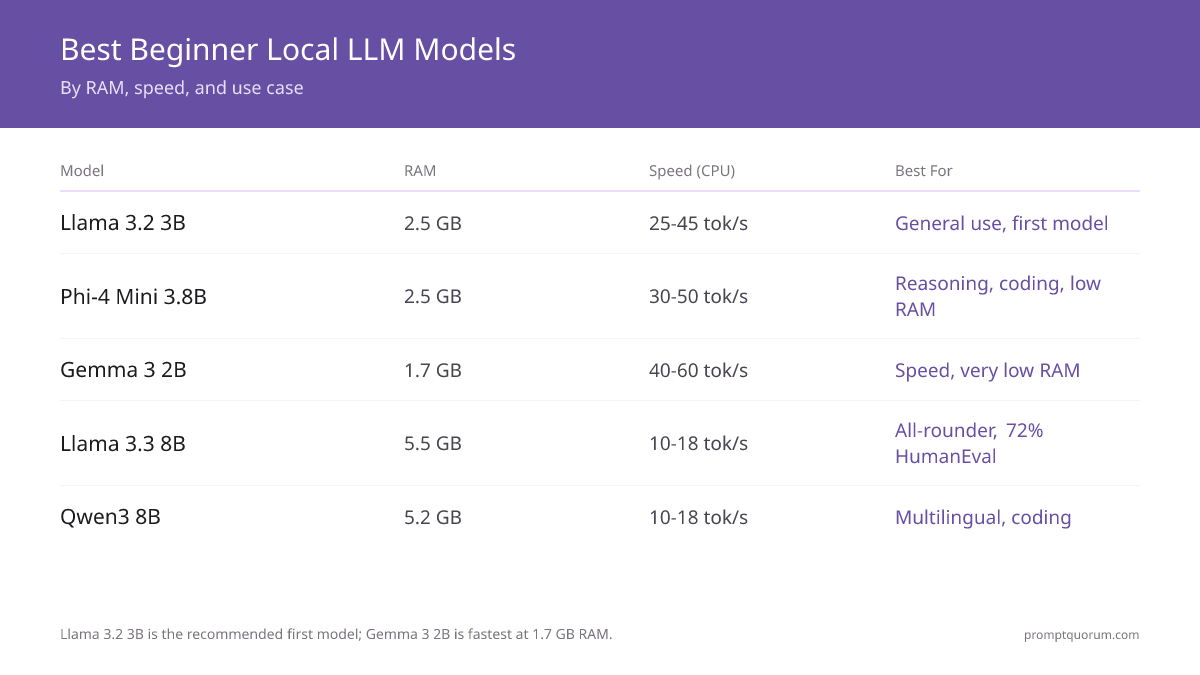
Which Model Wins by RAM, Speed, and Context Window?
Model | RAM | Speed (CPU) | Context | Best For |
|---|---|---|---|---|
| Llama 3.2 3B | 2.5 GB | 25-45 tok/s | 128K | General use, first model |
| Phi-4 Mini 3.8B | 2.5 GB | 30-50 tok/s | 128K | Reasoning, coding, low RAM |
| Gemma 4 E2B | 1.7 GB | 40-60 tok/s | 128K | Speed, very low RAM |
| Llama 3.1 8B | 5.5 GB | 10-18 tok/s | 128K | General all-rounder, 72% HumanEval |
| Qwen3 8B | 5.2 GB | 10-18 tok/s | 32K (131K YaRN) | Multilingual, coding |
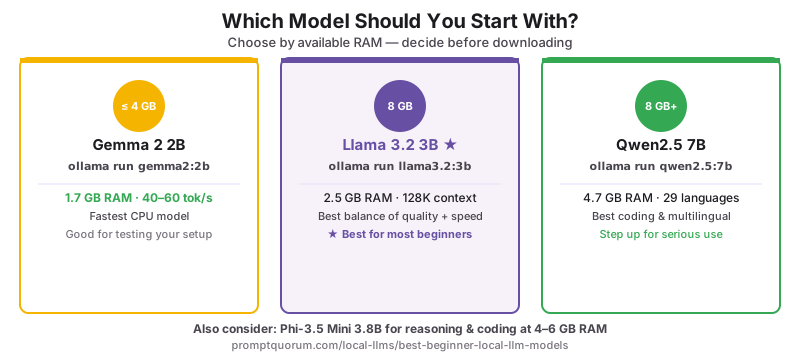
Which Model Should You Start With?
- 2 GB RAM (extreme low-end): `ollama run llama3.2:1b` -- smallest usable option, ~1.3 GB download. Quality is noticeably below 3B+ models but it runs on very old or constrained hardware.
- 4 GB RAM or less: `ollama run gemma4:e2b` -- fastest download, lowest memory use, 128K context. Acceptable quality for basic tasks.
- 8 GB RAM, first model: `ollama run llama3.2:3b` -- best balance of quality and RAM for a first experience.
- 4-6 GB RAM, reasoning/coding: `ollama run phi4-mini` -- 68% MMLU, 70% HumanEval at just 2.5 GB RAM. Better than Llama 3.2 3B on structured tasks.
- 8 GB RAM, serious use: `ollama run llama3.1:8b-instruct` or `ollama run qwen3:8b` -- step up for longer documents, complex instructions.
- Primarily coding tasks: `ollama run qwen3:8b` -- best HumanEval score in this list; strong at Python, JavaScript, and SQL.
- Non-English language: `ollama run qwen3:8b` -- 29+-language native support, no translation overhead.
Which Model Should You Choose Based on Your Region?
EU / GDPR: For EU organizations processing personal data locally, model provenance matters for compliance documentation. German BSI guidelines require documenting model origin and licence type for AI systems used in professional contexts. Llama (Meta/USA), Gemma (Google/USA), and Qwen (Alibaba/China) are all technically usable under GDPR for local inference -- for the cleanest EU-provenance narrative, Mistral AI (France) offers Apache 2.0-licensed models, though current Mistral Small releases (24B+) exceed this page's 4-8 GB beginner RAM range; see the hardware guide for the GPU tier needed to run them.
Japan (METI): For Japanese-language workflows, Qwen3 8B is the correct first model -- native Japanese tokenization produces better token efficiency on Japanese text than Llama. Run: `ollama run qwen3:8b`. METI AI Governance Guidelines require documenting the model name and version -- all five models here have versioned Ollama tags satisfying this.
China: Qwen3 8B (Alibaba) is the natural first model for Chinese-language workflows. Native Chinese tokenization and 29+-language support make it the standard for Mandarin-first workflows. For Chinese enterprise deployment under China's Data Security Law (数据安全法), Qwen3 running locally via Ollama satisfies data localization requirements.
Korea: Among these five beginner-tier picks, Qwen3 8B has the strongest native Korean tokenization. For dedicated Korean-language local models beyond this beginner tier, see Best Korean Language Models for Local Use.
How Do You Download and Run These Models?
All five models install with a single Ollama command -- no manual configuration required. See How to Install Ollama for setup, then Run Your First Local LLM for a step-by-step first-run walkthrough. If you are running on a laptop with limited RAM, How to Run Local LLMs on a Laptop covers quantization and performance tuning for constrained hardware.
Once your first model is running, the next step is learning how to prompt it effectively. Start with the prompt engineering fundamentals — 16 guides covering the building blocks every prompt needs, from temperature settings to output formatting.
What Mistakes Do Beginners Make When Choosing a Local LLM?
- Choosing a model size based only on parameter count -- 7B at 4-bit quantization can outperform a poorly-quantized 13B.
- Not accounting for GPU VRAM quantization overhead -- a model may need 10-15% more VRAM than the file size.
- Using older quantizations (Q3_K_S) when newer ones (Q4_K_M) offer better quality at the same size.
- Choosing Mistral Small v0.3 as the default 7B model: it was the community standard in 2023-2024 (7B, ~4.1 GB download, `ollama run mistral`) but is now outperformed by Qwen3 8B on coding and Llama 3.1 8B on English reasoning at the same RAM requirement. If a tutorial or tool defaults to `ollama run mistral`, switch to `ollama run qwen3:8b` or `ollama run llama3.1:8b-instruct` for better results without increasing RAM. Note: this is a different, unrelated model from the current 24B+ "Mistral Small 3.x" line, which needs far more RAM than any model on this page.
- Pulling a model without checking available RAM first: If you pull a model that exceeds available RAM, Ollama falls back to slow CPU inference with partial disk swapping -- sometimes under 1 tok/sec. Always run `free -h` (Linux/macOS) or check Task Manager (Windows) before pulling models above 7B.
Frequently Asked Questions
What is the best local LLM model for beginners in 2026?
Llama 3.2 3B for most users -- runs on any machine with 4 GB RAM, downloads in under 5 minutes, and produces strong instruction-following output. For 8 GB RAM, Qwen3 8B offers better coding and multilingual performance. For absolute lowest RAM, Gemma 4 E2B runs on 1.7 GB at 40-60 tok/sec on CPU, or Llama 3.2 1B on 2 GB or less.
What is the minimum RAM to run a local LLM?
The practical minimum for useful output is 4 GB RAM with a 3B model at Q4_K_M quantization. On 2 GB or less, Llama 3.2 1B is the smallest usable option, though quality drops noticeably. 8 GB RAM unlocks 7-8B models which produce noticeably better results on complex tasks.
What is the best 1B parameter local LLM?
Llama 3.2 1B is the recommended 1B model -- ~1.3 GB download, runs on 2 GB RAM or less via `ollama run llama3.2:1b`. It is usable for basic summarization and short Q&A, but noticeably weaker than 3B+ models on multi-step reasoning. Use it only when hardware genuinely cannot support a 3B model.
Is Mistral Small 3.2 a good beginner local LLM?
No -- Mistral Small 3.2 is a 24B-parameter model that needs roughly 14 GB+ of RAM/VRAM, well above the 4-8 GB beginner range covered on this page. It is a different, larger model from the 7B "Mistral Small v0.3" once recommended here. If you have 8 GB RAM, start with Llama 3.1 8B or Qwen3 8B instead. See the hardware guide for the 16GB+ GPU tier needed to run Mistral Small 3.2.
How do I run these models with Ollama?
Install Ollama from ollama.com, then run: `ollama run llama3.2:3b` for the recommended beginner model. Ollama downloads the model on first run. All five models listed here are in the Ollama library.
Is Llama 3.2 3B good enough for everyday tasks?
Yes for: summarization, simple Q&A, basic code explanation, and conversational chat. No for: multi-step reasoning, complex coding, and long-form structured writing. For those tasks, upgrade to Llama 3.1 8B or Qwen3 8B with 8 GB RAM.
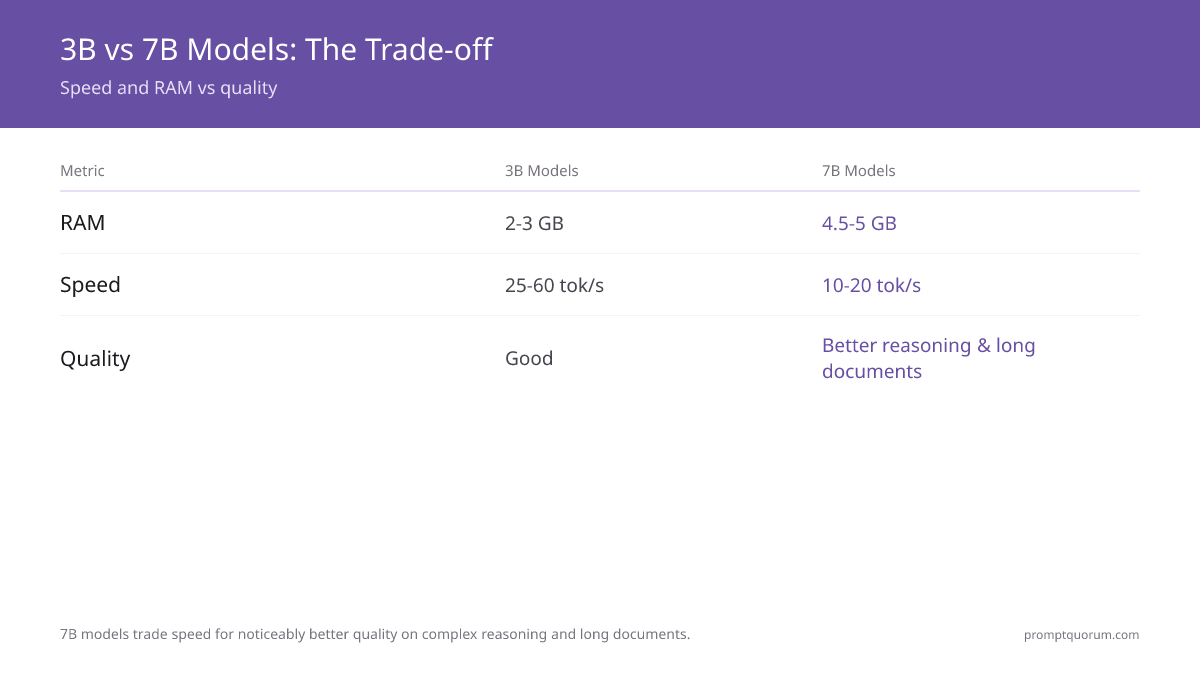
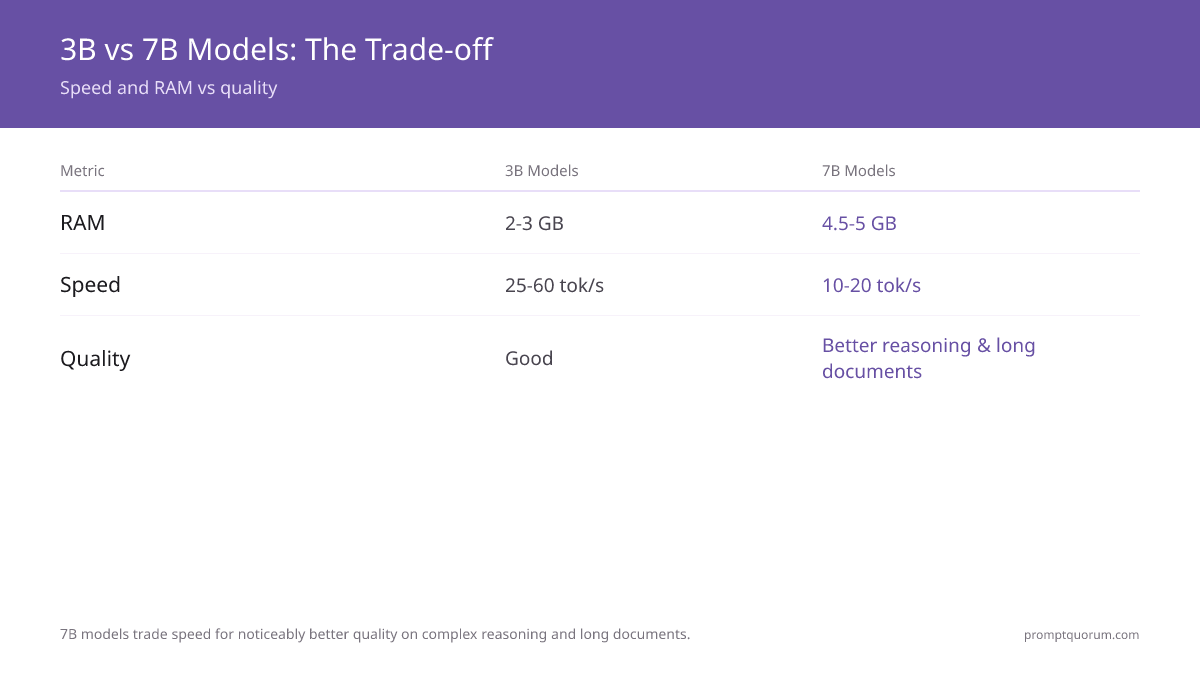
What is the difference between 3B and 7B models?
A 7B model produces noticeably better output on complex instructions and reasoning. A 3B model uses roughly half the RAM and runs 2-3× faster. The choice is almost always determined by available RAM -- use 3B on 4-6 GB machines, 7B on 8 GB machines.
Which model is best for coding tasks?
Qwen3 8B leads on HumanEval among the five models. For even better coding, use the dedicated code variant: `ollama run qwen2.5-coder:7b`. Phi-4 Mini 3.8B is the best coding model if limited to 4-6 GB RAM (70% HumanEval at 2.5 GB RAM).
Which model should I use for non-English languages?
Qwen3 8B supports 29+ languages natively including Chinese, Japanese, Korean, Arabic, and all major European languages. It processes non-English text more efficiently than Llama.
Are these models safe to use with private data?
Yes -- all five models run entirely on your hardware. No prompt text, context, or output is transmitted to external servers. Local inference is inherently more private than cloud APIs for sensitive data.
How long does it take to download these models?
On a 100 Mbps connection: Llama 3.2 1B (1.3 GB) ~2 minutes. Gemma 4 E2B (1.6 GB) ~2 minutes. Llama 3.2 3B (2 GB) ~3 minutes. Phi-4 Mini (2.3 GB) ~3 minutes. Llama 3.1 8B (~5 GB) and Qwen3 8B (~5.2 GB) ~6-7 minutes each. Models are cached after first download -- subsequent runs start in seconds.
Can I run multiple models on the same machine?
Yes -- all five can coexist on disk simultaneously. Plan for 15-20 GB if you install all five. Ollama loads one model at a time and unloads it after 5 minutes of inactivity.
Sources
- Meta AI. (2024). "Llama 3.2 Model Card." llama.meta.com/ -- Official specifications and benchmarks for Llama 3.2 3B and 1B models.
- Microsoft. (2025). "Phi-4 Mini Technical Report." huggingface.co/microsoft/Phi-4-mini-instruct -- Benchmark data for Phi-4 Mini (68% MMLU, 70% HumanEval).
- Google DeepMind. (2025). "Gemma 3 Model Card." ai.google.dev/gemma/docs/core -- Specifications and performance for Gemma 4 E2B, including 128K context window upgrade.
- Ollama. (2026). "Ollama Model Library." ollama.com/library -- Canonical source for Ollama model tags, sizes, and pull commands.
- Hugging Face. (2026). "Open LLM Leaderboard." huggingface.co/spaces/open-llm-leaderboard/open_llm_leaderboard -- MMLU, HumanEval, and MATH benchmark scores across all open models.
- Mistral AI. (2024). "Mistral Small v0.3 Release Notes." mistral.ai/news/announcing-mistral-7b/ -- Technical specifications and Apache 2.0 licence details for the legacy 7B model referenced in Common Mistakes.
- Alibaba Qwen Team. (2025). "Qwen3 Technical Report." arXiv:2505.09388. arxiv.org/abs/2505.09388 -- Multilingual benchmark data and architecture details for Qwen3 8B.
- Meta AI. (2025). "Llama 3.3 Model Card." llama.meta.com/ -- Official specifications and benchmarks for Llama 3.1 8B.