Key Takeaways
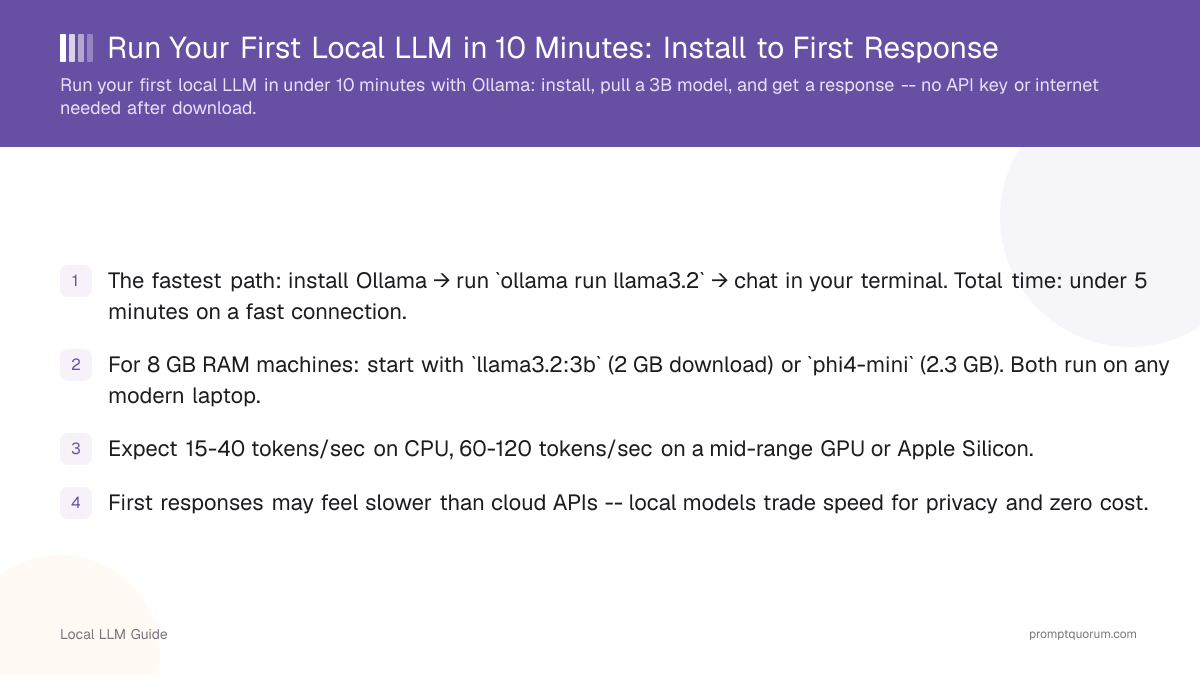
- The fastest path: install Ollama → run `ollama run llama3.2` → chat in your terminal. Total time: under 5 minutes on a fast connection.
- For 8 GB RAM machines: start with `llama3.2:3b` (2 GB download) or `phi4-mini` (2.3 GB). Both run on any modern laptop.
- Expect 15-40 tokens/sec on CPU, 60-120 tokens/sec on a mid-range GPU or Apple Silicon.
- First responses may feel slower than cloud APIs -- local models trade speed for privacy and zero cost.
- After the initial model download, everything runs offline. No internet needed for subsequent sessions.
📍 In One Sentence
Running your first local LLM takes under 10 minutes: install Ollama, run one command like `ollama run llama3.2` to pull a small model, and start chatting in your terminal with no API key, account, or internet connection required after the initial download.
💬 In Plain Terms
You don't need any special setup to try a local AI model. Install one free program (Ollama), type a single command, and it downloads a small model and opens a chat right in your terminal. After that first download, it works completely offline -- no account, no API key, no monthly bill.
Step 1: Install Ollama
Ollama is the fastest way to run a local LLM. Install it with one command or a 2-minute download:
# macOS (Homebrew)
brew install ollama

# Linux
curl -fsSL https://ollama.com/install.sh | sh

# Windows: download installer from ollama.com/download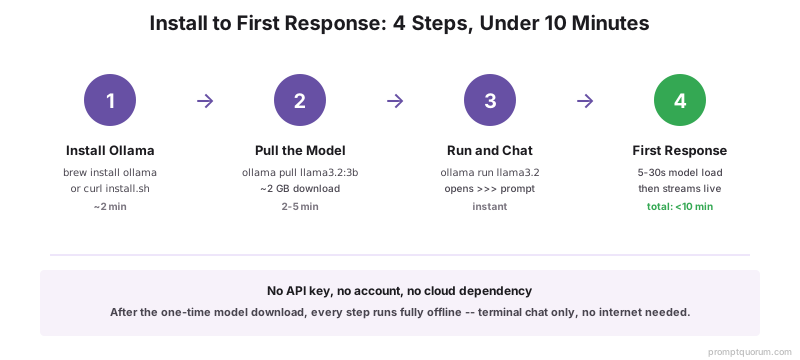
Verify Ollama Is Running
After installation, confirm Ollama is active:
curl http://localhost:11434
# Expected output: Ollama is running
Step 2: Choose Your First Model
Pick a model based on your available RAM. When in doubt, start with `llama3.2:3b` -- it runs on any machine with 4 GB of RAM and produces useful output:
Your RAM | Recommended Model | Download Size | Why |
|---|---|---|---|
| 4 GB | llama3.2:1b | ~1.3 GB | Smallest usable Llama model |
| 8 GB | Llama 3.2 3B | ~2 GB | Best quality/size ratio for beginners |
| 8-16 GB | Llama 3.1 8B | ~4.7 GB | Strong general-purpose model |
| 16+ GB | mistral:7b or qwen2.5:7b | ~4-5 GB | Competitive quality, fast inference |

Step 3: Pull the Model
Download the model with `ollama pull`. The model is saved to `~/.ollama/models` and only needs to be downloaded once:
ollama pull llama3.2

# Or pull a specific size variant
ollama pull llama3.2:3b
ollama pull llama3.1:8b
What the Download Looks Like?
Ollama shows download progress in the terminal. A `llama3.2:3b` model takes 2-5 minutes on a typical broadband connection. The model is stored compressed -- the 2 GB download expands to approximately 2.3 GB on disk.
pulling manifest
pulling 966de95ca8dc... 100% ▕████████████████▏ 1.9 GB
pulling 9f436a92eb8b... 100% ▕████████████████▏   42 B
verifying sha256 digest
writing manifest
success
Step 4: Run the Model and Send Your First Prompt
Start an interactive chat session:
ollama run llama3.2

# Ollama loads the model and shows a prompt:
>>> Send a message (/? for help)
Your First Conversation
Type a message and press Enter. The model streams its response token by token:
>>> What are local LLMs?

Local LLMs (large language models) are AI models that run entirely
on your own hardware -- your laptop, desktop, or server. Unlike cloud
services such as ChatGPT or Claude, local LLMs process everything
locally with no data sent to external servers...
What to Expect: Speed, Quality, and Limitations
Speed varies by hardware. On a 2023 laptop (no GPU): expect 15-25 tokens/sec for a 3B model and 8-15 tokens/sec for an 8B model. On Apple M3 Pro: 50-80 tokens/sec for 8B. On NVIDIA RTX 4070 Ti: 90-130 tokens/sec for 8B.
Quality from `llama3.2:3b` is noticeably lower than GPT-5.6 or Claude Opus 5 on complex tasks. For summarization, simple Q&A, and code explanation, the output is useful. For multi-step reasoning or long-form writing, upgrade to an 8B or 13B model.
Context window: `llama3.2:3b` supports 128K tokens by default in Ollama. In practice, quality degrades after ~16K tokens in a single conversation.
First response delay: the first response after `ollama run` includes model loading time (5-30 seconds). Subsequent responses in the same session are faster.
How Do You Use Your Local LLM Beyond the Terminal?
The Ollama terminal chat is useful for testing, but most real use cases need a better interface:
- Open WebUI: a full-featured web UI for Ollama. Run it with Docker: `docker run -d -p 3000:8080 --add-host=host.docker.internal:host-gateway ghcr.io/open-webui/open-webui:main`. Access at http://localhost:3000.
- LM Studio: if you prefer a desktop GUI, How to Install LM Studio covers the full setup. LM Studio's built-in chat is polished and supports conversation history.
- API integration: Ollama's API at `localhost:11434` is compatible with the OpenAI SDK. Any application that accepts an OpenAI base URL can connect to your local model.
- VS Code / Cursor: extensions like Continue.dev connect to Ollama and provide local AI coding assistance directly in your editor.
Running Your First Local LLM: Regional Context
EU / GDPR: Running a local LLM with Ollama means no prompt data, context, or output leaves your machine -- GDPR Article 46 transfer mechanisms do not apply. For EU professionals handling personal data, this is the privacy-preserving alternative to cloud AI APIs. Your first local model (llama3.2:3b) uses 2 GB of disk, generates zero external API calls, and satisfies German BSI data minimization guidelines by design.
Japan (METI): METI AI Governance Guidelines require documenting where AI inference occurs. Your first Ollama setup creates a complete and auditable local environment: model files stored at ~/.ollama/models with version-specific filenames, no external API dependencies, and inference verifiable via `ollama ps`. Japanese professionals running Llama or Qwen3 locally can document the exact model version and hardware for METI compliance purposes.
China: For Chinese-language workflows, replace llama3.2:3b with qwen2.5:3b as your first model: `ollama pull qwen2.5:3b`. Qwen3 processes Chinese text 30-40% more token-efficiently than Llama, producing better results at the same hardware tier. The ollama pull and run commands are identical.
Common Questions When Running Your First Local LLM
The model response is very slow -- is this normal?
On CPU-only hardware, 8-20 tokens/sec is normal for a 7B model. Each token is roughly 0.75 words. At 10 tokens/sec, a 100-word response takes about 13 seconds. To speed up inference, use a smaller model (3B instead of 8B), enable GPU offloading if you have a compatible GPU, or use quantization level Q4_K_M which is the fastest common setting.
Can I run two models at the same time?
Ollama can keep multiple models loaded simultaneously if you have enough RAM. By default, Ollama unloads a model after 5 minutes of inactivity. You can change this with the OLLAMA_KEEP_ALIVE environment variable. Running two 7B models simultaneously requires ~16 GB of RAM.
How do I stop Ollama from running in the background?
On macOS: click the llama icon in the menu bar and select Quit. On Linux: run `systemctl stop ollama`. On Windows: right-click the system tray icon and select Quit. To prevent Ollama from starting on login, remove it from your startup items.
What is the easiest way to run a local LLM for the first time?
Install Ollama (ollama.com), run `ollama pull llama3.2:3b`, then run `ollama run llama3.2:3b`. That is all. Three commands, 2-5 minutes, and you have a working AI model on your machine with no internet needed after the initial download.
How do I know if my local LLM is working correctly?
Run `ollama ps` in the terminal. If the model is running, it will show in the list with its name, size, and memory usage. Send it a simple prompt like "What is 2+2?" -- if it responds with "4", the model is working correctly.
Does my computer need a GPU to run a local LLM?
No. Local LLMs run on CPU. A GPU makes inference 5-10× faster, but CPU-only is fine for learning and for many real use cases. Modern laptops with Apple M1/M2, AMD Ryzen, or Intel 12th gen CPUs can run 3B-7B models at reasonable speeds (10-30 tokens/sec).
How much disk space does a local LLM take?
`llama3.2:1b` is 1.3 GB, `llama3.2:3b` is 2 GB, `llama3.1:8b` is 4.7 GB. These are the compressed sizes as stored by Ollama. After loading into RAM for inference, the sizes differ (see How Much VRAM for Local LLM for details).
Can I use my local LLM without an internet connection?
Yes, completely. Download the model once with Ollama (requires internet), then run locally forever with zero internet. Perfect for private networks, airplanes, or completely offline environments.
How is a local LLM different from ChatGPT?
ChatGPT runs on Anthropic's servers. Local LLMs run on your machine. Local = zero data leave your device, full privacy, no ongoing API costs. ChatGPT = better quality on complex tasks, requires internet and a paid subscription. Both have trade-offs.
What is the best first model to try with Ollama?
`ollama pull llama3.2:3b` -- it is 2 GB, runs on any modern laptop, produces competent answers, and is the starting point recommended by Ollama. After trying it, see Best Beginner Local LLM Models for alternatives based on your hardware.
Next Steps After Your First Run
Now that you have a working local LLM, explore what it can do. To understand which models perform best for your hardware, see Best Beginner Local LLM Models. For laptop-specific performance tips, see How to Run Local LLMs on a Laptop. For privacy and security best practices, see the Local LLM Security & Privacy Checklist.
Sources
- [Ollama Model Library](https://ollama.com/library) -- Official list of downloadable models and their specifications
- [Ollama GitHub Repository](https://github.com/ollama/ollama) -- Open-source code, documentation, and issue tracking
- [Meta Llama 3.2 Model Card](https://llama.meta.com/) -- Official specifications, training data, and performance benchmarks
Common Mistakes After Your First Run
- Confusing token count with speed -- a 7B model generating 100 tokens at 20 tokens/sec takes 5 seconds, not instant.
- Running inference while the system is busy with other tasks, reducing effective tokens/sec significantly.
- Not checking context window limits -- most beginner models support 2K-8K tokens, not the 100K+ of frontier models.
- Expecting instant responses on first run -- the first response includes model loading time (5-30 seconds). Subsequent responses in the same session are 2-5× faster.
- Using the wrong model tag -- `llama3.1:8b-text` is base text-completion mode and will loop/repeat endlessly. Use `-instruct` tags like `llama3.1:8b-instruct` for chat.