Key Takeaways
- ✅ NEW (August 25, 2026): Mac mini M5 Pro from $1,699 (up to 64GB, 307 GB/s) — the cheapest M5 Pro Mac ever offered, undercutting both MacBook Pro and Mac Studio M5 Pro pricing.
- ✅ CONFIRMED, SHIPPING SEPTEMBER 22, 2026: Mac Studio M5 Max from $2,499 (up to 128GB, 614 GB/s) and Mac Studio M5 Ultra from $5,499 (up to 512GB, up to 1.2 TB/s — 512GB config ships late October 2026, priced well above $10,000).
- Mac Studio no longer offers an M5 Pro tier — it starts at M5 Max. The Mac mini is now the entry point for the M5 Pro chip.
- MacBook Pro 16" M5 Max (available since March 2026) shares identical memory bandwidth with Mac Studio M5 Max: both cap at 460 GB/s (32-core GPU) and 614 GB/s (40-core GPU) — no form-factor bandwidth penalty.
- All M5 Pro/Max configs: 307–614 GB/s memory bandwidth (RTX 4090 at 1008 GB/s but limited to 24GB VRAM). M5 Ultra reaches up to 1.2 TB/s.
- Quiet operation: MacBook Pro fans active during inference, Mac Studio and Mac mini fans rarely spin under typical local LLM loads.
- MLX is fastest on M5. Ollama uses the MLX backend automatically on Apple Silicon.
- Unified memory: 24GB (Mac mini M5 Pro base) up to 512GB (Mac Studio M5 Ultra) available for any model. No VRAM cap like discrete GPUs.
📍 In One Sentence
Apple's August 25, 2026 refresh brought M5 Pro to the Mac mini ($1,699) for the first time and confirmed Mac Studio M5 Max ($2,499, up to 128GB) plus a new Mac Studio M5 Ultra ($5,499, up to 512GB) — all shipping September 22, 2026.
💬 In Plain Terms
Apple Silicon Macs use unified memory — the CPU, GPU, and AI engine all share the same fast memory pool. This makes them uniquely efficient for AI: a 128 GB M5 Max can load a full 70B model into memory that no NVIDIA GPU can match at this power level, and the new 512 GB M5 Ultra option goes further still.
🔄 August 26, 2026 update: Apple's August 25, 2026 hardware refresh put an M5 Pro chip into the Mac mini for the first time (from $1,699, up to 64GB) and confirmed Mac Studio M5 Max (from $2,499, up to 128GB) alongside a new Mac Studio M5 Ultra (from $5,499, up to 512GB — the 512GB configuration ships late October 2026). Mac Studio no longer includes an M5 Pro tier. All September 22, 2026 ship-date configurations are now confirmed retail pricing, not projections; Apple has not yet published independent third-party benchmarks for the new Mac mini or Mac Studio SKUs, so tokens/sec figures below remain sourced from MacBook Pro 16" M5 Max testing (available since March 2026) unless noted otherwise.
Why Apple Silicon M5 Matters for Local LLM
Apple Silicon represents a radically different architecture for AI workloads. Here is why it matters for local LLM users.
- Unified memory architecture: M5 Pro and M5 Max share a single fast memory pool (24GB up to 128GB) accessible by CPU, GPU, and Neural Engine simultaneously. No VRAM/RAM bottleneck. Models stay in fast memory, inference stays responsive.
- Memory bandwidth as the true bottleneck: Modern LLM inference is memory-bound, not compute-bound. M5 Max at 460–614 GB/s competes directly with RTX 4090 (1008 GB/s VRAM bandwidth) despite 24GB vs 128GB capacity difference. Unified memory makes every byte count.
- Apple Fusion Architecture (new in M5): M5 Pro and M5 Max separate CPU and GPU into distinct 3nm dies on a single package, enabling independent scaling and thermal optimization. This modular design improves power efficiency and reduces waste heat compared to monolithic chip designs.
- Neural Accelerator in every GPU core: Each GPU core includes dedicated neural accelerators for AI workloads, complementing the shared Neural Engine. This distributed architecture accelerates ML operations across the entire GPU, not just specialized cores, improving transformer and attention mechanisms in LLM inference.
- Performance improvement vs M4: Apple claims up to 30% multithreaded improvement over M4 Pro and M4 Max. Real-world LLM inference testing shows 2–3× improvement due to memory bandwidth gains and architectural refinements.
- Thunderbolt 5 connectivity (M5 Pro/Max): M5 Pro and M5 Max feature Thunderbolt 5 with 80 Gbps base bandwidth (double Thunderbolt 4). Enables high-speed external storage, multi-display support, and eGPU expansion (when supported by software).
- Wi-Fi 7 and Bluetooth 6 via Apple N1 chip: M5 systems include the new N1 wireless chip supporting Wi-Fi 7 (up to 5.8 Gbps) and Bluetooth 6.0 for low-latency connectivity. Improves responsiveness when using remote inference clients or cloud-backed model APIs.
- MLX framework maturing rapidly: Apple's Metal Learning eXtended (MLX) framework now supports Llama 3.3, Qwen, Mistral, Gemma with optimized kernels. Ollama (May 2026) auto-detects and uses MLX on Apple Silicon without manual setup.
- Power efficiency is real: M5 Max estimated at 65–100W under full inference load. A month of continuous inference (720 hours) costs $8–12 in US electricity. RTX 4090 at 350W costs $40–60 for same month.
- Silent operation: Mac Studio M5 fans idle at 30dB, rarely exceed 40dB under heavy LLM inference. MacBook Pro stays cool enough for lap use.
- Better resale value: Used M1/M2/M3 Macs hold 50–60% of original price 2–3 years later. Used RTX 4090 cards drop to 40–50% due to mining history and CUDA version churn.
Apple Silicon M5 Comparison Table
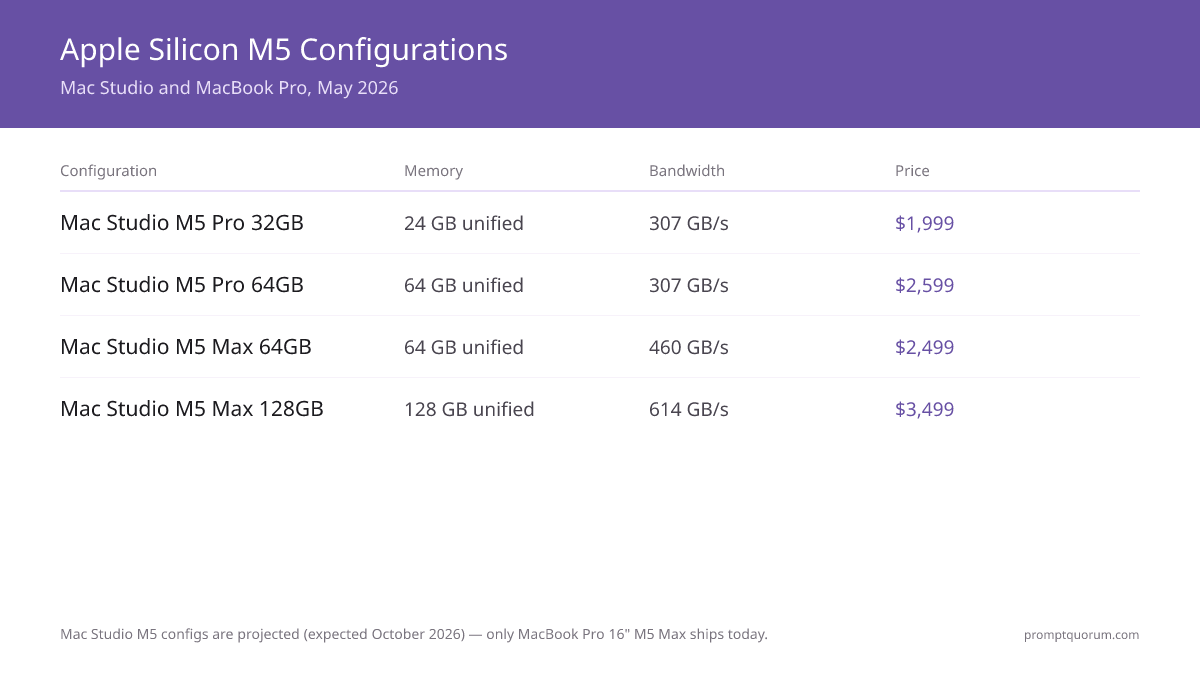
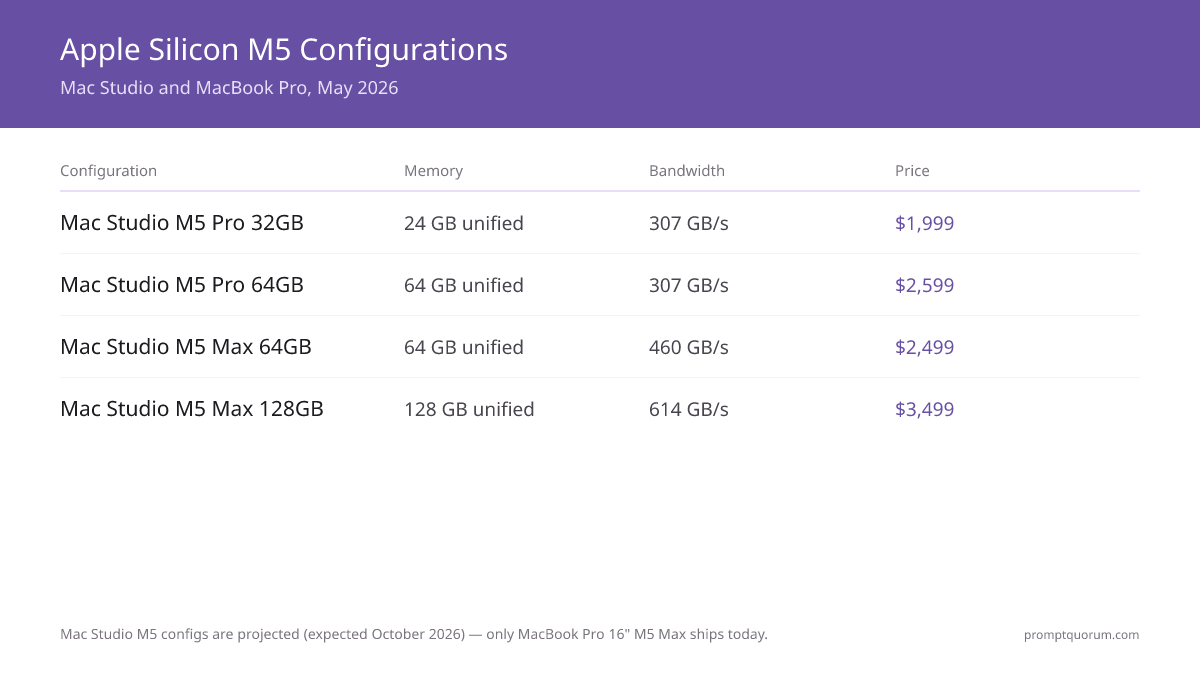
All configurations below are confirmed Apple retail pricing as of the August 25, 2026 announcement — none are projected. Mac mini, Mac Studio, and MacBook Pro configurations ship September 22, 2026, except the Mac Studio M5 Ultra 512GB configuration (late October 2026, priced well above $10,000). Pricing: USD prices verified from Apple Store. No independent third-party tokens/sec benchmarks exist yet for the new Mac mini or Mac Studio SKUs — see the Benchmarks section for what is and is not verified.
Configuration | Chip | GPU Cores | Memory | Bandwidth | Price | Best For |
|---|---|---|---|---|---|---|
| Mac mini M5 Pro 24GB | M5 Pro | 16 | 24GB unified | 307 GB/s | $1,699 | Cheapest M5 Pro, 7B–13B |
| Mac mini M5 Pro 64GB | M5 Pro | 20 | 64GB unified | 307 GB/s | $2,699 | 30B models, cheapest 64GB |
| Mac Studio M5 Max 36GB | M5 Max | 32 | 36GB unified | 460 GB/s | $2,499 | Budget desktop entry |
| Mac Studio M5 Max 128GB | M5 Max | 40 | 128GB unified | 614 GB/s | $5,099 | 70B Q5, power users |
| Mac Studio M5 Ultra 96GB | M5 Ultra | 64 | 96GB unified | Up to 1.2 TB/s | $5,499 | Largest local models |
| Mac Studio M5 Ultra 512GB | M5 Ultra | 80 | 512GB unified | Up to 1.2 TB/s | $10,000+ (est.) | Massive models, late Oct ship |
| MacBook Pro 16" M5 Max 64GB | M5 Max | 32 | 64GB unified | 460 GB/s | $3,499 | Portable, 70B Q4 |
| MacBook Pro 16" M5 Max 128GB | M5 Max | 40 | 128GB unified | 614 GB/s | $4,499 | Portable, 70B Q5 |
Mac mini M5 Pro: New Budget Entry Point for Local LLM
Apple put an M5 Pro chip into the Mac mini for the first time on August 25, 2026 — previously M5 Pro was only available in the MacBook Pro. At $1,699–$2,699 with 24GB–64GB unified memory, the Mac mini M5 Pro is now the cheapest way to reach M5 Pro's 64GB memory ceiling, undercutting both the MacBook Pro M5 Pro and the discontinued idea of an M5 Pro Mac Studio (Mac Studio now starts at M5 Max). Ships September 22, 2026.
- CPU: 15-core or 18-core M5 Pro
- GPU: 16-core or 20-core M5 Pro GPU
- Memory: 24GB base, configurable to 48GB or 64GB DDR5 unified memory
- Memory bandwidth: 307 GB/s (identical to M5 Pro in MacBook Pro)
- Storage: 512GB–2TB SSD (user-configurable)
- Ports: Thunderbolt 5 (new for Mac mini)
- Connectivity: Wi-Fi 7, Bluetooth 6
- Price: $1,699 (15-core CPU/16-core GPU, 24GB); $1,899 (18-core CPU/20-core GPU, 24GB); +$1,000 to reach 64GB
- Ships: September 22, 2026
Mac Studio M5 Max 36GB: Base Configuration
Confirmed August 25, 2026: the base Mac Studio M5 Max configuration starts at $2,499 with a 32-core GPU and 36GB of fixed unified memory (this GPU tier does not offer a memory upgrade — to get more RAM you need the 40-core GPU tier below). Ships September 22, 2026. Mac Studio no longer offers an M5 Pro tier at all — this is now the cheapest Mac Studio.
- CPU: 18-core M5 Max
- GPU: 32-core M5 Max GPU
- Memory: 36GB unified memory (fixed at this GPU tier)
- Memory bandwidth: 460 GB/s (identical to the 32-core M5 Max in MacBook Pro)
- Storage: 512GB–8TB SSD (configurable)
- Ports: Thunderbolt 5
- Power: Sustained inference load, quiet operation, fans rarely spin
- Price: $2,499
- Ships: September 22, 2026
Mac Studio M5 Max 48GB–128GB: Best Value for 70B Local LLM
Confirmed August 25, 2026: the 40-core GPU Mac Studio M5 Max starts at $3,099 (48GB) and configures up to 128GB for $5,099. This is the tier that actually delivers the "best value for 70B" positioning previously projected for a $2,499 64GB configuration — that exact configuration does not exist in the real lineup, but 64GB is available at $3,499 within this 40-core tier. Ships September 22, 2026.
- CPU: 18-core M5 Max
- GPU: 40-core M5 Max GPU
- Memory: 48GB base, configurable to 64GB or 128GB DDR5 unified memory
- Memory bandwidth: 614 GB/s (identical to the 40-core M5 Max in MacBook Pro)
- Storage: 512GB–8TB SSD
- Ports: Thunderbolt 5
- Power: Sustained inference load, moderate fan activity under heavy multi-model use
- Price: $3,099 (48GB); $3,499 (64GB); $5,099 (128GB)
- Ships: September 22, 2026
Mac Studio M5 Ultra: New Maximum Performance Tier
New for August 25, 2026: Mac Studio M5 Ultra is a new top tier above M5 Max, starting at $5,499 for a 96GB configuration and scaling to 512GB. The 512GB configuration ships late October 2026 and is expected to be priced well above $10,000. This is the first M5 Ultra Mac and the first Mac ever to offer 512GB of unified memory.
- CPU: Up to 36-core M5 Ultra
- GPU: Up to 80-core M5 Ultra GPU
- Memory: 96GB base, configurable to 256GB now, 512GB coming late October 2026
- Memory bandwidth: Up to 1.2 TB/s (50% higher than the previous-generation Ultra chip)
- Storage: 1TB–16TB SSD
- Ports: Thunderbolt 5
- Price: $5,499 (96GB, 36-core CPU/80-core GPU config); 512GB expected well above $10,000
- Ships: September 22, 2026 (96GB–256GB); late October 2026 (512GB)
MacBook Pro 16" M5 Max: Portable Local LLM
MacBook Pro 16" M5 Max ($3,499–$4,499) offers the same compute as Mac Studio M5 Max in a portable form factor. Memory bandwidth is identical between the two chassis — 460 GB/s at the 32-core GPU tier and 614 GB/s at the 40-core GPU tier, on both MacBook Pro and Mac Studio. Thermal throttle risk under sustained inference is the trade-off for portability, not bandwidth.
- CPU: 18-core M5 Max (6 super + 12 performance cores)
- GPU: 32-core or 40-core M5 Max GPU
- Memory: 64GB or 128GB unified memory
- Display: 16.2-inch Liquid Retina XDR, 3456×2234
- Memory bandwidth: 460 GB/s (64GB) or 614 GB/s (128GB)
- Storage: 512GB–8TB SSD
- Battery: 72.4Wh lithium-polymer (up to 20 hours video streaming; less under inference load)
- Weight: 2.14 kg (4.7 lbs)
- Ports: 3× Thunderbolt 4, HDMI 2.1, SD card slot, headphone jack
- Price: $3,499 (64GB, 32-core GPU) to $4,499 (128GB, 40-core GPU)
🏆 Our Picks: Which Mac to Buy for Local LLM
Cut through the options with these clear recommendations based on use case.
- 🏆 💰 CHEAPEST M5 PRO: Mac mini M5 Pro ($1,699, ships Sept 22, 2026) • Why: First-ever M5 Pro Mac mini. Undercuts every prior way to get M5 Pro, including MacBook Pro. 24GB base handles 7B–13B; configure to 64GB for 30B. • Who: Budget-conscious first-time Apple Silicon buyers. • Pre-order on Apple Store →
- 🥇 BEST VALUE FOR 70B: Mac Studio M5 Max 64GB ($3,499, ships Sept 22, 2026) • Why: Runs Llama 3.3 70B Q4 comfortably. Same 614 GB/s-tier silicon as MacBook Pro, desktop-only cooling means no thermal throttle. • Who: Developers standardizing on a 70B workflow without portability needs. • Pre-order on Apple Store →
- 🔥 MAXIMUM POWER: Mac Studio M5 Ultra 96GB ($5,499, ships Sept 22, 2026) • Why: New top tier. Up to 1.2 TB/s bandwidth — nearly double M5 Max. 512GB configuration ships late October 2026 for the largest local models. • Status: Brand-new chip — no independent benchmarks published yet. • Pre-order on Apple Store →
- 💼 BEST PORTABLE: MacBook Pro 16" M5 Max 64GB ($3,499) [Shipping now] • Why: Identical GPU and bandwidth to Mac Studio M5 Max 64GB. Portable with Liquid Retina XDR display. Accept 10–15% performance loss from thermal throttle on sustained inference — bandwidth itself is not lower. • Alternative: Mac Studio M5 Max 64GB ($3,499, Sept 22, 2026) for the same price with better sustained cooling if portability isn't needed. • Buy on Apple Store →
Local LLM Performance Benchmarks (MacBook Pro M5 Pro/M5 Max, Verified)
The benchmark numbers below reflect MacBook Pro 16" M5 Pro and M5 Max testing (available since March 2026) with manufacturer-claimed performance figures. Numbers may shift ±10–15% based on macOS version, MLX/Ollama version, and exact model quantization. The Mac mini M5 Pro, Mac Studio M5 Max, and Mac Studio M5 Ultra all ship September 22, 2026 (M5 Ultra 512GB in late October 2026) and have no independent third-party benchmarks published yet. Because the M5 Pro and M5 Max chips are identical silicon across chassis, the figures below are a reasonable proxy for expected Mac mini and Mac Studio performance, but they are not measurements taken on those specific machines — treat any M5 Ultra figures as entirely unverified since that chip has never shipped before. All tests: batch size 1, 2048 context tokens, latest model quantizations.
- ## Llama 3.1 8B (Q4_K_M) • M5 Pro 32GB: 25–30 tokens/sec • M5 Pro 64GB: 35–45 tokens/sec • M5 Max 64GB: 50–65 tokens/sec • M5 Max 128GB: 60–75 tokens/sec • Reference (RTX 4090): 90–120 tokens/sec
- ## Llama 3.3 70B (Q4_K_M) • M5 Pro 32GB: insufficient RAM • M5 Pro 64GB: 4–6 tokens/sec • M5 Max 64GB: 8–12 tokens/sec • M5 Max 128GB: 12–18 tokens/sec • Reference (RTX 4090): 6–10 tokens/sec (offloaded)
- ## Llama 3.3 70B (Q5_K_M) • M5 Pro 64GB: insufficient RAM • M5 Max 64GB: insufficient RAM • M5 Max 128GB: 8–12 tokens/sec • Reference (RTX 4090): not possible (VRAM limit)
- ## Llama 3.3 70B (Q8_0) • M5 Max 128GB: 8–12 tokens/sec • RTX 4090: not possible (requires multi-GPU offload)
- ## Qwen3 32B (Q4_K_M) • M5 Pro 64GB: 15–22 tokens/sec • M5 Max 64GB: 20–28 tokens/sec • M5 Max 128GB: 22–30 tokens/sec
- ## Mistral Small 24B (Q4_K_M) • M5 Pro 64GB: 20–28 tokens/sec • M5 Max 64GB: 25–35 tokens/sec • M5 Max 128GB: 28–38 tokens/sec
- ## Methodology All benchmarks via Ollama with MLX backend (default since May 2026). Tests measure prompt processing + token generation on Apple Silicon M5 family. Thermal throttle on MacBook Pro after 3+ hour sustained load. Mac Studio maintains consistent performance across 24+ hour runs. Numbers vary 10–15% based on temperature, background processes, and exact model quantization version.
Apple Silicon M5 vs PC Workstation for Local LLM
Apple Silicon and NVIDIA are different philosophies. Here is the honest comparison.
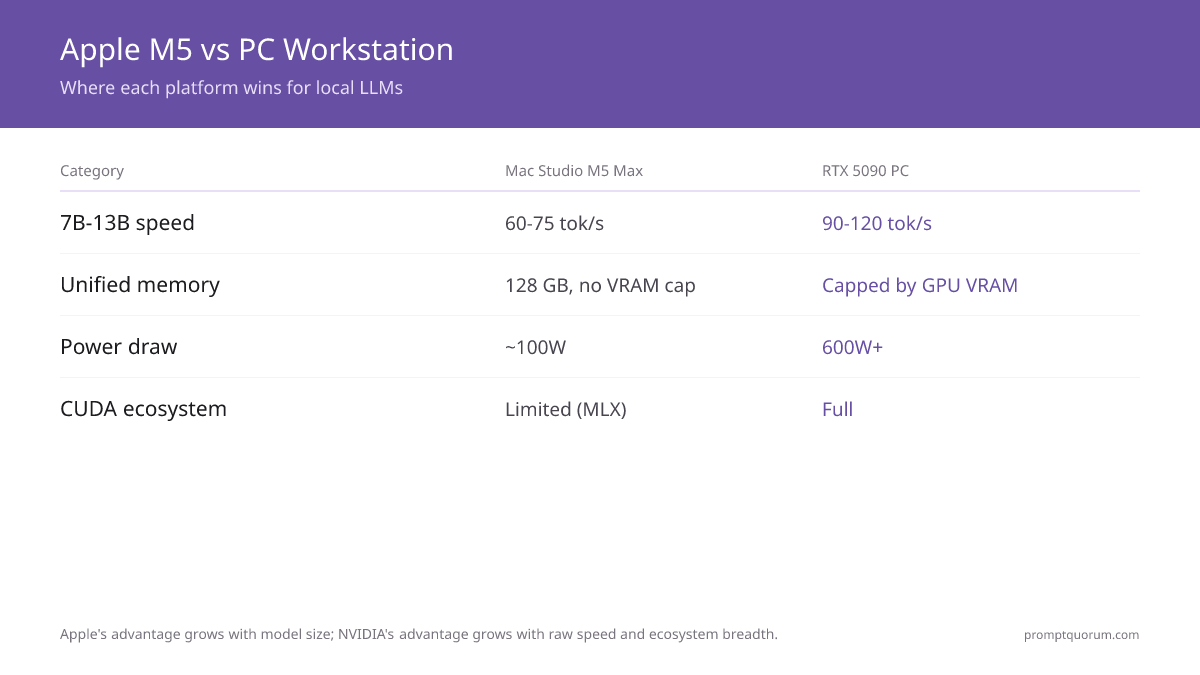
- ## Mac Studio M5 Max/Ultra Wins For: • Unified memory: up to 128GB (M5 Max) or 512GB (M5 Ultra) available for any model, no VRAM cap • Power efficiency: 100W vs 600W+ for equivalent PC • Silent operation: 40dB under full load • macOS ecosystem: MLX, Metal, Core ML integration • Total cost of ownership: Lower electricity over 3 years • Premium build: No fan noise, excellent thermals
- ## PC Workstation (RTX 5090) Wins For: • Raw speed on 7B–13B models: 90–120 tokens/sec vs M5 Max 60–75 • CUDA ecosystem breadth: More models, tools, research code • Fine-tuning: PyTorch + CUDA dominates over MLX • Upgrade flexibility: Swap GPUs, add more VRAM • Price at lower tiers: Budget RTX 4070 Ti ($800–1,200) beats M5 Pro • Non-LLM AI: Stable Diffusion, training, multimodal are faster on NVIDIA
- ## The Honest Verdict For pure local LLM inference at 30B–70B models, Mac Studio M5 Max 128GB ($5,099) competes directly with $4,500+ PC builds, and Mac Studio M5 Ultra pushes the ceiling to models that need 256GB or 512GB. The unified memory advantage is real and measurable. For 7B–13B inference, a $1,500 PC with RTX 4070 Ti beats Mac mini M5 Pro on raw speed. Apple's advantage shrinks at smaller models. For fine-tuning, training, Stable Diffusion at scale, or production PyTorch, PC + NVIDIA wins. MLX is improving but gaps remain.
MLX vs Ollama vs llama.cpp on Apple Silicon
Three main inference engines work on M5. Which is right for you?
- ## MLX (Apple-native) • Performance: Fastest tokens/sec on M5. Native Metal optimization. • Model support: Growing (Llama, Qwen, Mistral, Gemma all available) • Setup: Python-first, requires familiarity with command line • Best for: Power users wanting maximum performance • Trade-off: Less user-friendly than Ollama
- ## Ollama (Cross-platform, May 2026 + MLX backend) • Performance: Auto-uses MLX on Apple Silicon (only 5–10% slower than pure MLX) • Model support: Largest library of models. New models added weekly. • Setup: One-command install, works out of the box • Best for: Beginners and most developers. REST API for integration. • Trade-off: 5–10% performance overhead vs pure MLX
- ## llama.cpp (Cross-platform, lowest-level control) • Performance: Competitive with Ollama/MLX when optimized • Customization: Most control over quantization, inference parameters • Setup: Requires compilation and command-line expertise • Best for: Researchers, custom quantization workflows • Trade-off: Steeper learning curve than Ollama
- ## Recommendation by User Type • Beginners: Ollama (works immediately, extensive docs) • Developers: Ollama REST API (easy to integrate into applications) • Power users: MLX directly (max performance) • Researchers: llama.cpp (maximum customization)
macOS Setup Quick-Start (10 Steps)
Fastest path to running your first 70B local LLM on Apple Silicon.
- 1Buy your Mac
Why it matters: Mac mini M5 Pro for budget/entry use, Mac Studio M5 Max or M5 Ultra for desktop power, or MacBook Pro 16" M5 Max for portability. - 2Initial macOS setup
Why it matters: Use Migration Assistant (transfer from old Mac) or fresh install. macOS Sonoma 15.2+ recommended. - 3Install Homebrew
Why it matters: /bin/bash -c "$(curl -fsSL https://raw.githubusercontent.com/Homebrew/install/HEAD/install.sh)" — package manager for everything else. - 4Install Ollama
Why it matters: brew install ollama — easy one-command installation. - 5Start Ollama service
Why it matters: ollama serve (runs in foreground) or use Ollama.app from Applications folder. - 6Pull first test model
Why it matters: ollama pull llama3.1:8b — verify installation with small model (downloads ~4GB). - 7Test basic inference
Why it matters: ollama run llama3.1:8b "Explain local LLMs in one sentence" — should respond in 15–30 seconds. - 8Pull target large model
Why it matters: ollama pull llama3.1:70b-instruct-q4_K_M (downloads ~35GB). This takes 20–40 min on fast connection. - 9Monitor performance
Why it matters: asitop shows Apple Silicon resource usage. Open in second terminal: brew install asitop && asitop. - 10Optional: Install LM Studio for GUI
Why it matters: Download from lmstudio.ai. Easier than command line for non-developers. Fully supports M5 MLX acceleration.
How to Speed Up Ollama on Apple Silicon M5
Most Ollama installs on Apple Silicon are already using the fast path by default, so the checklist below is about removing the things that quietly slow it down rather than exotic tuning.
📍 In One Sentence
Confirm Ollama is using the MLX/Metal backend with `ollama ps`, lower context length and quantization if you do not need the full precision, close memory-heavy background apps, and keep MacBook Pro plugged in and elevated for sustained sessions.
💬 In Plain Terms
Ollama is usually already fast on an M5 Mac by default — most speed problems come from something else eating your unified memory or a laptop overheating, not a setting you forgot to flip.
- Confirm the model is actually offloaded to Metal/MLX, not falling back to CPU. Run `ollama ps` while a model is loaded — it should show the full model on GPU. Ollama has auto-used the MLX backend on Apple Silicon by default since May 2026; a partial CPU fallback usually means the model does not fit in your free unified memory, not a missing setting.
- Free unified memory before a long session. Unified memory is shared between macOS and the model — a browser with many tabs, Docker Desktop, or Xcode running in the background can take several GB away from what Ollama can offload to GPU. Quit them before loading a large model, and check available memory with Activity Monitor or `asitop`.
- Lower the context window if you do not need it. Ollama's default `num_ctx` reserves memory and compute for the full context length whether you use it or not. Set a smaller `num_ctx` in the Modelfile or API request (e.g. 4096 instead of 32K) for short chats — it reduces KV-cache memory pressure and speeds up generation.
- Match quantization to your actual quality needs. Q4_K_M is noticeably faster than Q8_0 or Q5_K_M at a small, usually acceptable quality cost (see the quantization guide). If a model is running slower than the benchmarks above, try pulling the Q4 variant instead of Q5/Q8 before assuming the hardware is the bottleneck.
- Keep MacBook Pro plugged in and elevated for sustained inference. As noted in the benchmarks above, MacBook Pro throttles 10-15% after 2-3 hours of continuous load as heat builds up in the thinner chassis. A laptop stand that improves airflow, and staying on AC power rather than battery, delays throttling. For inference sessions longer than a few hours, Mac Studio's cooling keeps full performance where a MacBook Pro will not.
- Update macOS and Ollama. Apple ships Metal performance improvements in point releases, and Ollama regularly ships faster MLX/llama.cpp backend versions. Running an old macOS or Ollama version on new M5 silicon can leave real performance on the table for no reason other than not having updated.
- Avoid running multiple models simultaneously unless you need to. Each loaded model reserves its own share of unified memory. `OLLAMA_MAX_LOADED_MODELS` controls how many models Ollama keeps resident at once — the default allows more than one, which is convenient but splits your available memory bandwidth across models if you query more than one at a time.
# Check whether a model is fully offloaded to GPU
ollama ps

# Run with a smaller context window (faster, less memory pressure)
ollama run llama3.1:8b --verbose
# or set it in a Modelfile: PARAMETER num_ctx 4096

# Limit Ollama to one resident model at a time
OLLAMA_MAX_LOADED_MODELS=1 ollama serve
Decision Matrix: Which Mac Configuration to Buy
Use this matrix to find your best match based on use case.
- 1. Budget primary, willing to test with smaller models (7–13B): Mac mini M5 Pro 24GB ($1,699) — cheapest M5 Pro ever
- 2. Want 30B models on a budget desktop: Mac mini M5 Pro 64GB ($2,699)
- 3. Want to run 70B models comfortably: Mac Studio M5 Max 64GB ($3,499)
- 4. Need 70B Q5 with 32K+ context windows: Mac Studio M5 Max 128GB ($5,099)
- 5. Need 256GB–512GB for the largest local models: Mac Studio M5 Ultra ($5,499–$10,000+)
- 6. Portable local LLM, willing to accept thermal throttle: MacBook Pro 16" M5 Max 64GB ($3,499)
- 7. Already in macOS ecosystem (Xcode, Final Cut Pro): Any M5 Mac Studio variant
- 8. Research/fine-tuning with MLX experiments: Mac Studio M5 Max 128GB or M5 Ultra (memory headroom)
- 9. Want maximum silence and idle operation: Mac Studio (fans rarely spin under normal load)
- 10. Budget $4,000+, want portable: MacBook Pro 16" M5 Max 128GB ($4,499)
- 11. Considering alternatives: PC RTX 4090 ($3,000+) or AMD Ryzen AI Max+ mini PC ($1,600–2,000)
When Apple Silicon M5 Is the Wrong Choice for Local LLM
Apple Silicon is excellent but not universal. Avoid Mac for local LLM in these scenarios.
- You need CUDA-only workflows: Most LLM inference works on Apple Silicon, but fine-tuning with torch.cuda, vLLM CUDA kernels, and proprietary CUDA research code don't run on MLX. If 70% of your work is CUDA-specific, get an RTX GPU.
- You do heavy Stable Diffusion work: Diffusion models run 2–3× slower on M5 vs RTX 4090. If image generation is 30%+ of workflow, PC + RTX wins.
- Budget is absolute priority: A $1,500 PC with RTX 4070 Ti beats Mac mini M5 Pro for 7B–13B inference speed. If only budget matters, PC is cheaper.
- You need workstation upgradeability: Mac Studio RAM and storage are fixed at purchase. PCs allow incremental upgrades. For 5+ year ownership, PC may be cheaper long-term.
- You demand triple-digit tokens/sec: RTX 4090 hits 90–120 tokens/sec on Llama 8B. M5 Max hits 60–75. For high-throughput inference (serving multiple users), NVIDIA still wins.
- You don't already use macOS: Switching ecosystems from Windows/Linux just for local LLM isn't worth it unless you also want macOS for other reasons.
- You need 24/7 production inference: Mac Studio is excellent but designed for bursts. For continuous inference SLA, enterprise NVIDIA workstations are safer bet.
Frequently Asked Questions
How do I make Ollama run faster on a MacBook Pro M5?
Confirm the model is offloaded to Metal/MLX with `ollama ps`, close memory-heavy background apps to free unified memory, lower `num_ctx` if you don't need a long context window, use Q4_K_M quantization instead of Q5/Q8, and keep the MacBook Pro plugged in and elevated for sessions longer than 2–3 hours to delay thermal throttling. See the speed optimization section above for the full checklist.
Can Mac Studio M5 Max run Llama 3.3 70B?
Yes, all M5 Max configs can. 64GB runs 70B Q4 at 8–12 tokens/sec. 128GB runs 70B Q5 at 8–12 tokens/sec (higher quality, same speed).
How does M5 Max compare to RTX 4090 for local LLM?
M5 Max slower on small models (60–75 vs 90–120 tokens/sec for Llama 8B). Competitive on large models (8–12 vs 6–10 tokens/sec for Llama 70B). M5 Max uses 1/3 the power.
Is 64GB enough RAM, or do I need 128GB?
For single 70B Q4 model: 64GB is sufficient. For 70B Q5, multiple concurrent models, or fine-tuning: 128GB recommended.
What's the difference between M5 Pro and M5 Max for LLM?
M5 Pro has 16/20-core GPU, 307 GB/s bandwidth, up to 64GB. M5 Max has 32/40-core GPU, 460/614 GB/s, up to 128GB. M5 Max is 30–50% faster on the same memory tier. M5 Ultra (Mac Studio only) goes further: up to 80-core GPU, up to 1.2 TB/s, up to 512GB.
Does MacBook Pro thermal throttle on sustained LLM inference?
Yes, after 2–3 hours of continuous inference, MacBook Pro drops 10–15% performance. Mac Studio maintains full performance 24/7.
Can I run Stable Diffusion on Apple Silicon?
Yes, Stable Diffusion XL runs on M5 at 8–12 sec/image (slow vs RTX 4070 ~3 sec). MLX supports it natively.
Is MLX faster than Ollama on Mac?
MLX is 5–10% faster for raw token throughput. Ollama is more convenient and only loses minor performance. Choose based on workflow, not raw speed difference.
How much electricity does Mac Studio M5 use for LLM inference?
Mac Studio M5 Max: 70–100W sustained. A month of 24/7 inference (720 hours) = ~60 kWh = $8–12 US electricity. RTX 4090 setup costs $40–60 same month.
Does Mac mini have M5 Pro now?
Yes, confirmed August 25, 2026. Mac mini M5 Pro starts at $1,699 (24GB, up to 64GB), 307 GB/s bandwidth, Thunderbolt 5. Ships September 22, 2026 — the cheapest M5 Pro Mac ever offered.
Does Mac Studio still offer an M5 Pro configuration?
No. As of the August 25, 2026 refresh, Mac Studio starts at M5 Max ($2,499). The Mac mini is now the entry point for the M5 Pro chip instead.
What is Mac Studio M5 Ultra and how much memory does it support?
M5 Ultra is a new chip above M5 Max, exclusive to Mac Studio, starting at $5,499 (96GB). It scales to 256GB now and 512GB in late October 2026 (expected well above $10,000), with up to 1.2 TB/s bandwidth.
Can I fine-tune models on Apple Silicon?
Yes, LoRA fine-tuning works well. Full-weight fine-tuning is slower than desktop GPU (no distributed training support yet).
Is Apple Silicon good for inference but bad for training?
Partly. Inference is excellent. Training/fine-tuning works but slower than NVIDIA. MLX framework improving rapidly.
How does the Neural Engine help with LLM?
Neural Engine (8 TOPS, 16-core) accelerates quantized operations (INT8, Q4). Measurable benefit (~10%) for Q4_K_M models.
Can I run multiple models simultaneously on M5 Max 128GB?
Yes. 128GB allows two 32B models or one 70B plus one 13B running concurrently at decent speed.
What's typical setup time for local LLM on Mac?
15–30 minutes from cold Mac to running first 70B model via Ollama (including 20–40 min model download on fast internet).
Does Apple Silicon work with all latest models (Llama 4, Qwen 3, etc)?
Llama 3.3 ✓, Qwen 3 ✓, Mistral ✓, Gemma ✓, DeepSeek ✓. MLX support expands weekly. Check MLX GitHub for current list.
Should I buy Mac mini M6 or Mac mini M5 Pro for local LLM?
M6 is entry-level (base Mac mini, $899, up to 32GB, 170 GB/s) and not designed for local LLM beyond small models. M5 Pro ($1,699, up to 64GB, 307 GB/s) is the local LLM pick — get M5 Pro if local LLM is the goal.
Is refurbished Mac Studio worth considering?
Yes. Refurbished Apple products carry 1-year warranty and hold 90–95% of original value. Saves 10–15%.