Key Takeaways
- Mac mini M6 (32 GB max): $899. Apple’s new entry-level Mac mini (Aug 2026) — silent, compact, cannot fit 70B models.
- Mac mini M5 Pro (64 GB max): $1,699. Only new Mac mini config with enough memory for 70B-class models. Ships Sept 22, 2026 — no independent benchmarks yet.
- Framework Desktop (128 GB): $1,999. Hit 70B at 20+ tok/s against the previous-generation M4 Pro. Purpose-built for local LLMs.
- ASUS PN51 + RTX 5060 Ti: $900. Best traditional x86 value. 7B at 25 tok/s, 13B at 15 tok/s.
- Intel NUC 13 + eGPU: $1,300. Premium build quality, Thunderbolt eGPU loses 15–25% bandwidth.
- Custom mini-ITX (Lian Li A4): $1,000–1,400. Most flexible, hardest to build.
- Avoid: Integrated-GPU-only mini PCs (1–2 tok/s on 7B), full ATX PSU cases (will not fit), RTX 4090 (too large for any SFF case).
📍 In One Sentence
Mini PCs with modern silicon run 7B-70B models in a compact form factor, with only higher-memory configurations like the Mac mini M5 Pro (64GB) or Framework Desktop (128GB unified) having enough headroom for 70B-class models -- budget mini-ITX builds with a discrete GPU handle 7B-13B for under $1,400.
💬 In Plain Terms
A mini PC is a good middle ground between a laptop and a full desktop tower for running local AI: small enough to sit next to a monitor, but powerful enough to run real models if you pick the right configuration. The key thing to check is memory -- a mini PC with only 32GB of unified memory tops out around mid-size models, while one with 64GB or more can handle a 70B model.
What Makes a Mini PC Suitable for Local LLMs?
A viable mini PC needs a PCIe x16 slot, 450W+ PSU, active cooling, and 1TB+ SSD. Most consumer mini PCs lack a discrete GPU slot entirely — always verify before buying.
- PCIe x16 slot (full length): To fit a discrete GPU. Some mini PCs use USB-C external docks — eGPU bandwidth loss is 15-25% vs. internal PCIe.
- Power budget: Minimum 450W SFX PSU. RTX 5060 Ti (165W) + CPU (65W) + board (50W) = 280W load, spikes to 420W+.
- Cooling: Active case fans required. Passive cooling works for 3B at idle; sustained 7B inference needs forced air.
- Storage: 1TB SSD minimum. A 7B model at Q4_K_M uses ~4 GB on disk; a library of 5 models fills 25 GB.
Mac Mini: M6, M5 Pro, and Previous-Generation Options
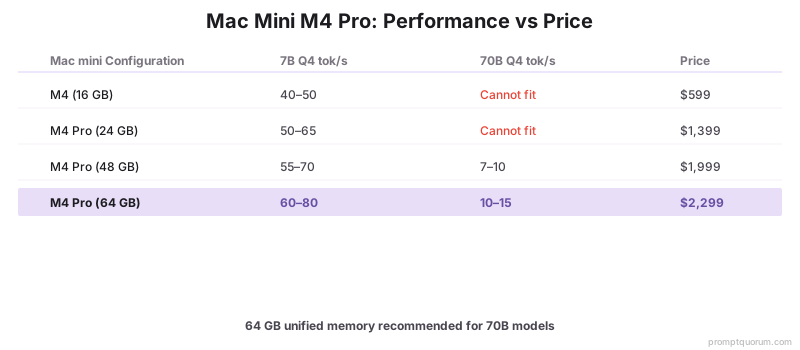
Apple refreshed the Mac mini on August 25, 2026, with the M6 chip (from $899, 32 GB unified memory ceiling) and the M5 Pro chip (from $1,699, 64 GB unified memory ceiling) — both ship September 22, 2026, and are now Apple’s current Mac mini lineup. Only the M5 Pro configuration reaches 64 GB; the base M6 tops out at 32 GB, which is not enough headroom for 70B-class models. The outgoing M4 (from $599) and M4 Pro (up to 64 GB, up to $2,299) are now the previous generation. Apple claims the M6 is roughly 40% faster on CPU tasks and up to 4x faster for AI workloads than the outgoing M4 — an Apple marketing claim, not an independent measurement, since the new chips have not shipped yet.
- Current lineup (Aug 2026): M6 from $899 (32 GB max) and M5 Pro from $1,699 (64 GB max) ship September 22, 2026. For 70B-class local LLMs, the M5 Pro configuration is required — the M6 caps at 32 GB and cannot fit them.
- Previous generation: M4 (from $599) and M4 Pro (up to 64 GB, up to $2,299) — the 10–15 tok/s 70B figure in the table above comes from this now-superseded generation.
- Pros: Silent (no fan noise at inference), compact form factor, macOS + Linux via Asahi, Ollama Metal GPU acceleration works out of the box.
- Cons: RAM cannot be upgraded on either chip. No independent 70B tok/s benchmarks exist yet for M6 or M5 Pro — both ship September 22, 2026. Apple’s ~40%-faster-CPU / up-to-4x-faster-AI claim for the M6 is Apple’s own marketing figure, not a third-party measurement.
- Command: `ollama run llama3.3:70b-instruct-q4_K_M` — works natively on Apple Silicon via Metal.
- For M5 Pro and M5 Max focused comparison (Mac Studio, MacBook Pro), see our Apple Silicon M5 local LLM guide →.
Mac mini Configuration | Memory Ceiling | 7B Q4 tok/s | 70B Q4 tok/s | Price |
|---|---|---|---|---|
| M4 (16 GB) — previous gen | 16 GB | 40–50 | Cannot fit | $599 |
| M4 Pro (64 GB) — previous gen | 64 GB | 60–80 | 10–15 | $2,299 |
| M6 — new (Aug 2026) | 32 GB | Not yet benchmarked | Cannot fit | From $899 |
| M5 Pro — new (Aug 2026) | 64 GB | Not yet benchmarked | Not yet benchmarked | From $1,699 |
Framework Desktop: AMD Ryzen AI Max 395+
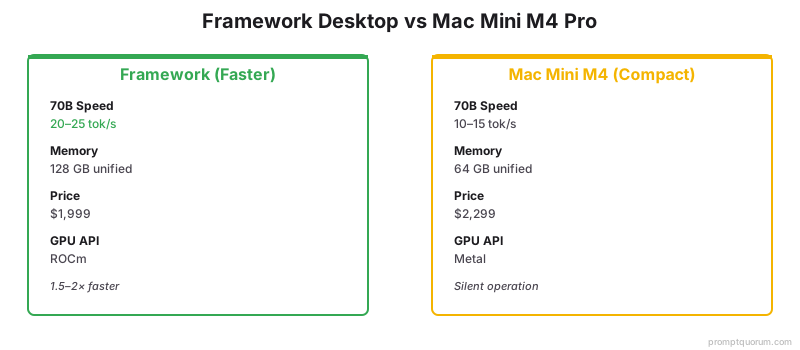
Framework Desktop with AMD Ryzen AI Max 395+ and 128 GB unified LPDDR5X memory runs Llama 3.3 70B at 20+ tok/s for $1,999 — launched late 2025 and purpose-built for local LLM workloads. The Framework Desktop uses the Strix Halo APU with 128 GB unified memory accessible to both CPU and integrated Radeon 8060S GPU. Marketed explicitly for local AI — a first for mainstream PC hardware.
- CPU: AMD Ryzen AI Max 395+ (16-core Zen 5)
- GPU: Radeon 8060S (40 RDNA 3.5 CUs)
- Memory: 128 GB LPDDR5X unified (no separate VRAM)
- Form factor: 4.5 L mini-ITX style
- Power: 120 W sustained, 200 W peak
- Pros: 70B at 20+ tok/s beat the previous-generation Mac mini M4 Pro (10–15 tok/s) at a similar price — independent benchmarks for the new M5 Pro Mac mini are not yet available. Fully upgradeable (mainboard, storage). Linux-first design. Open source firmware.
- Cons: ROCm setup required for Ollama (not as turnkey as Metal on Mac). Fan noise 40–50 dB under sustained load. Released late 2025 — driver maturity still improving.
Model | tok/s |
|---|---|
| Llama 3.1 8B Q4 | 45–60 |
| Llama 3.3 70B Q4 | 20–25 |
| DeepSeek-R1 70B Q4 | 18–22 |
| Qwen3 72B Q4 | 22–26 |
Which Mini PC Platform Is the Best Value?
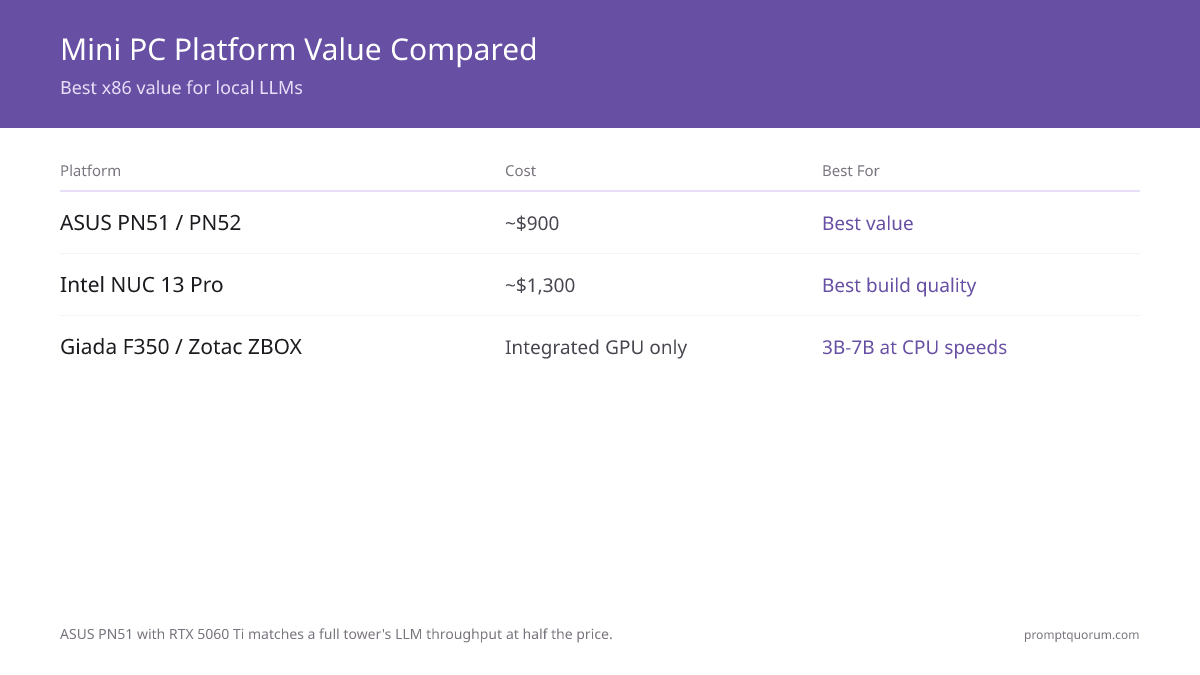
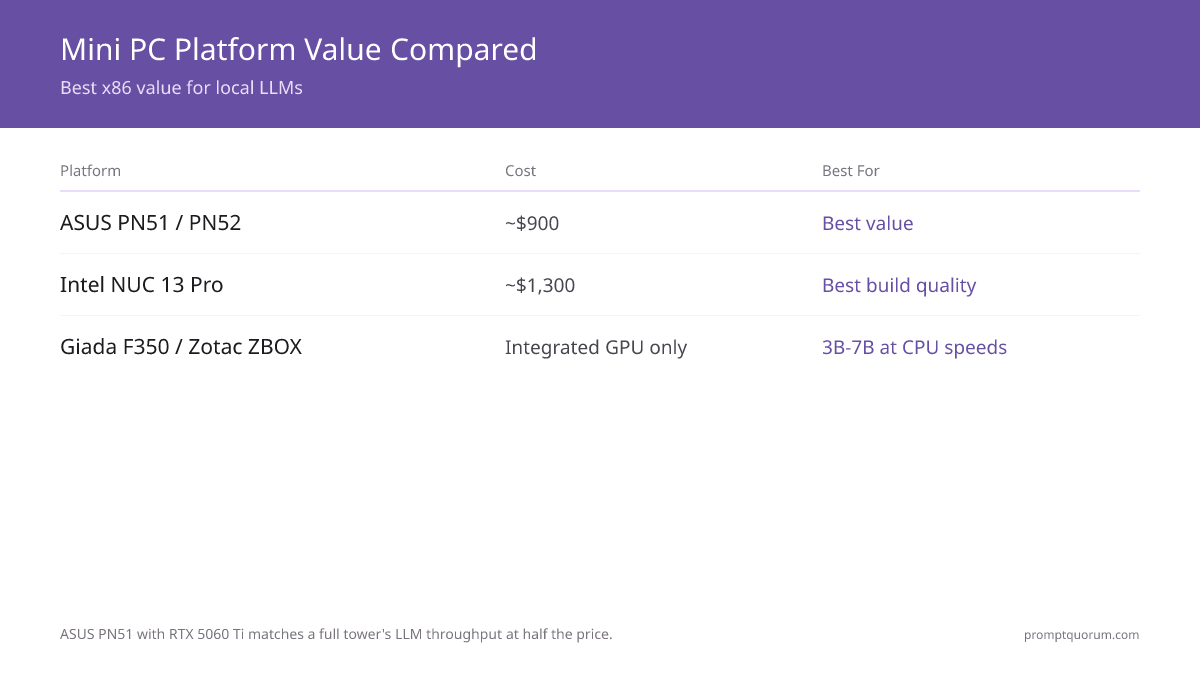
ASUS PN51 with Ryzen 5 and RTX 5060 Ti gives the best traditional x86 value at $900 — identical LLM throughput to a full tower at half the price.
- Intel NUC 13 Pro (Core i7): Compact, upgradeable 65W CPU. GPU via Thunderbolt 3 eGPU dock. $600 base + $450 RTX 5060 Ti + $250 dock = $1,300. Best build quality.
- ASUS PN51 or PN52 (mini-ITX barebone): Add Ryzen 5 ($150) + 32 GB RAM ($80) + 1TB SSD ($70) + RTX 5060 Ti ($450) = $900. Best value.
- Giada F350 or Zotac ZBOX Sphere (pre-built): Integrated GPU only. Suitable for 3B-7B at CPU speeds. Not recommended for discrete GPU inference.
- Custom mini-ITX build (Lian Li A4, Dan A4-H2O): Most flexible, hardest to assemble. $1,000-1,400 depending on GPU choice.
Which GPU Fits in a Mini PC Case?
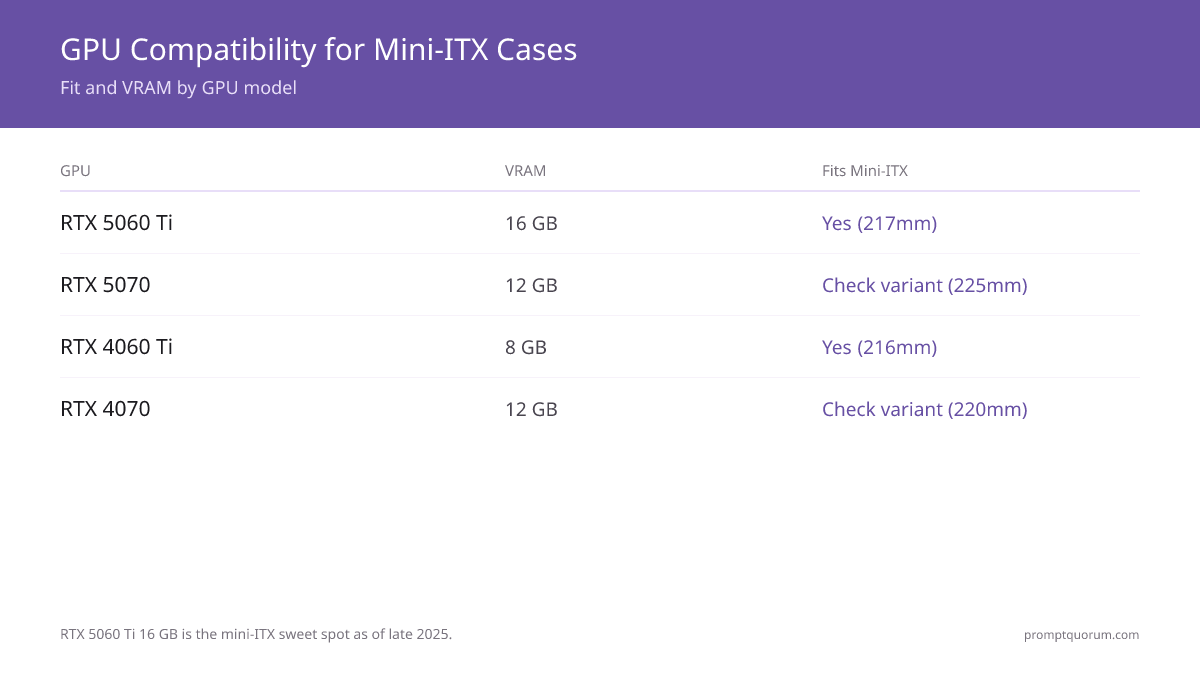
RTX 5060 Ti 16 GB became the mini-ITX sweet spot in late 2025 — fits all cases at 217mm, runs 13B at Q4 with VRAM headroom, under $500. RTX 5070 works in most cases but measure — some variants exceed 220mm.
GPU | VRAM | Max Model | Fits Mini-ITX | Price (2026) |
|---|---|---|---|---|
| RTX 5060 Ti | 16 GB | 13B Q4 | Yes (217mm) | $450–500 |
| RTX 5070 | 12 GB | 13B Q4 | Check variant (225mm) | $550–650 |
| RTX 4060 Ti | 8 GB | 7B Q4 | Yes (216mm) | $280–320 |
| RTX 4070 | 12 GB | 13B Q4 | Check variant (220mm limit) | $400–500 |
| RTX A4000 | 16 GB | 13B (comfortable) | Check variant | $250–350 used |
How Do You Manage Cooling in a Compact Mini PC Case?
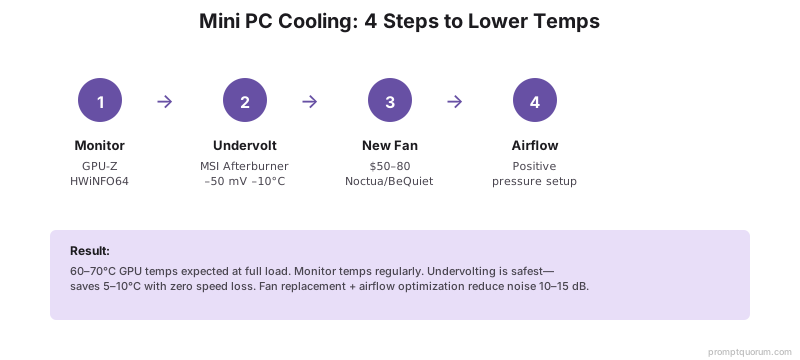
Expect 60-70°C GPU and 50-60 dB fan noise at full LLM inference load. Undervolting drops temps 5-10°C with no measurable speed loss.
- Thermals: GPU 60-70°C, CPU 55-65°C under sustained inference. Not dangerous but fans spin up.
- Noise: RTX 5060 Ti at full load = 50-60 dB (vacuum cleaner level). Acceptable for office, disruptive in quiet spaces.
- Undervolting: Drop core voltage 50mV via MSI Afterburner (Windows) or CoreCtrl (Linux). Reduces temps 5-10°C, loses 0-2% speed.
- Silent operation: Replace GPU fans with Noctua or BeQuiet! variants ($50-80). Reduces noise 10-15 dB.
What Are the Limits of Mini PCs for Local LLMs?
Traditional mini-ITX builds max out at 13B models (12-16 GB VRAM). Apple Silicon and AMD Ryzen AI Max options eliminate this constraint with unified memory up to 128 GB.
- Traditional mini-ITX max VRAM: 8-16 GB (single discrete GPU only). Cannot fit RTX 4090 (dual slot, 280mm+ long).
- Max model size (traditional): 13B comfortably. 70B requires CPU offloading and 3-5× speed penalty.
- Upgrade path: Limited. GPU swap may require case modification. RAM usually upgradeable.
- Multi-GPU: Impossible in mini-ITX. No room for a second discrete card.
- Longevity: Mini PC cases designed for office workloads, not 24/7 inference. Clean dust filters yearly.
- Mini PC hardware constrains model size, but model size isn't the only limit. Even the largest models have fundamental limitations — hallucinations, reasoning failures, and knowledge gaps. See what LLMs can't do for the full picture.
Regional Context: Data Residency with Mini PCs
Mini PCs running local LLMs keep all data on-premises — no data leaves the device, satisfying GDPR, APPI, and China DSL data residency requirements by default.
- EU / GDPR: Local inference eliminates data processor agreements (Article 28 GDPR). Sensitive professional data (legal, medical, financial) stays within the EU without SCC contractual overhead.
- Japan / APPI: The Act on Protection of Personal Information (APPI) requires explicit consent for cross-border data transfer. Local inference removes this requirement entirely.
- China / Data Security Law: The 2021 Data Security Law restricts sending certain categories of data offshore. A mini PC running Qwen3 locally satisfies these requirements without cloud routing.
Common Mini PC Mistakes for Local LLM Inference
The most common mistake is buying a consumer mini PC with integrated graphics — integrated GPUs are 10× slower than discrete cards for LLM inference.
- Buying a pre-built mini PC with integrated GPU for 7B inference. Integrated GPUs produce 1-2 tok/s vs. 25 tok/s for RTX 5060 Ti.
- Choosing a TB3 eGPU dock expecting full discrete GPU speed. eGPU loses 15-25% PCIe bandwidth — expect 12 tok/s instead of 15 on 7B.
- Assuming any mini PC case fits a full-size ATX PSU. Mini-ITX requires SFX or TFX form factor PSUs.
- Skipping RAM sizing — with only 8 GB free RAM, 7B model loading causes swap thrashing and 5-10× slowdowns.
- Not measuring GPU length before ordering — RTX 5070 variants range from 210mm to 242mm; check your specific case slot limit.
Frequently Asked Questions: Mini PCs for Local LLMs
Can I run 13B models smoothly on a mini PC?
Yes, at Q4 quantization with RTX 5060 Ti (16 GB) or RTX 4070 (12 GB). RTX 4060 Ti (8 GB) is too tight for comfortable 13B — VRAM headroom drops under 1 GB.
Is Intel NUC with external RTX 5060 Ti docked good for local LLMs?
Yes. TB3 eGPU loses 15-20% bandwidth, so expect 12 tok/s instead of 15 on 7B. Still usable and great for small spaces where a full tower is impractical.
How loud is a mini PC running LLMs?
RTX 5060 Ti at full load reaches 50-60 dB. Undervolting or replacing GPU fans with Noctua variants drops noise to 40-45 dB — acceptable for most offices.
Can I fit an RTX 4090 in a mini PC?
No. RTX 4090 is dual-slot and 280mm+ long. Custom SFF cases (Lian Li A4, Dan A4-H2O) max at 220mm GPU length.
Is a mini PC better than a laptop for local LLMs?
For stationary use, yes. Mini PC delivers better thermals (60-70°C sustained) and full PCIe bandwidth. Laptop throttles to ~10 tok/s under sustained load. Mini PC wins for desk use.
What is the total cost of a mini PC for 7B inference?
ASUS PN51 build: $900. Intel NUC 13 + RTX 5060 Ti eGPU dock: $1,300. Both run 7B at 20-25 tok/s; PN51 is better value.
Does a mini PC need a dedicated cooling solution for LLMs?
Yes for sustained inference. Stock mini-ITX case fans (1×80mm) are insufficient for RTX 5060 Ti at full load. Add a 92mm side fan or replace GPU fans with Noctua variants ($50-80).
Which mini PC CPU is best for local LLM inference?
CPU is secondary to GPU for token generation. Ryzen 7 7700X or Intel Core i7-14700K are sufficient. Prioritize GPU VRAM budget over CPU speed for 7B-13B inference.
Can the new Mac mini (M6 or M5 Pro) run Llama 3.3 70B?
Only the M5 Pro configuration (from $1,699, 64 GB unified memory ceiling) has enough memory headroom for 70B-class models — no independent tok/s benchmarks exist yet, since it ships September 22, 2026. The base M6 (from $899) tops out at 32 GB unified memory and cannot fit 70B models. For comparison, the outgoing M4 Pro (64 GB, $2,299) ran 70B at 10–15 tok/s.
Does the new Mac mini M6 support 64 GB of unified memory like the old M4 Pro?
No — the base M6 Mac mini caps at 32 GB unified memory, down from the M4 Pro’s 64 GB maximum. To get 64 GB unified memory in the new Mac mini lineup, you need the M5 Pro configuration (from $1,699), not the M6 (from $899). This is a meaningful change from the previous generation, where 64 GB was available on the mid-tier M4 Pro.
Is Framework Desktop better than the new Mac mini for local LLMs?
Framework Desktop ($1,999, 128 GB unified memory) still has more memory headroom than either new Mac mini chip — the M5 Pro tops out at 64 GB and the M6 at 32 GB. On the previous-generation M4 Pro, Framework Desktop’s 20+ tok/s on 70B beat the Mac mini’s 10–15 tok/s; no independent benchmark yet exists for the new M5 Pro chip. For ease of setup, Mac mini still wins — Ollama works with Metal out of the box, while Framework requires ROCm setup.
Which Mac mini configuration is best for local LLMs — M6 or M5 Pro?
For 70B-class models, only the M5 Pro (from $1,699, up to 64 GB unified memory) has enough headroom — the M6 (from $899) caps at 32 GB unified memory and cannot fit 70B models even at Q4 quantization. If you only need 7B–13B models, the base M6 is enough. The previous-generation M4 Pro (up to 64 GB, up to $2,299) is being phased out but ran 70B at 10–15 tok/s if you find one discounted.
What is a good alternative to the Mac mini for local LLMs?
Framework Desktop ($1,999, 128 GB unified memory) has more memory headroom than either new Mac mini configuration (M6: 32 GB, M5 Pro: 64 GB) and, on the previous-generation M4 Pro comparison, beat the Mac mini on raw 70B speed (20+ tok/s vs. 10–15 tok/s) — at the cost of a noisier fan and a ROCm setup step. For x86 flexibility instead of unified memory, an ASUS PN51 + RTX 5060 Ti build ($900) covers 7B–13B models at lower upfront cost.
What is the best budget mini PC for local LLMs in 2026?
ASUS PN51 or PN52 barebone with a Ryzen 5, 32 GB RAM, 1TB SSD, and RTX 5060 Ti 16 GB totals about $900 — the lowest-cost mini PC build that still hits 7B at 25 tok/s and 13B at 15 tok/s on a discrete GPU. Pre-built mini PCs with integrated graphics only cost less but drop to 1–2 tok/s on 7B, so they are not a real budget option for local LLM inference.