Key Takeaways
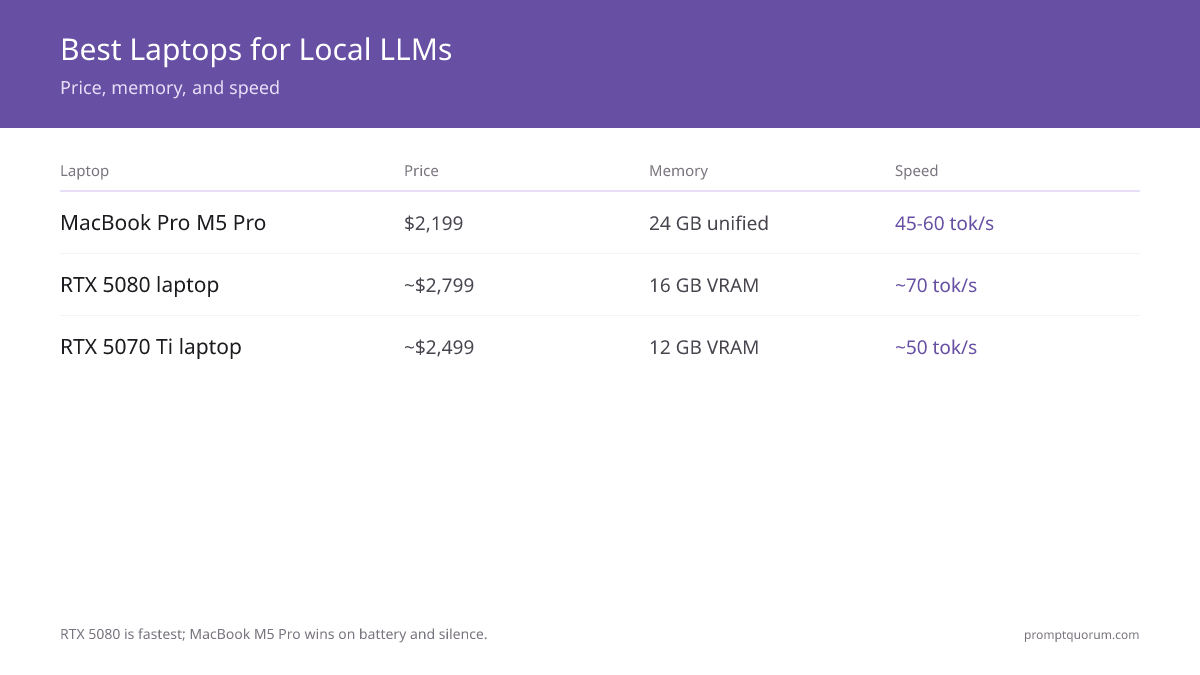
- Winner: MacBook Pro M5 Pro ($2,199) — 24 GB unified memory, silent, 45–60 tok/s on Qwen3 14B Q4.
- Best Windows: RTX 5080 laptop (~$2,799) — 16 GB GDDR7 VRAM, ~70 tok/s sustained on 7B models.
- Best mid-range Windows: RTX 5070 Ti laptop (~$2,499) — 12 GB VRAM handles 7B–13B models at ~50 tok/s.
- Cheapest budget pick: RTX 5070 laptop (~$1,899) — 8 GB VRAM, 7B models only, best price-per-dollar entry point.
- MacBook Pro M5 Max ($3,199+): 36–128 GB unified memory — runs 30B–70B models no other laptop can touch.
- Windows RTX 5000-series: faster raw tok/s than Apple Silicon on 7B; Mac wins on silence and battery.
- RTX 4070 laptops (2023): still functional for 7B–13B at 12–15 tok/s, but 30–50% slower than RTX 5080.
- Thermal throttling: expect 15–25% performance loss on Windows gaming laptops vs. desktop equivalents.
- Battery: MacBook M5 Pro runs LLM inference for 3–4 hours on battery; Windows laptops 1–2 hours under GPU load.
📍 In One Sentence
Best quiet laptop for local LLMs in 2026: MacBook Pro M5 Pro ($2,199, 24 GB unified memory, 45–60 tok/s on Qwen3 14B, silent). Best Windows: RTX 5080 laptop (~$2,799, 16 GB VRAM, ~70 tok/s). Cheapest budget pick: RTX 5070 laptop (~$1,899, 8 GB VRAM).
💬 In Plain Terms
For laptop AI: Mac uses unified memory (shared by CPU+GPU), so 24 GB can load larger models than a Windows laptop's 16 GB VRAM. Windows laptops with NVIDIA RTX GPUs are faster when the model fits in VRAM (16 GB handles 14B models), but are louder and run hotter under AI load.
What GPU Do You Need in a Laptop?
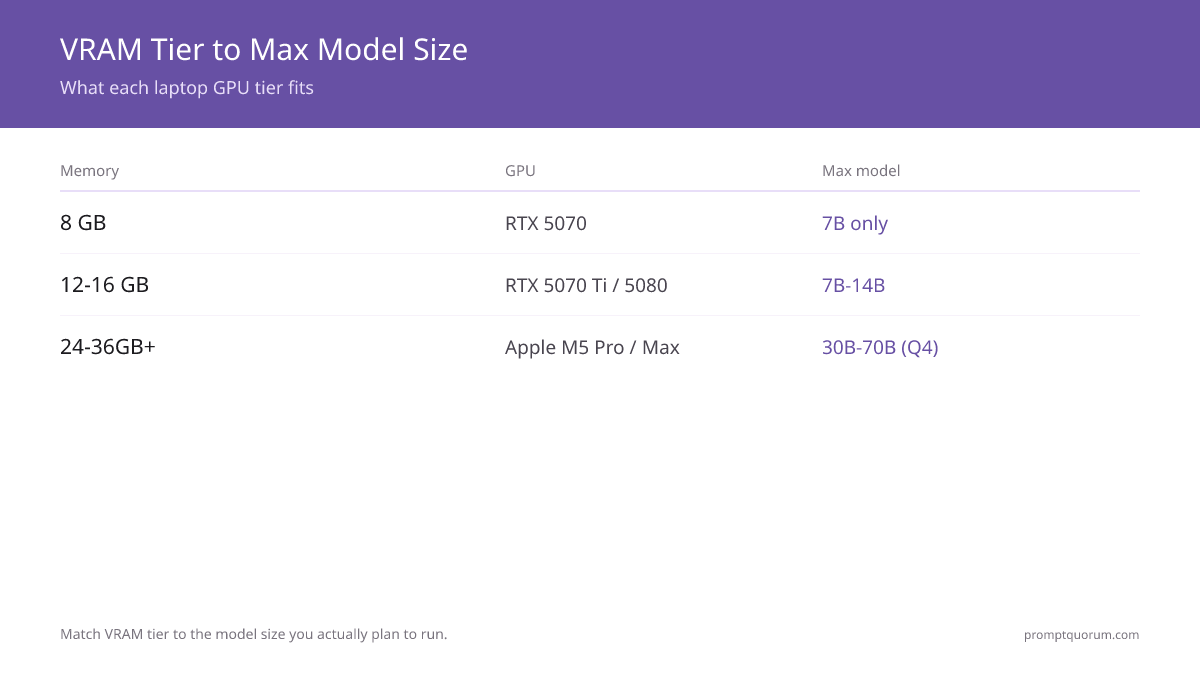
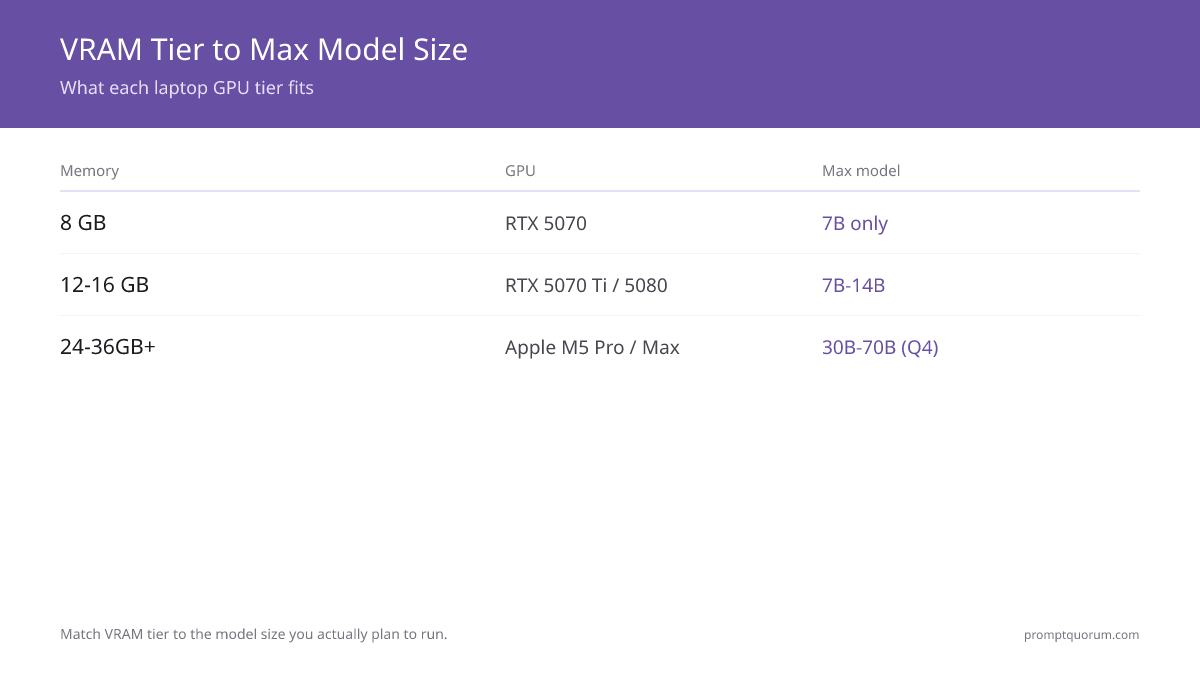
Laptop GPUs are mobile variants with lower TDP and less VRAM than desktop counterparts. July 2026 recommendation: RTX 5070 (8 GB) minimum for budget Windows builds, RTX 5070 Ti (12 GB) for comfortable 7B-13B headroom; MacBook Pro M5 Pro for Apple.
- MacBook Pro M5 Pro (24 GB unified): Best overall. Unified memory = GPU and CPU share the same pool. 45–60 tok/s on Qwen3 14B. Silent. $2,199.
- RTX 5080 laptop (16 GB GDDR7): Best Windows GPU for LLMs. ~70 tok/s on Llama 3.1 8B Q4. ~$2,799 in laptops.
- RTX 5070 Ti laptop (12 GB GDDR7): Good Windows budget pick. ~50 tok/s on 7B, 10–12 tok/s on 30B Q4. ~$2,499.
- RTX 5070 laptop (8 GB GDDR7): Minimum for 7B only. 8 GB VRAM limits you to 7B at Q4. ~$1,899.
- RTX 4070 laptop (12 GB GDDR6, 2023): Still functional — 12–15 tok/s on 7B, 8–10 tok/s on 13B. 30–50% slower than RTX 5070 Ti.
- RTX 4060 laptop (8 GB GDDR6, 2023): 10–12 tok/s on 7B only. Avoid for new purchases in 2026.
Best Laptops for Local LLMs (2026)
Prices verified. All run Ollama, LM Studio, and llama.cpp out of the box. Affiliate disclosure: no commission links on this page.
- MacBook Pro M5 Pro 14" ($2,199, 24 GB unified): Best overall laptop for local LLMs. 45–60 tok/s on Qwen3 14B Q4. Completely silent. 10–12 hr battery under normal use (3–4 hr under LLM load). See also: Apple Silicon vs GPU vs CPU for Local LLMs.
- MacBook Pro M5 Pro 16" ($2,499, 24 GB unified): Same chip as 14" with larger screen and bigger battery. Add 36 GB ($2,999) for comfortable 30B model headroom. See also: Running 70B Models on Apple Silicon M5 Max.
- RTX 5080 laptop (~$2,799, 16 GB GDDR7): Best Windows laptop for LLMs. ~70 tok/s on Llama 3.1 8B Q4. 16 GB VRAM fits 14B models at Q8 comfortably. Available in ASUS ROG Strix, MSI Titan, Lenovo Legion lineups.
- RTX 5070 Ti laptop (~$2,499, 12 GB GDDR7): Best mid-range Windows pick. ~50 tok/s on 7B. 12 GB VRAM handles 7B–13B at Q8, 30B at Q4. Available in ASUS ROG, Razer Blade, Dell Alienware lineups.
- RTX 5070 laptop (~$1,899, 8 GB GDDR7): Cheapest Windows option — the true budget pick. 8 GB VRAM limits you to 7B models at Q4, but that covers most coding-assistant and chat use cases. Available in the same ASUS ROG, MSI, and Lenovo Legion lineups as the 5080/5070 Ti.
- MacBook Pro M5 Max 14" ($3,199+, 36 GB unified): For researchers running 30B–70B models on the go. 40–60 tok/s on Llama 3.1 70B at Q4. See Running 70B Models on Apple Silicon M5 Max.
Performance Expectations: Desktop vs. Laptop
Laptop GPUs throttle under sustained LLM inference. Apple Silicon laptops are the exception — M5 chips do not throttle.
- MacBook Pro M5 Pro vs. desktop RTX 4060 Ti: M5 Pro: ~55 tok/s on Qwen3 14B Q4. Desktop RTX 4060 Ti: ~55 tok/s on Llama 3.1 8B Q4. Similar throughput, but M5 Pro handles 14B vs. 8B at the same speed — unified memory advantage.
- RTX 5080 laptop vs. desktop RTX 4060 Ti: RTX 5080 laptop: ~70 tok/s on 7B Q4 (plugged in). Desktop RTX 4060 Ti: ~55 tok/s on 8B Q4. RTX 5080 laptop wins on Windows for raw 7B speed but runs louder and hot.
- Thermal throttling (Windows laptops): Gaming laptops lose 15–25% vs. desktop equivalents under sustained 15-min+ inference. M5 Pro loses 0% — no thermal throttle on Apple Silicon.
- Battery inference: MacBook M5 Pro on battery: ~40 tok/s (graceful 25% drop). Windows RTX 5080 laptop on battery: GPU throttles to iGPU — inference drops to 2–4 tok/s. Always plug in Windows laptops for real LLM work.
Battery Life & Thermal Management
Local LLM inference drains laptop batteries fast — but much less so on Apple Silicon.
- MacBook Pro M5 Pro on battery: 3–4 hours under LLM inference load. 10–12 hours for normal mixed use. No fan noise. Inference speed: ~40 tok/s (graceful degradation, no throttle cliff).
- Windows RTX 5080 laptop on battery: GPU disables and switches to iGPU. LLM inference drops to 2–4 tok/s (unusable). 6–8 hours for light tasks. Always plug in for real inference work.
- Sustained inference on Windows: Keep the laptop on AC. Battery degrades faster under repeated deep-discharge cycles during GPU load.
- Cooling pads (Windows laptops): $30–50 external pad drops temps 5–10°C, helps sustain boost clocks 10% longer. Not needed on MacBook Pro.
Storage & RAM Upgrades
MacBook Pro memory is soldered — choose your unified memory configuration at purchase. Windows gaming laptops allow SSD and sometimes RAM upgrades.
- MacBook Pro: choose memory at purchase. 24 GB M5 Pro ($2,199) runs 14B comfortably. 36 GB M5 Pro ($2,999) adds headroom for 30B at Q4. 64 GB M5 Max ($3,999) runs 70B at Q4.
- Windows SSD upgrade: Most gaming laptops have an accessible M.2 slot. Upgrade 512 GB → 1 TB NVMe ($80–120). Models load noticeably faster from NVMe vs. older SATA SSD.
- Windows RAM: Many RTX 5080/5070 Ti laptops ship with 32 GB DDR5. 64 GB is useful if running multiple models or heavy CPU preprocessing.
- GPU not upgradeable (Windows): Soldered to motherboard. Choose wisely at purchase — the GPU is the limiting factor for local LLMs.
Common Laptop LLM Mistakes
- Buying a thin Windows ultrabook (Dell XPS 15 with iGPU only, Lenovo ThinkPad without dGPU) expecting 7B LLM performance. Integrated graphics deliver 1–2 tok/s at best.
- Expecting desktop performance on a Windows gaming laptop. Thermal throttling under 15-min sustained inference is real — expect 15–25% lower throughput vs. desktop RTX equivalents.
- Leaving a Windows gaming laptop in a closed bag during inference. Heat buildup throttles GPU clocks to 30% within 5 minutes.
- Running a Windows RTX laptop on battery for LLM work. The GPU switches to iGPU on battery — inference drops to 2–4 tok/s. Always use AC power for real work.
Frequently Asked Questions
Is the MacBook Pro M5 Pro good for local LLMs?
Yes — it is the best laptop for local LLMs in 2026. The 24 GB unified memory configuration ($2,199) runs Qwen3 14B at Q4 with 45–60 tok/s and no fan noise. Upgrade to 36 GB ($2,999) for comfortable 30B model headroom.
Which Windows laptop is best for running LLMs locally in 2026?
The RTX 5080 laptop (~$2,799, 16 GB GDDR7 VRAM) is the top Windows pick — ~70 tok/s on Llama 3.1 8B Q4. The RTX 5070 Ti laptop (~$2,499, 12 GB VRAM) is the best mid-range option at ~50 tok/s. The RTX 5070 laptop (~$1,899, 8 GB VRAM) is the cheapest option, limited to 7B models.
Can I run 14B models on an RTX 5070 Ti laptop?
Yes. The RTX 5070 Ti has 12 GB VRAM, which fits Qwen3 14B at Q4 comfortably. At Q8 (higher quality), 14B requires ~14 GB — you would need the RTX 5080 (16 GB) for Q8 on 14B.
Should I buy a gaming laptop or a mini PC for local LLMs?
Mini PC: cheaper, faster, more upgradeable, runs cooler. Gaming laptop: portable but thermal-limited. If you need portability, get MacBook Pro M5 Pro or an RTX 5080 laptop. If you stay at a desk, a desktop with RTX 4060 Ti 16GB outperforms any laptop and costs less.
Can I run a 7B model on battery on a Windows gaming laptop?
Technically yes, but the GPU switches to iGPU on battery. Inference drops to 2–4 tok/s (unusable for real work). MacBook Pro M5 Pro on battery delivers ~40 tok/s — much better for battery inference.
What is the best Apple laptop for local LLMs?
MacBook Pro M5 Pro 14" ($2,199, 24 GB) for most users. MacBook Pro M5 Max 14" ($3,199+, 36 GB) for 30B–70B models. MacBook Pro M5 Max 16" ($3,499+, 64 GB) for researchers running 70B at Q8.
Are 2023 RTX 4070 laptops still worth buying for LLMs in 2026?
Only at a significant used discount ($800–1,100 on eBay). New RTX 5070 Ti laptops (~$2,499) are 30–50% faster for LLM inference. If you already own an RTX 4070 laptop, it still runs 7B–13B models adequately.
What is the best notebook for local LLMs?
"Notebook" and "laptop" refer to the same device category. The best notebook for local LLMs in 2026 is the MacBook Pro M5 Pro ($2,199, 24 GB unified memory) — 45–60 tok/s on Qwen3 14B, completely silent. Best Windows notebook: RTX 5080 gaming notebook (~$2,799, 16 GB VRAM). Avoid thin ultrabooks — integrated graphics deliver only 1–2 tok/s.
What is the cheapest laptop for running local LLMs?
The RTX 5070 laptop (~$1,899, 8 GB GDDR7 VRAM) is the cheapest current option, limited to 7B models at Q4 — enough for most coding-assistant and chat use cases. For 7B–13B headroom, step up to the RTX 5070 Ti (~$2,499, 12 GB VRAM). A used 2023-era RTX 4070 laptop ($800–1,100 on eBay) is cheaper still but 30–50% slower.
Can I train or fine-tune an LLM on a laptop?
Training a model from scratch is not practical on any laptop. Fine-tuning a small model (up to ~7B) via LoRA or QLoRA is possible on a laptop with 12+ GB VRAM (RTX 5070 Ti or better) or 24 GB unified memory (MacBook Pro M5 Pro), but expect it to take hours, not minutes. For anything beyond LoRA fine-tuning of small models, use a desktop or cloud GPU instead — this guide covers running (inference), not training.
What laptops work best for local LLM inference in 2026?
MacBook Pro M5 Pro ($2,199, 24 GB unified memory) is the top pick — 45–60 tok/s on 14B, completely silent. RTX 5080 laptop (~$2,799, 16 GB VRAM) is the best Windows option at ~70 tok/s on 7B. RTX 5070 Ti laptop (~$2,499, 12 GB VRAM) is the best mid-range Windows pick at ~50 tok/s, or RTX 5070 (~$1,899, 8 GB VRAM) for the cheapest option.
Sources
- NVIDIA RTX 50-series mobile GPU specifications (GeForce RTX 5080 laptop, 5070 Ti laptop — NVIDIA official)
- Apple M5 Pro chip specifications and MacBook Pro M5 Pro pricing (Apple.com, July 2026)
- LLM benchmark data: Ollama 0.30.x benchmarks on MacBook Pro M5 Pro and RTX 5080 laptop
- TechPowerUp laptop GPU database (2026 mobile GPU models)