Key Takeaways
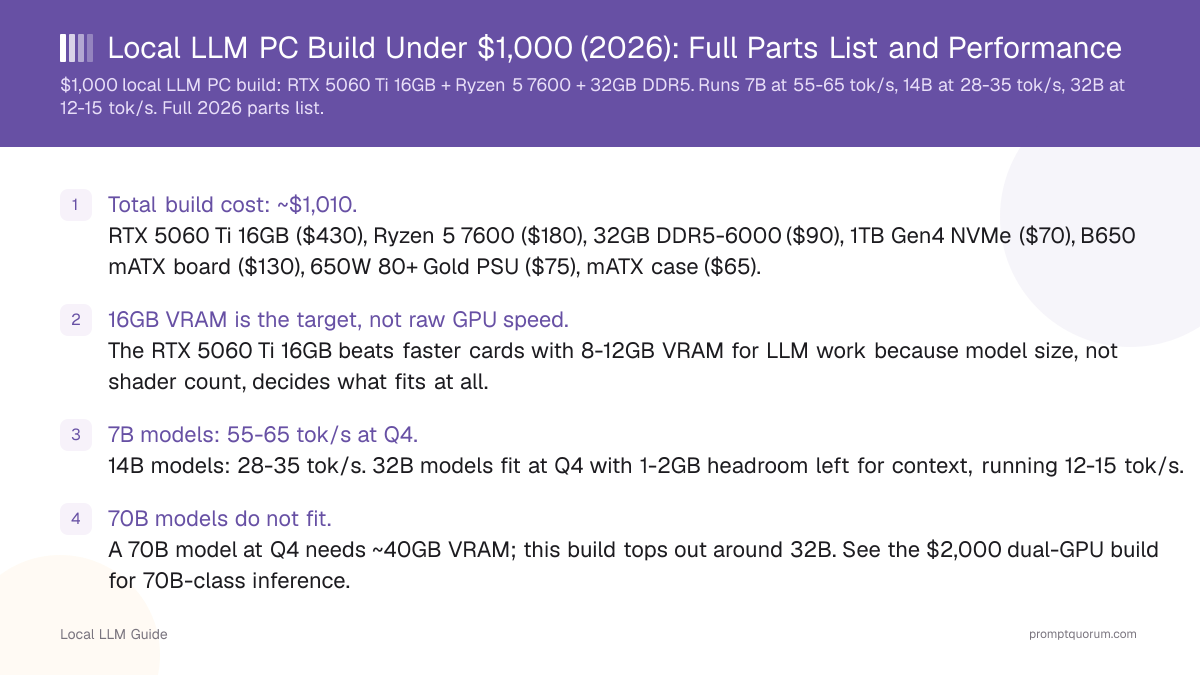
- Total build cost: ~$1,010. RTX 5060 Ti 16GB ($430), Ryzen 5 7600 ($180), 32GB DDR5-6000 ($90), 1TB Gen4 NVMe ($70), B650 mATX board ($130), 650W 80+ Gold PSU ($75), mATX case ($65).
- 16GB VRAM is the target, not raw GPU speed. The RTX 5060 Ti 16GB beats faster cards with 8-12GB VRAM for LLM work because model size, not shader count, decides what fits at all.
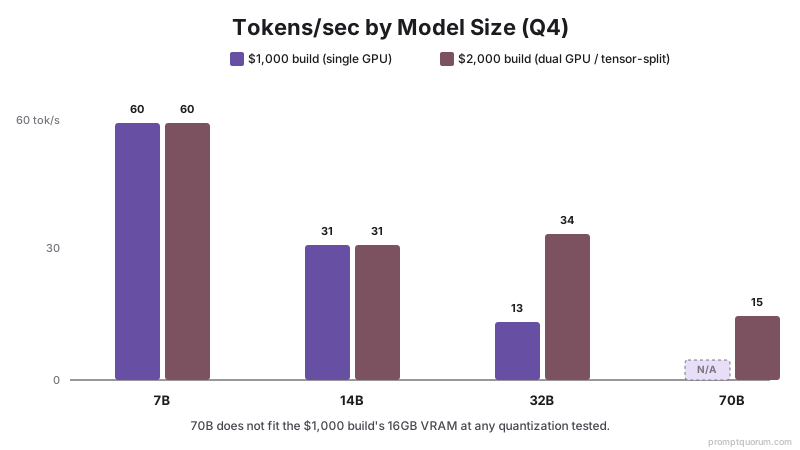
- 7B models: 55-65 tok/s at Q4. 14B models: 28-35 tok/s. 32B models fit at Q4 with 1-2GB headroom left for context, running 12-15 tok/s.
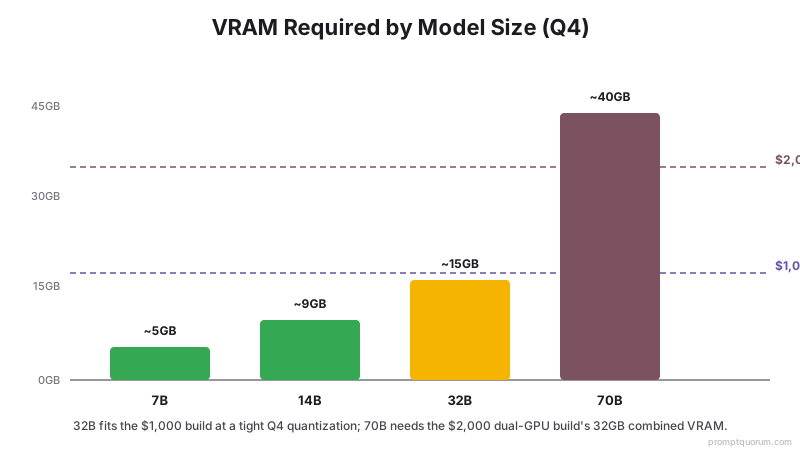
- 70B models do not fit. A 70B model at Q4 needs ~40GB VRAM; this build tops out around 32B. See the $2,000 dual-GPU build for 70B-class inference.
- 32GB system RAM, not 16GB. Model loading, OS overhead, and any CPU-offloaded layers need headroom beyond the GPU; 16GB causes swapping on 14B+ models.
- Avoid: 8GB GPUs (RTX 5060, RTX 4060 Ti 8GB) — they cap out at 7B and cannot grow into 13B-14B without a full GPU swap.
What This Budget Is Actually Buying
Local LLM inference speed is bottlenecked by VRAM capacity first, memory bandwidth second, and compute (CUDA cores) a distant third. A model that does not fit in VRAM either fails to load or spills into system RAM, dropping throughput by 5-10x. At $1,000, the only correct allocation is to overweight the GPU and underweight everything else — this is why the CPU here is a $180 mid-range part, not a $350 flagship.
This build assumes single-model inference (one model loaded at a time via Ollama, LM Studio, or llama.cpp), not concurrent multi-user serving. For serving multiple simultaneous requests, VRAM requirements scale up further and a $1,000 budget is not realistic.
📍 In One Sentence
A $1,000 local LLM PC build should spend nearly half its budget on GPU VRAM capacity, not CPU speed, since VRAM decides what models can run at all.
💬 In Plain Terms
VRAM = the GPU's own memory where the model lives; if the model does not fit, everything slows down 5-10x or fails to load.
Full Parts List
Prices are street prices and will vary by region and retailer.
Component | Pick | Price | Why |
|---|---|---|---|
| GPU | RTX 5060 Ti 16GB | $430 | 16GB VRAM is the build's core purpose — fits 14B comfortably, 32B at Q4 |
| CPU | AMD Ryzen 5 7600 | $180 | 6 cores is enough for single-model inference; CPU is not the bottleneck |
| RAM | 32GB DDR5-6000 (2x16GB) | $90 | Headroom for OS, model loading, and any CPU-offloaded layers |
| Storage | 1TB NVMe Gen4 SSD | $70 | Fast model load times; a 5-model library uses ~40-60GB at Q4 |
| Motherboard | B650 mATX | $130 | PCIe 4.0 x16 slot, DDR5 support, no unnecessary features |
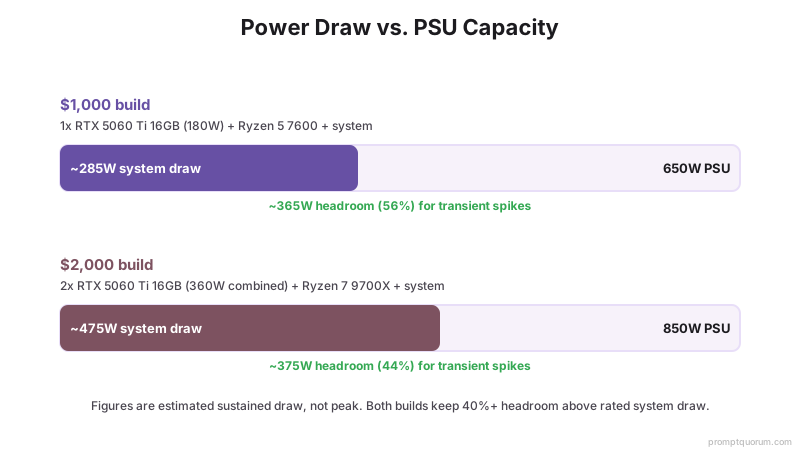
| PSU | 650W 80+ Gold | $75 | RTX 5060 Ti draws 180W; 650W leaves headroom for transient spikes |
| Case | mATX mid-tower | $65 | Airflow for sustained inference load; fits any 5060 Ti card length |
| CPU Cooler | Included stock cooler | $0 | Ryzen 5 7600 does not need aftermarket cooling for this workload |
Why the RTX 5060 Ti 16GB Over Cheaper GPUs
The 8GB and 12GB variants of similarly priced GPUs are false savings for local LLM work. An RTX 5060 Ti comes in 8GB and 16GB versions at a roughly $100 price difference — the 16GB card is the only one worth buying for LLM inference, because the 8GB version cannot comfortably fit anything past a 7B model at Q4 with any usable context length.
VRAM headroom also matters for context length: a 7B model itself needs about 4-4.5GB at Q4, but a 16K-token context adds another 1-2GB of KV cache. On an 8GB card that leaves almost nothing; on the 16GB card there is room for both the model and a long context window.
- RTX 5060 Ti 8GB ($330): Fits 7B at Q4 only, and barely — long context windows will overflow VRAM. Not recommended.
- RTX 4060 Ti 16GB (older gen, ~$450 used): Same VRAM as the 5060 Ti at similar or higher price with lower compute — no reason to prefer it new.
- RTX 5060 Ti 16GB ($430, this build): Best VRAM-per-dollar in the 16GB tier.
- Used RTX 3090 24GB (~$850-1,050): More VRAM (fits low-30B models more comfortably) but pushes total build cost well past $1,300 and draws significantly more power.
Expected Performance by Model Size
All figures are Q4_K_M quantization, measured with llama.cpp/Ollama on the RTX 5060 Ti 16GB. Actual speed varies by prompt length, quantization method, and inference engine.
Model Size | VRAM Used (Q4) | Tokens/sec | Fits Comfortably? |
|---|---|---|---|
| 7B-8B | ~4.5-5GB | 55-65 | Yes — full context headroom |
| 13B-14B | ~8-9GB | 28-35 | Yes — 8GB+ headroom for context |
| 20B (MoE, ~4B active) | ~12GB | 35-45 | Yes |
| 32B | ~14.5-15.5GB | 12-15 | Tight — short context only (4K-8K) |
| 70B | ~40GB | N/A | Does not fit — see $2,000 dual-GPU build |
Assembly Notes
- GPU clearance: Confirm the RTX 5060 Ti card length (varies 210-270mm by vendor) against the mATX case's maximum GPU clearance before ordering.
- RAM speed in BIOS: DDR5-6000 kits often ship running at JEDEC 4800 by default — enable EXPO/XMP in BIOS to get the rated 6000 speed, which affects CPU-side token generation if any layers offload.
- Driver install order: Install the latest NVIDIA driver and CUDA toolkit before installing Ollama or LM Studio, not after — both auto-detect GPU capability at install time.
- PSU cabling: The RTX 5060 Ti uses a single 8-pin (or 12VHPWR on some models) PCIe power connector — verify your PSU's modular cable kit includes the correct connector before building.
Upgrade Path
This build is designed so the GPU is the only part worth replacing later. The B650 motherboard supports a second PCIe slot (typically x4 electrical) for adding a second GPU down the line, though tensor-split multi-GPU inference needs at least x8/x8 to avoid a PCIe bandwidth bottleneck — see the $2,000 build for a board chosen with that in mind.
A straightforward upgrade from this build is swapping the RTX 5060 Ti 16GB for a used RTX 3090 24GB when budget allows, which unlocks comfortable 32B inference and light 70B offloading. The Ryzen 5 7600, 32GB RAM, and 650W PSU all have enough headroom to support that swap without further changes.
Common Mistakes at This Budget
- Buying the 8GB RTX 5060 Ti to save $100 — the VRAM ceiling this creates cannot be fixed with software and forces a GPU replacement later, costing more overall.
- Overspending on the CPU (e.g., a Ryzen 7 instead of Ryzen 5) while running an 8GB or 12GB GPU — CPU choice has almost no effect on tokens/sec once a model fits in VRAM.
- Skipping EXPO/XMP RAM profile setup in BIOS, leaving DDR5-6000 kits running at 4800 — a free performance loss that costs nothing to fix.
- Undersizing the PSU to save $20-30 — GPU power draw spikes briefly well above its rated TDP under sustained load, and a 550W unit leaves too little headroom.
Frequently Asked Questions
Can a $1,000 PC run local LLMs well?
Yes, for 7B-14B models comfortably and 32B models at a tight Q4 quantization. An RTX 5060 Ti 16GB, the core component of this build, is the deciding factor — VRAM capacity matters far more than raw budget above the GPU.
Why does this build spend so much on the GPU relative to the CPU?
Local LLM inference speed depends almost entirely on GPU VRAM capacity and memory bandwidth. A faster CPU does not increase tokens/sec once a model is loaded into VRAM, so a mid-range CPU and a strong GPU beat a strong CPU and a weak GPU for this specific workload.
Is 16GB VRAM enough for local LLMs in 2026?
16GB comfortably fits every 7B-14B model at Q4 with room for long context, and fits 32B models at Q4 with a short context window. It does not fit 70B-class models, which need roughly 40GB at Q4.
Can I use an 8GB GPU instead to save money?
You can, but it limits you to 7B models with minimal context headroom — a hard ceiling you cannot raise without replacing the card. The $100 saved on an 8GB RTX 5060 Ti is not worth losing access to 13B-14B models.
How much RAM do I actually need alongside a 16GB VRAM GPU?
32GB system RAM. This covers OS overhead, model file caching during load, and any layers offloaded to CPU for models that slightly exceed VRAM capacity.
Will this build run 32B models well?
It fits 32B models at Q4 quantization with roughly 12-15 tokens/sec, but context length is limited to about 4K-8K tokens since there is little VRAM headroom left after loading the model.
What software should I run on this build?
Ollama or LM Studio are the simplest starting points — both auto-detect the RTX 5060 Ti and handle Q4 quantization automatically. llama.cpp directly gives more control over quantization format and context settings.
Can this build be upgraded to run 70B models later?
Not with a single GPU — 70B at Q4 needs ~40GB VRAM. The clearest upgrade path is either swapping to a used RTX 3090 24GB (still not quite enough for full 70B) or adding a second GPU for VRAM pooling, which the $2,000 dual-GPU build covers directly.
Does the motherboard chipset (B650 vs B850) matter for local LLM inference?
Not for a single-GPU build. B650 provides a PCIe 4.0 x16 slot, which is what the GPU needs; the chipset differences between B650 and newer boards matter more for multi-GPU PCIe lane allocation than for single-GPU LLM inference.
Is a used GPU a better value than a new RTX 5060 Ti 16GB at this budget?
A used RTX 3060 12GB can be cheaper but has less VRAM and lower memory bandwidth, fitting fewer model sizes. A used RTX 3090 24GB is a genuine upgrade in VRAM but pushes total cost past $1,300 including the rest of the build — it belongs in a higher budget tier, not this one.